Stamp Convert an Image to Pixel Art (Games 2026)

By Arron R.8 min read
Convert an image to pixel art on Sorceress: clean the still if needed, open True Pixel, lock a palette and target size, pick a dither mode, export a sharp PNG,

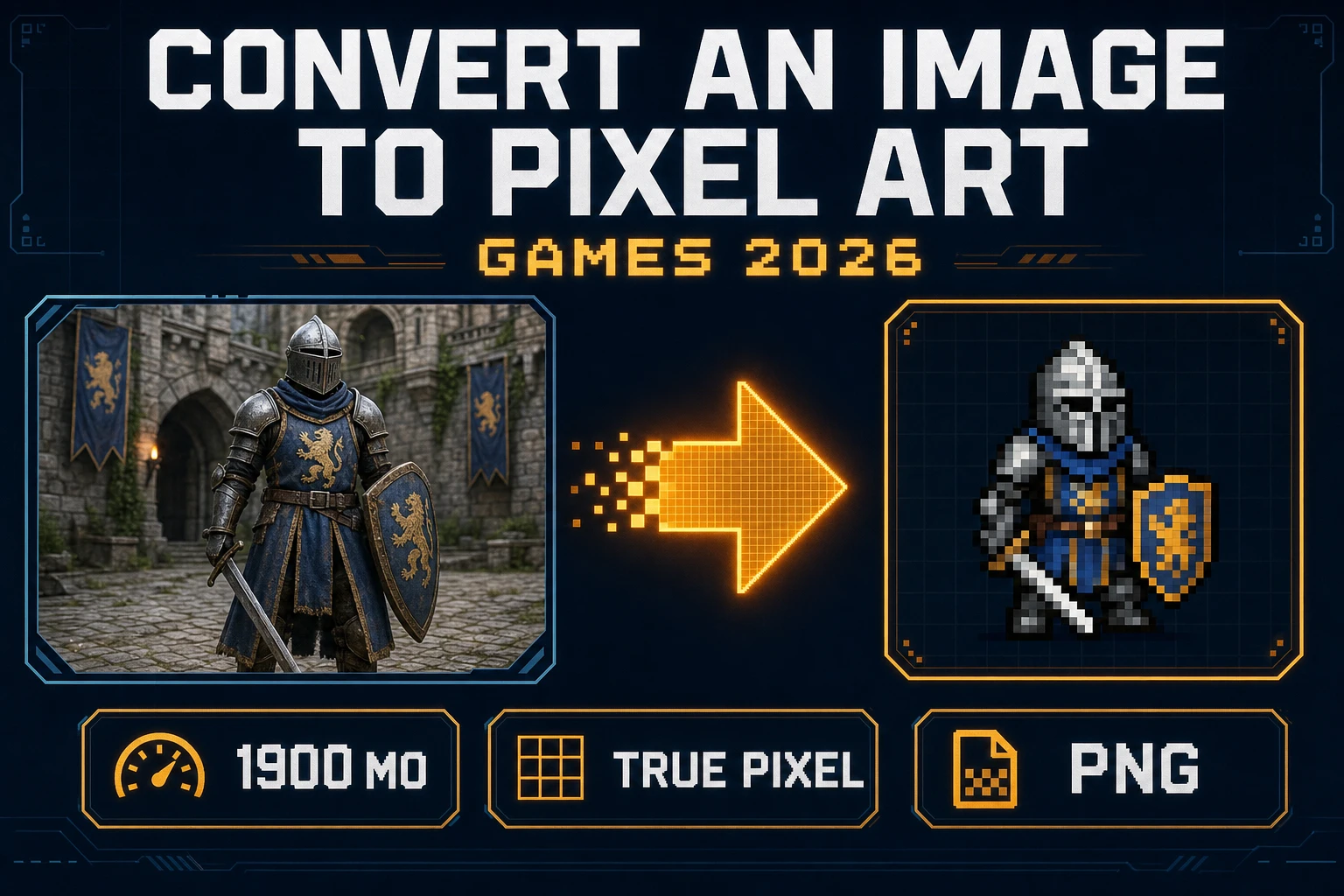
A photo of a knight is not a sprite. The camera noise, the soft focus, and the studio backdrop fight the grid the moment you drop the file into an engine. Searchers who type convert an image to pixel art want that still remapped onto integer cells, a short palette, and a PNG that still reads at walking distance on a phone.
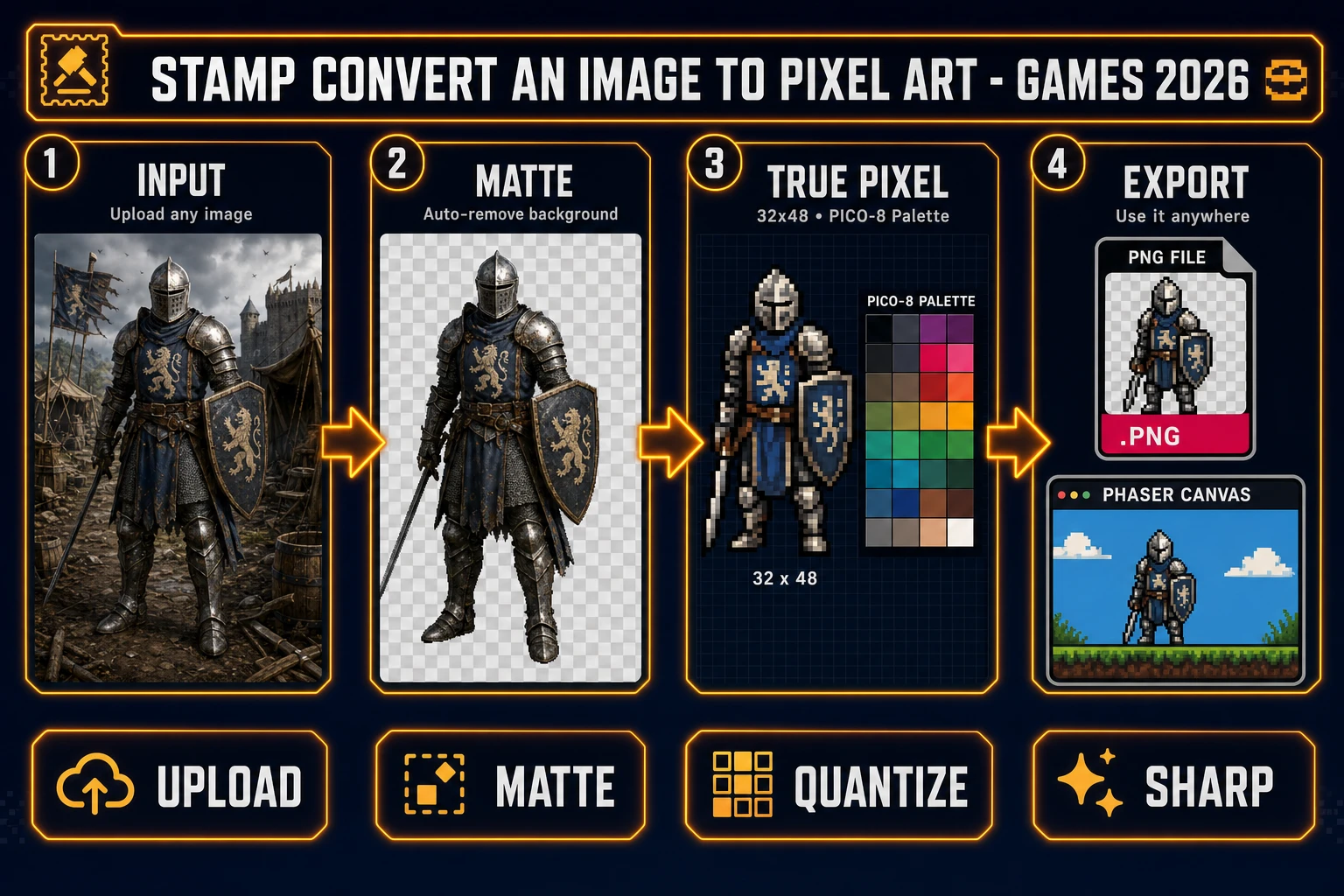
Four-step pipeline to convert an image to pixel art: upload a still, matte it, quantize in True Pixel, export a sharp PNG
Convert an image to pixel art: clean the still, lock a palette, then export a PNG the engine can scale without blur.

What convert an image to pixel art means for sprites

Pixel art is artwork built at the pixel level. The Wikipedia Pixel art page (verified 2026-09-22) frames it as deliberate placement of individual pixels, not a filtered photo. When you convert an image to pixel art for a game, you are not applying a stylish blur. You are choosing a target width and height, forcing every color onto a limited set, and writing a file whose edges stay hard under nearest-neighbor scale.

That is why how to convert an image to pixel art is a different question from how to make pixel art for games from a blank canvas. Hand-painting starts empty. Conversion starts with evidence: a pose, a costume, a prop silhouette you already like. The job is to keep the silhouette while throwing away photographic detail the engine cannot afford and the player cannot resolve at 32 or 64 pixels tall.

People also search pixel art how to make and how to make pixel art games. Both intents fold into the same pipeline once you have a still: prep the alpha, quantize, export, import with crisp scaling. The sections below stay on that path. If you need a full sheet of walk frames from a prompt instead of a photo, jump to Quick Sprites at the end. That is a generator path, not a conversion path.

True Pixel: the convert an image to pixel art surface

Sorceress True Pixel is the tool that converts an image to pixel art in this workflow. The Sprites & 2D home card badges it Pro and describes video or image input becoming a pixel-art animated sprite (verified 2026-09-22 in src/app/_home-v2/_data/tools.ts). The live page is /pixel-art.

Facts verified 2026-09-22 in src/app/pixel-art/page.tsx:

  • Eight palette presets: PICO-8 (16), SWEETIE-16, Endesga 32, Game Boy (4), CGA (16), NES (54), Grayscale (8), 1-Bit (2).
  • Three dither modes: none, ordered (Bayer), floyd-steinberg, with an intensity slider when dither is on.
  • Master resolution longest side capped at MASTER_RES_LONGSIDE = 256 before you pick the final export size.
  • Chroma key and Corridor Key background removal sit on the same surface. Cloud Corridor Key costs Math.max(1, Math.ceil(frameCount / 10) * (maxDim > 512 ? 2 : 1)) credits. Local Corridor Key is 0 credits.

A typical convert an image to pixel art run:

  1. Open True Pixel and drop a PNG or JPG of a single character or prop. Prefer a clear silhouette. Avoid tiny faces buried in a wide landscape crop.
  2. If the backdrop is a flat green or blue plate, enable chroma key and pick the plate color on the preview. If the backdrop is photographic, matte first with BG Remover (next section), then upload the transparent PNG.
  3. Pick a palette preset that matches the rest of the game. PICO-8 and SWEETIE-16 read as indie defaults. Game Boy and 1-Bit are for deliberate monochrome. NES is for larger, more colorful sheets.
  4. Set the target width and height to the size you will draw in the engine, not the size of the photo. A 48×64 hero is common for side-view jams.
  5. Start with dither none. If gradients band badly, try ordered at a moderate intensity, then floyd-steinberg only if you still need softer steps.
  6. Download the PNG. Open it on a checkerboard. Confirm empty pixels are actually empty before you celebrate.
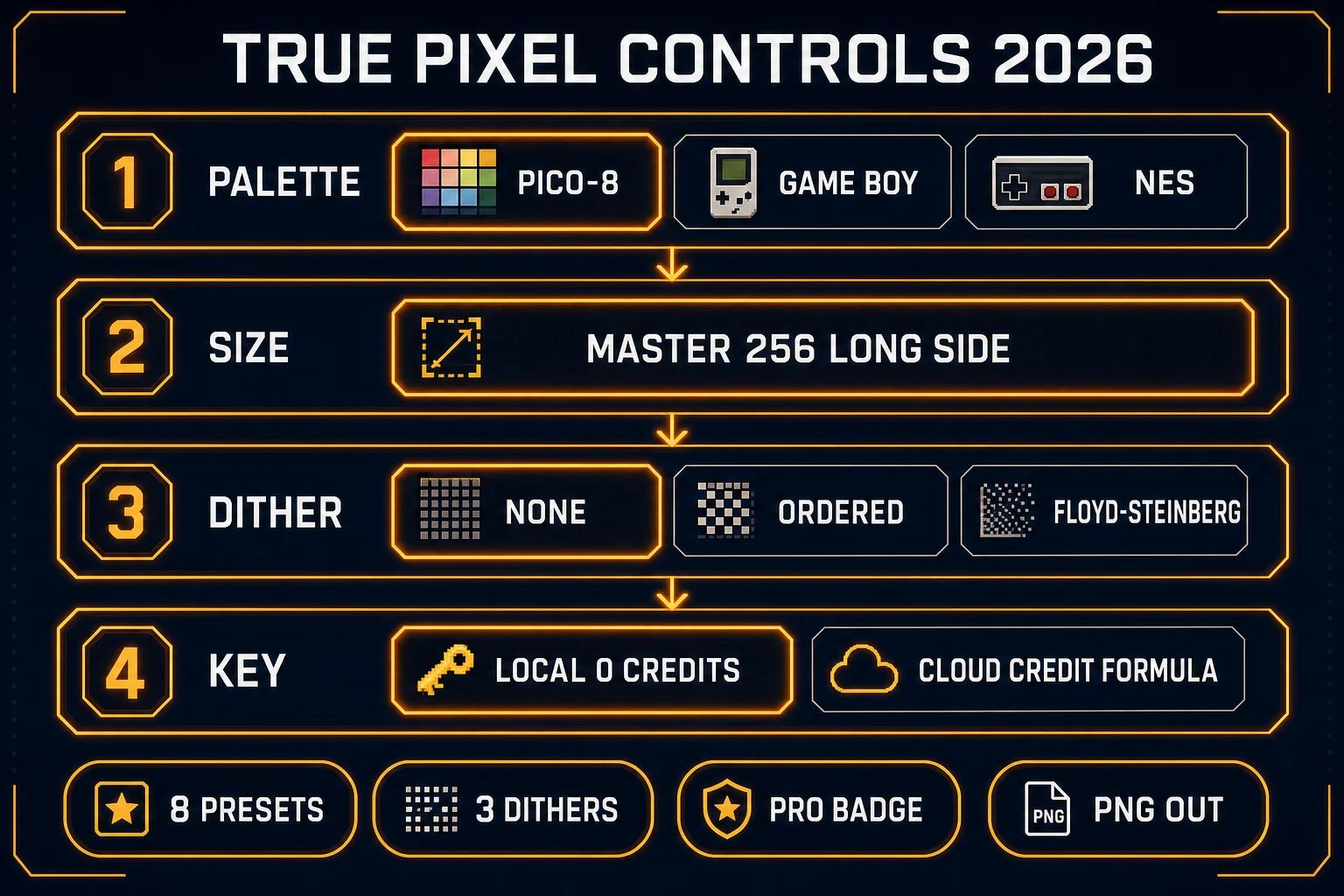
True Pixel controls for convert an image to pixel art: eight palette presets, three dither modes, master 256 long side, local zero-credit Corridor Key
True Pixel controls that matter when you convert an image to pixel art: palette, size, dither, and keying cost.

Clean leftover fringe in Canvas before you quantize

Sorceress Canvas is the Free in-browser editor on the Image Tools row (badge verified 2026-09-22). It is not a second pixel converter. It is where you crop, erase, and fill before True Pixel locks the grid. A noisy margin becomes a ring of junk colors after quantization. A tilted crop becomes a jagged outline you will fight for the rest of the jam.

Use Canvas when:

  • The still has a huge empty margin around a small figure. Crop it so the character fills most of the frame.
  • A matte left a pale halo. Erase the halo. Do not blur it into the hair.
  • A sleeve has a hole. Sample a nearby opaque pixel with the picker and brush it closed.

Then send or re-upload the cleaned still into True Pixel. Convert an image to pixel art on a messy full-frame screenshot and you will spend the dither pass fighting the background instead of shaping the character.

Matte photographic backdrops with BG Remover

When the source is an AI character render on a room or gradient, a hue key will not save you. BG Remover is the still-image AI powered cutout on Sorceress. The home card badges it AI Credits. The page bills BG_REMOVER_CREDITS = 3 per image, accepts PNG/JPG/WebP under 5 MB, and downloads a transparent PNG (verified 2026-09-22 against the bg-remover page constants used across the suite).

Order of operations for how to convert an image to pixel art from a photographic still:

  1. Run BG Remover. Download the PNG with alpha.
  2. Optional: open Canvas, erase fringe, crop tight.
  3. Drop that PNG into True Pixel and quantize.

Do not run a neural matte and a chroma key on the same pixels and expect them to agree. Pick the method that matches how the picture was made. Flat plate → chroma or Corridor Key inside True Pixel. Photo backdrop → BG Remover first.
Sheet pack after a single-frame convert

One convert an image to pixel art pass gives you one pose. A walk cycle needs a strip. Three honest options on Sorceress:

  • Repeat the True Pixel path on each pose you already drew or generated, then assemble a grid with the same palette and the same cell size.
  • Feed a short clip into True Pixel’s video path so every frame shares palette and dither settings, then export the frame pack.
  • Skip conversion entirely and open Quick Sprites when you want an AI-generated animated pixel sheet from a prompt. Quick Sprites is badged AI Credits on the Sprites & 2D row (verified 2026-09-22). That path invents frames; it does not preserve a specific photo.

For atlas layout details, the existing guide on how to make a sprite sheet covers cell size and packing. For the broader image to pixel art framing without the convert an query, see Image to Pixel Art in the Browser. This page stays on the conversion verb: still in, quantized PNG out.

Engine import after you convert an image to pixel art

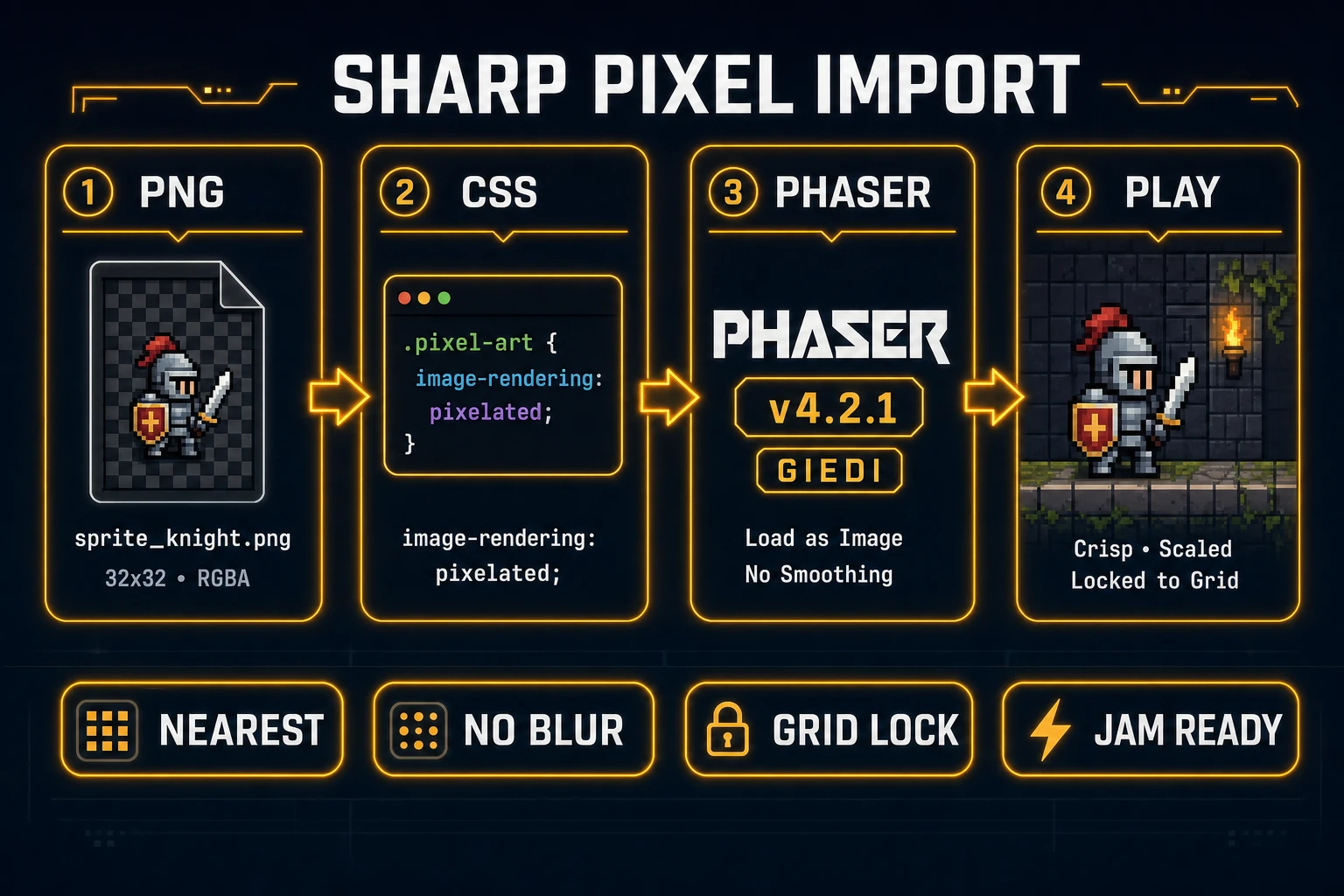
Export is half the job. Soft scaling undoes a clean convert an image to pixel art pass. MDN’s crisp pixel art look article (verified 2026-09-22) shows the CSS fix:

img.sprite,
canvas#game {
  image-rendering: pixelated;
}

The companion image-rendering page (verified 2026-09-22) documents pixelated and crisp-edges. Use integer scale factors when you can. Non-integer device pixel ratios can still look uneven; that is a browser limitation MDN calls out, not a broken PNG.

In canvas code, keep source pixels aligned to canvas pixels. Drawing a 48×64 sprite into a 50×70 destination softens edges even if CSS later says pixelated. Prefer 1:1 draw, then scale the canvas element with CSS.

Browser jam stacks often use Phaser. Phaser v4.2.1 “Giedi” was released 2026-07-09 (verified 2026-09-22 on phaser.io/download/stable). Load the PNG as a texture and disable any texture filtering that bilinear-blurs atlases. If you are vibe-coding the loader, keep the asset path and the pixelated CSS in the same prompt so the agent does not helpfully add smooth scaling.

After you convert an image to pixel art: PNG export, image-rendering pixelated, Phaser 4.2.1 import, crisp playtest
After convert an image to pixel art: keep nearest-neighbor scaling or the grid turns to mush.

How to convert an image to pixel art in five steps

If you want the short control path, this is how to convert an image to pixel art on Sorceress without opening a desktop paint suite:

  1. Start from a still with a readable silhouette. AI Image Gen or a phone photo both work if the figure is large in frame.
  2. Remove the backdrop. Flat plate stays inside True Pixel chroma or Corridor Key. Photographic backdrop goes through BG Remover first.
  3. Crop and erase fringe in Canvas so quantization does not invent junk edge colors.
  4. In True Pixel, lock palette, target size, and dither. Export PNG.
  5. Import with image-rendering: pixelated and integer draw sizes so the convert an image to pixel art pass stays sharp in playtests.

That five-step loop is the whole convert an image to pixel art job for a jam character. Music, collision, and level art come after the PNG is honest.

Common issues when you convert an image to pixel art

  • Muddy silhouette. The source was too small or too soft. Start from a sharper still, or regenerate the concept at a higher resolution in AI Image Gen before conversion.
  • Fringe colors in the palette. The backdrop was still in the file. Matte or chroma first. Re-run True Pixel on the clean PNG.
  • Banding on gradients. Switch dither from none to ordered, then adjust intensity. Floyd-Steinberg is the noisier last resort.
  • Blurry in-game. You converted correctly and then scaled with bilinear filtering. Fix image-rendering and texture filters, not the PNG.
  • Credit surprise on keying. Palette work is on-page. Corridor Key cloud charges by the formula above. Local Corridor Key stays at 0 credits. BG Remover is a separate 3-credit still tool.

Verdict: convert an image to pixel art on Sorceress

Convert an image to pixel art when you already have a pose worth keeping. On Sorceress the honest stack is BG Remover or Canvas for prep, True Pixel for palette and dither, PNG out, then pixelated import in the engine. How to make pixel art for games from scratch is a different afternoon. How to make pixel art games still needs music, collision, and a playable loop after the sprite lands. For the conversion job alone, the 2026 path above is enough: one still, one palette, one sharp file.

Open True Pixel, drop the cleaned still, and convert an image to pixel art before you rewrite the art by hand.

Frequently Asked Questions

What does convert an image to pixel art mean for a game sprite?

Convert an image to pixel art means downscaling a photo or AI still onto a fixed grid, locking colors to a small palette, and exporting a PNG the engine can draw without blur. Wikipedia’s Pixel art page (checked 2026-09-22) defines the form as art at the pixel level. For games the win is a readable silhouette at 32–64 px, not a filtered thumbnail of the photo.

How to convert an image to pixel art without Photoshop?

How to convert an image to pixel art in the browser on Sorceress: optional BG Remover or Canvas cleanup, then True Pixel at /pixel-art. Pick one of eight palette presets (PICO-8, SWEETIE-16, Endesga 32, Game Boy, CGA, NES, Grayscale, 1-Bit), set width and height, choose dither none / ordered / Floyd-Steinberg, and download the PNG. Facts verified 2026-09-22 in src/app/pixel-art/page.tsx.

Is convert an image to pixel art free on Sorceress?

The home card badges True Pixel Pro (verified 2026-09-22 in src/app/_home-v2/_data/tools.ts). Palette quantization and dither run in the page. Corridor Key cloud keying bills Math.max(1, Math.ceil(frames/10) * (maxDim > 512 ? 2 : 1)) credits; local Corridor Key is 0 credits. Canvas is Free. BG Remover is 3 credits per still.

How do I keep pixel art sharp after I convert an image to pixel art?

After you convert an image to pixel art, scale with nearest-neighbor, not bilinear. MDN’s crisp pixel art guide (verified 2026-09-22) shows image-rendering: pixelated on img and canvas so one source pixel maps to a block of screen pixels. Phaser v4.2.1 “Giedi” (released 2026-07-09, page checked 2026-09-22) is a common browser engine for that load path.

Should I convert an image to pixel art or generate a Quick Sprites sheet?

Convert an image to pixel art when you already have a still you want to keep. Use Quick Sprites when you want an AI-generated animated pixel sheet from a prompt instead of a photo. Both live on the Sprites & 2D row; Quick Sprites is badged AI Credits (verified 2026-09-22).

Sources

  1. Pixel art - Wikipedia
  2. Crisp pixel art look with image-rendering - MDN
  3. CSS image-rendering - MDN
  4. Phaser v4.2.1 Giedi download
Written by Arron R.·1,751 words·8 min read

Related posts