Stamp an AI Voxel Art Generator (Browser-Native)

By Arron R.15 min read
An AI voxel art generator that lives in a browser tab — Sorceress Voxel Studio takes a text prompt, an image, or an uploaded 3D model and outputs a textured vox

An AI voxel art generator that ships rigged, game-ready voxels in 2026 fits in a single browser tab — type a prompt, drop an image, or upload an existing 3D model, and a textured voxel character with an auto-bound humanoid skeleton (or a procedurally walk-rigged spider) drops out the other side ready for Unity, Godot, Three.js, Babylon.js, or a custom WebGL build. The category that used to mean buying MagicaVoxel skill (good but tedious), wiring a manual rig in Blender (slow), and hand-exporting per engine (error-prone) now collapses into the Sorceress Voxel Studio three-step flow: voxelize, rig, export. This guide walks the full pipeline, with every credit cost and capability verified against the live source on June 15, 2026.
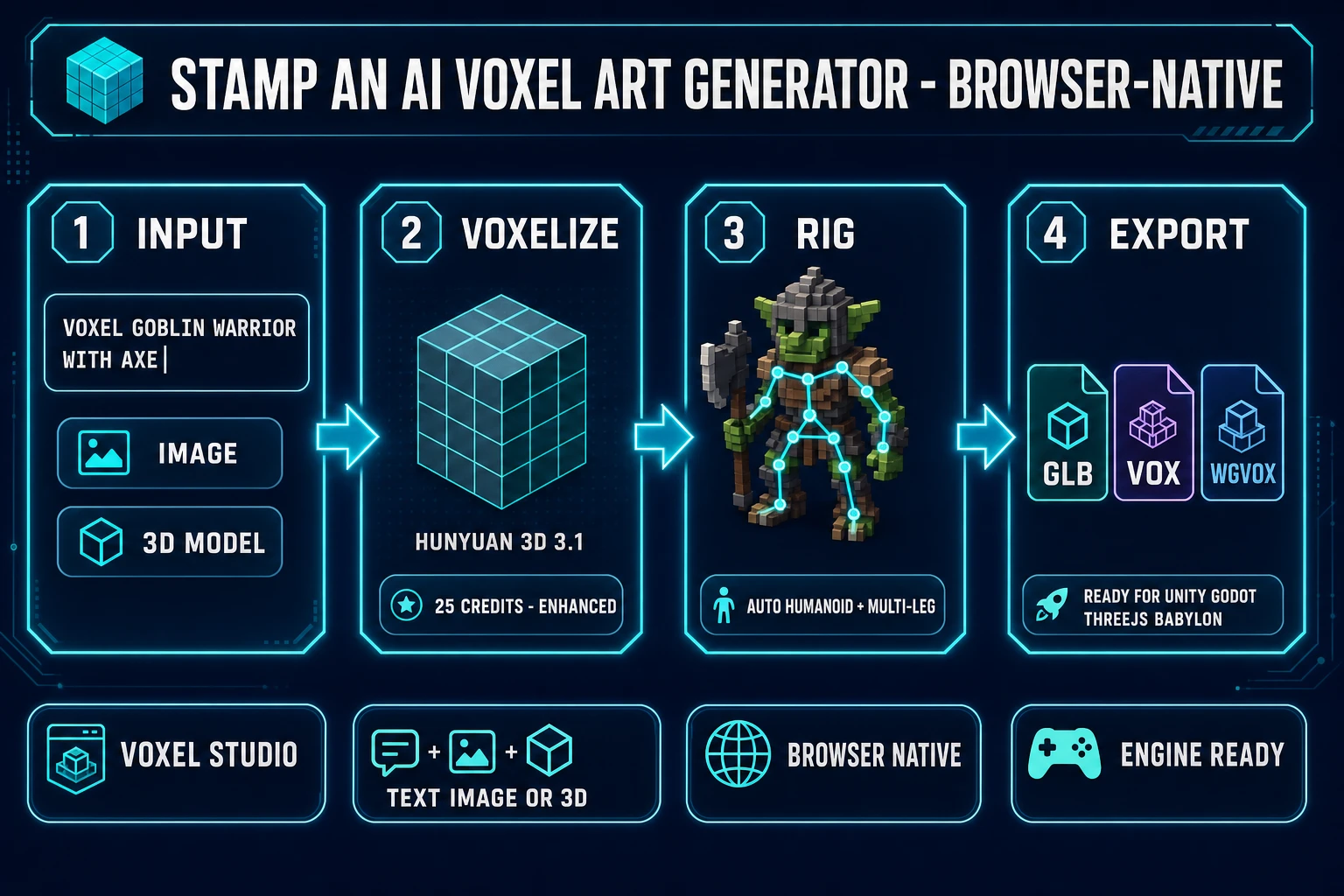
AI voxel art generator pipeline diagram for indie games - voxel goblin warrior prompt becomes Hunyuan 3D 3.1 voxelization with 25 credits then auto humanoid plus multi-leg rig then GLB VOX WGVOX export ready for Unity Godot Three.js Babylon
The 2026 AI voxel art generator pipeline runs four steps in one Sorceress Voxel Studio tab — input (text, image, or 3D upload), voxelize via Hunyuan 3D 3.1 Enhanced, auto-rig, and export — with verified credit costs from src/app/voxelgen/page.tsx on June 15, 2026.

What an AI voxel art generator actually delivers for games in 2026

The category covers any tool that takes a text prompt, a reference image, or an uploaded 3D model and outputs a game-ready voxel asset — a discrete-grid 3D representation where every unit is a colored cube. The technical primitive is the voxel itself: a volumetric pixel that, stacked into a three-dimensional grid, defines a finite 3D shape the way pixels stacked into a 2D grid define a sprite. The defining feature is the discreteness — every voxel is addressable, every voxel can be painted or removed, and the grid structure caches well in modern engines.

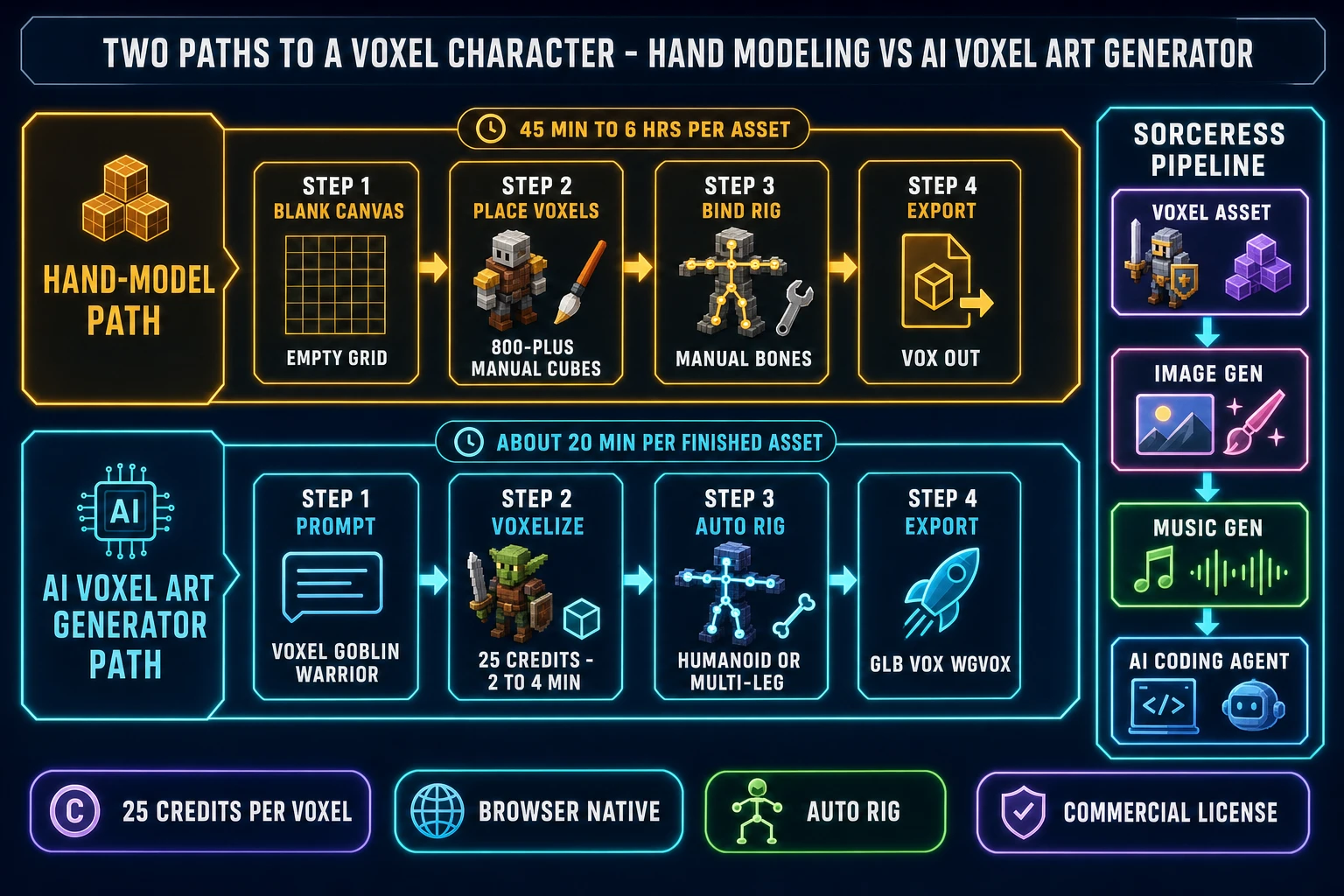
For an indie game team, the practical impact is twofold. First, voxels read as a deliberate stylistic choice, sitting in the same family as pixel art and lo-fi 3D — players recognize the language and forgive a lower polygon budget because the entire visual contract is "stylized small grid." Second, voxels animate cleanly under skeletal animation because the voxel groups bind to bones with predictable weight distribution. Hand-modeling a single voxel character takes 45 minutes to 6 hours in a traditional editor depending on silhouette complexity and palette discipline. An AI voxel art generator collapses the base voxelization step into 2 to 4 minutes per asset (verified against the Voxel Studio marketing FAQ on June 15, 2026), shifting the human effort from blank-canvas modeling to surgical edits in a paint-style editor.

The honest 2026 baseline: Sorceress Voxel Studio ships three input rails (text prompt, image reference, 3D model upload), routes voxelization through the Tencent Hunyuan 3D 3.1 Enhanced model at 25 credits per generation or the legacy Hunyuan 3D 2.1 Simple model at 20 credits, runs the entire pipeline in the browser, and bundles 100 starter credits at sign-up — enough for four complete voxel generations on the Enhanced model before any purchase. Verified against src/app/voxelgen/page.tsx on June 15, 2026.

Why voxel art still earns its keep in 2026 indie sales

Voxel art is not a nostalgia choice. It is an engineering choice with three concrete payoffs that show up on the day a game ships, not just on the day the studio brainstorms the look.

  • Performance budget. Voxel meshes are coarse compared to high-poly 3D, which means fewer triangles per frame, smaller memory footprint, and consistent frame pacing even on the cheapest devices a browser game runs on. A voxel character at 800 visible cubes compiles to a far smaller triangle count than the equivalent polygon-mesh character at 8,000 triangles, and the difference shows up immediately on a Chromebook, a budget Android phone, or a mid-tier laptop with integrated graphics.
  • Editing surface. Every voxel is addressable. A character that needs a slightly larger shield, a recolored cape, or a missing accessory can be edited in the browser voxel editor without touching topology, UV maps, or skin weights. Compare that to the polygon-mesh equivalent, where the same edit means re-modeling a section, re-baking AO, and re-weighting the rig.
  • Aesthetic license. The voxel style sets the right expectations for the rest of the pipeline. Players reading a voxel game do not expect motion capture, photoreal skin, or volumetric clouds — they expect blocky charm, clear silhouettes, and snappy gameplay. That budget gets reinvested into the parts of the game that matter: level design, encounter pacing, audio, dialogue.

The 2026 indie market reflects this. Voxel-style games (whether they call themselves "low-poly", "blocky", or strictly "voxel") continue to ship, sell, and review well on Steam, itch.io, and the WebGL distribution channels. The aesthetic does not date because it never claimed to be cutting-edge in the first place — it claimed to be readable, scalable, and warm. An AI voxel art generator does not invent this market. It removes the asset-production bottleneck that has historically kept solo and two-person teams from shipping into it.

The three input rails into Sorceress Voxel Studio — text, image, and 3D model upload

An AI voxel art generator that only accepts one input type is a research demo, not a production tool. Sorceress Voxel Studio ships three rails, each with a distinct use case verified against the marketing page on June 15, 2026:

  • Text prompt (text-to-voxel). Type a description and the Hunyuan 3D 3.1 Enhanced model generates a voxelized asset from scratch. The text-to-voxel path is exclusive to the Enhanced model per the supportsTextPrompt flag in the MODELS configuration verified June 15, 2026 — the legacy Simple model does not accept prompts. Use this rail when you have a clear idea but no reference art: a goblin warrior with an axe, a crystal golem guardian, a steampunk airship, a stylised tree. Prompts that ship clean voxels share a pattern: name the subject specifically, name the silhouette features, name the color anchor, name the style cue.
  • Image reference (image-to-voxel). Drop a concept-art image, a sketch, a generated image, or a reference render into the input and the model produces a voxelized version. Works on both the Enhanced (25 credits) and the Simple (20 credits) models. Use this rail when the project already has a 2D look book — the image-to-voxel pass is the cleanest way to keep the voxel cast on-model with the 2D concept work. Compatible inputs: PNG, JPG, WebP. Most concept art that reads cleanly as a 2D sprite reads cleanly as a voxel asset.
  • 3D model upload (3D-to-voxel). Upload an existing mesh in GLB, GLTF, FBX, OBJ, or STL format per the MODEL_EXTENSIONS array in src/app/voxelgen/page.tsx verified June 15, 2026, and the in-browser VoxelConverter voxelizes it locally — no AI generation step, no credit cost on the voxelization itself. Use this rail when you already own the silhouette (a free Sketchfab CC0 download, a Sorceress 3D Studio output, a Blender-modeled mesh) and just want a voxelized version of it for a stylized scene or a stylized character. This is the cleanest path for studios with existing 3D pipelines who want to add a voxel chapter without rebuilding from scratch.

The three rails compose. A common flow is to seed the look with a text prompt for the protagonist, voxelize 2D concept art for the supporting cast, and convert hand-modeled environment props from a 3D-to-voxel pass. Sorceress AI Image Gen at /generate sits naturally upstream of the image-to-voxel rail — generate the concept art, then drop it straight into Voxel Studio without leaving the Sorceress workspace.
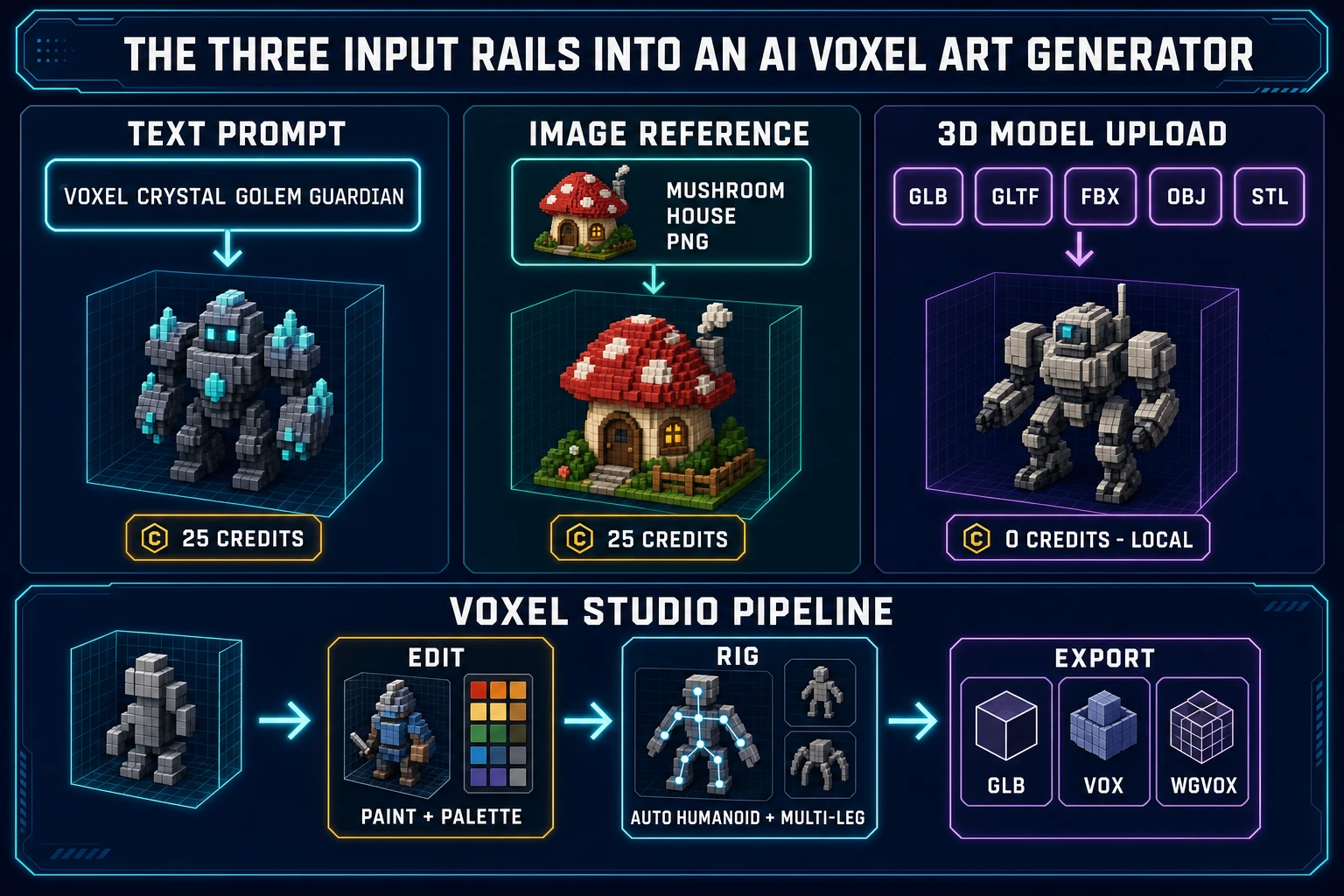
Three input rails into an AI voxel art generator - text prompt voxel crystal golem guardian at 25 credits, image reference mushroom house PNG at 25 credits, 3D model upload GLB GLTF FBX OBJ STL at zero credits - feeding the Voxel Studio pipeline of edit rig export
Sorceress Voxel Studio ships three input rails into its AI voxel art generator — text, image, and 3D model upload — verified against src/app/voxelgen/page.tsx on June 15, 2026. The 3D-to-voxel path runs locally in the browser via the VoxelConverter component and costs zero credits.

The Sorceress AI voxel art generator pipeline — prompt to rigged voxel in three steps

The core generation flow inside Sorceress Voxel Studio is three steps from a blank tab to an exportable rigged voxel character. Verified against src/app/voxelgen/page.tsx and the marketing page on June 15, 2026.

  1. Step one: voxelize. Open /voxelgen. Type a prompt into the input panel, drop an image into the upload zone, or drag a GLB/GLTF/FBX/OBJ/STL file into the model upload zone. Pick the Enhanced (3.1) model for text-to-voxel or for higher-fidelity image-to-voxel; the Simple (2.1) model remains in the schema for legacy job display but the UI defaults to Enhanced and the legacy Simple option is not selectable in the current build. Submit the job. Hunyuan 3D 3.1 runs the generation in roughly 2 to 4 minutes per asset. The output drops into the gallery as a card with a voxel preview thumbnail.
  2. Step two: rig. Open the voxel asset in the editor panel. For humanoid characters — bipeds with two arms and two legs, the standard game-character silhouette — run the automatic humanoid rigging flow. The auto-rig binds bones to voxel groups by anatomical convention (head, torso, upper arms, lower arms, hands, hips, upper legs, lower legs, feet) so the resulting rig is engine-ready for any modern game runtime that reads skeletal animation. For multi-legged creatures — spiders, crabs, beetles, alien bugs — run the procedural multi-leg walk-rigging flow (a Pro feature per the home v2 catalog verified June 15, 2026), which uses inverse kinematics to drive foot placement on uneven terrain at runtime.
  3. Step three: export. Pick the export format that matches the target engine. GLB drops straight into Unity, Godot, Three.js, Babylon.js, and any custom WebGL build with the rig and skin weights intact. VOX exports for any MagicaVoxel-compatible workflow. WGVOX exports for the Wizard Genie native voxel runtime and for the Sorceress in-house voxel pipeline. All three export buttons sit on every generated job card per the downloadJobAs function in src/app/voxelgen/page.tsx verified June 15, 2026.

Five prompt patterns that produce clean voxel characters consistently in 2026:

  • "voxel goblin warrior with axe, stocky build, green skin, leather armor, low-poly game asset" — concrete subject, clear silhouette, color anchor, style cue.
  • "voxel crystal golem guardian, blocky shoulders, glowing cyan crystal accents, fantasy game character" — same pattern with a stylised material.
  • "voxel space marine, bulky armor, helmet with visor, blue and silver palette, sci-fi game character" — sci-fi silhouette with explicit color anchor.
  • "voxel mushroom forest spirit, slim build, mushroom-cap head, soft pink and white palette, cute game NPC" — non-warrior silhouette with explicit character role.
  • "voxel knight character, full plate armor, sword at hip, gray and gold palette, classic RPG hero" — classic RPG archetype with concrete equipment.

Prompts that fail consistently: abstract requests ("a cool character", "a fantasy thing"), missing silhouette cues ("a hero"), or over-loaded prompts with conflicting style instructions ("realistic photoreal voxel character with painterly details"). The Hunyuan 3D 3.1 model converges fastest on prompts that name one concrete subject, two-to-four concrete features, and one explicit color anchor.
Auto-rigging humanoids and procedural walk-rigging multi-legged creatures

The rig is where most AI voxel pipelines fall apart, because a voxel mesh that cannot move is decoration, not a game character. Sorceress Voxel Studio handles both common rig cases in the same browser flow.

Humanoid auto-rig. Run the automatic humanoid rigging pass on any biped voxel character. The pass detects anatomical landmarks in the voxel grid (head cluster, torso, arms, hands, hips, legs, feet), creates a standard humanoid skeleton, and binds the skin weights to voxel groups by proximity. The output rig follows the conventional biped joint hierarchy that every modern game engine reads natively. The auto-rig works best on voxel characters with a clear T-pose or A-pose silhouette — if the input character has crossed arms or extreme proportions, edit the voxels first in the paint editor, then run the rig.

Procedural multi-leg walk-rigging. For voxel creatures that are not bipeds — spiders, crabs, beetles, scuttling alien bugs — the procedural multi-leg flow handles the case the conventional humanoid auto-rig cannot. Instead of binding bones to leg clusters statically, the procedural pass uses inverse kinematics to drive foot placement at runtime: the creature plants each leg on the terrain mesh dynamically as it walks, so the same rigged creature looks correct walking across uneven voxel terrain, flat plates, or chunky stair steps. This is a Pro feature per the home v2 catalog verified against src/app/_home-v2/_data/tools.ts on June 15, 2026.

Text-to-animation. Once the rig is bound, the Animate tab generates motion clips by plain-text prompt. The animation cost is 2 credits per generated clip per the ANIM_CREDIT_COST constant in src/components/studio/animate/AnimateUnified.tsx verified June 15, 2026. Common motion-prompt patterns that ship reliably: "walk cycle, slow, steady stride", "idle, gentle breathing, slight sway", "attack, overhead axe swing", "cast spell, hands raised, gather energy". The generated clips drop into the GLB export with the keyframes intact so the engine imports the animation alongside the rig.

The honest production note: animation generation works best on characters that match the rig profile (biped for humanoid, multi-leg for procedural walk). A non-conforming character — a quadruped on a humanoid rig, a humanoid on a multi-leg rig — will produce visually broken animations. Pick the rig that matches the silhouette, not the rig that is "more advanced". A clean humanoid rig on a clean voxel biped beats a procedural multi-leg rig on the same character every time.

Editing voxels in the browser — the manual-touch step everyone skips

Every AI voxel art generator output benefits from a manual-touch pass, and the teams that skip this step ship visually inconsistent assets. The Voxel Studio editor handles the touch-up step natively — no round-trip to MagicaVoxel, no Blender export, no third-party tool.

The editor exposes the usual voxel-editing primitives directly in the browser tab: paint individual voxels with palette colors, erase voxels in bulk, add or remove cubes in any axis, swap palette entries to recolor entire regions at once, mirror across a symmetry axis to clean up asymmetric generations, and inspect the asset from any angle with the built-in orbit camera. The editor uses standard Canvas-rendered 3D primitives and runs locally — no API calls, no credit cost on the editing step itself per the VoxelEditor component's local-only state model.

A practical touch-up checklist for a Sorceress Voxel Studio generation before export:

  1. Walk the asset 360 degrees in the editor camera and identify any silhouette flaws — missing voxels in the helmet, stray cubes around the cape, irregular shoulders.
  2. Fix the silhouette flaws by adding or removing voxels manually. Most generations need fewer than 20 manual edits to read cleanly from every angle.
  3. Swap any palette entries that drift from the intended color anchor. The Hunyuan model occasionally generates near-matches rather than exact matches; the palette swap takes seconds and the recoloring propagates across every voxel in that palette index.
  4. Run the symmetry pass if the character is supposed to be symmetric (most fantasy characters are). The mirror tool cleans up asymmetric generations in one click.
  5. Save the edited voxel record so the rig + animate steps run on the cleaned-up asset, not the raw generation.

The whole touch-up step takes 5 to 15 minutes per character, depending on how clean the original generation came out. Compared to the 45-minute-to-6-hour budget for hand-modeling a voxel character from a blank canvas, the edit-after-AI flow is the production pattern that ships finished assets at a sustainable rate.

Exports that just work — GLB, VOX, and WGVOX for game engines

An AI voxel art generator that exports to one format locks the asset into one ecosystem. Sorceress Voxel Studio ships three export rails so the same voxel character drops into the engine the team actually uses — not the engine the tool prefers.

  • GLB (glTF binary). The universal modern 3D path. Unity, Godot, Three.js, Babylon.js, and every custom WebGL engine import GLB natively with the rig and skin weights intact. Voxel Studio uses the standard GLTFExporter from three.js per the import statement in src/app/voxelgen/page.tsx verified June 15, 2026, so the resulting GLB conforms to the published glTF 2.0 specification. Use GLB when the target engine is anything modern — it is the default in every published 2026 engine documentation.
  • VOX. The native format of MagicaVoxel and the open-source voxel-art ecosystem. Use VOX when the project already touches a MagicaVoxel-style pipeline, when the asset will be edited further in a standalone voxel editor, or when the engine import path expects VOX over GLB.
  • WGVOX. The Wizard Genie native voxel format, packed via the helpers in src/lib/voxel/binary-format.ts verified June 15, 2026. Use WGVOX when the voxel asset will be wired into a game via the WizardGenie AI coding agent — the format is designed to round-trip cleanly through the Sorceress voxel runtime without conversion loss.

Bulk export is supported — select multiple voxel assets in the gallery and download all three formats at once via the bulk-download controls per bulkDownload in source. The downloaded files are plain blobs that any tool can read; nothing is locked behind a Sorceress proprietary wrapper at the file-format layer. A sister Sorceress walkthrough covers the original voxel character generation flow in more depth: the rigged-voxel-characters post from May 6 documents the first version of this pipeline end to end.

Two paths to a voxel character - hand-model path through MagicaVoxel at 45 minutes to 6 hours per asset versus AI voxel art generator path through Sorceress Voxel Studio at 25 credits and 2-to-4 minute generation plus 5-to-15 minute edit pass - paired with the Sorceress pipeline of voxel asset image gen music gen and AI coding agent
The two paths to a voxel character in 2026: the hand-model path through MagicaVoxel at 45 minutes to 6 hours per asset versus the AI voxel art generator path through Sorceress Voxel Studio at 25 credits per Enhanced generation and roughly 20 minutes per finished, rigged asset — verified against src/app/voxelgen/page.tsx and src/app/plans/page.tsx on June 15, 2026.

Pair Sorceress Voxel Studio with the rest of the indie game pipeline

Voxel Studio owns the asset layer for projects that target the voxel aesthetic. It does not own the whole game. The cleanest 2026 indie game-creation flow chains Voxel Studio with four other Sorceress tools, all running from the same credit pool and the same browser session:

  • Concept art. Use Sorceress AI Image Gen to generate 2D concept art for the voxel cast. Drop the generated images straight into the image-to-voxel rail to keep the voxel characters on-model with the concept art.
  • Polygon meshes. Use Sorceress 3D Studio for any asset that must be high-poly rather than voxel — bosses with intricate geometry, environment hero pieces, signature props. The two studios live in the same workspace and share the rigged-character library so a polygon character and a voxel character can both ship in the same scene.
  • Audio. Use Sorceress Music Gen for the soundtrack and Sorceress SFX Gen for combat hits, ambient layers, and UI feedback. Voxel games benefit from a wide audio palette because the visual minimalism leaves more room for the soundtrack to carry mood.
  • Game logic. Use the WizardGenie AI coding agent to wire the voxel cast into a working game — Phaser for 2D-perspective voxel scenes, Three.js or Babylon.js for full-3D voxel scenes. The WGVOX export path is designed to round-trip cleanly through WizardGenie's voxel-asset loader.
  • The catalog. The full Sorceress tool list lives at /tools-guide, and the pricing breakdown (100 starter credits, $49 Lifetime tier, credit tiers from $10 per 1,000 to $100 per 10,000) lives at /plans. The Lifetime tier unlocks every non-AI-generative capability across the entire suite, including the Voxel Studio editor, converter, and exports.

The companion read for the surface layer is the PBR texture walkthrough from June 15; the companion read for the mesh layer is the 2D-image-to-3D-model walkthrough; and the catalog roundup that maps every tool to every step lives in the 2026 field guide.

The verdict on AI voxel art generators in 2026

The honest 2026 stack for any indie team shipping voxel content commercially: open Sorceress Voxel Studio, burn the 100 starter credits on four Enhanced-model generations to seed the protagonist plus three supporting characters, top up at $10 per 1,000 credits when the starter allowance runs out, run the auto-humanoid rig on the bipeds, run the procedural multi-leg pass on any non-biped creatures, edit each generation in the browser voxel editor until the silhouette reads cleanly, export to GLB for the engine, and route the voxel cast into the WizardGenie AI coding agent for the game-logic layer.

An AI voxel art generator does not replace the artistic choices — the color palette, the character design, the silhouette — it removes the mechanical bottleneck of placing 800 cubes one at a time. The result is a production rate that lets a solo indie or a two-person team ship a complete voxel cast in a weekend rather than a month. That is the meaningful 2026 upgrade: not just "AI makes voxels", but "AI makes voxels at the rate the rest of the game-creation pipeline runs". Sorceress Voxel Studio is the browser-native tool that delivers the upgrade end-to-end.

Verified against src/app/voxelgen/page.tsx, src/app/pages/voxel-studio/page.tsx, src/lib/voxel/binary-format.ts, src/components/studio/animate/AnimateUnified.tsx, src/app/_home-v2/_data/tools.ts, and src/app/plans/page.tsx on June 15, 2026.

Frequently Asked Questions

What does an AI voxel art generator actually deliver in 2026?

An AI voxel art generator takes a text prompt, a reference image, or an uploaded 3D model and outputs a game-ready voxel asset — a discrete-grid 3D model where every unit is a colored cube. Sorceress Voxel Studio at /voxelgen runs this entire pipeline in a browser tab, accepts text prompts and image references on the Enhanced model at 25 credits per generation, accepts image-only on the legacy Simple model at 20 credits, and ships humanoid auto-rigging plus procedural multi-leg walk-rigging out of the same UI. Verified against src/app/voxelgen/page.tsx on June 15, 2026.

How is an AI voxel art generator different from a regular AI 3D model generator?

A regular AI 3D model generator outputs a continuous polygon mesh — thousands of triangles defining a smooth surface. An AI voxel art generator outputs a discrete cube grid where every unit is one colored voxel. The visual differences cascade. Voxels render fast because the grid structure caches well; polygon meshes need more memory and per-frame shader work. Voxels edit cleanly in a paint-style flow because every cube is addressable; polygon meshes need topology surgery. Voxels read as a deliberate stylistic choice in the same family as pixel art; polygon meshes target photoreal or stylised-realistic looks. Sorceress Voxel Studio sits in the voxel lane; Sorceress 3D Studio at /3d-studio sits in the polygon lane.

Can a free AI voxel art generator produce rigged characters that walk?

Yes — and Sorceress Voxel Studio is the path that does both halves in the same tab. Generate the voxel character from a prompt or image, then run the automatic humanoid rigging pass for bipeds (the rig binds bones to voxel groups by anatomical convention so the result is engine-ready), or run the procedural multi-leg walk-rigging flow for spiders, crabs, beetles, and other multi-legged creatures (a Pro feature per the home v2 tools catalog verified June 15, 2026). The text-to-animation step costs 2 credits per clip per ANIM_CREDIT_COST verified against src/components/studio/animate/AnimateUnified.tsx on June 15, 2026, and the resulting rigged character exports to GLB with the skeleton intact for engine import.

What input formats does Sorceress Voxel Studio accept for the image-to-voxel and 3D-to-voxel paths?

Image-to-voxel accepts standard image formats (PNG, JPG, WebP) — drop concept art, a sketch, or a generated image into the input and the Hunyuan 3D 3.1 Enhanced model produces a voxelized version. 3D-to-voxel accepts the five common interchange formats: GLB, GLTF, FBX, OBJ, and STL, verified against MODEL_EXTENSIONS in src/app/voxelgen/page.tsx on June 15, 2026. Upload an existing mesh and Voxel Studio voxelizes it in the browser using the VoxelConverter component. The text-to-voxel path is exclusive to the Enhanced model — the legacy Simple model supports image input only, per the MODELS configuration in source.

What export formats does an AI voxel art generator need to ship for a 2026 indie game?

Three formats cover the entire 2026 indie-game ecosystem. GLB is the universal modern path — Unity, Godot, Three.js, Babylon.js, and every custom WebGL engine import it natively with the rig + skin weights intact, per the engine compatibility list on the Voxel Studio marketing page verified June 15, 2026. VOX is the MagicaVoxel-format path for any pipeline that already touches the open-source voxel-art workflow. WGVOX is the Wizard Genie native format for posts that pair voxel assets with the AI coding agent at /wizard-genie/app, per the voxel binary-format helpers in src/lib/voxel/binary-format.ts verified June 15, 2026. Sorceress Voxel Studio ships all three export buttons on every generated job.

How does AI voxel art generation save time over MagicaVoxel or hand-modeling in 2026?

Hand-modeling a voxel character in any traditional editor (MagicaVoxel, Goxel, Avoyd) takes between 45 minutes and 6 hours per asset depending on the silhouette complexity and the artist's experience — every voxel is placed manually, palette by palette, layer by layer. An AI voxel art generator collapses the first 80 percent of that work into a single prompt cycle. The Hunyuan 3D 3.1 Enhanced model on Sorceress Voxel Studio produces the base voxelization in about 2 to 4 minutes per asset (verified against the Voxel Studio FAQ on June 15, 2026), and the human-touch step shifts from blank-canvas modeling to surgical edits in the voxel paint editor — typically another 5 to 15 minutes. End-to-end: an AI voxel art generator drops a complete asset cycle from hours to roughly 20 minutes for a finished, rigged voxel character.

Is the output of an AI voxel art generator legal to ship in a commercial indie game?

Sorceress Voxel Studio output is fully commercially licensable on every paid credit pack and on the 100-credit starter allowance — no attribution required. The credit math on June 15, 2026 per src/app/voxelgen/page.tsx and src/app/plans/page.tsx: 25 credits per Enhanced model generation, 20 credits per Simple model generation, 2 credits per animation clip, 100 starter credits at sign-up (enough for four Enhanced generations), and credit top-ups at $10 per 1,000, $20 per 2,000, $50 per 5,000, $100 per 10,000. The $49 Lifetime tier unlocks every non-AI-generative capability of the Voxel Studio (the editor, the converter, the export rails) permanently — the AI generation step still draws from the credit pool, but the editing, rigging, and export layers are unlocked forever.

How does an AI voxel art generator fit into the rest of the Sorceress game-creation pipeline?

Voxel Studio owns the asset layer for any project that targets the voxel aesthetic. Pair the voxel character output with Sorceress AI Image Gen at /generate for concept-art input that seeds image-to-voxel, with Sorceress 3D Studio at /3d-studio for polygon-mesh asset paths when a project mixes voxel and high-poly content, with WizardGenie at /wizard-genie/app for the AI coding agent that wires the asset into a working Phaser, Three.js, or Babylon.js game, and with Sorceress Music Gen + SFX Gen for the audio layer. Every tool runs from the same credit pool, the same project workspace, and the same browser session — verified against the Sorceress home v2 data file on June 15, 2026.

Sources

  1. Voxel (Wikipedia)
  2. Skeletal animation (Wikipedia)
  3. Inverse kinematics (Wikipedia)
  4. glTF (Wikipedia)
  5. Polygon mesh (Wikipedia)
  6. Canvas API (MDN)
Written by Arron R.·3,424 words·15 min read

Related posts