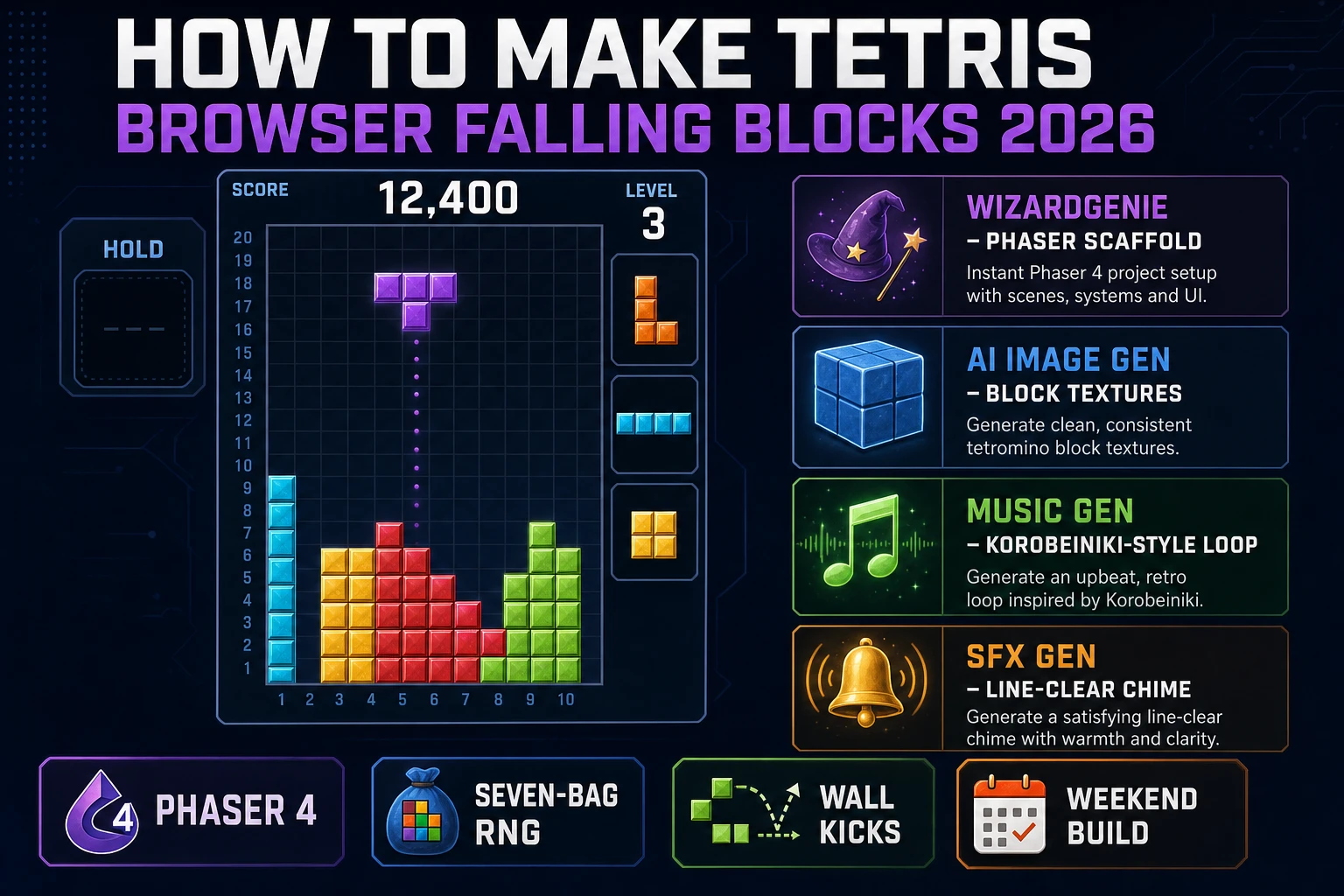
Alexey Pajitnov wrote the first version of Tetris on an Elektronika 60 in about three weeks in the mid-1980s, then spent another two months porting it to the IBM PC with Dmitry Pavlovsky and Vadim Gerasimov (verified against the Tetris Wikipedia entry on 2026-08-08). The mechanic is a single sentence: seven tetromino shapes fall on a 10-by-20 grid, the player rotates and shifts them, complete rows disappear and grant points, and the drop speed ramps as the score climbs. In this guide the pipeline for how to make Tetris runs from an empty repo to a shareable browser build: sketch the grid model and the seven rotation matrices on paper first, prompt WizardGenie to scaffold a Phaser 4 or vanilla Canvas project with the falling-block loop wired up, add the seven-bag piece randomiser and wall-kick table so pieces feel right, wire line-clear scoring and level speed-up, and finish with block textures from Sorceress AI Image Gen, a Korobeiniki-style ambient loop from Music Gen, and a satisfying line-clear chime from SFX Gen.
What "how to make Tetris" actually means in 2026 (mechanic vs. trademark)
The phrase "how to make Tetris" hides three different requests. Some searchers want to clone the mechanic as a coding exercise, matching the exact seven tetromino colours, the Super Rotation System wall-kicks, and the modern scoring curve. Some searchers want to build a falling-blocks game as a portfolio piece in Phaser or vanilla Canvas, learning the grid model, the rotation matrices, and the collision loop along the way. And some searchers want to ship an actual browser or mobile falling-blocks game competing with the existing market of Tetris-mechanic clones on itch.io and the mobile stores. This guide covers the second and third groups: how to make Tetris as a browser build that runs on any modern phone or desktop, and how to ship it under a name that will not get you a cease-and-desist.
Two ground rules matter before any code gets written. First, the mechanic (seven tetromino shapes rotate and fall on a grid, complete horizontal rows disappear, speed ramps with level) is a game mechanic and is not copyrightable, so the loop itself is fair use. Second, the name Tetris, the specific rainbow-per-shape colour palette used by modern authorised versions, the exact wall-kick tables from the Super Rotation System, and the Korobeiniki arrangement from the Game Boy version are all protected by trademark and copyright. The Tetris Company has enforced this line successfully in court, most notably in the 2012 case Tetris Holding LLC v. Xio Interactive Inc., where a US federal judge ruled the iOS game Mino violated Tetris copyright on look-and-feel grounds (verified against the Tetris Wikipedia entry on 2026-08-08). Pick a new name for your build (Stack Quest, Line Drop, Block Rain), generate original block art in AI Image Gen, arrange your own version of the underlying 1860s Russian folk tune Korobeiniki in Music Gen (the tune itself is public domain but any specific arrangement is protected), and ship under your own brand. Every falling-blocks game on itch.io that is not published by The Tetris Company follows exactly this playbook.
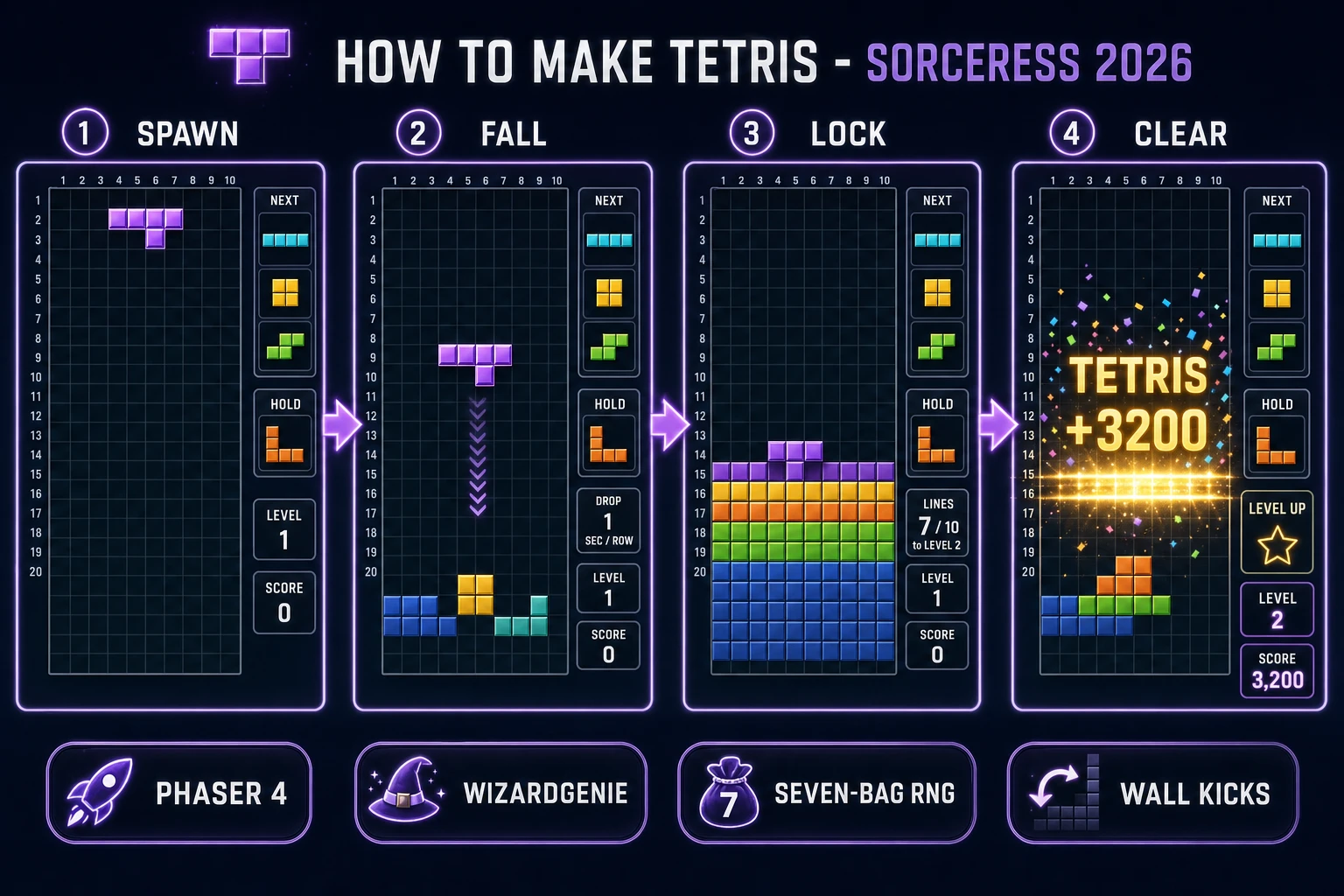
The Tetris game loop in one minute (spawn fall lock clear score)
Five moving parts and nothing else. A grid, typically 10 columns wide by 20 rows tall, storing which cells are locked and which are empty. A queue of upcoming pieces served by a seven-bag randomiser (each of the seven tetromino shapes appears exactly once per set of seven, then the bag reshuffles) so the RNG never punishes the player with a five-piece drought. A currently-falling piece, stored as a small rotation matrix plus an (x, y) grid position, that responds to player input (left, right, rotate CW, rotate CCW, soft drop, hard drop, hold) and to a gravity tick that pushes it down one row every N milliseconds. A collision-and-lock pass that fires when the piece can no longer move down, freezing its cells into the grid and spawning the next piece from the queue. And a line-detect-and-clear pass that scans every row for full occupancy, removes any complete rows, shifts the rows above down, awards points, and increments the line counter.
That is the entire game. Win state does not exist in the traditional sense — Tetris has no ending, only ever-increasing levels and ever-faster gravity. Loss state is the "topping out" moment: a newly-spawned piece cannot find room to spawn at the top of the grid, or a locked block ends up above the visible playfield. The design job for how to make Tetris feel right is to tune four numbers — starting gravity (typically 1000 ms per row at level 1), gravity ramp curve (Tetris DS style: drop_ms = pow(0.8 - (level - 1) * 0.007, level - 1) * 1000), lock delay (typically 500 ms of grace after a piece touches down, allowing the player to slide or spin it before it locks), and appearance-and-line-clear delay (typically 200 ms to make the piece transition and line-clear flash readable). Miss any of these and the game either feels sluggish or feels unplayably twitchy. Get them right and the tap loop is the tutorial.
Pick your engine for how to make Tetris: Phaser 4, vanilla Canvas, or Three.js
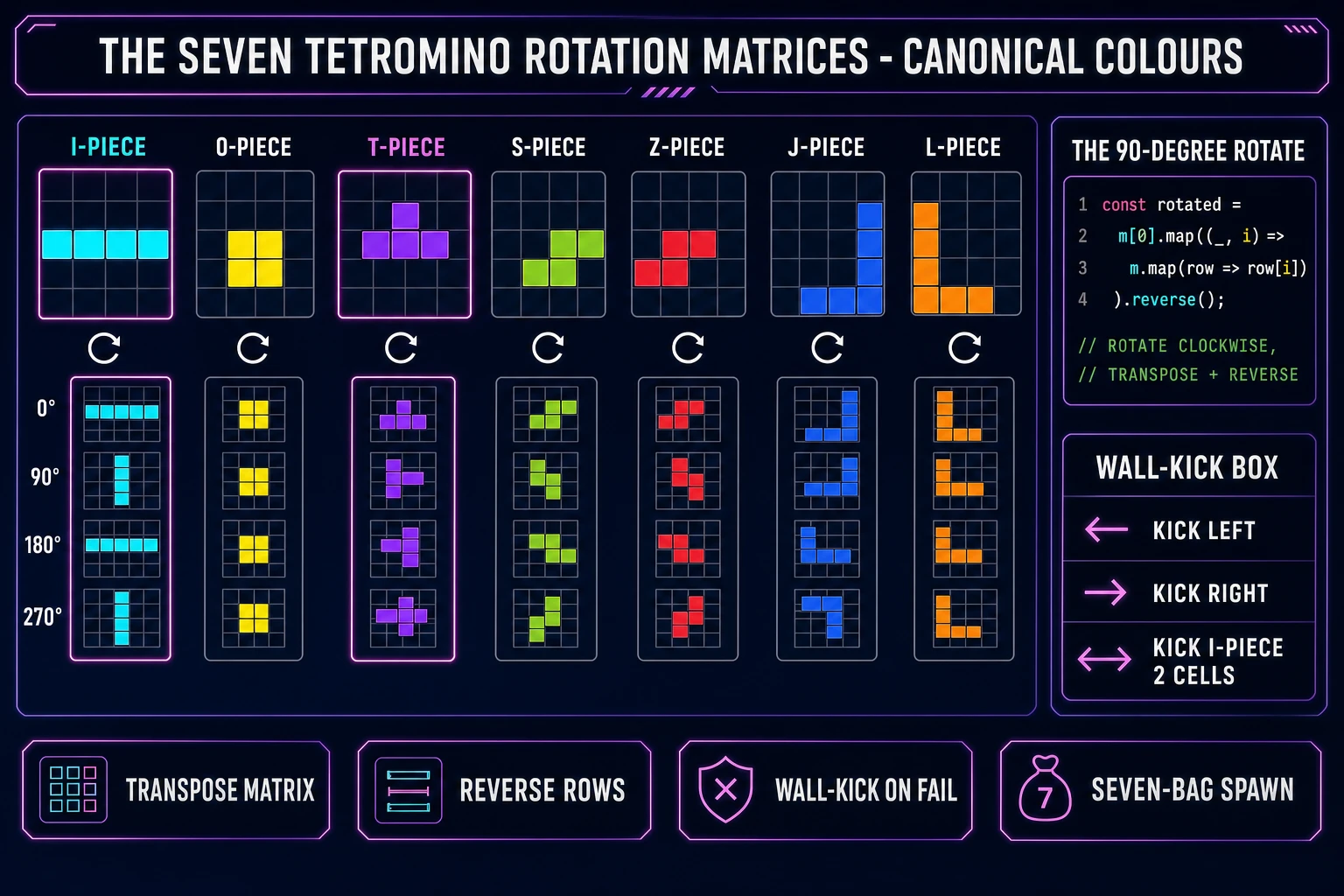
Three good browser targets in 2026, each with a different trade-off. Phaser 4.2.1 "Giedi" (released 9 July 2026, verified against the Phaser download page on 2026-08-08) is the default recommendation. Tetris is a fixed-grid, low-frame-rate game with sprite-simple visuals, and Phaser's Scene manager, Group container, and Sprite class map cleanly onto the grid render, the piece rendering, and the UI overlay. The tween chain is where Phaser earns its 900 KB minified footprint on a Tetris build: it makes the line-clear flash, the level-up shimmer, and the tetris (four-line clear) particle burst almost free to add, and those small pieces of feedback are the difference between a technically-correct Tetris and a Tetris players want to keep playing.
Plain HTML plus a single <script> tag on top of HTML5 Canvas 2D is the lean option. You write about 400 lines of vanilla JavaScript, produce a build under 15 KB total, and end up with something eligible for a JS13K-style code-golf entry or a pure-JavaScript learning demo. The trade-off is that every draw call, every animation frame, and every state transition is on you — there is no scene manager, no built-in input mapping, no tween library. Use vanilla Canvas if you want the exercise, the tiny build size, or a bootcamp-style project you can point to as evidence you understand game loops from first principles. The MDN Canvas API reference plus the requestAnimationFrame docs are all you need on the technical side.
Three.js r185 (verified against threejs.org on 2026-08-08) is possible but overkill for a straight Tetris. Three.js is built for 3D scenes with per-vertex geometry, PBR materials, and camera-controlled worlds, none of which a 2D falling-blocks game needs. Reach for Three.js only if you are doing a stylistic remix — a 3D-perspective view of the tetromino stack, a first-person "inside the well" camera, a Tetris Effect-style abstract particle background around the playfield. WizardGenie will scaffold in any of the three based on the prompt; the framework choice matters less than getting the rotation matrices and the seven-bag randomiser right.
Step 1 — grid model, tetromino rotation matrices, and gravity tick
This is the step every hobbyist Tetris tutorial rushes past, and it is the step that decides whether the game feels correct on the first playtest or spends its entire first hour debugging off-by-one errors on the grid. Before you open WizardGenie, sit with a piece of paper (or a spreadsheet) and write down three tables: the grid state model, the seven rotation matrices, and the gravity-per-level curve.
The grid is a 2D array, 10 wide by 20 tall (or 22 tall including two hidden rows above the visible playfield where new pieces spawn). Store 0 for an empty cell and a colour index 1 to 7 for a locked block. In JavaScript: const grid = Array.from({ length: 22 }, () => Array(10).fill(0)). When a piece locks, walk its rotation matrix and write the piece's colour index into each occupied cell.
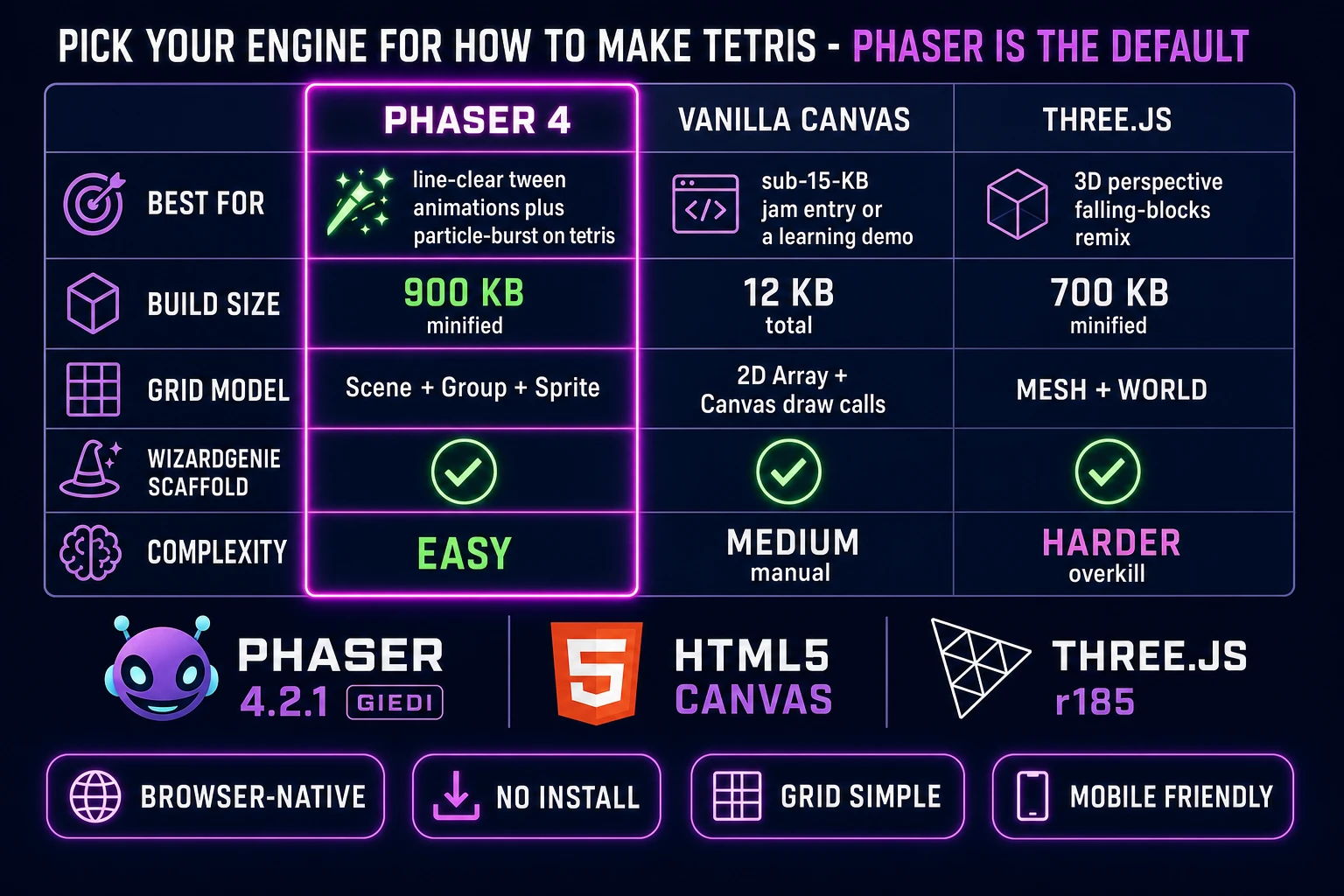
The seven tetromino spawn matrices, using 1 for filled and 0 for empty, are: I-piece as a 4-by-4 with the second row filled ([[0,0,0,0],[1,1,1,1],[0,0,0,0],[0,0,0,0]]), O-piece as a 2-by-2 fully filled, T-piece as a 3-by-3 ([[0,1,0],[1,1,1],[0,0,0]]), S-piece as [[0,1,1],[1,1,0],[0,0,0]], Z-piece as the mirror [[1,1,0],[0,1,1],[0,0,0]], J-piece as [[1,0,0],[1,1,1],[0,0,0]], and L-piece as [[0,0,1],[1,1,1],[0,0,0]]. Rotate a matrix 90 degrees clockwise with a three-line helper: const rotate = m => m[0].map((_, i) => m.map(row => row[i]).reverse()). That covers six of the seven pieces — the O-piece never rotates. Rotate counter-clockwise by transposing then reversing the columns instead of the rows.
Wall kicks are what separate a Tetris that feels right from one where rotating near a wall drops the piece into the void. When a rotation places any cell of the piece off the grid or on top of a locked block, try shifting the piece one column left, then one right, then two columns for the long I-piece before rejecting the rotation and locking the piece in its previous orientation. The Super Rotation System introduced in Tetris Worlds 2001 (verified against the Tetris Wikipedia entry on 2026-08-08) codifies the exact five-attempt kick table modern Tetris games use; your clone should implement a similar but not identical table to keep clear of the Tetris Company's guidelines while still letting spin-in moves work.
Gravity is a single number: milliseconds per row of drop. At level 1, use 1000 ms per row. At level N, compute drop_ms = pow(0.8 - (N - 1) * 0.007, N - 1) * 1000. That formula, mostly unchanged since Tetris DS in 2006, produces 800 ms at level 2, 630 ms at level 3, 500 ms at level 4, and reaches sub-50-ms (over 20 rows per second) by level 15. Ramp level by one every ten cleared lines. Do not skip the lock delay: after the piece touches down, wait 500 ms before locking to allow the player to slide or spin it into a better position. Lock delay is what makes T-spins possible.