Quiz How to Make a Trivia Game (Browser Question Loop 2026)

By Arron R.15 min read
How to make a trivia game in 2026: shape a JSON question bank with categories and difficulties, wire the draw-show-score-advance loop and a per-question timer i

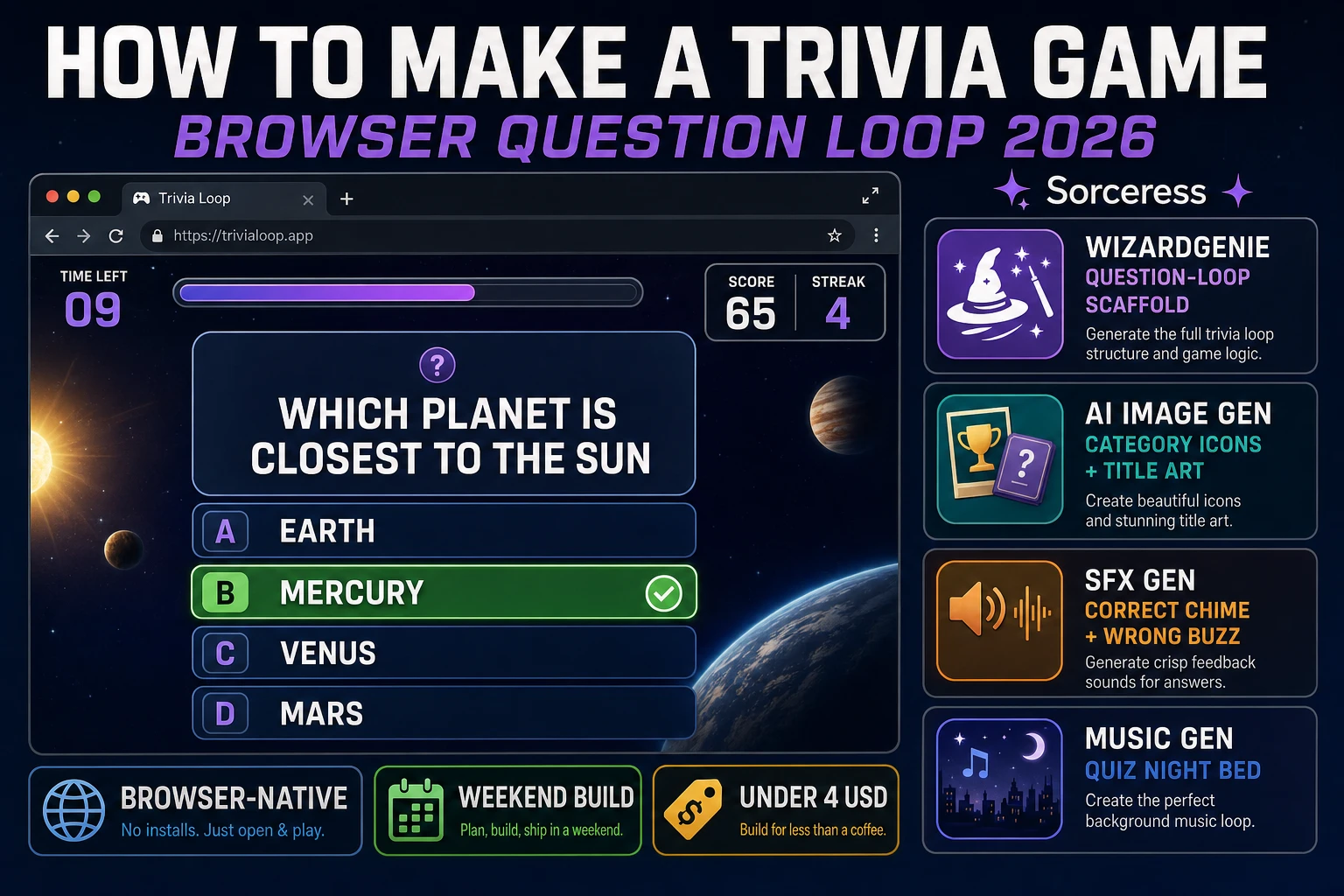
How to make a trivia game is one of the friendliest browser weekenders in 2026: a JSON bank of questions, four choice buttons, a countdown, a score, and a results screen. The genre has old roots — from pub-quiz nights and radio call-in shows to Trivial Pursuit (Chris Haney and Scott Abbott, 1979) and every kiosk quiz machine of the 1990s — and every modern web-quiz format from Kahoot to Sporcle to the mobile "which superhero are you" personality tests inherits the same underlying loop. Almost every tutorial for how to make a trivia game still stops at the JavaScript for a single question and calls it done. The 2026 pipeline is very different. A single HTML file loads a JSON question bank, a coding agent scaffolds the whole draw-show-score-advance loop in one prompt, and AI generation covers every asset the game needs. In a browser, that means WizardGenie to scaffold the question-loop interpreter, Sorceress AI Image Gen for the category icons and title art, SFX Gen for the correct chime, wrong buzz, and timer tick, and Music Gen for the calm quiz-night bed. This guide is the honest end-to-end for how to make a trivia game in 2026, in a browser, in a weekend.
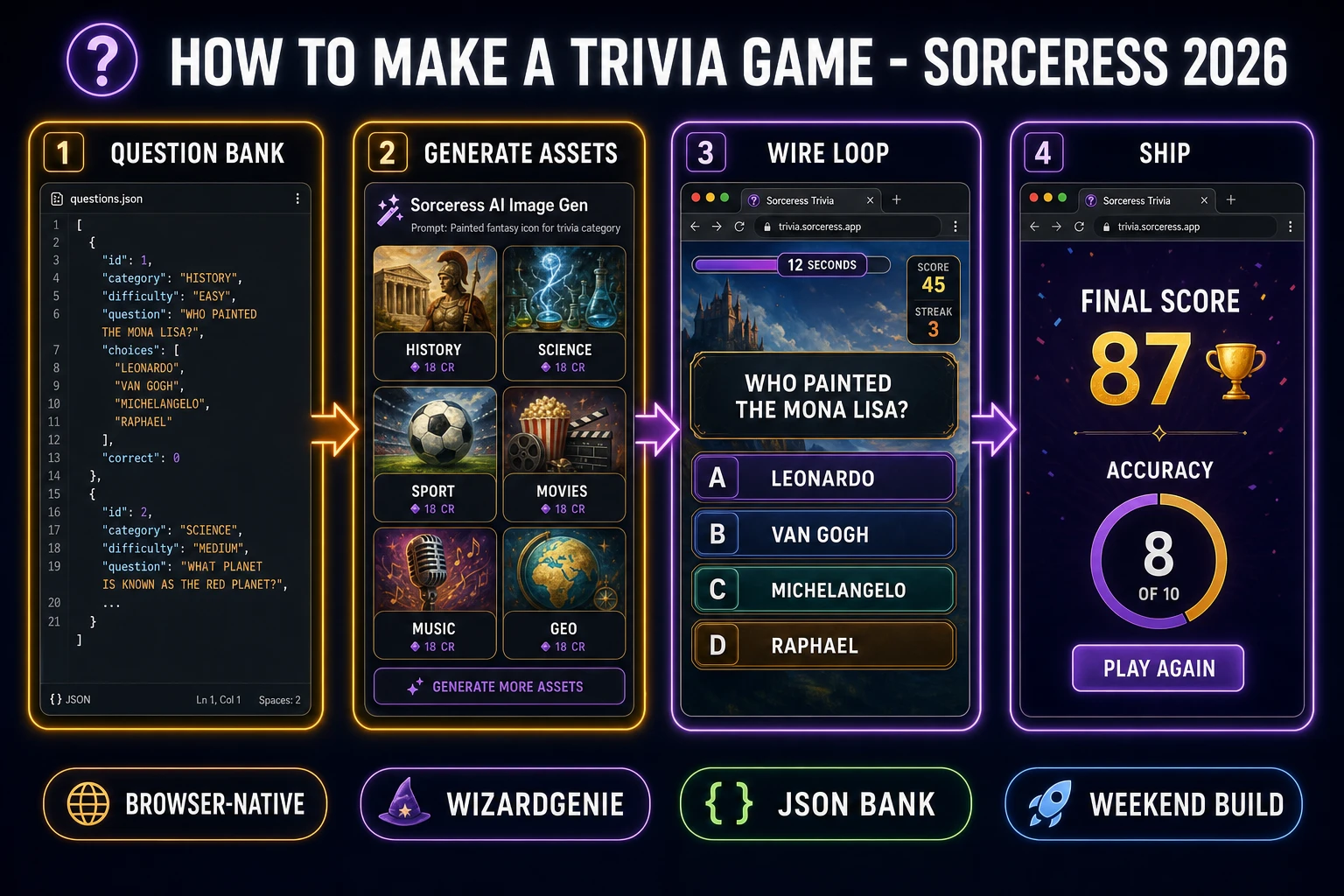
How to make a trivia game browser pipeline: build the JSON question bank, generate category icons, wire the question loop and timer in WizardGenie, and ship a browser build
The 2026 how to make a trivia game browser recipe: shape a JSON question bank, generate category icons with Nano Banana Pro, wire the draw-show-score-advance loop and per-question timer in WizardGenie, add correct and wrong stingers plus a calm music bed.

What "how to make a trivia game" actually means in 2026

The query "how to make a trivia game" hides three distinct intents. Some searchers want to run a real-world trivia night for a bar or a classroom — question packs, timing rules, scoring sheets — and a small share of the results serve that audience. This guide is not for them. A second, larger intent is a live multiplayer trivia app in the style of Kahoot or Quizizz, where a host projects questions on a screen and players answer on their phones in real time. That is a valid build but it needs a backend, a room-code system, and a WebSocket transport — a two-week project, not a weekend one. The third intent, and the one this guide targets, is a single-player browser trivia game: one player, ten to twenty questions per session, a category selector, a countdown timer, a score, and a best-score saved between sessions. That is a weekend build, it demos the whole Sorceress toolset, and it is the format most first-time trivia-game builders actually want.

The presentation contract for a browser trivia game is small and strict. A title screen shows the game name, a Play button, and a Category selector. A question card fills the center of the screen with the question text, four large choice buttons labelled A through D (or 1 through 4), a countdown bar or number at the top edge, a score HUD in the corner, and a small category badge. On answer, the correct choice highlights in green and the wrong choices go grey; a 1500 to 2000 ms hold lets the player see the reveal; then the next question loads. After ten questions (or twenty, whatever the round length is), a results screen shows the final score, accuracy percentage, longest streak, and a Play Again button. Every trivia game from the 1980s Trivia Machine arcade cabinet through Kahoot honours the same four-element layout, which is why the format renders so cleanly in a browser: it is fundamentally a switchable full-screen card UI, and HTML has been switching cards since 1993.

The trivia game loop in one minute (draw, show, score, advance)

Five moving parts and nothing else, in strict order per player action. First, draw — pick the next question from the bank, filtered by the player's chosen category and difficulty, without repeating a question from the current session. Second, show — render the question card with the four choices in freshly shuffled order (so the correct answer is not always in the same slot), start the per-question countdown timer, play a short question-intro click. Third, input — wait for either a click on one of the four choices or the timer expiry. Fourth, score — if the click matches the correct index, award base points plus a time bonus proportional to time remaining plus a streak multiplier; if wrong or timed out, reset the streak counter and play the wrong-answer buzz. Fifth, advance — briefly highlight the correct answer in green and the wrong picks in grey, hold for 1500 to 2000 ms, then loop back to draw for the next question. When the session length limit (10 or 20 questions) is reached, exit the loop to the results screen.

Every answer, autosave the running score, streak, and question index to localStorage under a key like trivia.session. On page load, if a session autosave exists, offer a Resume button on the title screen next to New Game. Under a second key like trivia.bestscore, keep the all-time best score, longest streak, and per-category best. That is the entire game. Five steps, executed per question, driven by a plain JavaScript state machine backed by a small questions array, a session state object, and a best-score object. Everything else — the animated countdown ring that pulses red in the last three seconds, the confetti burst on a ten-in-a-row streak, the fade transition between questions, the accessibility keyboard shortcuts (press 1-4 to answer, space to advance the reveal) — is polish layered on top. Keep the core loop tight, ship one full trivia game end-to-end, and only then layer polish. A first trivia game that ships ten questions per session across three categories with a clean results screen will teach you more than a half-built game with a full-features spec.
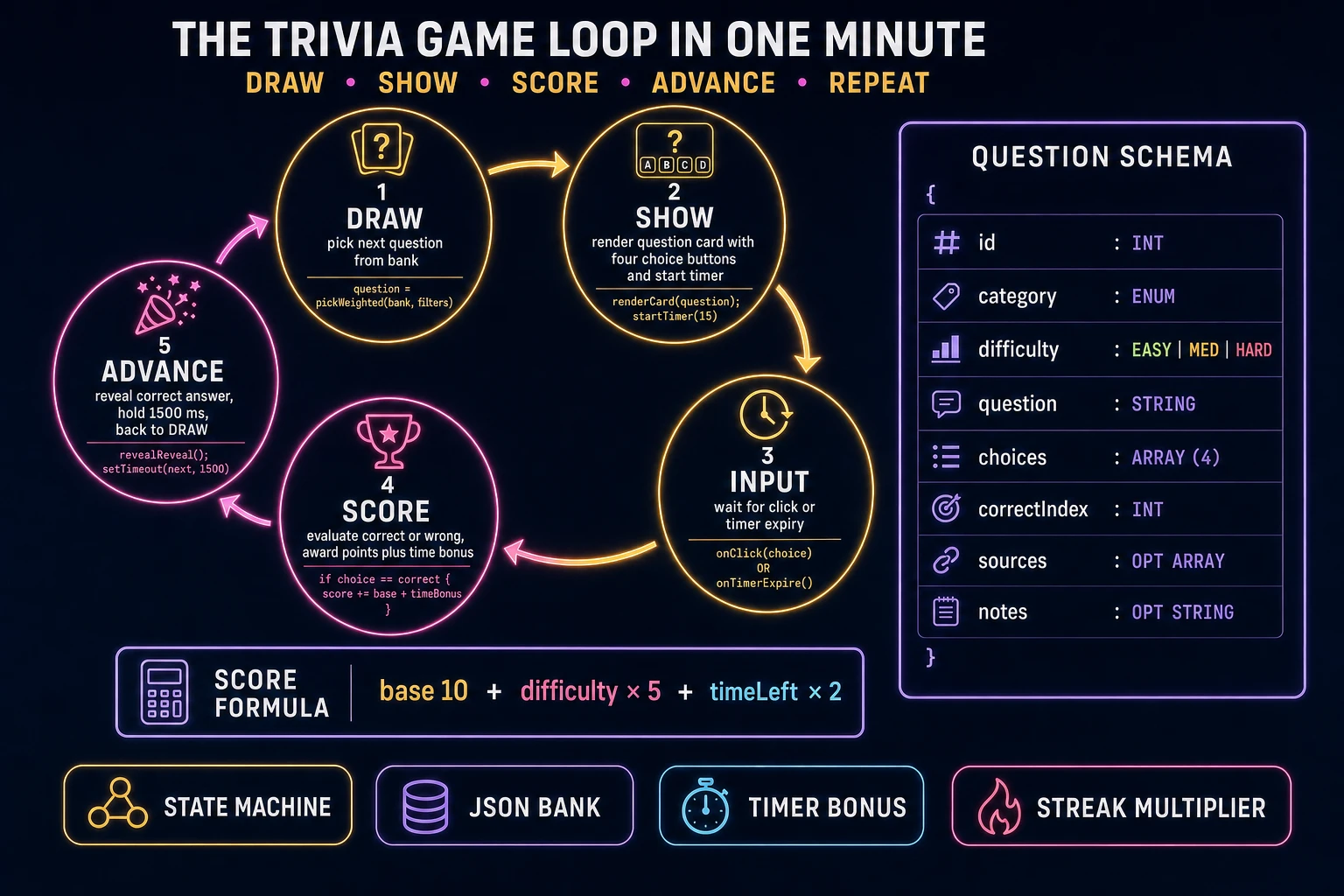
Trivia game loop state machine diagram showing five nodes: draw, show, input, score, advance, with a JSON question schema and score formula panel
The trivia game loop: draw the next question, show the card and start the timer, wait for input, score with a time bonus and streak multiplier, then advance to the reveal and back to draw.

Pick your engine for how to make a trivia game: React, Phaser 4, or vanilla DOM

Three good browser targets in 2026, each with a different trade-off. Vanilla JavaScript with a DOM-based layout is the honest default and the pick this guide recommends for a first build. A browser trivia game is fundamentally a switchable full-screen card UI: one <div> for the title screen, one for the question card, one for the results screen, and a small state variable that decides which is visible. The question card is a flexbox column with the question text on top, four choice buttons in a 2×2 grid below, and a countdown bar at the top edge. Total code footprint for a working trivia game is under 400 lines and ships as a single static HTML file. The Web Storage API handles best-score persistence. No engine to install, no build step, deploys to any static host including GitHub Pages, Netlify, or Vercel with a drag-and-drop.

React becomes the right pick if the trivia game grows into a longer app (five game modes, a per-user profile, a settings screen, a category-editor) or if you already have a React project you want to embed the quiz inside. React's component model maps cleanly onto the trivia game structure — a <TitleScreen>, a <QuestionCard>, a <ChoiceButton>, a <Timer>, a <ResultsScreen> — and React state hooks handle the running score and streak without ceremony. The cost is the build step and the roughly 130 KB React bundle, which matters more for a single-page portfolio piece than a hobby jam entry. React also makes the results screen easier to animate because you get transitions per component out of the box.

Phaser 4.2.1 "Giedi" (released 9 July 2026, verified against phaser.io on 2026-08-10) becomes the right pick if you want animated question reveals (a card that flips in from the side), particle effects for the correct-answer celebration (confetti, glitter, a soft flare), integrated audio timeline management so the countdown-tick SFX crossfades with the reveal chime, or if the trivia game has any real-time gameplay layer beyond click-a-choice (a boss round where a bar drains while you type an answer, a rapid-fire mode where questions flash by every three seconds). Phaser bundles Scene management, an asset loader, and audio playback in one file (roughly 900 KB minified) and its Scene lifecycle maps cleanly onto title-question-results transitions if you scale up to a multi-mode game.

WizardGenie is not a separate rendering engine — it scaffolds whichever of the three you pick, from a single natural-language prompt. WizardGenie is the Sorceress game-native coding agent. It ships as both a desktop app (Windows installer with auto-update, available to Early Access supporters and above) and a no-install web build at the same URL. Its coding-model lineup covers Claude Opus 4.7, Claude Sonnet 4.6, GPT-5.5, Gemini 3.1 Pro, DeepSeek V4 Pro, Kimi K2.5, Grok 4.2, and MiniMax M2.7 (verified 2026-08-10 in src/app/_home-v2/_data/tools.ts). For a trivia game, any frontier model scaffolds the whole question-loop interpreter in one prompt. If you want to run cheap, pair a frontier planner (Claude Opus 4.7 or GPT-5.5) with a budget executor (DeepSeek V4 Pro or Kimi K2.5) and let the executor do the typing — the Dual-agent planner-and-executor pattern is the whole reason WizardGenie exists, and it lands most projects at roughly one-fifth the single-frontier cost.
Step 1 — build the question bank JSON and category taxonomy

Nothing else in the pipeline matters if the question bank is not designed first. A trivia game lives or dies on the quality and breadth of its questions, and every hour spent on art before the bank exists is a bet against the design. Sketch the categories first on paper: five to eight buckets that cover the ground you care about. A general-knowledge trivia game typically ships History, Science & Nature, Sport, Movies & TV, Music, and Geography — six categories that cover 90 percent of what a casual player wants. Themed games can narrow to three or four (a video-games trivia game might ship Retro, Nintendo, Sony, PC; a movies trivia game might ship Classic, Marvel, Horror, Animation) but the total question count should still hit 200 minimum for repeat play.

Now the schema. Each question is one JSON object with these fields: id (integer, unique across the whole bank), category (one of the taxonomy strings), difficulty (easy, medium, hard), question (the prompt string, ideally under 120 characters so it wraps cleanly on mobile), choices (a four-element array of answer strings), correctIndex (0-3, index into the choices array), and optional sources (an array of URLs for the fact-check trail) and notes (a short explanation shown on reveal to teach the player something). Aim for 200 to 500 questions across five to eight categories with roughly 50 percent easy, 35 percent medium, 15 percent hard — that distribution keeps the game feeling generous while still surfacing enough hard questions to feel meaningful when you get one right.

Writing 500 questions by hand takes a full weekend. The faster path is a two-pass workflow. Pass one: ask a coding model in WizardGenie to draft 50 questions per category in the schema above, with sources filled in wherever the question quotes a specific fact. Pass two — the non-optional one — hand-audit every draft question for factual accuracy against a real source before shipping. A wrong answer marked correct is the single fastest way to lose player trust, and AI models still hallucinate specific facts often enough that unaudited banks embarrass you within the first hour of play. Save the audited bank as questions.json in the same folder as index.html. Optionally, ship a smaller-but-hand-curated starter-pack.json of 100 questions for the initial release and expand later; better to ship 100 solid questions than 500 shaky ones. Public sources like Open Trivia Database (roughly 4,000 questions across 24 categories, community-audited) are a fine seed to fork and edit.

Step 2 — wire question draw, choice-click scoring, and per-question timer in WizardGenie

With the question bank shipped, open WizardGenie. Drop in your questions.json and a bare-bones index.html shell with three empty <div> containers (title, question card, results). Give the agent one paragraph: Build a browser trivia game. Load questions.json at page start. On Play button click, filter by the selected category and difficulty, shuffle the filtered pool with a Fisher-Yates shuffle, and take the first ten as the session. For each session question, render the question card with the four choices in freshly shuffled order, start a 15-second countdown bar, and on click score base 10 + difficulty x 5 + timeLeft x 2 with a streak x 1.5 multiplier for three-in-a-row. Reveal the correct answer for 1500 ms, then advance. After ten questions, show a results screen with score, accuracy, longest streak, and a Play Again button. Autosave session state and best-score to localStorage. Feed that to any coding model in the lineup and the interpreter scaffolds in under three minutes.

The remaining hour of coding is polish, layered on with follow-up prompts. Add a streak indicator that pulses when the player hits three in a row and adds a small glow on five and ten — a five-line addition that hugely boosts play-feel. Add a keyboard shortcut layer so pressing 1, 2, 3, or 4 selects the corresponding choice and Space skips the reveal hold — three lines that are worth their weight for accessibility. Add a per-category best-score table on the results screen showing the player's top score in each category — four lines. Add a question-count selector on the title screen (10, 20, 50) — two lines. Each polish item is a follow-up prompt to WizardGenie, and the whole trivia game comes together over a Saturday afternoon. Be careful with Array.sort with a random comparator when you shuffle the choices — it does not produce a uniform distribution and biases the third slot. Ask WizardGenie for a proper Fisher-Yates shuffle instead.

Step 3 — AI Image Gen category icons, SFX Gen correct/wrong stingers, Music Gen soundtrack

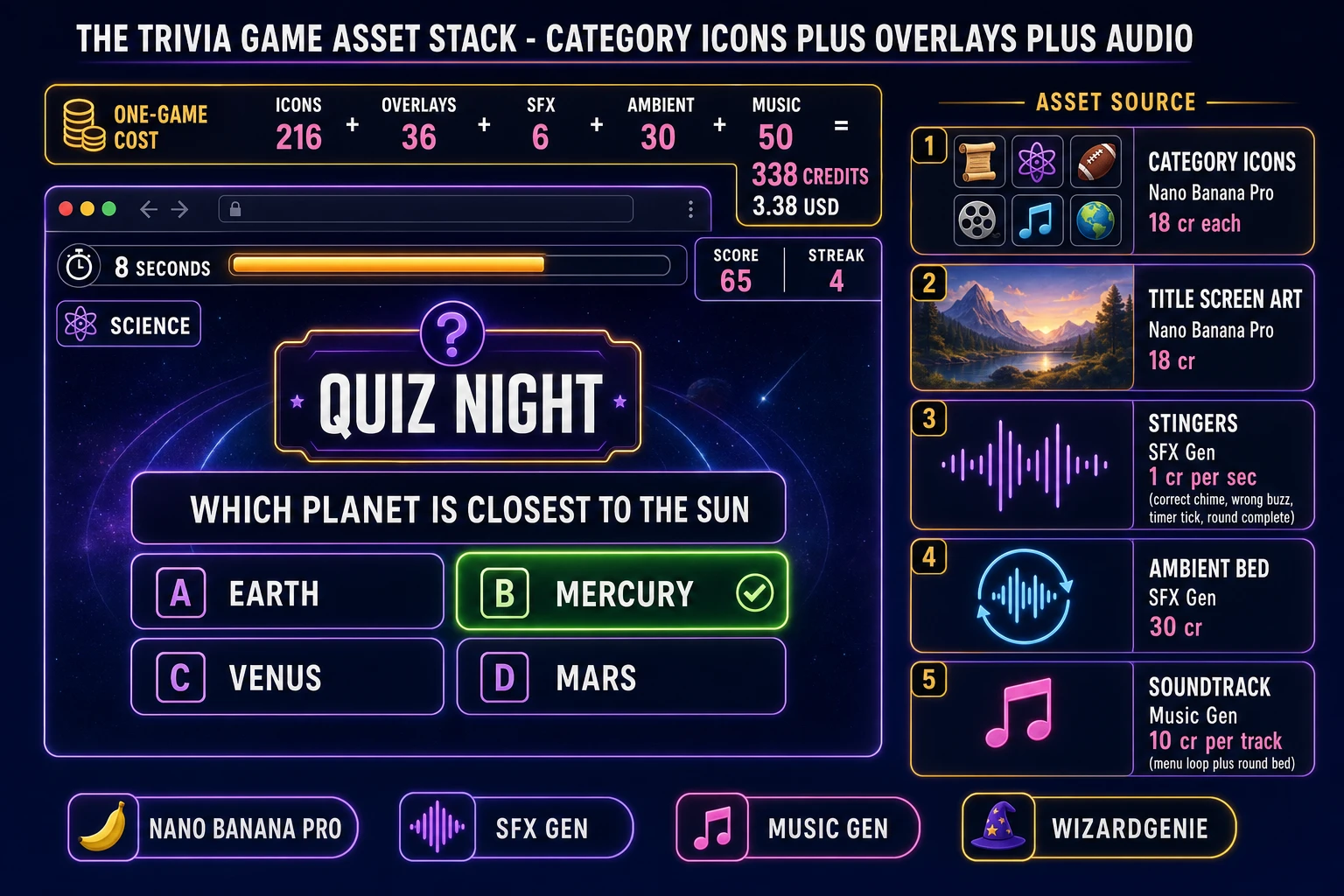
Open Sorceress AI Image Gen for the category icons first. A trivia game with six categories needs six matched icons: a scroll for History, an atom for Science & Nature, a football for Sport, a film reel for Movies & TV, a music note for Music, a globe for Geography. Nano Banana Pro at 18 credits per generation (verified 2026-08-10 in src/lib/models.ts line 303 as credits: 18) is the model of choice for icon work because its 2K resolution keeps the silhouettes crisp at small sizes and it holds a consistent art style across a full set. Prompt in a register like "trivia game category icon, 1:1, centred silhouette, painted flat vector style with soft shadow, transparent background, no text, cohesive palette across the set" and generate two variations per category. Pick the tightest six. Six icons at 18 credits each with two variations each is 216 credits or 2.16 USD.

Optional but recommended: generate two overlay backgrounds. A title-screen background (16:9, painted stage or library or arcade cabinet feel, no text, matching the icon palette) and a results-screen background (16:9, celebratory register, subtle confetti or spotlight motif, no text). Two overlays at 18 credits each is 36 credits or 0.36 USD. Total AI Image Gen cost for the visual set is roughly 252 credits or 2.52 USD, which is the cheapest asset budget of any full-featured browser game because a trivia game reuses the same six icons across every session.

Now the audio. Open SFX Gen. SFX Gen bills 1 credit per second (verified 2026-08-10 in src/app/sfx-gen/page.tsx line 23 as SEED_AUDIO_CREDITS_PER_SECOND = 1). Four stingers cover a first trivia game: a correct-answer chime (1 second, warm ascending arpeggio), a wrong-answer buzz (0.5 seconds, muted descending thud), a countdown-tick warning that plays each of the last three seconds (0.2 seconds, quiet clock click), and a round-complete sting (2 seconds, triumphant flourish). Total roughly 6 credits or 0.06 USD. Add one 30-second ambient bed loop for atmosphere — quiet jazz cafe chatter, or a low synth pad if you want a more modern feel — at 30 credits or 0.30 USD. Wire each stinger into the interpreter as a one-line new Audio(path).play() at the right event.

Open Music Gen. Music Gen bills 10 credits per generation (verified 2026-08-10 in src/app/music-gen/page.tsx line 28 as MUSIC_CREDIT_COST = 10). Two tracks cover a first trivia game: a title-and-menu loop (calm, curious, 60 seconds, low tempo, memorable hook) and a game-round bed (steady, slightly urgent but non-distracting, 90 seconds) that plays under the whole session. Prompt each with mood plus BPM plus lead instrument. Two or three generations per track to nail the loop, so budget 40 to 60 credits for the pair (0.40 to 0.60 USD). Add 2 credits per WAV render if you want lossless (WAV_CREDIT_COST = 2, same file line 31); MP3 is fine for browser delivery.

Trivia game asset stack showing a browser question card with four choices, a countdown, and a score HUD, next to a stack of asset-source tiles for category icons, overlays, stingers, ambient loop, and music tracks
The trivia game asset stack: painted category icons and title art from AI Image Gen, four short stingers plus an ambient bed from SFX Gen, and two music tracks from Music Gen — the whole visual and audio set for a browser trivia game costs under four dollars.

What a how to make a trivia game project costs on Sorceress in 2026

Concrete asset and generation budget for a browser trivia game — six categories, 200 to 500 questions, ten questions per session, category selector, per-question timer, best-score persistence — from empty repo to zip-and-ship playable, all numbers verified 2026-08-10 against local Sorceress source:

  • Category icons (AI Image Gen): 6 icons at Nano Banana Pro 18 credits per generation with 2 variations each = 216 credits (2.16 USD). 1:1 aspect, centred silhouette, painted flat vector style, transparent background.
  • Title and results overlays (AI Image Gen): 2 backgrounds at 18 credits each = 36 credits (0.36 USD). 16:9 painted, no text, matching palette.
  • Stingers (SFX Gen): 4 clips at 1 credit per second, roughly 6 seconds total = 6 credits (0.06 USD). Correct chime, wrong buzz, timer tick, round-complete sting.
  • Ambient bed (SFX Gen): 1 clip at 30 seconds = 30 credits (0.30 USD). Cafe chatter or low synth pad.
  • Background music (Music Gen): 2 tracks at 10 credits per generation, 2 to 3 tries each = 40 to 60 credits (0.40 to 0.60 USD). Add 2 credits per WAV render if you need lossless.
  • WizardGenie coding time: effectively free on the Sorceress side. Model-side API cost for a 2-to-4-hour prompt session on a cheap Executor like DeepSeek V4 Pro is typically under 0.60 USD.
  • Total for one complete browser trivia game: roughly 328 to 348 credits, or roughly 3.28 to 3.48 USD in Sorceress credits, plus under 0.60 USD in model API time. Under 4 USD end-to-end for a first trivia game with six categories, 200 questions, four stingers, and two music tracks.

Sorceress bills 100 credits per dollar at the standard rate (CREDITS_PER_DOLLAR = 100 in src/lib/models.ts line 69). New accounts start with 100 free credits (SIGNUP_GRANT = 100 in src/app/api/admin/credits/route.ts line 12), which covers all four stingers, the ambient loop, one round of music generation, and roughly two of the six category icons outright — enough to prototype the whole trivia game before you decide whether to top up. The Sorceress Lifetime tier at 49 USD one-time (LIFETIME_PRICE = 49 in src/app/plans/page.tsx line 51) covers unlimited SFX Gen and Music Gen use forever, which matters if you plan to build several themed trivia games (a Marvel-movies trivia game, a Nintendo trivia game, a music-history trivia game) — each additional game reuses the coding scaffold and pays only for its new icons and question bank.

For related browser-game pipelines that share this design-first-generate-the-assets-scaffold-the-interpreter-ship-the-browser-build spine, the closest reads are Guess How to Make Wordle (Browser Guess Grid 2026) for the sibling one-round short-session weekender, Escape How to Make an Escape Room Game (Browser Puzzle 2026) for the closest single-screen browser puzzle pattern, Recall How to Make a Memory Game (Browser Match Grid 2026) for another card-based short-session game, and Pen How to Make a Visual Novel (Browser Scene Loop 2026) for the JSON-schema-plus-scene-graph sibling. The Sorceress Tools Guide is the master index for every tool the guide referenced. Under four dollars, one weekend, and how to make a trivia game is a done deal.

Frequently Asked Questions

Do I need a database to make a trivia game?

No. A first browser trivia game runs on a plain JSON file loaded at page start. One flat array of question objects with fields id, category, difficulty, question, choices, and correctIndex is enough for the whole game. A 500-question bank across five categories is roughly 80 KB gzipped and loads in under 200 ms on any connection worth playing a browser game on. Only reach for a database (Supabase, PlanetScale, a JSON API you host) when you want daily fresh questions, user-submitted questions, or a leaderboard that stores scores per player. For a jam entry or a portfolio piece, one questions.json in the same folder as index.html is the honest answer, and it deploys to GitHub Pages, Netlify, or Vercel with zero backend.

How many questions do I need for a first trivia game?

Aim for 200 to 500 questions across five to eight categories. A single game session usually surfaces 10 to 20 questions, so 200 gives you roughly 10 to 20 fresh sessions before repeats start feeling stale. Split evenly across categories so a category-selector screen still finds enough questions in each bucket to fill a round. Difficulty distribution should skew easy: roughly 50 percent easy, 35 percent medium, 15 percent hard is the shape most players actually enjoy - the trivia genre lives on that pleasant flow of getting most answers right with a couple of stumps mixed in. Building the bank by hand is tedious; ask a coding model in WizardGenie to draft 200 questions in a category and then hand-audit for factual accuracy before shipping. Never publish an AI-drafted question bank without a human factual pass, because a wrong answer marked correct is the single fastest way to lose player trust.

How do I stop players from cheating by opening the browser inspector?

Accept that a determined player can always cheat in a browser trivia game, then design around it. The correctIndex is in the JSON payload, so anyone who opens devtools can read it. That is fine for single-player play - the person cheating is only cheating themselves. For competitive play (leaderboards, multiplayer live rounds), never trust the client. Move the correct-answer check to a server endpoint: the client POSTs the question id and its guess, the server looks up the answer against a private bank and returns just true or false plus the updated score. Rate-limit that endpoint per user (5 to 20 requests per minute is generous) and store the authoritative score server-side. If you do not want a backend, ship the game as single-player and put the leaderboard behind a Show my best-score button that only tracks the current browser via localStorage. Trying to obfuscate the JSON with base64 or homebrew crypto is a waste of time - it fools no one and adds bugs.

How should the timer work in a trivia game?

Per-question countdown, visible bar or number, decides between three outcomes on expiry: automatic wrong answer (fastest to code, most common), automatic skip with no penalty (kinder, still keeps pace), or reveal-then-advance (educational tone, shows the correct answer and moves on). Ten to twenty seconds per question is the sweet spot for a general-knowledge game; hard-category rounds sometimes stretch to 30. Award bonus points for fast correct answers on a linear curve - full bonus at zero elapsed seconds, zero bonus at expiry - which rewards confidence without punishing slow players who still know the answer. Cancel the timer on the moment the player clicks a choice, then hold the reveal state for 1500 to 2000 ms before advancing so the player sees whether they were right. Store the per-question elapsed time and the final total time in the score payload if you plan to rank players by both score and speed - many popular trivia apps use score-primary and time-tiebreak, which is a good default.

How much does it cost to build a trivia game on Sorceress?

A first-project browser trivia game budgets like this against the 2026 Sorceress rate card (all constants verified against local source on 2026-08-10). Six category icons at Nano Banana Pro 18 credits per generation (src/lib/models.ts line 303 credits: 18) with two variations each to pick a matching set is 216 credits or 2.16 USD. Two overlay backgrounds (title screen and results screen) at 18 credits each is 36 credits or 0.36 USD. Four SFX stingers at 1 credit per second (src/app/sfx-gen/page.tsx line 23 SEED_AUDIO_CREDITS_PER_SECOND) - correct chime, wrong buzz, timer-tick warning, round-complete sting - is roughly 6 credits or 0.06 USD. One 30-second ambient bed loop is 30 credits or 0.30 USD. Two music tracks at 10 credits per generation (src/app/music-gen/page.tsx line 28 MUSIC_CREDIT_COST) with two or three tries each is 40 to 60 credits or 0.40 to 0.60 USD. Total roughly 328 to 348 credits, or 3.28 to 3.48 USD, plus under 0.60 USD in coding-model API time. The free 100-credit signup grant (src/app/api/admin/credits/route.ts line 12 SIGNUP_GRANT) covers all four stingers, the ambient loop, one round of music generation, and roughly two of the six category icons outright.

Sources

  1. Phaser 4 - HTML5 Game Framework
  2. MDN - Web Storage API (localStorage best-score)
  3. MDN - Fisher-Yates shuffle (Array.sort with random comparator caveats)
  4. Open Trivia Database - Public JSON question source
Written by Arron R.·3,399 words·15 min read

Related posts