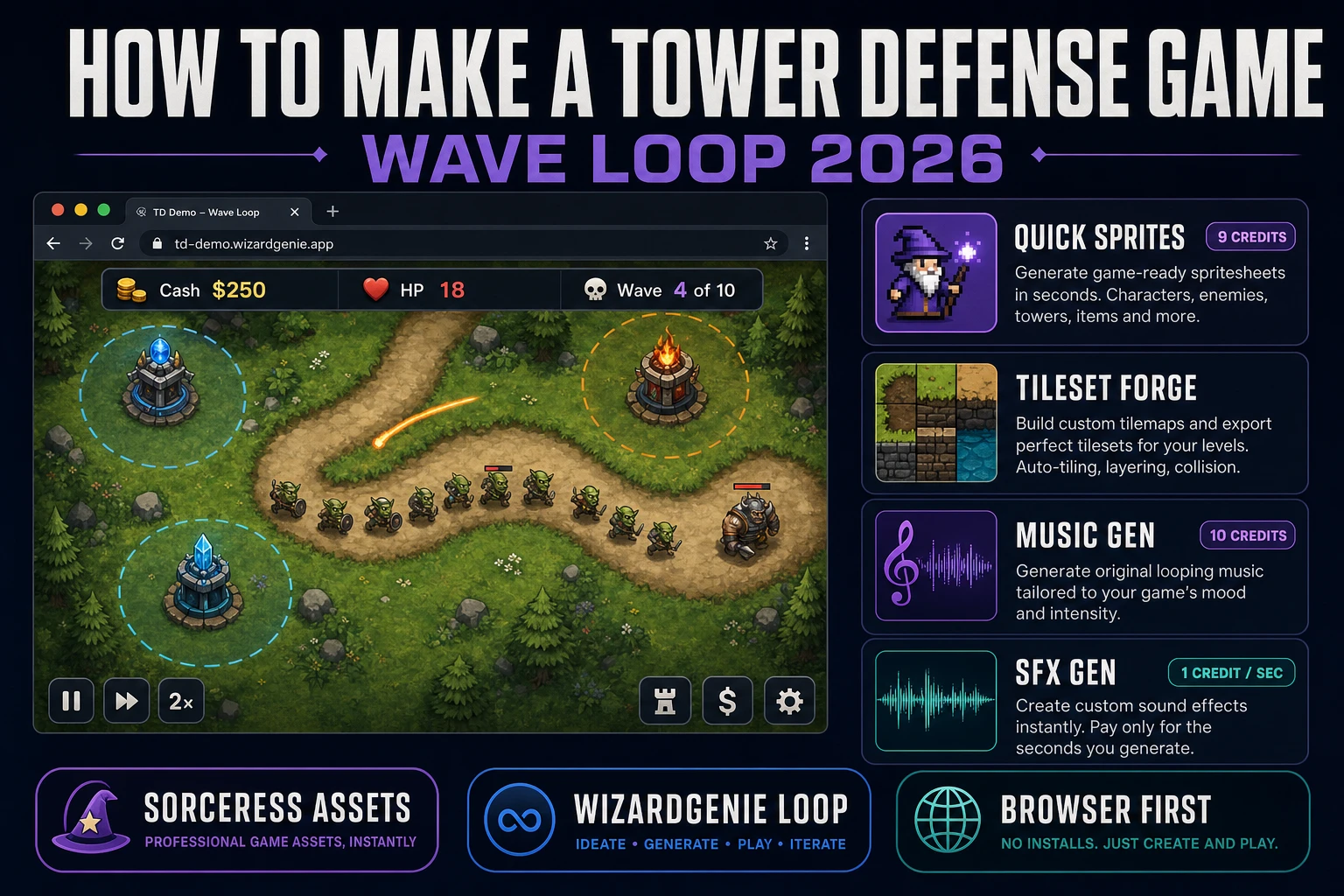
Fortify How to Make a Tower Defense Game (Wave Loop 2026)

By Arron R.12 min read
How to make a tower defense game in 2026: sketch the path, wave table, tower table, and economy on paper, generate towers and creeps on Quick Sprites, the path

People searching how to make a tower defense game in 2026 want the same thing every year: a real explanation of the tower defense game loop and a concrete workflow that ends with a playable browser game they can share. Not a five-hour Unity course. Not a "top 10 tower defense games ever made" listicle. A working recipe. This guide is that recipe: what the genre actually needs, which engine to pick in 2026, and how to generate every sprite, tile, track, and sound effect with the Sorceress asset stack while WizardGenie writes the game loop.
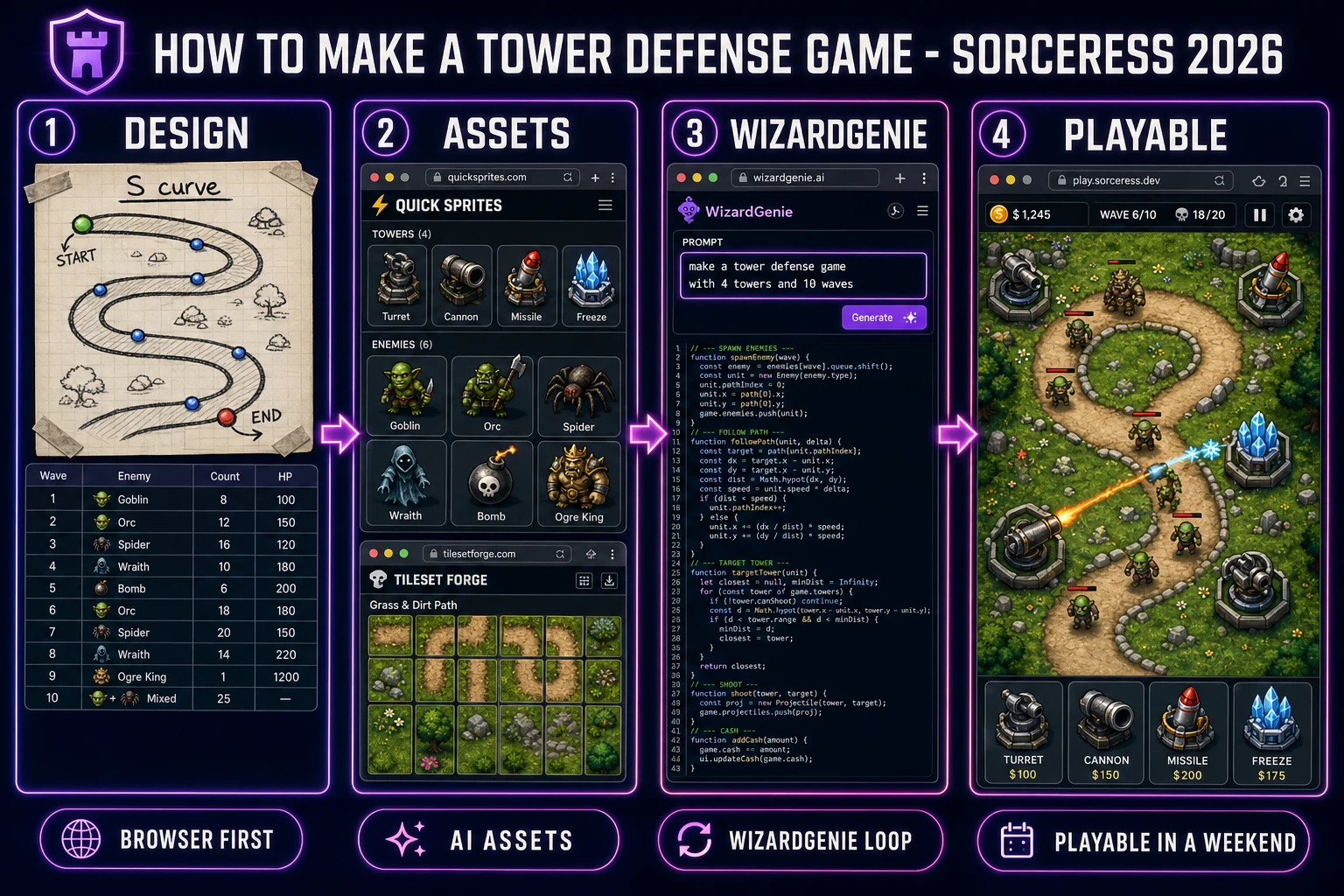
How to make a tower defense game pipeline: paper design, asset pack from Quick Sprites and Tileset Forge, code in WizardGenie, playable browser build
The 2026 tower defense pipeline: design on paper, generate every asset in a browser tab, and let WizardGenie write the game loop. One weekend, roughly three dollars in credits, one playable game.

How to make a tower defense game in 2026: the ingredients that actually matter

Tower defense is a strategy subgenre where the player places defensive structures along a path to stop waves of enemy attackers before they reach a base or exit. The genre traces back to Rampart (1990) and the 2007 Flash-era boom that gave us Desktop Tower Defense, Flash Element TD, and Fieldrunners, according to the Tower defense entry on Wikipedia. What a modern take needs, mechanically, is a small fixed set of ingredients: a path (or several) that enemies follow, a wave manager that spawns enemies over time with escalating difficulty, tower objects with range, cooldown, and damage, an economy where kills pay for towers and towers pay off in kills, a base HP or lives counter that ends the game if it hits zero, and a win condition (survive N waves, protect the base, hit a score).

Beginner posts on the search results page often confuse the genre with generic action games. Two things separate tower defense from every other 2D game a beginner might build. First, the player character is usually invisible — you are a placer, not a runner. Second, the loop has explicit build phases (mouse click to place a tower, no time pressure) alternating with wave phases (towers auto-attack, player watches or repositions). Every design decision downstream falls out of that build-wave rhythm.

The tower defense game loop in one minute (build wave attack repair)

Every tower defense game runs the same core loop, and understanding it in one minute is the difference between a real project and a stalled prototype:

  1. Build phase. Player has cash. Player clicks a valid grid tile to place a tower. Cash decreases. The tower has a range circle drawn on hover so the player can see coverage.
  2. Wave phase. A "Start Wave" button (or a timer) begins spawning enemies at the path start. Enemies follow the fixed path toward the base at a fixed speed.
  3. Attack sub-loop. Every frame, each tower looks at every enemy within range, picks a target (usually the one closest to the base), fires a projectile or applies instant damage, and starts a cooldown. Enemies that hit zero HP die and drop cash to the player. Enemies that reach the base subtract from base HP or lives.
  4. Repair / upgrade phase. Between waves the player spends new cash on more towers, upgrades, or repairs. Cash carries between waves; base HP does not fully refill.
  5. Loop escalates. Each wave is stronger than the last (more enemies, faster, tougher, sometimes airborne so ground-only towers miss). The game ends when base HP hits zero (lose) or the player survives the final wave (win).

The actual per-frame math sits inside a browser-standard animation loop. Every modern browser game drives its update step off the requestAnimationFrame API documented on MDN, which fires roughly 60 times per second in sync with the display refresh. Every tick, the loop walks each enemy along its path (usually a list of waypoints), each tower's cooldown counts down, and each active projectile moves toward its target.

Pick your engine in 2026: Phaser 4, Three.js, or WizardGenie (browser-first)

The engine question decides how much boilerplate you write vs how much you skip. Three honest 2026 answers, ranked by "playable game in a weekend":

  • WizardGenie (recommended for a first project). AI-powered game engine that runs in the browser and, on desktop, ships as a Windows installer. You describe the tower defense game in a paragraph; WizardGenie writes, runs, and iterates on the code in real time using its dual-agent Planner+Executor loop. The Planner (a top-tier reasoner) breaks the tower defense loop into tasks. The Executor (a cheap fast typer like DeepSeek V4 Pro) writes the actual JavaScript. Model lineup verified 2026-08-05 in src/app/_home-v2/_data/tools.ts: Claude Opus 4.7, GPT-5.5, Gemini 3.1 Pro, DeepSeek V4 Pro, Kimi K2.5, Grok 4.2, MiniMax M2.7 — bring your own key or use the fallback trial key.
  • Phaser 4. Popular 2D HTML5 game framework. Tilemap support for the path, arcade physics for projectiles, group management for enemies and towers. Best if you want to write the game yourself and understand every collision check. The Phaser project site hosts the current stable docs and examples.
  • Three.js. Only pick this if the tower defense you want is 3D — a Sanctum, Orcs Must Die!, or Anomaly-style first-person hybrid. The rendering is more expensive, the pathfinding math is trickier, and asset production takes longer. Not the first-project answer.

The rest of this guide assumes WizardGenie for the code side. Every step still applies unchanged if you swap in Phaser 4 by hand, but the "AI writes the loop" step becomes "you write the loop against the design doc."

Step 1 — design the path, waves, and economy on paper first

Skip this step and you will rewrite the game five times. Do it in 15 minutes on paper (or in a text file) and the AI code generation halves. The design doc needs four sections:

  1. Map + path. Grid size (typical: 20 wide by 12 tall at 32 or 48 pixel tiles), path shape (S-curve, spiral, straight-with-turns), start and end tiles. Beginners should start with one path; branching paths add code that is not worth writing in the first prototype.
  2. Wave table. A list of waves. For a first project, 10 waves is enough. Each row has: wave number, enemy type, count, spawn interval (seconds), HP, speed, cash-per-kill. Example: Wave 1: goblin, 10 enemies, 1s interval, 20 HP, 30 px/s, 5 cash each. Wave 5: orc, 15 enemies, 0.8s interval, 60 HP, 40 px/s, 10 cash. Wave 10 (boss): ogre king, 1 enemy, once, 800 HP, 20 px/s, 200 cash.
  3. Tower table. 3–4 tower types for a first pass. Turret (cheap, fast, low damage, ground only), cannon (medium cost, slow, splash damage), missile (expensive, long range, flies over water), freeze (utility, slows enemies in range). Each row: name, cost, range in tiles, damage, cooldown, targeting rule.
  4. Economy. Starting cash (typical: 100), base HP (typical: 20), interest between waves (optional: +5% cash per wave held). Cash-per-kill from the wave table needs to leave the player with roughly 1.2x the current tower cost after each wave — otherwise the difficulty curve breaks.

That is the whole design doc. Put it in a markdown file with two tables. WizardGenie parses tables well and will use them to seed the wave manager and the tower factory. A great secondary reference is the field guide in Turn a Prompt to Game AI Into a Playable Build, which walks the same "design doc first, code second" pattern for a different genre.
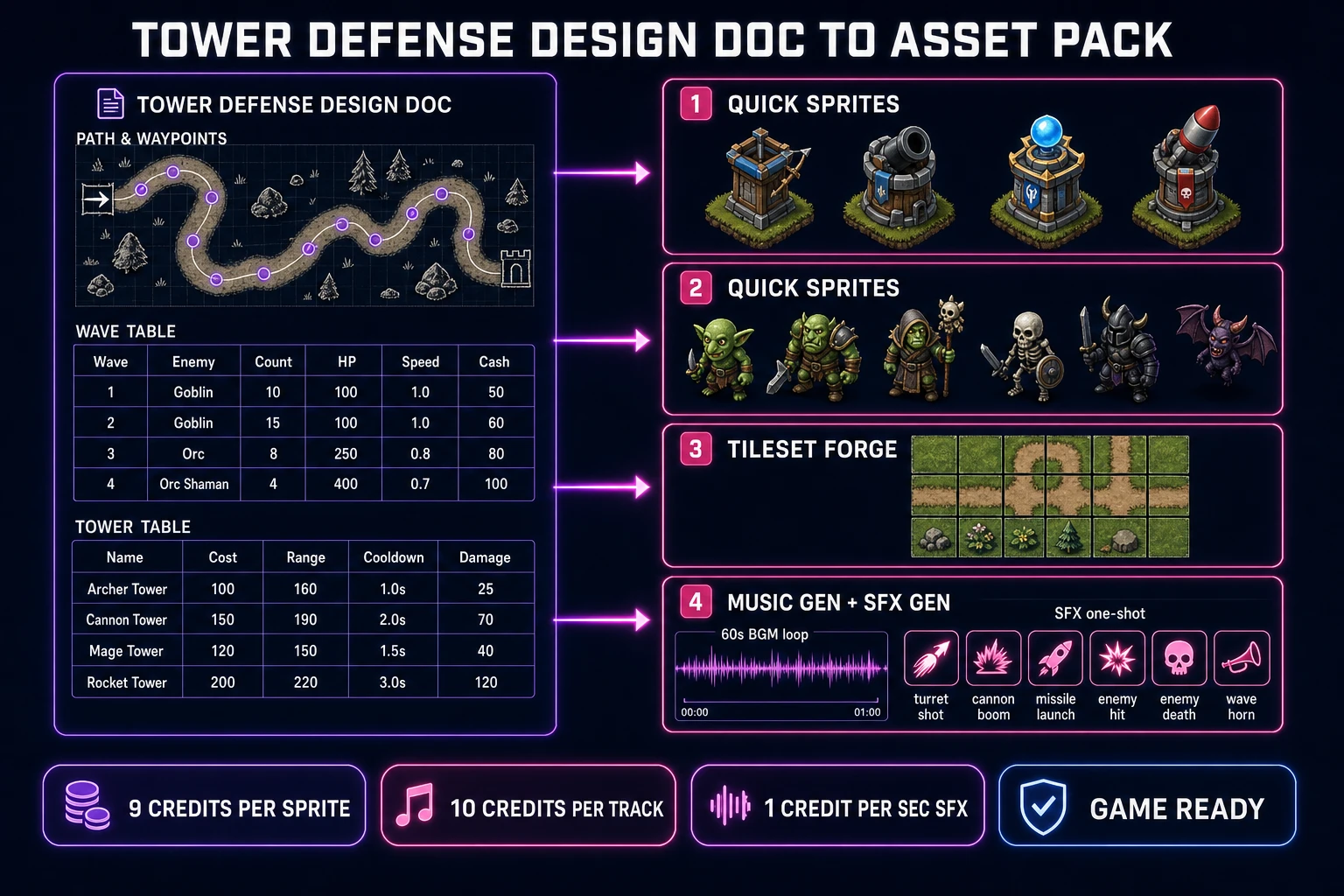
Tower defense design doc plus asset pipeline: wave table, tower table, Quick Sprites for towers and enemies, Tileset Forge for the path map
The four rows of the design doc feed the four AI asset tools. Wave table drives Quick Sprites (enemy roster). Tower table drives Quick Sprites (tower roster). Map + path drives Tileset Forge. Economy drives the HUD and the UI copy.

Step 2 — generate the asset pack (towers, creeps, path tiles, music, SFX)

The asset stack for a tower defense game is small compared to an RPG. Roughly 12–18 PNGs and 6–10 audio files. Broken down:

  • Tower sprites (4 towers). Open Sorceress Quick Sprites. Prompt for each tower: "top-down turret with rotating barrel, 64x64 pixel art, dark base with orange muzzle flash, single frame". Quick Sprites bills 9 credits per generation (verified 2026-08-05 in src/app/quick-sprites/page.tsx line 21 as CREDITS_PER_GEN = 9). Four towers = 36 credits = $0.36. If you want the barrel to rotate toward targets, generate a base sprite (bunker) and a barrel sprite separately — the code rotates the barrel PNG at render time.
  • Enemy sprites (5 creeps + 1 boss). Same prompt pattern but for enemies. "Top-down goblin creep, 32x32 pixel art, green skin, single walking frame" for the basic mob. Quick Sprites' four-angle walking option produces 4 direction facings if you want the enemy to visually turn when the path curves; for a straight-forward first project, a single frame per enemy is fine. 6 enemies at 9 credits = 54 credits = $0.54.
  • Path tileset (1 tileset). Open Sorceress Tileset Forge. Prompt for the biome: "top-down grass tile map with dirt path, 32x32 tile grid, 4x4 layout, seamless edges, JRPG palette." Tileset Forge outputs a tileable image ready to slice. Roughly 20–40 credits to iterate to a clean result. For a first project one tileset per biome is plenty.
  • Background music (1 loop). Open Sorceress Music Gen. Prompt: "60-second looping background track, marching percussion, medieval fantasy strings, energetic but not chaotic, mid tempo around 120 BPM, ends cleanly for loop." Music Gen bills 10 credits per generation (verified 2026-08-05 in src/app/music-gen/page.tsx line 28 as MUSIC_CREDIT_COST = 10). Export to WAV for cleaner in-engine playback (an additional 2 credits per WAV_CREDIT_COST at line 31), or stick with the default MP3.
  • SFX one-shots (6 sounds). Open Sorceress SFX Gen. Six essentials: turret shot, cannon boom, missile launch and impact, enemy hit, enemy death, wave-start horn, victory jingle. SFX Gen bills 1 credit per second of audio, minimum 1 credit (verified 2026-08-05 in src/app/sfx-gen/page.tsx lines 23–24). One-shot combat sounds are 0.3–1.5s each, so figure roughly 6–12 credits for the whole pack.

Save each file with a descriptive lowercase name (turret.png, cannon_shot.wav, bg_music.mp3, ogre_king.png) into a single assets/ folder in your project. Consistent lowercase-with-underscores names let the loader glob-import the whole folder at build time.

Step 3 — code the loop in WizardGenie (spawn follow target shoot cash)

With the design doc in one tab and the asset folder in another, open WizardGenie and paste the doc into the prompt. Ask it to scaffold a tower defense game with these components:

  1. Game state singleton that holds cash, base HP, current wave, and a list of enemies + towers + projectiles. Every frame this is what the render step reads.
  2. Path. A hardcoded array of waypoints ({x, y} pairs) in pixel coordinates. Every enemy carries an index into that array and a per-frame lerp toward the next waypoint. The math for the follow step is trivial — not A* pathfinding, just linear interpolation. A* only comes in if you let the player build towers that block the path (like Desktop Tower Defense); skip that on the first version.
  3. Wave manager that reads the wave table you pasted, keeps a timer, and spawns enemies at the path start according to the row for the current wave. When the wave's enemy count is exhausted and no enemies remain on the path, the manager waits for the "next wave" input or advances automatically after a rest interval.
  4. Tower factory reads the tower table and exposes a placement UI (click a valid tile to place). Each tower on the field runs a target-select step every frame: filter enemies within range, sort by distance-to-base (or lowest HP, or highest HP; pick one), fire when cooldown reaches zero, deduct cooldown from that frame. Damage is dealt instantly or by spawning a projectile that flies at fixed speed and applies damage on hit.
  5. UI layer. A top bar with cash, base HP, wave number. A right sidebar with buttons for each tower type showing cost and range. A "Start Wave" button that starts the next wave.
  6. Sound hooks. Play turret_shot.wav when a turret fires, enemy_hit.wav when a projectile lands, ogre_king.wav as a boss intro, victory.wav on final wave clear.

WizardGenie will produce a working prototype in one shot for the small design doc above. If it lands close but not perfect, iterate — "the turret range circle is not visible on hover", "wave 5 is too easy, double the goblin count", "cannon should splash within 40 pixels, not 20". Each iteration is a small chat turn, not a rewrite. The How to Make a Video Game With AI post covers the WizardGenie iteration rhythm in more depth. If you want to hand-write the code side in Phaser 4 instead, the reference workflow is in Wire a Browser Game Engine: Phaser AI Loop 2026.

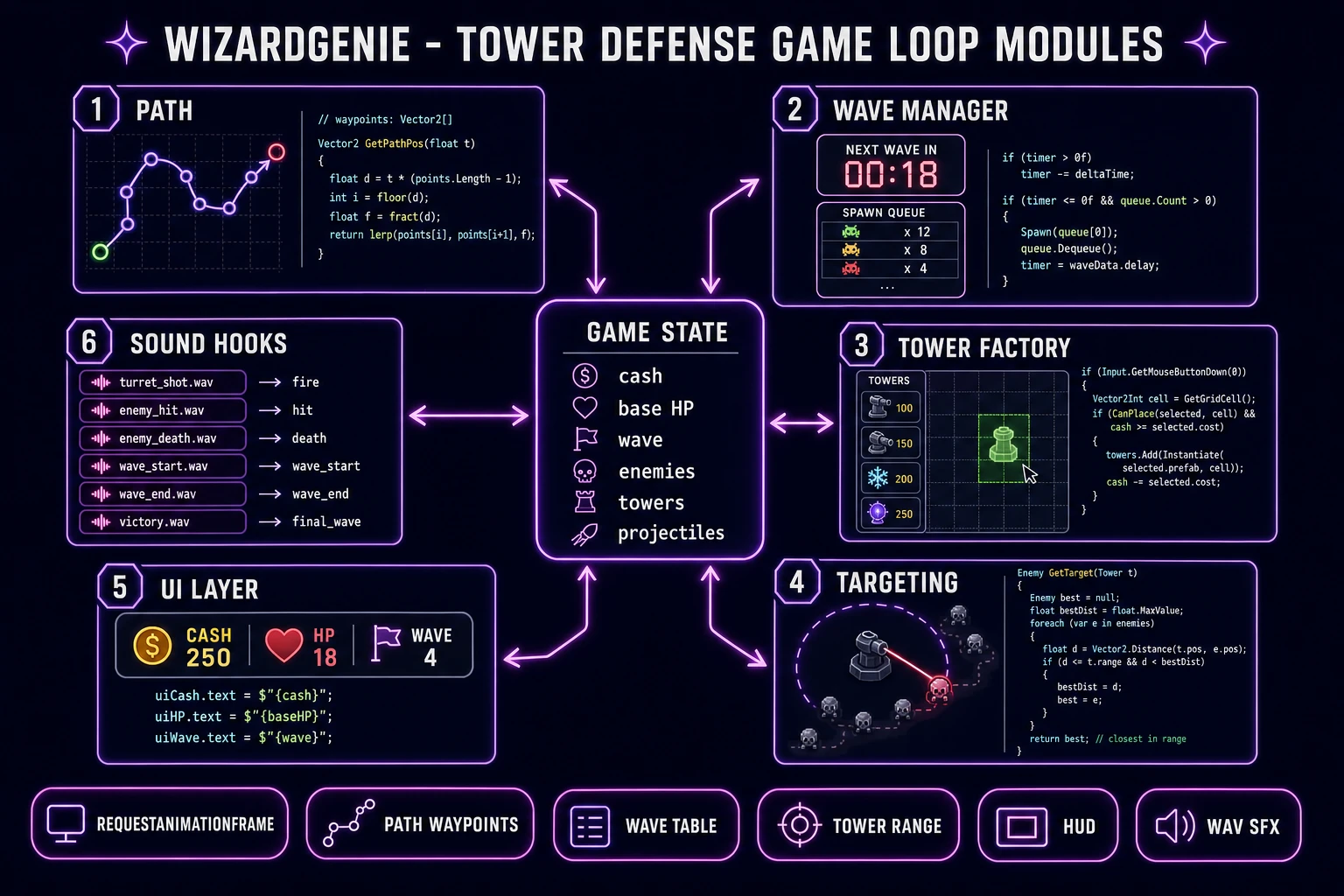
Tower defense game loop code diagram: game state, path waypoints, wave manager, tower factory, UI, sound hooks generated by WizardGenie
The six code modules WizardGenie writes from the design doc. Game state at the center; path, wave, tower, UI, and sound modules each read from and update it every frame.

Common issues (and how to fix each in under a minute)

Every first tower defense project trips on the same handful of bugs. Fix them by adjusting numbers in the design doc, not the code:

  • Enemies reach the base too fast. Path is too short or enemy speed is too high. Add more waypoints to lengthen the path (bendier is better), or drop enemy speed from 60 px/s to 30–40.
  • Player has too much cash after wave 3. Cash-per-kill is too high. Cut it in half and re-check that wave 4’s reward roughly matches one tower cost.
  • Towers feel useless. Range is too small or cooldown is too long. Bump range from 3 to 4 tiles, cooldown from 1.5s to 0.8s, and re-tune damage down proportionally.
  • Wave 10 boss dies instantly. HP scaling flat. Bosses should be roughly 20x the HP of the previous wave’s toughest enemy; adjust the wave table row and re-run.
  • Game feels silent. No music, or SFX not wired. Confirm bg_music.mp3 is preloaded and looping, and that each tower.fire() call plays its shot sound.

What a tower defense game costs to build on Sorceress in 2026

Concrete asset budget for the game described above, all numbers verified 2026-08-05 against the local Sorceress source:

  • Tower sprites: 4 towers x 9 credits = 36 credits ($0.36). Add a barrel sprite per tower for rotation and this doubles to 72 credits ($0.72).
  • Enemy sprites: 6 enemies x 9 credits = 54 credits ($0.54). If you want a walking cycle per enemy, use the four-angle walking option (still 9 credits per gen, one sheet per enemy) — total holds at 54 credits.
  • Tileset: ~30 credits ($0.30) for a single-biome iterated to a clean tileable result. A second biome (winter, desert) doubles it.
  • Music: 1 loop x 10 credits + 2 credits WAV export = 12 credits ($0.12). A second track for the boss wave doubles it.
  • SFX pack: 6 one-shots at 1–2 credits each = ~10 credits ($0.10).

Total AI asset cost: roughly 140–180 credits, or $1.40–$1.80 at Sorceress’s 100 credits per dollar standard rate (verified 2026-08-05 in src/lib/models.ts line 69 as CREDITS_PER_DOLLAR = 100). New accounts start with 100 free credits (verified 2026-08-05 in src/app/api/admin/credits/route.ts line 12 as SIGNUP_GRANT = 100), so a first-time user pays roughly $0.50–$0.80 out of pocket. The Sorceress Lifetime tier at $49 one-time (verified in src/app/plans/page.tsx line 51 as LIFETIME_PRICE = 49) covers unlimited Quick Sprites, Tileset Forge, Music Gen, and SFX Gen for the life of the account, which pays back after roughly the second or third full game.

Compare to the alternative: commissioning a pixel artist for 10 sprites (roughly $150–$400 total), a composer for one loop ($100–$300), and an SFX pack from a stock library ($20–$40). Traditional cost: $270–$740 for the same asset scope. That is not an argument that AI assets replace a human artist for a shipping commercial game — it is an argument that a genuine tower defense prototype exists at all for a solo dev with a weekend and a couple of dollars.

For related workflows: the How to Make an RPG Maker Game (AI Asset Pack 2026) post covers the same Sorceress asset stack for a top-down RPG. The Sorceress Tools Guide is the wide index across every tool referenced above, and the front page at Sorceress is where WizardGenie, Quick Sprites, Tileset Forge, Music Gen, and SFX Gen all live.

Frequently Asked Questions

How long does it take to make a tower defense game?

A first playable tower defense game on the recipe above takes a weekend: about 15 minutes on the design doc (path, wave table, tower table, economy), 30-60 minutes on the asset pack (4 towers, 6 enemies, one tileset, one BGM loop, six SFX one-shots in Sorceress Quick Sprites, Tileset Forge, Music Gen, and SFX Gen), and 2-4 hours iterating with WizardGenie on the game loop. Balance tuning takes another few hours after that. A polished commercial tower defense with 30+ waves and a full progression system is a multi-month project even with AI assets.

What is the easiest engine for a tower defense game in 2026?

For a first project, WizardGenie is the fastest path: paste the design doc into a browser tab and iterate on the generated code. For hand-writing the loop yourself, Phaser 4 (2D HTML5 game framework) is the honest recommendation - it has tilemaps for the path, an arcade physics module for projectiles, and group management for enemies and towers. Three.js is overkill unless you want 3D or first-person tower defense. Scratch and Roblox Studio both host popular tower defense scenes but the resulting game only plays inside their platforms.

Do I need to code AI pathfinding for a tower defense game?

Not for the basic version. Enemies in a classic tower defense follow a fixed path, so the code walks a hardcoded array of waypoints (x, y pixel pairs) with linear interpolation - one line of math per frame per enemy. A star pathfinding (A*) only comes in if you let the player place towers that block the path, like Desktop Tower Defense. Skip that on your first version. For the design doc pattern used above, a fixed path is the default and the correct choice.

How do I balance the waves in a tower defense game?

Fill out the wave table before writing any code, then adjust two numbers at a time. Enemy HP and count should roughly double every 3-4 waves; enemy speed increases 10-20 percent per wave; cash-per-kill should leave the player with roughly 1.2x the current tower cost after each wave (otherwise the curve breaks). If wave 5 is too easy, bump goblin count from 15 to 25. If the player is broke after wave 3, raise cash-per-kill 20 percent. Never rewrite the code to fix a balance bug - adjust the table row and reload.

Can I publish a browser tower defense game for free?

Yes. A WizardGenie build exports to a standard HTML5 bundle (index.html plus JS and asset files) that runs in any modern browser. Free static hosts that accept HTML5 games include GitHub Pages, Netlify, Vercel, and itch.io (free tier). Sorceress also hosts games at play.sorceress.games for accounts that use the newer publishing flow, but any static host works. Total hosting cost for a browser tower defense game is 0 dollars per month on GitHub Pages or itch.io free tier.

Sources

  1. Tower defense - Wikipedia
  2. Window: requestAnimationFrame() method - MDN Web Docs
  3. A* search algorithm - Wikipedia
  4. Phaser - HTML5 game framework
Written by Arron R.·2,721 words·12 min read

Related posts