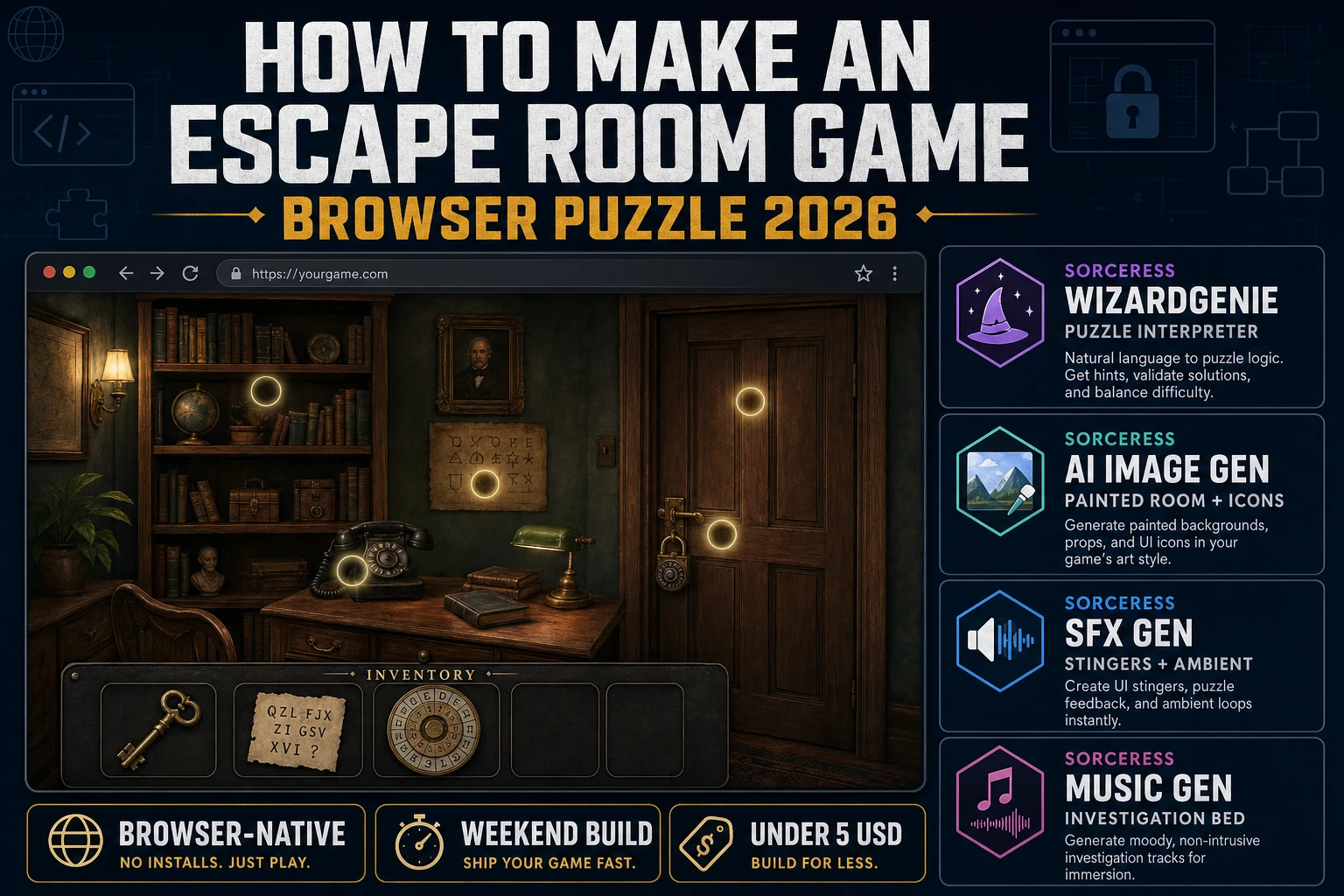
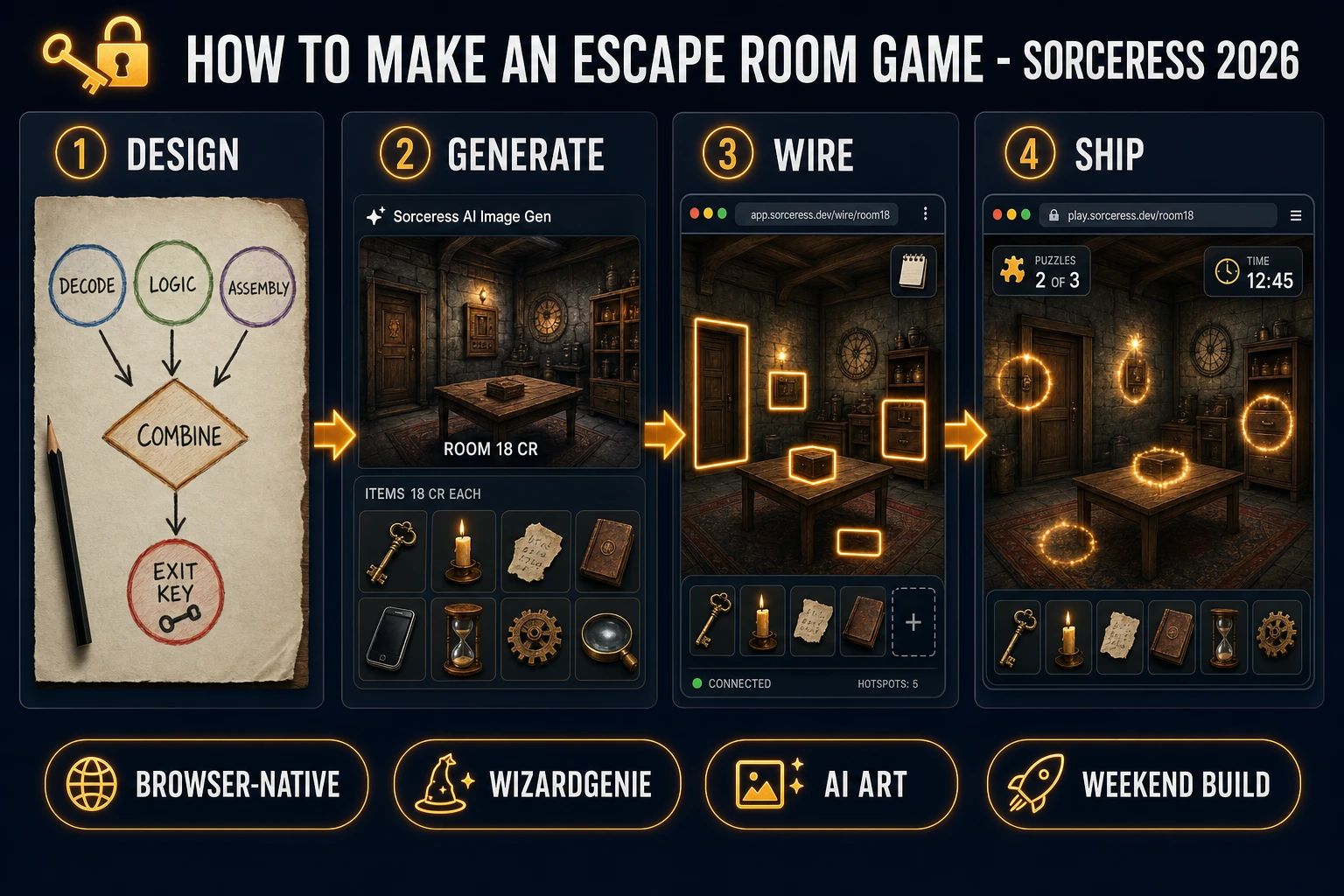
How to make an escape room game is one of the most honest weekend browser builds in 2026: one painted room, a compact clue chain, an inventory that combines items, and a locked door that opens when the last key drops. The format traces to the browser-native "escape the room" flash-game family that Crimson Room codified in 2004 and later seeded the real-life escape-room industry over the 2010s (Wikipedia lists more than 50,000 physical escape rooms worldwide by late 2019, all descended from that browser lineage — verified against en.wikipedia.org/wiki/Escape_room on 2026-08-10). Its digital cousin remains one of the cleanest formats a beginner can ship end-to-end on a static HTML page. Almost every tutorial for how to make an escape room game still assumes you will install Unity or Godot and treat the browser as an afterthought. The 2026 pipeline is very different. A single HTML file renders the room at full-bleed, a coding agent scaffolds the click-hotspot inventory system in one prompt, and AI generation covers every asset the game needs. In a browser, that means WizardGenie to scaffold the puzzle interpreter, Sorceress AI Image Gen for the painted room and hotspot icons, SFX Gen for the click, unlock, and ambient loops, and Music Gen for the tense ambient bed. This guide is the honest end-to-end for how to make an escape room game in 2026, in a browser, in a weekend.
What "how to make an escape room game" actually means in 2026
The query "how to make an escape room game" almost always hides one of two very different intents. Some searchers want a real-life escape room design brief — padlocks, laser mazes, prop budgets, and staff timing — and a small but real subset of the results serve that audience. This guide is not for them. The other, larger intent is a digital escape room game: a browser or mobile puzzle in the tradition of Crimson Room (2004, the game that named the genre) and modern hits like The Room, Cube Escape, and the countless "escape the classroom" and "escape the office" web puzzles that dominate Flash-era retrospectives. That is the pipeline this guide targets, because it is the one that lands honestly in a weekend and demos the whole Sorceress toolset.
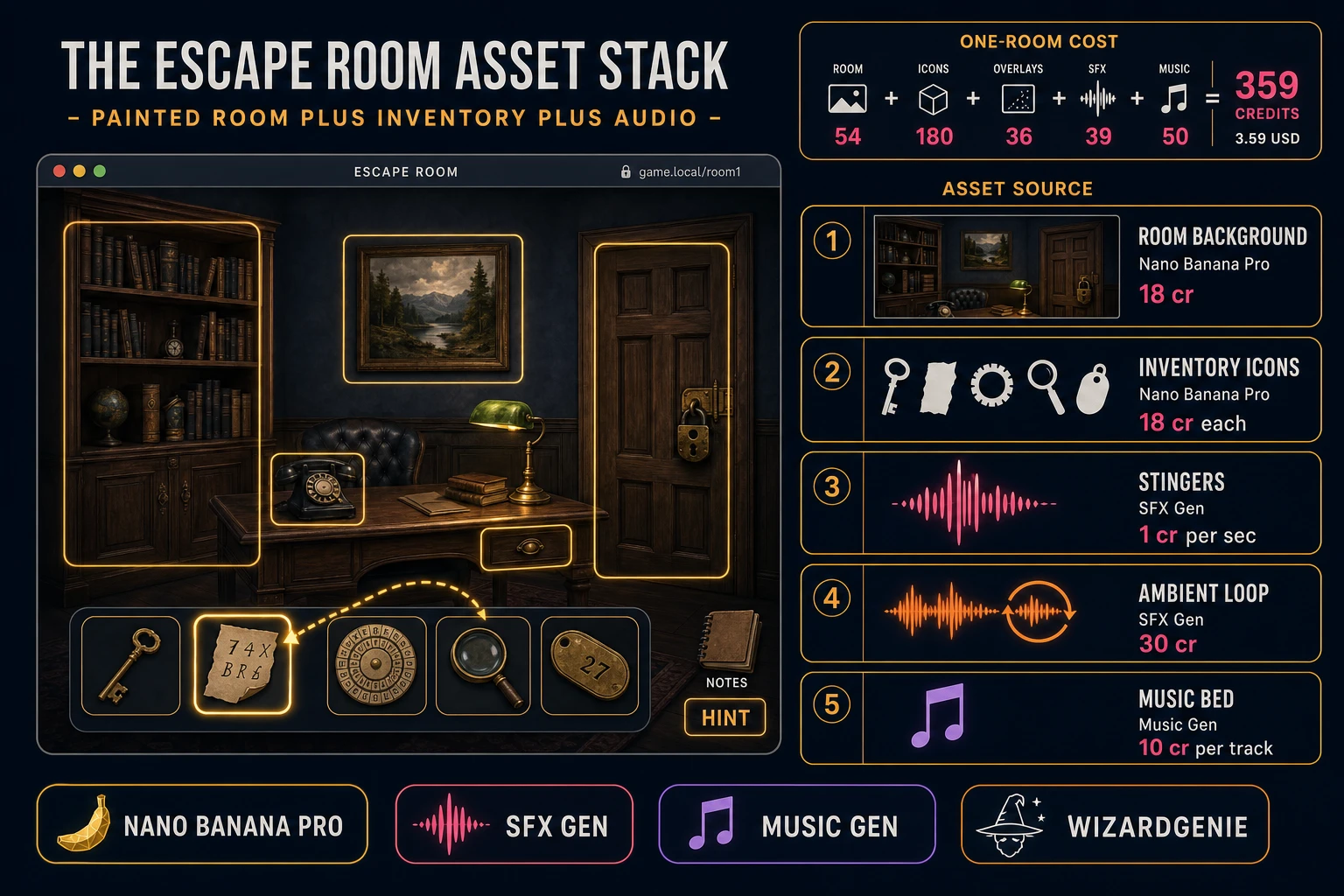
The presentation contract for a browser escape room game is small and strict. A single painted room fills the browser window at full-bleed, seen from the player character point of view. Hotspots — the objects the player can click — are invisible rectangles overlaid on the painted room, each tied to an inspect action that either adds an item to the inventory, reveals a puzzle overlay, or triggers a bit of dialogue. An inventory bar at the bottom of the screen shows collected items as small icons; two items can be dragged together to combine (key plus rusty tag equals labelled key). A notebook or clue-log button opens an overlay listing the puzzles the player has found and any hints they have earned. Solving the final puzzle unlocks the door and rolls credits. That is the whole layout. Every classic escape room game from Crimson Room through The Room Two honours the same four-element stack, which is why the format renders so cleanly in a browser: it is fundamentally a positioned-image UI, and HTML has been positioning images since 1993.
The escape room game loop in one minute (examine, collect, combine, solve)
Six moving parts and nothing else, in strict order per player action. First, the room renders at full-bleed with all currently-visible hotspots active. Second, the player clicks a hotspot. Third, the interpreter looks up the hotspot action — inspect (open a zoomed view or an item overlay), collect (add to inventory, remove hotspot), read (show a clue in the notebook), or use (require a specific inventory item to trigger, otherwise a nothing-happens line). Fourth, if the action was collect, the item slides into the inventory bar with a small pickup stinger from SFX Gen. Fifth, on inventory drag-and-drop between two items, the interpreter checks a combines table — if the pair matches, remove both, add the result item, play a success chime. Sixth, when the player uses the final item on the door hotspot, run the exit sequence — a longer stinger, a scene transition, and the credits panel.
Every action, autosave — write the current inventory contents, the set of solved puzzles, and any variable flags to localStorage under a key like escaperoom.autosave. On page load, if an autosave exists, offer a Continue button next to New Game. That is the entire game. Six steps, executed per click, driven by a plain JavaScript state machine backed by a small hotspots array, an inventory array, and a combines lookup table. Everything else — the ambient loop that swells when the player enters the last unsolved puzzle, the animated dust motes in the shaft of window light, the pixel-perfect item silhouettes that flash for a quarter second when the player toggles a highlight-hotspots hint button — is polish layered on top. Keep the core loop tight, ship one full escape room game end-to-end, and only then start layering polish. A first escape room game that ships one room with five puzzles and a clean exit will teach you more than a partially-built game with a full features spec.
Pick your engine for how to make an escape room game: React, Phaser 4, or vanilla DOM
Three good browser targets in 2026, each with a very different trade-off. Vanilla JavaScript with a DOM-based layout is the honest default and the pick this guide recommends for a first build. A browser escape room is fundamentally a stacked-image UI with invisible click targets: one full-bleed img for the painted room, a set of absolutely-positioned div elements for the hotspots (with cursor: pointer and event handlers), an inventory bar at the bottom rendered as a flexbox row of item tiles, and a notebook overlay rendered as a modal. Total code footprint for a working escape room game is under 500 lines and ships as a single static HTML file. The HTML Drag and Drop API handles the inventory-combine gesture natively; the Web Storage API handles autosave. No engine to install, no build step, deploy the whole game to any static host including GitHub Pages.
React becomes the right pick if the escape room game grows into a series (five rooms, a hub-world map, a save-slot browser) or if you already have a React project you want to embed the puzzle inside. React component model maps cleanly onto the escape room game structure — a <Room> component holds <Hotspot> children, an <Inventory> component holds <ItemTile> children, a <Notebook> component holds <ClueEntry> children — and React state hooks handle the puzzle-solved flags without ceremony. The cost is the build step and the roughly 130 KB React bundle, which matters more for a single-page portfolio piece than a hobby jam entry.
Phaser 4.2.1 "Giedi" (released 9 July 2026, verified against phaser.io/download/stable on 2026-08-10) becomes the right pick if you want animated ambient effects (flickering candle, floating dust, subtle sway on the window curtain), particle systems for object-inspect flourishes, integrated audio timeline management so BGM cross-fades with puzzle-solve stingers, or if the escape room has any real-time gameplay moments (a timed cipher-input puzzle, a beat-the-timer memory sequence, a physics-based lock-pick mini-game). Phaser bundles Scene management, an asset loader, and audio playback in one file (roughly 900 KB minified) and its Scene lifecycle maps cleanly onto room transitions if you scale up to a multi-room escape game.
WizardGenie is not a separate rendering engine — it scaffolds whichever of the three you pick, from a single natural-language prompt. WizardGenie is the Sorceress game-native coding agent. It ships as both a desktop app (Windows installer with auto-update, available to Early Access supporters and above) and a no-install web build at the same URL. Its coding-model lineup covers Claude Opus 4.7, Claude Sonnet 4.6, GPT-5.5, Gemini 3.1 Pro, DeepSeek V4 Pro, Kimi K2.5, Grok 4.2, and MiniMax M2.7 (verified 2026-08-10 in src/app/_home-v2/_data/tools.ts). For an escape room game, any frontier model scaffolds the whole hotspot-and-inventory interpreter in one prompt. If you want to run cheap, pair a frontier planner (Claude Opus 4.7 or GPT-5.5) with a budget executor (DeepSeek V4 Pro or Kimi K2.5) and let the executor do the typing — the Dual-agent planner-and-executor pattern is the whole reason WizardGenie exists, and it lands most projects at roughly one-fifth the single-frontier cost.
Step 1 — design the clue chain: 3 sub-puzzles, 1 combining puzzle, 1 exit key
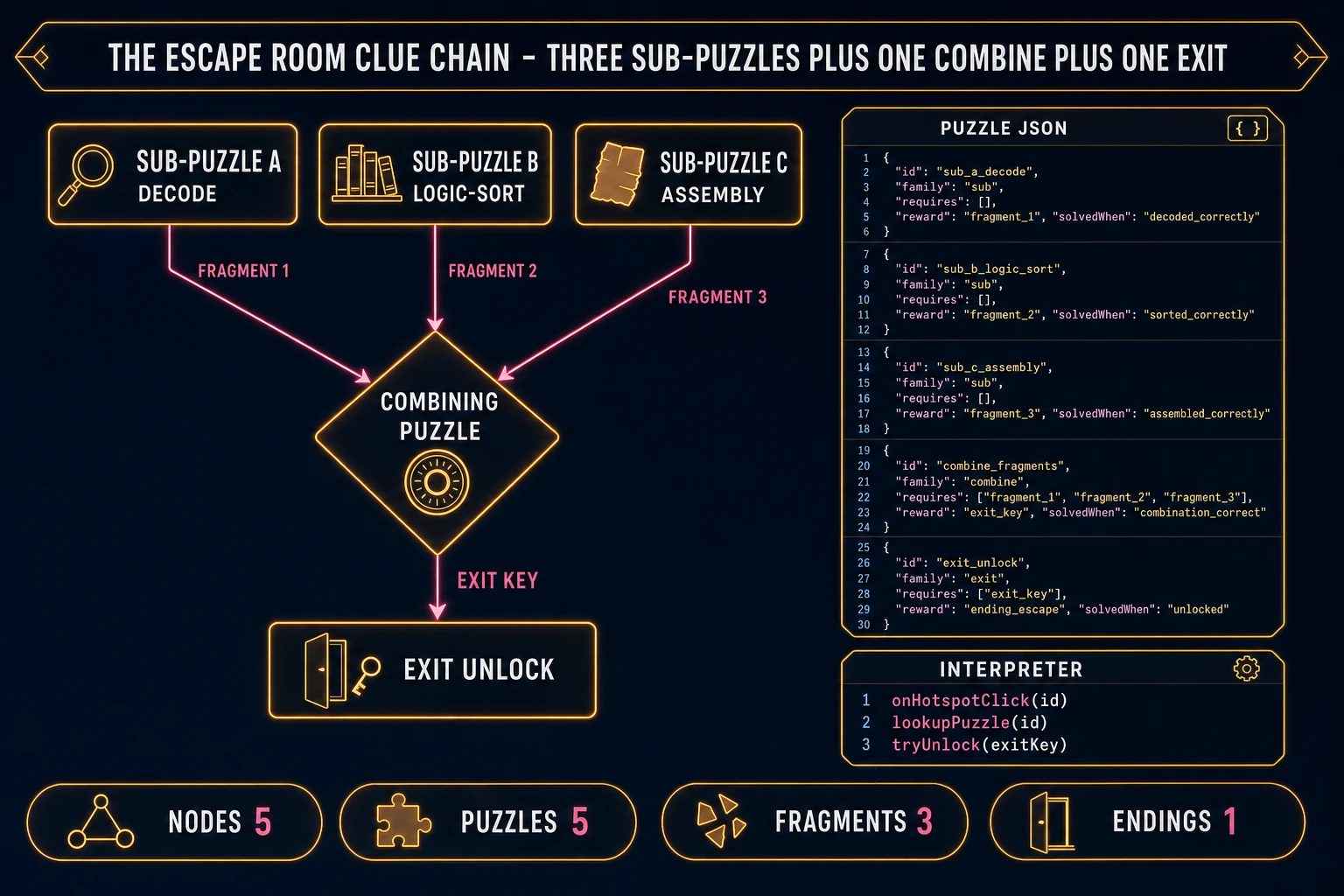
Nothing else in the pipeline matters if the clue chain is not designed first. An escape room game lives or dies on the puzzle structure, and every hour spent on art before the chain is a bet against the design. The canonical shape for a first escape room game clue chain is the 3+1+1 pattern: three independent sub-puzzles that can be solved in any order, one combining puzzle that requires all three sub-puzzle rewards as input, and one exit key that the combining puzzle produces. The 3+1+1 is small enough to design in an afternoon, deep enough to feel like a real puzzle, and forgiving enough to survive playtest — if a sub-puzzle is too hard, the player still has two others to work on while thinking.
Sketch the chain on paper first. Three sub-puzzles at different puzzle families for texture — a find-and-decode puzzle (hidden number scrawled behind a painting; combined with a phone dial for a code), a logic puzzle (books on a shelf must be sorted by an in-fiction rule to reveal a compartment), and a physical-assembly puzzle (three torn note fragments hidden around the room must be dragged together in the inventory to form a readable note). Each sub-puzzle yields one fragment. The combining puzzle takes the three fragments and produces the exit key — classically a rotational cipher lock where the three fragments are three digits, a Vigenere-style keyword lock where the fragments are three letters, or a physical key assembly where the three fragments are shaft, teeth, and handle.
Now convert the chain into puzzle-graph JSON. Each puzzle is one object with an id, a name, a family (logic, decode, assembly), a reward fragment id, a requires list of prerequisite ids, and a solvedWhen predicate that reads state. Sub-puzzles have empty requires. The combining puzzle lists the three fragment ids in requires. The exit unlock lists the combined key id in requires. Every hotspot in the room maps to one puzzle id, so clicking a hotspot fires the puzzle inspect handler. Total puzzle-graph size for a first escape room game is 15 to 25 lines of JSON — that is the whole design document, and the interpreter reads it directly.