Draft AI Character Description Generator (NPC Bible 2026)

By Arron R.12 min read
A game-side ai character description generator job is an NPC bible: draft six fields per NPC in WizardGenie (Planner + cheap Executor), seed one portrait in Sor

People who type ai character description generator into a search box in 2026 usually already have a face in mind — they need the words behind it. A merchant needs a shop, a temper, a rumor, and a five-line hook a party can push against. A quest-giver needs a wound, a debt, and a lie. That is a bible, not a portrait. This page treats the query as a text-first shipping problem: what the search actually wants, how WizardGenie drafts the party bible in a dual-agent pass, how Sorceress AI Image Gen stamps the portrait after the words are locked, and how free Canvas lands the whole sheet on one page. Every credit and every model claim in this piece was checked against the local source on 2026-09-29.
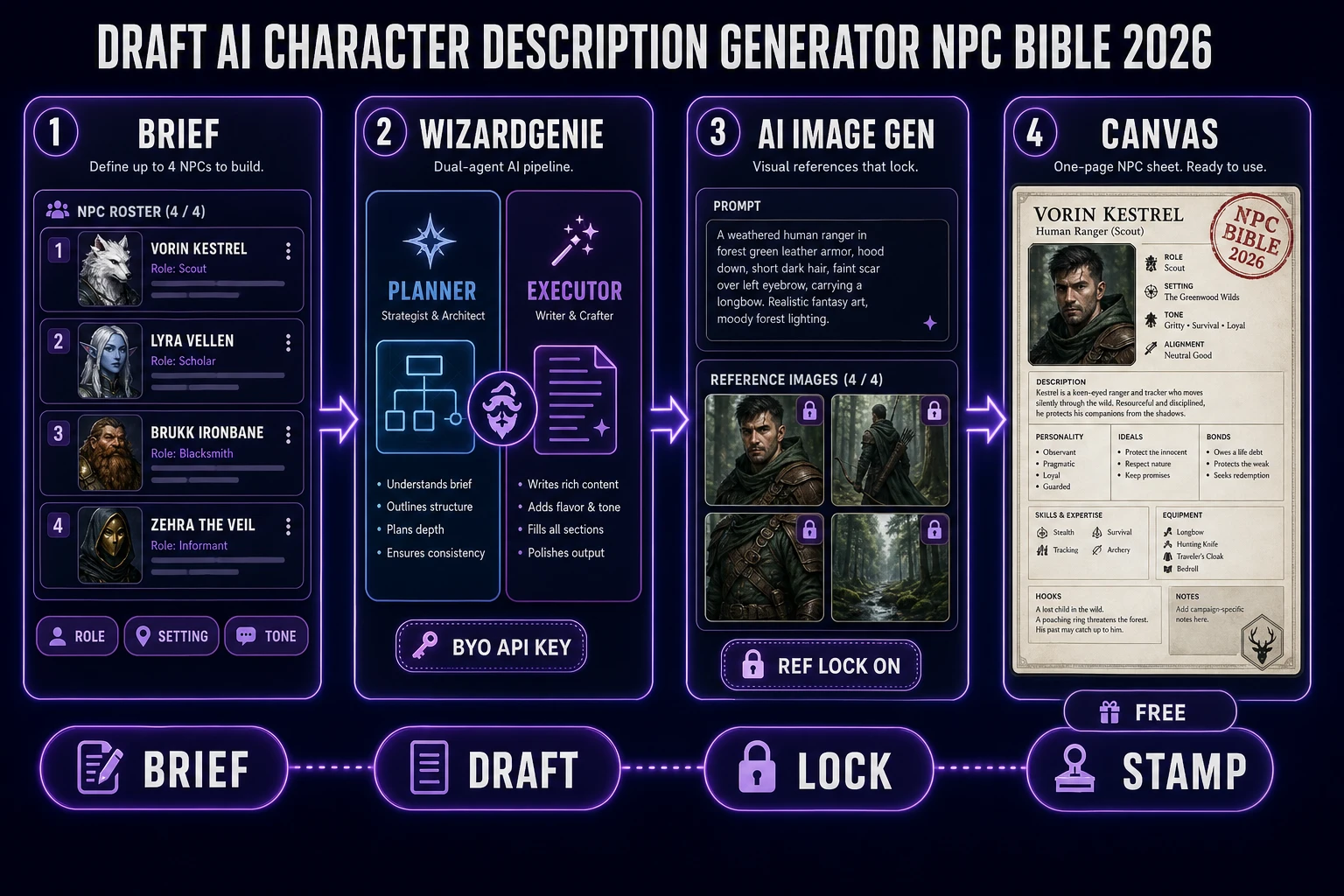
AI character description generator NPC bible pipeline: brief, WizardGenie dual-agent draft, AI Image Gen portrait, Canvas sheet
An ai character description generator reframed as an NPC bible: brief the role, draft the words in WizardGenie, seed one portrait, and stamp the whole sheet in Canvas.

What an ai character description generator search actually wants

DataForSEO lists ai character description generator at 1,600 searches a month with KD 0 and competition 0.03 (confirmed in tools/research-supplement.md, verified 2026-09-29 pull). Intent is informational, not transactional — the searcher is looking for a workflow that produces usable prose, not a purchase page. The sister phrase character ai generator sits at 880/mo but skews toward the Character.AI chatbot brand and toward portrait-first game queries. This page is aimed at the writer sitting between those two lanes: someone who needs description text, wants it consistent across a whole cast, and would prefer a portrait to stamp on the sheet at the end.

Wikipedia’s non-player character article (verified 2026-09-29) frames the job cleanly: NPCs fill any role not occupied by a player character — allies, bystanders, competitors, quest-givers, shopkeepers, monsters. Some are only a brief description (“You see a man in a corner of the tavern”); others need complete game statistics and backstories. An ai character description generator that only writes one-liners is fine for tavern extras. A generator for named cast — the wizard who has actually lost something, the merchant with a debt — needs full backstories that stay consistent across sessions.

Wikipedia’s backstory entry (verified 2026-09-29) is blunt about the mechanics: a backstory is the set of events leading up to the main plot, often used to lend depth or believability to the main story, and it is revealed through flashbacks, dialogue, direct narration, summary, or recollection. All five reveal-modes are gameplay events. If the description is only a personality adjective and a hair color, the player has nothing to bump into during the session. The generator has to output cause-and-effect the game can actually surface.

Wikipedia’s character sheet entry (verified 2026-09-29) notes that the gamemaster may keep proper sheets for NPCs, and some rulebooks ship dedicated “NPC sheets” that are smaller than the main player-facing ones. That is the shape we are targeting: not a full stat block, but a repeatable one-page bible per NPC — face, role, wound, want, secret, hook. Small enough to fit on a card. Rich enough to run.

Description first, portrait second

The temptation with any modern generator is to jump straight to the image model, generate twenty faces, and pick a favorite. For NPCs, that is the wrong order. A portrait tells you what a character looks like; a bible tells you what they want. Ship the words first, and the portrait becomes a coloring job. Ship the portrait first, and you spend the next hour retrofitting a personality onto a face that does not have room for it.

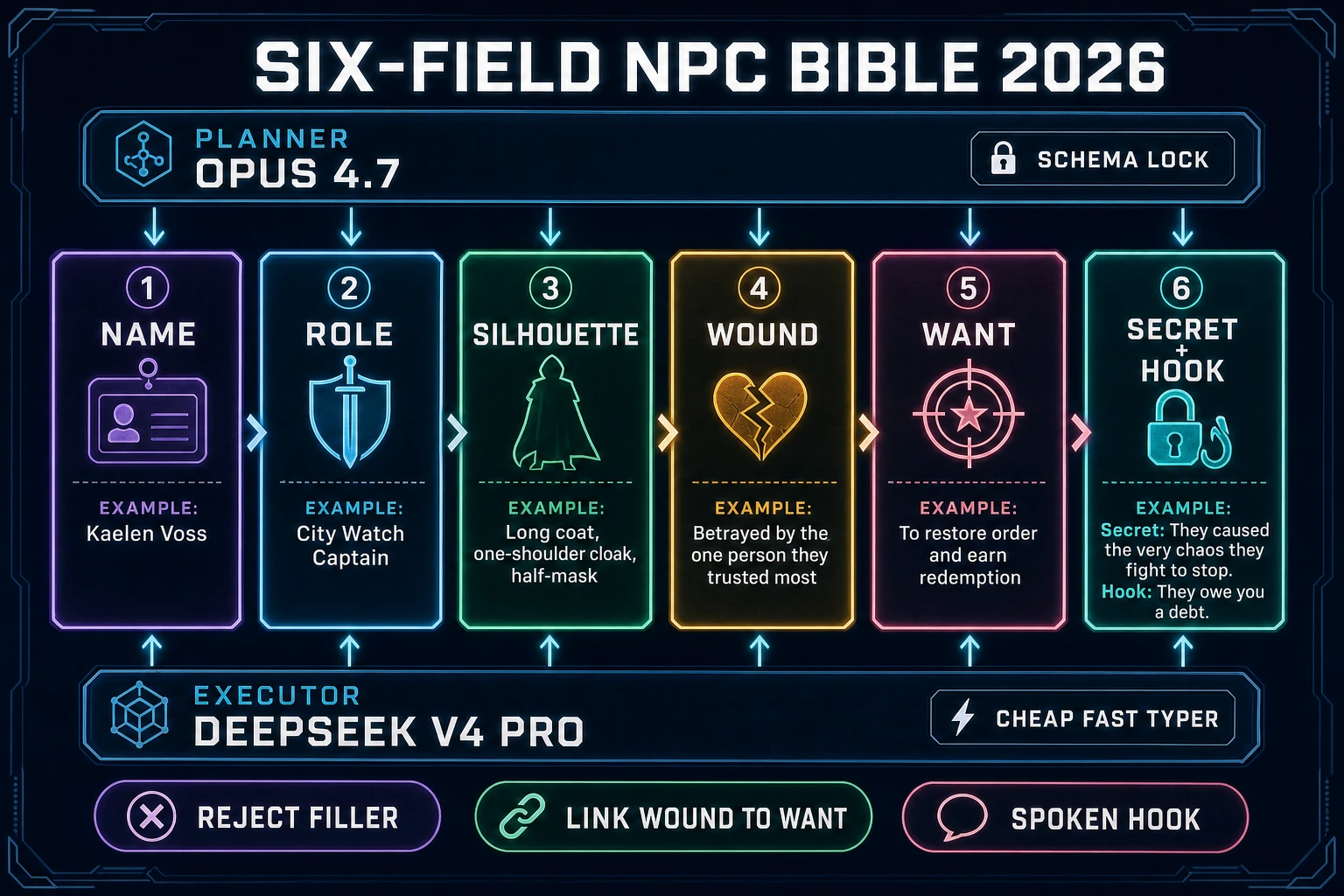
Practical shape of a text-first NPC bible for a game or tabletop cast:

  • Role — what the party needs this NPC to be in the story (quest-giver, gatekeeper, rival, mentor, foil). Not the vibe; the function.
  • Silhouette — one shape word plus one prop word. “Hunched apothecary with a strap of glass vials.” The image model reuses this later; the writer needs it now for tags and voice.
  • Wound — one concrete past event that still hurts. Not “trauma”; a specific loss with a date or place.
  • Want — one active goal the NPC would pay the party to help with, or would resist the party over.
  • Secret — one fact the NPC is currently hiding, with a tell.
  • Hook — the exact line the NPC delivers when the party first meets them. Not a summary of the line — the line.

Six fields. No adjectives that could describe anyone. If the generator returns “brave, clever, mysterious,” reject the row and re-prompt. The whole point of an ai character description generator worth using is that its output cannot be swapped between characters without noticing.

WizardGenie as the text engine

WizardGenie is the featured tool for the description step. The card tagline is “AI-powered game engine” — the tools catalog describes it as a browser-embedded engine that lets you describe a game and iterate on it in real time, and it drives every leading AI coding model (Claude Opus 4.7, GPT-5.5, Gemini 3.1 Pro, DeepSeek V4 Pro, Kimi K2.5, Grok 4.2, MiniMax M2.7) with a bring-your-own-API-key path or a fallback trial key. The property that matters for an ai character description generator brief is that the same agent surface that writes gameplay code will happily write structured NPC bibles when you hand it a template.

The way to get repeatable text from WG is the Planner + Executor pattern: an expensive reasoner writes the bible outline (six fields, one paragraph each), and a cheap fast typer expands each field into prose against the outline. Acceptable Planners are frontier reasoners — Claude Opus 4.7, GPT-5.5, Gemini 3.1 Pro, Grok 4.2. Acceptable Executors are cheap models with real context — DeepSeek V4 Pro, Kimi K2.5, MiniMax M2.7, Gemini 3.1 Flash, GPT-5.5 Mini. The economic logic is “expensive reasoner thinks, cheap fast typer executes.” Never put a frontier-priced model on the typing side — the pattern only earns its cost when the executor is actually cheap.

WG runs on both desktop and web. The web entry point is /wizard-genie/app; the desktop side is a Windows installer with native filesystem access and longer-running sessions. Pick whichever matches your habit — the bible template runs the same on both. Related Sorceress angles already on the blog: vibe coding with Claude for the coding-side of the dual-agent pattern, and character AI generator party lock for the portrait-first sibling of this brief.

A six-field NPC bible template you can paste today

Hand the Planner a system prompt that pins the shape. Keep the exact wording of the six fields — the value of the template is that every NPC comes back on the same schema.

You are drafting an NPC bible for a game party.
Return exactly one NPC per response, on this schema:

NAME:      <proper name, 1-3 words>
ROLE:      <story function, 1 sentence>
SILHOUETTE:<shape + prop, 1 sentence>
WOUND:     <one past loss, with place or date, 1 sentence>
WANT:      <current active goal, 1 sentence>
SECRET:    <hidden fact + tell, 1 sentence>
HOOK:      <first line the NPC actually says>

Rules:
- No adjectives that could describe another NPC.
- No 'brave', 'clever', 'mysterious', 'trauma', 'dark past'.
- The WANT must be something the party can help with or resist.
- The HOOK is a spoken line, in quotes, not a summary.

Then feed the Executor one line per NPC: “Draft one NPC. Setting: pirate free-port. Role: harbormaster who owes money to a cult.” The Planner keeps the schema honest; the Executor writes fast prose. Six-field bibles at that shape take a couple of seconds each on a modern executor and read as if the writer knew the world.

Guardrails to keep the ai character description generator loop honest:

  • Reject any NPC whose WOUND and WANT are not causally linked. If the harbormaster’s wound is a lost sister and the want is “better ledgers,” the row is filler. Re-prompt.
  • Reject any HOOK that is a paraphrase instead of a spoken line. The party needs the line to react to; a summary is authorial, not diegetic.
  • Cap the party at four to six named NPCs per bible pass. Human working memory is small; a cast the writer cannot recall by name will not stay consistent across sessions either.
  • Save the raw output as flat markdown or JSON, one file per NPC, named after the SILHOUETTE phrase — hunched_apothecary_glass_vials.md beats npc07_final_v2.md every time.
Six-field NPC bible template with Planner and Executor lanes and reject rules
NPC bible schema: six fields per character, Planner locks the shape, Executor writes the prose, reject rows that break the causal link.

Portraits in AI Image Gen, after the words are locked

Only now open AI Image Gen. The home more-tools card (verified 2026-09-29 in src/app/_home-v2/_data/tools.ts) lists Nano Banana Pro, Nano Banana 2, GPT Image 2, Grok Imagine, Seedream 5, Flux 2 Pro, and Z-Image Turbo behind one prompt field. The bible does most of the prompt work for you: NAME is the file name, SILHOUETTE is the prompt seed, ROLE is the pose, and WOUND becomes the expression. A generator that skips the bible has to invent all four every time.

Base credits verified today in src/lib/models.ts (2026-09-29 pull):

Model Base credits Best fit for an NPC portrait
Z-Image3Silhouette drafts and cheap tavern extras
Nano Banana 2 Lite4Lighter Nano Banana 2 lane for iteration
GPT Image 25Sharp cards with legible text on the sheet
Flux 2 Pro6 (+3 per ref)Painterly named NPCs
Nano Banana 29Default locked party workhorse (up to 14 refs)
Nano Banana Pro18Hero card for the campaign villain

New accounts start with SIGNUP_GRANT = 100 free credits (src/app/api/admin/credits/route.ts). CREDITS_PER_DOLLAR = 100, so one credit is one US cent on the top-up ledger. Reference maxima from src/lib/models.ts: Nano Banana max 3, Nano Banana Pro max 8, Nano Banana 2 max 14, GPT Image 2 max 16, Flux 2 Pro max 8 with refImageCredits: 3 per extra image. Seed one face on Z-Image at 3 credits, promote it to Nano Banana 2 at 9 credits when the SILHOUETTE clicks, and reserve Nano Banana Pro at 18 for the one NPC whose portrait will end up on the campaign trailer.

Prompt from the bible, not from vibes. A working prompt for the harbormaster row reads roughly: “Portrait of a weathered harbormaster in a stained coat and brass compass on a leather strap; single scar across the left eyebrow from a dockside fire five years ago; watchful, tired; painterly stylized game art, plain background.” Every phrase in that prompt maps to a field in the bible. Change only the pose or camera line between takes; keep the SILHOUETTE clause identical or the party stops looking like the same party.

Stamp the character sheet in Canvas

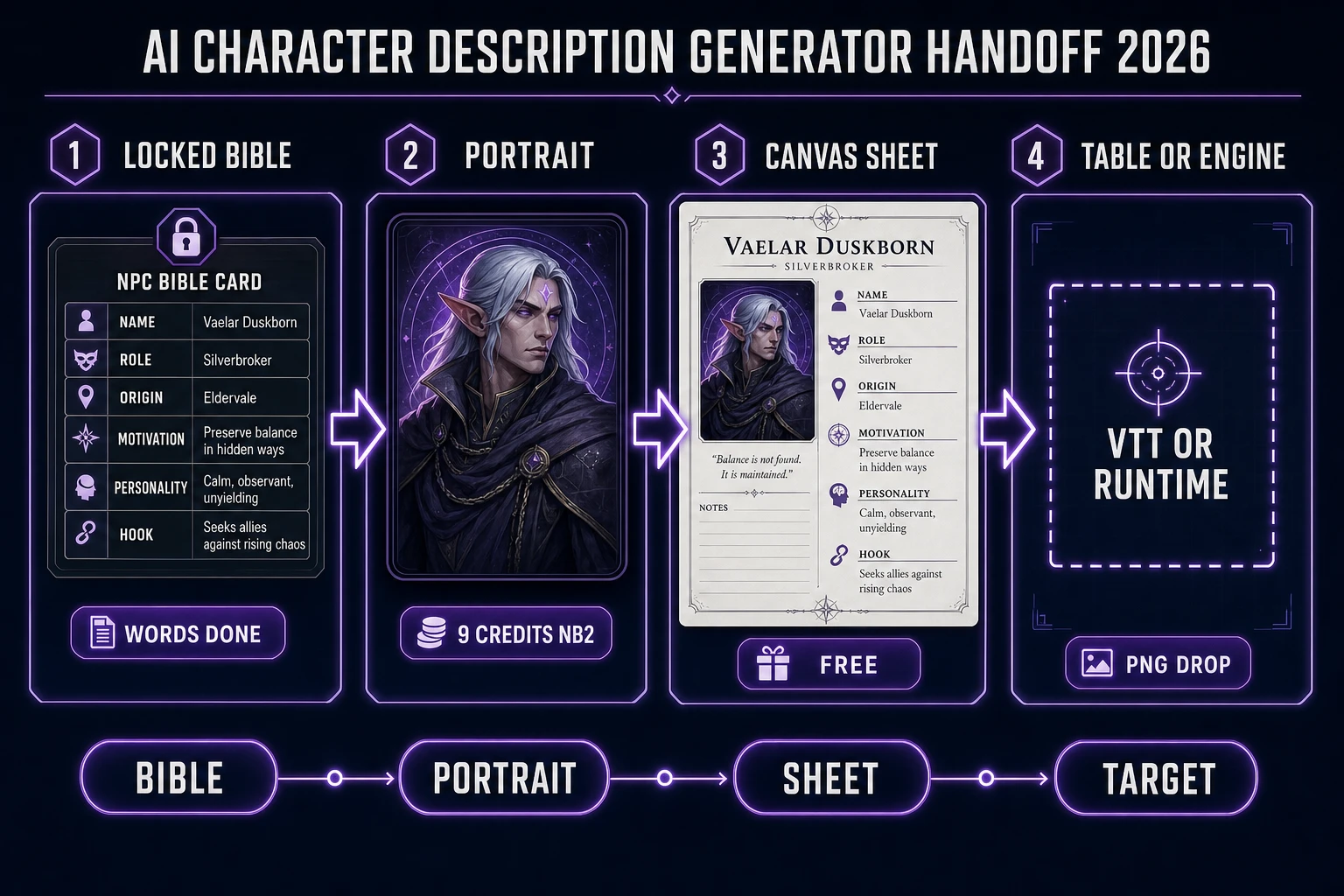
A portrait plus a paragraph is not yet a sheet. Open Canvas — the home more-tools card calls it a quick, easy in-browser image editor and badges it Free (verified 2026-09-29 in src/app/_home-v2/_data/tools.ts). Drop the locked portrait on the left, stamp the six bible fields as real text on the right, and export the whole thing as a single PNG per NPC. Do not ask Canvas to invent a face; treat it as the layout bench between AI Image Gen and the table.

Useful sheet habits for an ai character description generator export:

  • Same canvas size for every NPC in the party — a stack of mismatched sheets reads as a broken cast.
  • Stamp the six field labels (NAME, ROLE, SILHOUETTE, WOUND, WANT, SECRET, HOOK) with real fonts inside Canvas. Never ask the image model to render field labels; it will hallucinate letters at any size.
  • Reserve one corner for a session-side scratch box — where the DM writes what the party learned this session. That box is what turns a static sheet into a live one.
  • Export the finished sheet as PNG (Wikipedia’s character sheet entry, verified 2026-09-29, notes players commonly print sheets and photocopy them; PNG is the browser-native equivalent).

If a printed sheet needs true alpha on the portrait — for a tabletop token or an in-game party UI slot — open BG Remover at a flat BG_REMOVER_CREDITS = 3 per image (verified 2026-09-29 in src/app/bg-remover/page.tsx). Cut once, then stop regenerating backgrounds inside the diffusion model. Canvas is free layout; BG Remover is the paid alpha pass; Image Gen is the paid generation. The bill for a whole NPC bible session should be dominated by the words step (WG tokens) and the portrait step (Image Gen credits), with Canvas contributing zero.

AI character description generator handoff: locked bible, portrait, Canvas sheet, tabletop or engine target
Honest handoff after an ai character description generator lock: WG bible on the left, portrait in the middle, Canvas sheet on the right, table or engine at the end.

Credit math for a four-NPC bible session

Quote wallet numbers from source, not marketing memory. CREDITS_PER_DOLLAR = 100 in src/lib/models.ts. SIGNUP_GRANT = 100 in src/app/api/admin/credits/route.ts. Both checked 2026-09-29. WizardGenie tokens are metered against your chosen model provider (bring-your-own-API-key) or the fallback trial; Sorceress image credits only apply to the Image Gen and BG Remover columns.

Session plan WG bible Portrait line Canvas + alpha Credit total USD at 100 cr/$
1 draft NPC on Z-Image seedBYO tokens30 (Canvas Free)3$0.03
4-NPC party on Nano Banana 2BYO tokens36036$0.36
Same + BG Remover for tokensBYO tokens361248$0.48
Party + 1 Nano Banana Pro villainBYO tokens541266$0.66
Cheap tavern extras batch (12 Z-Image)BYO tokens36036$0.36

A four-NPC party with sheets, alpha tokens, and a single hero card lands at 66 credits ($0.66) on the Image Gen side, which the 100-credit signup grant covers with room to test. WizardGenie tokens sit outside that ledger — plug in an existing DeepSeek V4 Pro, Kimi K2.5, or MiniMax M2.7 API key on the Executor side and the words are effectively free at the per-NPC scale we are working at. Do not put Claude Opus 4.7, GPT-5.5, or Gemini 3.1 Pro on the typing side of the bible loop; keep the frontier reasoner on the Planner slot where its extra cost buys something the cheap models cannot.

A practical checklist before you spin the ai character description generator: write the six-field schema, brief the party in one sentence per NPC, run the Planner + Executor pass in WG, reject rows without a causal wound-to-want link, name the files after the SILHOUETTE phrase, seed one portrait on Z-Image or Nano Banana 2, lock the keeper as a reference for every follow-up NPC in the same visual family, stamp the sheet in Canvas, and cut alpha only when a token needs transparency. Filler adjectives are a Planner prompt problem; drifting faces are a reference-lock problem; melted sheet labels are a diffusion-in-Canvas problem — never a Canvas problem.

Verdict: bank an NPC bible, not a randomizer session

A clean ai character description generator session on Sorceress in 2026 ends with a folder of one-page NPC sheets a DM or a game runtime can actually consume. The finished shape is a set of six-field bibles, a locked stack of on-model portraits, optional alpha tokens, and a Canvas layout you can hand to a printer or an engine importer. The randomizer sites give you a hundred forgettable rows; a proper bible gives you four cast members the party will remember by name after the first session.

  1. Write the six-field schema (NAME, ROLE, SILHOUETTE, WOUND, WANT, SECRET, HOOK) — that is the whole prompt template from now on.
  2. Open WizardGenie, run the Planner + Executor pass (frontier reasoner on the Planner slot, cheap fast typer on the Executor slot), and reject rows whose wound and want are not causally linked.
  3. Seed one portrait in AI Image Gen — Z-Image at 3 credits for extras, Nano Banana 2 at 9 credits for named party members, Nano Banana Pro at 18 for the campaign villain — and lock the keeper as a reference for every follow-up NPC in the same family.
  4. Stamp the whole sheet in free Canvas: portrait on the left, six bible fields as real text on the right, session-side scratch box in the corner. Cut alpha in BG Remover at 3 credits per image when a token needs transparency.
  5. Save each NPC as a single PNG sheet, named after the SILHOUETTE phrase, and drop the folder into your VTT of choice or into a repo the game runtime can read.

That is the whole job the ai character description generator search is actually buying: not another wall of adjectives, not another random-name spinner, but a party of NPCs whose wants, wounds, and hooks fit on one page and whose faces stay on-model across a whole campaign. Draft the words first, seed one portrait, lock the party, and stamp the sheet — then let the table meet a cast the party can actually remember.

Frequently Asked Questions

What does an ai character description generator search actually want?

For the game-dev slice of the query, the searcher wants a repeatable NPC bible, not a chatbot session. DataForSEO lists ai character description generator at 1600/mo with KD 0 and competition 0.03 (tools/research-supplement.md, verified 2026-09-29). Wikipedia frames NPCs as any character not controlled by a player (verified 2026-09-29), and character-sheet practice keeps a proper sheet per NPC. The generator has to output six-field bibles (name, role, silhouette, wound, want, secret, hook) that stay consistent across sessions.

Why draft descriptions in WizardGenie instead of a plain chat prompt?

The Planner + Executor pattern. WizardGenie drives Claude Opus 4.7, GPT-5.5, Gemini 3.1 Pro, DeepSeek V4 Pro, Kimi K2.5, Grok 4.2, and MiniMax M2.7 with a bring-your-own-API-key path (verified 2026-09-29 in tools-catalog.md and src/app/_home-v2/_data/tools.ts). Put a frontier reasoner on the Planner slot to lock the six-field schema, and a cheap executor (DeepSeek V4 Pro, Kimi K2.5, MiniMax M2.7, Gemini 3.1 Flash, GPT-5.5 Mini) on the typing side. Never put a frontier model on the Executor slot.

What is the six-field NPC bible schema?

NAME (1-3 words), ROLE (story function, 1 sentence), SILHOUETTE (shape + prop, 1 sentence), WOUND (one past loss with place or date), WANT (one active goal the party can help with or resist), SECRET (one hidden fact with a tell), HOOK (the exact first line the NPC actually says). Reject any row whose WOUND and WANT are not causally linked, and any HOOK that is a paraphrase instead of a spoken line.

How much does a four-NPC ai character description generator party cost on Sorceress?

Verified 2026-09-29 against source: Nano Banana 2 is 9 credits per image, BG Remover is 3 credits per image, CREDITS_PER_DOLLAR = 100, SIGNUP_GRANT = 100. Four Nano Banana 2 portraits cost 36 image credits. Adding BG Remover alpha on all four is 12 more credits. Adding a hero Nano Banana Pro card at 18 credits brings the total to 66 credits or $0.66. WizardGenie tokens are metered against your own API key on the Executor side.

Do I need Canvas Pro to stamp a character sheet?

No. The home more-tools card badges Canvas as Free (verified 2026-09-29 in src/app/_home-v2/_data/tools.ts). Drop the locked portrait on the left, stamp the six bible field labels (NAME, ROLE, SILHOUETTE, WOUND, WANT, SECRET, HOOK) as real text on the right, reserve a corner for a session-side scratch box, and export the whole thing as a single PNG per NPC. Canvas does not invent free diffusion generations, but the layout step is free.

Sources

  1. Non-player character - Wikipedia
  2. Backstory - Wikipedia
  3. Character sheet - Wikipedia
  4. Text-to-image model - Wikipedia
  5. Image file type and format guide - MDN
Written by Arron R.·2,812 words·12 min read

Related posts