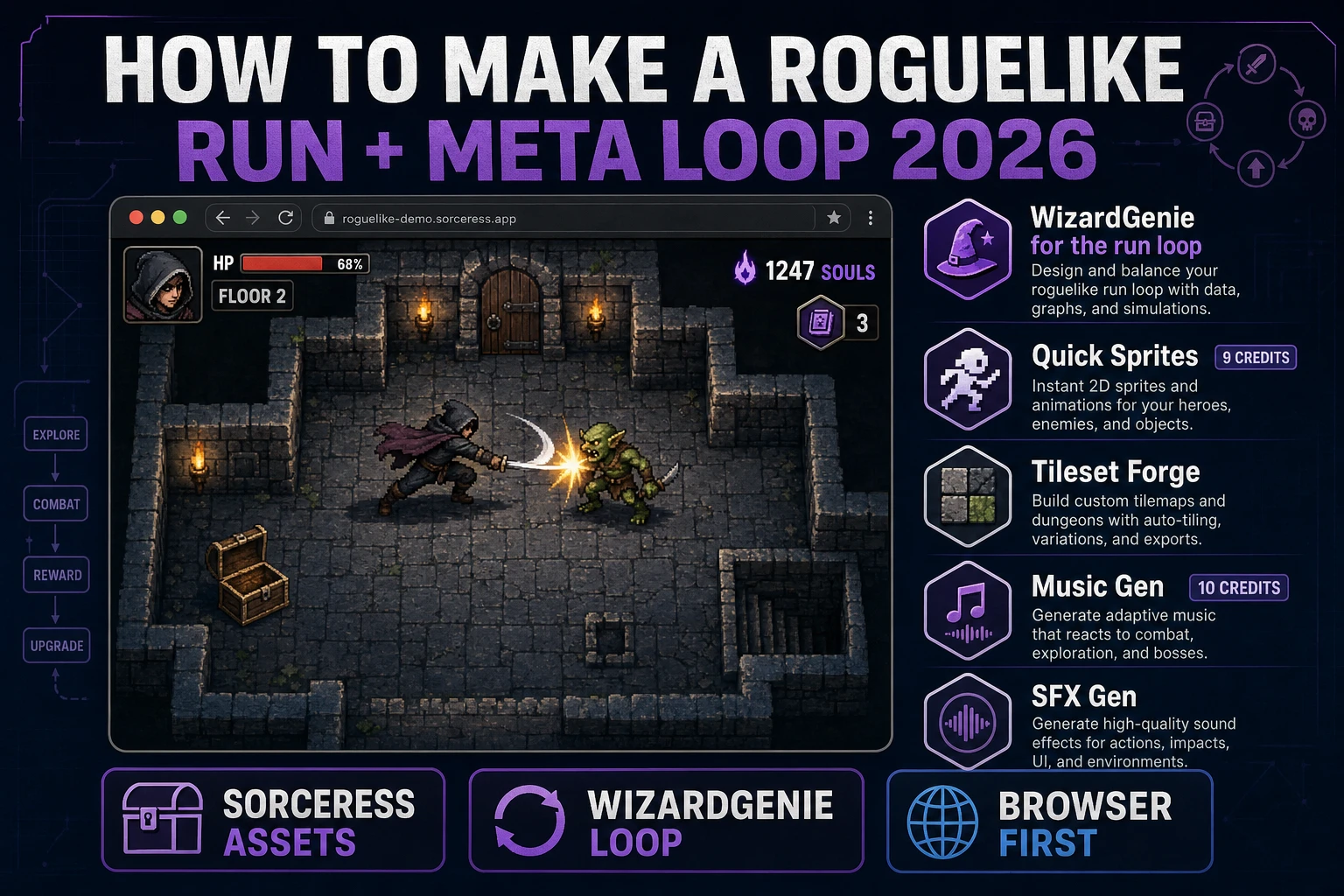
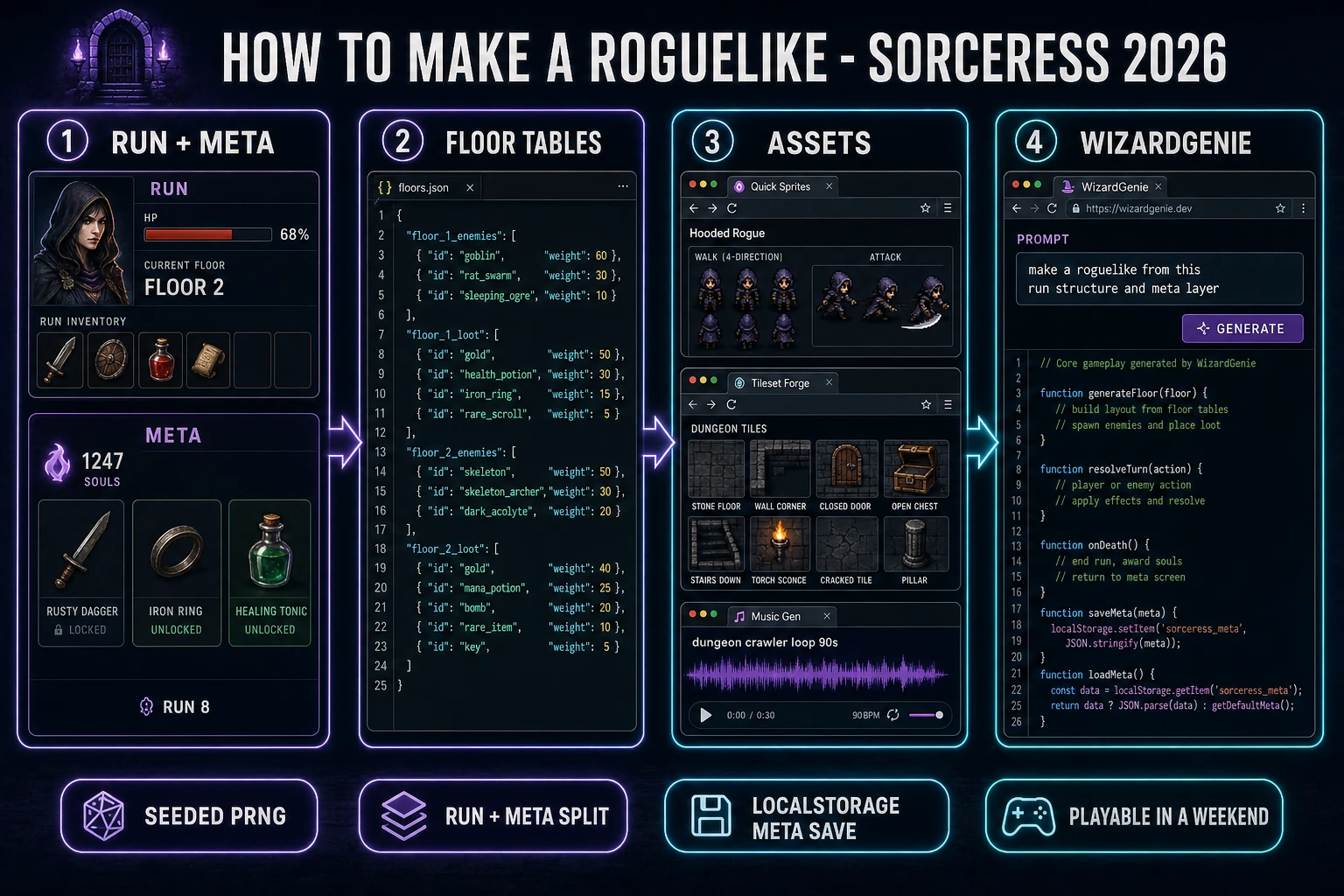
People searching how to make a roguelike in 2026 usually get one of two bad answers: a Python tutorial that shows how to draw an @ on a grid with the tcod library and stops there, or a marketing page for an asset store that promises a "roguelike kit" and delivers a top-down template. The honest 2026 answer is different. A modern roguelike has two loops, not one: a short-run loop where the player descends a procedurally generated map and permadies in 20 to 40 minutes, and a longer meta loop where every death unlocks something — a new starting item, a new class, a new dungeon branch — that persists into the next run. This guide walks the recipe for both: design the run and meta loops on paper first, generate the asset pack in Sorceress, then let WizardGenie wire the browser-first tick loop so a playable slice ships in two weekends.
What "how to make a roguelike" actually means (run + meta loop, not just permadeath)
The word roguelike is contested. The purist definition — the Berlin Interpretation from 2008 — demands turn-based grid movement, ASCII graphics, and permadeath, all inherited from the 1980 game Rogue. According to the roguelike entry on Wikipedia, that strict definition covers the classic canon (NetHack, Dungeon Crawl Stone Soup, ADOM, Caves of Qud) but not the modern indie hits people actually search tutorials for: Hades, Dead Cells, Slay the Spire, Enter the Gungeon, The Binding of Isaac, Balatro, Vampire Survivors. Those games are usually filed under rogue-lite or procedural death labyrinth. The one thing every game in both camps shares is the two-loop structure: a short expedition ("run") that ends when the player character dies or wins, plus a meta layer that persists across runs and rewards the player for playing again.
That two-loop split is why roguelikes feel different from other permadeath action games. In a survival game, dying is punishment. In a roguelike, dying is a comma — the player loses the run but keeps the meta unlocks (a new weapon in the starting pool, a new room type in the generator, a new enemy in the bestiary, a new NPC in the hub). Modern rogue-lites have made the meta loop the actual game: Hades hides half its story inside dozens of runs, Slay the Spire hides half its cards inside dozens of victories, Dead Cells hides half its map inside runes you have to bring back from earlier runs. If a tutorial only teaches the run loop and skips the meta layer, it is teaching how to make a Berlin-purist roguelike from 1988 and calling it a 2026 tutorial. This one teaches both loops honestly.
The roguelike run loop in one minute (spawn descend die reset)
Every roguelike, purist or lite, runs the same core run-loop. Understanding it in one minute is the difference between a real project and a stalled prototype:
- Spawn. The engine rolls a fresh seed, generates a dungeon floor (rooms + corridors, or a scrolling side-view level, or a card deck), spawns the player character at the entrance with their starting inventory (which the meta layer may have modified since the last run).
- Descend or advance. Player explores the floor, fights enemies, picks up items, spends resources, opens doors, finds the exit to the next floor. Combat is turn-based (classic roguelike), real-time twin-stick (Hades, Enter the Gungeon), platformer (Dead Cells), or card-based (Slay the Spire). The genre is defined by the loop, not the moment-to-moment control scheme.
- Escalate. Each floor rolls a harder enemy table, better loot table, and a new modifier (curse, boon, boss). Difficulty ramps until the player either wins the run (defeats the final boss, escapes the dungeon) or dies.
- Die or win. Permadeath fires. The current-run save file is wiped — hero, floor, inventory, gold, buffs. The player watches a short death screen ("You reached Floor 4. You died to a wolf. Runs completed: 7.") and hits Restart.
- Meta unlock. On death or win, the game evaluates what the run earned: XP toward a permanent level, currency toward the meta shop, story flags for the hub NPCs, unlocks for new starting items or classes. This is the layer that survives the wipe. The player’s next spawn starts from a slightly better baseline. Loop back to step 1.
Every per-frame update runs off the browser-standard animation loop. The requestAnimationFrame API documented on MDN fires roughly 60 times per second in sync with the display refresh; every tick the game code advances enemy AI within the visible room only, updates the player state, decrements any temporary buff timers, and checks for room transitions. Turn-based classic roguelikes still use requestAnimationFrame for the render pass but freeze the world logic between player inputs. Either way, the outer run loop is not a game loop — it is a state machine that returns to Spawn every time Die fires.
Pick your engine in 2026: WizardGenie, Godot 4, or Phaser 4
The engine question decides how much boilerplate you write vs how much you skip. Three honest 2026 answers, ranked by "playable slice in two weekends":
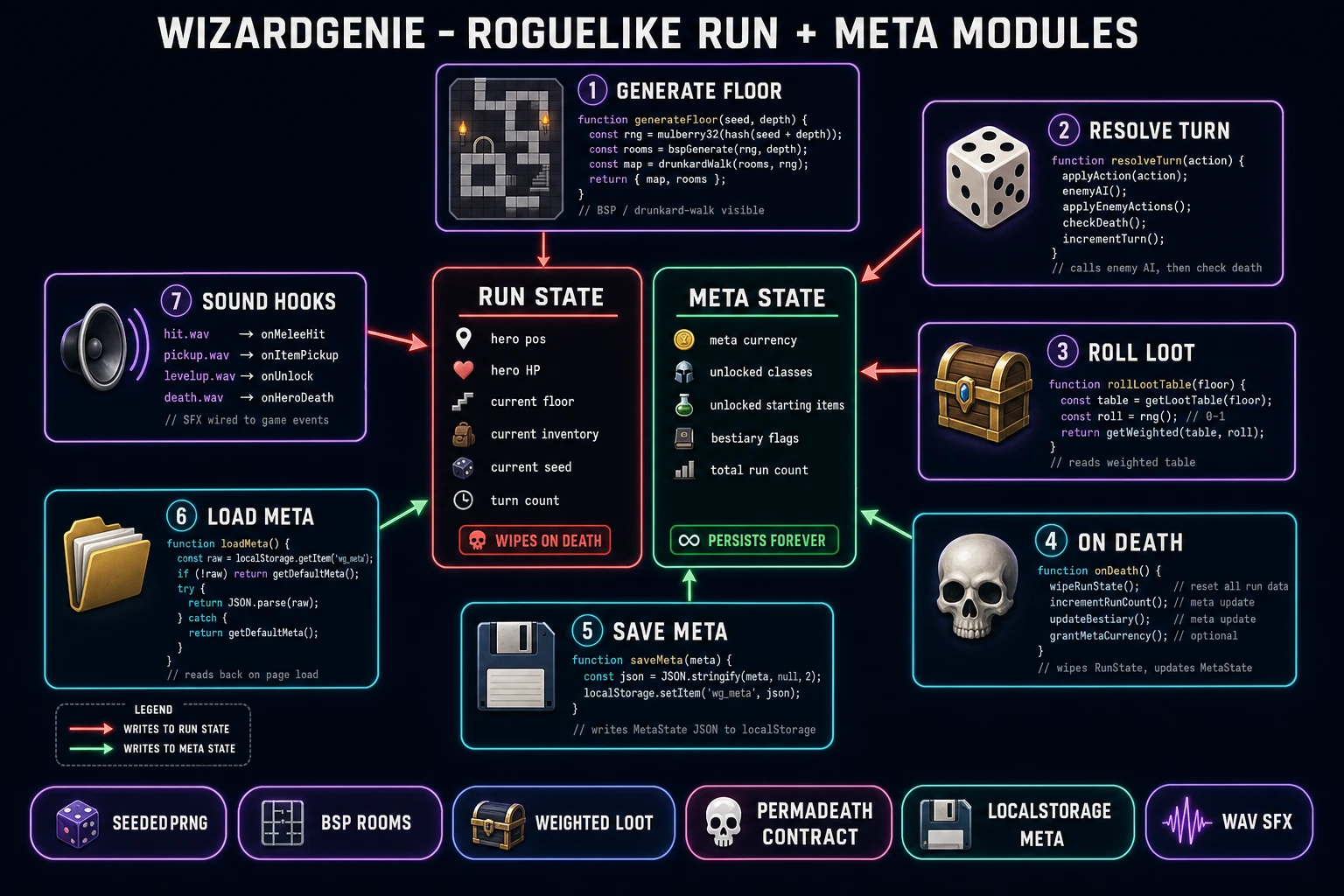
- WizardGenie (recommended for a first project). AI-powered game engine that runs in the browser and, on desktop, ships as a Windows installer with auto-updater. You paste the run-loop and meta-loop design docs into a paragraph; WizardGenie writes, runs, and iterates on the code in real time using its dual-agent Planner+Executor loop. The Planner (a top-tier reasoner) breaks the roguelike into procedural map generation, combat resolution, and meta-save tasks. The Executor (a cheap fast typer like DeepSeek V4 Pro) writes the actual JavaScript. Model lineup verified 2026-08-06 in
src/app/_home-v2/_data/tools.ts: Claude Opus 4.7, Claude Sonnet 4.6, GPT-5.5, Gemini 3.1 Pro, DeepSeek V4 Pro, Kimi K2.5, Grok 4.2, MiniMax M2.7 — bring your own key or use the fallback trial key. - Godot 4. Free open-source engine, current build released 14 July 2026 per the official Godot Windows download page verified 2026-08-06. The scene tree cleanly holds one Room scene instanced N times by the generator, plus a persistent AutoLoad singleton for the meta save (currency, unlocks, run count).
TileMapfor the dungeon grid,CharacterBody2Dplusmove_and_slide()for real-time movement, or a hand-rolled turn queue for classic turn-based. Best if you want to hand-code the engine and understand every roll. - Phaser 4. Popular 2D HTML5 game framework, currently at Phaser v4.2.1 "Giedi" released 9 July 2026 per the official Phaser download page verified 2026-08-06. Tilemap support for the dungeon grid, arcade physics for the hero, group management for enemies, container objects for procedural rooms. Best if you want a pure JavaScript build that ships as a single HTML bundle to itch.io.
The rest of this guide assumes WizardGenie for the code side. Every step still applies unchanged if you swap in Godot 4 or Phaser 4 by hand — the "AI writes the loop" step becomes "you write the loop against the design doc." Unity and Unreal are fine at commercial scale but heavier than a two-weekend prototype needs, and their web-export paths are noticeably fatter than a hand-rolled JS build for a small dungeon crawler. Scratch is technically roguelike-capable (search results show tutorials on how to make a roguelike in scratch) but its lack of a real random-with-seed API makes reproducible runs harder than they need to be.
Step 1 — design the run loop, the meta layer, and the seed system on paper
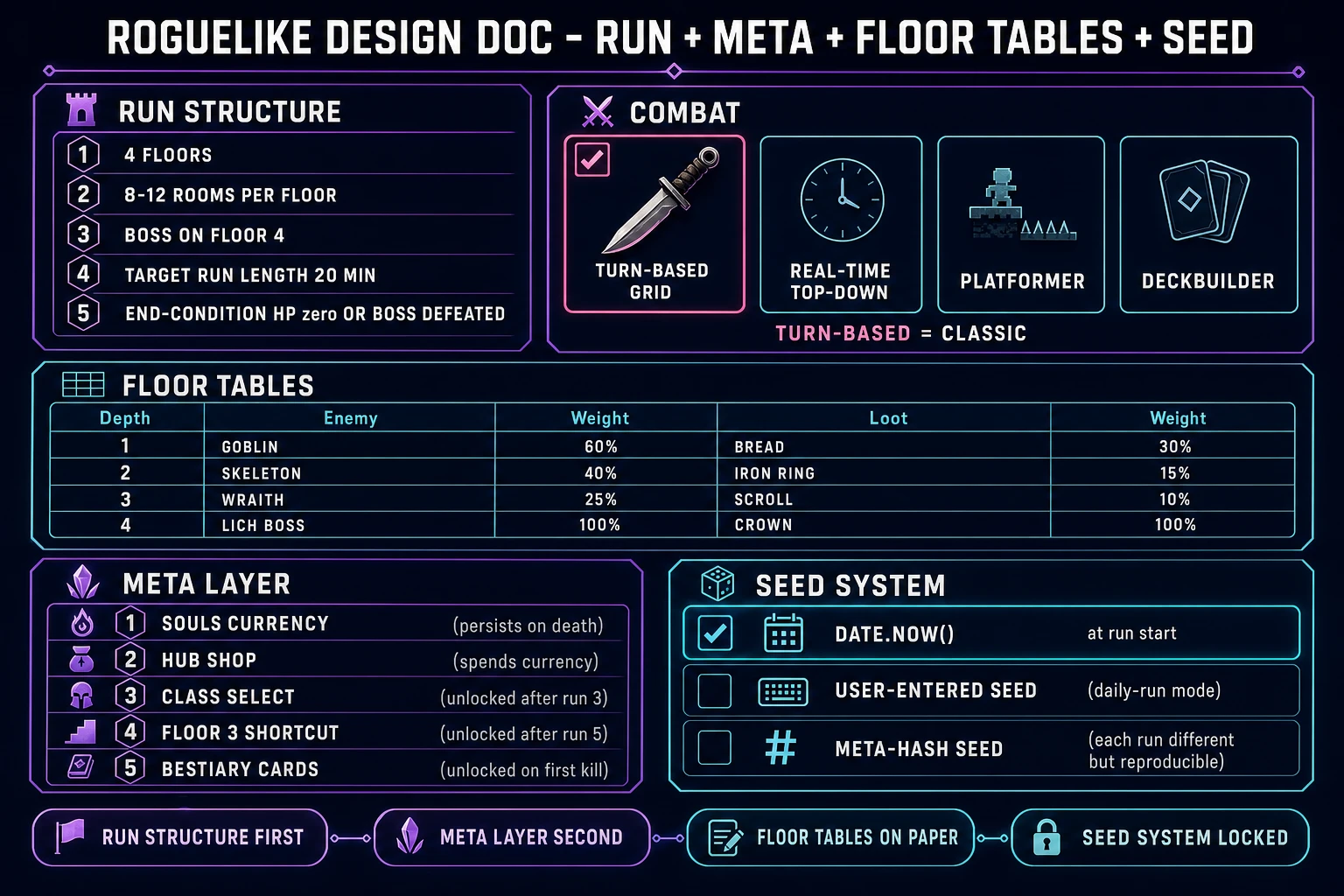
Skip this step and you will rewrite the roguelike four times. This is the genre where the design doc must be finished before the code starts, because every meta unlock cascades into every future run, and every seed choice cascades into every playtest. Do the design in 60 minutes on paper (or in a text file) and the AI code generation halves. The design doc needs five sections:
- Run structure. How many floors per run (3 to 5 is right for a first project). How many rooms per floor (7 to 12). Boss frequency (final floor, or every third floor). Approximate run length in minutes (20 for a first project, so the death-restart cycle stays snappy). What ends a run: hero HP hits 0, or hero wins by defeating the final boss.
- Combat system. One choice: turn-based grid (classic), real-time top-down (Hades-like), platformer (Dead Cells-like), or deckbuilder (Slay the Spire-like). All four are honest roguelike answers. Pick one and stick with it for the first project.
- Loot and enemy tables. Per-floor tables. Floor 1 enemy pool: goblin (weight 60), rat swarm (30), sleeping ogre (10). Floor 1 loot pool: bread (30), rusty knife (25), gold coin (25), health potion (15), rare relic (5). Wikipedia’s entry on procedural generation in games describes the same weighted-table pattern that has powered every roguelike since Rogue. Add one new enemy and one new loot entry per floor.
- Meta layer. This is the point of a rogue-lite. Three-to-five permanent unlocks for a first project. Reasonable defaults: a run-currency (souls, coins, dust) that persists on death; a hub shop that spends currency on permanent starting-inventory items; a class-select unlocked after run 3; a shortcut to Floor 3 unlocked after run 5; a bestiary card unlocked the first time each enemy is defeated. Write which resources persist and which reset on death — hero HP resets, meta currency persists.
- Seed system. Every roguelike needs deterministic random. Pick a seed source:
Date.now()at run start (unrepeatable), a user-entered seed (daily-run mode, tournament mode), or a hash of the meta save (each run different but reproducible). Store the seed with the run save so bug reports can reproduce the exact dungeon.
Put the whole design doc in a single markdown or JSON file. WizardGenie parses this structure well and will use it to seed the procedural generator, the enemy AI, the loot roll, and the meta-save schema. The same "design doc first, code second" approach powers every genre-specific tutorial in this series: Sprawl How to Make a Metroidvania (Map + Ability Gates) uses the same approach for room graphs and ability gates, Brave How to Make a Survival Game (Hunger + Loot 2026) uses it for hunger meters and loot tables, and Fortify How to Make a Tower Defense Game (Wave Loop 2026) uses it for enemy waves and tower economy.