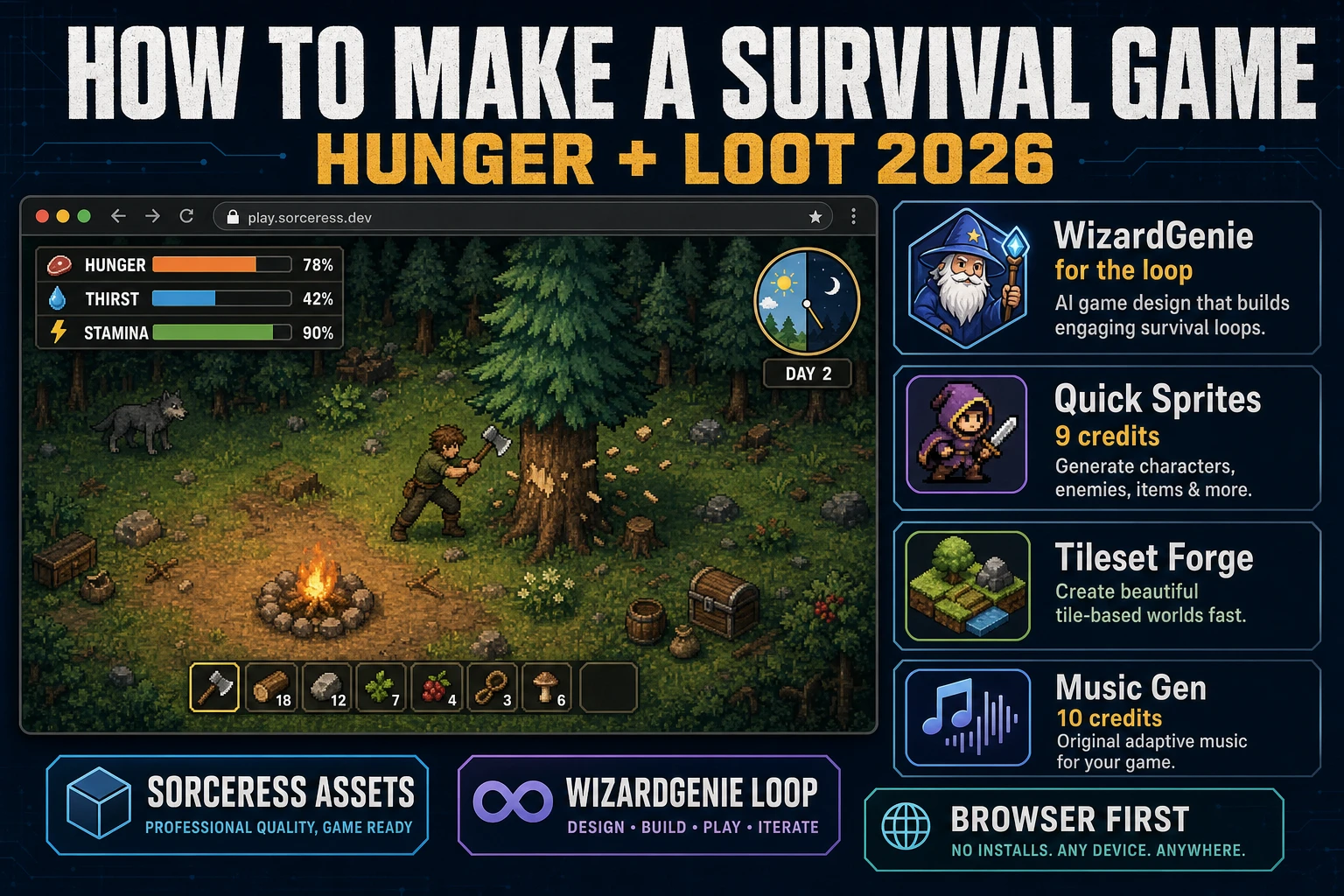
Brave How to Make a Survival Game (Hunger + Loot 2026)

By Arron R.14 min read
How to make a survival game in 2026: define hunger, thirst, and stamina meters on paper first, write the loot tables, generate hero, resource props, tilesets, a

People searching how to make a survival game in 2026 want the answer most tutorials skip: the survival tension is not in the sword swing or the tree-chop animation, it is in the numbers. Hunger decays at X per second, wood costs Y to swing an axe, a wolf drops Z meat, a campfire burns for T minutes. Get those numbers right on paper and the game feels like survival; get them wrong and it is a chore-simulator with a hunger bar. This guide walks the honest 2026 recipe: design the meters and loot tables first, generate the asset pack in Sorceress, then let WizardGenie wire the browser-first tick loop so a playable slice ships in two weekends.
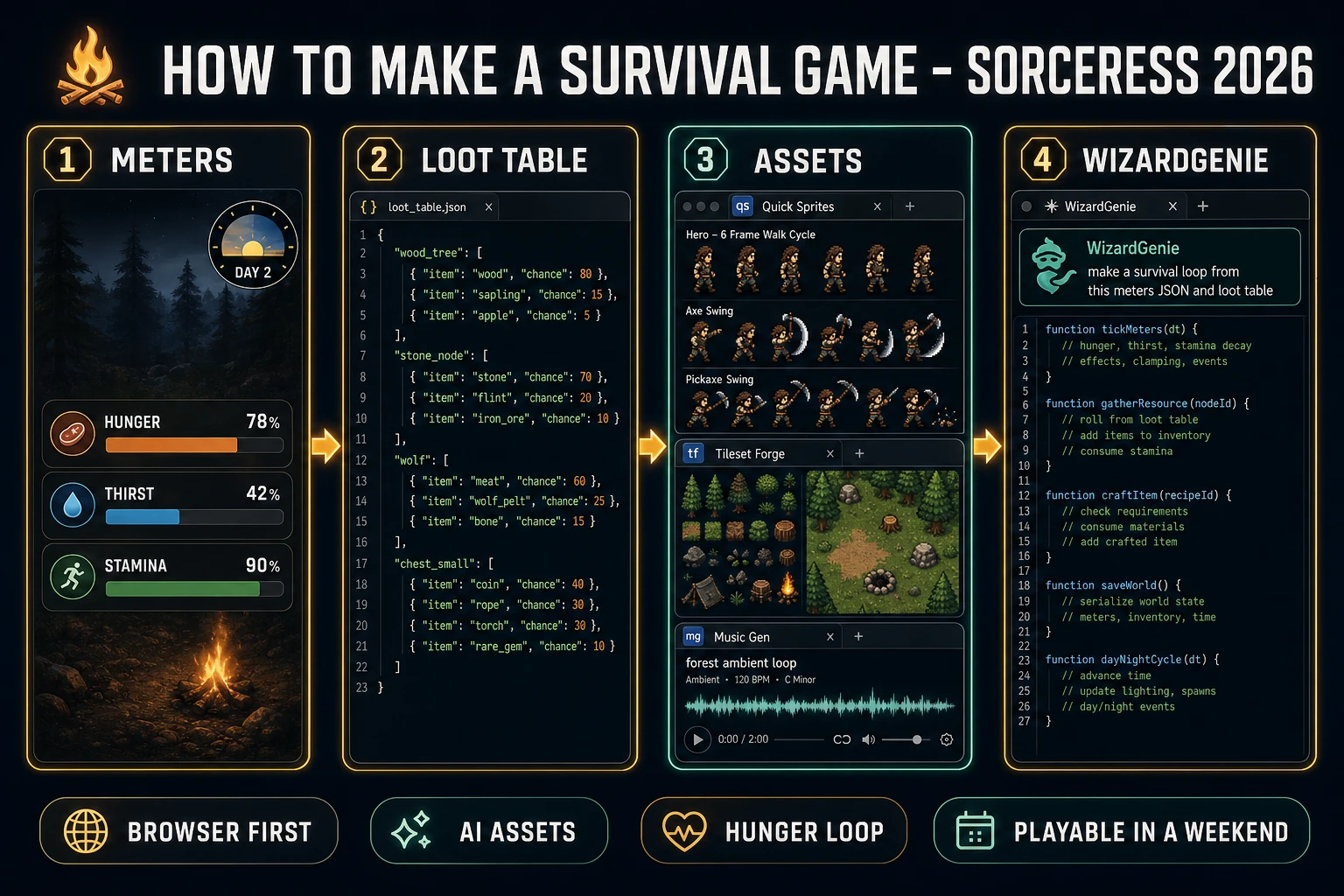
How to make a survival game pipeline: design meters and loot tables, generate assets in Sorceress, let WizardGenie code the browser tick loop
The 2026 survival game recipe: meters and loot table on paper, hero + resource props + tilesets + ambient music from Sorceress, WizardGenie wires the tick loop, day-night cycle, gather actions, and localStorage save. Two weekends, roughly one dollar in credits, one playable browser slice.

How to make a survival game in 2026: the ingredients most tutorials skip

Survival games are a subgenre where the player character starts with almost nothing, gathers resources from a hostile environment, crafts tools and shelter to survive longer, and typically dies permanently or drops all loot on death. According to the survival game entry on Wikipedia, the modern indie canon — Minecraft, Don’t Starve, The Long Dark, Rust, Valheim, Terraria, Subnautica — all obey the same three rules: resources are finite and gated by tools, meters (hunger, thirst, temperature, sanity, stamina) decay in real time, and the environment gets more hostile at night or in deeper zones. The engine and the art style vary wildly; the meter-and-loot loop does not.

What separates a real survival game from a top-down adventure with a hunger bar is not the art style or the map size. It is that the numbers pull against each other. Wood is easy to gather but heavy in the inventory. Meat restores a lot of hunger but rots in real time. Water is everywhere but only drinkable after boiling. Every action costs stamina; every hour costs hunger and thirst; every night costs safety. That tug-of-war is what pulls a player into a two-hour session and out of a hunger-bar checklist. If you skip the tug-of-war and write a checklist, no amount of art will save the design. That is why this recipe starts with the numbers, not the code.

The survival game loop in one minute (gather craft eat sleep repeat)

Every survival game runs the same core loop, and understanding it in one minute is the difference between a real project and a stalled prototype:

  1. Gather phase. Player wanders the biome using their current tools (or their fists), chops trees, mines stones, picks berries, hunts small animals. Each interaction rolls the source’s loot table and drops items into the inventory. Meters (hunger, thirst, stamina) tick down while this happens.
  2. Craft phase. Player opens the crafting menu, spends gathered items to craft a tool (axe, pickaxe, water flask), a food item (cooked meat, berry juice), or a shelter piece (campfire, wall). Each craft has a fixed cost table. Better tools speed up the next gather phase.
  3. Eat + drink phase. Player consumes food to restore hunger, drinks water to restore thirst, rests near a campfire to restore stamina. These actions are cheap in isolation and expensive in aggregate because ingredients came from step 1.
  4. Night phase. Day-night timer flips to night. Enemies (wolves, ghouls, cold weather) spawn more aggressively. Player retreats to shelter, tends the campfire, and waits or fights until dawn. This is the tension beat.
  5. Escalate. Next day, deeper zone, better tools, tougher enemies, richer loot. Loop repeats until the player dies or reaches a designed win condition (find the boat, defeat the boss, reach day 30).

Every per-frame update runs off the browser-standard animation loop. The requestAnimationFrame API documented on MDN fires roughly 60 times per second in sync with the display refresh; every tick, the game code decays the meters by decayRate * deltaTime, checks whether any of them hit zero (game over), advances the day-night clock, updates the hero position from input, and runs enemy AI within the visible area only. Off-screen entities can be frozen or coarser-ticked to keep the browser build responsive on a laptop.

Pick your engine in 2026: WizardGenie, Phaser 4, or Godot 4

The engine question decides how much boilerplate you write vs how much you skip. Three honest 2026 answers, ranked by "playable slice in two weekends":

  • WizardGenie (recommended for a first project). AI-powered game engine that runs in the browser and, on desktop, ships as a Windows installer with auto-updater. You paste the meters JSON and loot table into a paragraph; WizardGenie writes, runs, and iterates on the code in real time using its dual-agent Planner+Executor loop. The Planner (a top-tier reasoner) breaks the survival loop into tasks. The Executor (a cheap fast typer like DeepSeek V4 Pro) writes the actual JavaScript. Model lineup verified 2026-08-06 in src/app/_home-v2/_data/tools.ts: Claude Opus 4.7, Claude Sonnet 4.6, GPT-5.5, Gemini 3.1 Pro, DeepSeek V4 Pro, Kimi K2.5, Grok 4.2, MiniMax M2.7 — bring your own key or use the fallback trial key.
  • Godot 4. Free open-source engine, current build released 14 July 2026 per the official Godot Windows download page verified 2026-08-06. The scene tree cleanly holds the world scene plus a persistent AutoLoad singleton for the player stats and inventory, and Timer nodes handle the day-night tick without any custom scheduler. CharacterBody2D plus move_and_slide() handles top-down or platformer movement. Best if you want to hand-code the game and understand every meter tick.
  • Phaser 4. Popular 2D HTML5 game framework, currently at Phaser v4.2.1 "Giedi" released 9 July 2026 per the official Phaser download page verified 2026-08-06. Tilemap support for the biome, arcade physics for the hero, group management for enemies, gather nodes, and pickups. Best if you want a pure JavaScript build that ships as a single HTML bundle to itch.io.

The rest of this guide assumes WizardGenie for the code side. Every step still applies unchanged if you swap in Godot 4 or Phaser 4 by hand — the "AI writes the loop" step becomes "you write the loop against the design doc." Roblox Studio and Scratch are technically survival-capable (search results show lots of "how to make a survival game in scratch" and "how to make a survival game in roblox" tutorials for kids and jam entries) but their save systems are shallower and their crafting UIs are harder to wire, so they are outside the browser-first commercial-slice scope of this recipe. Unity and Unreal are fine at commercial scale but heavier than needed for a two-weekend prototype.

Step 1 — design the meters, loot tables, and day-night cycle on paper first

Skip this step and you will rewrite the survival game four times. This is the one genre where the design doc must be finished before the code starts, because every meter and every loot roll cascades into every other mechanic. Do the design in 45 minutes on paper (or in a text file) and the AI code generation halves. The design doc needs four sections:

  1. Meters. Three-to-five meters for a first pass: hunger, thirst, stamina, and optionally temperature and sanity. Each meter has a decay rate (percent per second), a restore source (food, water, campfire, sleep), and a death threshold (game over at 0, or slow HP drain below 20 percent). Reasonable first numbers: hunger 1 percent per 6 seconds, thirst 1 percent per 4 seconds, stamina 5 percent per second while running, regenerates 3 percent per second while idle.
  2. Loot table. Every gatherable resource on the map plus every enemy is a source. Each source lists possible drops with a weight (relative probability) and a roll count. Wikipedia’s entry on loot in video games describes the same pattern. Reasonable first entries: wood_tree drops wood (weight 80), sapling (15), apple (5); stone_node drops stone (90), coal (10); wolf drops meat_raw (100 percent guaranteed) plus pelt (50 percent chance).
  3. Crafting recipes. Four-to-six recipes for the first pass. Reasonable defaults: campfire = 5 wood + 2 stone; axe = 3 wood + 2 stone + 1 pelt handle wrap; water_flask = 1 pelt + 2 stone; cooked_meat = 1 meat_raw at campfire (30 seconds); shelter_wall = 8 wood + 4 stone. Each recipe has a requirement (campfire nearby, workbench nearby, or nothing).
  4. Day-night cycle. Total day length in real seconds (600 seconds = 10 minutes per full cycle is the standard for browser survival prototypes). Sunrise, noon, sunset, midnight all as fractions of day-length. Enemy spawn rate multiplier per phase (1.0 day, 3.0 night). Temperature drop at night (optional, degrees per second). Loop resets to sunrise after midnight.

Put the whole design doc in a single markdown or JSON file. WizardGenie parses this structure well and will use it to seed the meter tick, the gather actions, the crafting menu, and the day-night timer. A great reference for the same "design doc first, code second" pattern applied to a different genre is Sprawl How to Make a Metroidvania, which uses the same approach for room graphs and ability gates.
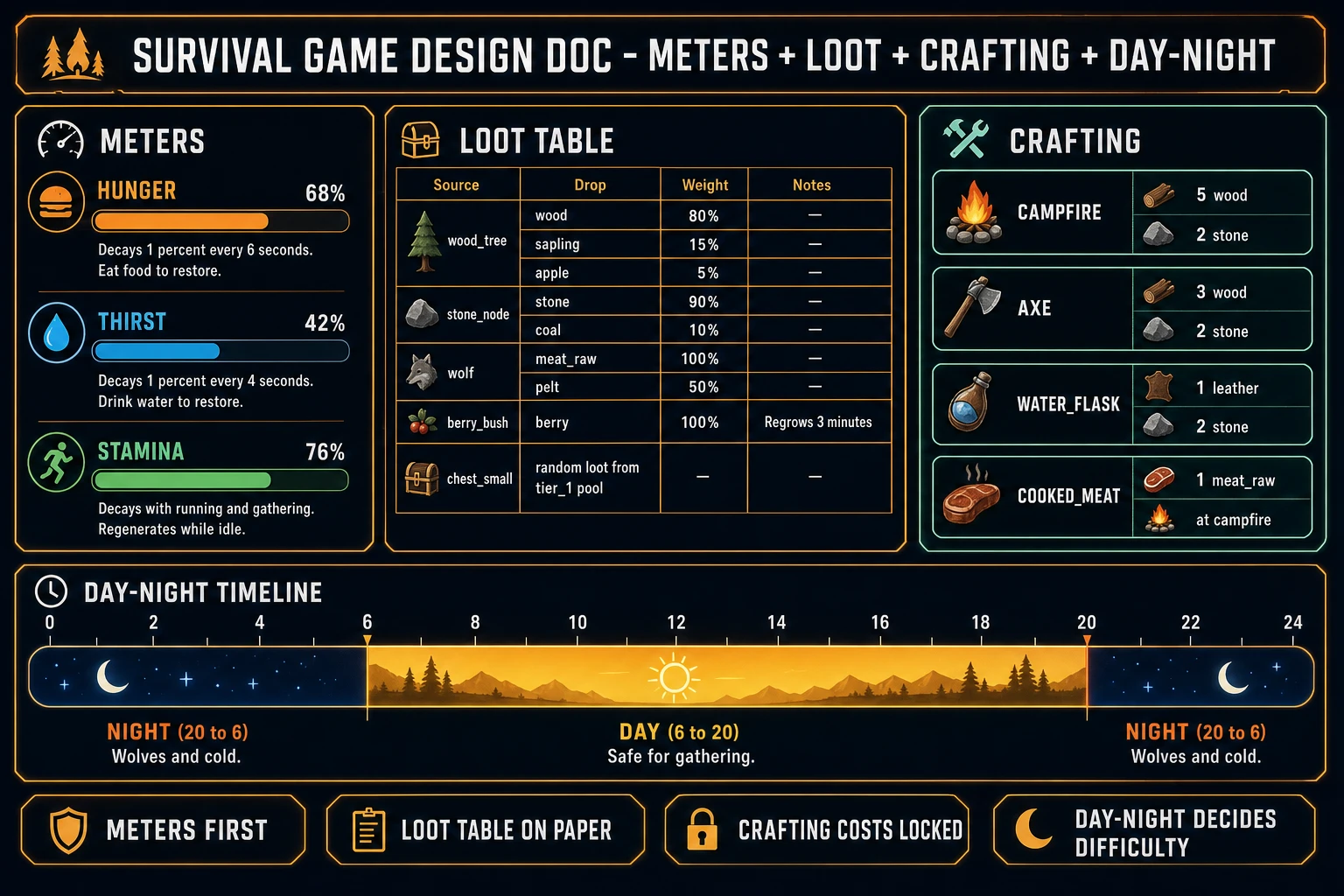
Survival game design doc with meters, loot table, crafting recipes, and day-night timeline laid out on one dashboard
The design doc is the whole survival game on one page. Meters, loot table, crafting recipes, day-night cycle. Every number pulls against the others — that is what makes the loop feel like survival, not a checklist.

Step 2 — generate the asset pack (hero, resource props, biome tiles, ambient music)

The asset stack for a first survival slice is small compared to the design doc. Roughly one hero sprite sheet, five resource-node sprites, one biome tileset, one ambient music loop, and a handful of one-shot SFX. Broken down:

  • Hero sprite sheet. Open Sorceress Quick Sprites. Prompt: "top-down survival hero, 32x32 pixel art, hooded traveler with backpack, 4-direction 6-frame walk cycles (up, down, left, right), plus 4-direction axe-swing and pickaxe-swing animations, muted forest palette, transparent background". Quick Sprites bills 9 credits per generation (verified 2026-08-06 in src/app/quick-sprites/page.tsx line 21 as CREDITS_PER_GEN = 9). Iterate two or three times to lock the silhouette.
  • Resource-node sprites. Five gatherable-object generations in Quick Sprites: tree (with chopped stump variant), rock (with mined variant), berry bush (with picked variant), water pool (animated ripple), and wolf enemy (with idle and hurt frames). 45 credits total for five sprites at 9 credits each.
  • Forest biome tileset. Open Sorceress Tileset Forge. Prompt: "top-down forest biome, 32x32 tile grid, grass, dirt path, moss stones, tree canopy edges, water shore, campfire ring, seamless edges, muted warm palette with soft shadow". Tileset Forge outputs a tileable strip you slice inside the standard tile-based video game grid described on Wikipedia. Roughly 20-40 credits to iterate to a clean result.
  • Ambient background music. Open Sorceress Music Gen. Prompt: "90-second looping ambient forest track, warm strings and light woodwinds, subtle wind, calm daytime mood with soft tension undercurrent, ends cleanly for loop". Music Gen bills 10 credits per generation (verified 2026-08-06 in src/app/music-gen/page.tsx line 28 as MUSIC_CREDIT_COST = 10). Add a second night-tension track: "90-second looping ambient night track, low drone, distant wolf howl every 40 seconds, cold uneasy mood". Add 2 credits per WAV export.
  • SFX one-shots. Open Sorceress SFX Gen. Six sounds — chop.wav (axe on wood), mine.wav (pickaxe on stone), drink.wav (short water gulp), eat.wav (short bite), hurt.wav (wolf bite hit), save.wav (soft chime). SFX Gen bills 1 credit per second, minimum 1 credit (verified 2026-08-06 in src/app/sfx-gen/page.tsx line 23 as SEED_AUDIO_CREDITS_PER_SECOND = 1). Six short one-shots at ~1 second each = ~6 credits total.

Drop every downloaded file into a single assets/ folder on your desktop. In WizardGenie, upload the folder in one drag-and-drop and paste the meters JSON plus loot table into the same prompt. Total asset generation time: roughly 20 minutes. Total credits spent: 130-160 depending on iteration.

Step 3 — let WizardGenie wire the survival loop (meters, gather, craft, save)

Open WizardGenie in a browser tab. Attach the assets folder. Paste the design doc as a single prompt with four sections labelled METERS, LOOT_TABLE, RECIPES, DAY_NIGHT. Then add a short freeform paragraph: Make a top-down survival game where the hero gathers wood/stone/berries, crafts a campfire and an axe, has to eat and drink to survive, and dies if hunger or thirst hit 0. Use requestAnimationFrame for the tick loop. Save the world state to localStorage on every craft and every night transition. Use the ambient_forest.wav loop during day and ambient_night.wav during night. Play chop.wav on axe swing, drink.wav on water action, hurt.wav on wolf bite.

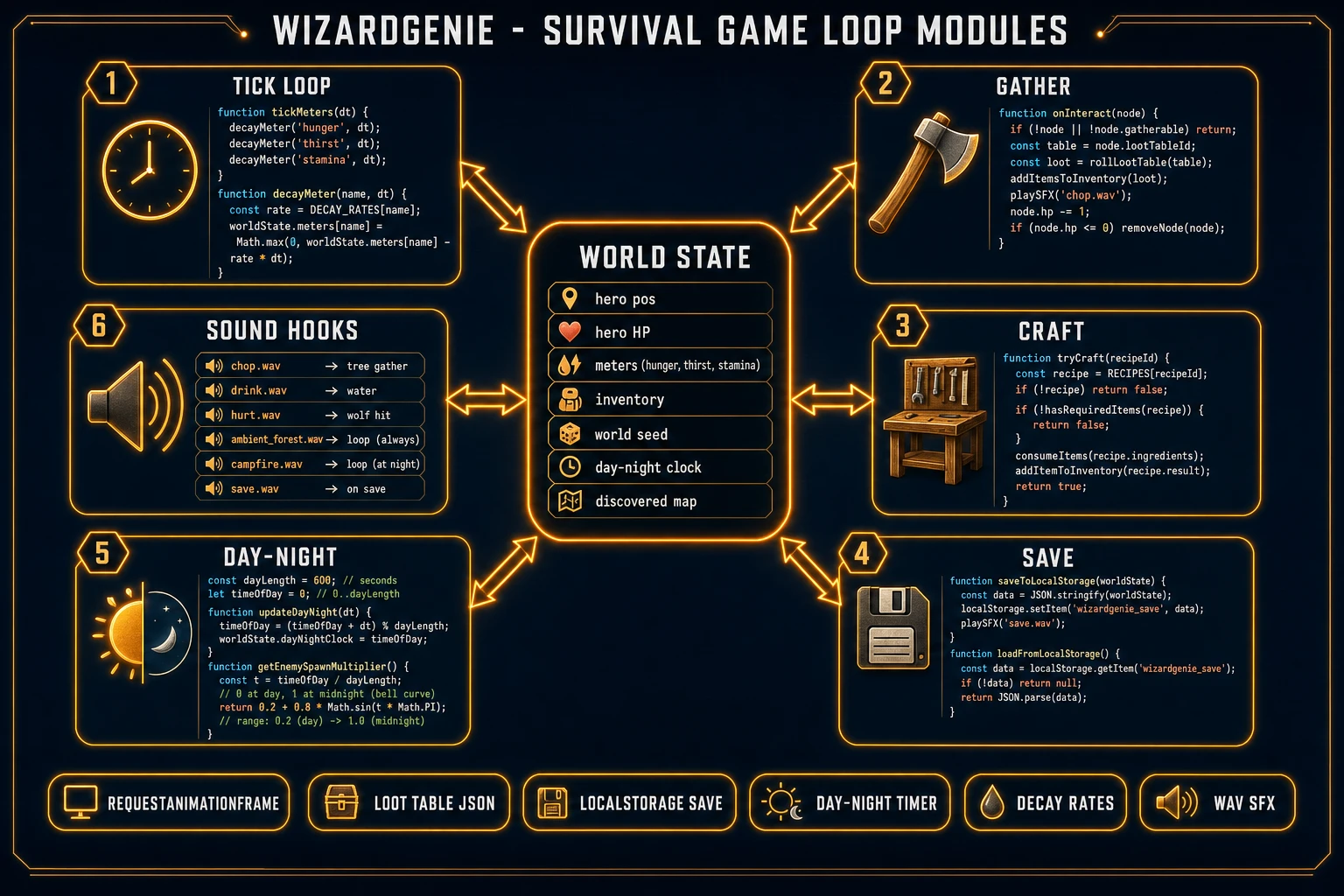
WizardGenie generates the six-module survival loop in one pass. The output structure is predictable across models: a WorldState object holding hero position, HP, meters, inventory, world seed, day-night clock, and discovered map; a tickMeters(deltaTime) function that decays each meter and triggers game-over on zero; a gatherResource(node) function that reads the loot table, rolls weighted drops, and pushes into inventory; a tryCraft(recipeId) function that checks inventory against the recipe cost and either spawns the crafted item or shows an insufficient-materials toast; a saveWorld() function that JSON-stringifies WorldState into localStorage and a loadWorld() that reads it back on page load; and a dayNightTick() that advances the clock, swaps ambient tracks at sunrise/sunset, and multiplies enemy spawn rates at night.

WizardGenie survival game code architecture with six modules: tick loop, gather, craft, save, day-night, sound hooks around a central WorldState
The WizardGenie survival game architecture in six modules. All six read from and write to a single WorldState object; that centralization is what makes the localStorage save one function call, and the debug HUD one render pass.

Iterate in three rounds. Round one: play for two minutes, note the first thing that feels off (meters decay too fast, wood is too rare, campfire does not restore stamina). Paste the observation back to WizardGenie: hunger decays too fast, try 1 percent per 10 seconds instead of per 6. WizardGenie tunes the constant and reloads the preview. Round two: add a small polish beat (hero animation loops during gather, campfire particles, day-night sky gradient). Round three: playtest a full ten-minute cycle end-to-end and confirm the tension curve holds — wood scarce at start, comfortable by minute five, wolves at minute seven, save-and-sleep by minute nine. If the curve is flat, tune the loot table weights; if the curve spikes, tune the meter decay rates. Fifteen minutes of tuning per round.

Common issues (and how to fix each in under a minute)

Every first survival game project trips on the same handful of small bugs. Fix them by tuning numbers, not by rewriting code:

  • Player dies of thirst in 2 minutes. Thirst decay rate is too high. Change from 1 percent per 4 seconds to 1 percent per 8 seconds. Confirm water is placed in the reachable starting area.
  • Wood is too cheap; campfire is trivial. Increase campfire recipe from 5 wood to 8 wood, or reduce wood_tree drop weight from 80 percent wood to 60 percent wood plus 40 percent nothing (make some swings miss).
  • Wolves swarm at day 2, unbeatable. Enemy spawn rate multiplier at night was set too high, or wolf HP is above the axe damage-per-hit ratio. Confirm axe = 3 wood + 2 stone + 1 pelt (chicken-and-egg without the axe, so drop the pelt requirement on tier-1 axe).
  • LocalStorage save fills up after 5 sessions. Old world snapshots are accumulating. Save under a single key survivalWorld and overwrite; do not append with a timestamp key.
  • Music does not swap at sunset. The day-night tick is comparing on strict equality with a floating-point time; use a range comparison. WizardGenie fixes this in one tweak — ask "swap music inside a window of 30 seconds around sunset instead of at the exact frame."
  • Save file breaks on schema change. Add a schemaVersion field to WorldState and a migration function on load. Bump the version whenever you change the loot table or the recipe list. Missing this is why every early survival prototype breaks between weekend one and weekend two.

What a how to make a survival game project costs on Sorceress in 2026

Concrete asset budget for the forest survival slice above, all numbers verified 2026-08-06 against the local Sorceress source:

  • Hero sprite sheet: 2-3 Quick Sprites generations x 9 credits = 18-27 credits (0.18-0.27 USD). Iterate on the four-direction walk and swing frames until the silhouette reads at 32x32.
  • Resource-node sprites (tree, rock, berry bush, water pool, wolf): 5 generations x 9 credits = 45 credits (0.45 USD). Add stumped/mined/picked variants in a free browser image editor after export for zero extra credits.
  • Forest biome tileset: 2-4 Tileset Forge generations = 20-40 credits (0.20-0.40 USD) to iterate to a clean tileable strip. A second biome (snow, desert, cave) doubles the total.
  • Ambient music (day + night loops): 2 loops x 10 credits + 4 credits WAV export = 24 credits (0.24 USD). Add a boss/danger track for another 12.
  • SFX pack (6 one-shots): 6 sounds at ~1 credit each = 6 credits (0.06 USD).

Total AI asset cost: roughly 115-140 credits, or 1.15-1.40 USD at Sorceress’s 100 credits per dollar standard rate (verified 2026-08-06 in src/lib/models.ts line 69 as CREDITS_PER_DOLLAR = 100). New accounts start with 100 free credits (verified 2026-08-06 in src/app/api/admin/credits/route.ts line 12 as SIGNUP_GRANT = 100), which covers most of the asset pack for a first survival game project. The Sorceress Lifetime tier at 49 USD one-time (verified in src/app/plans/page.tsx line 51 as LIFETIME_PRICE = 49) covers unlimited Quick Sprites, Tileset Forge, Music Gen, and SFX Gen for the life of the account — useful once you start iterating across three or four biomes and want to skip the per-generation credit math entirely.

WizardGenie itself is bring-your-own-key or trial-key on the model side, so the model cost depends on which coding model you pick from the lineup. On the cheap end, DeepSeek V4 Pro or MiniMax M2.7 runs the whole two-weekend survival build for a few cents in tokens. On the premium end, Claude Opus 4.7 or GPT-5.5 as the Planner with a cheap Executor still lands well under the price of one commercial engine seat per month. The dual-agent Planner+Executor pattern is specifically designed to make premium reasoning affordable by never putting the expensive model on the typing side.

Bigger picture: this workflow — design doc on paper plus AI-generated assets in a parallel tab plus WizardGenie writing the tick loop — is the standard for solo indie devs shipping playable survival slices in a weekend. If you want to go deeper on the assets side, the Sorceress Tools Guide is the wide index of every tool referenced above and the front page at Sorceress is where each of them lives. For related genre-specific tutorials that use the exact same asset pipeline: Fortify How to Make a Tower Defense Game (Wave Loop 2026) covers the same recipe for a wave-based strategy game, Sprawl How to Make a Metroidvania (Map + Ability Gates) covers the room-graph and ability-gate pattern, and Ignite a GDevelop Tutorial (Browser AI Assets 2026) covers the no-code event-sheet path for players who prefer a visual editor over an AI code assistant. All three articles share the same "design first, generate assets in Sorceress, code the loop last" spine as this survival game recipe.

Frequently Asked Questions

How long does it take to make a survival game?

A first playable survival slice on the recipe below takes about two weekends of focused work: one weekend for the hunger, thirst, stamina, and loot-table design plus the asset pack, one weekend for the code loop, day-night cycle, and save system. That gets you roughly one biome, five gatherable resources, three enemies, one crafting recipe, and a decay-and-restart loop, which is enough to prove the survival tension feels right. A commercial-scope survival game (multiple biomes, thirty-plus items, base building, multiplayer, dozens of hours of content) is a multi-year project even with AI assets - Don’t Starve took Klei about eighteen months for the singleplayer 1.0, and Valheim took Iron Gate five years from prototype to Steam Early Access.

What is the easiest engine for a survival game in 2026?

For a first browser-first survival game, WizardGenie is the fastest path: you paste the hunger and loot tables into one prompt and it iterates the tick loop, meter decay, gather actions, crafting recipes, and JSON save file for you in a browser tab. For hand-coding, Godot 4 (verified stable 14 July 2026 on godotengine.org) is honest because its scene tree cleanly holds the world scene plus a persistent AutoLoad singleton for the player stats, and Timer nodes handle the day-night tick without any custom scheduler. Phaser v4.2.1 Giedi (released 9 July 2026 per phaser.io/download/stable) is the pure JavaScript answer if you want a single HTML bundle. Unity is fine for a bigger survival project but heavier than needed for a solo two-weekend prototype.

What is a loot table and why does a survival game need one?

A loot table is a data structure that maps a source (an enemy, a chest, a tree, a rock, a fishing spot) to a weighted list of possible drops with a roll count. Wikipedia’s entry on loot in video games describes the same concept: instead of hardcoding what a chopped tree drops in the tree’s own code, you write a wood_tree entry in a JSON table listing wood 80 percent, sapling 15 percent, apple 5 percent, and roll the drop once per chop. Every survival game runs on loot tables because balancing gather rates, crafting costs, and enemy rewards from data instead of from code means a designer can rebalance the entire economy by editing one file. The loot table for the recipe below fits in a 40-line JSON file per biome.

Do I need to design the loot table before writing survival game code?

Yes. The loot table is the survival game’s economy on one page, and the game does not feel like a survival game until the numbers pull against each other. If wood is too cheap to gather, the campfire is trivial; if food heals too much, the hunger meter is decorative; if enemies drop too much iron, the crafting progression collapses in ten minutes. Write every gatherable resource, every drop rate, every recipe cost, and every meter decay rate in a single JSON block or spreadsheet before you open the code editor. Then hand that table to WizardGenie or your engine of choice. The code becomes almost mechanical once the numbers are locked; the hard work was designing the economy, not typing it out.

Can I make a browser survival game people actually play?

Yes. A WizardGenie or Phaser 4 survival game exports to a standard HTML5 bundle that runs in any modern browser and saves the player’s inventory, meters, and world seed to localStorage so a returning player picks up where they left off. Free static hosts that accept HTML5 games include GitHub Pages, Netlify, Vercel, and itch.io - the itch.io free tier is the community standard for indie survival jam builds and its Web-playable filter surfaces browser-first entries at the top of every jam. Godot 4 also exports to HTML5 for browser hosting, though the WASM bundle is heavier than a hand-rolled JS build. Total hosting cost for a browser survival game is 0 dollars per month on itch.io or GitHub Pages.

Sources

  1. Survival game - Wikipedia
  2. Loot (video games) - Wikipedia
  3. Tile-based video game - Wikipedia
  4. Window: requestAnimationFrame() method - MDN Web Docs
Written by Arron R.·3,206 words·14 min read

Related posts