Bingo How to Make a Bingo Game (Browser Card Grid 2026)

By Arron R.12 min read
How to make a bingo game in 2026: generate a 5×5 B-I-N-G-O card with a free center, wire ball draw, daub clicks, and win-line checks in WizardGenie, then add AI

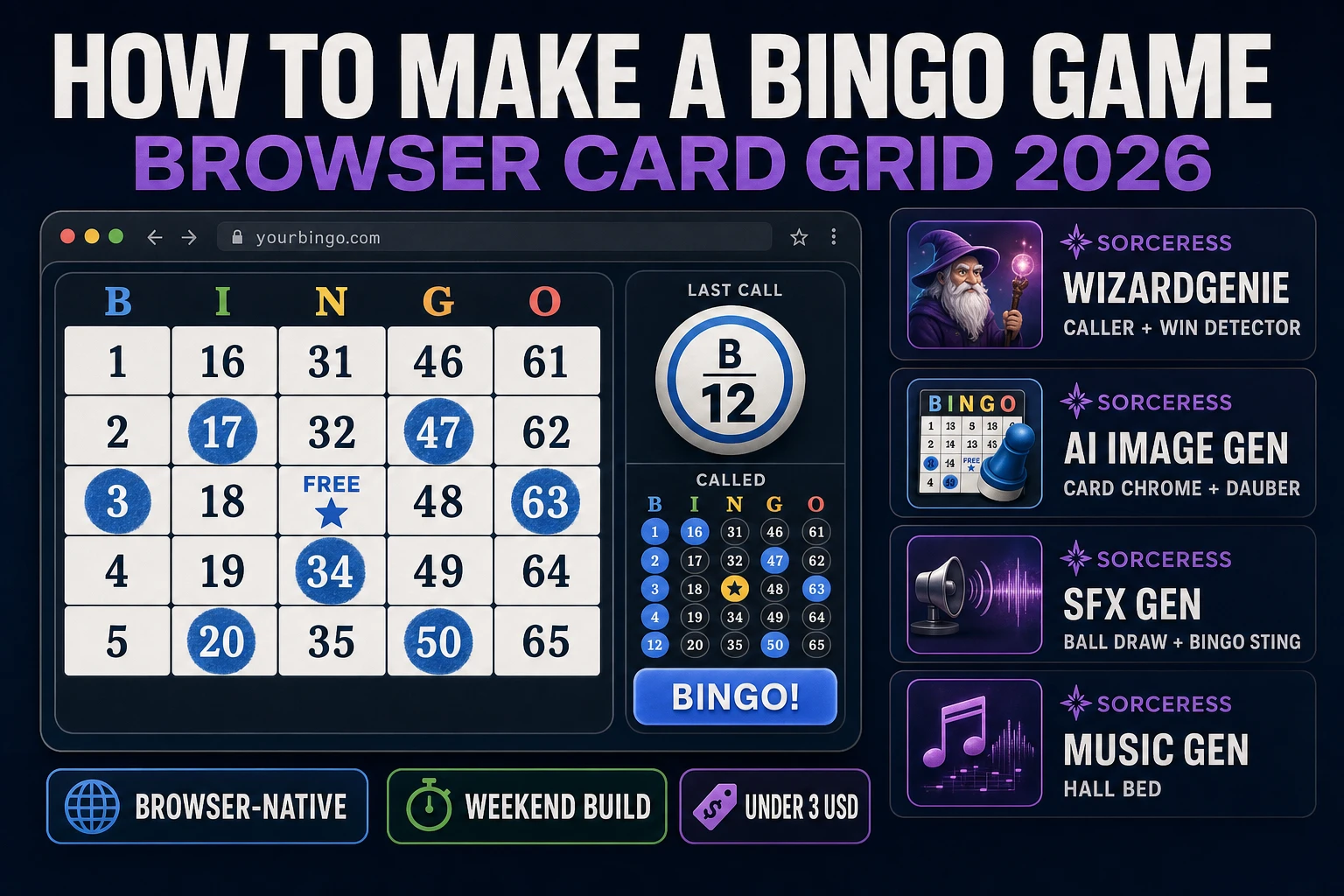
How to make a bingo game is one of the cleanest browser weekenders in 2026: a 5×5 card, a shuffled ball pool, a daub on match, and a pattern check that lights up when someone should yell Bingo. The American 75-ball format — popularized in the United States after Hugh J. Ward standardized carnival rules in the 1920s and Edwin S. Lowe sold home sets through the Depression — still uses the same B-I-N-G-O columns and free center square you see in church halls today. Almost every tutorial for how to make a bingo game still stops at printing a static card PDF. The 2026 pipeline is different. A coding agent scaffolds the caller, daub, and win-line detector from one prompt, and AI generation covers the card chrome and audio. In a browser, that means WizardGenie for the game loop, Sorceress AI Image Gen for card chrome and dauber art, SFX Gen for ball-draw and bingo stings, and Music Gen for a calm hall bed. This guide is the honest end-to-end for how to make a bingo game in 2026, in a browser, in a weekend.
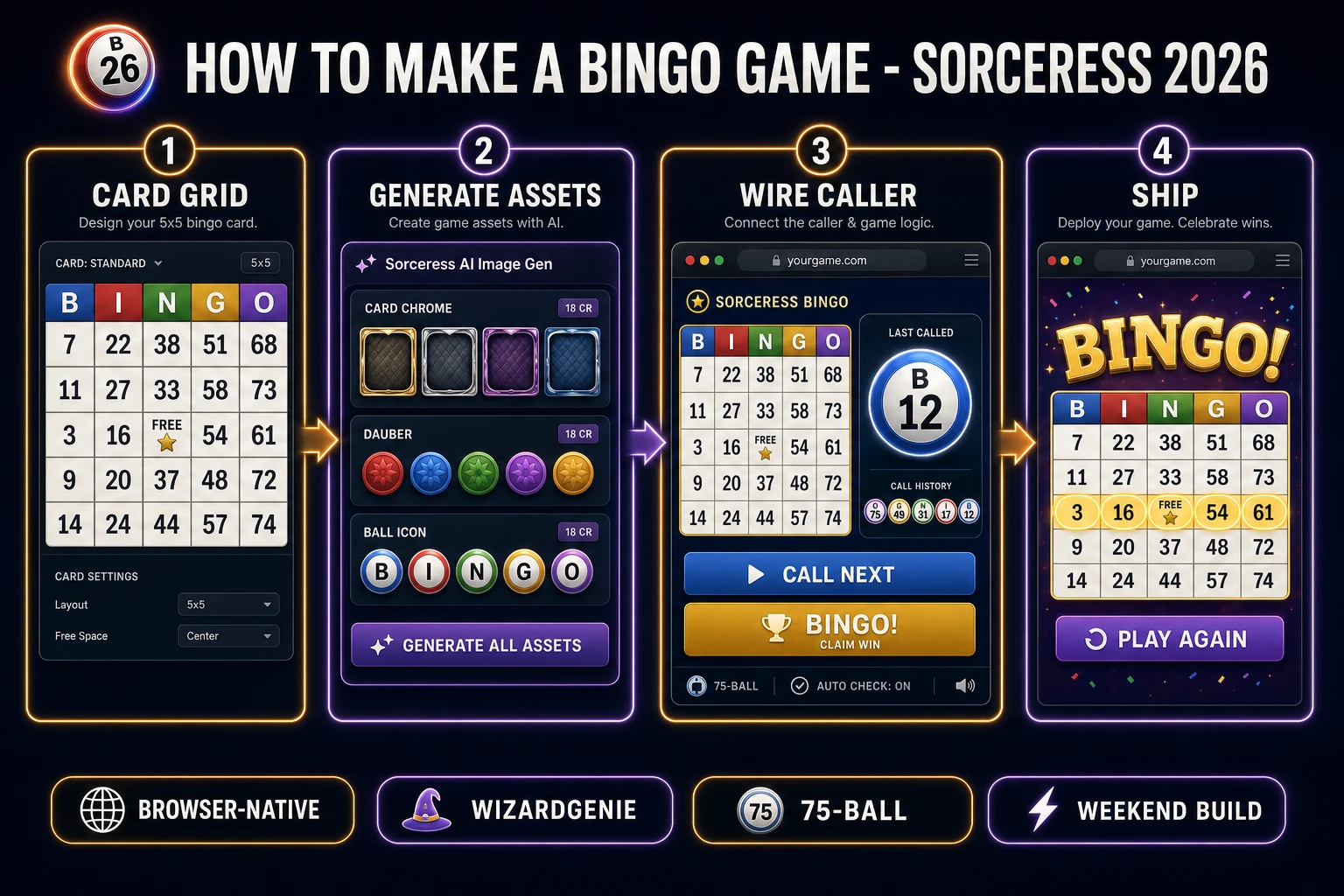
How to make a bingo game browser pipeline: build the 5x5 card grid, generate chrome assets, wire the caller and win detector in WizardGenie, and ship a browser build
The 2026 how to make a bingo game browser recipe: shape a 75-ball card with a free center, generate chrome in Nano Banana Pro, wire ball draw and win-line detection in WizardGenie, then add caller stingers and a music bed.

What how to make a bingo game actually means in 2026

The query “how to make a bingo game” hides three intents. Some searchers want printable classroom cards — a PDF generator with custom vocabulary or math facts in each cell. A second intent is a live multiplayer hall: one host caller, many players on phones, room codes, and a shared ball stream. That needs a backend and WebSockets, and it is a two-week project. The third intent, and the one this guide targets, is a single-player (or local hot-seat) browser bingo game: one or more cards on screen, an on-page caller, daub on match, a Bingo claim button, and a best-round timer saved between sessions. That is a weekend build, it demos the whole Sorceress toolset, and it is the format most first-time bingo builders actually want — including teachers who later swap number cells for vocabulary words.

The presentation contract is small and strict. A title screen shows the game name, a Play button, a Pattern selector (Any Line, Four Corners, X, Blackout), and a Daub mode toggle (Auto / Manual). The play screen shows one large 5×5 card with B-I-N-G-O headers, a free center marked from the start, a “called ball” badge (letter plus number), a Call Next control, a Bingo claim button, and a call-history strip of the last eight balls. On a valid claim, the completed pattern highlights in green, the caller freezes, and a results card shows balls-to-bingo plus Play Again. Every American hall game from Lowe’s paper sets through modern flashboard systems honours that same card-plus-caller layout, which is why the format renders cleanly in a browser: it is a grid UI plus a random sequence, and HTML has been drawing grids since tables were invented.

The bingo game loop in one minute (draw, call, daub, check)

Five moving parts and nothing else, in strict order per ball. First, draw — pop the next number from a shuffled pool of 1–75 with no repeats in the round. Second, call — map the number to its column letter (B 1–15, I 16–30, N 31–45, G 46–60, O 61–75), update the called-ball badge, append the call history, and play a short draw sting. Third, daub — if auto-daub is on, mark every matching cell on every active card; if manual, wait for a click on the matching cell and ignore wrong taps. Fourth, check — after each mark, run the pattern detectors for the selected win condition against the authoritative marked grid (free center already true). Fifth, claim — only when the player presses Bingo (or spacebar) do you verify the pattern, highlight the winning cells, play the win sting, and freeze the caller. Jumping the gun without a valid pattern plays a soft “false bingo” buzz and keeps the round alive.

Autosave the card layout, marked bitmask, remaining ball pool, selected pattern, and call history to localStorage under a key like bingo.session. On page load, if a session exists, offer Resume next to New Game. Under a second key like bingo.best, keep the fewest balls-to-bingo for each pattern. That is the entire game. Five steps, executed per ball, driven by a plain JavaScript state machine. Everything else — confetti on blackout, a “one away” near-win pulse, keyboard shortcuts for Call Next and Bingo, multi-card strips for party play — is polish. Keep the core loop tight, ship one full 75-ball round end-to-end, and only then layer polish. A first bingo game that ships any-line wins with clean claim verification will teach you more than a half-built hall with twelve unfinished patterns.
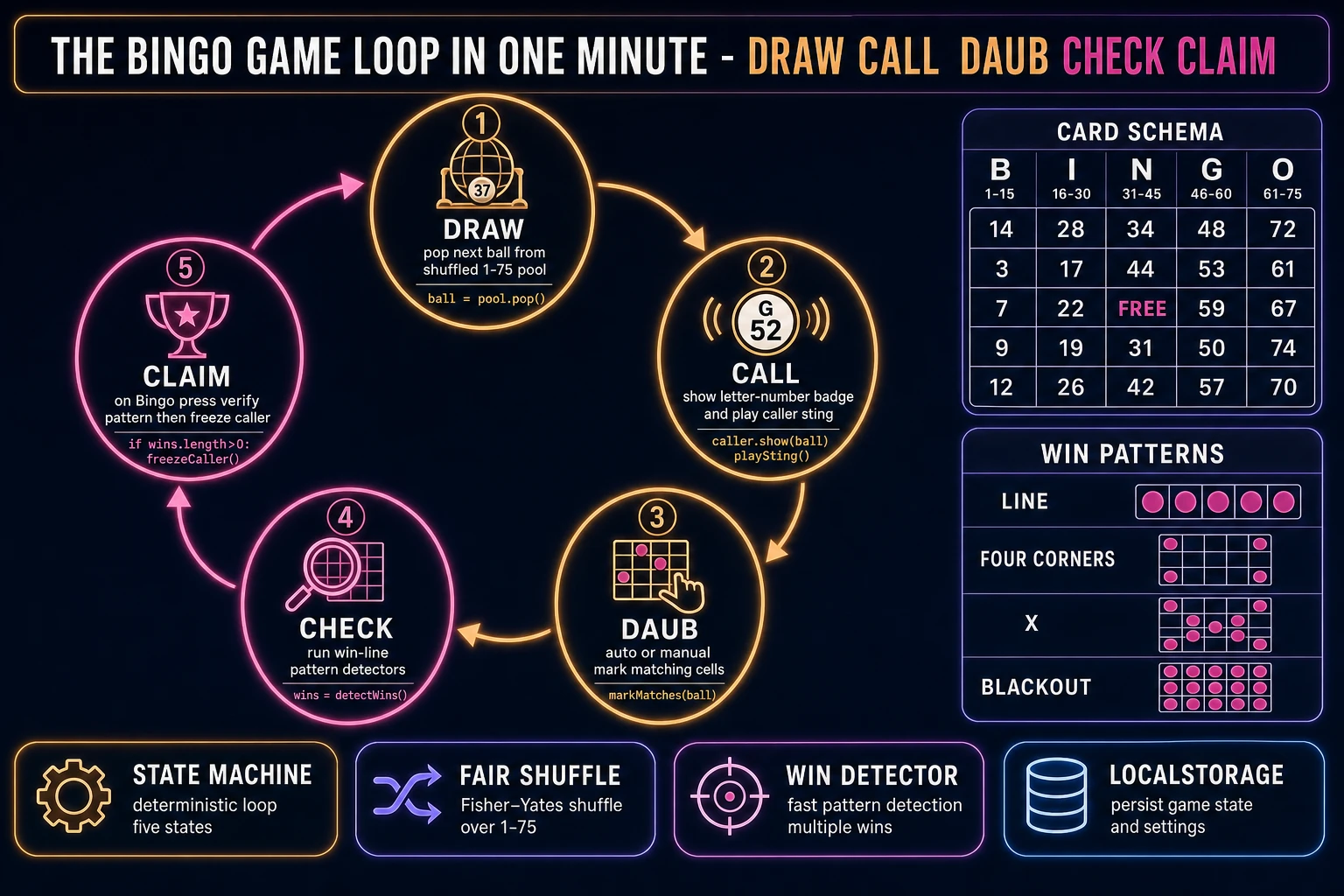
Bingo game loop state machine diagram showing draw, call, daub, check, and claim nodes with a 75-ball card schema and win pattern list
The bingo game loop: draw the next ball, call letter-plus-number, daub matching cells, check win patterns, then claim Bingo only after a verified pattern.

Pick your engine for how to make a bingo game: vanilla DOM, React, or WizardGenie

Three good browser targets in 2026, each with a different trade-off. Vanilla JavaScript with a DOM grid is the honest default and the pick this guide recommends for a first build. A bingo card is a CSS grid of twenty-five buttons or cells, a header row of five letters, and a small state object for marked cells. Total code footprint for a working bingo game is under 450 lines and ships as a single static HTML file. The Web Storage API handles session and best-score persistence. No engine to install, no build step, deploys to GitHub Pages, Netlify, or Vercel with a drag-and-drop.

React becomes the right pick if the bingo game grows into a longer app (classroom content editor, custom word bingo, multi-card party mode, teacher dashboard) or if you already have a React project to embed the card inside. Components map cleanly — <BingoCard>, <CallerBadge>, <PatternPicker>, <ResultsCard> — and hooks keep the marked bitmask and ball pool tidy. The cost is the build step and the React bundle, which matters more for a single-page portfolio piece than a jam entry.

Phaser becomes the right pick if you want animated ball flies from a hopper, particle bursts on Bingo, or integrated audio timelines so the caller sting crossfades with the win flourish. Phaser’s Scene lifecycle maps onto title-play-results if you scale up to themed modes (holiday bingo, music bingo). For a first card-grid game, Phaser is optional weight — use it when motion is the product, not when the product is a fair caller and a correct win detector.

WizardGenie is not a separate rendering engine — it scaffolds whichever of the three you pick, from a single natural-language prompt. WizardGenie is the Sorceress game-native coding agent. It ships as both a desktop app (Windows installer with auto-update, available to Early Access supporters and above) and a no-install web build at the same URL. Its coding-model lineup covers Claude Opus 4.7, GPT-5.5, Gemini 3.1 Pro, DeepSeek V4 Pro, Kimi K2.5, Grok 4.2, and MiniMax M2.7 (verified 2026-08-18 in src/app/_home-v2/_data/tools.ts). For a bingo game, any frontier model scaffolds the card generator and caller in one prompt. If you want to run cheap, pair a frontier planner (Claude Opus 4.7 or GPT-5.5) with a budget executor (DeepSeek V4 Pro or Kimi K2.5) and let the executor do the typing — the Dual-agent planner-and-executor pattern is why WizardGenie exists, and it lands most projects at roughly one-fifth the single-frontier cost.

Step 1 — generate the 5×5 card and free-space center

Nothing else in the pipeline matters if the card generator is wrong. American 75-ball bingo uses five columns labeled B, I, N, G, and O. Each column only draws from its own fifteen-number band: B 1–15, I 16–30, N 31–45, G 46–60, O 61–75. Sample five unique numbers per column without replacement, place them in the five row slots, and leave the exact center cell as FREE — treated as already marked for every pattern check. That layout is the same one documented on the American bingo Wikipedia page and in standard 75-ball rule summaries.

Implement the generator as a pure function that returns a 25-slot array (or a 5×5 matrix) plus a boolean marked array with index 12 (center) pre-set to true. Shuffle each column’s picks with Fisher-Yates driven by crypto.getRandomValues — not Array.sort(() => Math.random() - 0.5), which biases order. Persist the generated card so New Round can rebuild numbers while Resume restores the same sheet mid-game. For classroom or party play, generate three cards per session and show them in a horizontal strip; the caller is shared, and any card’s valid claim ends the round.

Before you write a single pixel of chrome, unit-test the generator: every B cell is in 1–15, no duplicates inside a column, center is FREE, and a freshly marked free-only board does not falsely win Any Line. Those four asserts catch 90 percent of the bugs that make a bingo demo embarrassing in front of a classroom.

Step 2 — wire the caller, daub click, and win-line detector in WizardGenie

With the card generator solid, open WizardGenie. Drop in a bare index.html with containers for title, play, and results. Give the agent one paragraph: Build a browser 75-ball bingo game. Generate a 5×5 B-I-N-G-O card with column ranges B1–15, I16–30, N31–45, G46–60, O61–75 and a free center. Shuffle balls 1–75 with Fisher-Yates using crypto.getRandomValues. On Call Next, pop the next ball, show letter-number, append call history. Support Auto and Manual daub. After each mark, check patterns for Any Line, Four Corners, X, and Blackout. Only end the round when the player presses Bingo and the pattern verifies. Autosave session and best balls-to-bingo per pattern to localStorage. Feed that to any coding model in the lineup and the interpreter scaffolds in under three minutes.

The remaining hour is polish via follow-ups. Add a near-win pulse when any line is one cell short — three lines that make the hall feel alive. Add keyboard shortcuts (N for Call Next, Space for Bingo, 1–4 for pattern presets). Add a call-history strip of the last eight balls so players can catch up after looking away. Add a false-bingo soft buzz when claim fails verification. Each item is a follow-up prompt, and the whole bingo game comes together over a Saturday afternoon. Keep the win detector pure and tested: feed it boards that are one cell short and boards that just completed, for every pattern you ship.

Step 3 — AI Image Gen card chrome, SFX Gen ball-draw and bingo sting, Music Gen bed

Open Sorceress AI Image Gen for the visual set first. A bingo game needs three matched pieces: card chrome (the wooden or neon frame around the 5×5 grid), a dauber/marker stamp for manual mode, and a ball icon for the caller badge. Nano Banana Pro at 18 credits per generation (verified 2026-08-18 in src/lib/models.ts line 303 as credits: 18) holds a consistent style across the set. Prompt in a register like “bingo game UI asset, centred, painted flat vector, soft shadow, transparent background, no text, cohesive carnival palette” and generate two variations each. Three assets × two variations × 18 credits is 108 credits or 1.08 USD.

Optional but recommended: two overlays. A title-screen background (16:9, hall or carnival feel, no text) and a results-screen background (16:9, celebratory, subtle confetti, no text). Two overlays at 18 credits each is 36 credits or 0.36 USD. Total AI Image Gen for the visual set is roughly 144 credits or 1.44 USD — still a lean asset budget because the same chrome wraps every round.

Now the audio. Open SFX Gen. SFX Gen bills 1 credit per second (verified 2026-08-18 in src/app/sfx-gen/page.tsx line 23 as SEED_AUDIO_CREDITS_PER_SECOND = 1). Four clips cover a first bingo game: ball-draw (1 second, soft hopper click), daub tap (0.3 seconds, rubber stamp), near-win tick (0.2 seconds, quiet pulse), and bingo win (2 seconds, bright flourish). Total roughly 6 credits or 0.06 USD. Add one 30-second ambient bed — quiet hall murmur or soft synth pad — at 30 credits or 0.30 USD. Wire each sting as a one-line new Audio(path).play() on the matching event.

Open Music Gen. Music Gen bills 10 credits per generation (verified 2026-08-18 in src/app/music-gen/page.tsx line 28 as MUSIC_CREDIT_COST = 10). Two tracks cover a first bingo game: a title-and-menu loop (warm, social, 60 seconds) and a play bed (steady, non-distracting, 90 seconds) under the caller. Two or three generations per track, so budget 40 to 60 credits (0.40 to 0.60 USD). Add 2 credits per WAV render if you want lossless (WAV_CREDIT_COST = 2, same file line 31); MP3 is fine for browser delivery.

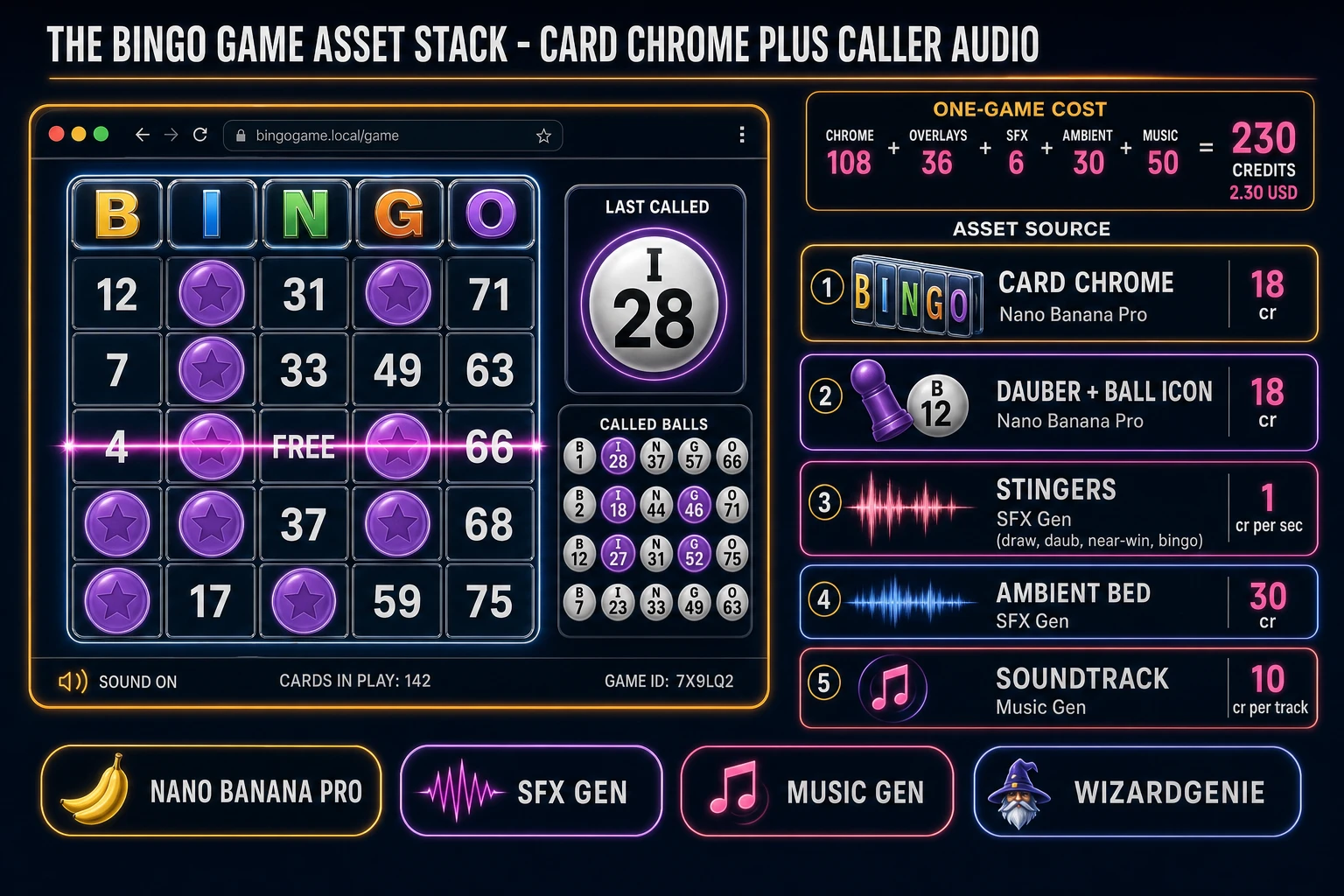
Bingo game asset stack showing a browser 5x5 card with called ball HUD next to asset tiles for card chrome, dauber, stingers, ambient bed, and music tracks
The bingo game asset stack: card chrome and dauber from AI Image Gen, four short stingers plus an ambient bed from SFX Gen, and two music tracks from Music Gen — the whole visual and audio set costs under three dollars.

What a how to make a bingo game project costs on Sorceress in 2026

Concrete asset and generation budget for a browser bingo game — 75-ball card, free center, caller, auto/manual daub, four win patterns, best balls-to-bingo — from empty repo to zip-and-ship playable, all numbers verified 2026-08-18 against local Sorceress source:

  • Card chrome, dauber, ball icon (AI Image Gen): 3 assets at Nano Banana Pro 18 credits per generation with 2 variations each = 108 credits (1.08 USD). Transparent backgrounds, matched carnival palette.
  • Title and results overlays (AI Image Gen): 2 backgrounds at 18 credits each = 36 credits (0.36 USD). 16:9 painted, no text.
  • Stingers (SFX Gen): 4 clips at 1 credit per second, roughly 6 seconds total = 6 credits (0.06 USD). Draw, daub, near-win, bingo win.
  • Ambient bed (SFX Gen): 1 clip at 30 seconds = 30 credits (0.30 USD). Hall murmur or soft pad.
  • Background music (Music Gen): 2 tracks at 10 credits per generation, 2 to 3 tries each = 40 to 60 credits (0.40 to 0.60 USD). Add 2 credits per WAV render if you need lossless.
  • WizardGenie coding time: effectively free on the Sorceress side. Model-side API cost for a 2-to-4-hour prompt session on a cheap Executor like DeepSeek V4 Pro is typically under 0.50 USD.
  • Total for one complete browser bingo game: roughly 220 to 240 credits, or roughly 2.20 to 2.40 USD in Sorceress credits, plus under 0.50 USD in model API time. Under 3 USD end-to-end for a first bingo game with fair cards, four patterns, and full caller audio.

Sorceress bills 100 credits per dollar at the standard rate (CREDITS_PER_DOLLAR = 100 in src/lib/models.ts line 69). New accounts start with 100 free credits (SIGNUP_GRANT = 100 in src/app/api/admin/credits/route.ts line 12), which covers all four stingers, the ambient loop, one music track, and one chrome piece outright — enough to prototype before you top up. The Sorceress Lifetime tier at 49 USD one-time (LIFETIME_PRICE = 49 in src/app/plans/page.tsx line 51) covers unlimited SFX Gen and Music Gen use forever, which matters if you plan themed variants (classroom vocabulary bingo, music bingo, holiday blackout nights) — each extra theme reuses the coding scaffold and pays only for new chrome and content cells.

For related browser-game pipelines that share this design-first-generate-assets-scaffold-the-loop spine, the closest reads are Quiz How to Make a Trivia Game (Browser Question Loop 2026) for the sibling short-session party game, Recall How to Make a Memory Game (Browser Match Grid 2026) for another grid-based weekender, Sum How to Make a Math Game (Browser Quiz Loop 2026) for the classroom-adjacent loop, and Board How to Make a Board Game (Browser Tabletop 2026) for turn-based tabletop siblings. The Sorceress Tools Guide is the master index for every tool this guide referenced. Under three dollars, one weekend, and how to make a bingo game is a done deal.

Frequently Asked Questions

What bingo format should a first browser game use?

Ship 75-ball American bingo first. That is the 5×5 B-I-N-G-O card with a free center square and numbers 1–75 restricted by column (B 1–15, I 16–30, N 31–45, G 46–60, O 61–75). It is the format most North American players already know, it maps cleanly onto a DOM or canvas grid, and the free-space center makes win-line math friendlier for beginners. Save 90-ball UK tickets (3×9 with no free space) for a second mode once the 75-ball loop is solid. Announce the target pattern before each round — any line, four corners, X, or blackout — so players know what counts as a win.

How do I generate fair bingo cards in JavaScript?

For each column, sample five unique numbers from that column’s 15-number range without replacement, then place them in the five row slots. Leave the exact center cell (row 2, column 2, zero-indexed) as FREE and treat it as already marked. Use a Fisher-Yates shuffle backed by crypto.getRandomValues (or a crypto-seeded PRNG) rather than Array.sort with Math.random, which biases order. Persist each generated card as a 25-slot array plus a marked bitmask so you can resume a round from localStorage. For classroom or party play, generate three to six cards per player session so one slow card does not end the night.

Should the browser game auto-daub or require manual clicks?

Offer both. Auto-daub marks matching numbers the instant a ball is called — better for kids, accessibility, and players holding multiple cards. Manual daub requires a click or tap on the matching cell and feels closer to hall bingo with a physical dauber. Put a Daub mode toggle on the title screen and store the preference in localStorage. In either mode, still require an explicit Bingo button (or spacebar) to claim a win so a false pattern does not auto-end the round. After a claim, highlight the completed pattern in green, play the win sting, and freeze the caller until the player starts a new round.

How do I detect a bingo win without bugs?

Represent the card as a 5×5 boolean grid with the free center pre-set to true. After every daub, run a small set of pattern checkers against the current target: five horizontals, five verticals, two diagonals, four-corners, optional X (both diagonals), and optional blackout (all 25 true). Short-circuit on the first match. Never trust only the UI highlight — keep the authoritative marked state in a typed array or bitmask and derive the display from that. Unit-test each pattern with a hand-built board that is one cell short of a win and one that just completed it. That catch list eliminates the classic false bingo and missed bingo bugs that sink classroom demos.

How much does it cost to build a bingo game on Sorceress?

A first-project browser bingo game budgets like this against the 2026 Sorceress rate card (all constants verified against local source on 2026-08-18). Card chrome, dauber marker, and ball icon at Nano Banana Pro 18 credits each with two variations each is 108 credits or 1.08 USD (src/lib/models.ts line 303 credits: 18). Two overlays (title and results) at 18 credits each is 36 credits or 0.36 USD. Four SFX clips at 1 credit per second (src/app/sfx-gen/page.tsx line 23 SEED_AUDIO_CREDITS_PER_SECOND) — ball draw, daub tap, near-win tick, bingo win — are roughly 6 credits or 0.06 USD. One 30-second ambient bed is 30 credits or 0.30 USD. Two music tracks at 10 credits per generation (src/app/music-gen/page.tsx line 28 MUSIC_CREDIT_COST) with two or three tries each is 40 to 60 credits or 0.40 to 0.60 USD. Total roughly 220 to 240 credits, or 2.20 to 2.40 USD, plus under 0.50 USD in coding-model API time. The free 100-credit signup grant (src/app/api/admin/credits/route.ts line 12 SIGNUP_GRANT) covers the stingers, ambient bed, first music track, and one chrome piece outright.

Sources

  1. Bingo (American version) - Wikipedia
  2. How to Play 75-Ball Bingo - Bingo Docs
  3. MDN - Web Storage API (localStorage best-score)
  4. MDN - Crypto.getRandomValues (fair ball shuffle)
  5. Phaser 4 - HTML5 Game Framework
Written by Arron R.·2,684 words·12 min read

Related posts