Tally How to Make a Clicker Game (Browser Score Loop 2026)

By Arron R.14 min read
How to make a clicker game in 2026: pick an exponential number curve, wire a click-to-score handler feeding a per-tick auto-producer, add an upgrade shop that s

Cookie Clicker (2013) remains the canonical answer to how to make a clicker game — Julien "Orteil" Thiennot wrote the whole thing in one evening, posted a link on 4chan, and had 50,000 players within hours, then 200,000 players per day within a month (verified against the Cookie Clicker Wikipedia article on 2026-08-08). The mechanic is one sentence: click a target, watch a number go up, spend that number on upgrades that either boost the per-click value or add a per-tick auto-producer, and prestige when the growth curve stalls. The implementation is one afternoon of code. In this guide the pipeline for how to make a clicker game runs from an empty repo to a shareable browser build: design the number curve on paper first (this is the design work most tutorials skip), prompt WizardGenie to scaffold a React project with a click handler, a per-tick producer, and an upgrade shop that scales prices 15 percent per purchase, persist state to the standard localStorage browser API on every change, and finish with click-target art from Sorceress AI Image Gen, a tap thunk from SFX Gen, and an ambient loop from Music Gen.
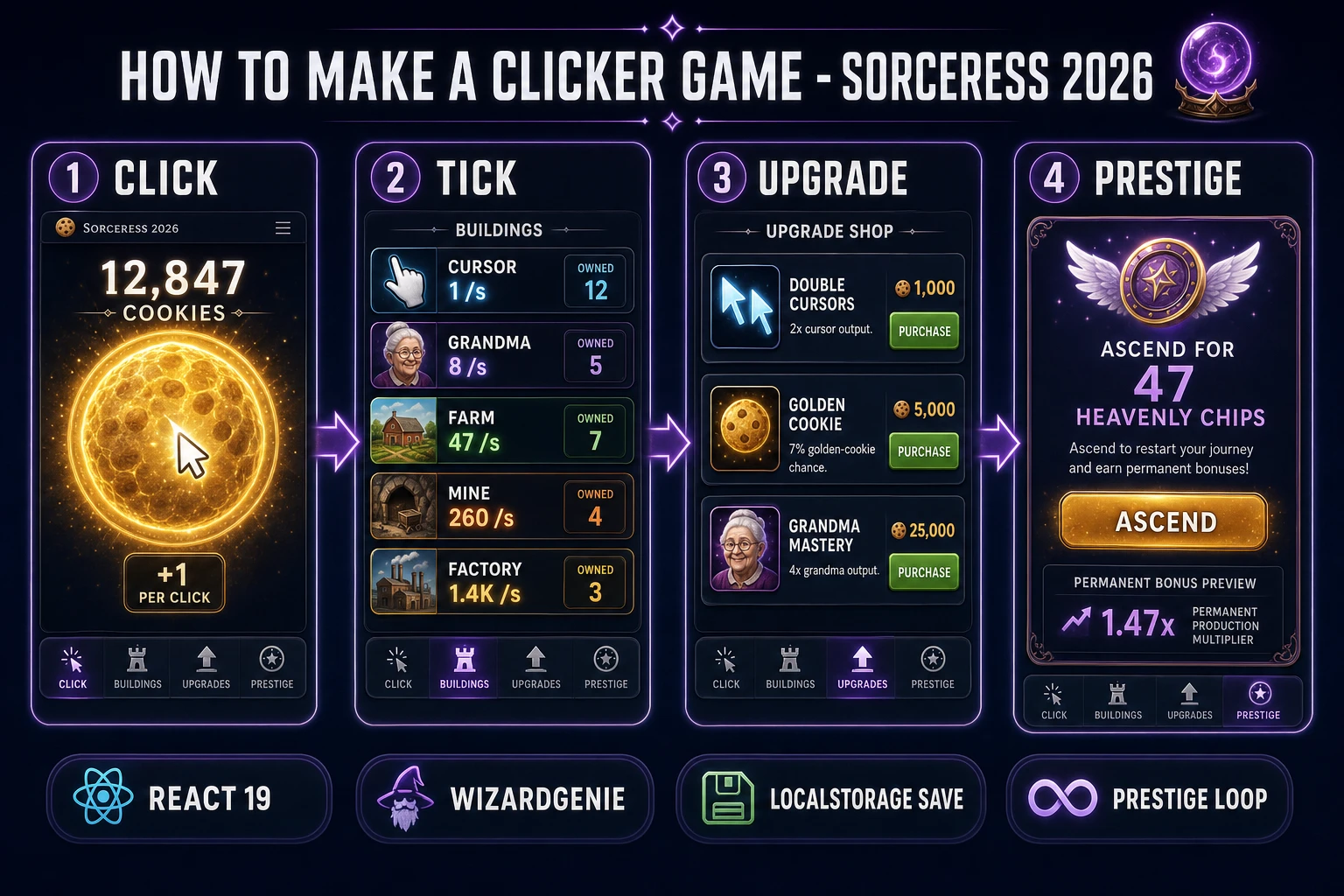
How to make a clicker game browser pipeline: click, tick, upgrade, prestige panels with a WizardGenie React scaffold and Sorceress toolset
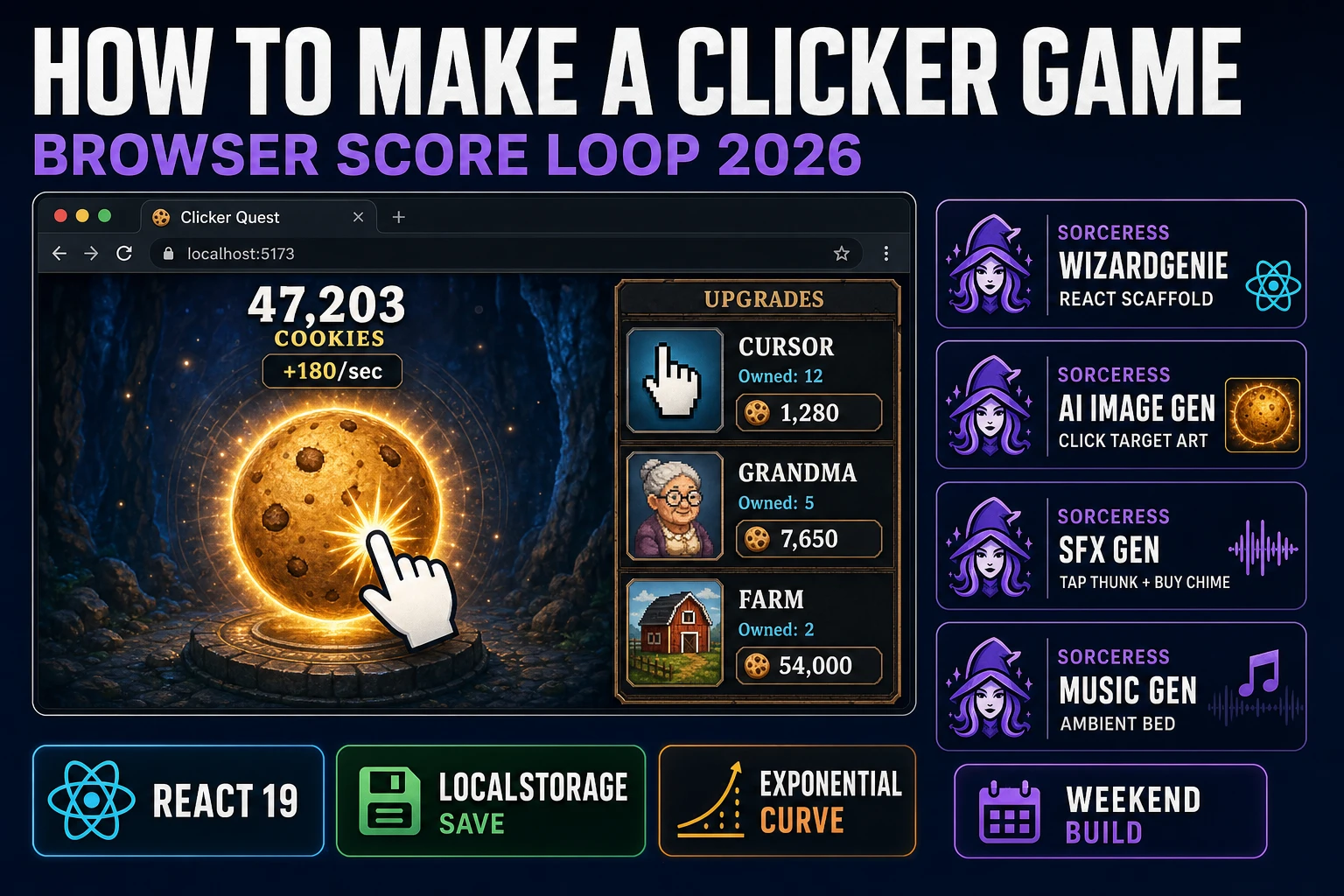
The 2026 browser clicker recipe: WizardGenie scaffolds the React project, AI Image Gen supplies the click-target art, SFX Gen ships the tap thunk and buy chime, Music Gen delivers the ambient loop. Ship the whole build in one weekend.

What "how to make a clicker game" actually means in 2026

The phrase "how to make a clicker game" hides three different requests. Some searchers want to clone Cookie Clicker as a coding exercise, matching the exact 15-percent building-price curve, the achievement grid, the grandmapocalypse research tree, and the ascension prestige loop. Some searchers want to build a clicker-style game as a portfolio piece in React or vanilla HTML, learning the state model, the per-tick timer, and the exponential-cost shop along the way. And some searchers want to ship an actual browser or mobile incremental competing with the current market of clicker games that still generate durable ad revenue on itch.io, Kongregate-style portals, and mobile stores (Trimps, Kittens Game, Antimatter Dimensions, and dozens of smaller entries every year). This guide focuses on the second and third groups: how to make a clicker game as a browser build that runs on any modern phone or desktop, and how to make it your own so you can ship under a name that is not taken.

Two ground rules matter before any code gets written. First, the mechanic (click a target, buy upgrades, watch a number grow exponentially, prestige for a permanent multiplier) is a game mechanic and is not copyrightable, so the loop itself is fair use. Second, artwork, names, and specific number curves that are recognizable as another game's are protected under trademark and copyright, so do not name your build Cookie Clicker and do not lift the exact grandma-and-farm building lineup with the same names. Pick a new theme (bakery, factory, spellbook, garden, spaceship), pick a new set of building names, and generate your own art in AI Image Gen. Every hit incremental since 2013 has done exactly this — Trimps re-themes the buildings as breeding animals, Kittens Game re-themes them as villages and huts, Antimatter Dimensions re-themes them as physical quantities. The math is public; the theme is yours.

The clicker game loop in one minute (click tick multiply save)

Five moving parts and nothing else. A click target (a big button, a stylized orb, a themed icon) that fires an event handler on every click, adding the current per-click value to the running score. A per-tick timer running at 10 to 20 ticks per second that adds accumulated per-second production (the sum across all owned auto-producers) to the score every tick. An upgrade shop that lists purchasable buildings and multiplier upgrades, each with a current price computed from a base cost times a growth factor to the owned-count power. A save loop that serializes the entire state (score, per-click, per-second, owned-count per building, prestige points, timestamps) to localStorage on every buy and on a debounced 1-second timer. And a prestige system that lets the player soft-reset for a permanent multiplier once the score curve slows down.

That is the entire game. Win state does not exist in the traditional sense — a clicker game has no ending, only ever-increasing numbers and ever-more-expensive purchases. Loss state does not exist either. What the player is chasing is the next threshold: the next building unlock, the next zero on the counter, the next prestige tier that lets them start over with a 1.47x or 2x global multiplier. The design job for how to make a clicker game that actually feels good is to make each threshold arrive at a satisfying interval — roughly every 30 to 90 seconds for the first hour of gameplay, gradually stretching to 5 to 15 minutes by mid-game. Get that pacing wrong and the game feels either grindy (thresholds too far apart) or trivial (thresholds too close). The 15-percent price rule and the per-tick timer are how you tune it.
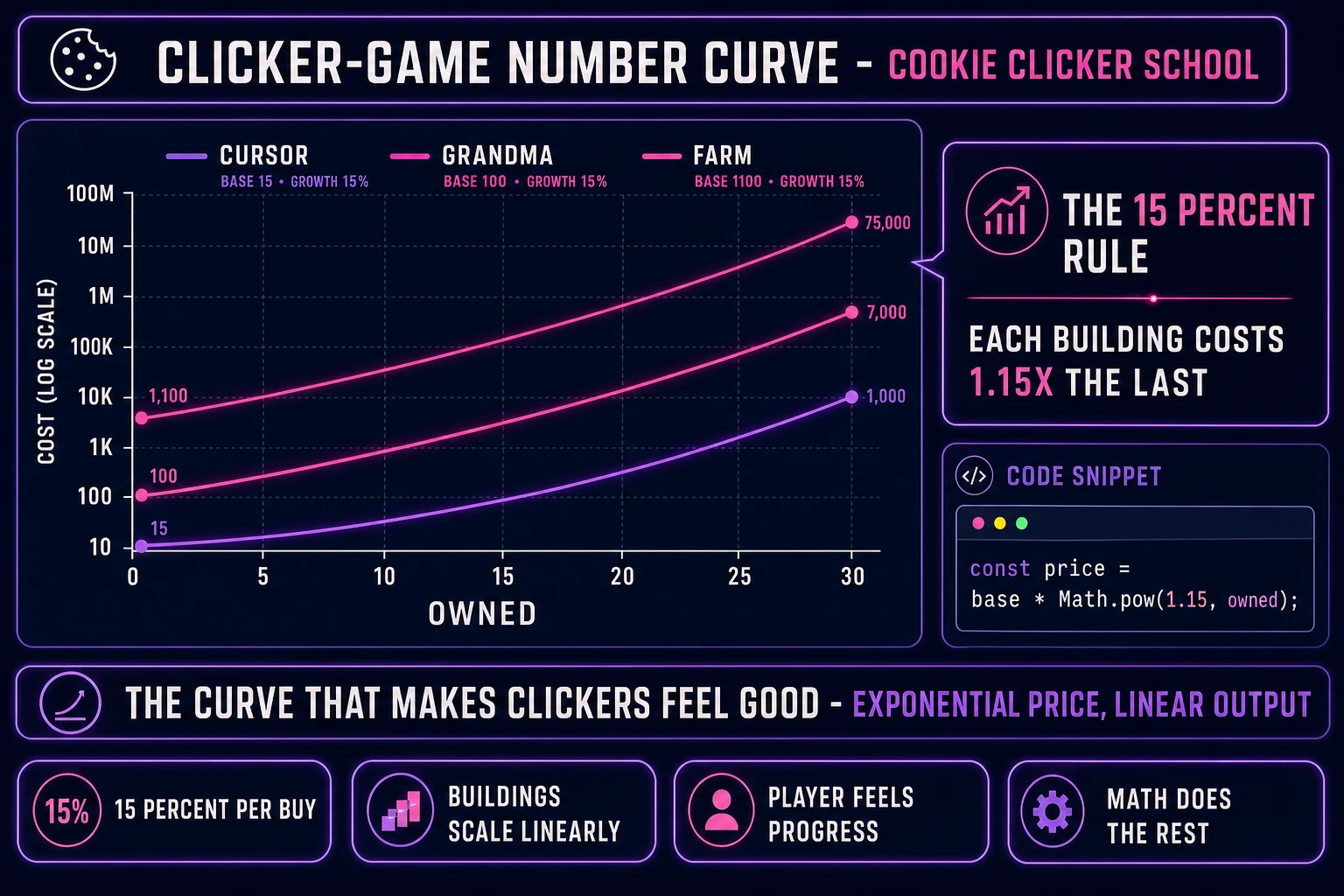
Clicker game exponential price curve: cursor grandma farm buildings with 15 percent per-purchase growth plotted against owned count on a log scale
The 15-percent rule is the math that makes clickers feel good. Each building costs 1.15x the last purchase, so the tenth of a building is roughly 4x the first, and the thirtieth is roughly 66x the first. Player progress feels linear because the numerator (score) also grows exponentially with each purchase.

Pick your engine for how to make a clicker game: React, Phaser 4, or vanilla DOM

Three good browser targets in 2026, each with a different trade-off. React 19.2 (verified against react.dev/versions on 2026-08-08) is the default recommendation for a standard clicker build. A clicker is a UI-driven counter game with a per-tick timer and no per-frame render loop — the entire visual state fits in a single React component tree, with useState for the score and building counts, useEffect for the setInterval tick and the localStorage save, useReducer for the upgrade shop actions, and CSS transitions for the click bounce and buy flash. Bundle size lands around 45 KB gzipped for a clean React 19 build. Total lines of code for a full clicker with 6 buildings, 10 upgrades, and a prestige loop: about 400.

Plain HTML plus a single <script> tag is the leanest option. You write about 250 to 350 lines of vanilla JavaScript, produce a build under 15 KB total, and end up with something eligible for a JS13K-style code-golf entry or a pure-JavaScript learning demo. The trade-off is that every DOM update has to be written by hand instead of leaning on a virtual-DOM diff, so debugging state is on you. Use plain HTML if you want the exercise or the tiny build size; use React if you want the game done by Sunday night.

Phaser 4.2.1 Giedi (released 9 July 2026, verified against phaser.io/download/stable on 2026-08-08) is possible but overkill for a straight clicker. Phaser is built for real-time game loops with sprite animation, physics bodies, and per-frame updates, none of which a clicker needs. The 900 KB minified runtime is dead weight for a mostly-static UI game. Reach for Phaser only if you plan to bolt on real-time visual effects the standard clicker does not have — particle explosions on a purchase, animated background scenes tied to prestige tiers, a physics-based cookie shower on golden-cookie clicks, an animated mini-game inside the upgrade shop. WizardGenie will scaffold in any of the three based on the prompt.
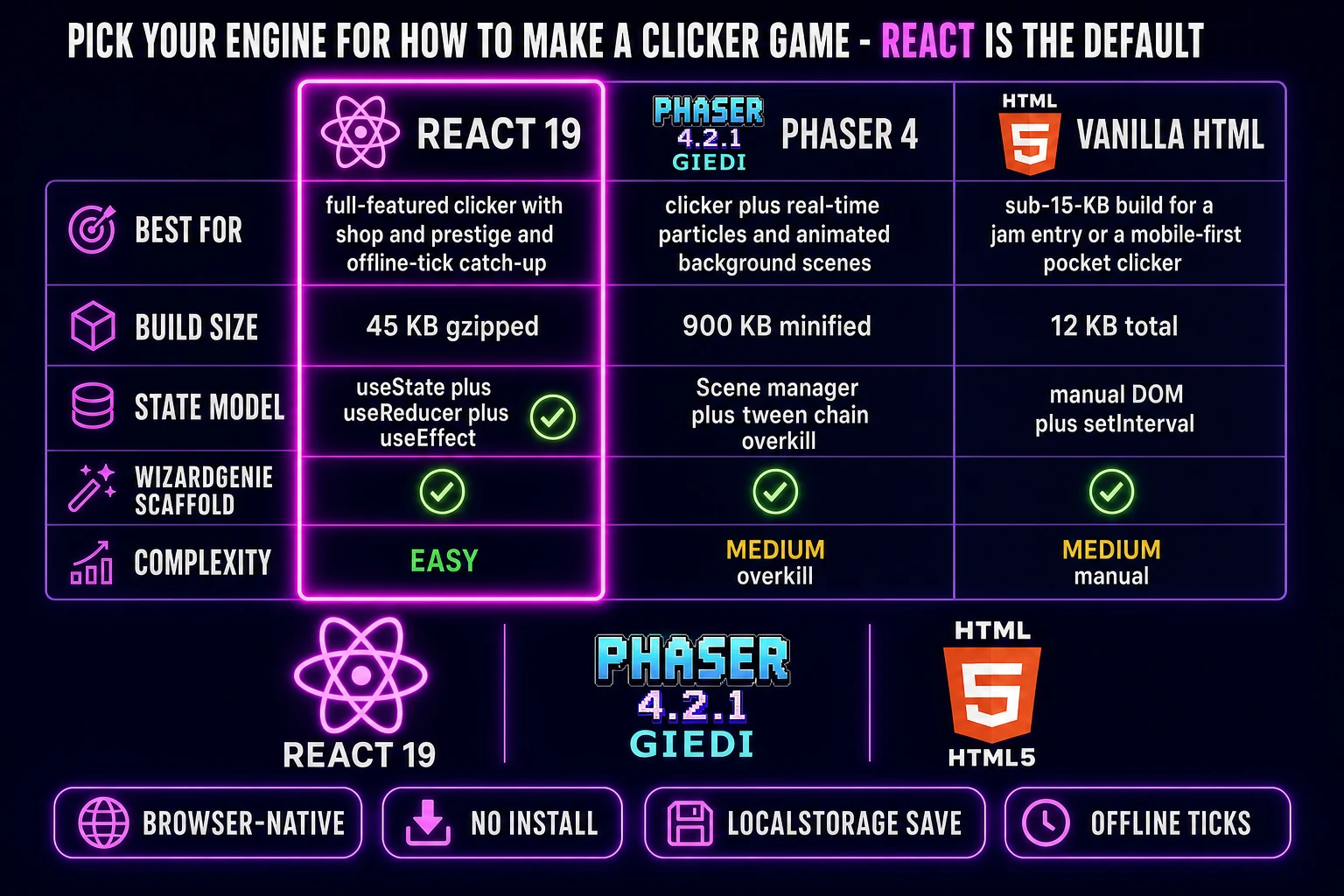
Comparison table of browser engines for a clicker game: React 19 versus Phaser 4 versus vanilla HTML across best-for build-size state-model WizardGenie-scaffold and complexity
React 19 is the default engine for a how to make a clicker game browser build in 2026. Vanilla HTML is for the sub-15-KB jam entry; Phaser 4 is for the clicker-plus-particles remix. All three are one prompt away from a WizardGenie scaffold.

Step 1 — design the number curve, upgrade tree, and prestige loop on paper first

This is the step every hobbyist clicker tutorial skips, and it is the step that decides whether players play for ten minutes or ten hours. Before you open WizardGenie, sit with a piece of paper (or a spreadsheet) and write down three tables: the building tier (name, base cost, base output), the upgrade tier (name, cost, effect), and the prestige formula (score threshold to trigger, points gained, points-to-multiplier curve).

For a first clicker following the Cookie Clicker school, six buildings is the sweet spot. Base cost and base output per tier are typically: Cursor (cost 15, output 0.1 per second), Grandma (cost 100, output 1), Farm (cost 1,100, output 8), Mine (cost 12,000, output 47), Factory (cost 130,000, output 260), and Bank (cost 1,400,000, output 1,400). Each building costs 1.15x the last purchase of the same building — the 15-percent rule is the number that makes the whole curve feel right. Compute it as const price = Math.ceil(base * Math.pow(1.15, owned)). Ten purchases of any building will cost roughly the same as owning all the previous buildings put together, which is the pacing intuition that keeps players engaged.

The upgrade tier is where you add long-term hooks. A first pass: three upgrades per building (2x output at 100 owned, 2x again at 500 owned, 2x again at 1000 owned), plus 3 to 5 global upgrades (2x per-click, 2x per-tick, unlock golden cookies with 7 percent random spawn, unlock a research tree, unlock ascension). Each upgrade doubles or triples the effective growth for a short window, which gives the score curve those satisfying jumps that keep the number-goes-up dopamine loop firing.

Prestige is the mid-game hook that turns a 30-minute session into a 30-hour campaign. The Cookie Clicker formula is roughly heavenlyChips = Math.floor(Math.cbrt(totalEarned / 1e12)) — cube root of lifetime score in trillions. Each heavenly chip adds a 1 percent permanent multiplier to production on future runs. That means the first ascension gains 5 to 15 chips (5 to 15 percent multiplier), the second gains 20 to 40, the third gains 60 to 100, and so on. Ascension is triggered manually by the player when the current run's growth has flattened, usually about 90 minutes into a first run. Design the threshold so players actually hit ascension on their first session — do not gate it behind so much grinding that they quit before they see it.
Step 2 — wire the click-to-score, upgrade shop, and localStorage save in WizardGenie

Open WizardGenie. WizardGenie is the Sorceress game-native coding agent; it ships as both a desktop app (Windows installer with auto-update, available to Early Access supporters and above) and a no-install web build at the same URL. The coding-model lineup (verified 2026-08-08 in src/app/_home-v2/_data/tools.ts lines 735 to 742) covers Claude Opus 4.7, Claude Sonnet 4.6, GPT-5.5, Gemini 3.1 Pro, DeepSeek V4 Pro, Kimi K2.5, Grok 4.2, and MiniMax M2.7. Any frontier model in the lineup scaffolds a working clicker on the first prompt. For a cheap run, pair a frontier planner (Claude Opus 4.7) with a cheap executor (DeepSeek V4 Pro or Kimi K2.5) — the dual-agent Planner + Executor pattern lands the same output at roughly one-fifth the API cost.

The seed prompt is one paragraph. "Scaffold a React 19.2 Vite project called tally-clicker. State model: score number, perClick number, perSecond number, owned map building-name to count, upgrades set of purchased upgrade ids, prestige number, lastSaved timestamp. On the main screen, render a big central click orb that adds perClick to score on click; a right-side upgrade shop listing six buildings (Cursor base 15 output 0.1, Grandma base 100 output 1, Farm base 1100 output 8, Mine base 12000 output 47, Factory base 130000 output 260, Bank base 1400000 output 1400), each with a purchase button that shows the current price computed as ceil(base * pow(1.15, owned)) and buys one on click; a top score display formatted with Intl.NumberFormat compact notation; a per-second production display. Run a setInterval every 100 milliseconds that adds perSecond / 10 to score and recomputes perSecond from owned buildings. Save state to localStorage keyed 'tally-clicker-save' on every buy and on a 1-second debounce. On page load, read the save, and if lastSaved is more than 10 seconds ago, apply offline ticks capped at 3 hours. Add a prestige button that appears when score exceeds 1e12, computes heavenlyChips = floor(cbrt(score / 1e12)), and on click resets the run keeping prestige points and adding a 1 percent multiplier per chip." Feed that to any coding model and you get a working scaffold in about two minutes.

The one part to double-check the agent on is the exponential price formula. A naive implementation writes price = base * (1 + 0.15 * owned), which is a linear growth curve, not exponential. That will feel wrong within 20 minutes of gameplay because the buildings never actually get expensive — the tenth of a building costs 2.5x the first instead of 4x, and the thirtieth costs 5.5x instead of 66x. The correct formula is Math.ceil(base * Math.pow(1.15, owned)), verified against the Cookie Clicker Wikipedia article's building-cost description on 2026-08-08. Test with cursor at owned 30: should be about 15 * 66 = ~990, not 15 + 30 * 2.25 = ~82. If your first ten purchases feel too cheap and your twentieth still feels cheap, this is why.

The localStorage save loop is 10 lines. On every buy or upgrade purchase, call localStorage.setItem('tally-clicker-save', JSON.stringify({ ...state, lastSaved: Date.now() })). On page load, wrap JSON.parse(localStorage.getItem('tally-clicker-save')) in a try/catch (in case the save is corrupted or missing) and hydrate your state atom. Add the Page Visibility API listener to save when the tab is hidden, catching the exit before the player closes the browser. Offline-tick catch-up: compute offlineSeconds = Math.min((Date.now() - lastSaved) / 1000, 10800) (capped at 3 hours) and add perSecond * offlineSeconds to score on load with a small "welcome back, you earned X while away" toast.

Step 3 — AI Image Gen for the click target, SFX Gen for the tap thunk, Music Gen for the bed

A default React clicker with a plain button and no audio feels like a placeholder. Three cheap polish passes lift it to shippable.

Open Sorceress AI Image Gen. First prompt: the click target. "A large glowing golden orb, 3D rendered, purple neon rim light, transparent background, centered composition, mobile-app polish, 512 by 512" gives you a satisfying click target. Second prompt series: 6 building icons. Prompt one per building: "cartoon flat-style cursor icon", "cartoon flat-style grandma silhouette", "cartoon flat-style farm barn", "cartoon flat-style mine cart", "cartoon flat-style factory building", "cartoon flat-style bank vault". Generate at 256 by 256, downscale in CSS. Third pass (optional): a dark navy background pattern with faint numeric watermarks. Total AI Image Gen budget: 8 to 10 generations, roughly 40 to 200 credits depending on model and quality tier.

Open SFX Gen. Sorceress SFX Gen uses the MiniMax Speech-02 sound-effect model with billing at 1 credit per second (verified 2026-08-08 in src/app/sfx-gen/page.tsx line 23 as SEED_AUDIO_CREDITS_PER_SECOND = 1). Generate four short clips. A "short soft plastic-button tap thunk, 0.15 seconds" for every click on the main orb (about 1 credit). A "short cheerful purchase chime, 0.4 seconds, bright and ascending" for building buys (about 1 credit). A "deep magical prestige stinger, 1.2 seconds, dramatic ascending swell with a subtle chorus" for ascension (about 2 credits). A "very short golden-cookie shimmer, 0.3 seconds, magical twinkling" for the golden-cookie spawn (about 1 credit). Under 6 credits total. Wire each clip to the matching event; keep the tap thunk at 30 percent volume so 200 clicks per minute do not exhaust the player's ears.

Open Music Gen. Music Gen bills 10 credits per generation (verified 2026-08-08 in src/app/music-gen/page.tsx line 28 as MUSIC_CREDIT_COST = 10). Prompt for something calm and loopable: "ambient chiptune background loop, 60 BPM, minor key, seamless 30-second loop, no drums, mellow synth pads, focus-work friendly". Preview and regenerate until the loop sounds background-appropriate; two or three tries is typical, so budget 20 to 30 credits. Export as MP3 (or 2 more credits for WAV per line 31's WAV_CREDIT_COST = 2 constant). Autoplay at 20 percent volume on first user interaction (browsers block audio autoplay before a click). Add a mute button in the corner.

What a how to make a clicker game project costs on Sorceress in 2026

Concrete asset and generation budget for a browser clicker from empty repo to shareable playable build, all numbers verified 2026-08-08 against local Sorceress source:

  • Click target and building icons (AI Image Gen): roughly 5 to 20 credits per asset depending on model and quality, 8 to 10 assets total, so 40 to 200 credits (0.40 to 2.00 USD). Skip most icons and use emoji or plain-CSS shapes to knock this to 5 to 20 credits for just the click orb.
  • Sound effects (SFX Gen): 1 credit per second, 4 short clips at under 1 second each, so about 4 to 6 credits (0.04 to 0.06 USD).
  • Ambient music loop (Music Gen): 10 credits per generation, 2 to 3 tries typical, so 20 to 30 credits (0.20 to 0.30 USD). Add 2 more credits if you want WAV.
  • WizardGenie coding time: effectively free on the Sorceress side (bring your own model API key, or use one of the trial-key options for the smaller models). Model-side API cost for a 3-to-5-hour prompt session on a cheap Executor like DeepSeek V4 Pro is typically under 0.60 USD.
  • Total for one complete browser clicker build: 64 to 236 credits, or roughly 0.64 to 2.36 USD in Sorceress credits, plus under 0.60 USD in model API time. Under 3 USD end-to-end for the whole project.

Sorceress bills 100 credits per dollar at the standard rate (CREDITS_PER_DOLLAR = 100 in src/lib/models.ts line 69). New accounts start with 100 free credits (SIGNUP_GRANT = 100 in src/app/api/admin/credits/route.ts line 12), which is enough to cover every icon and every sound effect in this build with headroom to spare. The Sorceress Lifetime tier at 49 USD one-time (LIFETIME_PRICE = 49 in src/app/plans/page.tsx line 51) unlocks unlimited SFX Gen and heavy AI Image Gen use, which matters if you plan to spin the same clicker engine into a series of themed variants (bakery clicker, spellbook clicker, spaceship clicker, farm clicker) — the incremental genre rewards a shared engine plus dozens of themed skins, exactly the way Cookie Clicker itself spawned a decade of derivatives.

For related browser-game pipelines that share this "design the numbers, prompt the coder, ship the browser build" spine, the closest reads are Tick How to Make an Idle Game (Browser AI 2026) for the idle-first sibling to how to make a clicker game that runs while the tab is closed, Guess How to Make Wordle (Browser Guess Grid 2026) for the same weekend-browser-project pattern on a puzzle mechanic, and Flap How to Make Flappy Bird (Browser Loop 2026) for the one-mechanic-plus-scoring pattern on a physics classic. The Sorceress Tools Guide is the master index. Under 3 USD, one weekend, and how to make a clicker game is a done deal.

Frequently Asked Questions

How is a clicker game different from an idle game?

A clicker game (or incremental) puts the player's finger on the primary source of score - every tap increments the counter directly, and idle auto-producers unlock as a secondary layer once the player has bought upgrades. An idle game inverts that: the auto-producers are the primary source of score, and clicking is either absent or supplementary. Cookie Clicker (2013) is the canonical clicker - you start by clicking a big cookie, and buildings that auto-generate cookies unlock as upgrades. AdVenture Capitalist and most modern mobile incrementals are idle-first - the game runs and grows even when you close the tab. The mechanics overlap heavily in practice, which is why some players use the terms interchangeably, but the distinction matters when you design the first hour of gameplay. Clicker-first means the tap loop is the tutorial; idle-first means the number goes up before you learn what any of the buttons do. This guide targets the clicker-first pattern where clicking is central and satisfying, and auto-production is a mid-game reward.

How long does it take to make a browser clicker game?

Between four and eight hours for a first shippable browser build if you follow the pipeline in this guide. Roughly 45 minutes to design the number curve, upgrade tree, and prestige loop on paper. About one hour to prompt WizardGenie through the click-to-score handler, the per-tick auto-producer, and the upgrade shop UI. Around 90 minutes to wire the 15 percent exponential price scaling, offline-tick catch-up on tab reopen, and localStorage save on every state change. Roughly 30 minutes to add prestige (soft-reset for permanent boost multipliers). Around 20 minutes for AI Image Gen click-target art plus 5 to 10 building icons. Ten minutes for SFX Gen tap thunk, purchase chime, and prestige stinger. About 15 minutes for Music Gen background loop. Experienced JavaScript developers who have written an exponential-cost shop before can hit playable in under three hours; the extra hours go into the polish pass that decides whether players stick around for an hour or ten.

How do you keep numbers readable when a clicker game reaches billions or higher?

Use Intl.NumberFormat with compact notation for anything above about ten thousand. new Intl.NumberFormat('en', { notation: 'compact', maximumFractionDigits: 2 }).format(12345678) returns 12.35M, and it handles B (billion), T (trillion), and beyond automatically up to about 10 to the fifteenth. Above that, most clickers switch to short-scale suffixes (quadrillion, quintillion, sextillion) or use scientific-notation-adjacent labels (aa, ab, ac...) borrowed from the Cookie Clicker school. A common pattern is a small helper: values under 1e15 use Intl compact formatting, values above that get a lookup-table suffix. Store the raw number as a JavaScript BigInt or a mantissa-plus-exponent pair once it exceeds Number.MAX_SAFE_INTEGER (about 9 quadrillion) - regular JavaScript numbers lose precision above that, which will show up as scores that stop counting up correctly around the trillion mark. Break-Infinity-style helper libraries pack the mantissa-plus-exponent pattern into a few lines; adopt the pattern before your first prestige unlock, not after.

How do you save clicker game progress in the browser?

Serialize the entire game state to JSON and write it to localStorage on every meaningful change, then read it back on page load. window.localStorage.setItem('clicker-save', JSON.stringify(state)) plus a listener that fires on every buy, every tick, or on a debounced 1-second timer covers all the common cases. localStorage is synchronous, string-only, and has a 5 to 10 MB per-origin cap depending on browser - that is orders of magnitude more space than a clicker save needs, so quota is a non-issue. On page load, read localStorage.getItem('clicker-save'), JSON.parse it, and hydrate your state atom. Handle the offline-tick catch-up by storing the last-saved wall-clock timestamp: on load, compute (Date.now() - lastSaved) / 1000 = offline seconds, then apply that many production ticks capped at some ceiling (Cookie Clicker caps offline progress at a few hours for balance). The Page Visibility API lets you save reliably when the player switches tabs or minimizes the browser, catching the exit before it happens. Do not use IndexedDB for a browser clicker; it is asynchronous and overkill for a save that fits in 10 KB of JSON.

Which framework should I use for a browser clicker game in 2026?

Plain React or vanilla HTML plus a small state library. A browser clicker is a UI-driven counter game with a per-tick timer and no per-frame physics or sprite animation beyond an occasional bounce or particle burst. React 19.2 (verified against react.dev/versions on 2026-08-08) with useState for score, useEffect for the setInterval tick, and useReducer for the upgrade shop actions produces a clean clicker in about 400 lines. Vanilla HTML plus a single script tag is the lean option (250 to 350 lines, sub-15 KB build). Phaser 4.2.1 Giedi (released 9 July 2026) is overkill for a straight clicker because none of its per-frame render loop and physics system is needed - reach for Phaser only if you plan to bolt on live particle effects, animated background scenes, or a real-time mini-game inside the upgrade shop. WizardGenie will scaffold in any of the three based on the prompt; the framework choice matters less than getting the number curve right.

Sources

  1. Cookie Clicker - Wikipedia (canonical incremental-game reference)
  2. MDN - Window.localStorage (browser save API)
  3. MDN - Intl.NumberFormat (large-number formatting)
  4. MDN - Page Visibility API (offline-tick handling)
Written by Arron R.·3,161 words·14 min read

Related posts