Sync How to Make a Music Game (Browser Rhythm Loop 2026)

By Arron R.11 min read
How to make a music game in 2026: model a beatmap of timed notes with hit windows, wire a scrolling note highway and scoring in WizardGenie, then add Music Gen

A scored note highway is what most beginners mean when they search “how to make a music game”: a song clock, a chart of timed notes, lanes scrolling toward a hit line, judgment windows for Perfect / Great / Good / Miss, a combo meter, and a rank card when the track ends. A full commercial rhythm suite with licensed catalogs and custom controllers is a studio project — months of audio engineering before the first honest chart. A browser rhythm loop is different. A coding agent scaffolds the beatmap model, AudioContext clock, and highway render from one prompt, and AI generation covers the track, hit stings, and lane art. On desktop or web, that means WizardGenie for the spawn-and-hit loop, Music Gen for the playable bed, SFX Gen for hit and miss cues, and AI Image Gen for highway chrome. This guide is the honest end-to-end for how to make a music game in 2026, as a weekend build you can finish once.
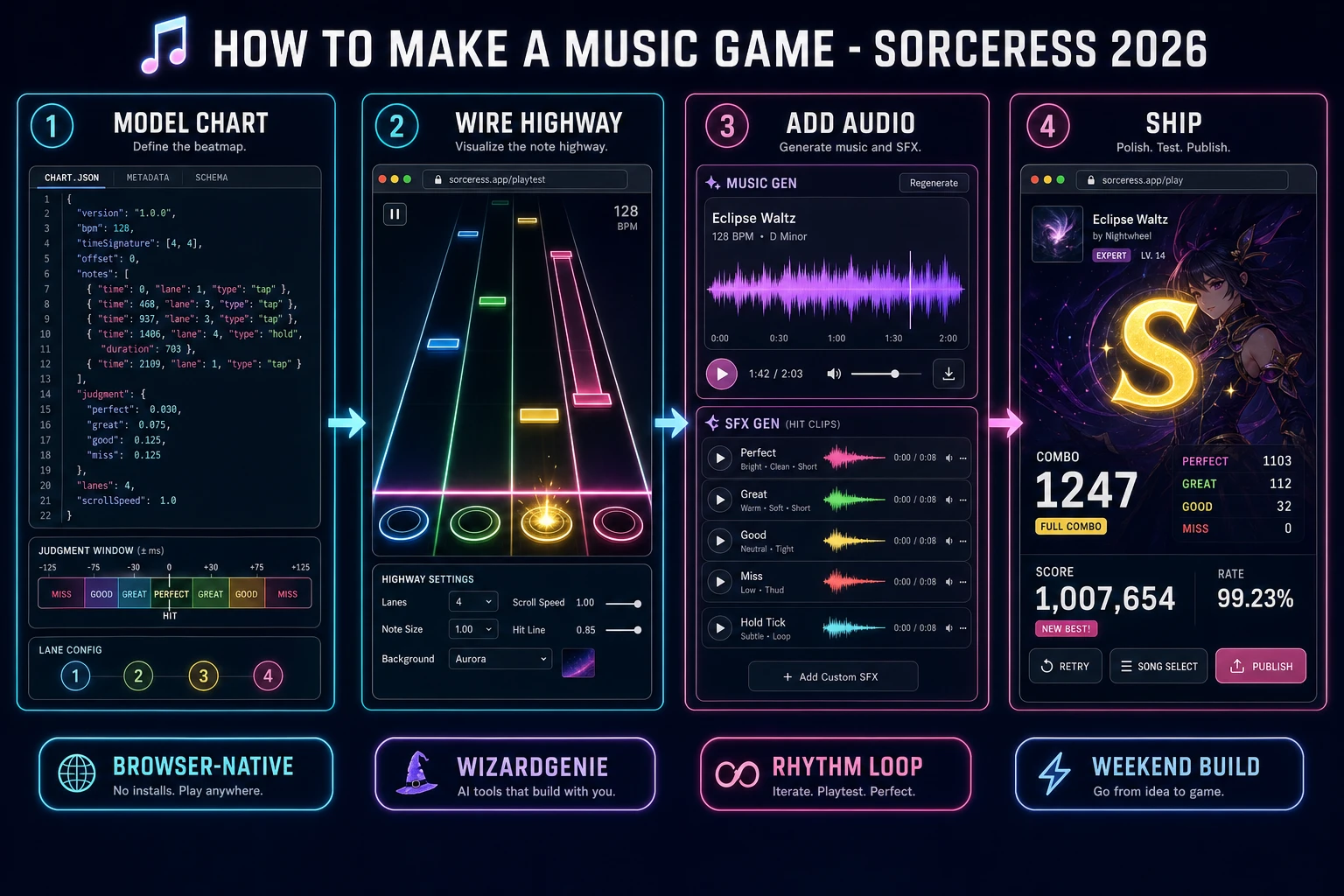
How to make a music game browser pipeline: model a beatmap chart with hit windows, wire a note highway in WizardGenie, and ship a browser rhythm loop
The 2026 how to make a music game recipe: model a beatmap and hit windows, wire a note highway in WizardGenie, then add Music Gen tracks, SFX Gen hits, and AI Image Gen highway art.

What how to make a music game actually means in 2026

The query “how to make a music game” hides three intents. Some searchers want a freeform sandbox where tapping pads invents melodies — a music-making toy, not a scored loop. A second intent is a full chart editor with BPM detection, snapping, and community song packs — a serious tooling project. The third intent, and the one this guide targets, is a browser beat-matching game: load one track, spawn notes from a JSON chart, scroll them down (or up) a multi-lane highway, judge presses against an audio clock, score combo and accuracy, and show a results card. That is a weekend build, it demos the Sorceress toolset, and it is the format most music game tutorial and javascript music game searchers actually want.

The presentation contract is small and strict. A title screen shows the song name, difficulty label, and Start. The play screen shows the highway, score, combo, and a progress bar. On finish, freeze input, play a short sting, show Perfect / Great / Good / Miss counts plus a letter rank, and offer Replay. The music video game overview on Wikipedia (verified 2026-08-21) still separates rhythm-matching from freeform music-making and mixing cleanly — cite it when you write your itch.io blurb so players know which promise you kept. If you already shipped a pure score-chase or arcade loop, the sibling guide on how to make a rhythm game covers shared judgment ideas; this post owns the beatmap chart, AudioContext sync, and Music Gen track pipeline for a full how to make a music game weekend build.

The music game loop in one minute (spawn, scroll, hit, score, clear)

Five moving parts, repeated until the chart ends. First, spawn — enqueue upcoming notes whose time is within a look-ahead window of the audio clock. Second, scroll — each frame, place every live note at y = hitLineY - (note.time - now) * pixelsPerSecond (or the inverse if notes rise). Third, input — on key or tap for a lane, find the nearest unscored note in that lane inside the judgment windows. Fourth, score and combo — award Perfect / Great / Good, raise or break combo, and play the matching SFX. Fifth, miss or clear — if a note passes the miss threshold unscored, break combo; when the last note is judged and the track ends, show the results card. That is the entire browser rhythm loop. Multiplayer races, custom USB controllers, and auto-chart from arbitrary MP3s are polish layered after one honest four-lane chart feels fair.
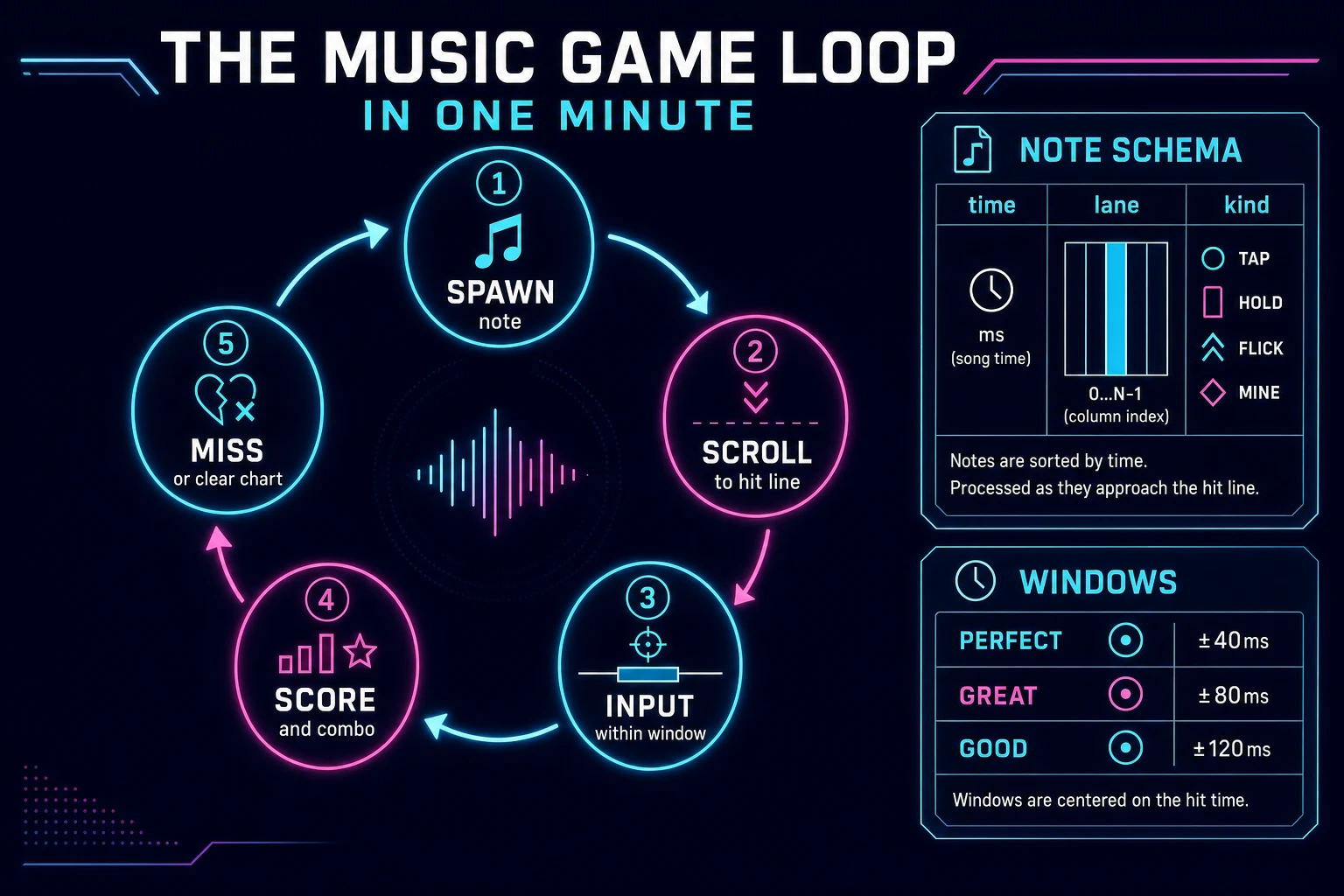
Music game loop state machine diagram showing spawn note, scroll to hit line, input within window, score and combo, and miss or clear chart
The music game loop: spawn notes from the chart, scroll them to the hit line, judge input within windows, update score and combo, then miss or clear the chart.

Pick your engine for how to make a music game: Web Audio, Phaser, or WizardGenie

Three good browser targets in 2026, each with a different trade-off. Vanilla JavaScript with canvas + Web Audio is the honest default and the pick this guide recommends for a first build. Decode or stream the track through an AudioContext, drive hit detection from audio.currentTime, and paint the highway on a single canvas. Total code footprint for a working note highway game is under 500 lines including chart load, spawn, judgment, and results. No engine to install, ships as a static HTML file, deploys anywhere. The MDN Web Audio API docs and BaseAudioContext.currentTime cover the timing surface you must trust.

DOM-only lanes become awkward once dozens of notes move every frame — reflow cost shows up as stutter that players blame on “bad sync.” Keep DOM for menus and results; keep the highway on canvas.

Phaser 4.1.0 (verified 2026-08-21 on the official Phaser API documentation page) becomes the right pick if you want Scene lifecycle for title-play-results, tweens on Perfect flashes, or particle pops on combo milestones. Phaser does not invent your beatmap or audio clock — you still need the same chart schema and currentTime-based judgment. Use Phaser when motion polish is the product; use canvas + Web Audio when the product is a beat matching game people can clear on a phone.

WizardGenie is not a separate rendering engine — it scaffolds whichever of the three you pick from a single natural-language prompt. WizardGenie ships as both a desktop app (Windows installer with auto-update, available to Early Access supporters and above) and a no-install web build. Its coding-model lineup covers Claude Opus 4.7, GPT-5.5, Gemini 3.1 Pro, DeepSeek V4 Pro, Kimi K2.5, Grok 4.2, and MiniMax M2.7 (verified 2026-08-21 in src/app/_home-v2/_data/tools.ts). For a music game, any frontier model scaffolds the chart loader, highway, and scoring in one prompt. Pair a frontier planner with a budget executor like DeepSeek V4 Pro or Kimi K2.5 for the typing pass — the Dual-agent pattern lands most projects at roughly one-fifth the single-frontier cost.

Step 1 — model a beatmap chart with timing windows

Nothing else in the pipeline matters if Perfect fires when the note is still a full beat away. Start with a small, testable chart schema and pure judgment helpers:

const WINDOWS = { perfect: 0.04, great: 0.08, good: 0.12 }; // seconds

/** @typedef {{ time: number, lane: 0|1|2|3, kind?: 'tap'|'hold' }} Note */

function loadChart(json) {
  const notes = [...json.notes].sort((a, b) => a.time - b.time || a.lane - b.lane);
  return {
    title: json.title,
    bpm: json.bpm,
    offset: json.offset || 0, // seconds added to audio.currentTime for chart sync
    notes,
    windows: json.windows || WINDOWS,
  };
}

function judge(delta, windows) {
  const a = Math.abs(delta);
  if (a <= windows.perfect) return 'perfect';
  if (a <= windows.great) return 'great';
  if (a <= windows.good) return 'good';
  return null;
}

function findHit(notes, scored, lane, now, windows) {
  let best = null;
  let bestAbs = Infinity;
  for (let i = 0; i < notes.length; i++) {
    if (scored[i] || notes[i].lane !== lane) continue;
    const d = notes[i].time - now;
    const a = Math.abs(d);
    if (a > windows.good) {
      if (d > windows.good) break; // sorted; later notes are farther
      continue;
    }
    if (a < bestAbs) { bestAbs = a; best = i; }
  }
  return best;
}

function missIndex(notes, scored, now, windows) {
  for (let i = 0; i < notes.length; i++) {
    if (scored[i]) continue;
    if (now - notes[i].time > windows.good) return i;
  }
  return -1;
}

Game state is { chart, audio, startedAtAudio, scored: boolean[], combo, maxCombo, counts, status: 'ready'|'playing'|'results' }. Store note times in seconds from song start, not frame indices. Apply chart.offset once when computing now = audio.currentTime - startedAtAudio + chart.offset so a late decode or intro silence does not ruin every judgment. Unit-test three asserts before you paint UI: a note at t=1.0 judged at 1.03 returns Perfect with default windows; the same note at 1.15 returns null / miss path; findHit prefers the closer of two overlapping same-lane candidates. Those asserts are the difference between a rhythm game browser players trust and one that feels “off” no matter how pretty the highway looks.

Author the first chart by hand: one 60–90 second Music Gen loop, 4 lanes, 40–80 taps, no holds yet. Write times on beat at your BPM (beat = 60 / bpm), then nudge a few off-beat accents. Hold notes and multi-lane chords are a follow-up afternoon once tap timing already feels fair.

Step 2 — wire note highway and hit detection in WizardGenie

With the model solid, open WizardGenie. Drop in a bare index.html with a full-viewport canvas and a song-select strip. Give the agent one paragraph: Build a browser music game with a four-lane note highway. Load a JSON beatmap of { time, lane } notes. Start an AudioContext, play an audio element routed through the context, and drive judgment from audio.currentTime plus a chart offset. Each animation frame, spawn upcoming notes, draw them scrolling toward a hit line, and auto-miss notes past the good window. Map keys D F J K (and touch buttons) to lanes 0–3. On hit, score Perfect/Great/Good with windows 40/80/120ms, update combo, and flash the lane. On chart end, show results with counts and a letter rank. Use canvas for the highway and Web Audio for the clock. Feed that to any coding model and the scaffold lands in under five minutes.

The remaining afternoon is polish via follow-ups. Keep the render and input helpers thin:

function songNow(game) {
  return game.audio.currentTime - game.startedAtAudio + game.chart.offset;
}

function drawHighway(ctx, game, now) {
  const { notes } = game.chart;
  const pps = 400; // pixels per second
  const hitY = ctx.canvas.height * 0.82;
  for (let i = 0; i < notes.length; i++) {
    if (game.scored[i]) continue;
    const y = hitY - (notes[i].time - now) * pps;
    if (y < -40 || y > ctx.canvas.height + 40) continue;
    const x = (notes[i].lane + 0.5) * (ctx.canvas.width / 4);
    ctx.fillRect(x - 28, y - 12, 56, 24);
  }
  ctx.fillRect(0, hitY - 2, ctx.canvas.width, 4);
}

function onLane(game, lane) {
  if (game.status !== 'playing') return;
  const now = songNow(game);
  const idx = findHit(game.chart.notes, game.scored, lane, now, game.chart.windows);
  if (idx == null) return;
  const delta = game.chart.notes[idx].time - now;
  const grade = judge(delta, game.chart.windows);
  if (!grade) return;
  game.scored[idx] = true;
  game.counts[grade]++;
  game.combo = grade === 'miss' ? 0 : game.combo + 1;
  game.maxCombo = Math.max(game.maxCombo, game.combo);
  playSfx(grade);
}

Resume or create the AudioContext inside the Start click — browsers block autoplay until a user gesture. Route the <audio> element through createMediaElementSource so currentTime and audible output share one graph. Calibrate pixelsPerSecond so a note is visible for about 1.5–2.0 seconds before the hit line; too fast reads as unfair, too slow feels sluggish. Persist high scores with localStorage keyed by chart id. Related scoring and streak patterns also show up in the trivia question-loop guide and the clicker score-loop guide; reuse HUD layout ideas if you already shipped those.

Step 3 — Music Gen tracks, SFX Gen hits, AI Image Gen highway art

Silent gray bars prove the loop. Music and chrome make it feel like a game people finish. Open Music Gen (10 credits per generation, verified 2026-08-21 in src/app/music-gen/page.tsx) and prompt a 60–90 second instrumental with a clear pulse — “upbeat electronic loop, steady 120 BPM kick, no vocals, clean mix for a rhythm game.” Generate twice if the first bed has muddy transients. Export the MP3/WAV, drop it next to your chart, and set chart.bpm to match what you hear (tap-tempo once while the kick plays if you are unsure). Sibling deep-dives on beds live in how to make game music if you want longer soundtrack craft after the highway works.

Open SFX Gen (1 credit per second of audio, verified 2026-08-21 in src/app/sfx-gen/page.tsx) and generate four short clips: a bright Perfect tick (~0.5–1s), a softer Great tick, a dull Miss thud, and a short results fanfare. Trigger Perfect/Great on grade, Miss when missIndex fires, and the fanfare when status flips to results. Keep hit SFX quieter than the Music Gen bed so the kick still reads as the timing anchor.

Open AI Image Gen and run Nano Banana Pro at 18 credits per pass (verified 2026-08-21 in src/lib/models.ts). Prompt two assets: a dark neon highway backdrop (lanes, glow, no busy faces in the note path), and optional title-screen key art. Draw the backdrop under the canvas or as the canvas clear fill; keep note sprites high-contrast so judgment never competes with decoration. Browse the rest of the stack from the tools guide if you later add Speech Gen for announcer lines. The asset stack for a weekend how to make a music game project stays well under a dollar of credits; see the cost section below for the line-item math.

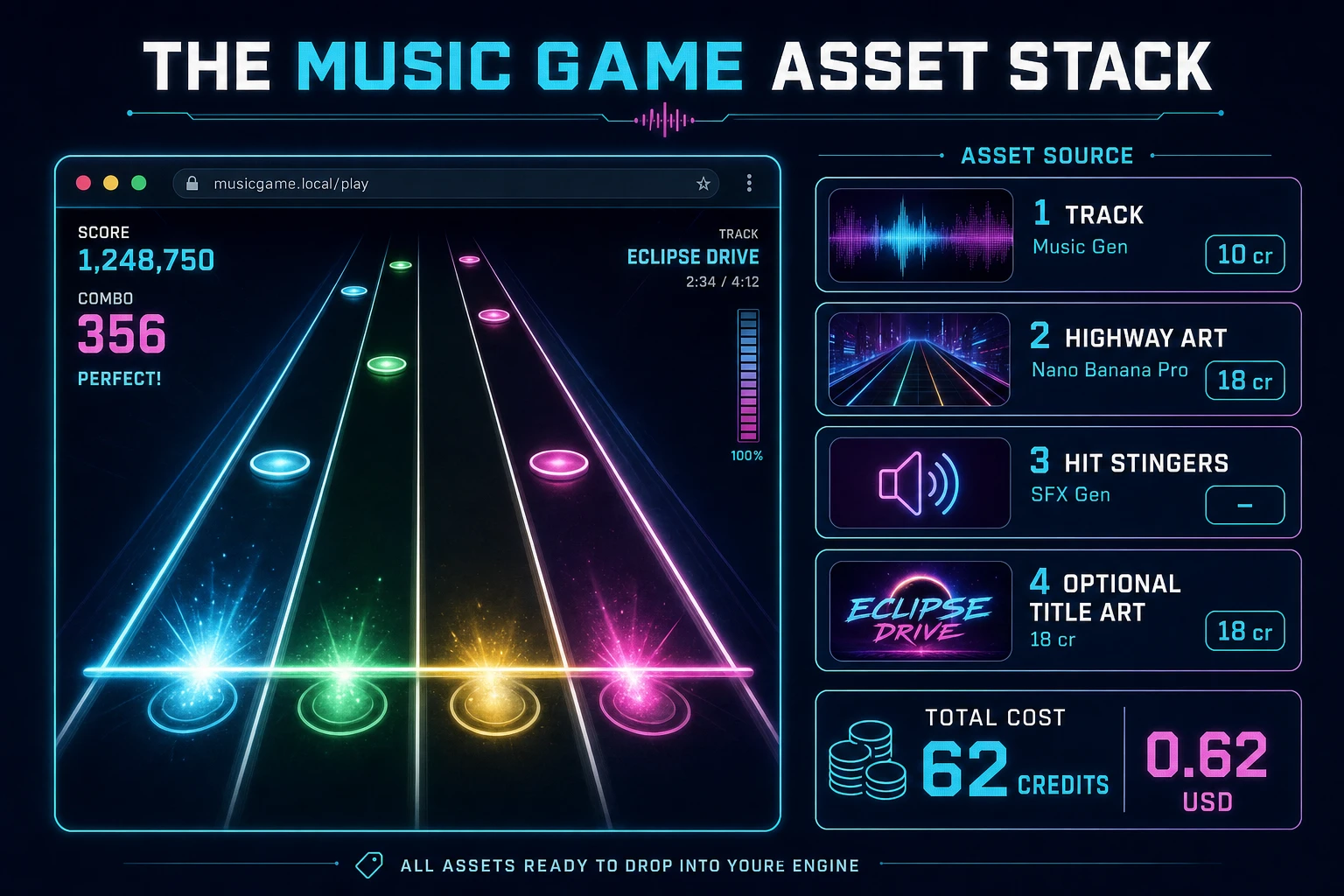
Music game asset stack diagram showing Music Gen tracks, AI Image Gen highway art, SFX Gen hit stingers, and total credit cost under one dollar
The music game asset stack: Music Gen for the playable bed, AI Image Gen for highway and title art, SFX Gen for hit and miss cues — roughly 62 credits on the 2026 Sorceress rate card.

What a how to make a music game project costs on Sorceress in 2026

Here is an honest first-project budget against the live Sorceress rate card (verified 2026-08-21 against local source). Two Music Gen track tries at 10 credits each = 20 credits ($0.20). Two Nano Banana Pro images at 18 credits each = 36 credits ($0.36) for highway backdrop and title art. Four SFX clips totaling about 6 billable seconds at 1 credit/sec = 6 credits ($0.06). Coding-model API time for the WizardGenie scaffold and polish pass is typically under $0.40 when you pair a frontier planner with DeepSeek V4 Pro or Kimi K2.5 as executor. Grand total: roughly 62 credits ($0.62) plus sub-dollar agent time. The free 100-credit signup grant covers the entire art and audio stack on day one. Credit packs and supporter tiers live on Plans if you outgrow the grant.

That is the whole pipeline for how to make a music game in a browser in 2026: a beatmap of timed lane notes, an AudioContext clock with honest hit windows, a canvas highway that scrolls toward a hit line, and a thin Sorceress asset layer so the first chart looks finished. Ship the static build, clear your own Easy chart once without looking at the JSON times, then decide whether holds, a chart editor, or a second song pack is worth another afternoon — only after Perfect already feels earned.

Frequently Asked Questions

Is a music game the same as a rhythm game?

Rhythm-matching is the dominant music-game subgenre, but music video games also include freeform music-making and mixing sandboxes. For a first how to make a music game project, build a scored beat-matching note highway — that is what most music game tutorial and javascript music game searchers expect. Save sandbox composers and karaoke pitch scoring for a second build after one honest chart feels fair.

Should I sync to AudioContext.currentTime or requestAnimationFrame?

Drive hit detection from AudioContext.currentTime (or a clock derived from it), not from rAF alone. Display frames can jitter; the audio clock is the beat-matching source of truth. Use rAF only to paint note positions as timeOffset = note.time - audio.currentTime. The MDN Web Audio API and currentTime docs cover scheduling precision for a browser rhythm loop.

How wide should hit windows be for beginners?

Start generous: Perfect ±40ms, Great ±80ms, Good ±120ms, Miss beyond that. Those windows teach a beat matching game without feeling unfair on a laptop speaker. Tighten later for hard charts. Always store windows in the chart JSON so you can retune without rewriting input code.

Canvas or DOM for a note highway game?

Prefer canvas (or Phaser) for a scrolling note highway — dozens of notes moving every frame are cheaper as sprites than as DOM nodes. A static DOM menu for song select and results is fine. Phaser 4.1.0 (verified 2026-08-21 on the official Phaser API docs) is optional Scene polish for title-play-results; your beatmap schema and AudioContext clock still do the real work.

How much does it cost to build a music game on Sorceress?

A first-project browser music game with one chart, highway art, and audio budgets like this against the 2026 Sorceress rate card (verified 2026-08-21 against local source). Two Music Gen track tries at 10 credits each = 20 credits or 0.20 USD (src/app/music-gen/page.tsx line 28). Two AI Image Gen Nano Banana Pro passes at 18 credits each = 36 credits or 0.36 USD (src/lib/models.ts line 303). Four SFX clips at 1 credit per second (src/app/sfx-gen/page.tsx line 23) — hit, miss, combo, win — roughly 6 credits or 0.06 USD. Total roughly 62 credits or 0.62 USD plus under 0.40 USD in coding-model API time. The free 100-credit signup grant (src/app/api/admin/credits/route.ts line 12) covers the full art and audio stack outright.

Sources

  1. Music video game - Wikipedia
  2. MDN - Web Audio API
  3. MDN - BaseAudioContext.currentTime
  4. Phaser 4.1.0 API Documentation
Written by Arron R.·2,417 words·11 min read

Related posts


