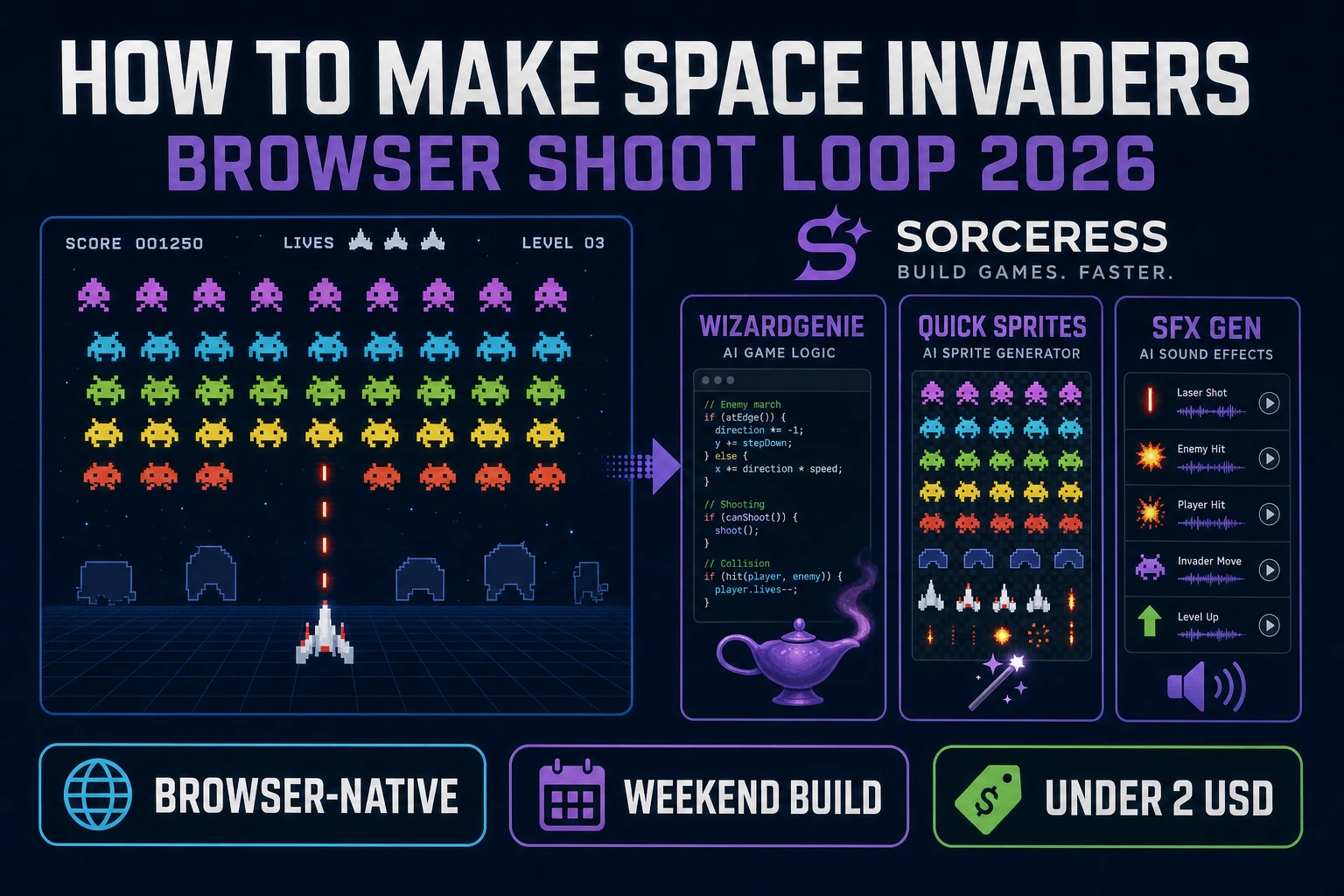
Orbit How to Make Space Invaders (Browser Shoot Loop 2026)

By Arron R.11 min read
How to make Space Invaders in 2026: model a marching alien grid with faster steps as rows clear, wire left-right ship control and one-shot bullets in WizardGeni

Most beginners who search “how to make Space Invaders” want a ship at the bottom, rows of aliens that march left and right while creeping downward, and a single upward bullet that clears invaders one at a time until the wave is gone. A full Taito tribute with bunkers, UFO bonuses, and fifty wave variants is a month of tuning. A browser shoot loop is different. A coding agent scaffolds grid march logic, one-shot bullets, and lives from one prompt, and AI generation covers invader sprites and laser pops. On desktop or web, that means WizardGenie for the fixed-shooter loop, Quick Sprites for alien rows and ship art, SFX Gen for laser and explosion audio, and optional Music Gen for a tension bed. This guide is the honest end-to-end for how to make Space Invaders in 2026, as a weekend build you can finish once.
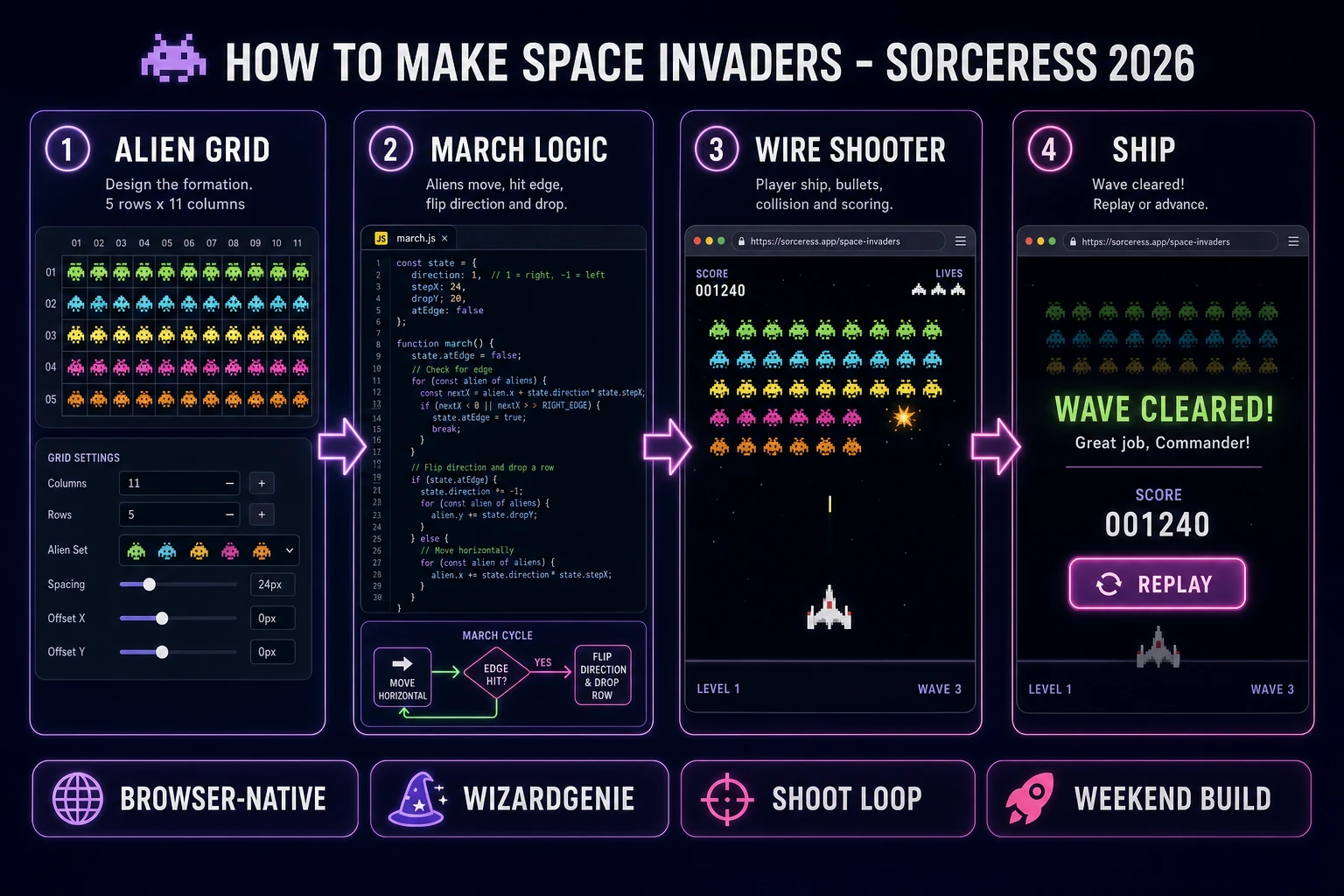
How to make Space Invaders browser pipeline: model an alien grid that marches and descends, wire player movement and bullet fire in WizardGenie, and ship a browser shoot loop
The 2026 how to make Space Invaders recipe: model a marching alien grid with accelerating steps, wire left-right ship control and one-shot bullets in WizardGenie, then add Quick Sprites invader sprites and SFX Gen laser pops.

What how to make Space Invaders actually means in 2026

The query “how to make Space Invaders” hides three intents. Some searchers want a Unity or Godot template with prefab invaders and particle explosions — that is engine shopping, not a minimal playable loop. A second intent is a full Galaga-style formation shooter with dive attacks and combo chains — a commercial-scale scope. The third intent, and the one this guide targets, is a browser fixed shooter: player ship at the bottom, five rows of aliens marching in formation, one player bullet on screen at a time, aliens that speed up as their count drops, and game over when invaders reach the player row or lives hit zero. That is a weekend build, it demos the Sorceress toolset, and it is the format most space invaders clone tutorial and javascript space invaders searchers actually want.

The presentation contract is small and strict. A title screen shows the game name, high score, and Start. The play screen shows the alien grid, player ship, score, lives icons, and wave label. On alien hit, remove the cell, play an explosion sound, and shorten the march interval. On player death, decrement lives and respawn the ship after a short pause. On wave clear, freeze input briefly, show a banner, rebuild the grid, and reset march speed. On game over, show final score and Replay. The Space Invaders overview on Wikipedia (verified 2026-08-22) still separates the 1978 Taito cabinet from later formation shooters cleanly — cite it when you write your itch.io blurb so players know which promise you kept. If you already shipped a free-roaming vector shooter, the sibling guide on how to make Asteroids covers rotate-thrust physics; this post owns the marching grid and one-shot vertical bullets instead.

The Space Invaders loop in one minute (move, shoot, march, clear wave)

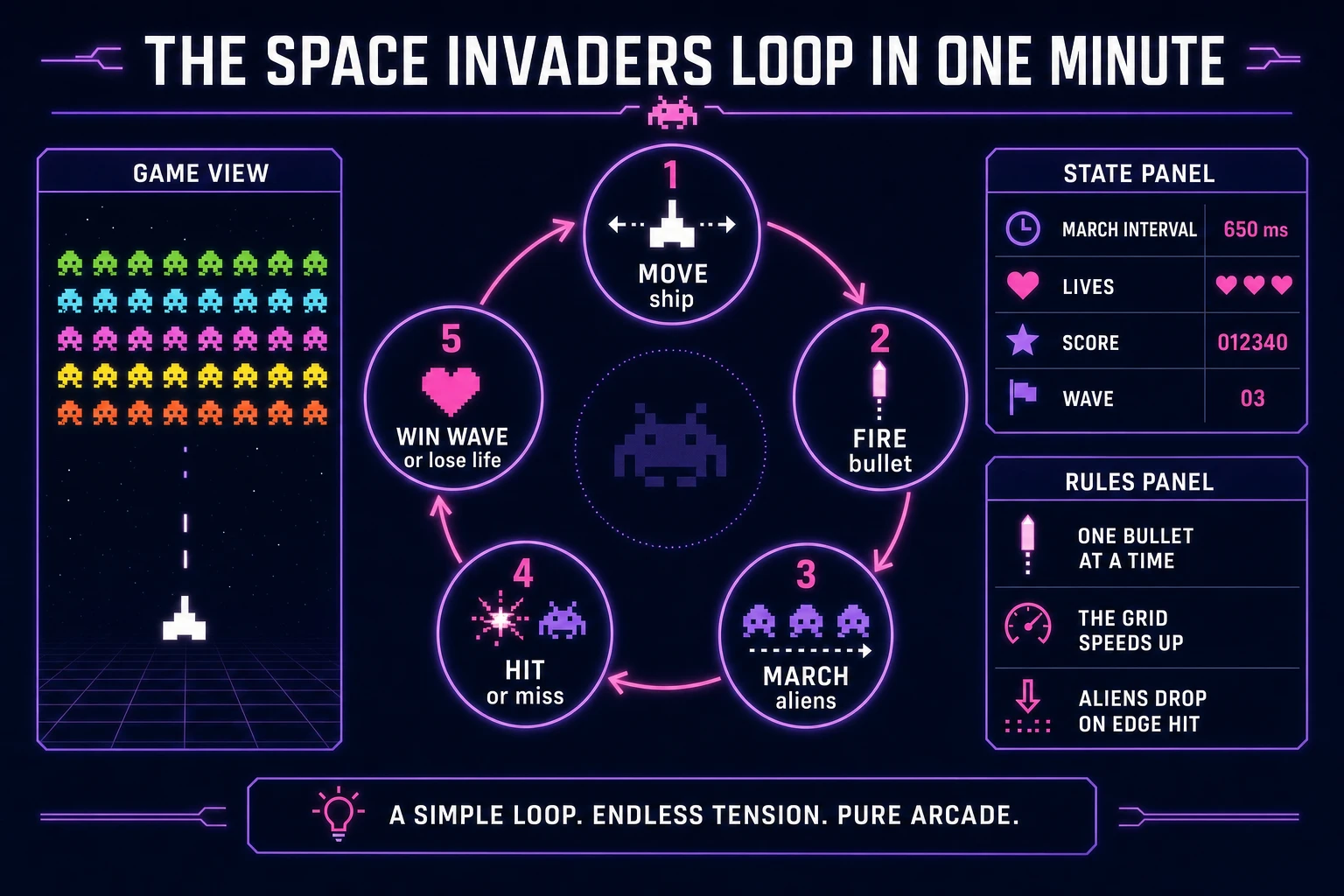
Five moving parts, repeated until lives hit zero or the player quits. First, move — slide the player ship left and right with arrow keys or touch, clamped to canvas width. Second, shoot — on fire input, spawn one upward bullet if none is in flight. Third, march — on a timer tick, shift every live alien horizontally; when any alien hits the side margin, flip direction and drop the whole formation one row. Fourth, hit or miss — integrate bullet position; on overlap with a live alien, null the cell, add score, and remove the bullet; on overlap with the player or bottom row breach, lose a life. Fifth, win wave or game over — when every alien is gone, advance wave and rebuild the grid; when lives reach zero, show final score. That is the entire fixed shooter loop. Bunkers, UFO bonuses, and dive attacks are polish layered after one honest five-by-eleven grid clears without collision gaps.
Space Invaders loop state machine diagram showing move ship, fire bullet, march aliens, hit or miss, and win wave or lose life
The Space Invaders loop: move the ship, fire one bullet, march the alien grid faster as rows thin, and clear the wave before invaders reach the bottom.

Pick your engine for how to make Space Invaders: canvas, Phaser, or WizardGenie

Three good targets in 2026, each with a different trade-off. Vanilla JavaScript on canvas is the honest default and the pick this guide recommends for a first build. Draw ship, aliens, and bullets each frame with fillRect or drawImage, run collision in a single update function, and wire keyboard events for movement and fire. Total code footprint for a working html5 space invaders loop is under 400 lines including grid march and lives. No engine to install, ships as a static HTML file, deploys anywhere. The MDN Canvas API docs cover drawing and animation frames.

DOM with CSS transforms becomes the right pick only for a toy demo — fifty alien cells as divs reflow painfully once you animate march ticks ten times per second. Stick with canvas for any browser space invaders build you expect strangers to play on mobile.

Phaser 4.1.0 (verified 2026-08-22 on the official Phaser API documentation page) becomes the right pick if you want Arcade Physics groups, alien death tweens, or Scene transitions between title and play. Phaser does not invent your march logic — you still need the same direction-flip helpers and interval timers. Use Phaser when explosion polish is the product; use raw canvas when the product is an alien shooter tutorial people can read in one sitting.

WizardGenie is not a separate rendering engine — it scaffolds whichever of the two you pick from a single natural-language prompt. WizardGenie ships as both a desktop app (Windows installer with auto-update, available to Early Access supporters and above) and a no-install web build. Its coding-model lineup covers Claude Opus 4.7, GPT-5.5, Gemini 3.1 Pro, DeepSeek V4 Pro, Kimi K2.5, Grok 4.2, and MiniMax M2.7 (verified 2026-08-22 in src/app/_home-v2/_data/tools.ts). For Space Invaders, any frontier model scaffolds grid march, bullets, and lives in one prompt. Pair a frontier planner with a budget executor like DeepSeek V4 Pro or Kimi K2.5 for the typing pass — the Dual-agent pattern lands most projects at roughly one-fifth the single-frontier cost.

Step 1 — model alien grid and player movement

Nothing else in the pipeline matters if aliens tunnel through bullets or the march timer never accelerates. Start with a small, testable model:

const COLS = 11, ROWS = 5, ALIEN_W = 32, ALIEN_H = 24, GAP = 8;
const SHIP_W = 48, BULLET_SPEED = 6, MARCH_BASE = 600, MARCH_MIN = 120;

function makeGrid() {
  return Array.from({ length: ROWS }, () =>
    Array.from({ length: COLS }, () => ({ alive: true }))
  );
}

function aliveCount(grid) {
  return grid.flat().filter((c) => c.alive).length;
}

function marchInterval(grid) {
  const dead = COLS * ROWS - aliveCount(grid);
  return Math.max(MARCH_MIN, MARCH_BASE - Math.floor(dead / 5) * 40);
}

function alienRect(col, row, dir, offsetX, dropRows) {
  return {
    x: col * (ALIEN_W + GAP) + GAP + offsetX,
    y: row * (ALIEN_H + GAP) + 60 + dropRows * (ALIEN_H + GAP),
    w: ALIEN_W,
    h: ALIEN_H,
  };
}

function aabb(ax, ay, aw, ah, bx, by, bw, bh) {
  return ax < bx + bw && ax + aw > bx && ay < by + bh && ay + ah > by;
}

function tickMarch(state, canvasW) {
  const { grid, dir, offsetX, dropRows } = state;
  let hitEdge = false;
  for (let r = 0; r < ROWS; r++) {
    for (let c = 0; c < COLS; c++) {
      if (!grid[r][c].alive) continue;
      const rect = alienRect(c, r, dir, offsetX, dropRows);
      if (rect.x <= 0 || rect.x + ALIEN_W >= canvasW) hitEdge = true;
    }
  }
  if (hitEdge) {
    state.dir *= -1;
    state.dropRows += 1;
    state.offsetX += state.dir * 4;
  } else {
    state.offsetX += state.dir * 4;
  }
}

function updateBullet(bullet, grid, state, shipX, shipY, canvasH) {
  if (!bullet) return null;
  bullet.y -= BULLET_SPEED;
  if (bullet.y < 0) return null;
  for (let r = 0; r < ROWS; r++) {
    for (let c = 0; c < COLS; c++) {
      if (!grid[r][c].alive) continue;
      const rect = alienRect(c, r, state.dir, state.offsetX, state.dropRows);
      if (aabb(bullet.x, bullet.y, 4, 12, rect.x, rect.y, rect.w, rect.h)) {
        grid[r][c].alive = false;
        return 'hit';
      }
    }
  }
  const bottomY = 60 + ROWS * (ALIEN_H + GAP) + state.dropRows * (ALIEN_H + GAP);
  if (bottomY >= shipY - 10) return 'breach';
  return bullet;
}

Game state is { grid, dir, offsetX, dropRows, shipX, bullet, lives, score, wave, lastMarch }. Unit-test four asserts before you paint UI: march interval shrinks as aliens die; edge hit flips direction and increments dropRows; a bullet centered on an alien nulls that cell; breach returns when the formation reaches the player row. Those asserts are the difference between a fixed shooter game people trust and one that randomly awards free clears when bullets clip between cells.

Keep bunkers and UFO bonuses out of v1 — they are variants on the same march grid. Related top-down pacing also shows up in the top-down shooter guide if you want another aim-and-fire weekend pattern after this one ships.

Step 2 — wire bullet fire and wave descent in WizardGenie

With the model solid, open WizardGenie. Drop in a bare index.html with a canvas element and a score div. Give the agent one paragraph: Build a 5×11 Space Invaders-style game on canvas. Player ship at bottom, arrow keys move, space fires one upward bullet at a time. Aliens march on an interval that speeds up as count drops. Flip direction and drop one row on edge hit. Three lives. Rebuild grid on wave clear. Use requestAnimationFrame loop. Feed that to any coding model and the scaffold lands in under five minutes.

The remaining afternoon is polish via follow-ups. Keep the input handler thin:

function onKeyDown(game, code, canvas) {
  if (code === 'ArrowLeft') game.shipX = Math.max(0, game.shipX - 12);
  if (code === 'ArrowRight') game.shipX = Math.min(canvas.width - SHIP_W, game.shipX + 12);
  if (code === 'Space' && !game.bullet) {
    game.bullet = { x: game.shipX + SHIP_W / 2 - 2, y: canvas.height - 50 };
    playSfx('laser');
  }
}

function gameLoop(game, canvas, ctx, now) {
  if (now - game.lastMarch >= marchInterval(game.grid)) {
    tickMarch(game, canvas.width);
    game.lastMarch = now;
    playSfx('march', 0.15);
  }
  const bulletResult = updateBullet(game.bullet, game.grid, game, game.shipX, canvas.height - 40, canvas.height);
  if (bulletResult === 'hit') {
    game.score += 10;
    game.bullet = null;
    playSfx('explode');
    if (aliveCount(game.grid) === 0) advanceWave(game);
  } else if (bulletResult === 'breach') {
    endGame(game);
  } else {
    game.bullet = bulletResult;
  }
  draw(game, ctx, canvas);
  requestAnimationFrame((t) => gameLoop(game, canvas, ctx, t));
}

function advanceWave(game) {
  game.wave += 1;
  game.grid = makeGrid();
  game.dir = 1;
  game.offsetX = 0;
  game.dropRows = 0;
  game.lastMarch = performance.now();
  playSfx('wave');
}

Add alien return fire on a timer once the grid crosses the screen midpoint — one downward bullet from a random live alien in the bottom two rows every two seconds is enough for tension. Clamp ship movement to canvas edges so players cannot hide off-screen. Persist high score with localStorage keyed by game id so Refresh does not wipe a personal best.

Step 3 — Quick Sprites aliens, SFX Gen laser pops, Music Gen tension bed

Flat colored rectangles prove the loop. Art and audio make the invasion feel intentional. Open Quick Sprites at 9 credits per generation (verified 2026-08-22 in src/app/quick-sprites/page.tsx). Prompt three assets: a horizontal invader row sheet with two animation frames per color, a player ship sprite with a subtle glow, and an optional bunker tile if you add shields in v2. Import aliens as drawImage slices per cell and swap the ship from a generated PNG.

Open SFX Gen (1 credit per second of audio, verified 2026-08-22 in src/app/sfx-gen/page.tsx) and generate four short clips: a sharp player laser (~0.3s), a crunchy alien explosion, a low player death boom, and a short wave-clear fanfare. Trigger laser on fire, explode on each alien hit, death on life loss, and fanfare when advanceWave runs. Keep march tick audio at very low volume — the original cabinet used a heartbeat-like step sound, but browser builds often skip it until polish pass.

Optional but nice: open Music Gen (10 credits per generation, verified 2026-08-22 in src/app/music-gen/page.tsx) and prompt a looping tension bed — “minimal synth pulse, steady tempo, no vocals, arcade anxiety, low dynamics.” One or two tries is enough. Mute music by default so players who want silence stay in flow. Browse the rest of the stack from the tools guide if you later add AI Image Gen for a starfield backdrop. The asset stack for a weekend how to make Space Invaders project stays well under a dollar of credits; see the cost section below for the line-item math.

Space Invaders asset stack diagram showing Quick Sprites alien sprites, SFX Gen laser and explosion audio, optional Music Gen tension bed, and total credit cost under one dollar
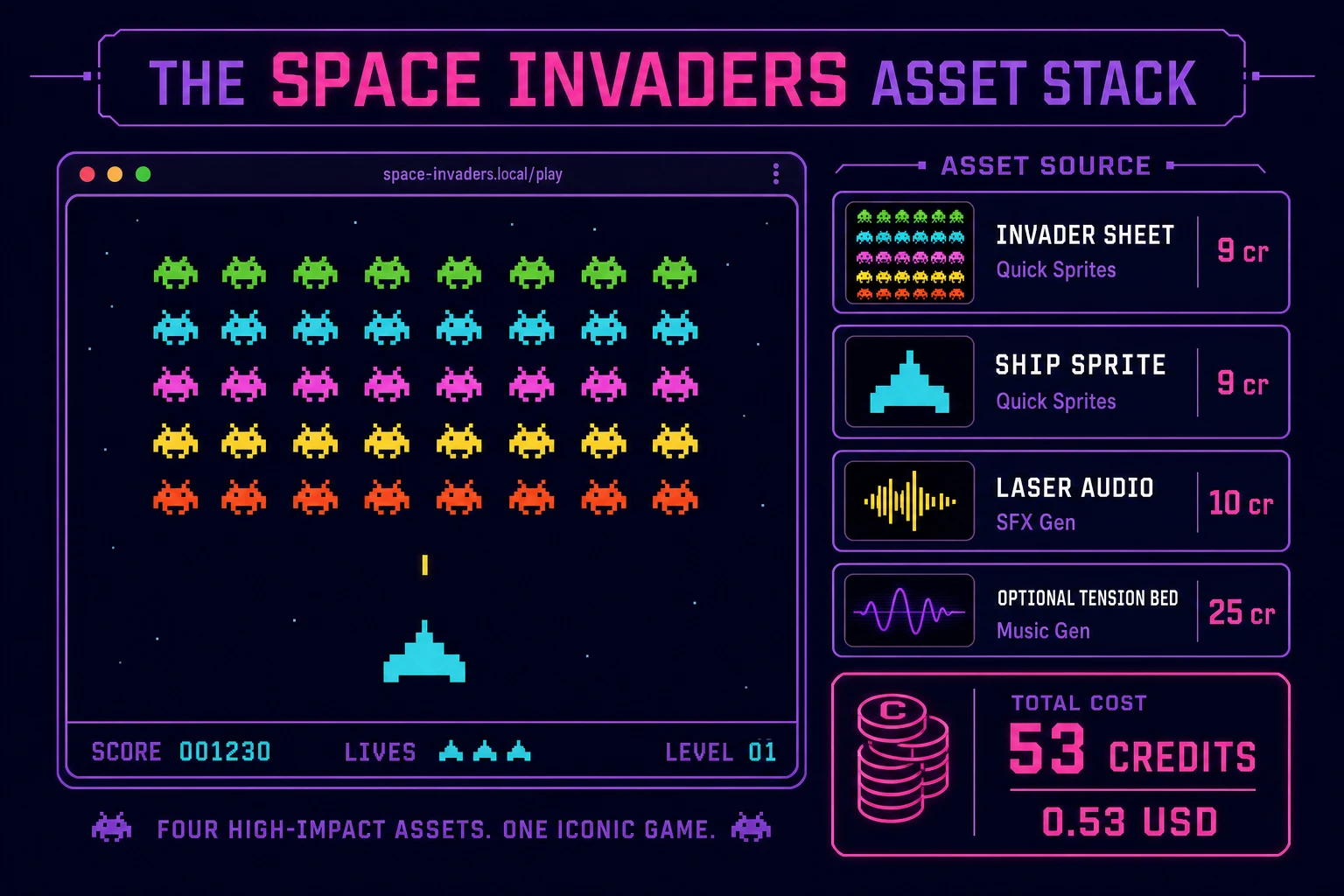
The Space Invaders asset stack: Quick Sprites for invader rows and ship art, SFX Gen for laser and explosion cues, optional Music Gen tension bed — roughly 53 credits on the 2026 Sorceress rate card.

What a how to make Space Invaders project costs on Sorceress in 2026

Here is an honest first-project budget against the live Sorceress rate card (verified 2026-08-22 against local source). Three Quick Sprites passes at 9 credits each ($0.09 each) — invader row sheet, ship sprite, optional bunker tile — = 27 credits ($0.27). Four SFX clips totaling about 6 billable seconds at 1 credit/sec = 6 credits ($0.06). Optional Music Gen tension bed with a retry at 10 credits each = 20 credits ($0.20). Coding-model API time for the WizardGenie scaffold and polish pass is typically under $0.40 when you pair a frontier planner with DeepSeek V4 Pro or Kimi K2.5 as executor. Grand total: roughly 53 credits ($0.53) plus sub-dollar agent time. The free 100-credit signup grant covers the entire art and audio stack on day one. Credit packs and supporter tiers live on Plans if you outgrow the grant.

That is the whole pipeline for how to make Space Invaders in 2026: a marching alien grid with accelerating steps, one-shot vertical bullets, canvas collision, and a thin Sorceress asset layer so the playfield looks finished. Ship the static build, clear three waves without march bugs, then decide whether bunkers or UFO bonuses are worth another afternoon — only after the first honest life loss already feels fair. For related arcade ports in the same weekend budget, see how to make Pac-Man, how to make pong, and how to make a breakout game.

Frequently Asked Questions

Which alien grid layout should a beginner use for how to make Space Invaders?

Start with five rows and eleven columns of uniform invaders, each worth ten points. That mirrors the 1978 Taito cabinet footprint most space invaders clone tutorial searchers expect. Leave bunkers, UFO bonus ships, and mystery-point UFOs out of v1 — one honest march-and-shoot loop where the grid speeds up as aliens die is enough for a first ship.

How does the alien grid speed up when invaders are destroyed?

Track alive count each frame. Base step interval might be 600 ms at full grid, then subtract 40 ms for every five aliens destroyed, floored at 120 ms. On each tick, move every live alien horizontally by one cell width; when any alien touches the left or right margin, flip direction and drop every alien one row downward. That acceleration curve is what makes fixed shooter game builds feel like the arcade original without rewriting movement code per alien.

Canvas or Phaser for a browser space invaders build?

Canvas is the honest default for a first html5 space invaders scaffold — you draw the ship, alien sprites, and bullet rectangles each frame and run AABB collision in under 250 lines. Phaser 4.1.0 (verified 2026-08-22 on the official Phaser API documentation page) adds Arcade Physics groups and Scene lifecycle if you want tweened death animations without rewriting overlap yourself. Pick Phaser when motion polish is the product; pick raw canvas when the product is a javascript space invaders tutorial people can fork in one file.

How do player bullets and alien shots share the screen without tunneling?

Cap the player to one in-flight bullet at a time — that is the classic constraint. Store bullets as { x, y, vy } arrays for player shots and { x, y, vy } for alien drops. Each frame integrate y, then test AABB overlap against every live alien cell and the player hitbox. Remove the bullet on first hit. Alien shots spawn on a timer from a random live alien in the bottom two rows once the grid has crossed the midpoint. Unit-test that a bullet centered on an alien nulls that cell and increments score before the next march tick.

How much does it cost to build Space Invaders on Sorceress?

A first-project browser shoot loop with art and audio budgets like this against the 2026 Sorceress rate card (verified 2026-08-22 against local source). Three Quick Sprites passes at 9 credits each (src/app/quick-sprites/page.tsx line 21) — invader row sheet, player ship, optional bunker tile — = 27 credits or 0.27 USD. Four SFX clips at 1 credit per second (src/app/sfx-gen/page.tsx line 23) — player laser, alien explosion, player death, wave clear — roughly 6 credits or 0.06 USD. Optional Music Gen tension bed: two tries at 10 credits each (src/app/music-gen/page.tsx line 28) = 20 credits or 0.20 USD. Total roughly 53 credits or 0.53 USD plus under 0.40 USD in coding-model API time. The free 100-credit signup grant (src/app/api/admin/credits/route.ts line 12) covers the full art and audio stack outright.

Sources

  1. Space Invaders - Wikipedia
  2. MDN - Canvas API
  3. MDN - Keyboard events
  4. Phaser 4.1.0 API Documentation
Written by Arron R.·2,390 words·11 min read

Related posts


