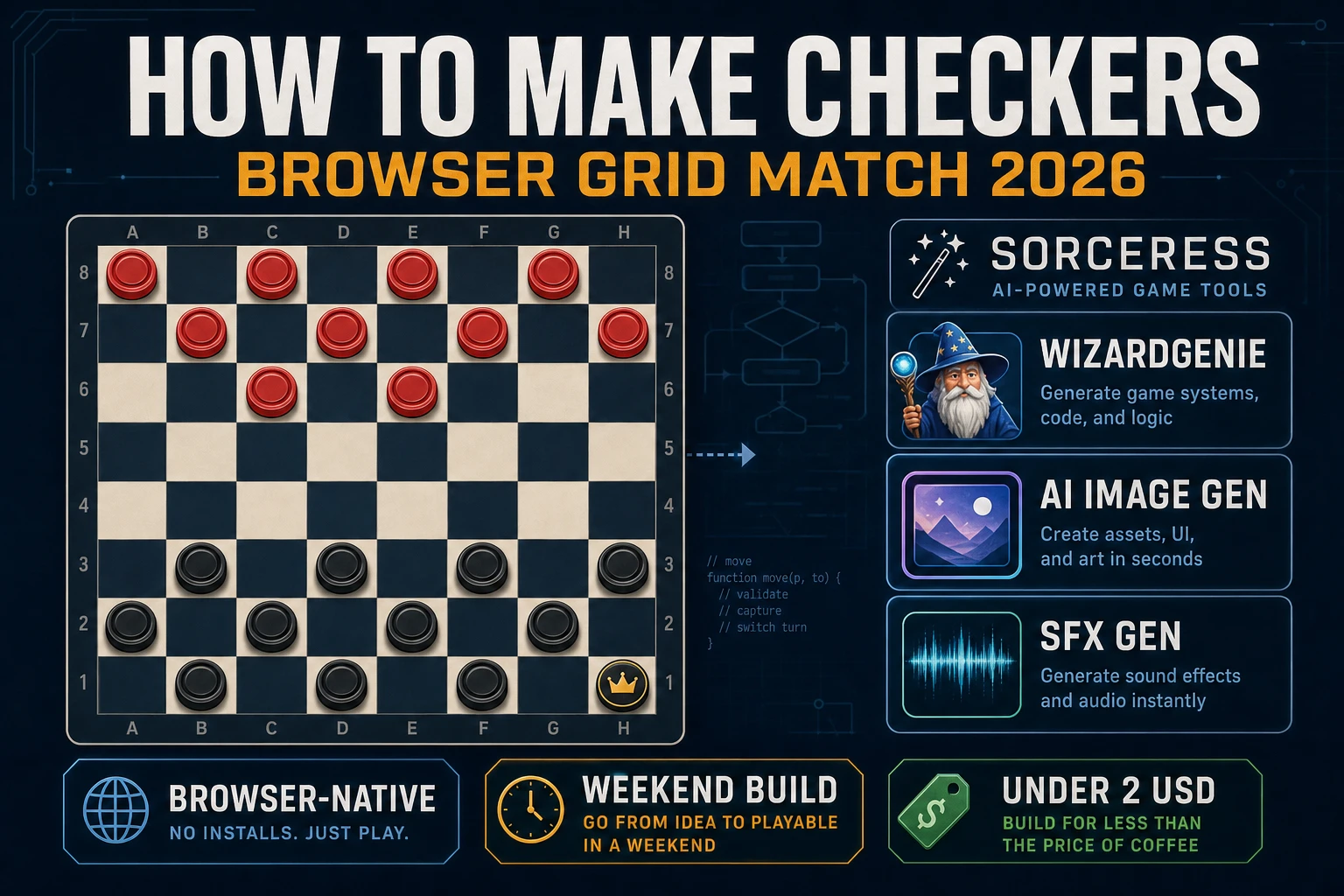
King How to Make Checkers (Browser Grid Match 2026)

By Arron R.12 min read
How to make checkers in 2026: model an 8×8 English draughts board with mandatory jumps and kings, wire click-to-move and multi-jump in WizardGenie, then add AI

American checkers is what most beginners mean when they search “how to make checkers”: an 8×8 English draughts board, twelve men per side on the dark squares, mandatory jumps, kings that reverse direction, and a win when the opponent’s side has no legal move left. A full tournament engine with opening books and endgame tables is a research project — months of bitboards before the first honest match. A browser grid-match loop is different. A coding agent scaffolds the board model, jump tree, and click-to-move flow from one prompt, and AI generation covers piece art and capture stings. On desktop or web, that means WizardGenie for the select-and-jump loop, AI Image Gen for board wood and piece sets, SFX Gen for move and capture cues, and optional Music Gen for a quiet lounge bed. This guide is the honest end-to-end for how to make checkers in 2026, as a weekend build you can finish once.
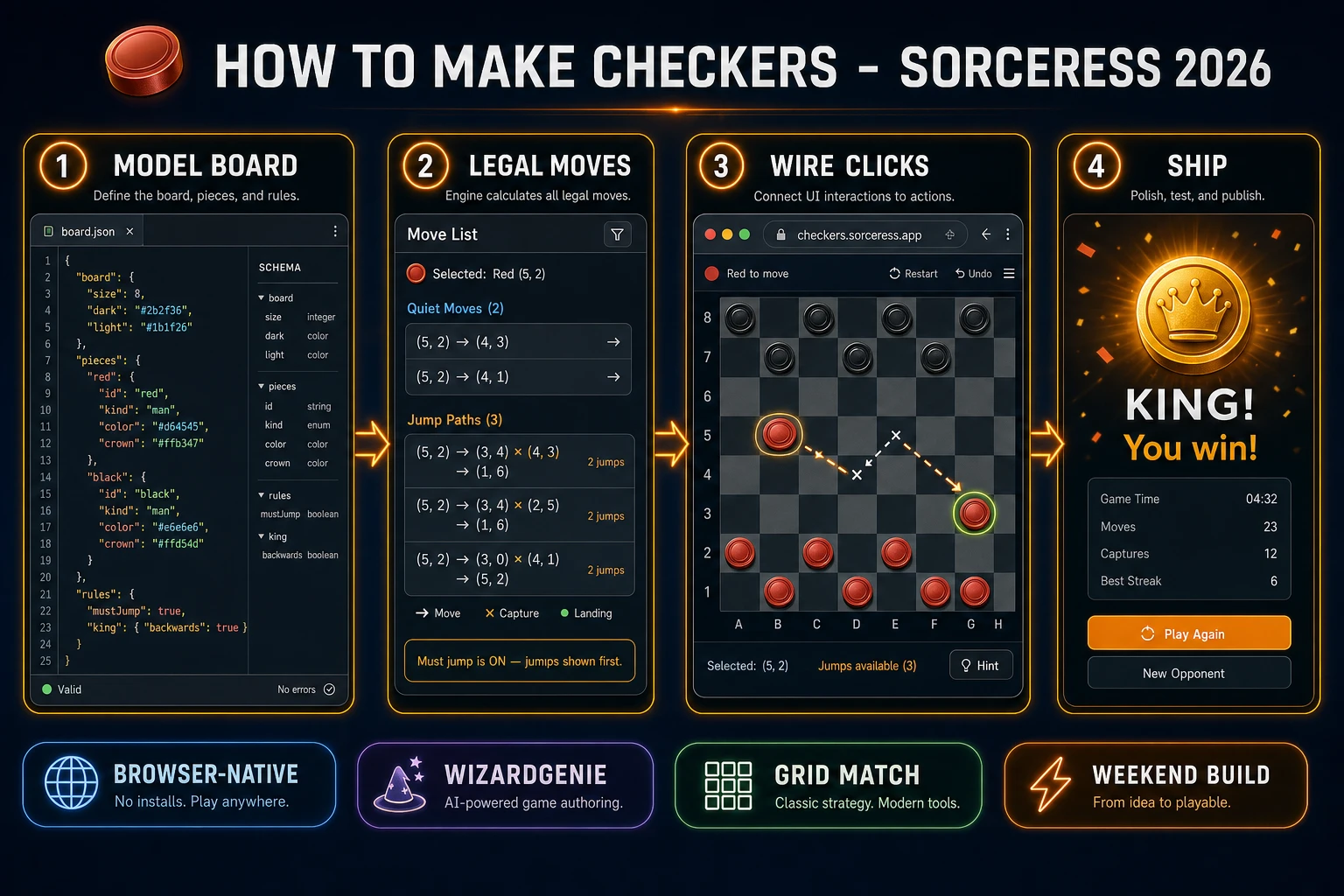
How to make checkers browser pipeline: model an 8x8 draughts board with jumps and kings, wire click-to-move in WizardGenie, and ship a browser checkers game
The 2026 how to make checkers recipe: model board state and legal moves, wire click-to-move and multi-jump in WizardGenie, then add AI Image Gen pieces and SFX Gen capture audio.

What how to make checkers actually means in 2026

The query “how to make checkers” hides three intents. Some searchers want a printable paper board and cardboard discs for a rainy afternoon — that is craft, not a playable digital game. A second intent is a full checkers AI that solves endgames and plays at master strength — a serious search and evaluation problem. The third intent, and the one this guide targets, is a browser draughts match: a fixed 8×8 grid, red and black pieces on dark squares, click or tap to select, legal highlights, quiet moves and forced jumps, crowning on the back rank, and a win card when one side cannot move. That is a weekend build, it demos the Sorceress toolset, and it is the format most checkers game tutorial and javascript checkers searchers actually want.

The presentation contract is small and strict. A title screen shows the game name, two-player or vs AI label, and Start. The play screen shows the board, whose turn it is, captured trays, and Undo. On win, freeze input, play a short sting, show move count, and offer Replay. The English draughts overview on Wikipedia (verified 2026-08-21) still separates American 8×8 rules from international 10×10 and flying kings cleanly — cite it when you write your itch.io blurb so players know which promise you kept. If you already shipped a chess or tabletop loop, the sibling guides on how to make a chess game and how to make a board game cover shared board UI patterns; this post owns draughts jumps and crowning instead.

The checkers loop in one minute (select, move, capture, king, win)

Five moving parts, repeated until one side cannot move. First, select — click or tap a piece of the side to move; if any piece has a jump, only jump-capable pieces are selectable. Second, show — highlight quiet landing squares or the first step of each jump path. Third, move or jump — click a highlighted square; for a multi-jump, keep the same piece locked until the path ends. Fourth, capture and crown — remove jumped pieces, and if a man lands on the opposite back rank, promote to king and end that multi-jump (English rules). Fifth, win or switch — if the opponent has no legal move, show the win card; otherwise flip the turn. That is the entire checkers loop. Opening books, flying kings, and online matchmaking are polish layered after one honest two-player match feels fair.
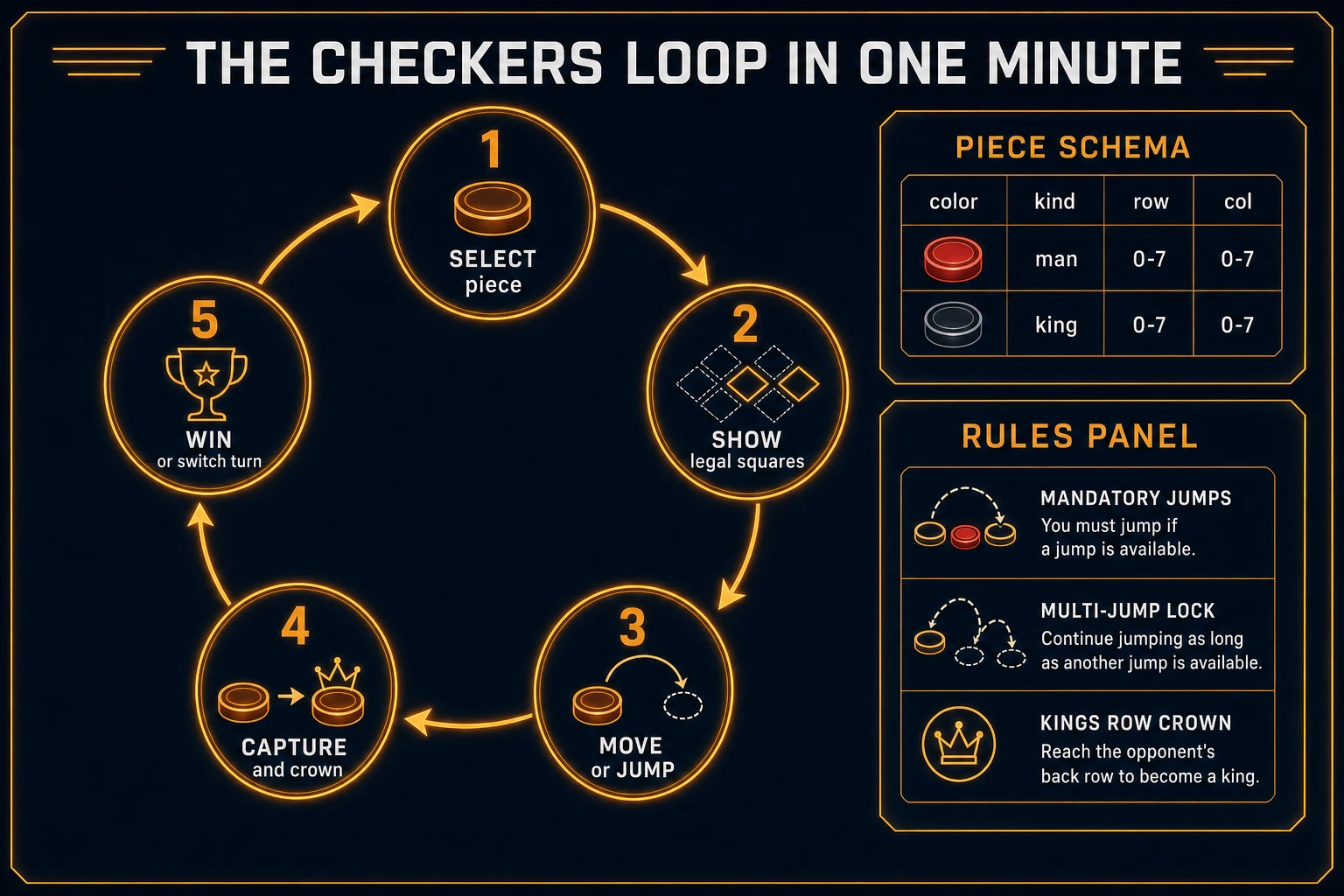
Checkers loop state machine diagram showing select, show legal squares, move or jump, capture and crown, and win or switch turn
The checkers loop: select a piece, show legal squares, move or jump, capture and crown, then win or switch turn.

Pick your engine for how to make checkers: DOM grid, canvas, or WizardGenie

Three good targets in 2026, each with a different trade-off. Vanilla JavaScript on a DOM grid is the honest default and the pick this guide recommends for a first build. Render a CSS grid of 64 buttons, paint light and dark squares, and place piece spans only on dark playable cells. Total code footprint for a working html5 checkers rules engine is under 500 lines including quiet moves, jump trees, and turn switching. No engine to install, ships as a static HTML file, deploys anywhere. The MDN Element click event docs and Pointer events cover the input surface for mouse and touch.

Canvas with painted wood grain becomes the right pick if every square is custom art and pieces need smooth drag arcs. You trade free focus rings and accessibility for visuals — fine for a showcase jam, heavier once you reimplement hit-testing and mobile taps yourself.

Phaser 4.1.0 (verified 2026-08-21 on the official Phaser API documentation page) becomes the right pick if you want Scene lifecycle for title-play-win, tweens when a piece captures, or particle pops on crowning. Phaser does not invent your jump tree — you still need the same board schema and legal-move helpers. Use Phaser when motion polish is the product; use DOM when the product is a browser draughts match people can tap on a phone.

WizardGenie is not a separate rendering engine — it scaffolds whichever of the three you pick from a single natural-language prompt. WizardGenie ships as both a desktop app (Windows installer with auto-update, available to Early Access supporters and above) and a no-install web build. Its coding-model lineup covers Claude Opus 4.7, GPT-5.5, Gemini 3.1 Pro, DeepSeek V4 Pro, Kimi K2.5, Grok 4.2, and MiniMax M2.7 (verified 2026-08-21 in src/app/_home-v2/_data/tools.ts). For checkers, any frontier model scaffolds the board, jump generation, and click-to-move flow in one prompt. Pair a frontier planner with a budget executor like DeepSeek V4 Pro or Kimi K2.5 for the typing pass — the Dual-agent pattern lands most projects at roughly one-fifth the single-frontier cost.

Step 1 — model board state and legal move generation

Nothing else in the pipeline matters if jumps are optional when a capture exists, or if a crowned man keeps jumping after promotion. Start with a small, testable model for English draughts:

const SIZE = 8;
const DIRS = {
  red: [[-1,-1],[-1,1]], black: [[1,-1],[1,1]],
  king: [[-1,-1],[-1,1],[1,-1],[1,1]],
};
const dirsFor = (p) => p.kind === 'king' ? DIRS.king : DIRS[p.color];

function setup() {
  const board = Array.from({ length: SIZE }, () => Array(SIZE).fill(null));
  for (let r = 0; r < SIZE; r++) for (let c = 0; c < SIZE; c++) {
    if ((r + c) % 2 === 0) continue;
    if (r < 3) board[r][c] = { color: 'black', kind: 'man' };
    if (r > 4) board[r][c] = { color: 'red', kind: 'man' };
  }
  return board;
}

function quietMoves(board, r, c) {
  const piece = board[r][c];
  if (!piece) return [];
  return dirsFor(piece).flatMap(([dr, dc]) => {
    const nr = r + dr, nc = c + dc;
    return nr >= 0 && nc >= 0 && nr < SIZE && nc < SIZE && !board[nr][nc]
      ? [{ from: [r, c], to: [nr, nc], path: [[nr, nc]], captures: [] }] : [];
  });
}

function collectJumps(board, r, c, origin = null, path = [], captures = []) {
  const piece = board[r][c], start = origin || [r, c], results = [];
  let found = false;
  for (const [dr, dc] of dirsFor(piece)) {
    const mr = r + dr, mc = c + dc, lr = r + 2 * dr, lc = c + 2 * dc;
    if (lr < 0 || lc < 0 || lr >= SIZE || lc >= SIZE || board[lr][lc]) continue;
    const mid = board[mr] && board[mr][mc];
    if (!mid || mid.color === piece.color) continue;
    if (captures.some(([a, b]) => a === mr && b === mc)) continue;
    const nextPath = path.concat([[lr, lc]]), nextCaps = captures.concat([[mr, mc]]);
    const saved = board[r][c], midSaved = board[mr][mc];
    board[r][c] = null; board[mr][mc] = null; board[lr][lc] = saved;
    const deeper = collectJumps(board, lr, lc, start, nextPath, nextCaps);
    board[lr][lc] = null; board[mr][mc] = midSaved; board[r][c] = saved;
    results.push(...(deeper.length ? deeper : [{ from: start, to: [lr, lc], path: nextPath, captures: nextCaps }]));
    found = true;
  }
  if (!found && path.length) results.push({ from: start, to: path[path.length - 1], path, captures });
  return results;
}

function allMoves(board, color) {
  const jumps = [], quiet = [];
  for (let r = 0; r < SIZE; r++) for (let c = 0; c < SIZE; c++) {
    const p = board[r][c];
    if (!p || p.color !== color) continue;
    jumps.push(...collectJumps(board, r, c));
    quiet.push(...quietMoves(board, r, c));
  }
  return jumps.length ? jumps : quiet;
}

function applyMove(board, move) {
  const [fr, fc] = move.from, piece = Object.assign({}, board[fr][fc]);
  board[fr][fc] = null;
  for (const [cr, cc] of move.captures) board[cr][cc] = null;
  const [tr, tc] = move.to;
  const crowned = piece.kind === 'man' && tr === (piece.color === 'red' ? 0 : SIZE - 1);
  if (crowned) piece.kind = 'king';
  board[tr][tc] = piece;
  return crowned;
}

Game state is { board, turn, selected, legal, midJump, winner }. Unit-test four asserts before you paint UI: a man on an empty board only generates forward quiet diagonals; a forced single jump disables all quiet moves for that side; a three-jump chain returns one path with three captures; crowning on the final landing of a jump does not continue the chain. Those asserts are the difference between a checkers rules engine people trust and one that silently allows illegal retreats.

Keep international 10×10 boards and flying kings out of v1 — they are rule variants on top of the same jump-tree idea. Related card-loop pacing also shows up in the solitaire Klondike guide if you want another weekend tabletop pattern after this one ships.

Step 2 — wire click-to-move and multi-jump in WizardGenie

With the model solid, open WizardGenie. Drop in a bare index.html with a CSS grid of 64 squares and a status line for whose turn it is. Give the agent one paragraph: Build English draughts (American checkers) on an 8×8 board. Pieces live only on dark squares. Men move and jump diagonally forward; kings move and jump both ways. Jumps are mandatory. Generate the full jump tree; if any jump exists, hide quiet moves. On the player’s turn, click a piece to select, then click a highlighted square to move. Multi-jump locks selection to that piece until the path completes. Crowning on the back rank ends the current multi-jump. Win when the opponent has zero legal moves. Use DOM buttons and click handlers. Feed that to any coding model and the scaffold lands in under five minutes.

The remaining afternoon is polish via follow-ups. Keep the click handler thin and testable:

function onSquareClick(game, r, c) {
  if (game.winner) return;
  const piece = game.board[r][c];
  if (game.midJump) {
    const next = game.legal.find((m) => m.to[0] === r && m.to[1] === c);
    if (!next) return;
    const crowned = applyMove(game.board, {
      from: game.selected, to: next.to, path: next.path, captures: next.captures.slice(0, 1),
    });
    if (!crowned) {
      const more = collectJumps(game.board, r, c).filter((m) => m.captures.length);
      if (more.length) { game.selected = [r, c]; game.legal = more; return; }
    }
    game.midJump = false; game.selected = null; game.legal = [];
    return endTurn(game);
  }
  if (piece && piece.color === game.turn) {
    game.legal = allMoves(game.board, game.turn).filter((m) => m.from[0] === r && m.from[1] === c);
    if (game.legal.length) game.selected = [r, c];
    return;
  }
  if (!game.selected) return;
  const move = game.legal.find((m) => m.to[0] === r && m.to[1] === c);
  if (!move) { game.selected = null; game.legal = []; return; }
  if (move.captures.length > 1) {
    applyMove(game.board, {
      from: move.from, to: move.path[0], path: [move.path[0]], captures: [move.captures[0]],
    });
    game.midJump = true; game.selected = move.path[0];
    game.legal = collectJumps(game.board, move.path[0][0], move.path[0][1]);
    return;
  }
  applyMove(game.board, move); endTurn(game);
}

function endTurn(game) {
  game.selected = null; game.legal = []; game.midJump = false;
  const next = game.turn === 'red' ? 'black' : 'red';
  if (!allMoves(game.board, next).length) game.winner = game.turn;
  else game.turn = next;
}

Wire clicks with pointerup or the classic click event so touch devices do not need a separate path. Style legal squares with a soft outline; style the selected piece with a ring that survives the mid-jump lock. Never allow deselect mid-jump — that’s how illegal “abort capture” bugs appear. Persist the board with localStorage keyed by match id so Refresh does not wipe a half-finished game. For a light AI opponent later, call allMoves for the computer side and pick a random jump-preferring move — a true checkers AI with evaluation is a follow-up afternoon once two-player already feels fair.

Step 3 — AI Image Gen pieces and board, SFX Gen capture, Music Gen lounge bed

Gray circles on a CSS checkerboard prove the loop. Art and audio make the match feel intentional. Open AI Image Gen and run Nano Banana Pro at 18 credits per pass (verified 2026-08-21 in src/lib/models.ts). Prompt two assets: a wood or felt board backdrop with clear dark/light contrast, and a red/black piece set (man and king variants) that stays readable at small square sizes. Keep piece silhouettes high-contrast — flat discs with a simple crown mark still win for a checkers game tutorial. Drop the backdrop as a CSS background-image on the play stage; keep DOM piece nodes on top for hit-testing.

Open SFX Gen (1 credit per second of audio, verified 2026-08-21 in src/app/sfx-gen/page.tsx) and generate four short clips: a soft select tap (~1s), a wood move click, a brighter capture thud, and a short crown or win sting. Trigger select on piece pick, move on quiet landings, capture on each jumped removal, and crown when kind flips to king. Keep volumes low so a twenty-minute match does not fatigue.

Optional but nice: open Music Gen (10 credits per generation, verified 2026-08-21 in src/app/music-gen/page.tsx) and prompt a quiet lounge or café bed — “soft instrumental lounge, no vocals, low dynamics for a checkers table.” One or two tries is enough. Mute music by default so players who want silence stay in flow. Browse the rest of the stack from the tools guide if you later add Speech Gen for turn announcements. The asset stack for a weekend how to make checkers project stays well under a dollar of credits; see the cost section below for the line-item math.

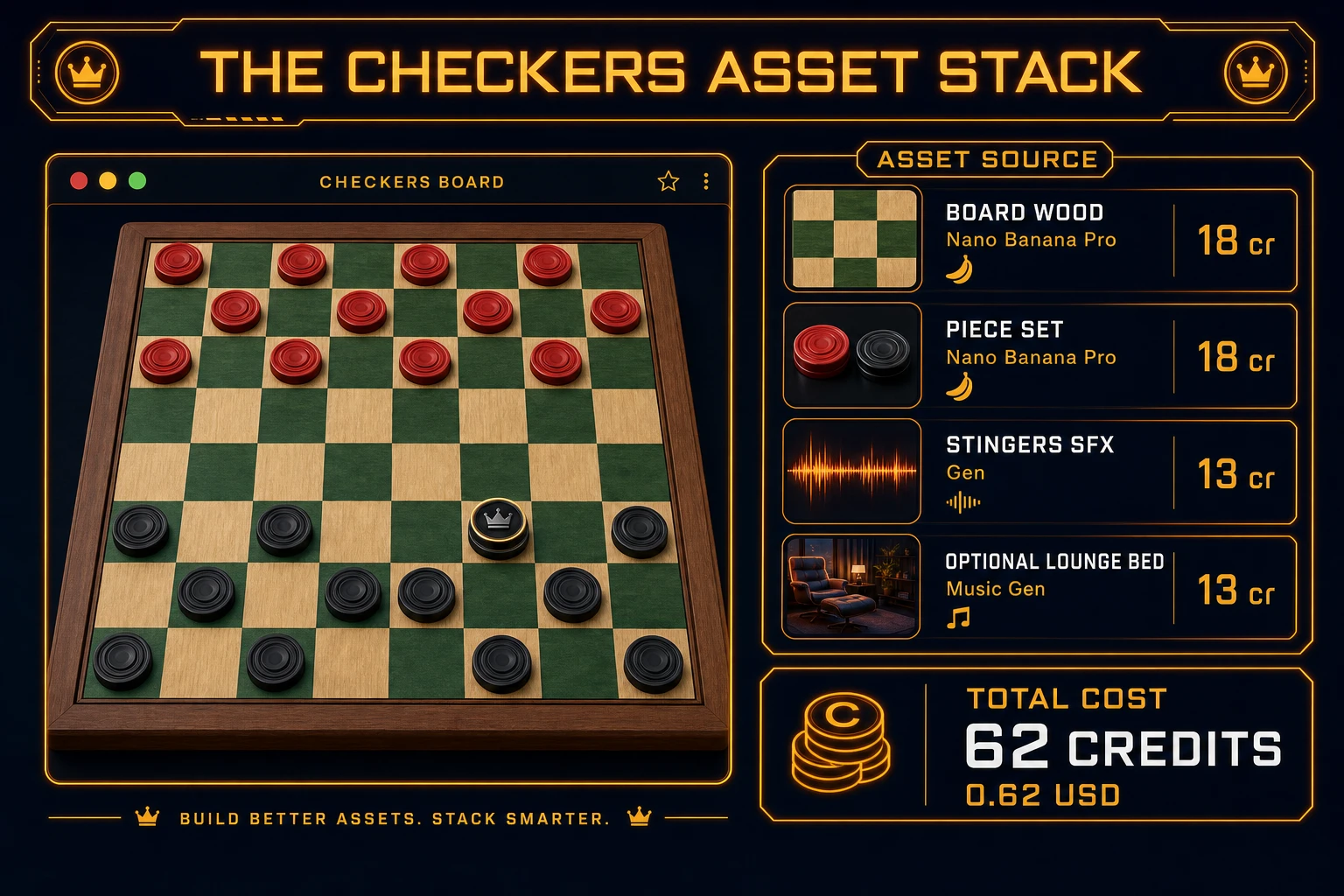
Checkers asset stack diagram showing AI Image Gen board and pieces, SFX Gen stingers, optional Music Gen lounge bed, and total credit cost under one dollar
The checkers asset stack: AI Image Gen for board wood and piece sets, SFX Gen for select and capture cues, optional Music Gen lounge bed — roughly 62 credits on the 2026 Sorceress rate card.

What a how to make checkers project costs on Sorceress in 2026

Here is an honest first-project budget against the live Sorceress rate card (verified 2026-08-21 against local source). Two Nano Banana Pro images at 18 credits each = 36 credits ($0.36) for board wood and red/black piece art. Four SFX clips totaling about 6 billable seconds at 1 credit/sec = 6 credits ($0.06). Optional Music Gen lounge bed with a retry at 10 credits each = 20 credits ($0.20). Coding-model API time for the WizardGenie scaffold and polish pass is typically under $0.40 when you pair a frontier planner with DeepSeek V4 Pro or Kimi K2.5 as executor. Grand total: roughly 62 credits ($0.62) plus sub-dollar agent time. The free 100-credit signup grant covers the entire art and audio stack on day one. Credit packs and supporter tiers live on Plans if you outgrow the grant.

That is the whole pipeline for how to make checkers in 2026: an 8×8 English draughts board model, mandatory jump generation with multi-jump lock, crowning that ends the chain, DOM click-to-move, and a thin Sorceress asset layer so the table looks finished. Ship the static build, play one full two-player match without forgiving illegal retreats, then decide whether a minimax checkers AI or a second rule variant is worth another afternoon — only after the first forced triple jump already feels fair.

Frequently Asked Questions

Which checkers rules should a beginner implement first?

Start with English draughts (American checkers): an 8×8 board, 12 men per side on dark squares, men move and jump diagonally forward only, kings move and jump diagonally in both directions, jumps are mandatory, and crowning ends the current multi-jump. That ruleset is what most how to make checkers searchers expect. Skip flying kings, international 10×10 boards, and huffing until one honest two-player loop feels fair.

Should I store the board as a 2D array or as a piece list?

Store both views derived from one source of truth. Keep an 8×8 board of { color, kind } or null for empty dark playable squares (light squares are never occupied), and derive a piece list when you need AI search or move enumeration. A javascript checkers rules engine that only stores “piece at square index 1–32” works for tournament notation, but a beginner html5 checkers UI is easier with row/col coordinates and a helper that converts to dark-square indices when you export replays.

How do I implement mandatory multi-jumps correctly?

Generate the full tree of jump sequences from the selected piece, not a single adjacent capture. After each landing square, recurse on every new capture that piece can still make, collecting paths. On the player’s turn, if any piece has a non-empty jump tree, disable quiet moves entirely. When the player starts a jump, lock selection to that piece until the chosen path completes or they undo. Unit-test a three-jump forced chain before you paint chrome.

DOM grid or canvas for browser draughts?

Prefer a DOM CSS grid of 64 buttons for a first browser draughts build — click handling, focus rings, and mobile taps come free via the click event. Canvas becomes the right pick when every square is painted wood grain and pieces need smooth drag arcs. Phaser 4.1.0 (verified 2026-08-21 on the official Phaser API docs) is optional polish for title scenes and capture tweens, not a requirement for a legal move engine.

How much does it cost to build checkers on Sorceress?

A first-project browser checkers board with jumps, kings, and audio budgets like this against the 2026 Sorceress rate card (verified 2026-08-21 against local source). Board wood plus red/black piece sets: two AI Image Gen Nano Banana Pro passes at 18 credits each = 36 credits or 0.36 USD (src/lib/models.ts line 303). Four SFX clips at 1 credit per second (src/app/sfx-gen/page.tsx line 23) — select, move, capture, king crown — roughly 6 credits or 0.06 USD. Optional Music Gen lounge bed: two tries at 10 credits each = 20 credits or 0.20 USD. Total roughly 62 credits or 0.62 USD plus under 0.40 USD in coding-model API time. The free 100-credit signup grant (src/app/api/admin/credits/route.ts line 12) covers the full art and audio stack outright.

Sources

  1. English draughts - Wikipedia
  2. MDN - Element: click event
  3. MDN - Pointer events
  4. Phaser 4.1.0 API Documentation
Written by Arron R.·2,613 words·12 min read

Related posts


