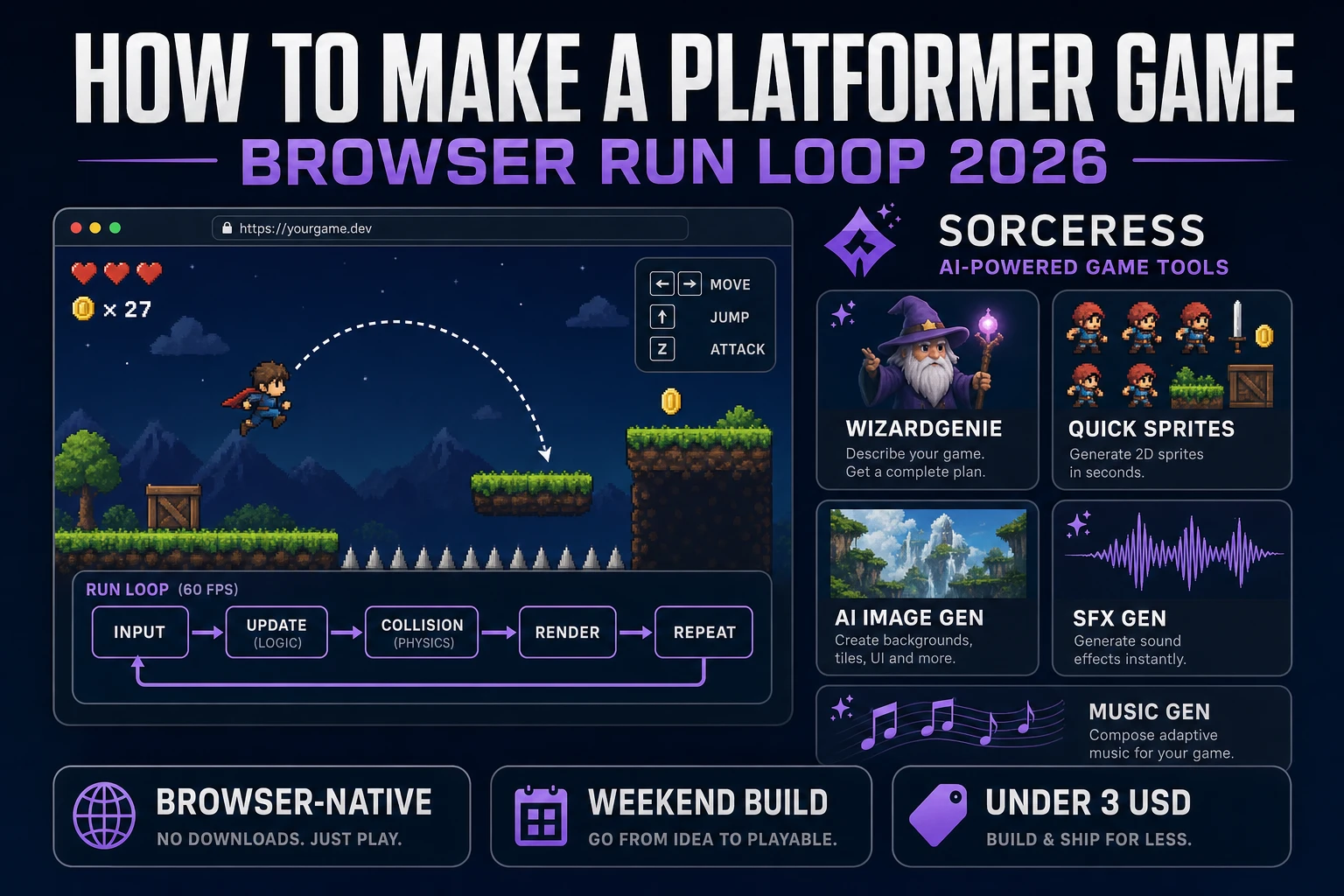
Jump How to Make a Platformer Game (Browser Run Loop 2026)

By Arron R.10 min read
How to make a platformer game in 2026: model a side-view run loop with gravity, solid tiles, and a jump buffer, wire move-jump-camera in WizardGenie, then add Q

Side-view run-and-jump is what most beginners mean when they search “how to make a platformer game”: gravity that sticks, solid platforms that don’t leak, a jump that forgives near-misses, and a goal flag you can reach in under a minute. Full Metroidvanias with ability gates and map screens are a different sport — weeks of systems work before the first honest room feels good. A browser run loop is different. A coding agent scaffolds the tile collider, coyote timer, and camera follow from one prompt, and AI generation covers sprite sheets, terrain tiles, and jump audio. In a browser, that means WizardGenie for the physics loop, Quick Sprites for the runner sheet, Sorceress AI Image Gen for tiles and backdrop, SFX Gen for jump and land stings, and Music Gen for a run bed. This guide is the honest end-to-end for how to make a platformer game in 2026, in a browser, in a weekend.
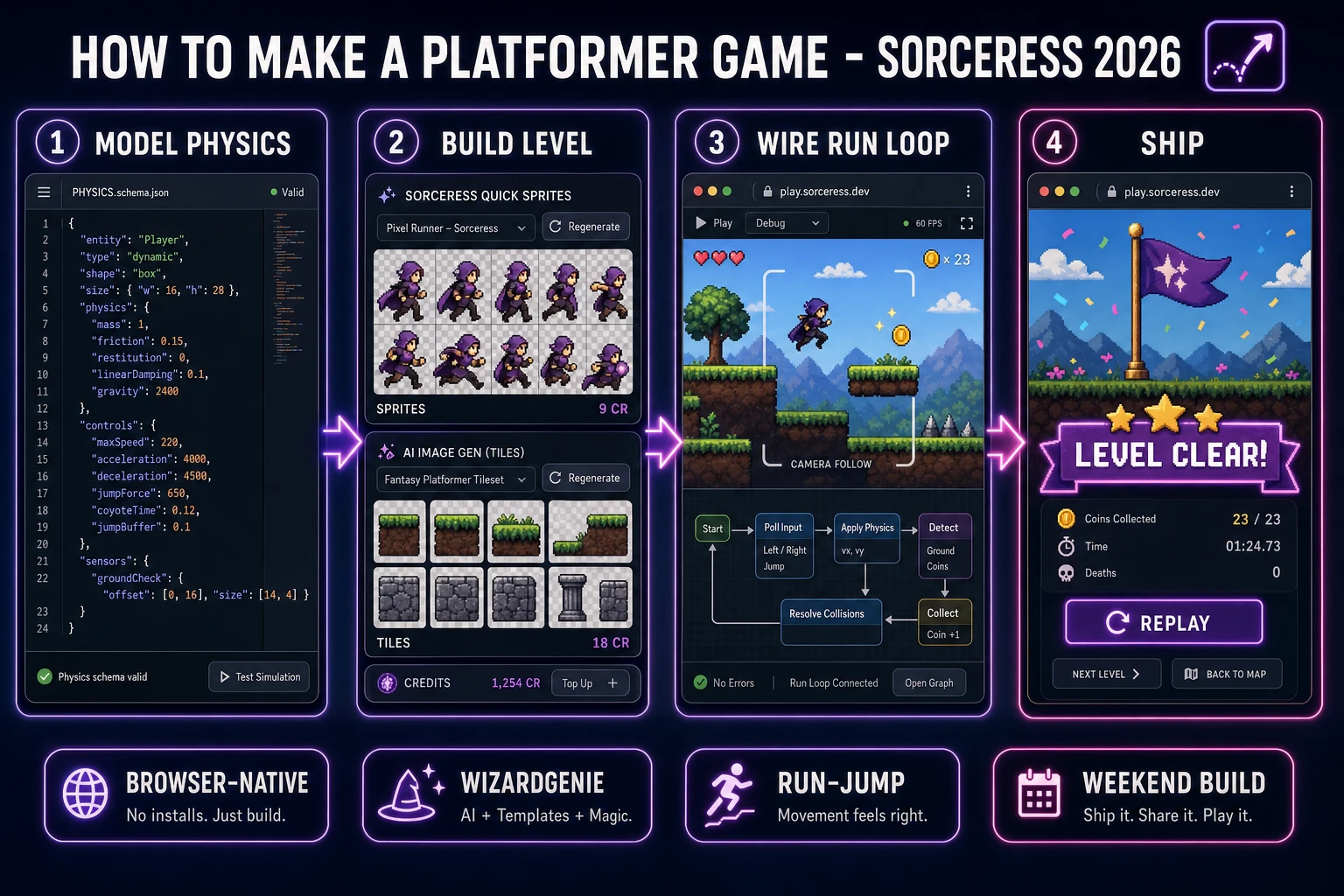
How to make a platformer game browser pipeline: model gravity and solid tiles, wire run-jump-camera in WizardGenie, and ship a browser run loop
The 2026 how to make a platformer game browser recipe: model physics and tiles, build the level with platforms and a goal, wire the run loop in WizardGenie, then add Quick Sprites sheets, AI tiles, and jump audio.

What how to make a platformer game actually means in 2026

The query “how to make a platformer game” hides three intents. Some searchers want a full Metroidvania with ability unlocks, a world map, and backtracking — that is a multi-week project, not a weekend jam. A second intent is a one-button endless runner with procedural gaps — useful, but a narrower skill set (spawn timing, not free roam). The third intent, and the one this guide targets, is a single-player browser side-view platformer: a tilemap of solid platforms, a player with gravity and a jump, coyote time plus jump buffer, coin pickups, a camera that follows on wider levels, and a win screen when the goal flag is touched. That is a weekend build, it demos the whole Sorceress toolset, and it is the format most platformer tutorial and browser platformer searchers actually want.

The presentation contract is small and strict. A title screen shows the level name, Start Run, and optionally a “ghost trail” toggle that records your best path. The play screen shows the side view, the runner sprite, HUD for coins and deaths, Pause, and Restart. On win, freeze input, play a short flourish, show time and deaths, and offer Retry or Next Level. The platform game overview on Wikipedia still separates classic jump-and-run from endless runners and puzzle-platformers cleanly — cite it when you write your itch.io blurb so players know which promise you kept.

The platformer loop in one minute (input, integrate, collide, camera, win)

Five moving parts, repeated until the flag. First, input — read left/right hold and jump press; set a short jump-buffer timer on keydown. Second, integrate — add gravity to vy, clamp fall speed, apply horizontal acceleration and friction. Third, collide — move on X and resolve solid tiles, then move on Y and resolve; update onGround and coyote frames. Fourth, camera — lerp the view toward the player so wide levels stay readable. Fifth, win — when the player AABB overlaps the goal flag, stop the clock and show the completion card. That is the entire run loop. Double-jump, wall-slide, dash, and moving platforms are polish layered after one honest jump feels sticky.
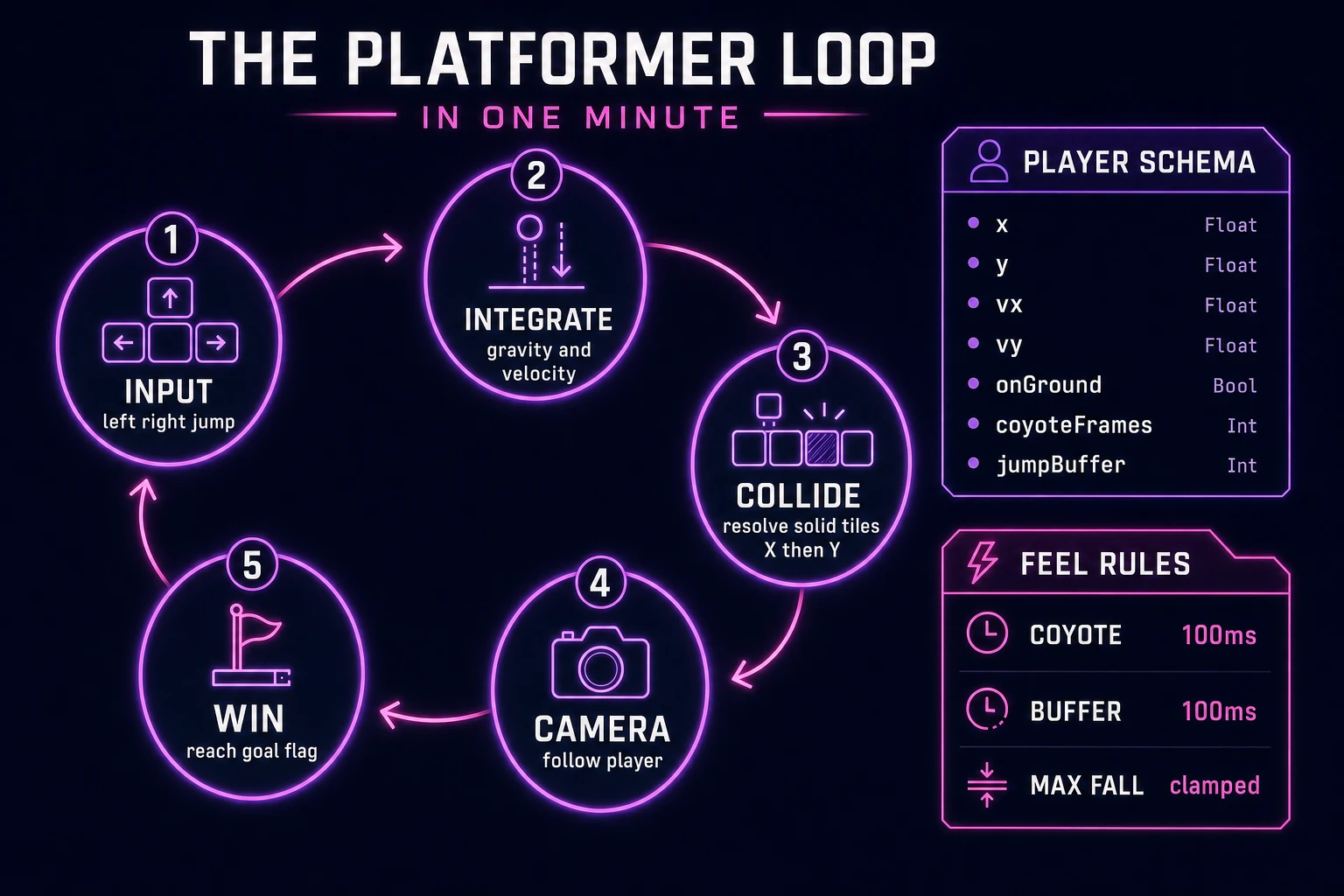
Platformer game loop state machine diagram showing input, integrate, collide, camera, and win nodes with player schema and feel rules panel
The run loop: read input, integrate gravity, collide with solid tiles on X then Y, follow with the camera, then win on goal overlap.

Pick your engine for how to make a platformer game: canvas, Phaser, or WizardGenie

Three good browser targets in 2026, each with a different trade-off. Vanilla JavaScript on a 2D canvas is the honest default and the pick this guide recommends for a first build. Store the level as a 2D tile array, blit terrain from a tileset image, and draw the player sprite at world coordinates minus camera offset. Total code footprint for a working javascript platformer is under 700 lines including collision and coyote timers. No engine to install, ships as a static HTML file, deploys anywhere. The MDN Canvas API docs cover the drawing surface; pair it with requestAnimationFrame for the frame loop.

DOM rectangles with CSS transforms become the right pick if you want accessible focus targets and screen-reader labels on HUD buttons. You trade blit speed for semantics — fine for a short single-screen puzzle-platformer, heavier once you scroll a long world with many tiles.

Phaser 4.1.0 (verified 2026-08-20 on the official Phaser API documentation page) becomes the right pick if you want arcade physics colliders, tweens on coin pop, or Scene lifecycle for title-play-victory. Phaser’s arcade body API removes a weekend of hand-rolled AABB math — use it when motion polish is the product, not when the product is understanding gravity and tile resolution. A phaser platformer tutorial that skips the feel timers still feels wrong; the engine does not invent coyote time for you.

WizardGenie is not a separate rendering engine — it scaffolds whichever of the three you pick from a single natural-language prompt. WizardGenie ships as both a desktop app (Windows installer with auto-update, available to Early Access supporters and above) and a no-install web build. Its coding-model lineup covers Claude Opus 4.7, GPT-5.5, Gemini 3.1 Pro, DeepSeek V4 Pro, Kimi K2.5, Grok 4.2, and MiniMax M2.7 (verified 2026-08-20 in src/app/_home-v2/_data/tools.ts). For platformers, any frontier model scaffolds the physics and tile collider in one prompt. Pair a frontier planner with a budget executor like DeepSeek V4 Pro or Kimi K2.5 for the typing pass — the Dual-agent pattern lands most projects at roughly one-fifth the single-frontier cost.

Step 1 — model player physics, gravity, and solid tiles

Nothing else in the pipeline matters if the player sinks through floors or snags on corners. Start with a tilemap and a player body:

const TILE = 32;
const GRAVITY = 0.55;
const MAX_FALL = 12;
const MOVE_ACCEL = 0.6;
const MOVE_MAX = 4.2;
const JUMP_FORCE = -9.2;
const COYOTE_MS = 100;
const BUFFER_MS = 100;

const map = [
  [1,1,1,1,1,1,1,1,1,1,1,1],
  [1,0,0,0,0,0,0,0,0,0,0,1],
  [1,0,0,0,0,0,0,1,1,0,0,1],
  [1,0,0,1,1,0,0,0,0,0,0,1],
  [1,0,0,0,0,0,0,0,0,1,1,1],
  [1,1,1,1,1,1,1,1,1,1,1,1],
];

function makePlayer(x, y) {
  return {
    x, y, w: 20, h: 28,
    vx: 0, vy: 0,
    onGround: false,
    coyoteMs: 0,
    jumpBufferMs: 0,
  };
}

function solidAt(tx, ty) {
  const row = map[ty];
  return !row || row[tx] === 1;
}

Game state is { map, player, cameraX, coins, goal, dead }. Resolve movement in two passes: apply vx, then push out of solid tiles on the X axis using the four corners of the AABB; then apply vy (after gravity), then resolve Y and set onGround when a downward collision sticks. Separate axes prevent the classic “corner teleport” bug that makes side scroller tutorial clones feel broken. Unit-test a standing floor (player rests with vy === 0), a head-bonk ceiling, and a one-tile gap the player must clear with a buffered jump. Those asserts are the difference between a jump and run game people trust and one they rage-quit after clipping into a wall.

Feel timers live on the player: when onGround flips false, start coyoteMs = COYOTE_MS and count down each frame; on jump keydown set jumpBufferMs = BUFFER_MS. Consume both when a jump actually fires (vy = JUMP_FORCE). Skip wall-jump and double-jump until single-jump landings feel sticky for ten clean runs in a row.

Step 2 — wire run, jump, and camera scroll in WizardGenie

With the model solid, open WizardGenie. Drop in a bare index.html with a canvas sized to the viewport. Give the agent one paragraph: Build a browser side-view platformer on a tilemap. Model a player with gravity, max fall speed, horizontal acceleration, jump force, coyote time, and jump buffering. Resolve solid tiles on X then Y. Collect coins by AABB overlap. Follow the player with a lerped camera on levels wider than the canvas. Win when the player touches a goal flag tile. Show a HUD for coins and deaths, Restart, and a Level Clear screen with time. Feed that to any coding model and the scaffold lands in under five minutes.

The remaining afternoon is polish via follow-ups. Keep the integrator pure and testable:

function stepPlayer(p, input, dtMs) {
  const next = { ...p };
  if (input.left) next.vx -= MOVE_ACCEL;
  if (input.right) next.vx += MOVE_ACCEL;
  if (!input.left && !input.right) next.vx *= 0.78;
  next.vx = Math.max(-MOVE_MAX, Math.min(MOVE_MAX, next.vx));

  next.vy = Math.min(MAX_FALL, next.vy + GRAVITY);
  if (input.jumpPressed) next.jumpBufferMs = BUFFER_MS;
  else next.jumpBufferMs = Math.max(0, next.jumpBufferMs - dtMs);
  if (!next.onGround) next.coyoteMs = Math.max(0, next.coyoteMs - dtMs);
  else next.coyoteMs = COYOTE_MS;

  const canJump = next.onGround || next.coyoteMs > 0;
  if (next.jumpBufferMs > 0 && canJump) {
    next.vy = JUMP_FORCE;
    next.onGround = false;
    next.coyoteMs = 0;
    next.jumpBufferMs = 0;
  }
  return next;
}

Camera follow is a one-liner lerp: cameraX += (player.x - canvas.width / 2 - cameraX) * 0.12, then clamp to world bounds. Draw tiles and sprites at worldX - cameraX. Test with a near-miss ledge jump (coyote should save it), a pre-landing mash (buffer should fire), and a restart mid-air — those three cases catch most run-loop bugs before players do.

Step 3 — Quick Sprites sheets, AI Image Gen tiles, SFX Gen cues, Music Gen run bed

Open Quick Sprites for the runner. Quick Sprites bills 9 credits per generation (verified 2026-08-20 in src/app/quick-sprites/page.tsx line 21 as CREDITS_PER_GEN = 9). Two sheets cover a first platformer: a walk/run cycle facing right, and a jump/fall pose strip. Prompt like “16-bit side-view platformer hero, transparent background, walk cycle sprite sheet, game ready, no text.” Mirror left in code with ctx.scale(-1, 1) so you do not pay for a second facing. Two passes at 9 credits is 18 credits or 0.18 USD for the character core.

Open Sorceress AI Image Gen for the visual set. A platformer needs one terrain tileset (grass top, dirt fill, stone, spike optional) plus a simple backdrop strip. Nano Banana Pro at 18 credits per generation (verified 2026-08-20 in src/lib/models.ts line 303) holds style consistency when you lock the first tile pass as a reference for matching props. Three passes at 18 credits is 54 credits or 0.54 USD. Prompt tiles like “side-view grass dirt stone platformer tileset, seamless 32px game tiles, flat lighting, no text.” Keep HUD numbers and the goal flag as code-drawn overlays — never bake chrome into the AI images.

Open SFX Gen. SFX Gen bills 1 credit per second (verified 2026-08-20 in src/app/sfx-gen/page.tsx line 23 as SEED_AUDIO_CREDITS_PER_SECOND = 1). Five clips cover a first platformer: jump (0.3 seconds), land (0.4 seconds), coin (0.5 seconds), hurt (0.6 seconds), and win (2 seconds). Total roughly 8 credits or 0.08 USD. Add one 30-second ambient bed — soft wind or distant city — at 30 credits or 0.30 USD.

Open Music Gen. Music Gen bills 10 credits per generation (verified 2026-08-20 in src/app/music-gen/page.tsx line 28 as MUSIC_CREDIT_COST = 10). Two tracks cover a first platformer: a title-menu loop (upbeat chiptune mood, 60 seconds) and a run bed (steady pulse, 90 seconds) under active play. Two tries per track budgets 40 credits or 0.40 USD. MP3 is fine for browser delivery; add 2 credits per WAV render if you need lossless (WAV_CREDIT_COST = 2, same file line 31).

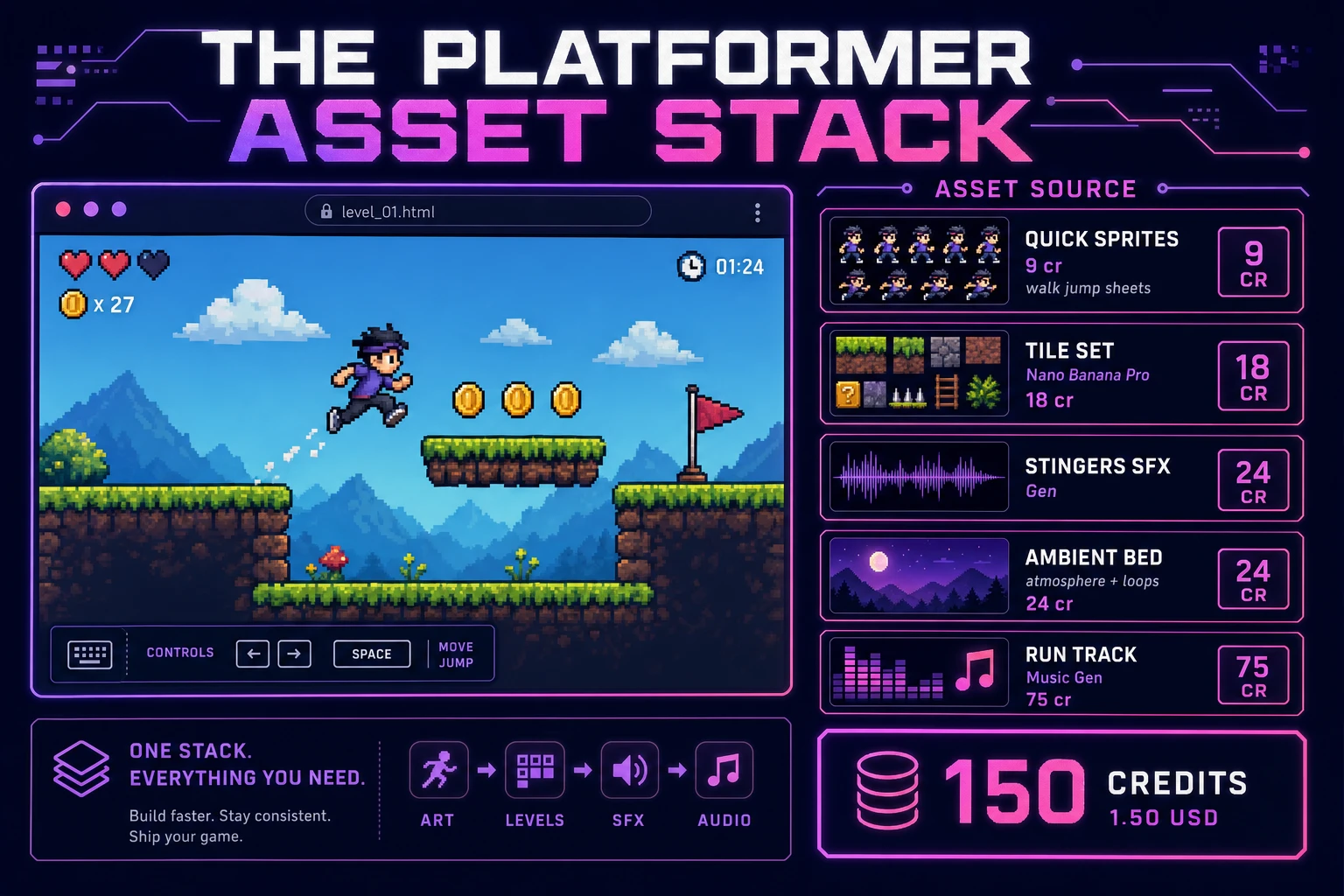
Platformer game asset stack showing a browser side-scroller next to asset tiles for Quick Sprites sheets, terrain, stingers, ambient bed, and music tracks
The platformer asset stack: runner sheets from Quick Sprites, terrain from AI Image Gen, five short stingers plus an ambient bed from SFX Gen, and two run tracks from Music Gen — the whole set costs about one-fifty in Sorceress credits.

What a how to make a platformer game project costs on Sorceress in 2026

Concrete asset and generation budget for a browser side-view platformer — gravity, solid tiles, coyote feel, camera, audio — from empty repo to zip-and-ship playable, all numbers verified 2026-08-20 against local Sorceress source:

  • Player sheets (Quick Sprites): 2 generations at 9 credits each = 18 credits (0.18 USD).
  • Tiles and backdrop (AI Image Gen): 3 passes at Nano Banana Pro 18 credits each = 54 credits (0.54 USD).
  • Stingers (SFX Gen): 5 clips at 1 credit per second, roughly 8 seconds total = 8 credits (0.08 USD). Jump, land, coin, hurt, win.
  • Ambient bed (SFX Gen): 1 clip at 30 seconds = 30 credits (0.30 USD).
  • Background music (Music Gen): 2 tracks at 10 credits per generation, 2 tries each = 40 credits (0.40 USD).
  • WizardGenie coding time: effectively free on the Sorceress side. Model-side API cost for a 3-to-5-hour prompt session on a cheap Executor like DeepSeek V4 Pro is typically under 0.50 USD.
  • Total for one complete browser platformer: roughly 150 credits, or roughly 1.50 USD in Sorceress credits, plus under 0.50 USD in model API time. Under 2.50 USD end-to-end for a run loop with fair jump feel and full audio.

Sorceress bills 100 credits per dollar at the standard rate (CREDITS_PER_DOLLAR = 100 in src/lib/models.ts line 69). New accounts start with 100 free credits (SIGNUP_GRANT = 100 in src/app/api/admin/credits/route.ts line 12), which covers the stingers, ambient loop, Quick Sprites sheets, and part of the tile art outright — enough to prototype before you top up. The Sorceress Lifetime tier at 49 USD one-time (LIFETIME_PRICE = 49 in src/app/plans/page.tsx line 51) covers unlimited SFX Gen and Music Gen use forever, which matters if you ship a campaign of ten rooms that each need fresh sting variants.

For related browser action and run-loop pipelines that share this model-first-scaffold-the-UI spine, the closest reads are Dash How to Make a Platformer (Browser AI Loop) for the shorter cousin keyword, Sprawl How to Make a Metroidvania (Map Ability Gates) for the gated-map upgrade path, Flap How to Make Flappy Bird (Browser Loop 2026) for one-button jump timing, Top How to Make a Shooter Game (Browser Top-Down 2026) for another action loop, and Crown How to Make a Strategy Game (Browser Turn Loop 2026) for a turn-based contrast. The Sorceress Tools Guide is the master index for every tool this guide referenced. Under three dollars, one weekend, and how to make a platformer game is a done deal.

Frequently Asked Questions

Should a beginner build a side-scroller or a single-screen platformer first?

Start single-screen. A fixed camera with three platforms, one pit, and a goal flag teaches gravity, solid collision, coyote time, and jump buffering without camera math. Side-scrolling adds world width, camera lerp, parallax layers, and off-screen despawn — useful, but it doubles debug time before the first honest jump feels good. A how to make a platformer game tutorial that ships the run loop on one screen produces a playable demo in an afternoon; scroll and multi-room maps can wait until landings feel sticky and jumps feel fair.

Tilemap collision or free-form AABB boxes for a first browser platformer?

Use a tilemap of solid cells for the first build. A 2D array of 0/1 tiles makes floor, wall, and ceiling checks a four-corner sample against the grid — short, testable, and easy to draw as colored rectangles while you wait on art. Free-form AABB boxes (hand-placed rectangles) work for one-off props later, but they invite floating gaps and misaligned seams. Ship tile solidity first, then add moving platforms as special tiles or as separate kinematic AABBs that carry the player’s velocity when standing on them.

What are coyote time and jump buffering, and do I need both?

Coyote time lets the player jump for a few frames after walking off a ledge — typically 80–120 ms — so near-misses still feel fair. Jump buffering remembers a jump press for a similar window before landing, so mashing jump before touchdown still triggers. You need both for a jump and run game that doesn’t feel spiteful. Implement them as two short timers on the player: coyoteFrames counting down while airborne after leaving ground, and jumpBufferFrames set on keydown and consumed on the next grounded frame. Skip double-jump until single-jump feel is locked.

Do I need Phaser arcade physics for a javascript platformer?

No. Vanilla canvas with a custom integrator is enough for a first browser platformer: apply gravity, clamp fall speed, resolve X then Y against tiles, and animate with requestAnimationFrame. Phaser 4.1.0 arcade physics becomes the right pick when you want built-in colliders, tweens, and Scene lifecycle for title-play-victory without writing those yourself. Use Phaser when motion polish and multi-scene structure are the product; use vanilla when the product is understanding the physics and shipping a static HTML file.

How much does it cost to build a platformer game on Sorceress?

A first-project browser platformer with gravity, solid tiles, jump feel, camera, and audio budgets like this against the 2026 Sorceress rate card (verified 2026-08-20 against local source). Player sprite sheets: two Quick Sprites generations at 9 credits each = 18 credits or 0.18 USD (src/app/quick-sprites/page.tsx line 21). Tiles and backdrop: three AI Image Gen passes at Nano Banana Pro 18 credits each = 54 credits or 0.54 USD (src/lib/models.ts line 303). Five SFX clips at 1 credit per second (src/app/sfx-gen/page.tsx line 23) — jump, land, coin, hurt, win — roughly 8 credits or 0.08 USD. One 30-second ambient run bed = 30 credits or 0.30 USD. Two Music Gen tracks at 10 credits per generation (src/app/music-gen/page.tsx line 28) with two tries each = 40 credits or 0.40 USD. Total roughly 150 credits or 1.50 USD plus under 0.50 USD in coding-model API time. The free 100-credit signup grant (src/app/api/admin/credits/route.ts line 12) covers the stingers, ambient loop, Quick Sprites sheets, and part of the tile art outright.

Sources

  1. Platform game - Wikipedia
  2. MDN - Canvas API
  3. Phaser 4.1.0 API Documentation
  4. MDN - requestAnimationFrame
Written by Arron R.·2,353 words·10 min read

Related posts


