Guess How to Make Wordle (Browser Guess Grid 2026)

By Arron R.11 min read
How to make Wordle in 2026: load a 2315-word answer list, build a 6x5 guess grid with a virtual keyboard, code the two-pass green/yellow/grey colour-feedback lo

Wordle is the deceptively small puzzle that ate 2022. Josh Wardle shipped the first version in October 2021 as a private project for his partner, released it publicly a few weeks later, and by January 2022 The New York Times had acquired it for what Reuters and the Wordle Wikipedia article both peg at a low-seven-figure sum (verified against the game's Wikipedia entry on 2026-08-08). The mechanic is one sentence: guess a five-letter word in six tries, with per-letter green, yellow, and grey feedback after each guess. The implementation is one afternoon of code, and it is one of the cleanest first-projects an aspiring browser-game developer can pick up in 2026. In this guide the pipeline runs from an empty repo to a shareable browser build: source or generate a five-letter word list, prompt WizardGenie to scaffold a React project with a 6x5 guess grid and a virtual keyboard, get the two-pass colour-feedback logic right (this is the one part everyone gets wrong on the first try), rotate the daily answer with a fixed epoch seed, and finish with tile art from Sorceress AI Image Gen and key-click sound effects from SFX Gen.
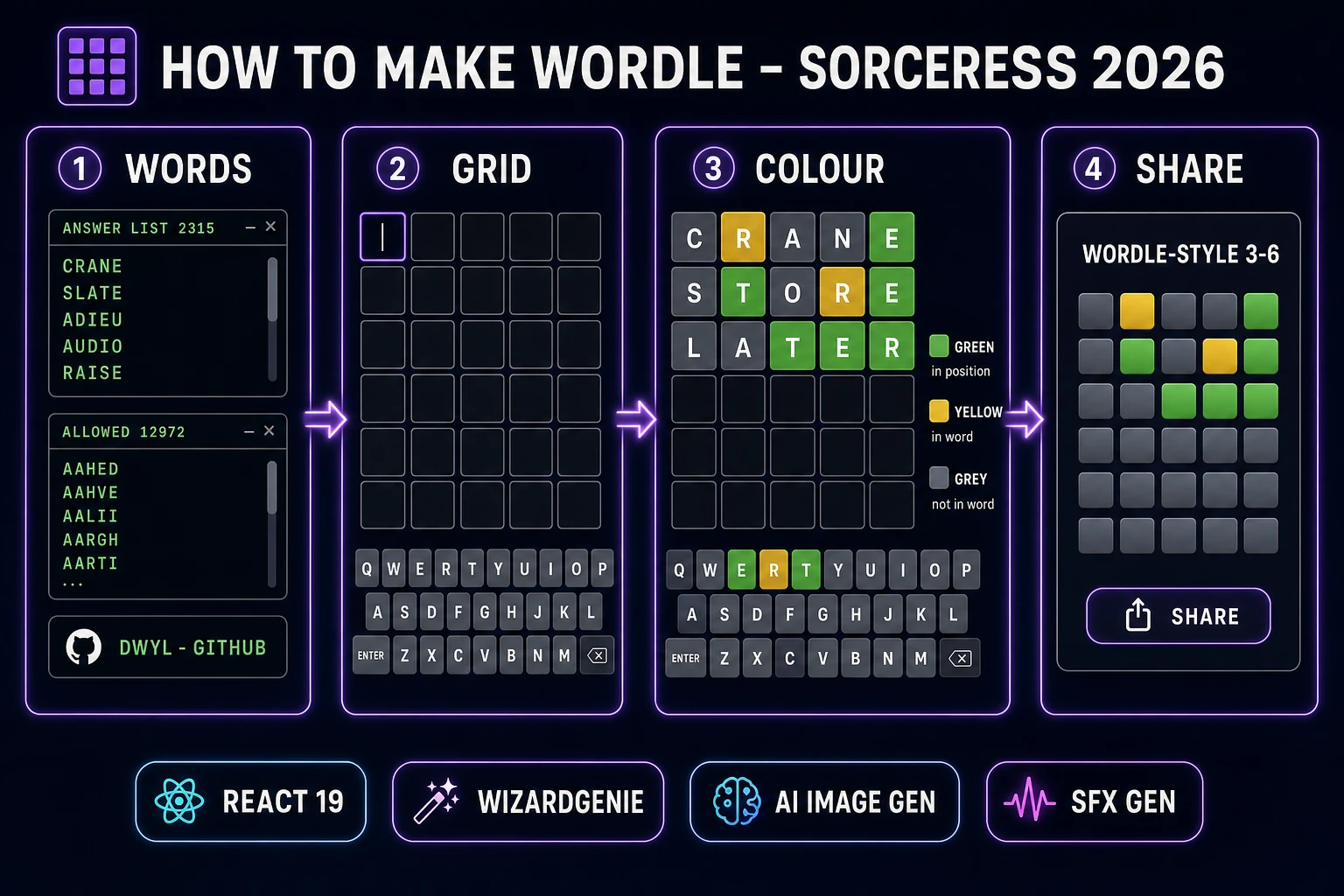
How to make Wordle browser pipeline: source word list, build 6x5 guess grid, apply two-pass colour feedback, and share the daily result with Sorceress toolset
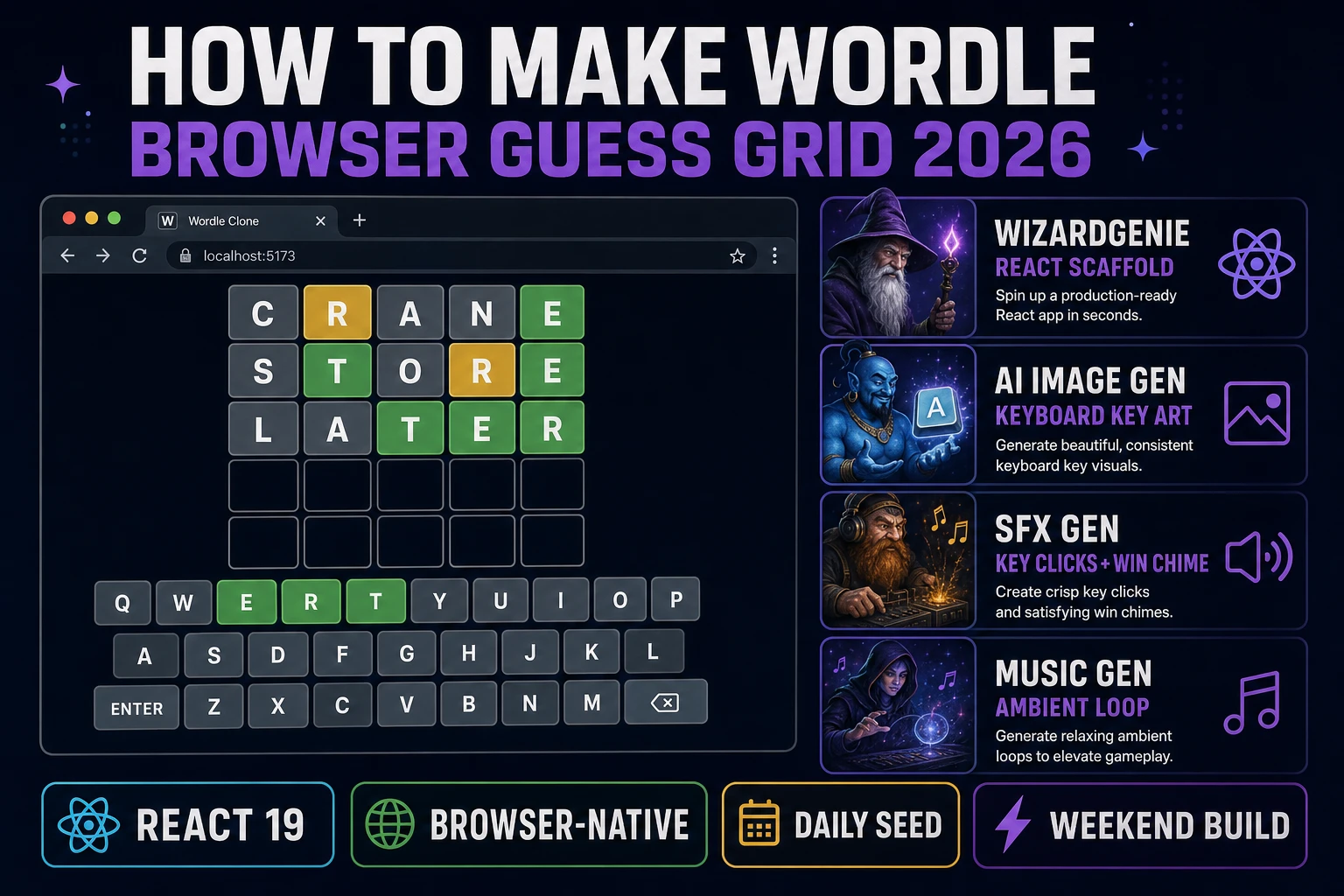
The 2026 browser Wordle recipe: WizardGenie scaffolds the React project, AI Image Gen supplies the keyboard-key art, SFX Gen ships the key click and win chime. Ship the whole build in one weekend.

What “how to make Wordle” actually means in 2026

The phrase “how to make Wordle” hides three different requests. Some searchers want to clone the original Josh Wardle release as a coding exercise, matching the exact 2315-word answer list, the 12972-word allowed-guess list, and the emoji share format. Some searchers want to build a Wordle-style word game as a portfolio piece in vanilla React or plain HTML, learning the state model and the colour-feedback algorithm along the way. And some searchers want to ship an actual daily word puzzle on their own domain, competing in the crowded post-Wordle sub-genre alongside Quordle, Dordle, Absurdle, Semantle, and Contexto. This guide focuses on the second and third groups: how to make Wordle as a browser build that runs on any modern phone or desktop browser, and how to make it your own so you can put it up under a name that is not owned by The New York Times.

Two ground rules matter before any code gets written. First, the game mechanic (six guesses, five letters, green/yellow/grey feedback) is not copyrightable, so the loop itself is fair use. Second, the name Wordle and the specific NYT typography are trademarked, so pick a new name (Guess Grid, Five Letters, Word Vault, Daily Five) and pick a distinct palette. Every hit clone since 2022 has done exactly this - the mechanic is public, the branding is not.

The Wordle game loop in one minute (input guess score colour reveal)

Five moving parts and nothing else. A hidden five-letter answer word chosen from a curated answer list. A 6-by-5 grid of tiles that starts empty. A virtual keyboard (plus physical keyboard listener) that lets the player type letters into the current row. A submit action, fired by pressing Enter, that validates the current row against an allowed-guess word list (if the word is not in the list, shake the row and reject the submission - do not consume a guess). And a colour-feedback pass that runs once per submitted guess, marking each tile position green, yellow, or grey based on comparison with the answer.

That is the entire game. Win state fires when a full green row is submitted (typically animated with a small confetti burst or bounce). Loss state fires when all six rows are used without a green match (typically animated by revealing the answer above the grid). A share button generates a text-and-emoji summary of the tile colours without leaking the answer. Persistence is one localStorage key that stores today's guesses plus a lastPlayed date, so refreshing the browser does not reset progress mid-game.
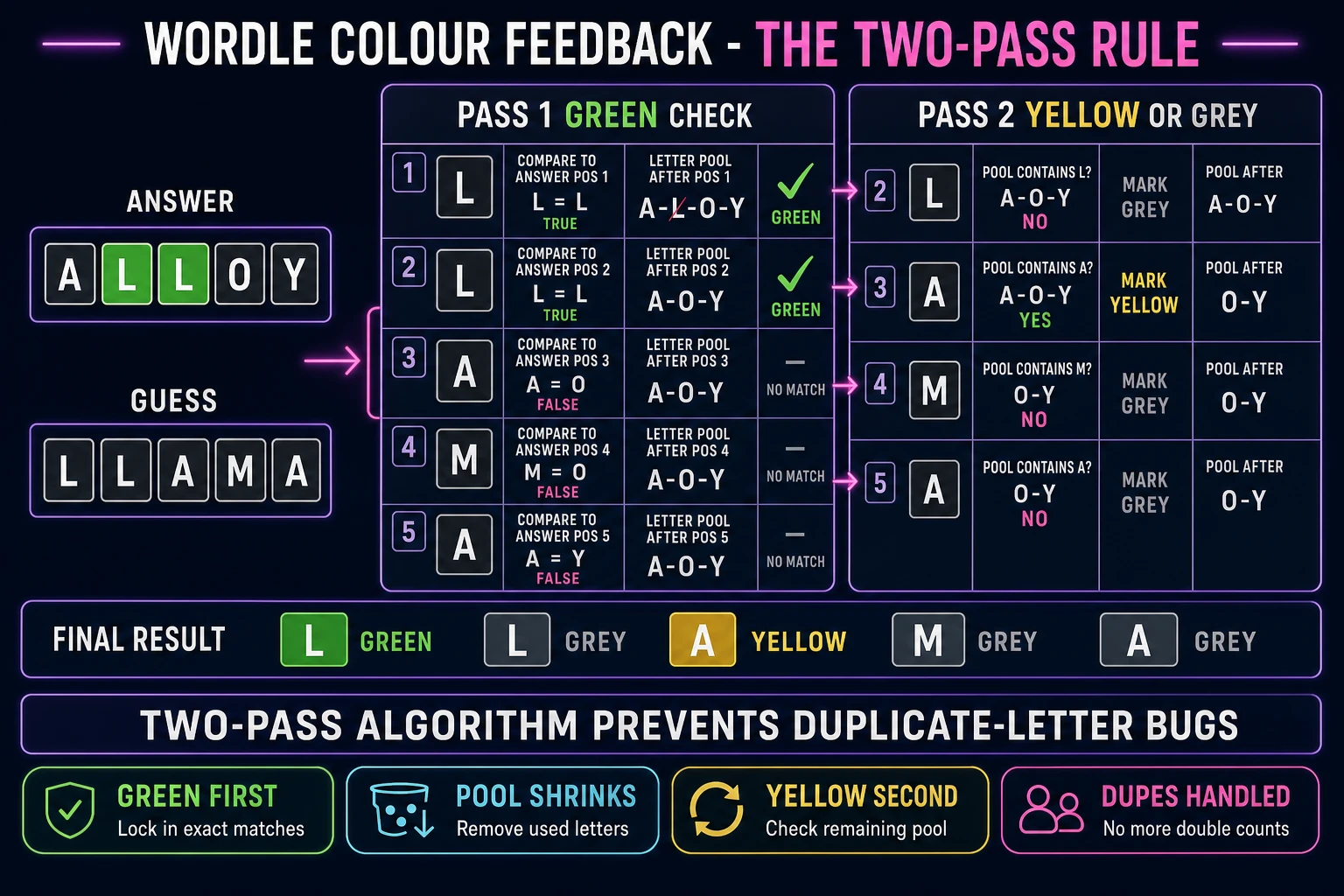
Wordle two-pass colour-feedback algorithm worked example with ALLOY as answer and LLAMA as guess, showing green pass and yellow-or-grey pass with a shrinking letter pool
The two-pass colour algorithm is what separates a working Wordle build from a broken one. Pass 1 marks every exact-position match green and removes that letter from the running pool. Pass 2 walks the remaining positions and marks yellow only if the letter is still in the shrunken pool. This is why duplicate letters behave correctly.

Pick your engine for how to make Wordle: vanilla React, Phaser 4, or plain HTML

Three good browser targets in 2026, each with a different trade-off. React 19.2 (verified against react.dev/blog on 2026-08-08) is the default recommendation for a standard Wordle build. Wordle is a UI-driven text game with no per-frame render loop - the entire visual state can live in a single React component tree, with a useState hook for the guess grid, a useEffect for the daily-seed rotation on mount, and CSS transitions for the tile flip animation. Bundle size lands around 45 KB gzipped for a clean React 19 build, which is fine for a mobile browser and instant on a desktop.

Plain HTML plus a single <script> tag is the leanest option. You write about 200 lines of vanilla JavaScript, produce a build under 20 KB total, and end up with something eligible for a Mozilla-style local-storage tutorial or a JS13K jam entry. The trade-off is that every DOM update has to be written by hand instead of leaning on a virtual-DOM diff, so debugging state is on you. Use plain HTML if you want the exercise or the tiny build size; use React if you want the game done by Sunday night.

Phaser 4.2.1 Giedi (released 9 July 2026, verified against phaser.io/download/stable on 2026-08-08) is possible but overkill for a straight Wordle clone. Phaser is built for real-time game loops with sprite animation, physics bodies, and per-frame updates, none of which Wordle needs. The 900 KB minified runtime is dead weight for a text-input game. Reach for Phaser only if you plan to bolt on real-time visual effects the standard game does not have - particle explosions on a green row, animated tile-flip cascades, a physics-based confetti burst on a win, an animated background layer. WizardGenie will scaffold in any of the three based on the prompt.
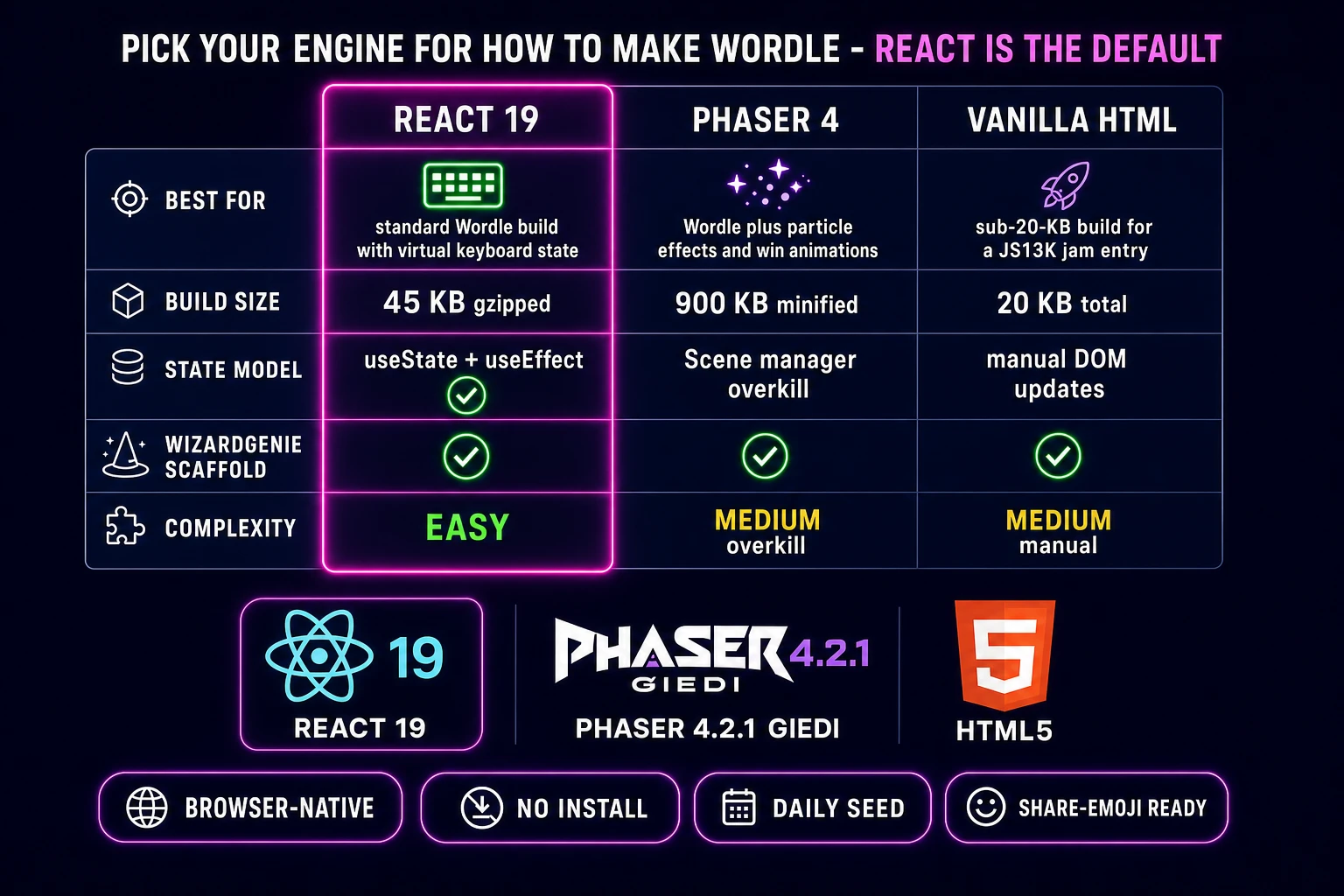
Comparison table of browser engines for a Wordle clone: React 19 versus Phaser 4 versus vanilla HTML across best-for build-size state-model WizardGenie-scaffold and complexity
React 19 is the default engine for a browser Wordle build in 2026. Vanilla HTML is for the sub-20-KB jam entry; Phaser 4 is for the Wordle-plus-particles remix. All three are one prompt away from a WizardGenie scaffold.

Step 1 — source or generate the five-letter word list

Two word lists power Wordle: the answer list (words the game can pick as today's puzzle) and the allowed-guess list (words the player is allowed to type without the row rejecting). Original Wordle used a 2315-word curated answer list and a 12972-word allowed-guess list. Both lists have been public since the game launched in 2021 and are widely mirrored on GitHub, but there are three cleaner sources depending on your goals.

Option one, the fastest: grab the open-source dwyl/english-words repository, filter to five-letter entries, and split into two lists (curated common words for answers, full filtered list for allowed guesses). Under MIT license, roughly 15,918 five-letter words after filtering. Option two, the traditional: use ENABLE (Enhanced North American Benchmark LExicon), a public-domain Scrabble word list widely used in word games. Option three, the manual: write your own 500 to 1000 answer words that fit your target audience (kids-safe, sci-fi themed, cooking themed, whatever the game concept needs). A themed word list is what actually differentiates a Wordle-style build from Wordle itself - Semantle uses semantic similarity, Contexto uses relatedness, your build might use only cooking terms.

Store both lists as static JSON in the project (/public/answers.json and /public/allowed.json). Load once on app start, keep in memory. Even the full 12972-word allowed list is under 100 KB uncompressed and gzips to about 30 KB, which is a one-time cost paid on first visit and cached forever.
Step 2 — build the 6x5 guess grid, keyboard, and colour-feedback logic in WizardGenie

Open WizardGenie. WizardGenie is the Sorceress game-native coding agent; it ships as both a desktop app (Windows installer with auto-update, available to Early Access supporters and above) and a no-install web build at the same URL. The coding-model lineup (verified 2026-08-08 in src/app/_home-v2/_data/tools.ts lines 735 to 742) covers Claude Opus 4.7, Claude Sonnet 4.6, GPT-5.5, Gemini 3.1 Pro, DeepSeek V4 Pro, Kimi K2.5, Grok 4.2, and MiniMax M2.7. For a Wordle build, any of the frontier models scaffolds the whole project on the first prompt. If you want to run cheap, pair a frontier planner like Claude Opus 4.7 with a cheap executor like DeepSeek V4 Pro or Kimi K2.5 - the Planner + Executor pattern lands the same output at roughly one-fifth the API cost.

The seed prompt is one paragraph. “Scaffold a React 19.2 Vite project called guess-grid. Load answers.json (2315 five-letter words) and allowed.json (12972 five-letter words) from /public on mount. Render a 6-row-by-5-column guess grid with rounded-corner tiles, plus a virtual QWERTY keyboard below. Track current row index and current letter position in useState. On physical key press or virtual key click, insert the letter at the current position and advance. On Backspace, delete and step back. On Enter, if the current row is 5 letters and is in allowed.json, run the two-pass colour-feedback algorithm against today's answer, apply green/yellow/grey CSS classes to each tile with a 300ms staggered flip animation, advance to the next row, and update virtual-keyboard key colours. If the row is a full green match, fire a win state; if row 6 fails, reveal the answer. Persist today's guesses to localStorage keyed by the day index. Rotate the daily answer using days_since_epoch mod answers.length with epoch 2026-01-01.”

The one part to double-check the agent on is the two-pass colour algorithm. A naive one-pass implementation walks the guess left-to-right, marks each letter green if it matches the answer at that position, yellow if it appears anywhere in the answer, grey otherwise. That is wrong when the guess has duplicate letters. If the answer is ALLOY and the guess is LLAMA, the naive algorithm marks both Ls yellow (because L appears in the answer), but the correct behaviour is that the first L is green (position 1 exact match), the second L is grey (the only L in the answer's letter pool got consumed by the green match), the A is yellow, and everything else is grey. The two-pass fix is short: first walk through and mark all green matches while removing consumed letters from a running letter pool; then walk through again to mark yellow only if the letter is still available in the shrunken pool. Test with ALLOY vs LLAMA, ERROR vs REEDS, and MOMMY vs POPPY. If those three cases work, the algorithm is right.

Step 3 — polish with AI Image Gen tile art, daily-seed rotation, and SFX Gen key clicks

A default React Wordle build with grey tiles and system fonts feels like a placeholder. Three cheap polish passes lift it to shippable.

Open Sorceress AI Image Gen. Prompt for a set of virtual keyboard-key backgrounds in three states: default (light grey with subtle bevel), pressed (slightly darker with inset shadow), and disabled (dimmed with strike-through). Prompt style: “flat modern mobile-app keyboard key, rounded corners, subtle gradient, 60 by 80 pixel, transparent background”. Generate at 512 by 512 and downscale in CSS. Three keys total; use them as background-image on the virtual keyboard buttons. Optional: generate a background pattern (dark navy with faint five-letter word watermarks) for the app shell. Total AI Image Gen budget: 3 to 5 generations, roughly 15 to 100 credits depending on model and quality tier.

Daily-seed rotation is 10 lines of JavaScript. Pick an epoch date (2026-01-01 is convenient for a 2026 launch); compute days_since_epoch = Math.floor((Date.now() - new Date('2026-01-01').getTime()) / 86400000); the daily answer is answers[days_since_epoch % answers.length]. Use the standard Intl.DateTimeFormat browser API if you want to rotate at local midnight rather than UTC midnight. Store the current day's index in localStorage alongside the player's guesses so a browser refresh preserves mid-game state.

Open SFX Gen. Sorceress SFX Gen uses the MiniMax Speech-02 sound-effect model with billing at 1 credit per second (verified 2026-08-08 in src/app/sfx-gen/page.tsx line 23 as SEED_AUDIO_CREDITS_PER_SECOND = 1). Generate four short clips. A “short soft keyboard key click, 0.15 seconds” for every letter press (about 1 credit). A “short mechanical enter-key thunk, 0.25 seconds” for row submit. A “bright ascending three-note win chime, 0.8 seconds, cheerful” for the green-row win. A “soft descending two-note game-over sting, 0.6 seconds, disappointed but gentle” for the row-6 loss. Under 5 credits total. Wire each clip to the appropriate event; volume around 40 to 60 percent so audio does not startle a player who forgot their headphones were on.

What a how to make Wordle project costs on Sorceress in 2026

Concrete asset and generation budget for a browser Wordle clone from empty repo to shareable playable build, all numbers verified 2026-08-08 against local Sorceress source:

  • Word list sourcing: free. dwyl/english-words is MIT-licensed; the original Wordle answer and allowed-guess lists are widely mirrored. Zero Sorceress credits, zero API cost.
  • Keyboard key art and background pattern (AI Image Gen): roughly 5 to 20 credits per asset depending on model and quality, 3 to 5 assets total, so 15 to 100 credits (0.15 to 1.00 USD). Skip entirely and use CSS-only tile styling to knock this to zero.
  • Sound effects (SFX Gen): 1 credit per second, 4 short clips under 1 second each, so about 4 to 6 credits (0.04 to 0.06 USD).
  • WizardGenie coding time: effectively free on the Sorceress side (bring your own model API key, or use one of the trial-key options for the smaller models). Model-side API cost for a 2-to-3-hour prompt session on a cheap Executor like DeepSeek V4 Pro is typically under 0.30 USD.
  • Total for one complete browser Wordle build: 19 to 106 credits, or roughly 0.19 to 1.06 USD in Sorceress credits, plus under 0.30 USD in model API time. Under 1.50 USD end-to-end for the whole project.

Sorceress bills 100 credits per dollar at the standard rate (CREDITS_PER_DOLLAR = 100 in src/lib/models.ts line 69). New accounts start with 100 free credits (SIGNUP_GRANT = 100 in src/app/api/admin/credits/route.ts line 12), which is enough to cover every asset and every sound effect in this build with headroom to spare. The Sorceress Lifetime tier at 49 USD one-time (LIFETIME_PRICE = 49 in src/app/plans/page.tsx line 51) unlocks unlimited SFX Gen and heavy AI Image Gen use, which matters if you plan to spin the same word-game engine into a series (Quordle-style two-answer variant, Sedecordle-style sixteen-answer variant, themed daily variants for cooking or geography or music trivia) - the word-game genre rewards a shared engine plus dozens of themed skins.

For related browser-game pipelines that share this “source the assets, prompt the coder, ship the browser build” spine, the closest reads are Flap How to Make Flappy Bird (Browser Loop 2026) for the same one-mechanic-plus-scoring pattern on a physics classic, Deal How to Make a Card Game (Browser AI 2026) for the state-machine and hand-management side of small browser games, and Coil How to Make a Snake Game in Python (Turtle 2026) for the same weekend-project spirit in a different language. The Sorceress Tools Guide is the master index. Under 1.50 USD, one weekend, and how to make Wordle is a done deal.

Frequently Asked Questions

Can I legally make a Wordle clone in 2026?

You can build a Wordle-style guessing game because the underlying mechanic (guess a hidden word in six tries with per-letter green, yellow, and grey feedback) is a game mechanic, and game mechanics are not copyrightable in most jurisdictions. What is protected is the specific Wordle name and logo, which The New York Times owns after acquiring the game in January 2022 for a reported low-seven-figure sum (verified against the Wordle Wikipedia article on 2026-08-08). Do not call your build Wordle. Do not copy the exact NYT typography, tile animation curve, or share-emoji format character for character. Pick a new name like Guess Grid, Five Letters, or Word Vault, generate your own tile art in AI Image Gen, and pick a different palette. Dozens of Wordle-style games (Quordle, Dordle, Absurdle, Semantle, Contexto) ship on real domains and app stores under different names using the same mechanic. Your build fits that pattern.

How long does it take to make a Wordle clone in the browser?

Between three and six hours for a first-time browser build if you follow the pipeline in this guide. Roughly 20 minutes to source the answer and allowed-guess word lists (either the public dwyl/english-words repo filtered to five-letter words, or a copy of the original Wordle 2315-answer and 12972-guess lists which have been public since the New York Times acquisition). 30 to 60 minutes to prompt WizardGenie through the 6x5 grid layout, the virtual keyboard, and the input state machine. Roughly one hour on the two-pass colour-feedback algorithm, which is the one part that trips up first-time implementers because the naive one-pass version mis-marks duplicate letters. 30 minutes for the daily-seed rotation and localStorage save. 20 minutes for the flip-and-reveal tile animation. 15 minutes for AI Image Gen keyboard-key art and SFX Gen key clicks. Experienced JavaScript developers who have written a two-pass string diff before can finish the whole thing in under two hours.

How does Wordle's green, yellow, and grey colour feedback actually work?

The colour rule is a two-pass string comparison, not a one-pass lookup, and this is where every naive Wordle implementation breaks. Pass one: for each letter position i in the guess, if the guess letter equals the answer letter at position i, mark position i green and remove that letter from a running letter pool built from the answer. Pass two: for each remaining non-green position, if the guess letter is still present in the letter pool, mark position i yellow and remove one instance of that letter from the pool; otherwise mark position i grey. This two-pass design makes duplicate letters behave correctly. If the answer is ALLOY and the guess is LLAMA, the first L is green (position 1), the second L is grey (position 2 is not L, and the only remaining L in the pool was consumed by the green match), the A is yellow (there is an A in the answer at position 3), and the two Ms are grey. Get this two-pass logic wrong and duplicate-letter guesses feel broken to the player.

Which engine should I use for how to make Wordle in the browser?

Use plain React or vanilla HTML plus a small state library. Wordle is a UI-driven text game with no per-frame rendering loop, no physics, and no sprite animation beyond a CSS flip on tile reveal. That makes Phaser 4 and Three.js overkill - both are built for real-time game loops that a Wordle build does not need. React 19.2 (verified against react.dev/blog on 2026-08-08) plus a single useState hook for the guess grid, a useEffect for the daily-seed rotation, and CSS transitions for the tile flip gets you the entire game in about 200 lines. Vanilla HTML plus a single script tag is even leaner and produces a build under 20 KB if that matters for a JS13K-style jam entry. Phaser 4.2.1 works if you plan to bolt on real-time visual effects (particle explosions on a win, spinning tiles, a background animation) but for a straight Wordle clone the extra 900 KB of runtime is dead weight. WizardGenie will scaffold in any of these based on the prompt.

How do I make the daily answer rotate at midnight like the real Wordle?

Compute the day index client-side and use it to look up the answer from a fixed list. Pick an epoch date - the original Wordle used 19 June 2021 as day 0, which you can reuse or shift to your own launch date. On page load, compute days_since_epoch = floor((Date.now() - epoch_ms) / 86400000). Use days_since_epoch mod answer_list.length as the index into your 2315-word answer list. That produces the same answer for every player on the same UTC day, which is the entire point of Wordle. To rotate at local midnight instead of UTC midnight, use Intl.DateTimeFormat to get the player's timezone offset and shift the epoch calculation. Persist a lastPlayed date to localStorage so the game state resets on a new day but survives a browser refresh mid-game. The New York Times version also uses a curated answer sequence rather than raw modulo cycling, which you can copy by shipping a hand-ordered word list instead of an alphabetized one.

Sources

  1. Wordle - Wikipedia (game history + rule reference)
  2. MDN - Window.localStorage (daily-seed persistence)
  3. MDN - Intl.DateTimeFormat (daily rotation timezone reference)
  4. dwyl/english-words - open English word list on GitHub
Written by Arron R.·2,572 words·11 min read

Related posts