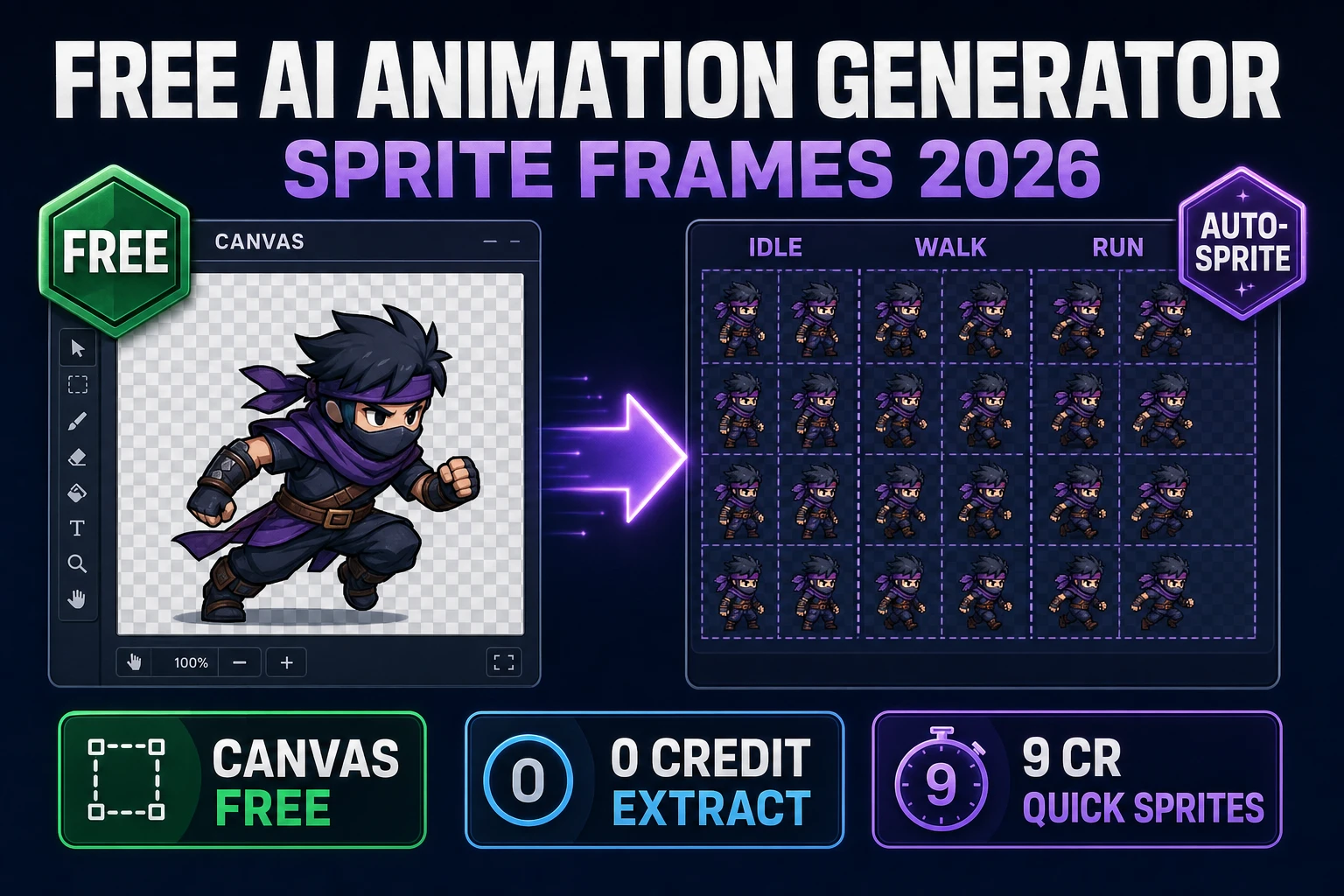
Fuse Free AI Animation Generator (Sprite Frames 2026)

By Arron R.8 min read
A free AI animation generator for game sprite frames in 2026 is a fused stack: Canvas (Free badge), Auto-Sprite classic chroma and local GPU at 0 credits, then

Search free AI animation generator in September 2026 and most results bury the cost math: a “free” trial that expires after three clips, a watermarked export, or a local install that still needs a 24 GB GPU. For game sprites the question is narrower. You need animated frames — idle, walk, run — that load in Phaser, not a cinematic MP4. This article maps the honest free AI animation generator path on Sorceress: which tools are genuinely Free, which steps run at 0 credits, and where AI Credits still apply. Every badge, credit formula, and model name below was checked 2026-09-18 against src/app/_home-v2/_data/tools.ts, src/app/autosprite-v2/page.tsx, src/app/quick-sprites/page.tsx, src/lib/models.ts, and the Phaser v4.2.1 Giedi release notes.
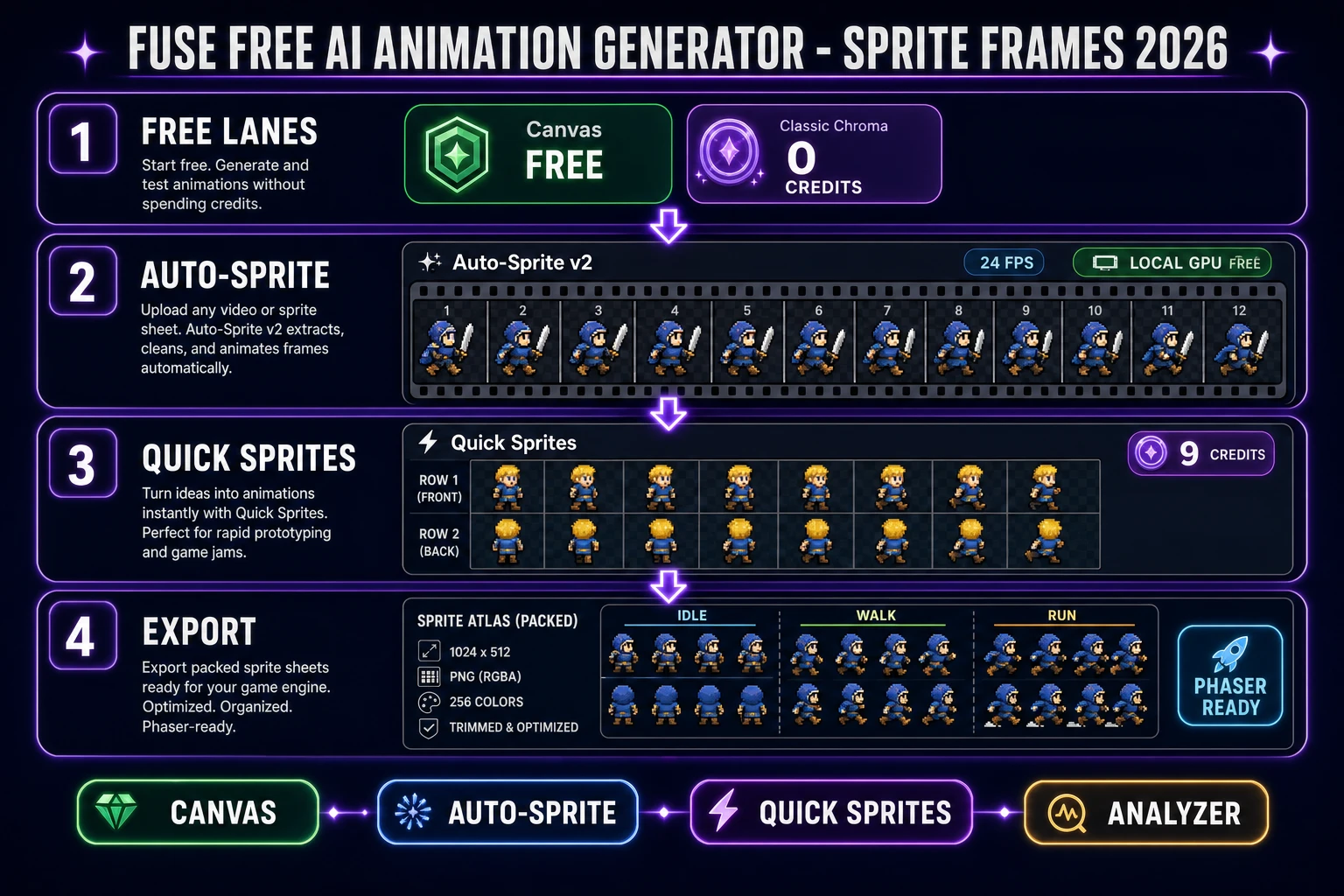
Fuse free AI animation generator sprite frames 2026 pipeline with Canvas Auto-Sprite Quick Sprites and Sprite Analyzer
The 2026-09-18 free AI animation generator fuse for sprite frames — Free Canvas, zero-credit Auto-Sprite extract, credit-priced Quick Sprites only when you need AI packs.

What “free” means for a free AI animation generator in 2026

In computer graphics a sprite is a 2D bitmap composited into a larger scene (see the Wikipedia entry on sprites). An animation generator for games is not one button that invents motion forever at zero cost — it is a pipeline that produces a texture atlas of frames an engine can scrub. “Free” therefore splits into three buckets that marketing pages usually collapse into one word.

Bucket one is always free: browser tools with a Free badge and no credit meter. On Sorceress that is Canvas (badge: Free, verified 2026-09-18 in src/app/_home-v2/_data/tools.ts). Bucket two is zero-credit processing inside a Pro-gated tool: classic chroma key and local-GPU CorridorKey inside Auto-Sprite v2 both bill creditsCost: 0. Bucket three is AI Credits: generative steps that call a cloud model. Quick Sprites charges 9 credits per generation; Cloud CorridorKey charges 1 credit per 10 frames at standard resolution. A free AI animation generator workflow that stays honest uses buckets one and two for extraction and cleanup, and spends bucket three only on keyframes and AI frame packs.

That distinction matters because DataForSEO still shows free ai animation generator at 1,300 searches per month (KD 35, verified 2026-09-13 in tools/research-supplement.md). Searchers want the free path named plainly — not a soft-focus synonym for “cheap if you already paid.”

Sorceress free-tier lanes for sprite animation

Verified 2026-09-18 against the home-v2 tools catalog, the lanes that actually touch a free AI animation generator sprite workflow break down like this.

Tool Badge What is free What costs credits
Canvas Free Full in-browser image editor — crop, paint, cleanup Nothing
Auto-Sprite v2 Pro Classic chroma key (in-browser, 0 credits); Local GPU CorridorKey (Free) Cloud CorridorKey: 1 cr / 10 frames (SD), 2 cr / 10 frames (HD); VIP Cloud = free
Quick Sprites AI Credits None on the generative step 9 credits per generation (CREDITS_PER_GEN)
Sprite Analyzer Pro Frame-by-frame preview and frame-data extract (no AI meter) Requires Pro / Lifetime access ($49)
AI Image Gen AI Credits None on generation Per-model credits (Z-Image Turbo is the budget keyframe lane)

Lifetime access unlocks the Pro tools at a one-time LIFETIME_PRICE = 49 (verified 2026-09-18 in src/app/plans/page.tsx). Credits convert at CREDITS_PER_DOLLAR = 100 (verified in src/lib/models.ts). That math is what makes the free AI animation generator claim auditable: Free badge means zero forever; Pro means pay once for the tool surface; AI Credits means pay per cloud call.
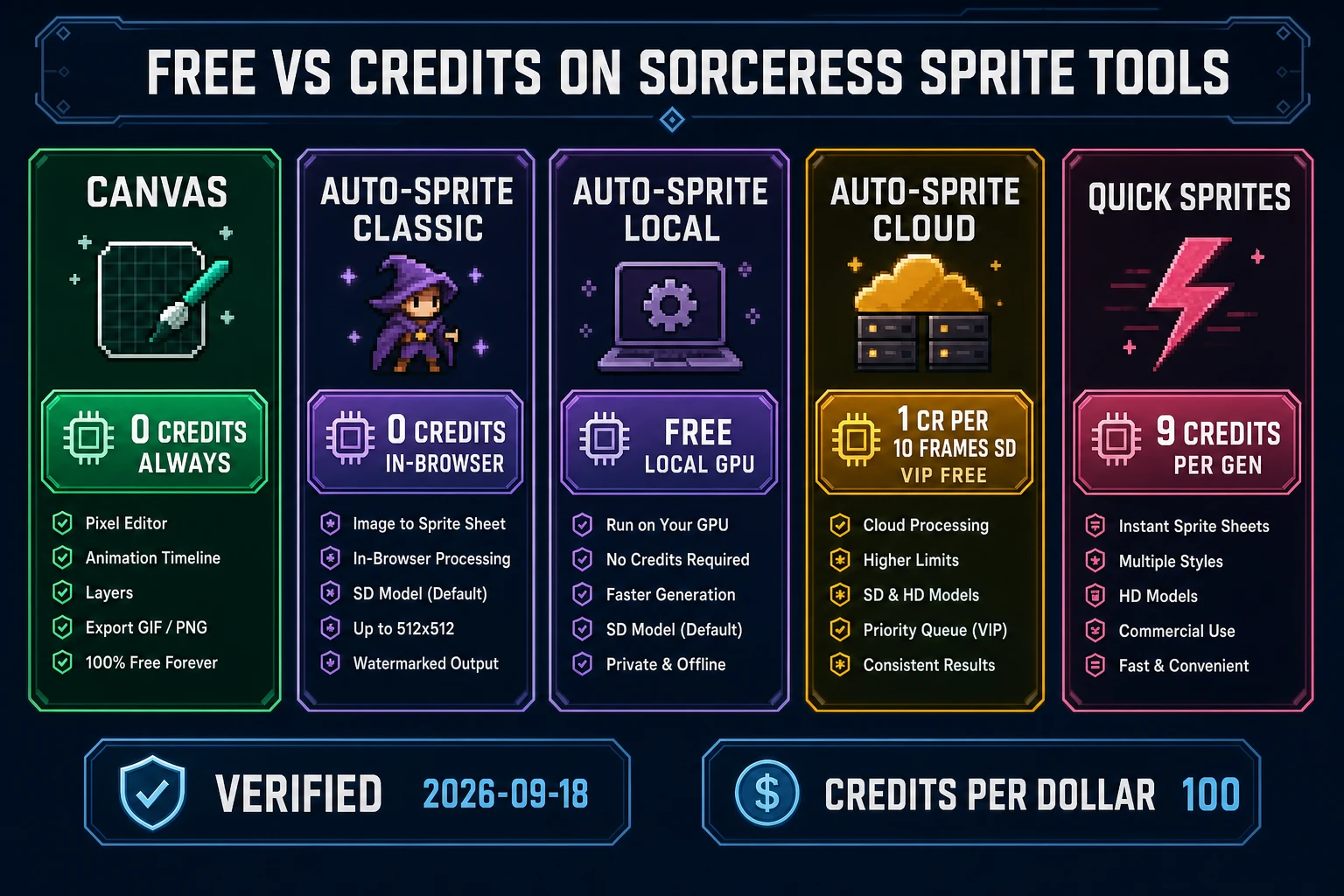
Free versus credits comparison chart for free AI animation generator tools on Sorceress Canvas Auto-Sprite Quick Sprites 2026
Verified 2026-09-18 cost lanes — Canvas Free, Auto-Sprite classic/local at 0 credits, Cloud and Quick Sprites on the credit meter.

Auto-Sprite v2 as the sprite-frame free AI animation generator

Auto-Sprite v2 is the extraction engine: prompt → AI character → AI video → game-ready sprite sheet (home-v2 card copy, verified 2026-09-18). For a free AI animation generator angle the important surface is not the marketing three-step — it is the processing mode picker.

Classic chroma key removes any background color you pick (green, blue, red, or anything else) instantly in the browser with no credits required. The UI copy states that explicitly (verified 2026-09-18 in src/app/autosprite-v2/page.tsx). Classic is the right free path when your source clip already has a flat plate and you need a transparent atlas today.

Local GPU CorridorKey is the neural keyer on your machine. The cost breakdown labels local backend Free; cloud jobs show the credit formula. Classic and local both write creditsCost: 0 on the job record.

Cloud CorridorKey is the paid neural path: Math.max(1, Math.ceil(frameCount / 10) * (isHiRes ? 2 : 1)) where isHiRes = maxDim > 512. A 40-frame standard-res job is 4 credits ($0.04). A 100-frame hi-res job is 20 credits ($0.20). VIP members get Cloud GPU free and unlimited. Frame sampling uses requestVideoFrameCallback on HTMLVideoElement (MDN baseline since October 2024, page last modified 2025-09-11, re-checked 2026-09-18) so extracted frames match the true video timeline instead of a naive seeked race.

For the free AI animation generator reader: feed a short walk clip (your own capture, or a clip you already generated), pick Classic or Local, export the PNG sheet. That is a real animated sprite pack at $0 on the credit ledger.
Quick Sprites for character-frame packs

When you do not have a video clip and you want the AI to invent the walk frames, Quick Sprites is the AI Credits lane. Verified 2026-09-18: badge AI Credits, description “AI-generated animated pixel sprite sheets,” CREDITS_PER_GEN = 9 in src/app/quick-sprites/page.tsx. Batch size multiplies the bill — four packs is 36 credits ($0.36).

The input pattern is a character reference plus a pose / action list. Drop a portrait from AI Image Gen, choose frame count (8 for a short cycle, 12 for a standard walk, 24 for a smooth run), pick the action, and export the sheet. Quick Sprites is not free — calling it free would violate Hard Rule accuracy — but at nine cents per pack it is the cheapest AI frame invention step inside the Sorceress free AI animation generator stack. Pair it with Classic Auto-Sprite only when you need a second matte pass; most Quick Sprites exports already land as pixel sheets ready for engine import.

AI Image Gen for keyframe generation

Upstream of both Auto-Sprite and Quick Sprites sits AI Image Gen. Verified 2026-09-18 in src/app/_home-v2/_data/tools.ts, the panel routes Nano Banana Pro, Nano Banana 2, GPT Image 2, Seedream 5 Lite, Flux 2 Pro, Z-Image Turbo, and more from one prompt field. For a free AI animation generator budget, generate one locked keyframe on Z-Image Turbo (Ultra fast tag), ask for a plain white or green plate, then either (a) animate that still through AI Video Gen and extract in Auto-Sprite Classic, or (b) feed the still straight into Quick Sprites for a 9-credit pack.

Consistent-character discipline still applies. Pin the seed and the reference image before you vary pose. Ask for full-body, single subject, no scene clutter — chroma key and Quick Sprites both fail when the silhouette is buried in a busy environment. The Wikipedia chroma-key article is still the right mental model: you need a dominant plate color, not a photographic backdrop.

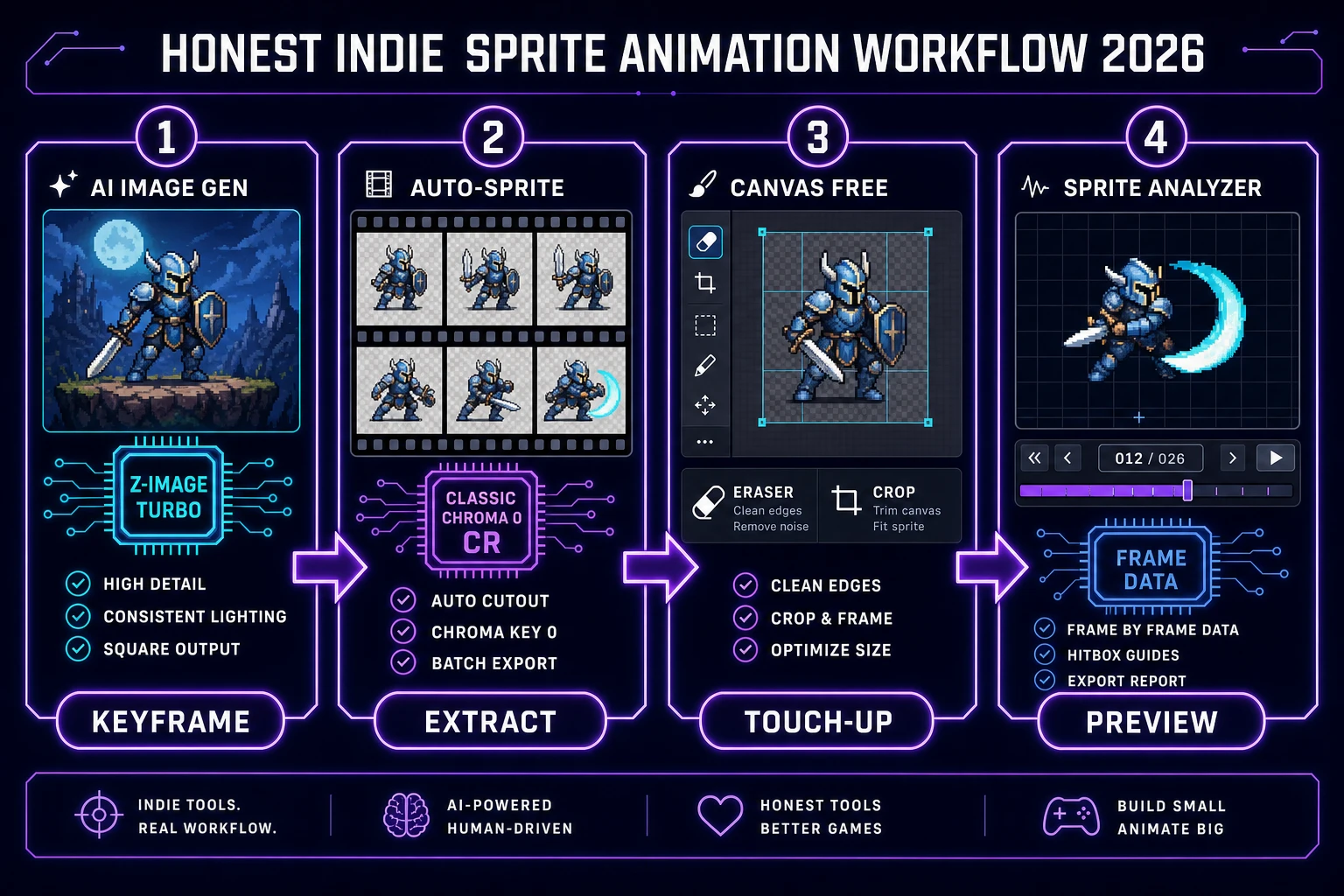
Honest indie free AI animation generator workflow keyframe extract Canvas touch-up Sprite Analyzer preview 2026
The low-spend free AI animation generator loop — keyframe, zero-credit extract, Free Canvas touch-up, Sprite Analyzer preview.

The honest indie free AI animation generator workflow

Here is the end-to-end path that keeps spend near zero while still shipping a walk pack a jam game can load.

  1. Keyframe. Open AI Image Gen, pick Z-Image Turbo or Nano Banana 2, prompt a full-body character on a flat green or white plate. Spend the minimum per-model credits for one seed portrait.
  2. Motion (optional). If you need video-driven motion, run a short clip in AI Video Gen, then jump to step 3. If you want AI-invented pixel frames instead, skip to Quick Sprites at 9 credits and jump to step 5.
  3. Extract at 0 credits. Drop the clip into Auto-Sprite v2. Choose Classic chroma or Local GPU. Confirm the cost chip reads Free / 0 credits. Export the PNG atlas.
  4. Touch up on Free Canvas. Open Canvas (Free badge). Fix fringe pixels, crop empty rows, paint out a bad frame. No credits.
  5. Preview frame data. Load the sheet in Sprite Analyzer to scrub frame-by-frame and extract frame data before engine import. Pro-gated, no AI meter.
  6. Engine load. In Phaser v4.2.1 Giedi (released 2026-07-09, verified 2026-09-18 on the phaserjs/phaser releases page), register the animation with this.anims.create() and generateFrameNumbers via the AnimationManager API (docs.phaser.io). The same atlas pattern works in any engine that loads a texture atlas (Wikipedia: texture atlas).

That is the free AI animation generator fuse in practice: generative spend only on the keyframe (and optionally one Quick Sprites pack), zero credits on extract and cleanup, Pro unlock for the analyzer surface. Avoid Cloud CorridorKey until hair-grade edges matter; avoid multi-pack Quick Sprites batches until the silhouette is locked.

// Phaser 4.2.1 — load a free AI animation generator sprite sheet
this.load.spritesheet('hero', 'hero-walk.png', {
  frameWidth: 64,
  frameHeight: 64
});

this.anims.create({
  key: 'hero-walk',
  frames: this.anims.generateFrameNumbers('hero', { start: 0, end: 7 }),
  frameRate: 10,
  repeat: -1
});

this.add.sprite(200, 300, 'hero').play('hero-walk');

The verdict on free AI animation generators for indie games

The honest 2026-09-18 verdict: there is no forever-free cloud model that invents polished walk cycles at unlimited volume. There is a free AI animation generator workflow that keeps extraction and cleanup at $0 while concentrating spend on the one or two generative calls that actually need a model. On Sorceress that fuse is Canvas (Free) + Auto-Sprite Classic/Local (0 credits) + optional Quick Sprites at 9 credits + Sprite Analyzer for preview.

If a competitor page promises “unlimited free AI animation” without naming GPU hours, credit meters, or watermark rules, treat it as a trial funnel — not a production pipeline. For jam-length projects the Sorceress path above ships a Phaser-ready sheet in an afternoon with credits measured in cents, not dollars. That is the bar a free AI animation generator search should clear in 2026.

For related deep-dives, see Sprawl an AI Sprite Animation Generator (Walk Pack 2026) for the full video-to-sheet walk pack, Video to Sprite With an AI Animation Generator (2026) for the clip-first path, and Loop AI Animation Video Generator (Trailer Path 2026) when you need trailer clips instead of sprite frames. The catalog lives at the Sorceress Tools Guide. Ready to fuse the first pack — open Auto-Sprite v2 on Classic and keep the credit chip at zero.

Frequently Asked Questions

What counts as a free AI animation generator for game sprites in 2026?

A free AI animation generator for game sprites is a browser pipeline that turns a character description into animated sprite frames without a per-frame cloud GPU bill on every step. On Sorceress (verified 2026-09-18 in src/app/_home-v2/_data/tools.ts), Canvas carries a Free badge at /canvas. Auto-Sprite v2 at /autosprite-v2 runs classic in-browser chroma key and local-GPU CorridorKey at 0 credits (creditsCost: 0 in src/app/autosprite-v2/page.tsx). Cloud CorridorKey charges Math.max(1, Math.ceil(frameCount / 10) * (isHiRes ? 2 : 1)) credits, with VIP unlimited free. Quick Sprites at /quick-sprites charges CREDITS_PER_GEN = 9 per generation. The honest free path fuses Free Canvas cleanup with zero-credit Auto-Sprite extraction; AI generation steps still spend credits.

Is Auto-Sprite v2 free?

Auto-Sprite v2 is listed as Pro in the tools catalog (badge: Pro at /autosprite-v2, verified 2026-09-18 in src/app/_home-v2/_data/tools.ts). Inside the tool, classic chroma key processes instantly in the browser with no credits required, and the local GPU CorridorKey backend is labeled Free. Cloud CorridorKey is 1 credit per 10 frames at standard resolution (maxDim ≤ 512) or 2 credits per 10 frames when hi-res, with VIP members processing Cloud GPU jobs at 0 credits. Lifetime Sorceress access is $49 (LIFETIME_PRICE in src/app/plans/page.tsx).

How much does Quick Sprites cost per animated pixel sprite sheet?

Quick Sprites deducts CREDITS_PER_GEN = 9 credits per generation (verified 2026-09-18 in src/app/quick-sprites/page.tsx). At CREDITS_PER_DOLLAR = 100 (src/lib/models.ts), that is $0.09 of underlying provider spend per pack. Batch size multiplies the cost: a 4-pack run is 36 credits. The tool is badged AI Credits in the catalog and produces AI-generated animated pixel sprite sheets from a character reference plus pose list.

Can I use a free AI animation generator output in Phaser 4?

Yes. Phaser v4.2.1 Giedi (released 2026-07-09, verified 2026-09-18 on github.com/phaserjs/phaser/releases) loads sprite sheets through the AnimationManager (docs.phaser.io AnimationManager API). Export a horizontal or grid PNG atlas from Auto-Sprite v2 or Quick Sprites, then call this.anims.create() with generateFrameNumbers on the texture key. The Wikipedia sprite and texture-atlas entries define the same frame-grid pattern engines expect.

What is the cheapest end-to-end free AI animation generator workflow on Sorceress?

Cheapest verified 2026-09-18 path: (1) generate one keyframe in AI Image Gen at /generate (per-model credits; Z-Image Turbo is the budget lane), (2) animate via AI Video Gen only if you need motion beyond Quick Sprites, (3) extract frames in Auto-Sprite v2 on classic chroma or local GPU (0 credits), (4) touch up in Canvas (Free), (5) preview frame data in Sprite Analyzer (Pro badge, no per-frame AI charge). Skip Cloud CorridorKey and Quick Sprites until the silhouette is locked. That keeps the free AI animation generator promise honest: free on extraction and cleanup, credits only on generative steps.

Sources

  1. Sprite (computer graphics) - Wikipedia
  2. HTMLVideoElement.requestVideoFrameCallback() - MDN
  3. Phaser v4.2.1 Giedi Release
  4. Phaser AnimationManager API
  5. Chroma key - Wikipedia
  6. Texture atlas - Wikipedia
Written by Arron R.·1,724 words·8 min read

Related posts