Fork How to Make an RPG Maker Game (AI Asset Pack 2026)

By Arron R.12 min read
How to make an RPG Maker game in 2026: build the story and map plan in MZ, then generate the missing assets (48x48 character walk sheets, 48x48 tilesets, BGM, a

Most guides on how to make an rpg maker game stop at "install RPG Maker, click New Project, done." That is not the hard part. The hard part is filling img/characters, img/tilesets, audio/bgm, and audio/se with art and audio that do not look like the sample RTP everyone else uses. This guide covers the honest 2026 version of the workflow: RPG Maker MZ as the runtime and event editor, Sorceress as the AI asset pack that produces the sprites, tiles, tracks, and effects that make the game feel like yours.
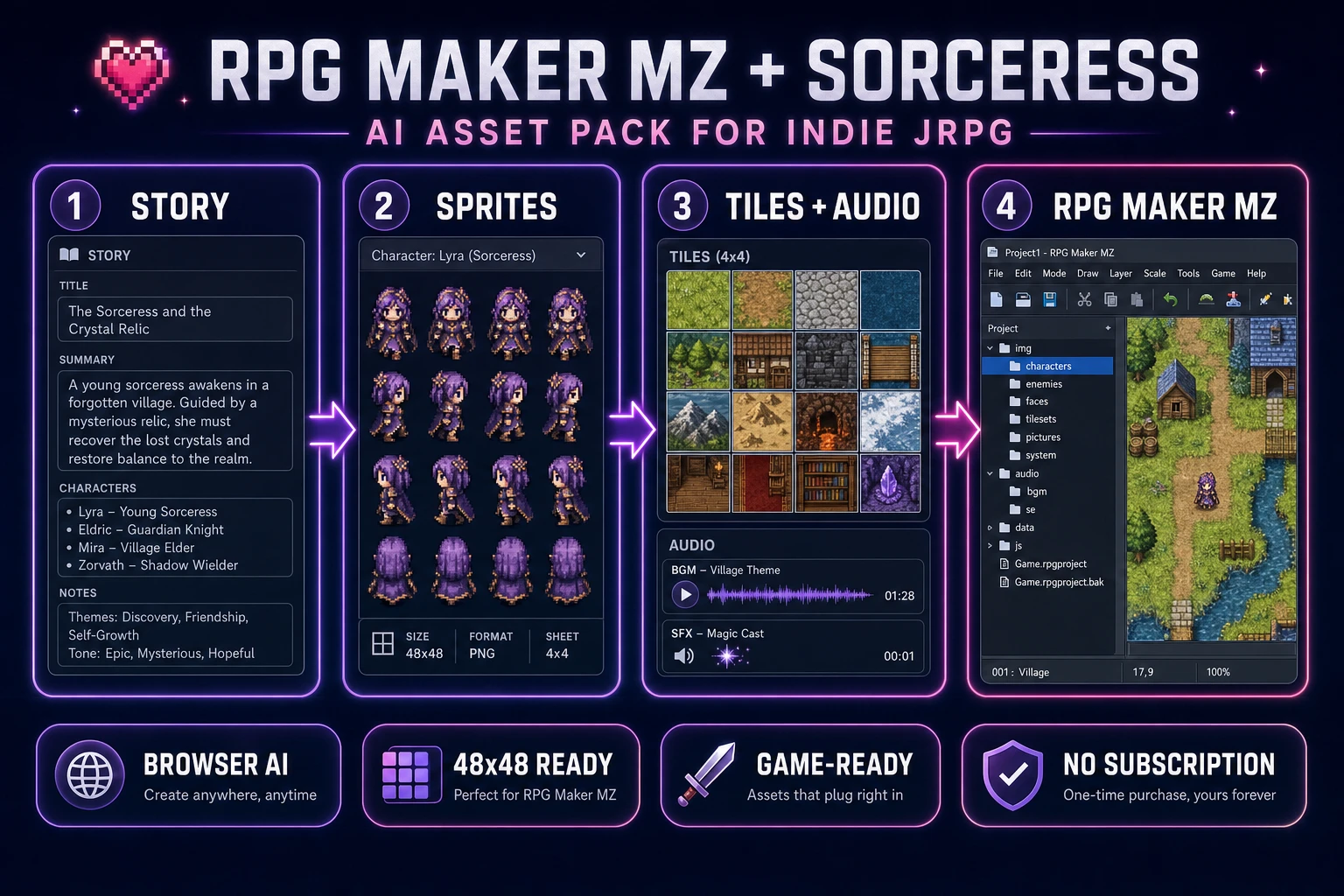
Hero diagram: how to make an rpg maker game pipeline with AI asset generation for characters, tilesets, BGM, and SFX
The 2026 RPG Maker MZ pipeline: keep the engine, replace the RTP. Character sheets, tileset A-E, BGM loops, and SFX one-shots are generated on Sorceress and dropped straight into the project folder.

What a how to make an rpg maker game search actually wants in 2026

Ranked SERPs on this query mostly show one of three things: a five-minute video that installs RPG Maker MZ and moves a character across an empty map, a written tutorial that stops after the first cutscene event, or a listicle of "top 10 RPG Maker games." None of them answer the follow-up question every new dev asks by hour two: where do the assets come from? The RTP (Runtime Package) that ships with MZ is fine for a demo, but every stock RPG Maker game looks the same because they all use the same eight villager sprites and the same medieval town tiles.

The realistic 2026 answer is not "learn Aseprite and Cubase over six months." It is a hybrid: keep RPG Maker MZ for the parts it does well (event system, database, tile-based map editor, plugin API, playtesting), and generate the visual and audio content in a browser-based AI asset stack. This guide walks through both halves.

RPG Maker MZ, MV, Unite, and VX Ace: which engine to pick in 2026

RPG Maker is a family of engines, not a single product. As of August 2026, the honest ranking for a new game project:

  • RPG Maker MZ (2020, currently v1.10.0 released February 2026) is the default recommendation. Native HTML5 export means the game runs in any browser plus Windows, macOS, Linux, iOS, and Android via the built-in deployment options. The v1.10.0 update added a Passability visualiser and Eraser tool to the map editor, 189 new sample maps, and a new-project tutorial template. Base tile and sprite size: 48x48. Steam price: 79.99 USD, on sale roughly 32 USD during the semi-annual RPG Maker Festival (60 percent off).
  • RPG Maker MV (2015) is functionally identical for asset formats (48x48, same charset layout, same tileset A-E structure) and has a bigger plugin ecosystem. Pick MV only if you want a specific MV-only plugin. New projects should default to MZ.
  • RPG Maker Unite (2023) is the Unity-based fork. It supports arbitrary sprite sizes and has a modern renderer, but the asset formats differ (transparent margins between frames, custom frame counts, Unity project dependency). Adoption is lower and the plugin ecosystem is thinner. Not recommended for a first project.
  • RPG Maker VX Ace (2011) is legacy but still widely used because of decades of RTP mods. Base tile size: 32x32. Only pick VX Ace if you have a specific reason (existing project, ancient tutorial you are following, or you actually prefer Ruby scripting to JavaScript).

Rest of this article assumes MZ. Everything except the specific pixel dimensions applies unchanged to MV. The Sorceress asset pipeline works for both.

The Sorceress how to make an rpg maker game pipeline in five steps

Five steps, in order:

  1. Scope and script. One town, one dungeon, one boss. Write the pitch in one paragraph.
  2. Build the empty loop in MZ. Player, first map, one NPC talking, one battle, one save point. Use the RTP placeholder assets. Ship this before art.
  3. Generate the character sheets on Quick Sprites. 48x48 four-angle walking, one PNG per hero and one per major NPC. Trim from 4 frames per direction to 3 for the MZ default charset format.
  4. Generate the tilesets on Tileset Forge and pixel-clean on True Pixel. One 512x512 base tileset per biome (town, dungeon, forest), sliced into the A-E tileset slots that MZ expects.
  5. Generate the audio on Music Gen and SFX Gen. Three BGM loops (town, dungeon, boss), one battle victory jingle in audio/me, and a menu-click / footstep / hit / potion set of one-shots in audio/se.
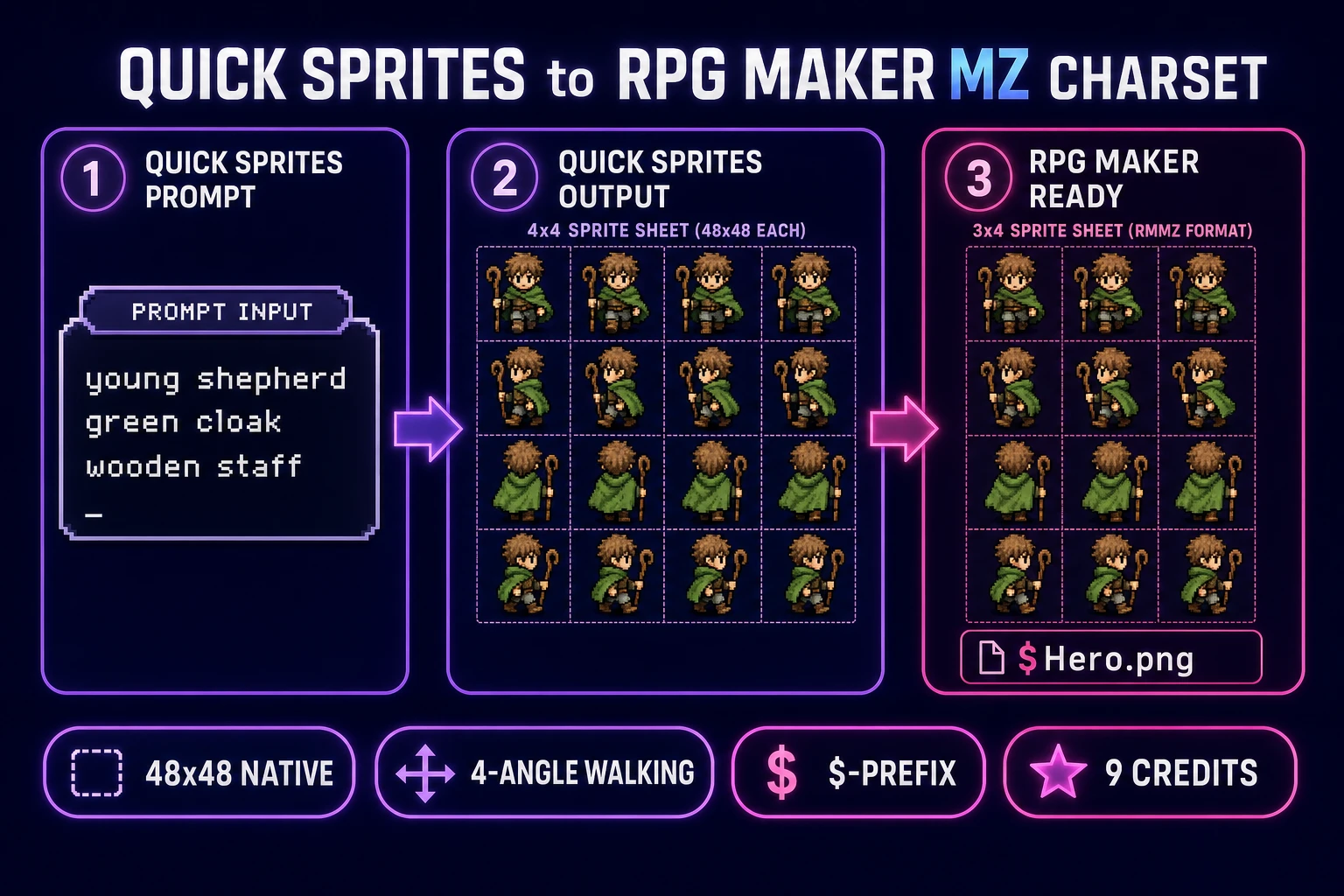
Character sheet pipeline: prompt to Quick Sprites 48x48 four-angle walking output to trimmed 3-frame RPG Maker MZ charset ready for img/characters folder
Character step. Quick Sprites produces a 48x48 four-angle walking sheet with 4 frames per direction. RPG Maker MZ default charset expects 3 frames per direction; drop the last frame in each row, save the trimmed PNG as $Hero.png, and the engine parses it correctly.

Step 1: scope the RPG in one paragraph and one map

A first RPG is not a first novel. The scope that actually ships:

  • One protagonist with a name and one line of motivation ("Ren, a shepherd, wants to find out why the well went dry").
  • One town with roughly 10 tiles of interior and 10 tiles of exterior.
  • One dungeon with 3 rooms, one puzzle, one mid-encounter, one boss.
  • One battle system: default MZ turn-based. Do not swap in a battle plugin on day one.
  • Estimated play length: 15 to 30 minutes.

That is the whole design doc. If you cannot fit the whole game description into a single paragraph, cut before you code. When the paragraph is done, open WizardGenie, paste the pitch, and ask it to break the game into an ordered task list of RPG Maker events (parallel process, autorun, action button, on-touch). Those bullet points become the event checklist you tick off in MZ.

Step 2: build the empty loop in RPG Maker MZ (before any art)

Launch MZ, pick the built-in tutorial template that was added in v1.10.0 (it walks you through creating your first map, event, and battle). Ignore the art. Use every placeholder sprite and tileset that ships with the RTP.

The empty loop you are trying to reach:

  1. The player spawns on the town map. Arrow keys move the character.
  2. Talking to one NPC ("Elder Bran") triggers a Show Text event, then a Change Party Member event that adds a second party member.
  3. Walking to a tile marked with a Transfer Player event moves the party to the dungeon map.
  4. Touching the enemy sprite on the dungeon map triggers a Battle Processing event using one of the default troops.
  5. Winning the battle triggers a Show Text (victory line) and a Transfer Player back to the town save point.

Playtest with F5 (fullscreen) or F12 (windowed). When the loop plays start-to-end without a script error, save and commit. You now have an "RPG Maker game." Everything after this is asset replacement.
Step 3: replace the character sprites with 48x48 walk sheets from Quick Sprites

This is where most tutorials on how to make an rpg maker game quietly give up. The MZ charset format is strict: each character block is 3 columns (walk-left, stand, walk-right) by 4 rows (down, left, right, up), for 12 frames total. Each frame is 48x48 pixels for MZ and MV, or 32x32 for VX Ace. A single-character sheet prefixed with a dollar sign (e.g. $Hero.png) is 144x192 pixels. A full 8-character sheet in a 4x2 grid is 576x384 pixels.

Sorceress Quick Sprites generates 48x48 four-angle walking sheets natively (four directions, four frames per direction). To fit the MZ default charset:

  1. Prompt Quick Sprites with your hero description: "a young shepherd in a green cloak, brown boots, wooden staff, 48x48 pixel art walk cycle, top-down JRPG style". Select the Four Angle Walking style. 9 credits per generation.
  2. Download the output PNG (192x192, four directions x four frames).
  3. Open the sheet in any image editor and delete the last column of each row so you have 3 frames per direction. Resave as 144x192.
  4. Rename to $Hero.png (leading dollar sign; that tells MZ this file is a single character, not a sheet of 8).
  5. Drop the file in project/img/characters/. In MZ, open the Database, Actor 1, and set Character Image to $Hero, index 0.
  6. Playtest with F5. Ren the shepherd should now walk in all four directions with a 3-frame cycle.

If you want a 4-frame walk cycle (smoother animation), you can install a community plugin like OcRam_Char_Converter or the popular VS_Movement plugin that adds arbitrary frame-count support. Keep the raw Quick Sprites output at 192x192 in that case and the plugin will slice correctly.

For NPCs, generate up to 8 characters at once and combine into a 4x2 grid sheet at 576x384 pixels named without the dollar prefix (e.g. Villagers1.png). MZ will index them 0-7 in reading order (top-left is 0, top-right is 3, bottom-left is 4, bottom-right is 7).

Step 4: replace the tilesets with Tileset Forge and clean on True Pixel

MZ splits tiles into five slots labeled A through E in each tileset. A is terrain (grass, water, walls, floor); B, C, D, E are event tiles, decor, structures, doodads. Each tile is 48x48. A full A-slot tile sheet is 768x768 (16 wide x 16 tall). B-E are 768x768 as well.

The workflow that produces usable tiles quickly:

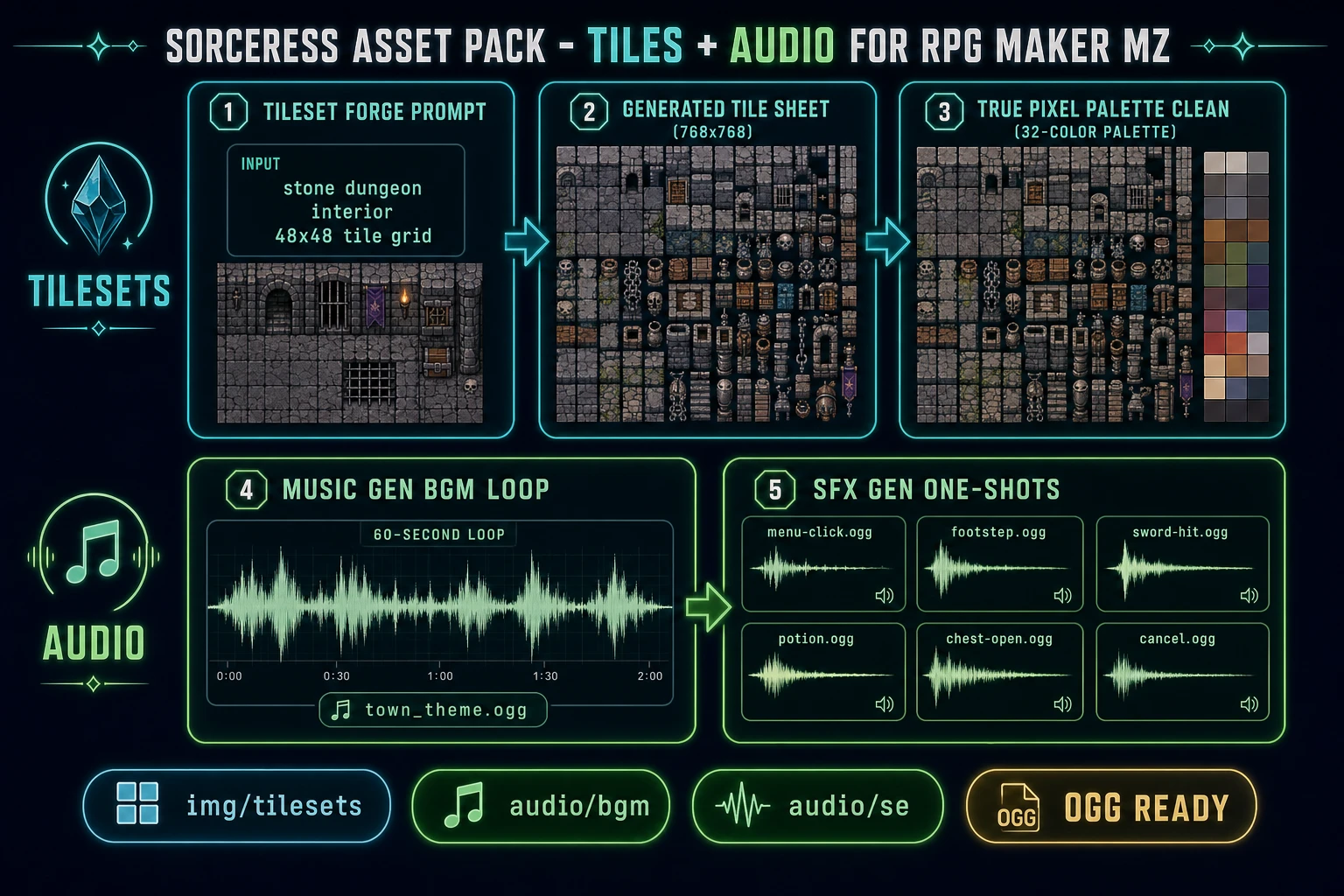
  1. Open Tileset Forge. Prompt with the biome you need: "stone dungeon interior, dark grey brick walls, torch-lit floor, 48x48 tile grid, top-down JRPG, seamless edges."
  2. The tool returns a tileable image. Pull it into True Pixel and quantize to a 32 or 64 color palette so it sits alongside RPG Maker's default palette without color banding.
  3. Slice the output into 16x16 grid cells (48x48 each) using True Pixel's grid overlay, then export as PNG.
  4. Drop the exported PNG into project/img/tilesets/. In MZ, open Database, Tilesets, pick your dungeon tileset, and assign the PNG to slot A2 (for grass/floor terrain) or B (for event decor).
  5. Redraw the dungeon map with the new palette. Playtest with F5.

For a first project, one A-slot tileset per biome is enough. A minimal RPG needs three biomes (town outdoor, town interior, dungeon) plus a starter B slot with basic decor (chest, sign, torch, door). That is 4 PNG files. Total generation cost is under 30 credits on Sorceress if you get the prompt right on the first pass.

Tileset and audio pipeline: Tileset Forge to True Pixel palette clean to img/tilesets folder, plus Music Gen BGM loop and SFX Gen one-shot to audio/bgm and audio/se folders
The other half of the asset pack. Tilesets go through Tileset Forge, then True Pixel for palette cleanup, then into img/tilesets as A-slot or B-slot PNGs. BGM loops from Music Gen land in audio/bgm as OGG. SFX one-shots from SFX Gen land in audio/se.

Step 5: generate the BGM and SFX pack on Music Gen and SFX Gen

RPG Maker MZ has native support for looping BGM (background music), looping BGS (background sound like rain or wind), one-shot ME (musical effects like victory jingles), and one-shot SE (sound effects like menu clicks and footsteps). Formats are OGG and M4A. A minimum viable audio pack is roughly 10 files:

  • 3 BGM loops: town theme (bright, roughly 90 BPM), dungeon theme (tense, minor key, roughly 60 BPM), boss theme (fast, driving percussion, roughly 140 BPM). Generate on Music Gen at around 60 seconds each. Export as OGG so the file is compact and MZ loops it cleanly.
  • 1 ME victory jingle: 8-10 seconds, fanfare shape, no loop. Music Gen has a "short jingle" preset that fits.
  • 6 SE one-shots on SFX Gen: menu-select click, menu-cancel click, footstep on stone, sword hit, potion drink, chest open. Each around 0.5 to 1.5 seconds, exported as OGG.

Drop the BGM files into project/audio/bgm/, the ME jingle into project/audio/me/, and the SE files into project/audio/se/. In MZ, open Database, Tilesets or each Map's properties, and set the BGM by filename. For SFX, use the Play SE event command in your event editor.

A concrete example: the "chest open" event on your dungeon map now uses your chest sound instead of the default RTP click. Nothing has changed about the event logic. The event feels different because the audio is bespoke.

How to deploy the finished RPG Maker MZ game to the web

Once the game plays cleanly with your assets, deploy from MZ's Game menu with Deployment. Pick "Web browsers (HTML5)" as the target. MZ produces a folder with index.html, js/, and audio/ that you can upload to any static host. The exported build is about 30-80 MB depending on how much RTP audio you kept (delete unused RTP audio from the project before deploying to shrink the build).

Windows, macOS, Linux, iOS, and Android deployment targets are available in the same dialog. All three desktop targets bundle NW.js (the Chromium-based runtime MZ uses under the hood) so the executable weighs around 200 MB even for a small game.

What a how to make an rpg maker game project actually costs in Sorceress in 2026

Concrete cost estimate for the minimum viable RPG described above, using verified Sorceress credit prices in August 2026:

  • Character sprites: 4 heroes plus 8 NPCs = 12 characters. Quick Sprites at 9 credits each = 108 credits. Approximate USD: 1.08.
  • Tilesets: 3 biomes plus 1 decor slot. Tileset Forge and AI Image Gen usage roughly 60-90 credits total. Approximate USD: 0.90.
  • BGM tracks: 3 loops at Music Gen's per-loop cost, plus 1 jingle. Roughly 60-120 credits total. Approximate USD: 1.20.
  • SFX pack: 6 one-shots at SFX Gen's low per-shot cost. Roughly 30-60 credits. Approximate USD: 0.60.

Total AI asset cost: roughly 260-380 credits, or 2.60 to 3.80 USD at Sorceress's 1 credit = 1 cent standard rate (verified in src/lib/models.ts). New accounts start with 100 free credits (verified in the signup grant path), so a first-time user pays roughly 1.60 to 2.80 USD out of pocket. The Lifetime tier at 49 USD one-time removes credit accounting entirely and covers unlimited runs on Quick Sprites, True Pixel, Tileset Forge, Music Gen, and SFX Gen for the life of the account, which pays back after roughly the fifth game.

Compare to the alternative: commissioning a pixel artist for 12 characters (around 20-40 USD each), a musician for 3 loops (around 100-200 USD each), and an SFX pack from a stock library (around 20-40 USD). Traditional cost: 550-1000 USD for the same asset scope. That is not an argument that AI assets are "better than" a human artist. It is an argument that they exist at all for a solo dev with a weekend and a Steam Festival copy of MZ.

What not to do (three things that will slow you down)

Three common traps when you are new to how to make an rpg maker game that AI assets do not fix:

  1. Do not swap the default battle system on day one. Battle plugins (SRPG Engine, Yanfly's ATB, Visustella's CTB) are excellent, but every one of them takes 2-6 hours to configure correctly. If you swap before you have a first-loop playtest, you will spend the whole weekend debugging plugin parameters and never make a map. Ship the vanilla MZ turn-based battle first, then swap on the next game.
  2. Do not skip the RTP sample maps. The 189 sample maps that shipped in v1.10.0 are professionally designed. Copy the layout of a town, then repaint with your tileset. Trying to design a "readable" JRPG town from scratch on your first project is a lot harder than it looks.
  3. Do not generate all 30 sprites before the loop plays. You will spend the credits, discover the plugin you need does something unexpected with the sprite size, and have to regenerate. Loop first. Assets second. Every time.

If you follow the five-step pipeline above and skip the three traps, you will have a playable, custom-asset RPG Maker MZ game in a weekend. That is what "how to make an rpg maker game" honestly looks like in 2026.

Frequently Asked Questions

How do I make an RPG Maker game as a total beginner?

Install RPG Maker MZ (v1.10.0 as of February 2026), start a new project from the built-in tutorial template, and design the first map and one battle before you worry about art. Once the loop plays, generate replacements for the placeholder character in Sorceress Quick Sprites (48x48 four-angle walking), tiles in Tileset Forge, BGM in Music Gen, and SFX in SFX Gen. Drop each file into the matching folder inside your project (img/characters, img/tilesets, audio/bgm, audio/se) and press F5 to test.

What sprite size does RPG Maker MZ use?

48x48 pixels per frame is the default for both characters and tiles in MZ and MV. A full character sheet is 576x384 (8 characters in a 4x2 grid) and a single-character sheet prefixed with a dollar sign is 144x192 (3 frames wide by 4 directions tall). VX Ace uses 32x32. Quick Sprites in Sorceress outputs 48x48 four-angle walking sheets that fit the MZ/MV grid after a small trim.

Can I make an RPG Maker game for free?

The engine itself is paid. RPG Maker MZ is 79.99 USD on the official store and Steam, though it drops to roughly 32 USD during the regular 60 percent off Festival sales. The assets are the free-or-cheap part. Sorceress gives new accounts 100 starter credits, and the Lifetime tier is 49 USD one-time for unlimited access to Quick Sprites, True Pixel, Tileset Forge, Music Gen, and SFX Gen (enough to make every sprite, tile, track, and sound effect for a full RPG).

How do I add my own sprites to RPG Maker MZ?

Drop the PNG into your project's img/characters folder. If it contains eight 3x4 character blocks in a 4x2 grid, name it anything (e.g. Villagers1.png). If it contains a single 3x4 character block, prefix the filename with a dollar sign (e.g. Hero.png with a leading dollar sign). The engine reads dimensions on load; no import wizard needed. Tiles go in img/tilesets in one of the A-through-E slots, BGM goes in audio/bgm, and SFX goes in audio/se.

What are the folder paths for RPG Maker MZ assets?

Inside your project root: img/characters for walk sprites, img/faces for portrait cutins, img/tilesets for A-E tile sheets, img/battlebacks1 and img/battlebacks2 for battle backgrounds, img/enemies for enemy graphics, audio/bgm for looping music, audio/bgs for looping ambience, audio/me for jingles (level up, victory), and audio/se for one-shot sound effects. Each folder accepts PNG for images and OGG/M4A for audio.

Sources

  1. RPG Maker MZ Asset Standards - Official Help
  2. RPG Maker MZ v1.10.0 Release Notes - RPG Maker Guild
  3. Charsets Structure and Avoiding Traps - The Official RPG Maker Blog
Written by Arron R.·2,622 words·12 min read

Related posts