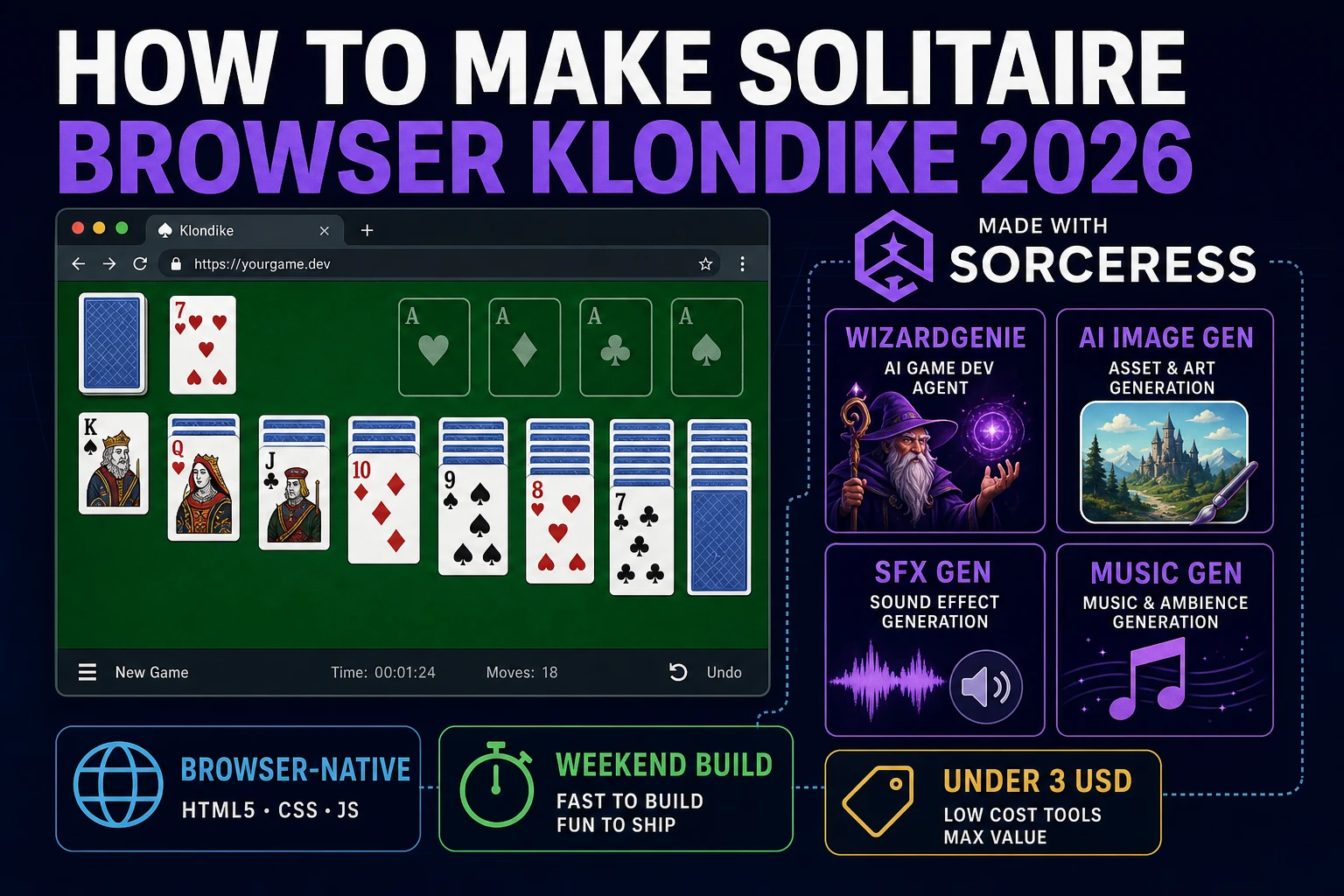
Deal How to Make Solitaire (Browser Klondike 2026)

By Arron R.11 min read
How to make solitaire in 2026: deal Klondike with seven tableau piles and four foundations, wire drag-drop, stock flips, and undo in WizardGenie, then add AI Im

Klondike patience is the solitaire most people mean when they search “how to make solitaire”: seven tableau columns, four suit foundations, a stock you flip when stuck, and drag-drop moves until every card lands Ace-through-King. Microsoft bundled it with Windows for decades, so the rules are muscle memory even for players who never read a rulebook. Most javascript solitaire tutorials stop at a static screenshot and a hardcoded board array. The 2026 pipeline is different. A coding agent scaffolds the deck model, move validator, and pointer-driven drag layer from one prompt, and AI generation covers the felt table, card backs, and lounge audio. In a browser, that means WizardGenie for the Klondike loop, Sorceress AI Image Gen for the table and card art, SFX Gen for shuffle and place stings, and Music Gen for a calm background bed. This guide is the honest end-to-end for how to make solitaire in 2026, in a browser, in a weekend.
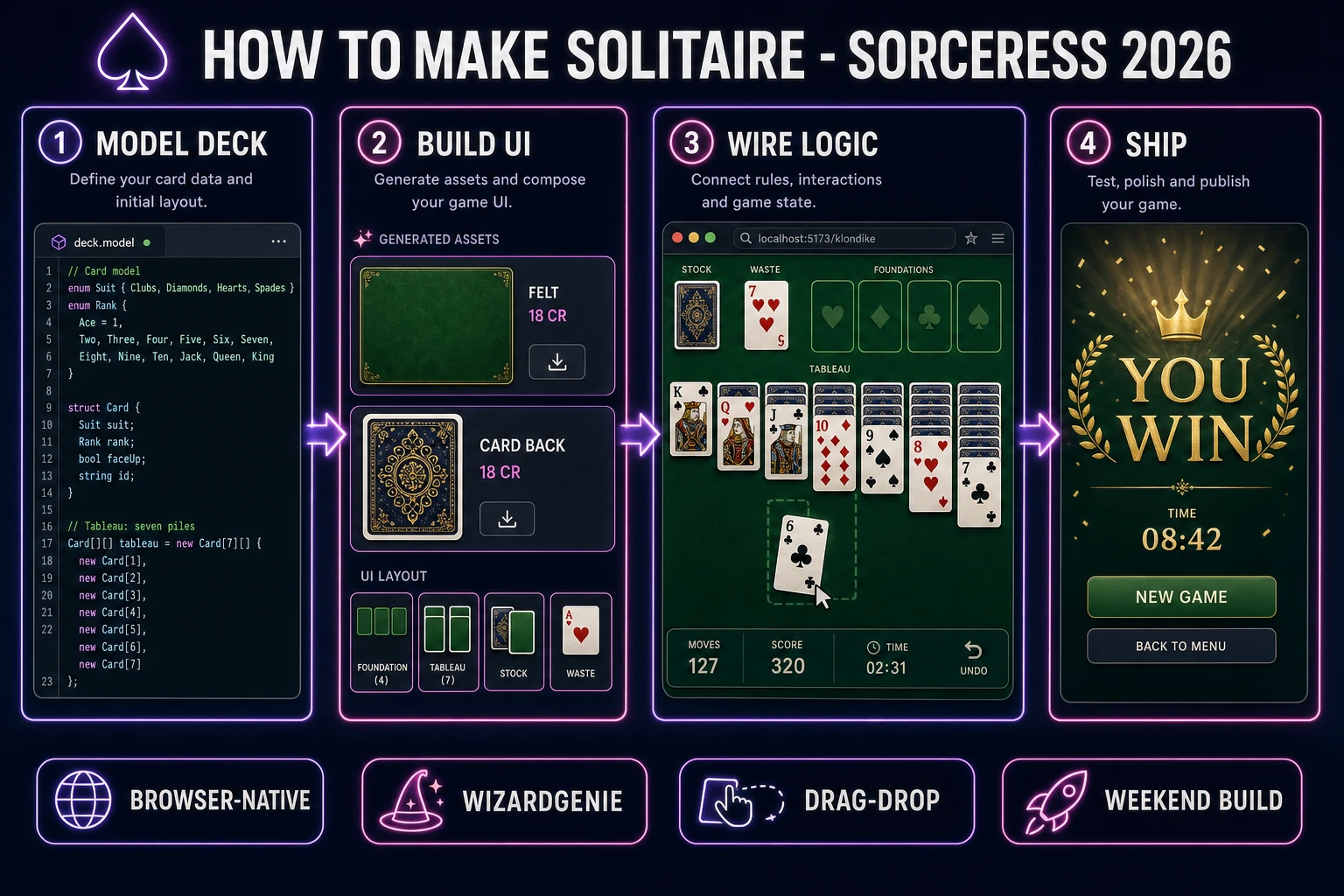
How to make solitaire browser pipeline: model a Klondike deck with seven tableau piles, wire drag-drop in WizardGenie, and ship a browser build
The 2026 how to make solitaire browser recipe: model the Klondike deck and piles, build the felt UI with drag-drop, wire move validation and undo in WizardGenie, then add shuffle stingers and a lounge music bed.

What how to make solitaire actually means in 2026

The query “how to make solitaire” hides three intents. Some searchers want a printable deck PDF or a physical card layout — that is a graphic-design problem, not a game loop. A second intent is a solitaire solver: paste a deal, watch an algorithm brute-force moves. Useful for analysis, but not playable. The third intent, and the one this guide targets, is a single-player browser Klondike game: a fair deal routine, seven tableau piles with face-up and face-down cards, four foundation piles, stock and waste piles, drag-drop (or tap-to-move) input, undo, a timer, optional draw-one versus draw-three stock rules, and a win screen when all fifty-two cards reach the foundations. That is a weekend build, it demos the whole Sorceress toolset, and it is the format most solitaire game tutorial and browser klondike searchers actually want.

The presentation contract is small and strict. A title screen shows the game name, a New Game button, a Draw mode toggle (one card or three), and optionally a Daily Deal seed keyed to the UTC date. The play screen shows green felt (or your theme), seven tableau columns with overlapping cards, four empty foundation slots top-right, stock bottom-left, waste beside stock, an Undo button, move counter, and running timer. On win, freeze input, play a short flourish, show elapsed time and best time, and offer New Game or Replay. The Klondike Wikipedia overview is still the cleanest rules summary: build foundations by suit from Ace to King, build tableau in alternating colors descending, empty tableau slots accept Kings only.

The solitaire loop in one minute (deal, select, move, flip, win)

Five moving parts, repeated until the board clears or the player gives up. First, deal — shuffle a standard fifty-two-card deck, place one face-up card on tableau pile one, then deal increasing face-down stacks across seven piles with the top card of each pile face-up. Remaining cards form the stock. Second, select — pointer-down on a face-up card selects that card and every face-up card stacked below it in the same tableau column (a valid sub-stack). Third, move — drag the stack to another tableau pile or a foundation; on release, run the move validator; if illegal, snap back. Fourth, flip — when no tableau moves exist, tap stock to move one (or three) cards to waste; when stock empties, optionally recycle waste back to stock. Fifth, win — when all four foundations hold thirteen cards each, stop the timer and show the completion card. That is the entire solitaire loop. Auto-complete to foundations, hints that flash a legal move, and Vegas scoring modes are polish layered after one honest round works.
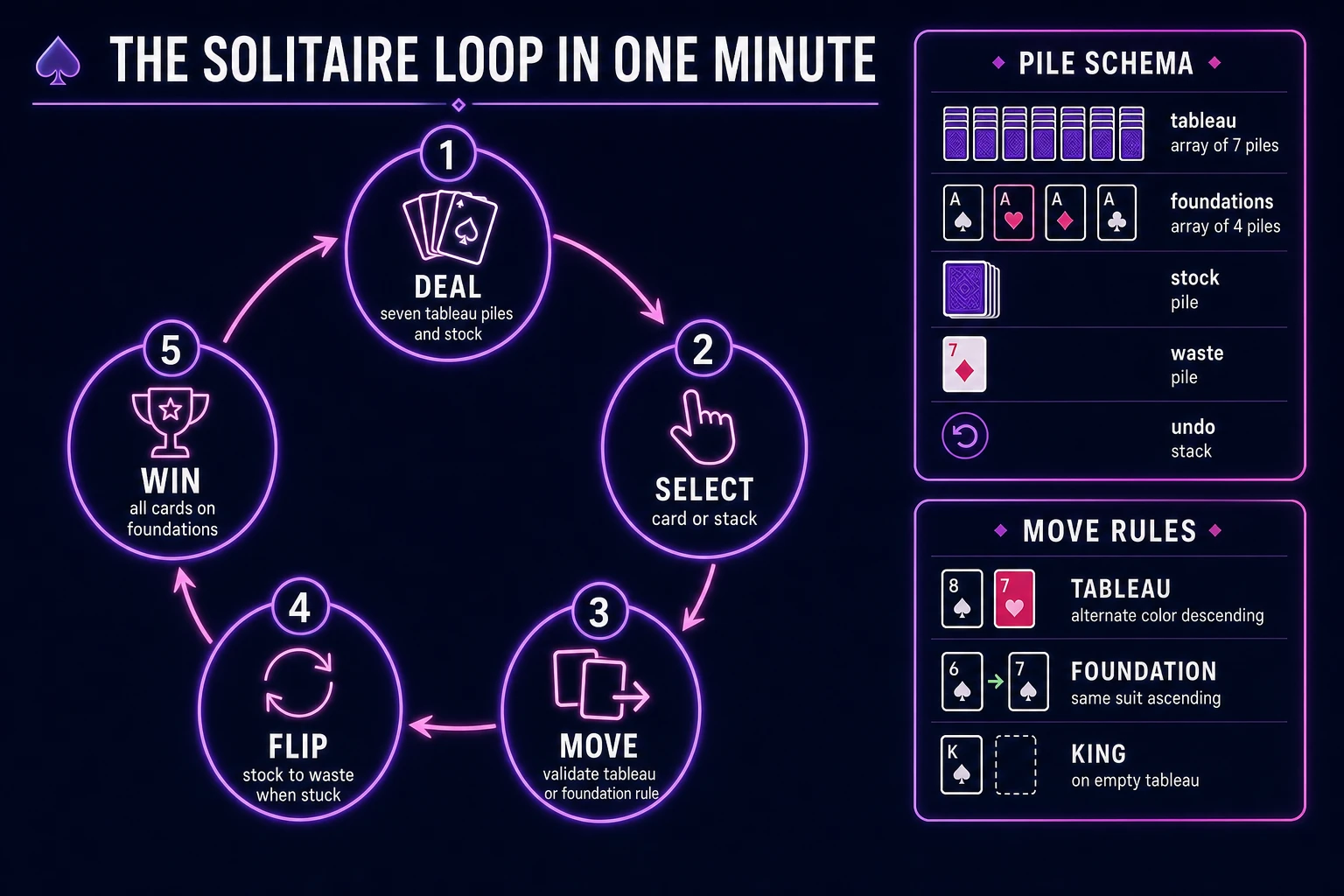
Klondike solitaire game loop state machine diagram showing deal, select, move, flip stock, and win nodes with pile schema and move rules panel
The Klondike loop: deal seven tableau piles, select a card stack, validate moves onto tableau or foundations, flip the stock when stuck, then win when all cards reach the foundations.

Pick your engine for how to make solitaire: vanilla DOM, canvas, or WizardGenie

Three good browser targets in 2026, each with a different trade-off. Vanilla JavaScript with absolutely positioned card divs is the honest default and the pick this guide recommends for a first build. Each card is a <div> with a CSS background sprite or two layered images (back and face). Tableau piles offset cards vertically so you see the rank strip. Pointer events handle drag with a floating clone. Total code footprint for a working patience game tutorial is under 800 lines including the deal and validator. No engine to install, ships as a single static HTML file, deploys anywhere. This is the stack most html5 solitaire and javascript solitaire tutorials should have started with.

Canvas becomes the right pick if you want fan-spread animations, card flip tweens, or particle confetti on win. You still keep New Game and Undo in the DOM for accessibility; canvas owns the felt and cards. The cost is hit-testing rectangles for every card on every frame during drag.

Phaser 4.2.1 “Giedi” (verified 2026-08-19 on the official Phaser download page) becomes the right pick if you want tweens when cards snap onto foundations, shader-based glow on valid drop targets, or integrated audio timelines. Phaser’s Scene lifecycle maps cleanly onto title-play-win if you later add themed skins (space solitaire, neon casino). For a first card-drag game, Phaser is optional weight — use it when motion is the product, not when the product is a correct Klondike validator and a reliable undo stack.

WizardGenie is not a separate rendering engine — it scaffolds whichever of the three you pick from a single natural-language prompt. WizardGenie ships as both a desktop app (Windows installer with auto-update, available to Early Access supporters and above) and a no-install web build. Its coding-model lineup covers Claude Opus 4.7, GPT-5.5, Gemini 3.1 Pro, DeepSeek V4 Pro, Kimi K2.5, Grok 4.2, and MiniMax M2.7 (verified 2026-08-19 in src/app/_home-v2/_data/tools.ts). For solitaire, any frontier model scaffolds the deck model and drag layer in one prompt. Pair a frontier planner with a budget executor like DeepSeek V4 Pro or Kimi K2.5 for the typing pass — the Dual-agent pattern lands most projects at roughly one-fifth the single-frontier cost.

Step 1 — model deck, tableau, foundations, and Klondike deal

Nothing else in the pipeline matters if the move rules are wrong or the deal duplicates cards. Start with a canonical deck: fifty-two cards, each { id, suit, rank } where suit is hearts, diamonds, clubs, or spades and rank runs Ace (1) through King (13). Build helper predicates once:

function isRed(suit) {
  return suit === 'hearts' || suit === 'diamonds';
}

function canTableauMove(moving, destTop) {
  if (!destTop) return moving.rank === 13; // King on empty column
  return isRed(moving.suit) !== isRed(destTop.suit)
    && moving.rank === destTop.rank - 1;
}

function canFoundationMove(card, foundationTop) {
  if (!foundationTop) return card.rank === 1; // Ace starts pile
  return card.suit === foundationTop.suit
    && card.rank === foundationTop.rank + 1;
}

The Klondike deal is deterministic given a seed. Shuffle with Fisher–Yates, then loop column c from 0 to 6 and row r from 0 to c, pushing one card onto tableau pile c face-down except the last card in each column, which starts face-up. Stock gets the remainder. Store game state as { tableau: Card[][], foundations: Card[][], stock: Card[], waste: Card[], undo: State[] }. Unit-test the deal: fifty-two unique ids, seven tableau piles with 1+2+3+4+5+6+7 = 28 cards, twenty-four in stock. Test canTableauMove with a red 7 onto a black 8 (legal) and a red 7 onto a red 6 (illegal). Those asserts are the difference between a solitaire clone people trust and one they rage-quit after the first illegal snap.

Step 2 — wire drag-drop, undo, and win detection in WizardGenie

With the model solid, open WizardGenie. Drop in a bare index.html with a felt container and pile drop zones. Give the agent one paragraph: Build a browser Klondike solitaire game. Model fifty-two cards with suit and rank. Deal seven tableau piles with the standard Klondike layout. Support pointer drag of valid card stacks between tableau piles and to foundations. Flip one card from stock to waste on stock click; recycle waste to stock when stock is empty. Validate every move with alternating-color descending tableau rules and same-suit ascending foundation rules. Push full state onto an undo stack on each legal move. Win when all foundations hold thirteen cards. Include timer, move counter, New Game, and Undo buttons. Feed that to any coding model and the scaffold lands in under five minutes.

The remaining afternoon is polish via follow-ups. Use Pointer events rather than the older HTML Drag and Drop API alone — pointer events behave on touch screens where native drag often fails. Add double-click to auto-move a card to its foundation when the move is unambiguous. Add highlight valid drop targets while dragging. Keep the commit handler pure:

function applyMove(state, fromPile, toPile, count) {
  if (!canMove(state, fromPile, toPile, count)) return state;
  const next = cloneState(state);
  next.undo.push(snapshot(state));
  const cards = next[fromPile].splice(-count, count);
  next[toPile].push(...cards);
  flipTopFaceDown(next, fromPile);
  next.won = next.foundations.every(p => p.length === 13);
  return next;
}

Each follow-up is a prompt. Test with a nearly won board, an illegal color mismatch, and a fresh deal — those three cases catch ninety percent of card drag drop game bugs before players do.

Step 3 — AI Image Gen card backs and felt, SFX Gen shuffle and deal, Music Gen lounge bed

Open Sorceress AI Image Gen for the visual set. A Klondike game needs one felt table texture (seamless green or your theme), one ornate card back design, and optionally a subtle logo plate for the title screen. Nano Banana Pro at 18 credits per generation (verified 2026-08-19 in src/lib/models.ts line 303) holds style consistency when you use the card back as a reference for a matching Ace-of-spades face plate. Three passes at 18 credits is 54 credits or 0.54 USD for the visual core. Prompt the felt like “top-down green casino felt texture, soft lighting, seamless, no cards, no text.” Prompt the card back like “symmetrical ornate card back, red and gold pattern, flat vector, no text, transparent corners.”

Render ranks and suits in CSS or a tiny SVG sprite sheet if you want crisp Ace-through-King faces without fifty-two AI generations — that is the standard approach in production solitaire clone projects. AI Image Gen covers the table and back; code covers pips.

Open SFX Gen. SFX Gen bills 1 credit per second (verified 2026-08-19 in src/app/sfx-gen/page.tsx line 23 as SEED_AUDIO_CREDITS_PER_SECOND = 1). Four clips cover a first solitaire game: shuffle (1.5 seconds, card riffle), deal (0.8 seconds, soft cascade), place (0.3 seconds, muted tap), and win (2 seconds, bright resolve). Total roughly 7 credits or 0.07 USD. Add one 25-second ambient bed — quiet room tone or distant casino murmur — at 25 credits or 0.25 USD.

Open Music Gen. Music Gen bills 10 credits per generation (verified 2026-08-19 in src/app/music-gen/page.tsx line 28 as MUSIC_CREDIT_COST = 10). Two tracks cover a first solitaire game: a title-menu loop (warm, relaxed, 60 seconds) and a focus bed (steady lounge piano, 90 seconds) under active play. Two tries per track budgets 40 credits or 0.40 USD. MP3 is fine for browser delivery; add 2 credits per WAV render if you need lossless (WAV_CREDIT_COST = 2, same file line 31).

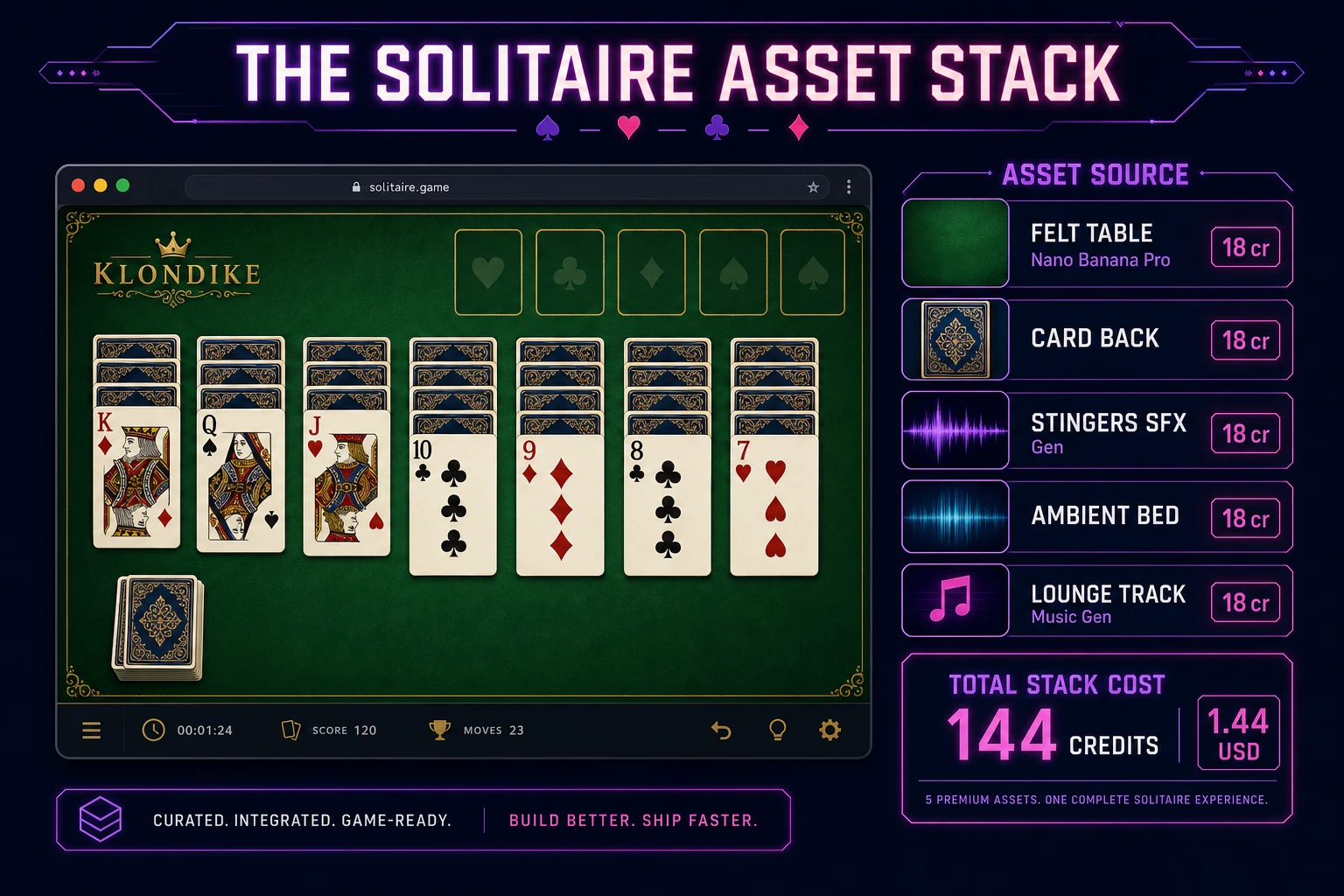
Solitaire game asset stack showing a Klondike browser layout next to asset tiles for felt table, card back, stingers, ambient bed, and music tracks
The solitaire asset stack: felt and card back from AI Image Gen, four short stingers plus an ambient bed from SFX Gen, and two lounge tracks from Music Gen — the whole set costs under two dollars in Sorceress credits.

What a how to make solitaire project costs on Sorceress in 2026

Concrete asset and generation budget for a browser Klondike game — fair deal, drag-drop, undo, stock flip, timer — from empty repo to zip-and-ship playable, all numbers verified 2026-08-19 against local Sorceress source:

  • Felt table and title plate (AI Image Gen): 3 passes at Nano Banana Pro 18 credits each = 54 credits (0.54 USD).
  • Card-back art (AI Image Gen): included in the three passes above; optional face-plate styling adds 1 pass at 18 credits (0.18 USD) if you want a custom Ace.
  • Stingers (SFX Gen): 4 clips at 1 credit per second, roughly 7 seconds total = 7 credits (0.07 USD). Shuffle, deal, place, win.
  • Ambient bed (SFX Gen): 1 clip at 25 seconds = 25 credits (0.25 USD).
  • Background music (Music Gen): 2 tracks at 10 credits per generation, 2 tries each = 40 credits (0.40 USD).
  • WizardGenie coding time: effectively free on the Sorceress side. Model-side API cost for a 3-to-5-hour prompt session on a cheap Executor like DeepSeek V4 Pro is typically under 0.50 USD.
  • Total for one complete browser solitaire game: roughly 144 credits, or roughly 1.44 USD in Sorceress credits, plus under 0.50 USD in model API time. Under 2.50 USD end-to-end for a Klondike clone with drag-drop, undo, and full audio.

Sorceress bills 100 credits per dollar at the standard rate (CREDITS_PER_DOLLAR = 100 in src/lib/models.ts line 69). New accounts start with 100 free credits (SIGNUP_GRANT = 100 in src/app/api/admin/credits/route.ts line 12), which covers the stingers, ambient loop, one music track, and part of the felt art outright — enough to prototype before you top up. The Sorceress Lifetime tier at 49 USD one-time (LIFETIME_PRICE = 49 in src/app/plans/page.tsx line 51) covers unlimited SFX Gen and Music Gen use forever, which matters if you ship draw-three mode, Vegas scoring, or seasonal card-back themes that need fresh audio each month.

For related browser card and grid pipelines that share this model-first-scaffold-the-UI spine, the closest reads are Sol How to Make Sudoku (Browser Grid Logic 2026) for the sibling logic-grid cousin, Bingo How to Make a Bingo Game (Browser Card Grid 2026) for another card-grid weekender, Mate How to Make a Chess Game (Browser AI Loop 2026) for turn-based board rules with drag pieces, Slide How to Make 2048 (Browser Merge Grid 2026) for the daily-seed puzzle cousin, and Hang How to Make Hangman (Browser Letter Grid 2026) for another casual browser classic. The Sorceress Tools Guide is the master index for every tool this guide referenced. Under three dollars, one weekend, and how to make solitaire is a done deal.

Frequently Asked Questions

What is the difference between Klondike and generic solitaire?

In search traffic, “solitaire” almost always means Klondike patience: seven tableau piles with alternating colors and descending rank, four foundation piles built Ace through King by suit, a stock pile you flip one or three cards at a time, and a waste pile you replay until the stock empties. Spider, FreeCell, and Pyramid use different layouts and win conditions. If your how to make solitaire tutorial ships Klondike rules with drag-drop on tableau and foundations, you match what browser solitaire and javascript solitaire searchers expect. Label the title screen “Klondike” so power users know which variant you implemented.

Should a browser solitaire use HTML drag-drop or pointer events?

Start with pointer events for both mouse and touch. HTML Drag and Drop works on desktop but feels laggy on phones and fights scroll gestures. Track pointerdown on a card, clone a floating card element that follows pointermove, and on pointerup hit-test which pile is under the cursor. Keep the data model pure: an array of pile objects, each pile an ordered list of card ids. The renderer reads pile state; dragging is a temporary overlay. Add keyboard shortcuts later — select a card with arrows, move with Enter — but pointer-first is the right default for a solitaire game tutorial aimed at casual players.

How do I validate legal Klondike moves in JavaScript?

Encode each card as { suit, rank } with rank 1–13. Tableau accepts a moved stack if the destination top card is opposite color and exactly one rank higher, or the destination pile is empty and the bottom card of the stack is a King. Foundations accept only the next rank of the same suit starting from Ace. Stock flips move the top card(s) to waste; when stock is empty, optionally recycle waste back to stock. Before mutating state, run canMove(sourcePile, destPile, cardCount) — if false, snap the card back. Push a deep copy of the entire game state onto an undo stack on every legal move so Undo is one pop away.

How do I detect a win in Klondike solitaire?

Win when all fifty-two cards sit on the four foundation piles, each foundation holding thirteen cards of one suit in ascending order. The cheap check is foundations.every(p => p.length === 13). Also expose isWinnable for analytics — some deals are unwinnable under strict rules, but casual browser klondike often allows unlimited passes through the stock. Track move count and elapsed time on win, persist best times per deal seed in localStorage, and show a completion card with New Game and Replay Deal buttons. Play a short win sting and freeze input so players get closure.

How much does it cost to build solitaire on Sorceress?

A first-project browser Klondike with drag-drop, undo, stock flip, timer, and audio budgets like this against the 2026 Sorceress rate card (verified 2026-08-19 against local source). Felt table and card back: three AI Image Gen passes at Nano Banana Pro 18 credits each = 54 credits or 0.54 USD (src/lib/models.ts line 303). Optional face-plate styling: one pass at 18 credits = 18 credits or 0.18 USD. Four SFX clips at 1 credit per second (src/app/sfx-gen/page.tsx line 23) — shuffle, deal, place, win — roughly 7 credits or 0.07 USD. One 25-second ambient bed = 25 credits or 0.25 USD. Two Music Gen tracks at 10 credits per generation (src/app/music-gen/page.tsx line 28) with two tries each = 40 credits or 0.40 USD. Total roughly 144 credits or 1.44 USD plus under 0.50 USD in coding-model API time. The free 100-credit signup grant (src/app/api/admin/credits/route.ts line 12) covers the stingers, ambient loop, and one music track outright.

Sources

  1. Klondike (solitaire) - Wikipedia
  2. MDN - HTML Drag and Drop API
  3. MDN - Pointer events (touch-friendly card dragging)
  4. Phaser 4.2.1 API Documentation
Written by Arron R.·2,398 words·11 min read

Related posts


