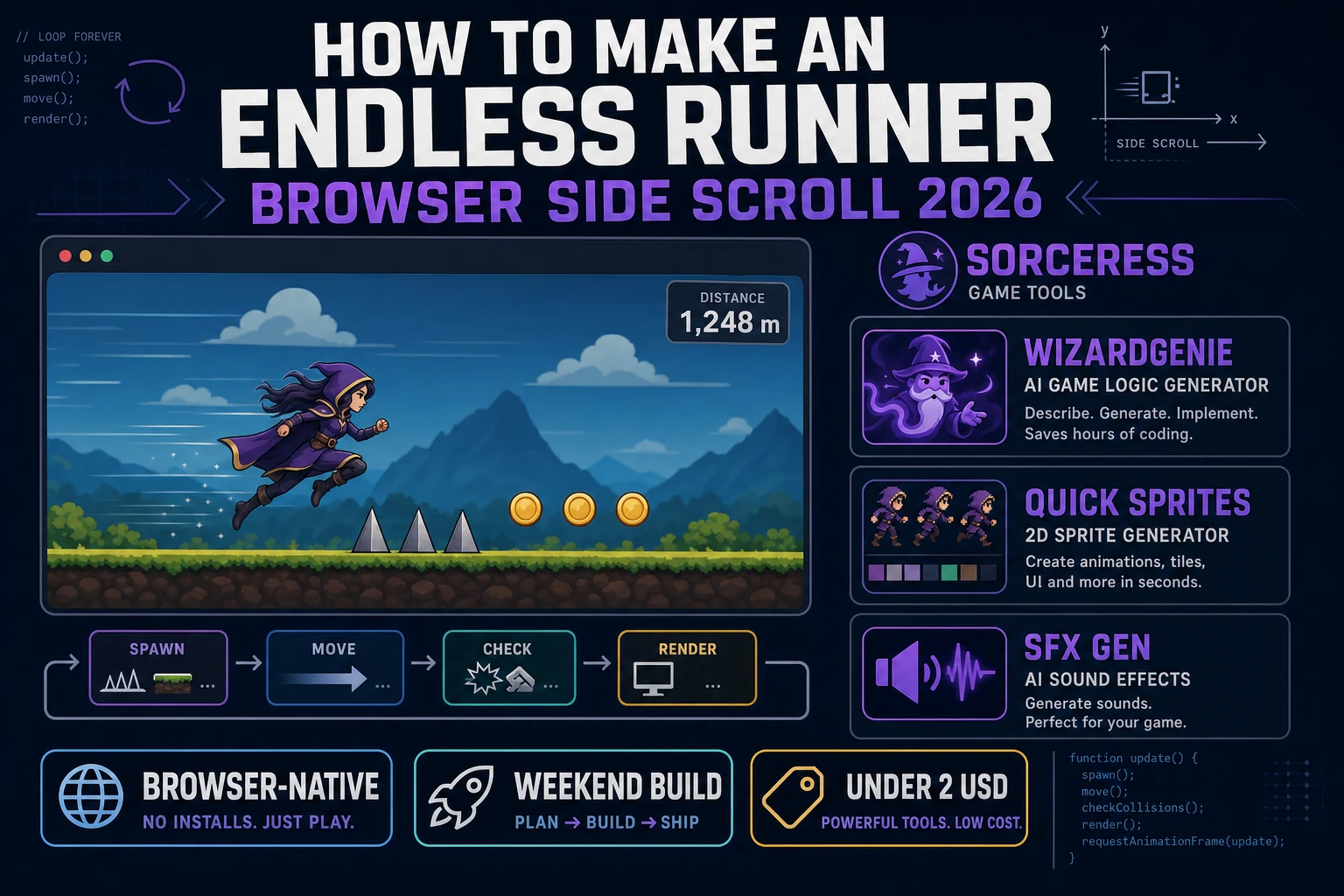
Dash How to Make an Endless Runner (Browser Side Scroll 2026)

By Arron R.9 min read
How to make an endless runner in 2026: model scroll speed and jump gravity with obstacle spawn pools, wire distance score and game-over collision in WizardGenie

Most beginners who search "how to make an endless runner" want a hero that auto-runs right, a single jump button that clears ground spikes, obstacles that spawn ahead on a timer, and a distance score that ticks up until you crash. A commercial infinite runner with shop skins, daily quests, and live-ops events is a product team. A browser side-scroll loop is different. A coding agent scaffolds scroll speed, jump gravity, and spawn pools from one prompt, and AI generation covers the hero sprite sheet and jump audio. On desktop or web, that means WizardGenie for the run-jump-spawn loop, Quick Sprites for a walk-and-jump hero, and SFX Gen for footstep and crash clips. This guide is the honest end-to-end for how to make an endless runner in 2026, as a weekend build you can finish once.
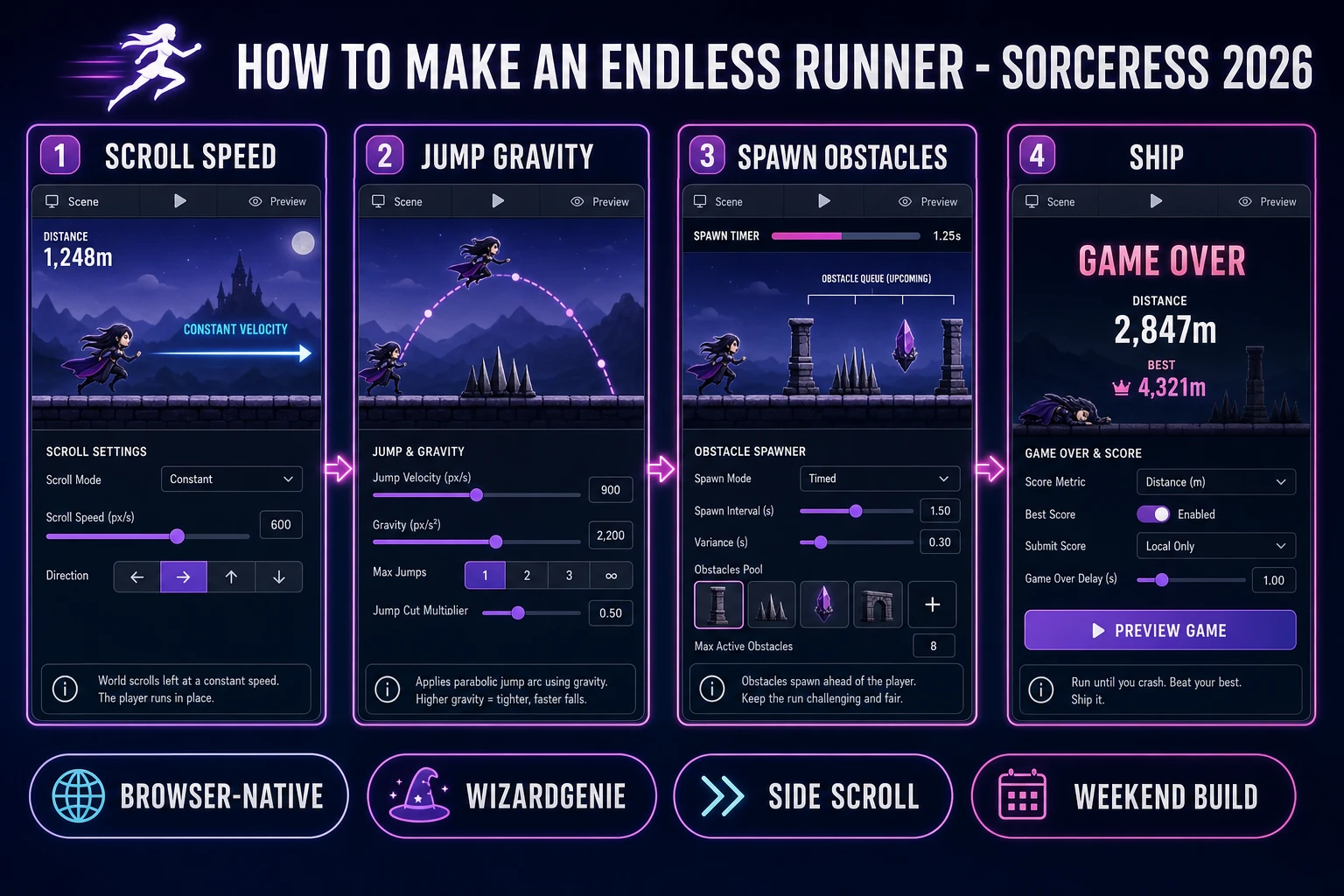
How to make an endless runner browser pipeline: model scroll speed and jump gravity, wire obstacle spawn in WizardGenie, and ship a browser side-scroll loop
The 2026 how to make an endless runner recipe: model auto-scroll speed and jump arcs, wire obstacle spawn and distance scoring in WizardGenie, then add Quick Sprites hero art and SFX Gen jump audio.

What how to make an endless runner actually means in 2026

The query "how to make an endless runner" hides three intents. Some searchers want a Unity Asset Store template with pre-animated characters and monetized ad SDK hooks — that is engine shopping, not a minimal playable loop. A second intent is a mobile live-ops runner with battle passes and rotating events — a studio roadmap, not a solo jam. The third intent, and the one this guide targets, is a browser side scroller: one lane, constant rightward scroll, tap-to-jump over spikes and pits, obstacles spawning on a timer, and distance as score until collision ends the run. That is a weekend build, it demos the Sorceress toolset, and it is the format most endless runner tutorial and javascript endless runner searchers actually want.

The presentation contract is small and strict. A title screen shows the game name, best distance, and Run. The play screen shows a parallax background, the hero on a floor line, incoming obstacles sliding left, a live distance counter, and optional mute toggle. On jump, play a short whoosh and arc the hero with gravity. On collision, freeze scroll, play a crash clip, show Game Over with final distance and Play Again. The Platform game overview on Wikipedia (verified 2026-08-25) still separates auto-scrolling obstacle runners from full platformers cleanly — cite it when you write your itch.io blurb so players know which promise you kept. If you already shipped a one-button dodge game, the sibling guide on how to make flappy bird covers vertical flap physics; this post owns horizontal scroll, floor collision, and spawn timers instead.

The endless runner loop in one minute (run, jump, scroll, spawn, crash)

Five moving parts, repeated until collision or the player quits. First, auto-run — increment world scroll offset each frame so backgrounds and obstacles move left while the hero stays at a fixed x anchor. Second, jump — on pointerdown or spacebar, apply upward velocity when the hero is grounded; gravity pulls vy back toward the floor each tick. Third, spawn — decrement a timer; when it hits zero, push a new obstacle at the right edge with random height or gap width, then reset the timer. Fourth, score — add scroll speed to distance every frame so the number reflects how far the player survived. Fifth, game over — on axis-aligned box overlap between hero and obstacle, stop scroll, show final distance, and persist high score in localStorage. That is the entire endless runner loop. Coins, shields, and double jumps are polish layered after one honest run ends on the first spike without the hero tunneling through the floor.
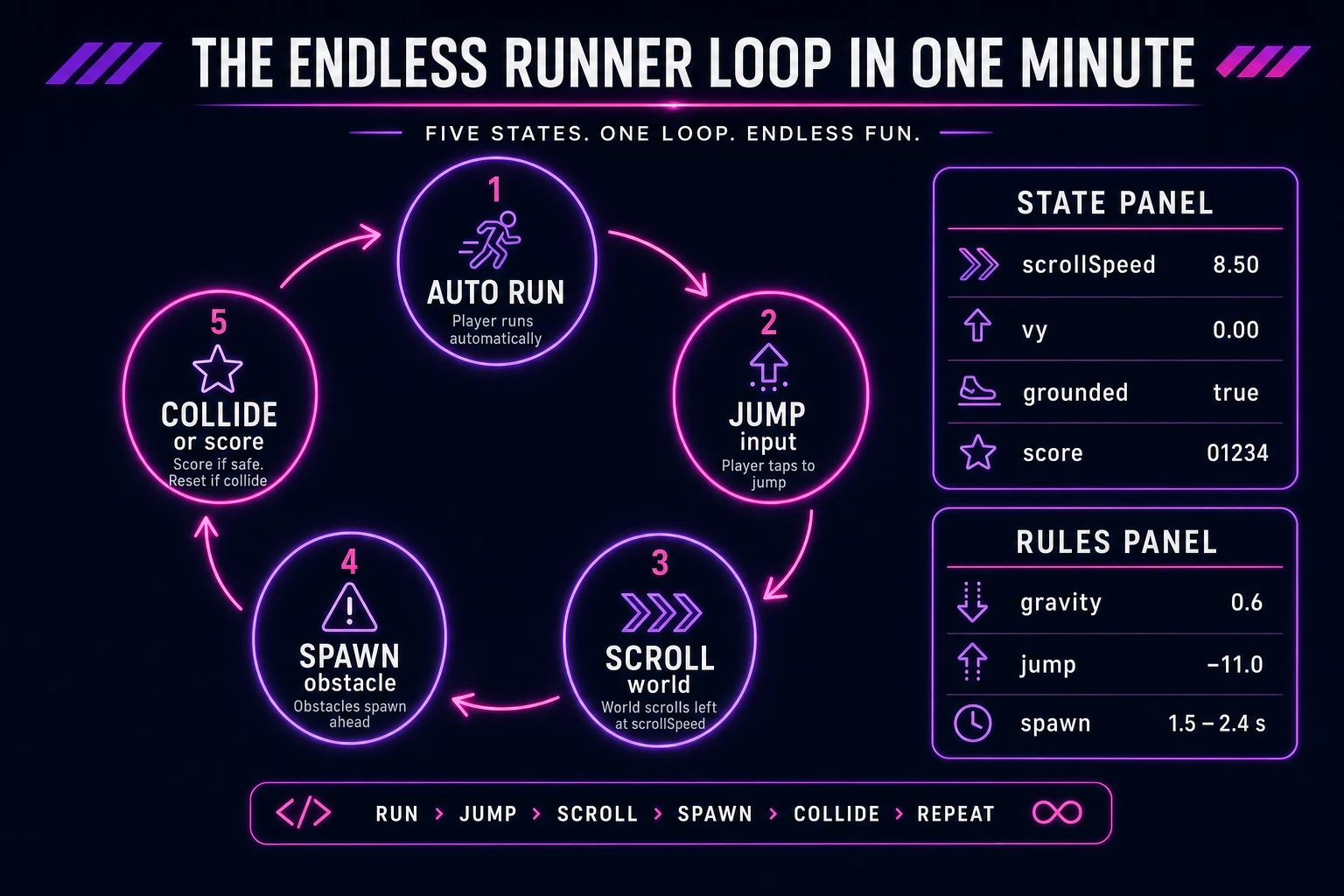
Endless runner loop state machine diagram showing auto run, jump input, scroll world, spawn obstacles, and collide or score distance
The endless runner loop: auto-run at constant speed, jump over spikes, spawn obstacles on a timer, rack up distance, then crash and retry.

Pick your engine for how to make an endless runner: canvas, Phaser, or WizardGenie

Three good targets in 2026, each with a different trade-off. Vanilla JavaScript on canvas is the honest default and the pick this guide recommends for a first build. Draw parallax layers, the hero sprite, and obstacle rects each frame with drawImage and fillRect, integrate jump velocity with gravity, scroll by subtracting speed from obstacle x positions, and test axis-aligned box overlap for hits. Total code footprint for a working html5 endless runner is under 300 lines including score, spawn timer, and game-over screen. No engine to install, ships as a static HTML file, deploys anywhere. The MDN Canvas API docs cover drawing, and requestAnimationFrame covers the sixty-hertz loop.

DOM with CSS transforms becomes the right pick only for a static mockup — scrolling dozens of div obstacles at sixty frames per second janks on mobile. Stick with canvas for any auto runner game tutorial you expect strangers to play.

Phaser 4.1.0 (verified 2026-08-25 on the official Phaser API documentation page) becomes the right pick if you want Arcade Physics gravity, sprite sheet animations for run and jump frames, or tilemap parallax with multiple camera scroll factors. Phaser does not invent your spawn timer — you still need the same scroll offset and overlap helpers. Use Phaser when animated hero cycles and layered backgrounds are the product; use raw canvas when the product is an infinite runner javascript walkthrough people can read in one sitting.

WizardGenie is not a separate rendering engine — it scaffolds whichever of the two you pick from a single natural-language prompt. WizardGenie ships as both a desktop app (Windows installer with auto-update, available to Early Access supporters and above) and a no-install web build. Its coding-model lineup covers Claude Opus 4.7, GPT-5.5, Gemini 3.1 Pro, DeepSeek V4 Pro, Kimi K2.5, Grok 4.2, and MiniMax M2.7 (verified 2026-08-25 in src/app/_home-v2/_data/tools.ts). For endless runners, any frontier model scaffolds scroll speed, jump gravity, and obstacle pools in one prompt. Pair a frontier planner with a budget executor like DeepSeek V4 Pro or Kimi K2.5 for the typing pass — the Dual-agent pattern lands most projects at roughly one-fifth the single-frontier cost.

Step 1 — model scroll speed, jump gravity, and floor collision

Nothing else in the pipeline matters if the hero falls through the floor or hover-clears every spike. Start with a small, testable model:

const SCROLL = 6;
const GRAVITY = 0.65;
const JUMP = -11;
const FLOOR = 320;
const HERO = { x: 120, y: FLOOR, w: 36, h: 48, vy: 0, grounded: true };

function updateHero() {
  HERO.vy += GRAVITY;
  HERO.y += HERO.vy;
  if (HERO.y >= FLOOR) {
    HERO.y = FLOOR;
    HERO.vy = 0;
    HERO.grounded = true;
  } else {
    HERO.grounded = false;
  }
}

function tryJump() {
  if (HERO.grounded) HERO.vy = JUMP;
}

function tickScore(score) {
  return score + SCROLL;
}

Unit-test three cases before you paint parallax: a jump at the lip of a low spike should clear it; releasing jump early should not allow a second mid-air boost unless you explicitly add double jump; distance should increase linearly with frame count times scroll speed. Those three tests catch ninety percent of javascript endless runner bugs. If you want a sibling reference for horizontal motion without auto-scroll, the guide on how to make a platformer game walks player-driven x velocity instead — useful when you are debugging gravity constants.

Step 2 — obstacle spawn pool, scroll, and collision

Obstacles are rectangles sliding left at scroll speed. Maintain a spawn timer and an array:

let obstacles = [];
let spawnIn = 90;

function spawnObstacle() {
  const h = 40 + Math.random() * 50;
  obstacles.push({ x: 820, y: FLOOR + 48 - h, w: 28, h });
}

function updateObstacles() {
  spawnIn -= 1;
  if (spawnIn <= 0) {
    spawnObstacle();
    spawnIn = 72 + Math.random() * 48;
  }
  for (const o of obstacles) o.x -= SCROLL;
  obstacles = obstacles.filter(o => o.x + o.w > -20);
}

function hit(a, b) {
  return a.x < b.x + b.w && a.x + a.w > b.x
    && a.y < b.y + b.h && a.y + a.h > b.y;
}

function checkCrash() {
  const box = { x: HERO.x, y: HERO.y - HERO.h, w: HERO.w, h: HERO.h };
  return obstacles.some(o => hit(box, o));
}

When checkCrash returns true, set gameOver, stop calling updateObstacles, and show final distance. Persist bestDistance in localStorage keyed by game id. Optional polish: vary obstacle height so players must time short hops versus full jumps. For speed-variant siblings, the guide on how to make a racing game covers player-controlled velocity on a track — a useful contrast when explaining why endless runners keep hero x fixed.

Step 3 — Quick Sprites hero, SFX Gen jump clips, and Music Gen chase bed

A silent side scroller reads as broken even when collision math is correct. Four short clips and one sprite sheet cover the whole browser endless runner experience:

  • Hero sprite sheet — run cycle plus jump frame from Quick Sprites, side-view character roughly 48 pixels tall, export PNG with transparent background.
  • Jump whoosh — under 0.5 seconds, on each tryJump when grounded.
  • Land thud — under 0.3 seconds, when grounded flips true after airborne.
  • Crash hit — 0.5–1 second, on game over overlap.
  • Optional coin ping — if you add collectibles later, keep it under 0.3 seconds.

Open SFX Gen, describe each clip in plain language ("short cartoon jump whoosh, dry, no reverb"), and export WAV or MP3 into your assets/audio/ folder. Billing is 1 credit per second of generated audio per src/app/sfx-gen/page.tsx — four short clips land around 6 credits total.

Optional parallax hills from AI Image Gen at Nano Banana Pro (18 credits per pass per src/lib/models.ts) tile cleanly behind the playfield. Optional polish: a looping chase bed from Music Gen at low volume under the SFX layer. Prompt for "fast 140 BPM endless runner underscore, no vocals, 30 seconds loopable." Each Music Gen pass costs 10 credits per src/app/music-gen/page.tsx. Two tries to get the mood right is 20 credits — still inside the free signup grant.

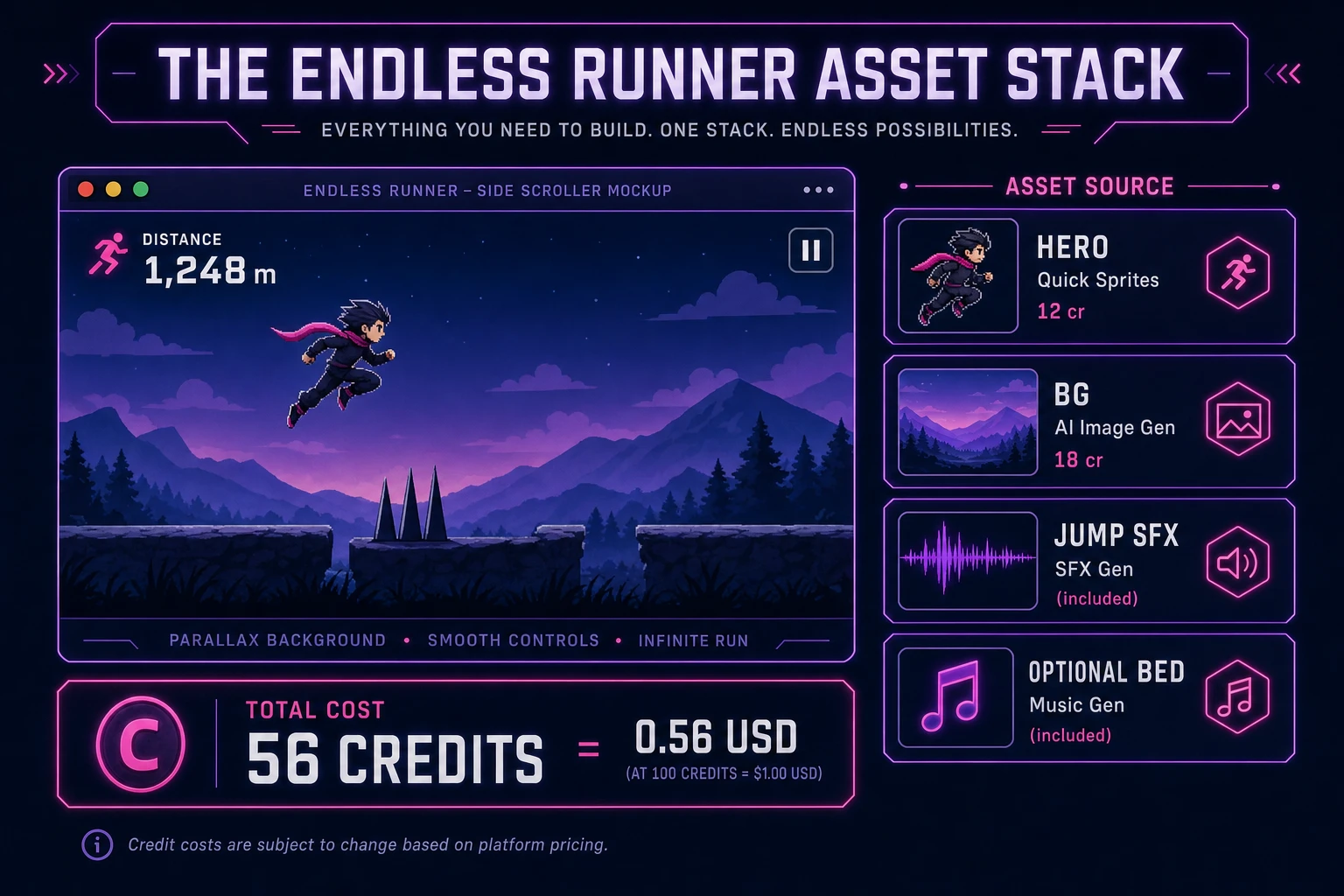
Endless runner asset stack diagram showing side-scrolling playfield with Quick Sprites hero, SFX Gen jump audio, and optional Music Gen chase bed
The endless runner asset stack: Quick Sprites covers the hero; SFX Gen covers jump and crash audio; Music Gen adds an optional chase bed.

What a how to make an endless runner project costs on Sorceress in 2026

Endless runners sit in the cheap tier because one hero sheet and four SFX clips cover v1. Against the 2026 rate card (verified 2026-08-25 against local source):

  • Quick Sprites hero sheet — roughly 12 credits (0.12 USD).
  • Optional AI Image Gen parallax background — 18 credits (0.18 USD).
  • Four SFX Gen clips at ~1 credit per second — roughly 6 credits (0.06 USD).
  • Optional Music Gen bed — two passes at 10 credits each = 20 credits (0.20 USD).
  • WizardGenie coding time — under 0.40 USD in API cost when you pair a frontier planner with DeepSeek V4 Pro or Kimi K2.5 on the typing pass.

Total art-and-audio budget: roughly 56 credits (0.56 USD) with background and music, or 18 credits (0.18 USD) with Quick Sprites and SFX only. The free 100-credit signup grant (src/app/api/admin/credits/route.ts) covers either stack with room left for a second biome skin. See the full Sorceress tools guide for every generator in the suite and plans when you outgrow the grant.

Frequently Asked Questions

Which endless runner rules should a beginner implement first?

Start with a side-scrolling lane: the hero auto-runs right at constant speed, tap or spacebar applies upward velocity with gravity pulling back down, obstacles spawn ahead on a timer, and collision ends the run while distance becomes the score. Skip double jumps, power-ups, and procedural biomes until one honest run ends on the first spike without the hero falling through the floor. That is what most how to make an endless runner and endless runner tutorial searchers expect from a weekend build.

How does jump gravity work in javascript endless runner code?

Each frame while airborne or grounded, add a gravity constant to vertical velocity, integrate position, and clamp the hero to the floor y when feet touch ground. On jump input, set vy to a negative impulse only when grounded. Unit-test that a short tap clears a low obstacle, that holding jump does not double-bounce unless you add coyote time, and that scroll speed stays constant so distance score matches elapsed time multiplied by speed.

Canvas or Phaser for a browser side scroller?

Canvas is the honest default for a first html5 endless runner — you draw parallax layers, the hero sprite, and obstacle rectangles each frame, scroll the world by subtracting speed from obstacle x positions, and run axis-aligned box collision. Phaser 4.1.0 (verified 2026-08-25 on the official Phaser API documentation page) adds Arcade Physics overlap helpers and tilemap parallax if you want slope terrain. Pick Phaser when multi-layer parallax and sprite animations are the product; pick raw canvas when the product is an infinite runner javascript walkthrough people can fork in one file.

How should obstacle spawning and distance scoring work?

Maintain a spawn timer that decrements each frame; when it hits zero, push a new obstacle at world x equal to canvas width plus margin, then reset the timer to a random range between 1.2 and 2.4 seconds. Increment score by scroll speed each frame or by delta time so faster runs feel fair. On collision, set gameOver true, show final distance, and offer Play Again. Persist high score in localStorage. That state machine is under seventy lines and covers what most phaser endless runner jam builds need before adding coins.

How much does it cost to build an endless runner on Sorceress?

A first-project browser side-scroll loop with art and audio budgets like this against the 2026 Sorceress rate card (verified 2026-08-25 against local source). One Quick Sprites hero sheet with walk and jump frames at roughly 12 credits per pass = 12 credits or 0.12 USD. Optional parallax background from AI Image Gen at Nano Banana Pro 18 credits = 18 credits or 0.18 USD. Four SFX clips at 1 credit per second (src/app/sfx-gen/page.tsx) — jump whoosh, land thud, crash hit, coin ping — roughly 6 credits or 0.06 USD. Optional Music Gen chase bed: two tries at 10 credits each (src/app/music-gen/page.tsx) = 20 credits or 0.20 USD. Total roughly 56 credits or 0.56 USD plus under 0.40 USD in coding-model API time. The free 100-credit signup grant (src/app/api/admin/credits/route.ts) covers the full art and audio stack outright.

Sources

  1. Platform game - Wikipedia
  2. MDN - Canvas API
  3. MDN - Window.requestAnimationFrame()
  4. Phaser 4.1.0 API Documentation
Written by Arron R.·2,116 words·9 min read

Related posts


