Crown How to Make a Strategy Game (Browser Turn Loop 2026)

By Arron R.11 min read
How to make a strategy game in 2026: pick a turn-based tactics loop on a square grid, wire unit selection, pathfinding, and combat in WizardGenie, then add AI I

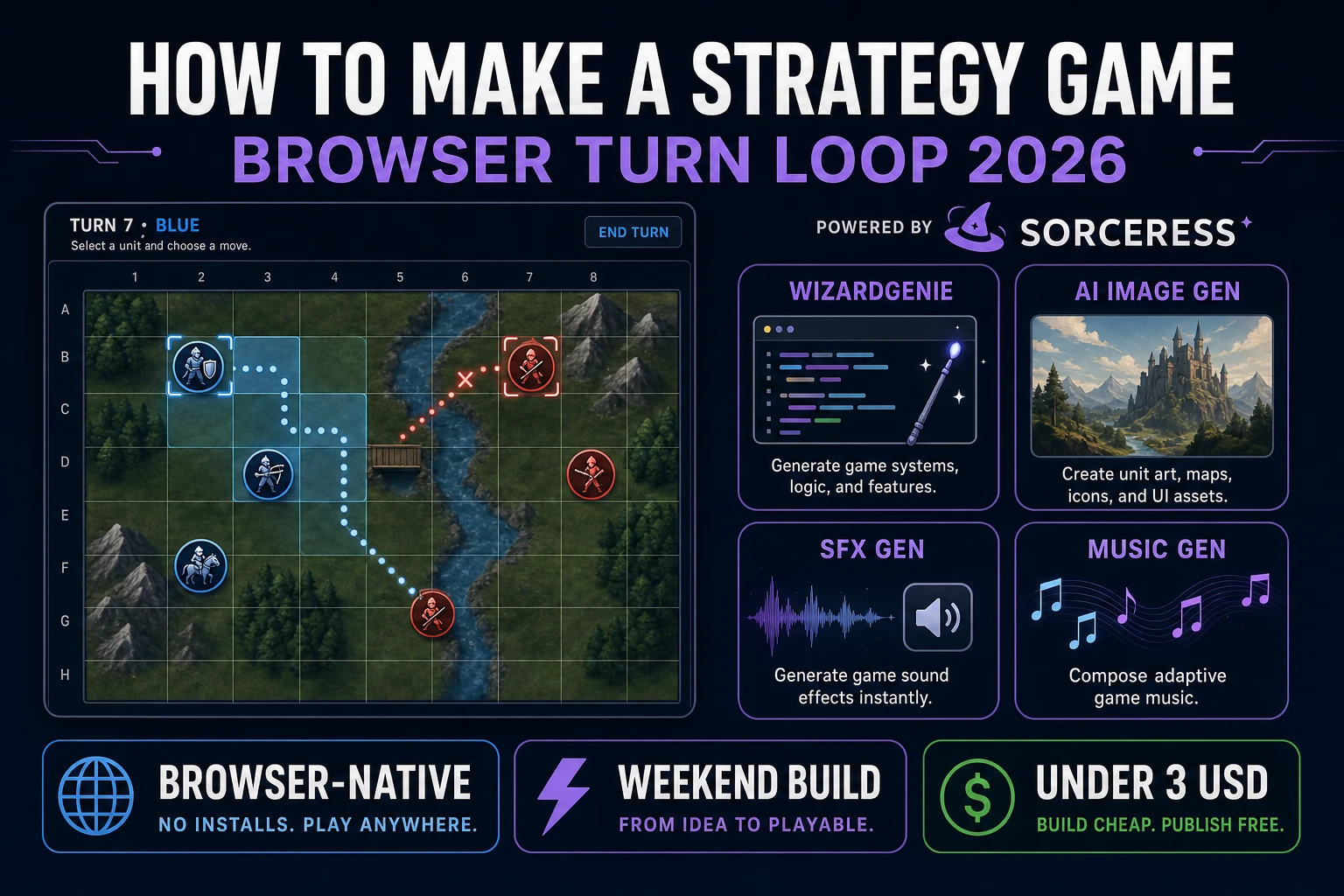
Turn-based tactics is what most beginners mean when they search “how to make a strategy game”: a grid, a handful of units, move ranges, attack rolls, and a win condition you can explain in one sentence. Real-time empire builders with fog of war and production queues are a different sport — months of systems work before the first honest match. A browser turn loop is different. A coding agent scaffolds the tile map, BFS pathfinding, and combat resolver from one prompt, and AI generation covers terrain tiles, unit portraits, and war-room audio. In a browser, that means WizardGenie for the tactics loop, Sorceress AI Image Gen for tiles and portraits, SFX Gen for select and hit stings, and Music Gen for a planning bed. This guide is the honest end-to-end for how to make a strategy game in 2026, in a browser, in a weekend.
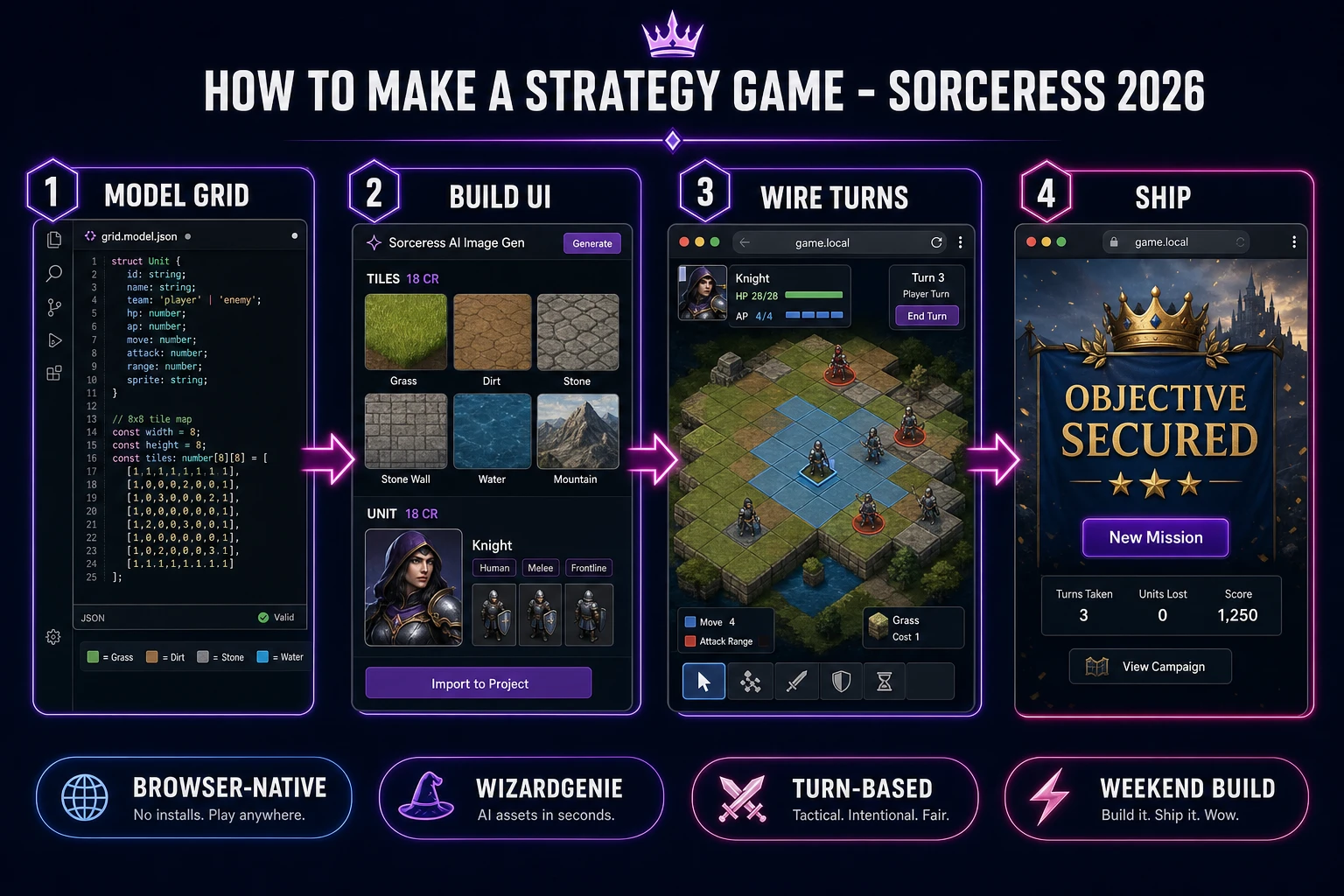
How to make a strategy game browser pipeline: model a turn-based grid with units, wire pathfinding in WizardGenie, and ship a browser tactics build
The 2026 how to make a strategy game browser recipe: model the grid and units, build the tactics UI with move highlights, wire turns and combat in WizardGenie, then add terrain tiles, portraits, and war-room audio.

What how to make a strategy game actually means in 2026

The query “how to make a strategy game” hides three intents. Some searchers want a full real-time strategy clone with base building, resource harvesters, and a fog of war — that is a team project, not a weekend jam. A second intent is a board-game converter: digitize chess or a custom cardboard wargame with no AI. Useful, but narrow. The third intent, and the one this guide targets, is a single-player browser turn-based tactics game: an eight-by-eight (or larger) square grid, three-to-six player units, a matching enemy squad, movement ranges, adjacent or ranged attacks, hit points, a greedy enemy phase, and a win screen when enemies are cleared or an objective tile is held. That is a weekend build, it demos the whole Sorceress toolset, and it is the format most turn based strategy tutorial and browser strategy game searchers actually want.

The presentation contract is small and strict. A title screen shows the mission name, Start Battle, and optionally a difficulty toggle that scales enemy HP. The play screen shows the grid, unit sprites with HP bars, a side panel for the selected unit (name, AP remaining, move range, attack power), End Turn, and Undo last action. On win, freeze input, play a short flourish, show turns taken and units lost, and offer Retry or Next Mission. The strategy video game overview on Wikipedia still separates turn-based strategy from real-time cleanly; the turn-based tactics page is the tighter genre label for small-squad grid combat — cite both when you write your itch.io blurb so players know which promise you kept.

The strategy loop in one minute (select, move, attack, end turn, win)

Five moving parts, repeated until one side folds. First, select — click a friendly unit that still has action points; highlight reachable tiles and valid attack targets. Second, move — click a highlighted tile; animate along the BFS path and spend movement. Third, attack — click an enemy in range; roll hit chance, apply damage, remove the unit at zero HP. Fourth, end turn — when the player presses End Turn (or all friendlies are spent), flip turnOwner to the enemy phase and run greedy AI for each foe. Fifth, win — when no enemies remain, or when a designated objective tile is occupied by a friendly unit at the end of a round, stop the clock and show the completion card. That is the entire tactics loop. Fog of war, overwatch, flanking bonuses, and multi-mission campaigns are polish layered after one honest skirmish works.
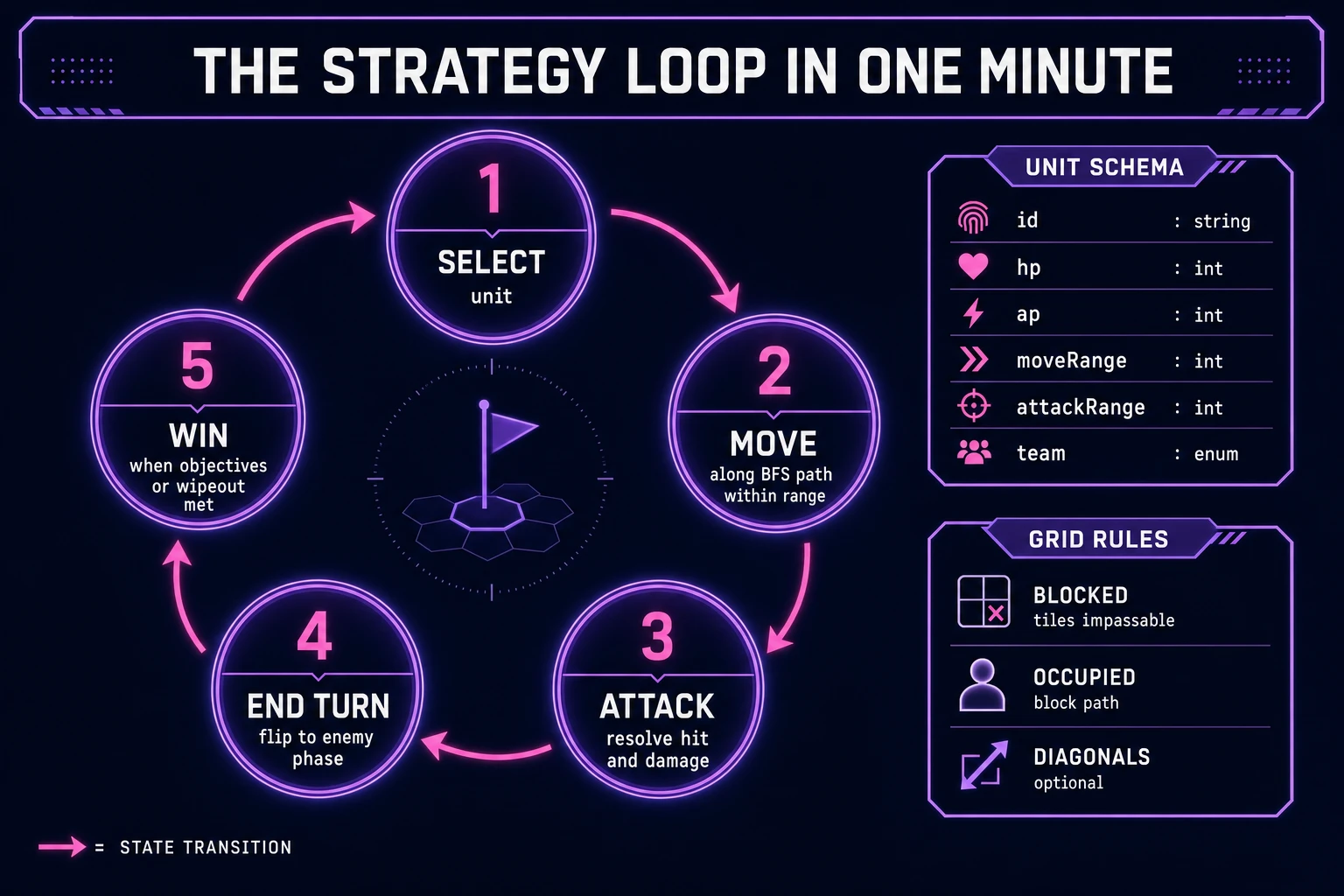
Turn-based strategy game loop state machine diagram showing select, move, attack, end turn, and win nodes with unit schema and grid rules panel
The tactics loop: select a unit, move within BFS range, attack if adjacent or in range, end the turn for the enemy phase, then win on wipeout or objective control.

Pick your engine for how to make a strategy game: canvas grid, Phaser, or WizardGenie

Three good browser targets in 2026, each with a different trade-off. Vanilla JavaScript on a 2D canvas is the honest default and the pick this guide recommends for a first build. Store the map as a 2D array of tile types, blit terrain from a tileset image, and draw unit sprites centered on cell coordinates. Click maps to grid indices with Math.floor(x / tileSize). Total code footprint for a working tactics game tutorial is under 900 lines including BFS and combat. No engine to install, ships as a static HTML file, deploys anywhere. The MDN Canvas API docs cover the drawing surface you need.

DOM grid with CSS grid or absolute cells becomes the right pick if you want accessible buttons per tile and screen-reader labels on units. You trade blit speed for semantics — fine for an 8×8 puzzle map, heavier once you push past 16×16 with animations.

Phaser 4.1.0 (verified 2026-08-20 on the official Phaser API documentation page) becomes the right pick if you want tweens when units slide along paths, particle hits on crits, or Scene lifecycle for title-battle-victory. Phaser’s arcade physics is optional here — turn-based games barely need continuous collision. Use Phaser when motion polish is the product, not when the product is a correct pathfinder and a readable combat log.

WizardGenie is not a separate rendering engine — it scaffolds whichever of the three you pick from a single natural-language prompt. WizardGenie ships as both a desktop app (Windows installer with auto-update, available to Early Access supporters and above) and a no-install web build. Its coding-model lineup covers Claude Opus 4.7, GPT-5.5, Gemini 3.1 Pro, DeepSeek V4 Pro, Kimi K2.5, Grok 4.2, and MiniMax M2.7 (verified 2026-08-20 in src/app/_home-v2/_data/tools.ts). For tactics, any frontier model scaffolds the grid model and turn pipeline in one prompt. Pair a frontier planner with a budget executor like DeepSeek V4 Pro or Kimi K2.5 for the typing pass — the Dual-agent pattern lands most projects at roughly one-fifth the single-frontier cost.

Step 1 — model the grid, units, and turn order

Nothing else in the pipeline matters if pathfinding walks through walls or two units occupy the same cell. Start with a tile map and a unit list:

const TILE = { FLOOR: 0, WALL: 1, OBJECTIVE: 2 };

const map = [
  [1,1,1,1,1,1,1,1],
  [1,0,0,0,0,0,0,1],
  [1,0,1,0,0,1,0,1],
  [1,0,0,0,2,0,0,1],
  [1,0,1,0,0,1,0,1],
  [1,0,0,0,0,0,0,1],
  [1,1,1,1,1,1,1,1],
];

function makeUnit(id, team, x, y) {
  return {
    id, team, x, y,
    hp: 10, maxHp: 10,
    moveRange: 3, attackRange: 1,
    attackPower: 3, ap: 2, maxAp: 2,
  };
}

Game state is { map, units, turnOwner, selectedId, phase } where phase is 'select' | 'move' | 'attack' | 'enemy'. Occupancy is derived: a cell is blocked if the tile is WALL or another living unit sits there. Pathfinding is BFS from the selected unit, depth-limited to moveRange, skipping blocked cells. Store parent pointers so you can reconstruct the path for animation. Unit-test BFS on an open floor (reachable count equals the diamond of Manhattan distance) and on a corridor with a wall plug (path goes around or fails cleanly). Those asserts are the difference between a grid strategy game people trust and one they rage-quit after a unit teleports through a fortress wall.

Turn order for v1 is side-based, not per-unit initiative: the player activates all friendly units (each spends its AP), then the enemy phase runs every foe once. Initiative queues and simultaneous turns are later depth. Keep canAct(unit) as unit.hp > 0 && unit.ap > 0 && unit.team === turnOwner.

Step 2 — wire selection, pathfinding, and combat in WizardGenie

With the model solid, open WizardGenie. Drop in a bare index.html with a canvas and a side panel. Give the agent one paragraph: Build a browser turn-based tactics game on an 8×8 square grid. Model units with HP, AP, moveRange, and attackRange. On select, highlight reachable tiles via BFS. Click a tile to move along the path. After moving, allow an adjacent attack that rolls hit chance and applies damage. End Turn runs a greedy enemy AI that moves toward the nearest player unit and attacks if in range. Win when all enemies are defeated or a friendly unit stands on the objective tile at end of turn. Show HP bars, a combat log, Undo, and a victory screen. Feed that to any coding model and the scaffold lands in under five minutes.

The remaining afternoon is polish via follow-ups. Keep combat pure and testable:

function resolveAttack(attacker, defender, rng = Math.random) {
  const hitChance = 0.75;
  if (rng() > hitChance) {
    return { hit: false, damage: 0, defenderHp: defender.hp };
  }
  const damage = attacker.attackPower;
  const defenderHp = Math.max(0, defender.hp - damage);
  return { hit: true, damage, defenderHp };
}

function applyAttack(state, attackerId, defenderId) {
  const next = cloneState(state);
  const atk = next.units.find(u => u.id === attackerId);
  const def = next.units.find(u => u.id === defenderId);
  if (!atk || !def || atk.ap < 1) return state;
  const dist = Math.abs(atk.x - def.x) + Math.abs(atk.y - def.y);
  if (dist > atk.attackRange) return state;
  const result = resolveAttack(atk, def);
  def.hp = result.defenderHp;
  atk.ap -= 1;
  next.log.push(result.hit
    ? `${atk.id} hits ${def.id} for ${result.damage}`
    : `${atk.id} misses ${def.id}`);
  next.units = next.units.filter(u => u.hp > 0);
  return next;
}

Seed the RNG in tests so miss/hit cases are deterministic. Add hover tooltips that show predicted damage. Keep the combat log as an array of strings rendered in the side panel — players of every tactics game tutorial expect to read what just happened. Test with a nearly won board (one enemy at 1 HP), an illegal attack through a wall, and a fresh mission start — those three cases catch most turn-pipeline bugs before players do.

Step 3 — AI Image Gen tiles and portraits, SFX Gen cues, Music Gen war-room bed

Open Sorceress AI Image Gen for the visual set. A tactics game needs one terrain tileset strip (grass, dirt, stone, wall) or four separate tile PNGs, plus two or three unit portrait styles (knight, archer, enemy grunt). Nano Banana Pro at 18 credits per generation (verified 2026-08-20 in src/lib/models.ts line 303) holds style consistency when you lock the first terrain pass as a reference for matching unit art. Four passes at 18 credits is 72 credits or 0.72 USD for the visual core. Prompt tiles like “top-down fantasy grass dirt stone wall tiles, seamless 64px game tileset, flat lighting, no text.” Prompt units like “top-down pixel knight unit, transparent background, game sprite, facing south, no text.”

Keep HP bars and move highlights as code-drawn overlays — never bake them into the AI images. That is the standard approach in production browser strategy game projects: AI covers the paint; the renderer covers the UI chrome.

Open SFX Gen. SFX Gen bills 1 credit per second (verified 2026-08-20 in src/app/sfx-gen/page.tsx line 23 as SEED_AUDIO_CREDITS_PER_SECOND = 1). Five clips cover a first tactics game: select (0.3 seconds, soft click), move (0.6 seconds, boot steps), attack (0.8 seconds, whoosh), hit (0.5 seconds, impact), and win (2 seconds, brass resolve). Total roughly 8 credits or 0.08 USD. Add one 30-second ambient bed — quiet war-room murmur or distant map table — at 30 credits or 0.30 USD.

Open Music Gen. Music Gen bills 10 credits per generation (verified 2026-08-20 in src/app/music-gen/page.tsx line 28 as MUSIC_CREDIT_COST = 10). Two tracks cover a first strategy game: a title-menu loop (low drums, planning mood, 60 seconds) and a battle bed (steady tension, 90 seconds) under active turns. Two tries per track budgets 40 credits or 0.40 USD. MP3 is fine for browser delivery; add 2 credits per WAV render if you need lossless (WAV_CREDIT_COST = 2, same file line 31).

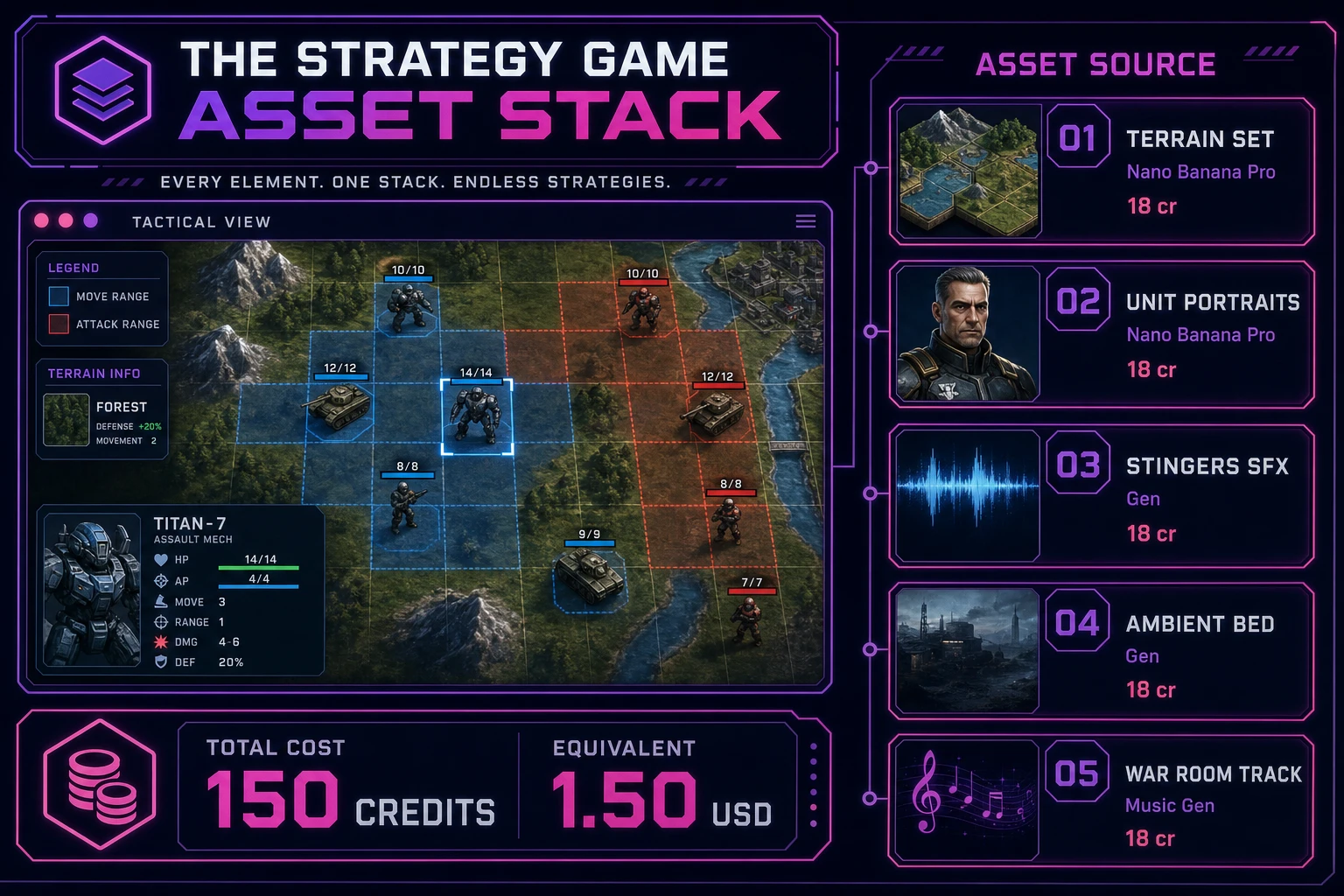
Strategy game asset stack showing a browser tactics grid next to asset tiles for terrain, unit portraits, stingers, ambient bed, and music tracks
The strategy game asset stack: terrain and portraits from AI Image Gen, five short stingers plus an ambient bed from SFX Gen, and two war-room tracks from Music Gen — the whole set costs about one-fifty in Sorceress credits.

What a how to make a strategy game project costs on Sorceress in 2026

Concrete asset and generation budget for a browser turn-based tactics game — grid pathfinding, unit selection, combat, enemy phase — from empty repo to zip-and-ship playable, all numbers verified 2026-08-20 against local Sorceress source:

  • Terrain tiles and unit portraits (AI Image Gen): 4 passes at Nano Banana Pro 18 credits each = 72 credits (0.72 USD).
  • Stingers (SFX Gen): 5 clips at 1 credit per second, roughly 8 seconds total = 8 credits (0.08 USD). Select, move, attack, hit, win.
  • Ambient bed (SFX Gen): 1 clip at 30 seconds = 30 credits (0.30 USD).
  • Background music (Music Gen): 2 tracks at 10 credits per generation, 2 tries each = 40 credits (0.40 USD).
  • WizardGenie coding time: effectively free on the Sorceress side. Model-side API cost for a 3-to-5-hour prompt session on a cheap Executor like DeepSeek V4 Pro is typically under 0.50 USD.
  • Total for one complete browser strategy game: roughly 150 credits, or roughly 1.50 USD in Sorceress credits, plus under 0.50 USD in model API time. Under 2.50 USD end-to-end for a turn-based tactics slice with pathfinding, combat, and full audio.

Sorceress bills 100 credits per dollar at the standard rate (CREDITS_PER_DOLLAR = 100 in src/lib/models.ts line 69). New accounts start with 100 free credits (SIGNUP_GRANT = 100 in src/app/api/admin/credits/route.ts line 12), which covers the stingers, ambient loop, one music track, and part of the terrain art outright — enough to prototype before you top up. The Sorceress Lifetime tier at 49 USD one-time (LIFETIME_PRICE = 49 in src/app/plans/page.tsx line 51) covers unlimited SFX Gen and Music Gen use forever, which matters if you ship a campaign of ten maps that each need fresh sting variants.

For related browser board and tactics pipelines that share this model-first-scaffold-the-UI spine, the closest reads are Mate How to Make a Chess Game (Browser AI Loop 2026) for turn-based board rules with piece movement, Board How to Make a Board Game (Browser Tabletop 2026) for the tabletop cousin, Fortify How to Make a Tower Defense Game (Wave Loop 2026) for the real-time grid cousin, Deal How to Make Solitaire (Browser Klondike 2026) for another rules-heavy browser classic, and Lex How to Make a Word Game (Browser Guess Loop 2026) for a lighter logic loop. The Sorceress Tools Guide is the master index for every tool this guide referenced. Under three dollars, one weekend, and how to make a strategy game is a done deal.

Frequently Asked Questions

Should a beginner build turn-based or real-time strategy first?

Start turn-based. Real-time strategy needs simultaneous AI, path queues, fog of war, and production buildings ticking every frame — that is a multi-week project even for experienced teams. A turn-based tactics slice gives you a grid, units with action points, move-then-attack turns, and a clear win condition (eliminate enemies or capture an objective tile). Players already understand chess-like turns from board games and Fire Emblem–style tactics. A how to make a strategy game tutorial that ships the turn loop first produces a playable demo in one weekend; RTS can wait until the grid, pathfinding, and combat math feel solid.

Square grid or hex grid for a browser tactics game?

Use a square grid for the first build. Square neighbors are four or eight cells, BFS pathfinding is a short textbook algorithm, and tile art aligns cleanly with canvas blit rectangles. Hex grids look great for war-game authenticity and fix diagonal distance quirks, but neighbor math, axial coordinates, and art pipelines add a full day of debugging before the first unit moves. Ship square-grid movement with Manhattan or Chebyshev distance, then swap to hex only if the fantasy of the setting demands it. Most javascript strategy and grid strategy game tutorials that succeed begin on squares.

How do action points and movement range work together?

Give each unit moveRange (tiles per turn) and attackCost (AP). On the player’s turn, selecting a unit highlights reachable tiles via BFS capped at moveRange, excluding occupied and blocked cells. Moving spends the whole move for that unit — or spend 1 AP per tile if you want finer control. After moving (or instead of moving), the unit may attack an adjacent enemy if remaining AP covers attackCost. End the unit’s activation when AP hits zero or the player explicitly ends its turn. Track whose side is active with turnOwner: 'player' | 'enemy', then run a simple greedy AI for the enemy phase: move toward nearest foe, attack if in range. That is enough for a tactics game tutorial players respect.

Do I need a full AI opponent for the first strategy demo?

No. Script a single scenario with three player units and three enemy units on a fixed map. Enemy AI can be greedy: each enemy unit moves toward the closest player unit and attacks if adjacent. That AI is fifty lines and teaches the same turn pipeline as a smarter planner. Add scoring later — threat maps, focus fire, healing priorities — once human turns feel snappy. Hot-seat two-player (pass the laptop) is another valid v1 and skips AI entirely. The presentation win is readable movement ranges and honest hit rolls, not a tournament-grade commander.

How much does it cost to build a strategy game on Sorceress?

A first-project browser turn-based tactics game with grid pathfinding, unit selection, combat, and audio budgets like this against the 2026 Sorceress rate card (verified 2026-08-20 against local source). Terrain tiles and unit portraits: four AI Image Gen passes at Nano Banana Pro 18 credits each = 72 credits or 0.72 USD (src/lib/models.ts line 303). Five SFX clips at 1 credit per second (src/app/sfx-gen/page.tsx line 23) — select, move, attack, hit, win — roughly 8 credits or 0.08 USD. One 30-second ambient war-room bed = 30 credits or 0.30 USD. Two Music Gen tracks at 10 credits per generation (src/app/music-gen/page.tsx line 28) with two tries each = 40 credits or 0.40 USD. Total roughly 150 credits or 1.50 USD plus under 0.50 USD in coding-model API time. The free 100-credit signup grant (src/app/api/admin/credits/route.ts line 12) covers the stingers, ambient loop, and one music track outright.

Sources

  1. Strategy video game - Wikipedia
  2. Turn-based tactics - Wikipedia
  3. MDN - Canvas API
  4. Phaser 4.1.0 API Documentation
Written by Arron R.·2,405 words·11 min read

Related posts


