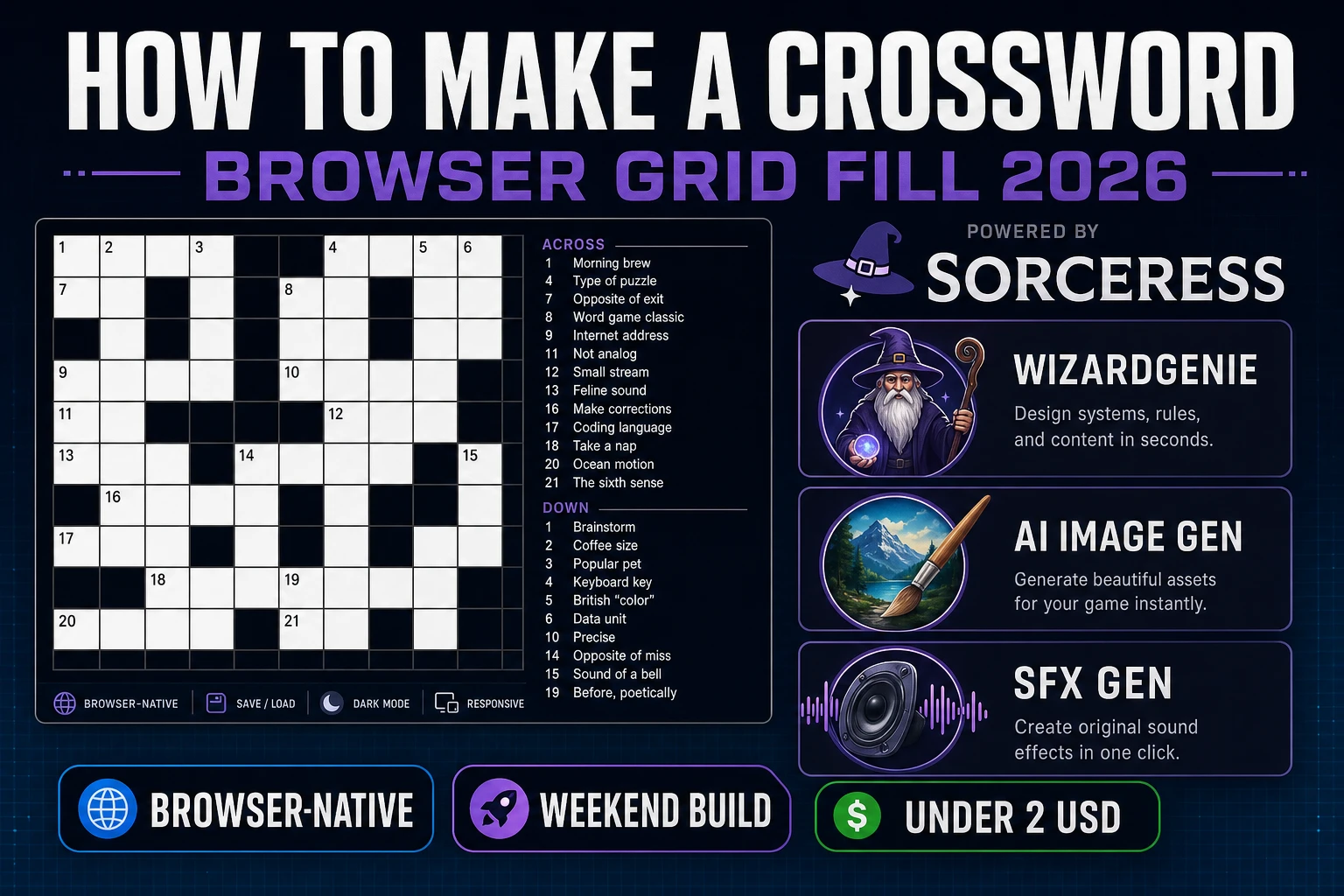
Clue How to Make a Crossword (Browser Grid Fill 2026)

By Arron R.11 min read
How to make a crossword in 2026: model a black-and-white letter grid with across and down clue lists, wire cell focus and answer checking in WizardGenie, then a

American-style word grids are what most beginners mean when they search “how to make a crossword”: a black-and-white letter board, numbered across and down entries, a clue list beside the grid, and a Check Answers button that marks wrong cells without spoiling the whole puzzle. Fully automated crossword generators that invent fair interlocking banks from a giant lexicon are a research project — months of constraint solvers before the first honest theme puzzle. A browser grid-fill loop is different. A coding agent scaffolds the cell model, numbering pass, and focus movement from one prompt, and AI generation covers tile chrome and key stings. In a browser, that means WizardGenie for the fill-and-check loop, AI Image Gen for letter-tile polish and title art, and SFX Gen for tap, error, and win cues. This guide is the honest end-to-end for how to make a crossword in 2026, in a browser, in a weekend.
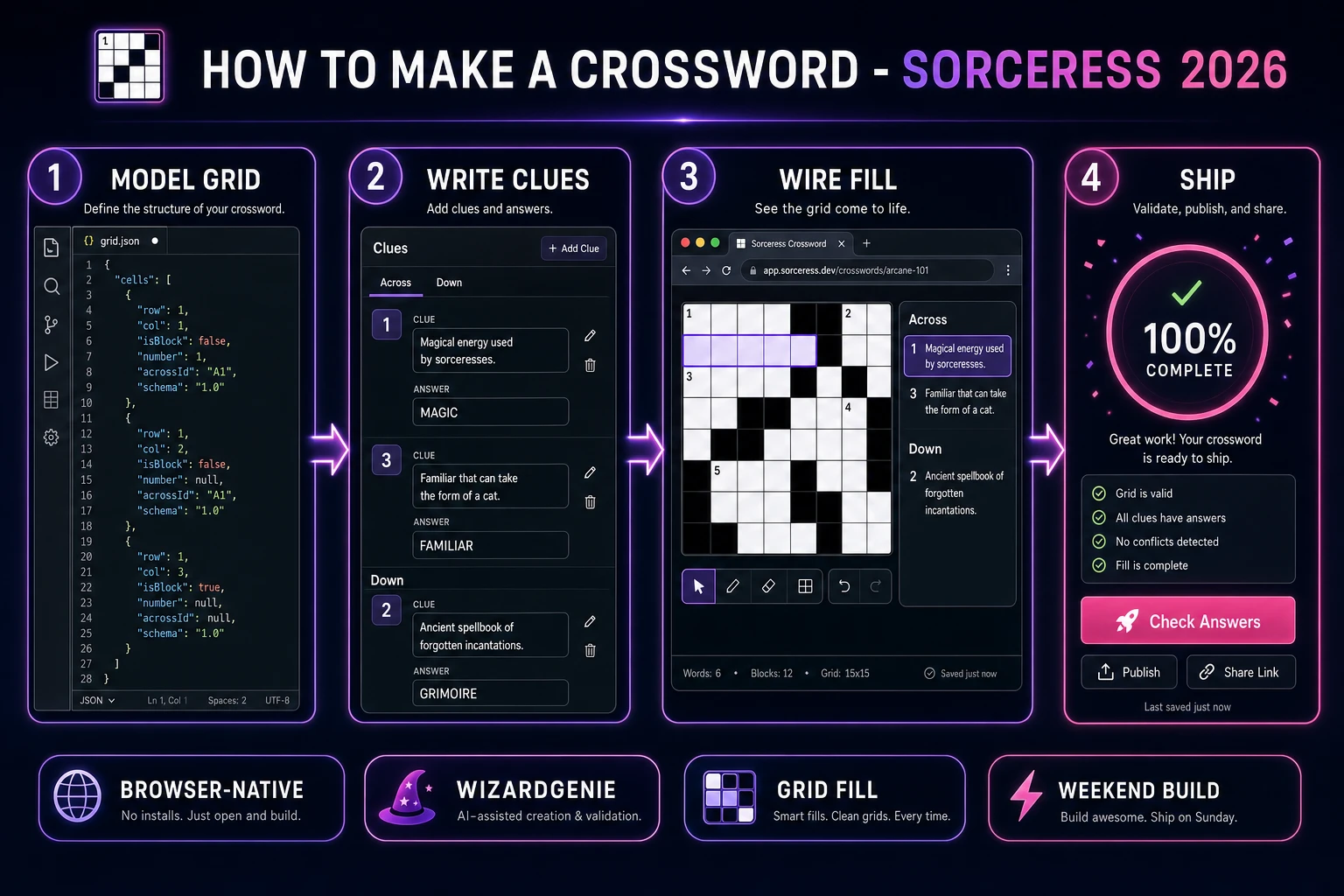
How to make a crossword browser pipeline: model a black-white grid with clues, wire fill and check in WizardGenie, and ship a browser crossword maker
The 2026 how to make a crossword browser recipe: model the grid and clue lists, number across and down entries, wire fill and check in WizardGenie, then add AI Image Gen chrome and SFX Gen key audio.

What how to make a crossword actually means in 2026

The query “how to make a crossword” hides three intents. Some searchers want a printable PDF worksheet for a classroom — that is desktop publishing, not a playable game. A second intent is a full crossword generator that invents grids and clues from a word bank with rotational symmetry — a serious algorithms problem. The third intent, and the one this guide targets, is a browser crossword puzzle: a fixed grid of black and white cells, hand-authored or imported clues, letter entry with keyboard and tap, across/down highlighting, Check / Reveal / Clear, a progress percent, and a win card when every white cell matches the answer key. That is a weekend build, it demos the Sorceress toolset, and it is the format most crossword puzzle tutorial and javascript crossword searchers actually want.

The presentation contract is small and strict. A title screen shows the puzzle name, theme blurb, and Start. The play screen shows the grid, the active clue, Across and Down lists, and buttons for Check Cell, Check Word, Check Puzzle, and Reveal Letter. On complete, freeze input, play a short sting, show time and mistakes, and offer Replay or Next Puzzle. The Crossword overview on Wikipedia (verified 2026-08-20) still separates American blocked grids from cryptic British-style clues cleanly — cite it when you write your itch.io blurb so players know which promise you kept. If you already shipped a guess-style word loop, the sibling guide on how to make a word game covers dictionary validation; this post owns interlocking grid fill instead.

The crossword loop in one minute (focus, type, advance, check, complete)

Five moving parts, repeated until the grid is filled correctly. First, focus — click or tap a white cell; the active across or down entry highlights, and the matching clue scrolls into view. Second, type — accept A–Z (and optionally digits for rebus variants later); uppercase the letter into the cell. Third, advance — move focus to the next white cell in the active direction; wrap within the entry, then jump to the next unfinished entry if you prefer “skip filled” UX. Fourth, check — on demand, compare player letters to the answer key for a cell, an entry, or the whole puzzle; mark wrong cells without auto-filling them. Fifth, complete — when every white cell matches, show the win card and lock edits. That is the entire grid-fill loop. Auto-generated themes, cryptics, and multiplayer race modes are polish layered after one honest mini puzzle feels fair.
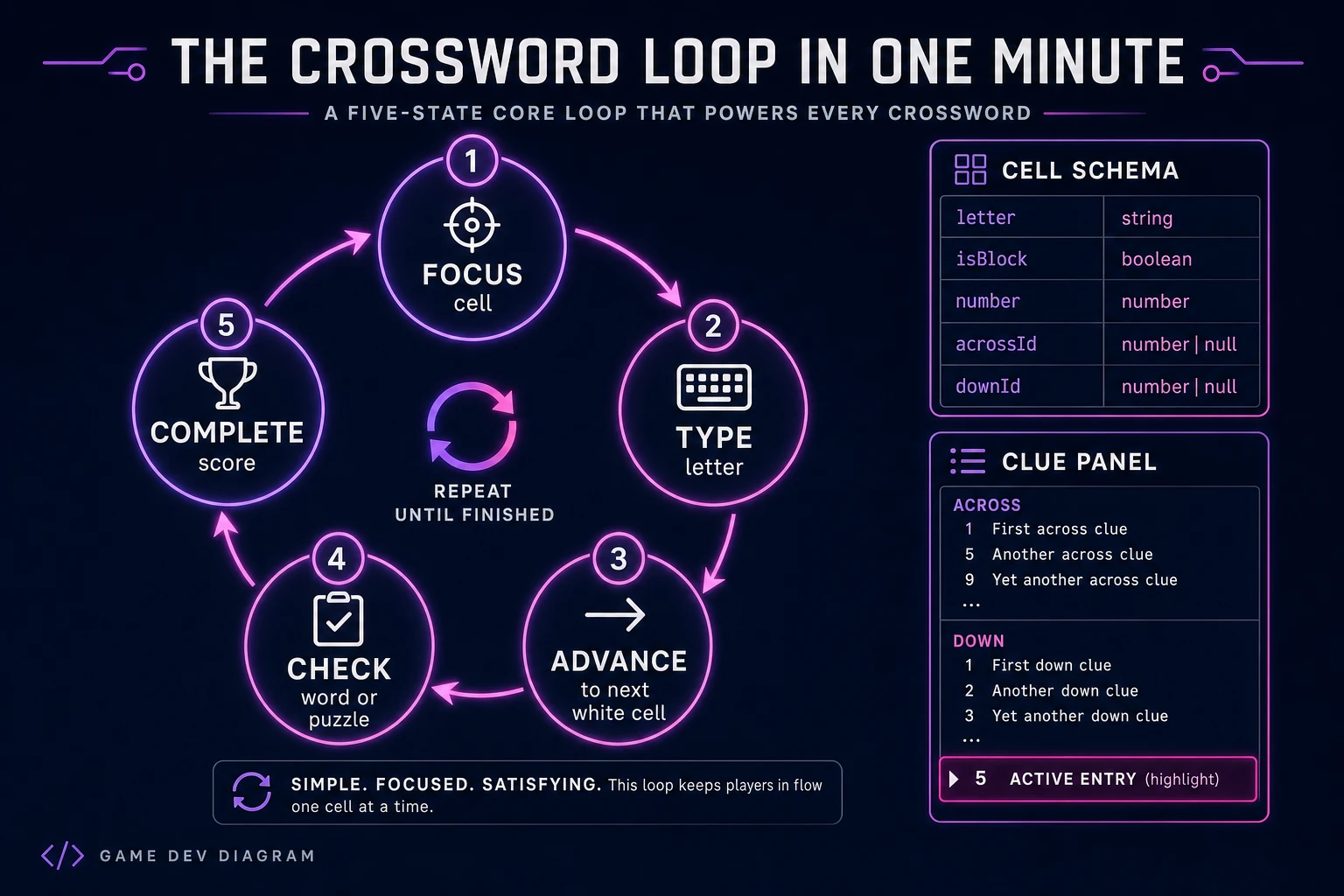
Crossword loop state machine diagram showing focus, type, advance, check, and complete nodes with cell schema and clue panel
The grid-fill loop: focus a white cell, type a letter, advance along the active entry, check answers on demand, then celebrate when the puzzle completes.

Pick your engine for how to make a crossword: DOM grid, Phaser, or WizardGenie

Three good browser targets in 2026, each with a different trade-off. Vanilla JavaScript on a DOM grid is the honest default and the pick this guide recommends for a first build. Render a CSS grid of <input maxlength="1"> (or button-cells with a shared hidden input), style black cells as non-focusable blocks, and stamp small superscript numbers in the corner of entry starts. Total code footprint for a working html5 crossword is under 450 lines including numbering, focus movement, and check. No engine to install, ships as a static HTML file, deploys anywhere. The MDN KeyboardEvent docs and HTMLElement.focus() cover the input surface.

Canvas with a custom caret becomes the right pick if every letter sits on painted parchment art and you need pixel-perfect theme chrome. You trade accessibility for visuals — fine for a showcase jam, heavier once you reimplement selection, mobile soft keyboards, and screen-reader labels yourself.

Phaser 4.1.0 (verified 2026-08-20 on the official Phaser API documentation page) becomes the right pick if you want Scene lifecycle for title-play-win, tweens when a word completes, or particle pops on Check Puzzle. Phaser does not invent your numbering algorithm — you still need the same cell schema and clue lists. Use Phaser when motion polish is the product; use DOM when the product is a browser crossword maker people can type into on a phone.

WizardGenie is not a separate rendering engine — it scaffolds whichever of the three you pick from a single natural-language prompt. WizardGenie ships as both a desktop app (Windows installer with auto-update, available to Early Access supporters and above) and a no-install web build. Its coding-model lineup covers Claude Opus 4.7, GPT-5.5, Gemini 3.1 Pro, DeepSeek V4 Pro, Kimi K2.5, Grok 4.2, and MiniMax M2.7 (verified 2026-08-20 in src/app/_home-v2/_data/tools.ts). For crossword, any frontier model scaffolds the grid, numbering, and check flow in one prompt. Pair a frontier planner with a budget executor like DeepSeek V4 Pro or Kimi K2.5 for the typing pass — the Dual-agent pattern lands most projects at roughly one-fifth the single-frontier cost.

Step 1 — model the grid, numbering, and clue lists

Nothing else in the pipeline matters if across 1 and down 1 share a cell but disagree on the letter. Start with a small, testable model:

const SIZE = 9;

function emptyCell() {
  return {
    letter: '',
    answer: '',
    isBlock: false,
    number: null,
    acrossId: null,
    downId: null,
  };
}

function makeGrid(blocks) {
  const cells = Array.from({ length: SIZE }, () =>
    Array.from({ length: SIZE }, emptyCell)
  );
  for (const [r, c] of blocks) cells[r][c].isBlock = true;
  return cells;
}

function isWhite(cells, r, c) {
  return r >= 0 && c >= 0 && r < SIZE && c < SIZE && !cells[r][c].isBlock;
}

function numberGrid(cells) {
  const across = [];
  const down = [];
  let n = 1;
  for (let r = 0; r < SIZE; r++) {
    for (let c = 0; c < SIZE; c++) {
      if (!isWhite(cells, r, c)) continue;
      const startAcross = !isWhite(cells, r, c - 1);
      const startDown = !isWhite(cells, r - 1, c);
      if (!startAcross && !startDown) continue;
      cells[r][c].number = n;
      if (startAcross) {
        const id = `A${n}`;
        let len = 0, cc = c;
        while (isWhite(cells, r, cc)) {
          cells[r][cc].acrossId = id;
          len++;
          cc++;
        }
        across.push({ id, number: n, row: r, col: c, length: len, clue: '', answer: '' });
      }
      if (startDown) {
        const id = `D${n}`;
        let len = 0, rr = r;
        while (isWhite(cells, rr, c)) {
          cells[rr][c].downId = id;
          len++;
          rr++;
        }
        down.push({ id, number: n, row: r, col: c, length: len, clue: '', answer: '' });
      }
      n++;
    }
  }
  return { across, down };
}

Game state is { cells, clues: { across, down }, direction: 'across' | 'down', focus: { r, c }, mistakes, startedAt }. After numbering, paste answers into each entry and write the matching clue strings — or load a JSON puzzle file with blocks, across, and down arrays. Stamp each white cell’s answer letter from its across entry (down must match at intersections — assert that once at load). Unit-test three asserts before you paint UI: a 5×5 with known blocks produces the expected entry starts; every white cell has at least one of acrossId / downId; intersecting across and down answers agree on shared cells. Those asserts are the difference between a word grid game people trust and one that silently accepts impossible fills.

Symmetry is optional for a first mini. American dailies often use 180-degree rotational symmetry on black cells; you can add a “mirror blocks” helper later. For a themed jam puzzle, asymmetric blocks are fine if the fill still interlocks honestly. Keep rebus and circles out of v1 — they are presentation rules on top of the same cell model.

Step 2 — wire fill, focus movement, and check in WizardGenie

With the model solid, open WizardGenie. Drop in a bare index.html with a CSS grid sized to SIZE × SIZE and a sidebar for clues. Give the agent one paragraph: Build a browser crossword on a 9×9 black-and-white grid. Model cells with letter, answer, isBlock, number, acrossId, and downId. Number across and down starts left-to-right, top-to-bottom. Click a cell to focus; toggle direction on second click of the same cell. Typing a letter fills the cell and advances along the active entry. Arrow keys move between white cells; Backspace clears and steps backward. Show Across and Down lists; highlight the active clue. Buttons: Check Cell, Check Word, Check Puzzle, Reveal Letter, Clear. On full correct fill, show a win card with elapsed time. Use DOM inputs and KeyboardEvent handlers. Feed that to any coding model and the scaffold lands in under five minutes.

The remaining afternoon is polish via follow-ups. Keep check helpers pure and testable:

function checkCell(game, r, c) {
  const cell = game.cells[r][c];
  if (cell.isBlock) return null;
  if (!cell.letter) return 'empty';
  return cell.letter === cell.answer ? 'ok' : 'wrong';
}

function checkEntry(game, entry, dir) {
  const results = [];
  for (let i = 0; i < entry.length; i++) {
    const r = dir === 'across' ? entry.row : entry.row + i;
    const c = dir === 'across' ? entry.col + i : entry.col;
    results.push(checkCell(game, r, c));
  }
  return results;
}

function isComplete(game) {
  for (let r = 0; r < SIZE; r++) {
    for (let c = 0; c < SIZE; c++) {
      const cell = game.cells[r][c];
      if (!cell.isBlock && cell.letter !== cell.answer) return false;
    }
  }
  return true;
}

function onKey(game, key) {
  const { r, c } = game.focus;
  const cell = game.cells[r][c];
  if (cell.isBlock) return;
  if (/^[a-zA-Z]$/.test(key)) {
    cell.letter = key.toUpperCase();
    advance(game);
  } else if (key === 'Backspace') {
    cell.letter = '';
    retreat(game);
  } else if (key === ' ') {
    game.direction = game.direction === 'across' ? 'down' : 'across';
  }
}

Wire keyboard in capture phase so the page does not scroll on arrows. On mobile, rely on the focused input’s soft keyboard — a phaser crossword tutorial that paints letters on canvas without a real input leaves phone players stuck. Style wrong-check marks as a soft red outline that clears on the next edit; never overwrite the player’s letter during Check. Persist draft fills with localStorage keyed by puzzle id so Refresh does not wipe a half-finished theme puzzle.

For a second puzzle slot, load another JSON file with the same schema — that is enough to feel like a browser crossword maker without building an editor UI yet. An in-browser editor (paint blacks, type answers, auto-number) is a follow-up afternoon once fill-and-check already feels fair. Related grid logic for number placement also shows up in the Sudoku browser grid guide; reuse focus and CSS cell patterns if you already shipped that loop.

Step 3 — AI Image Gen tile chrome, SFX Gen key stings

Gray inputs prove the loop. Art and audio make the puzzle feel intentional. Open AI Image Gen and run Nano Banana Pro at 18 credits per pass (verified 2026-08-20 in src/lib/models.ts). Prompt two assets: a soft paper or night-desk backdrop behind the grid, and optional decorative tile chrome (corner ornaments, title banner) that does not fight letter legibility. Keep letter cells high-contrast — black text on near-white cells still wins for a crossword puzzle tutorial. Drop the backdrop as a CSS background-image on the play stage; keep the DOM inputs on top.

Open SFX Gen (1 credit per second of audio, verified 2026-08-20 in src/app/sfx-gen/page.tsx) and generate four short clips: a soft key tap (~1s), a brighter “word complete” chime when an entry’s letters all match, a dull error thud on Check Word with mistakes, and a short win sting. Trigger the tap on successful letter entry, the word chime when checkEntry returns all ok, the error on any wrong, and the win when isComplete flips true. Keep volumes low so a twenty-minute solve does not fatigue.

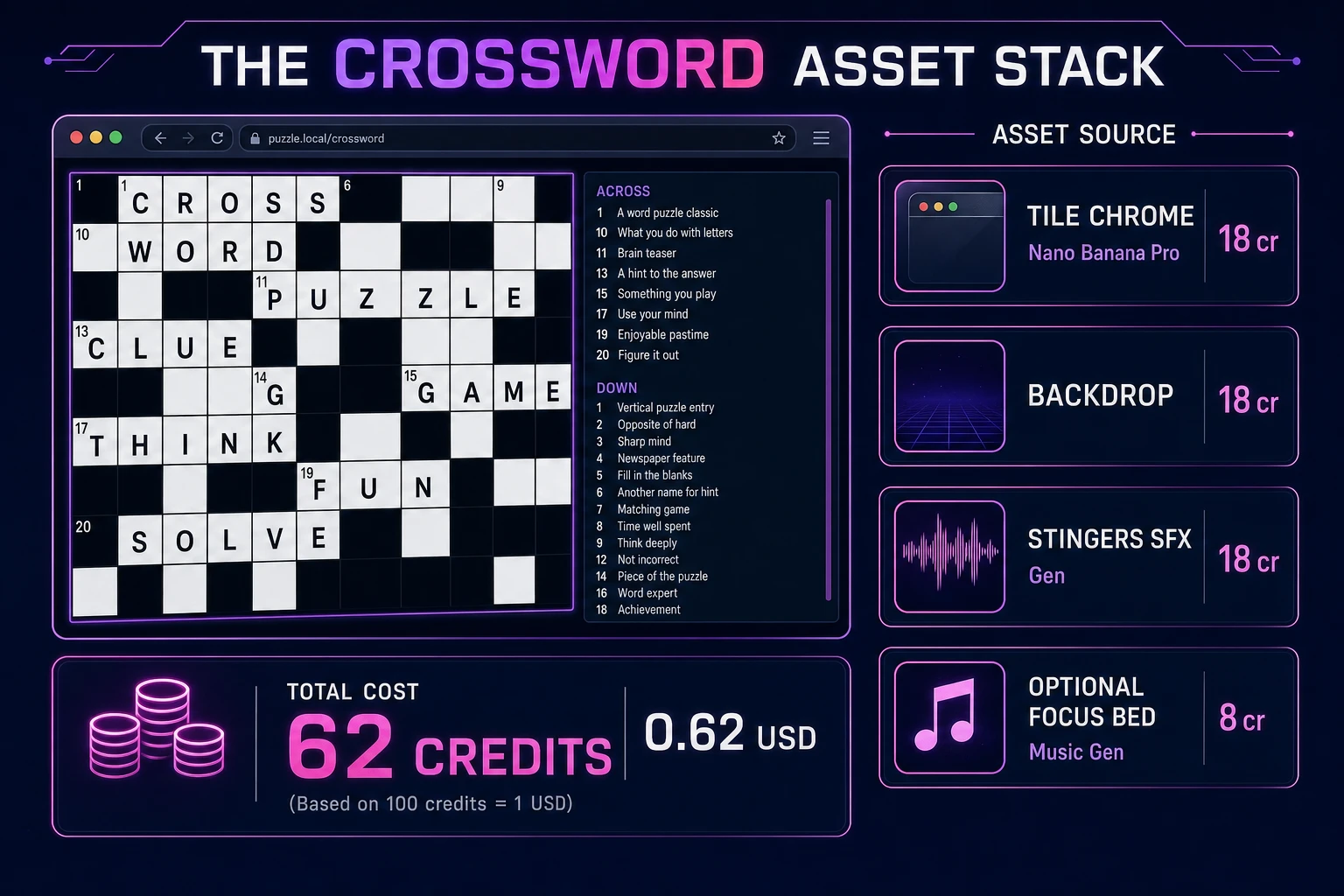
Optional but nice: open Music Gen (10 credits per generation, verified 2026-08-20 in src/app/music-gen/page.tsx) and prompt a quiet lo-fi or library-ambience loop — “soft focus bed, no vocals, low dynamics for a crossword.” One or two tries is enough. Mute music by default so solvers who want silence stay in flow. Browse the rest of the stack from the tools guide if you later add Speech Gen for spoken clues. The asset stack for a weekend how to make a crossword project stays well under a dollar of credits; see the cost section below for the line-item math.

Crossword asset stack diagram showing AI Image Gen tile chrome, SFX Gen stingers, optional Music Gen focus bed, and total credit cost under one dollar
The crossword asset stack: AI Image Gen for backdrop and chrome, SFX Gen for key and check cues, optional Music Gen focus bed — roughly 62 credits on the 2026 Sorceress rate card.

What a how to make a crossword project costs on Sorceress in 2026

Here is an honest first-project budget against the live Sorceress rate card (verified 2026-08-20 against local source). Two Nano Banana Pro images at 18 credits each = 36 credits ($0.36) for backdrop and title chrome. Four SFX clips totaling about 6 billable seconds at 1 credit/sec = 6 credits ($0.06). Optional Music Gen focus bed with a retry at 10 credits each = 20 credits ($0.20). Coding-model API time for the WizardGenie scaffold and polish pass is typically under $0.40 when you pair a frontier planner with DeepSeek V4 Pro or Kimi K2.5 as executor. Grand total: roughly 62 credits ($0.62) plus sub-dollar agent time. The free 100-credit signup grant covers the entire art and audio stack on day one. Credit packs and supporter tiers live on Plans if you outgrow the grant.

That is the whole pipeline for how to make a crossword in a browser in 2026: a black-and-white cell model, a numbering pass that stamps across and down ids, DOM focus with keyboard fill, honest check helpers, and a thin Sorceress asset layer so the grid looks finished. Ship the static build, solve your own mini once without peeking at the answer key, then decide whether a puzzle editor or a second themed pack is worth another afternoon — only after the first across 1 already feels fair.

Frequently Asked Questions

What size crossword should a beginner build first?

Start with a 9×9 or 11×11 American-style grid with roughly 20–30 clues, not a full Sunday 21×21. A how to make a crossword tutorial that ships a small themed puzzle first teaches black-cell layout, across/down numbering, and check-answer flow without drowning you in clue writing. Once fill and check feel fair, grow to 15×15 or add a puzzle picker. Mini grids also keep your word list and symmetry rules testable in one afternoon.

Should I store the crossword as a 2D array or as a list of entries?

Store both. Keep a cells[row][col] grid with { letter, isBlock, number, acrossId, downId } for rendering and focus movement, and a separate clues.across / clues.down array of { id, number, clue, answer, row, col, length }. The grid drives UI; the entry list drives check, reveal, and progress. A javascript crossword that only stores strings in cells makes “highlight the active across word” painful — you need the entry ids on every white cell.

How do I number across and down clues correctly?

Scan left-to-right, top-to-bottom. A white cell starts an across entry if it has no white cell to the left (edge or black). It starts a down entry if it has no white cell above. If either is true, assign the next integer and stamp that number on the cell. Then walk right for across length and answer letters, and walk down for the down entry. Unit-test against a hand-drawn 5×5 before you generate larger layouts.

DOM inputs or canvas for a browser crossword maker?

Prefer a DOM grid of single-character inputs (or contenteditable cells) for a first html5 crossword. Native focus, mobile keyboards, and screen readers come free. Canvas becomes attractive when you want heavy themed art under every letter — but then you reimplement caret, selection, and accessibility yourself. Phaser 4.1.0 (verified 2026-08-20 on the official Phaser API docs) is optional polish for title scenes and tweens, not a requirement for fill-and-check.

How much does it cost to build a crossword on Sorceress?

A first-project browser crossword with grid fill, clue panel, check/reveal, and audio budgets like this against the 2026 Sorceress rate card (verified 2026-08-20 against local source). Tile chrome and title backdrop: two AI Image Gen Nano Banana Pro passes at 18 credits each = 36 credits or 0.36 USD (src/lib/models.ts line 303). Four SFX clips at 1 credit per second (src/app/sfx-gen/page.tsx line 23) — key tap, word complete, error, win — roughly 6 credits or 0.06 USD. Optional Music Gen focus bed: two tries at 10 credits each = 20 credits or 0.20 USD. Total roughly 62 credits or 0.62 USD plus under 0.40 USD in coding-model API time. The free 100-credit signup grant (src/app/api/admin/credits/route.ts line 12) covers the full art and audio stack outright.

Sources

  1. Crossword - Wikipedia
  2. MDN - KeyboardEvent
  3. MDN - HTMLElement.focus()
  4. Phaser 4.1.0 API Documentation
Written by Arron R.·2,499 words·11 min read

Related posts


