People searching ai character voice generator in 2026 are usually indie devs, jam participants, or solo RPG makers who need forty NPCs to sound like forty different people by Friday. They already know a text-to-speech line reader exists; that is not the problem. The problem is that a generic monotone reader does not sell a haggard tavern keeper, a chirpy shopkeep, a grim shieldmaiden, and a wisecracking sidekick as four distinct people. Voice acting is the difference between "video game character" and "someone I remember playing".
Hiring 40 voice actors is not the answer for a jam or a solo project either. What is: a browser tool that gives every NPC a consistent vocal identity, cloneable reference voices for named leads, per-line emotion control for combat barks vs quest dialogue, and MP3 export the engine can drop straight into an audio bank. This piece walks a five-step pipeline built around Sorceress Speech Gen, whose MiniMax Speech-02 HD and Turbo models plus 17 stock preset voices ship exactly that surface. Every MiniMax capability and Sorceress credit constant below verified 2026-08-05 against the live Replicate model readme and local Sorceress source.
What an ai character voice generator needs for a game NPC roster in 2026
The phrase ai character voice generator clusters with three overlapping intents. First, indie devs building a game with more than a dozen speaking NPCs who cannot realistically hire a voice cast. Second, RPG designers writing branching dialogue trees where every faction needs a distinct accent identity across dozens of variant lines. Third, prototypers who want temp voices during greybox so the game feels alive months before shipping — even if the plan is to record real actors later. All three want the same feature set: consistent per-character voice identity across many lines, per-line emotion control, natural intonation on question marks and exclamation marks, and a file format the engine can consume without a conversion step.
The floor for a game-usable tool is that the voice does not audibly reset between lines from the same character. Older TTS engines produced tiny pitch and cadence drift between calls that made the same "voice" sound like three different voices across a fight. MiniMax Speech-02 (verified 2026-08-05 against the official Replicate model page) locks the vocal identity by voice_id, so every generation reads from the same underlying voice model — the same Grunwald sounds like Grunwald in line 47 as he did in line 1.
The ceiling is the emotion axis. Reading "Hold the line!" in a neutral voice sounds wrong; reading it angry sounds right. MiniMax exposes eight emotion presets plus an auto-detect mode that infers tone from the line text itself. Sorceress Speech Gen surfaces those directly (verified 2026-08-05 in src/app/speech-gen/page.tsx lines 324–333: none/Neutral, Happy, Calm, Sad, Angry, Fearful, Disgusted, Surprised).
Build a voice bible before you generate a single line
The single biggest workflow mistake in AI voice generation is generating first, casting later. Every seasoned dev who has been through the loop once ends up building a small voice bible before touching the tool. A voice bible is a plain markdown table with one row per named character: the character name, the picked preset voice or the cloned voice_id, a default emotion, and 2–3 sample lines you have already recorded in your head as read by that voice.
The bible pays off in three ways. First, it prevents preset drift — a common failure mode where Grunwald reads as Deep_Voice_Man in scene 2 and accidentally as Imposing_Manner in scene 5 because a week passed and you forgot. Second, it forces you to differentiate characters by voice ahead of time, which is where the actual writing craft lives. Third, when a stakeholder asks "why does Grunwald sound like a shopkeep?", you have a written record showing the picked voice and can either defend it or swap it in one place.
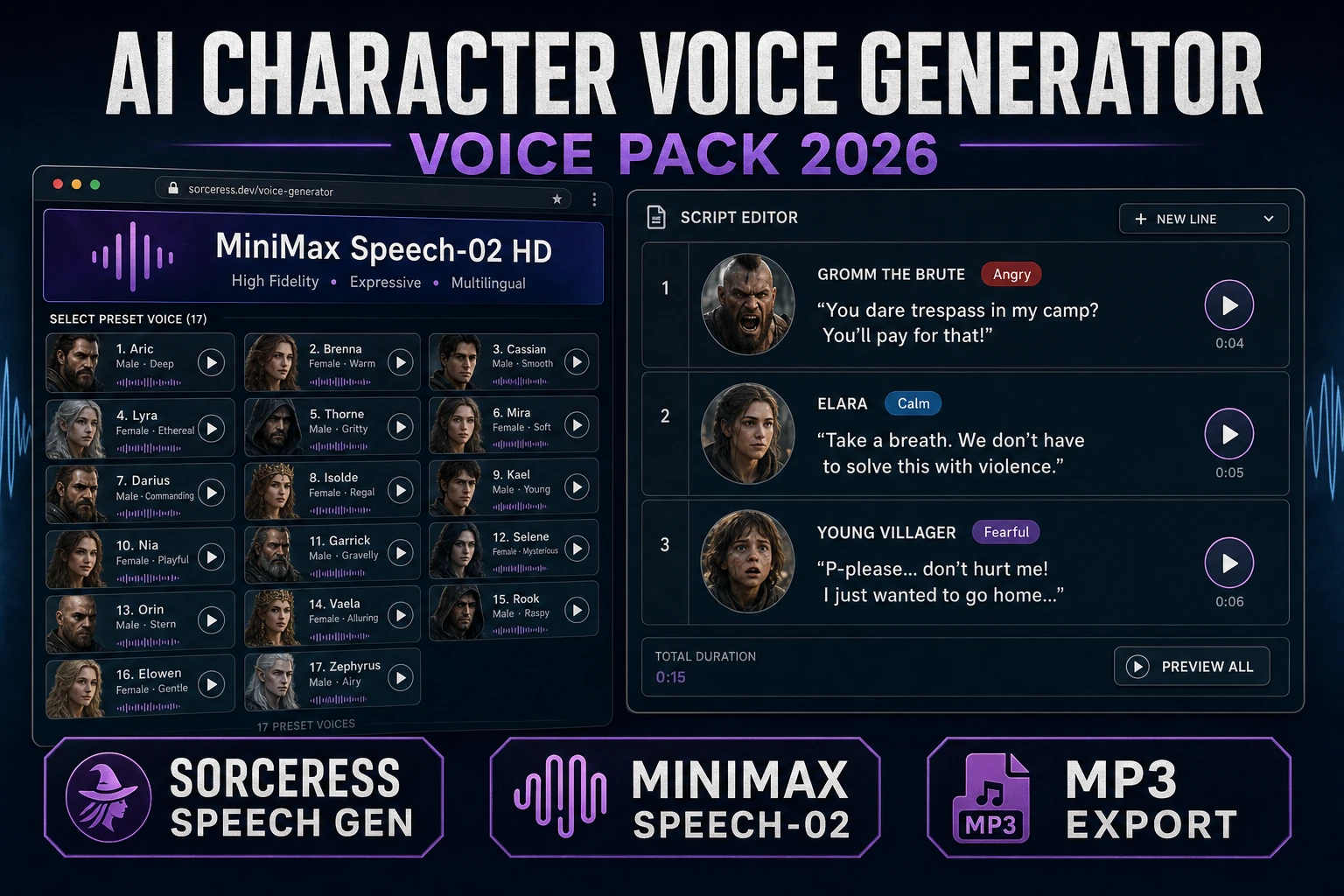
The Sorceress preset roster (verified 2026-08-05 in src/app/speech-gen/page.tsx lines 301–319) is 17 stock voices — 9 male (Deep_Voice_Man, Casual_Guy, Patient_Man, Young_Knight, Determined_Man, Decent_Boy, Imposing_Manner, Elegant_Man, Friendly_Person) and 8 female (Wise_Woman, Calm_Woman, Inspirational_girl, Lively_Girl, Lovely_Girl, Abbess, Sweet_Girl_2, Exuberant_Girl). For a jam roster of 8–12 NPCs this is enough. For a bigger roster, clone reference voices for named leads (heroes, main villain, quest-giver) and lean on presets for the crowd (guards, merchants, farmers).
The Sorceress ai character voice generator pipeline in five steps
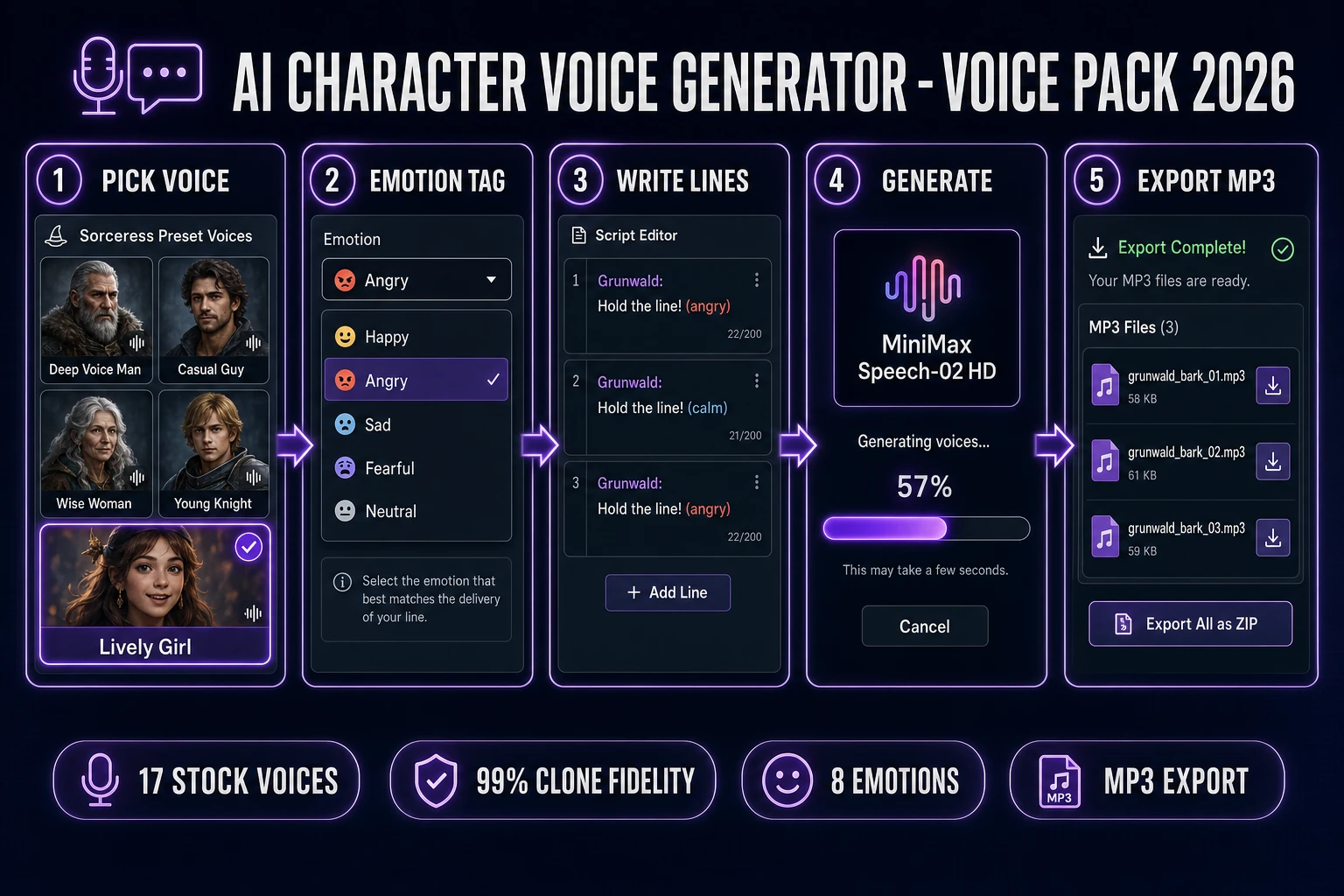
Every Sorceress ai character voice generator run has the same five steps, and each step maps to either a voice picker action, a script editor action, or a file handoff:
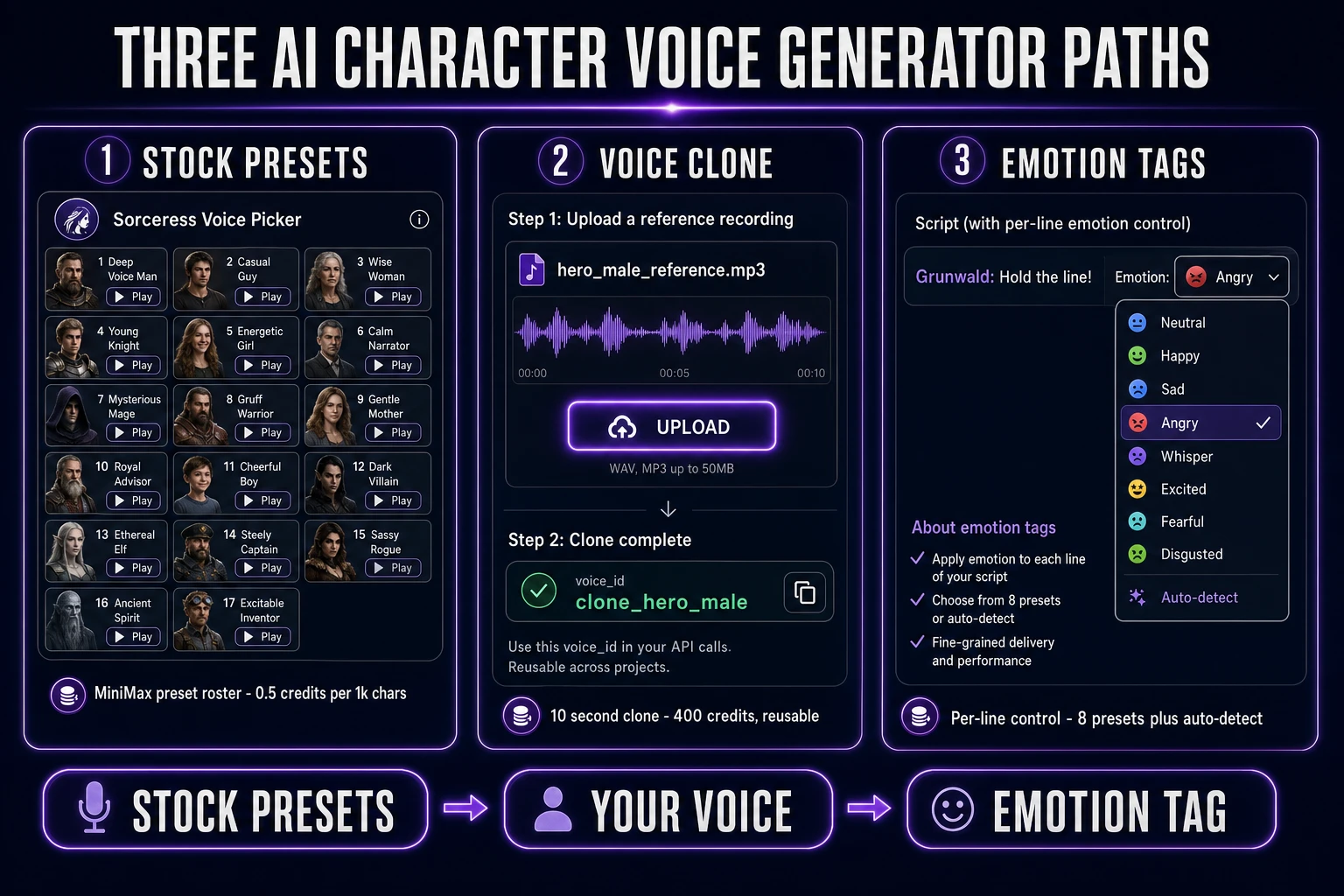
- Pick a voice. Open Sorceress Speech Gen, click through the 17 preset roster with the inline preview player, or upload a 10–299 second audio sample to clone your own reference voice. Save each pick against a character name in the voice bible.
- Tag emotion. For each NPC line, pick one of the 8 emotion presets (Neutral, Happy, Calm, Sad, Angry, Fearful, Disgusted, Surprised) or leave on auto-detect so the model infers tone from the line text.
- Write the script. Type the line in the script editor. Use standard punctuation — question marks lift the terminal syllable, exclamation marks tighten the delivery, ellipses insert real pause. Emojis and stage directions are stripped; keep the line clean.
- Generate. Click generate. The tool calls MiniMax Speech-02 HD (default) or Speech-02 Turbo (faster, cheaper) with your
voice_id, emotion, and text, and returns an MP3 blob typically in 2–8 seconds per line. - Export. Save the MP3 with a boring, sortable filename (
grunwald_bark_01.mp3,grunwald_quest_01.mp3,grunwald_death.mp3). Drag into the engine's audio folder. Done.
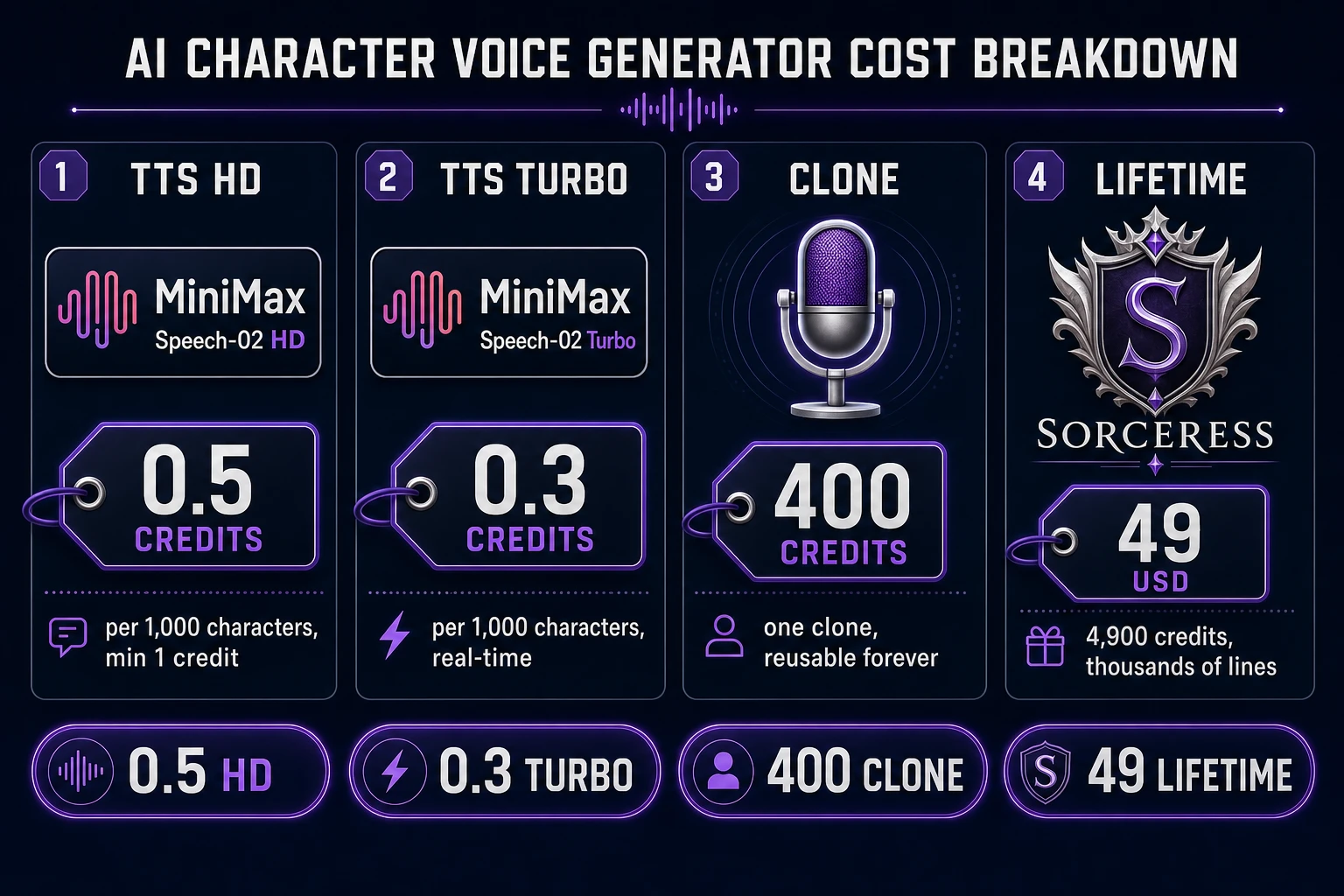
Only step 4 touches paid infrastructure. Verified 2026-08-05 in src/app/speech-gen/page.tsx lines 28–30, TTS billing is 0.5 credits per 1,000 characters on HD, 0.3 credits per 1,000 characters on Turbo, with a 1-credit floor per generation. Steps 1, 2, 3, and 5 are prep and file work.
Step 1 — pick a stock MiniMax preset or clone your own reference voice
Open Speech Gen. The default view is the stock voice picker. Every tile has an inline preview player — hover, click, hear the voice read the sample script. Reserve the first pass for shortlisting: mark the 3–4 candidates that match the character's demographic and vibe (Deep_Voice_Man for a gruff shieldmaster, Wise_Woman for the temple abbess, Lively_Girl for the shopkeep who greets you at level 1). Only then commit.
For named leads — the player character, the main villain, the memorable quest-giver — a cloned reference voice is usually worth the 400 credits. Open the Clone tab and drop an audio file. Verified 2026-08-05 in src/app/speech-gen/page.tsx lines 32–34, the sample must be at least 10 seconds long, at most 4:59 (299 seconds), and under 20 MB. MP3 at 128 kbps hits both size limits for a 3-minute clip.
MiniMax's clone quality reaches roughly 99% reported vocal similarity from a single 10-second sample (verified 2026-08-05 against the MiniMax Speech-02 series Replicate page). In practice, a clean 30–60 second sample of the speaker reading a neutral paragraph produces better generalization to varied lines than the raw 10-second minimum. Record with a decent USB mic, in a quiet room, no music behind, and the clone job returns a reusable voice_id in about 75 seconds. That voice_id is permanent; you use it forever without re-uploading the source sample.
Whether stock or cloned, the picked voice becomes the vocal identity for that character. Write it into the voice bible next to the character name so the next session picks the same one.