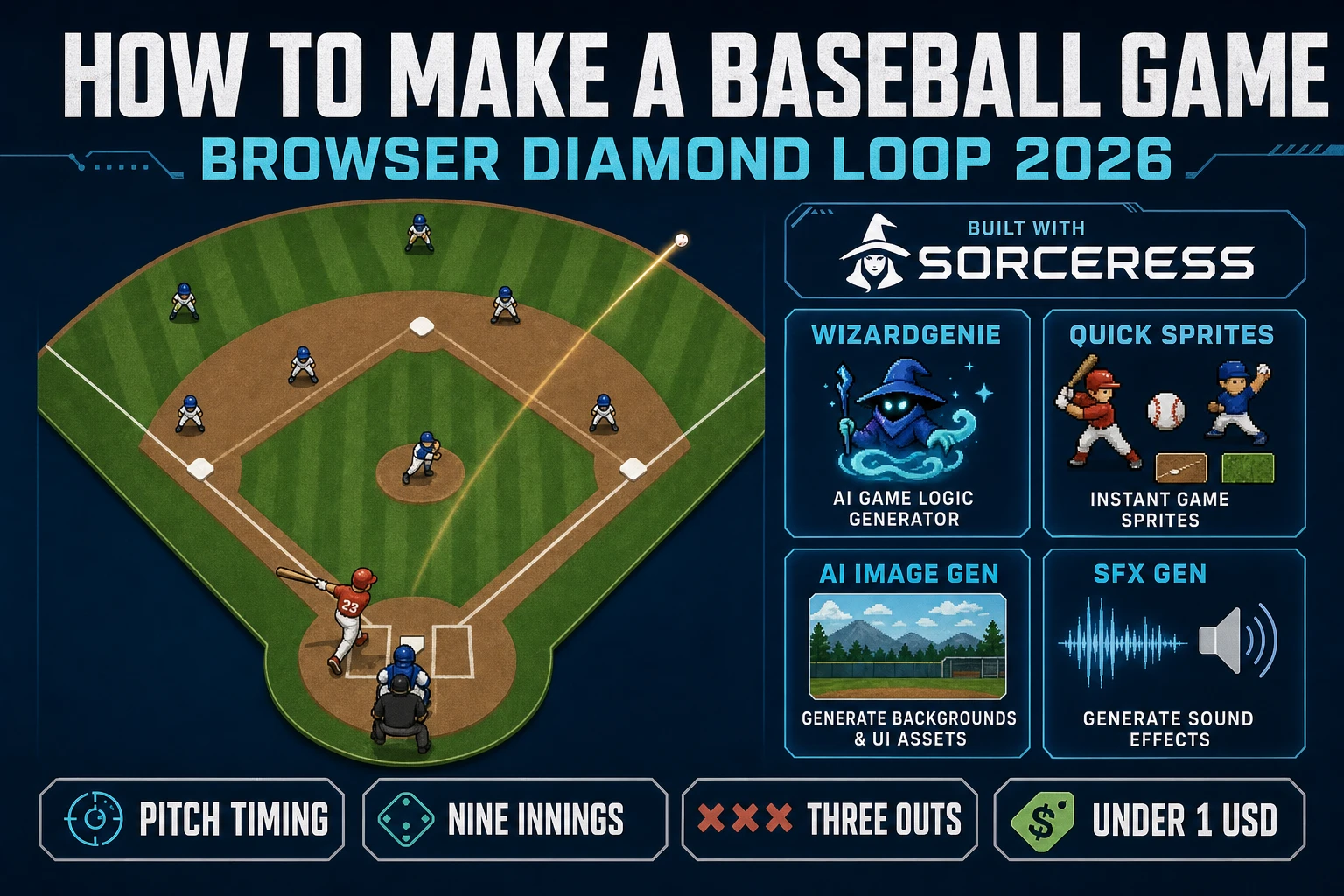
Bat How to Make a Baseball Game (Browser Diamond Loop 2026)

By Arron R.17 min read
How to make a baseball game in 2026: model a diamond with nine-inning clock and honest pitch-swing timing, wire pitch swing hit run inside WizardGenie against a

Most beginners who search "how to make a baseball game" want the honest diamond feel - a top-down field with green infield grass and brown base paths, a pitcher on the mound throwing a fastball toward home plate, a batter timing a swing on a 100 ms contact window, a ball that arcs into the outfield on a clean line drive, a runner rounding first and sliding into second, three outs to end the half-inning, and a scoreboard that flips to HOME 1 AWAY 0 when the runner touches home plate - not an MLB-licensed simulation with real-player biomechanics on day one. Live baseball games at commercial scale are famously demanding because a single project juggles a pitch-timing physics loop, a nine-fielder positional AI with defensive shifts, ball-and-strike umpire logic, base-stealing and pickoff races, and a nine-inning game structure with pinch hitters and bullpen management. A browser baseball game aimed at a portfolio piece or a jam is a different animal. A coding agent scaffolds the diamond, the pitch-swing timing, the fielder pursuit, and the inning clock from a single prompt, and AI generation covers the field, the uniforms, the bat cracks, and the organ break between innings. On desktop or web, that means WizardGenie for the diamond-loop interpreter, Quick Sprites for fielder and batter sprites, AI Image Gen for the field and uniforms, and SFX Gen for the bat cracks and glove pops. This guide is the honest end-to-end for how to make a baseball game in 2026, as a weekend build you can actually finish.
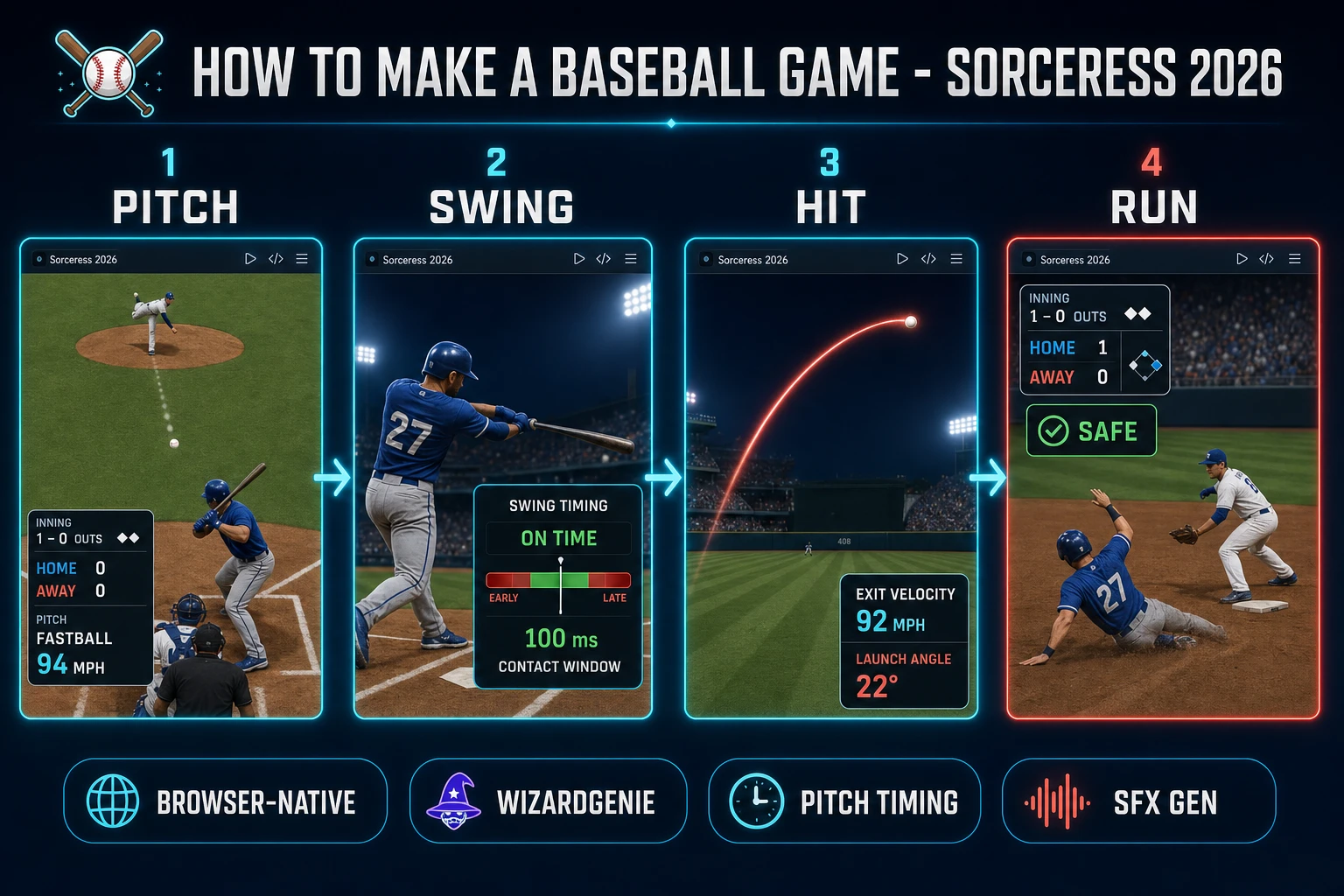
How to make a baseball game browser pipeline: pitch from the mound, time the swing, hit the ball into the outfield, and round the bases in WizardGenie with AI Image Gen uniforms and SFX Gen bat cracks
The 2026 how to make a baseball game recipe: pitch from the mound, time the batter swing, hit the ball into the outfield on a clean line drive, and round the bases against a fielder pursuit AI.

What how to make a baseball game actually means in 2026

The query "how to make a baseball game" hides three distinct intents. Some searchers want a broadcast breakdown of positional strategy - the defensive shift, the hit-and-run, the double switch - which is a coaching article, not a browser build. A second intent is the broader sports-game category covered by siblings like how to make a hockey game and how to make a soccer game - useful, but each targets a different playing surface, camera, and possession model. The intent this article targets is the third: a browser baseball game that boots into a single-page HTML shell with a top-down green diamond, four white bases 90 feet apart, nine fielders per team in home and away uniforms, a pitcher's mound 60.5 feet from home plate, honest pitch-swing timing so a fastball crosses the plate in 300 ms and a swing lands only on a 100-ms contact window, a batting order that rotates through nine hitters per half-inning, WASD or gamepad control of the batter with Space to swing, arrow keys to steer a batted ball via bat angle, a fielder pursuit AI that runs to the landing spot and either catches the ball on the fly or scoops the grounder, and a scoreboard that persists across innings with runs by frame plus a game-total. That is a weekend build, it demos the Sorceress toolset honestly, and it is the format most baseball game tutorial and javascript baseball searchers actually want.

The presentation contract is small and strict. A green diamond fills most of the viewport, with brown base paths connecting home to first, first to second, second to third, and third back to home, a pitcher's mound with a dirt circle in the center, a batter's box on either side of home plate, dugouts drawn as long rectangles along each foul line, and an outfield fence curving from left field to right field. Nine fielders per team are rendered as short sprites with team-colored uniforms and numbers on the back at fixed defensive positions (pitcher, catcher, first, second, shortstop, third, left, center, right). The ball is a small white circle whose current position is tracked at 60 Hz. A HUD at the top-left reads "INNING 1 TOP - COUNT 0-0 - OUTS 0 - HOME 0 AWAY 0" and updates on every pitch and every out. A SWING TIMING meter appears at the bottom when the swing key is pressed - if the meter reads ON TIME (within a 30 ms sweet spot) the ball lines cleanly to the outfield; EARLY produces a pulled grounder to the shortstop; LATE produces an opposite-field pop fly. The baseball overview on Wikipedia (verified 2026-09-01) is the canonical reference for the nine-per-side team structure, the nine-inning game, and the three-out half-inning rule - cite that page in your itch.io blurb so players know you shipped a real baseball diamond loop, not a home-run derby minigame.

The baseball diamond loop in one minute (pitch, swing, hit, run)

Five moving parts, cycled every pitch and every out. First, pitch - the pitcher releases the ball from the mound at a chosen velocity (85-97 mph fastball, 74-82 mph curve, 78-85 mph change) and location (in, out, up, down against the strike zone) and the ball travels the mound-to-plate distance in a scaled 300-550 ms flight with pitch-specific horizontal and vertical break. Second, swing - the batter presses Space to trigger a 200-ms swing animation with a 100-ms contact window in the middle; if the ball reaches the front of home plate during that contact window and inside the swing plane, a contact event fires. Third, hit or miss - a contact event computes exit velocity and launch angle from the swing timing offset and the pitch location, producing either a foul ball (angle > 45 degrees off the pull line, becomes a strike unless already at two strikes), a grounder to the infield (launch angle < 10 degrees), a line drive to the outfield (10-25 degrees), a fly ball (25-45 degrees), or a home run (25-35 degrees plus 105+ mph exit velocity clearing the fence); a miss registers as a strike unless the pitch was outside the strike zone (then it is a ball). Fourth, field or run - the nearest fielder runs toward the ball's projected landing spot at a capped 24-feet-per-second, and the runner (or runners) advance around the bases at 20 feet per second (roughly) so a catch or force out closes the play, and a base hit lets the batter reach first while any runners on base advance a station. Fifth, out or safe - an out increments the half-inning out count; three outs flip the half-inning; a safe advance updates the base-runner state and, if a runner touches home plate, increments the run total on the scoreboard. That five-step cycle, wrapped by a nine-inning game with a top and bottom half per frame, is the whole html5 baseball loop - everything else (steal attempts, sacrifice flies, hit-by-pitch, intentional walks, pitching changes) is polish on top.
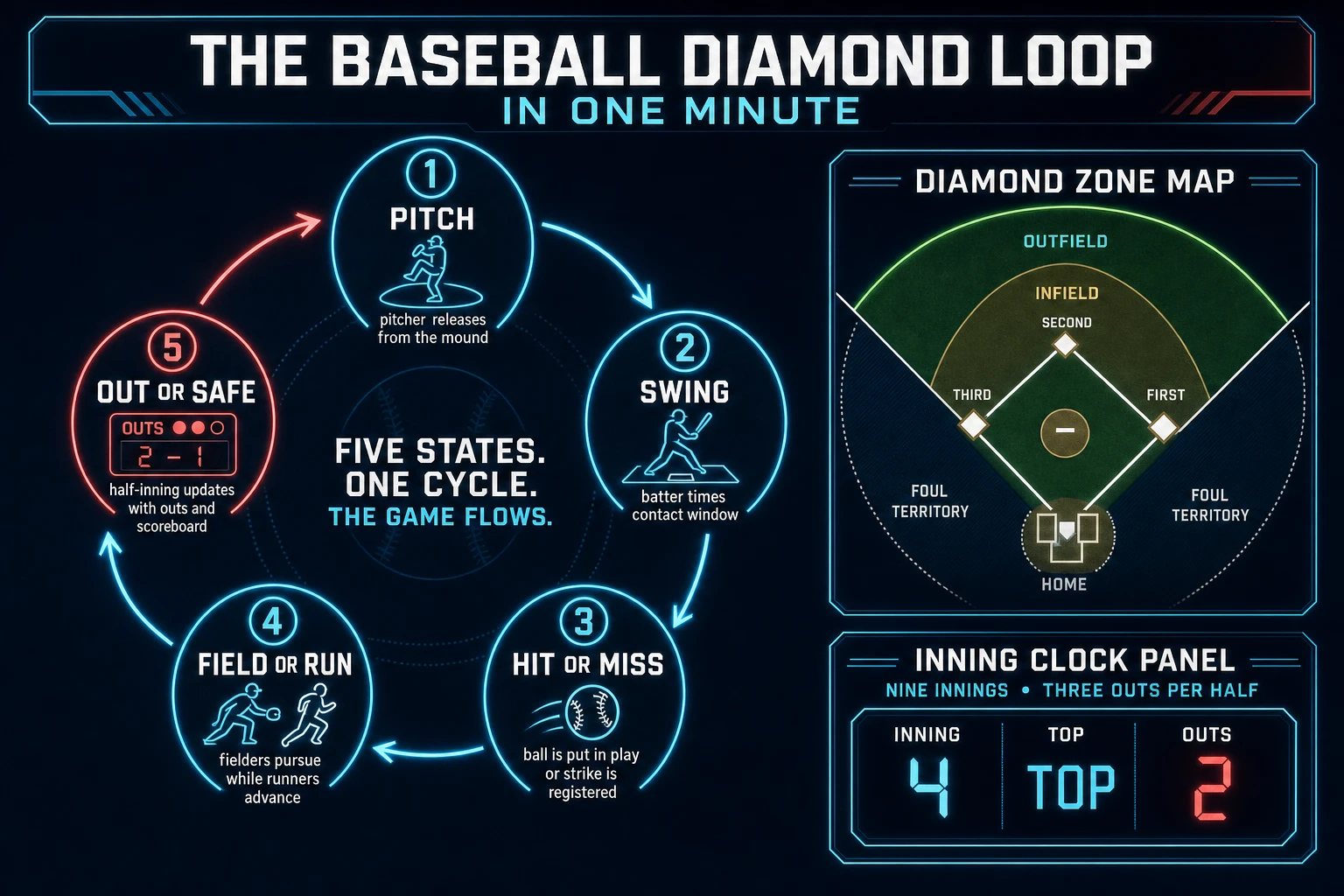
Baseball diamond loop state machine diagram showing pitch release from the mound, batter swing with contact window, hit or miss outcome, field or run pursuit, and out or safe scoreboard update with three-out half-innings
The baseball diamond loop: pitch from the mound, time the batter swing on a 100-ms contact window, resolve hit or miss, resolve field or run, and increment outs and runs against a nine-inning clock.

Pick your engine for how to make a baseball game: Canvas, Phaser, or WizardGenie

Three good targets in 2026, each with a different trade-off. Plain HTML Canvas 2D is the honest default and the pick this guide recommends for a first build. Baseball is light on graphics - the diamond is a flat plane with painted lines, the sprites are small top-down fielders and one batter and one pitcher, and the biggest render load is the static field backdrop that draws once per half-inning. The MDN Canvas API reference (verified 2026-09-01) covers the drawImage sprite-atlas pattern that lets you pack all nine fielders plus the batter and pitcher orientations into a single texture and stamp any player at any position with one blit. Cache the diamond backdrop to an offscreen canvas once at boot, redraw only the moving fielders, batter, pitcher, ball, and runners each frame, and the whole browser baseball game holds a stable 60 fps in any modern browser without any WebGL overhead.

Separate the pitch-timing tick from the render frame using a fixed-timestep loop driven by MDN requestAnimationFrame (verified 2026-09-01). A 60 Hz physics tick keeps the pitch flight and swing contact window deterministic across a range of monitor refresh rates - a 300 ms fastball flight uses exactly 18 ticks regardless of whether the player is on a 60 Hz laptop or a 144 Hz gaming monitor. Without the fixed timestep, a 144 Hz display would advance the pitch 2.4x faster and the 100-ms contact window would evaporate into 42 ms, an impossible swing for a human. This is the same discipline the sibling how to make a hockey game guide uses for its puck friction loop - baseball just swaps the sliding puck for a ball with a strict window-based swing timing.

Phaser v4.2.1 "Giedi" (released 9 July 2026, verified 2026-09-01 on the official Phaser stable download page) becomes the right pick when a browser baseball game wants Phaser's Arcade Physics for the ball-and-fielder collisions, its input plugins for a clean gamepad hookup via the MDN Gamepad API (verified 2026-09-01), and its Scene system for the batting-lineup, game, and end-of-game screens. Phaser saves an hour on the ball-in-flight wiring but adds a small learning curve; for a pure vanilla-JavaScript learning build, plain Canvas with a hand-rolled fixed-timestep loop is more instructive.

WizardGenie is not a separate baseball engine - it scaffolds whichever of the two you pick from a single natural-language prompt. WizardGenie ships as both a desktop app (Windows installer with auto-update, available to Early Access supporters and above) and a no-install web build inside the browser. A one-paragraph prompt describing the diamond, the pitch-swing loop, the fielder pursuit AI, and the three-out inning discipline scaffolds a working baseball game code shell in under twenty minutes. Follow-up prompts refine the pitch-type mix, the fielder error rate, or the base-stealing timing without any manual code stitching. For beginners, WizardGenie is the fastest path from "I want to build a baseball game" to a browser tab you can actually pitch to.

Step 1 - Model the diamond and pitch-swing timing (worked example)

The diamond is a discrete four-base grid with continuous fielder positions overlaid. Encode home plate as a fixed origin point at the bottom-center of the field, first base 90 units to the right along the foul line, second base 90 units above first (or roughly 127 units diagonally from home), third base 90 units to the left of home, and the pitcher's mound at 60.5 units above home plate. Store the four bases as an array of {x, y} points, the pitcher's mound as one {x, y} point, and the outfield fence as a curve of {x, y} points from left field to right field.

Model the ball as a point with position, velocity, and a launch-angle-derived vertical component. On pitch release, set the ball position at the pitcher's mound and give it a velocity vector pointed at home plate with a magnitude tied to the pitch type (fastball 94 units per second, curve 78, change 82). Add a small horizontal or vertical break force in the last third of the flight for curveball or slider pitches (about 6-18 units of lateral drift). On bat contact, replace the incoming velocity with a new velocity vector derived from the swing timing offset (early swings pull left, late swings push right) and the swing plane's launch angle (0-45 degrees), with an exit-velocity magnitude scaled to the timing sweet spot (100 percent inside the 30 ms core, dropping linearly to 40 percent at the edges of the 100 ms window). Update ball position and vertical component every tick with a simple gravity acceleration (32 units per second squared, scaled to your grid) so a fly ball rises and falls in a parabola that your fielders can chase.

Model the swing input as a state machine with three states: IDLE (accept Space keydown), SWINGING (200 ms of animation, first 50 ms is bat cocking, middle 100 ms is contact window, final 50 ms is follow-through), and COOLDOWN (100 ms of no-swing lockout before returning to IDLE). Only fire a contact event on ball-plate crossing during the middle 100 ms; a Space press during COOLDOWN registers as no-swing and the pitch becomes a called ball or strike based on the pitch location relative to the strike zone. The baseball rules overview on Wikipedia (verified 2026-09-01) defines the strike zone as roughly the width of home plate horizontally and from the batter's knees to the letters on their uniform vertically - a rectangle you can encode as a 4-unit-wide and 3-unit-tall zone centered above home plate.
Step 2 - Wire the pitch-swing-hit-run cycle in WizardGenie

Open WizardGenie and prompt one paragraph that names the diamond, the four bases, the pitch-timing model, and the three-out inning discipline. A concrete opening prompt: Build a browser baseball game with a top-down green diamond, four white bases 90 units apart with a pitcher's mound 60.5 units from home plate, nine fielders per team at fixed defensive positions, a batter who presses Space to swing on a 200 ms animation with a 100 ms contact window, and a pitcher that throws every 2 seconds cycling through fastball 94 units per second, curveball 78 units per second, and changeup 82 units per second with 6-18 unit lateral break for the curve. On contact, compute exit velocity and launch angle from swing timing offset and pitch location, produce foul balls over 45 degrees off the pull line, grounders under 10 degrees, line drives 10-25 degrees, fly balls 25-45 degrees, and home runs at 25-35 degrees over 105 units per second exit velocity. Fielders run to the projected landing spot at 24 units per second and catch fly balls or scoop grounders. Runners advance at 20 units per second along the base paths. Three outs flip the half-inning; nine innings finish the game. On any hit or out, update the count, outs, and scoreboard HUD; on a run scored, pulse a red LED at home plate and play a bat crack SFX. Feed that to any coding model in the lineup and the interpreter scaffolds in under twenty minutes.

The remaining hour is polish via follow-up prompts. Add a ball-and-strike count display so the current count reads as "BALLS 2 - STRIKES 1" in the HUD, and a small graphic of a strike-zone box shows where each pitch crossed the plate. Add pitch-selection UI for the human batter so the batter can toggle between BUNT (short 100-ms swing that redirects the ball to a shallow infield location) and SWING (full 200-ms swing with the standard timing window) - twenty lines of state-machine code. Add a base-running command panel so the human player can press 1 for hold, 2 for advance-on-hit, and 3 for steal, and the base runner AI executes on the next pitch. Add a hockey game code hook-style baseball difficulty parameter that scales pitcher location accuracy, fielder speed, and umpire strike-zone strictness in a single tunable variable, and expose a difficulty dropdown in the pause menu (Rookie 60 percent accuracy, Pro 80 percent, All-Star 92 percent). Each item is a follow-up prompt, and the whole browser baseball experience lands over a Saturday afternoon.

Optional siblings on the same base shell: for a fenced-rink puck-and-goaltender loop with a different physics profile, borrow from how to make a hockey game. For a fenced-field continuous-possession soccer loop, see how to make a soccer game. For a court-based scoring loop with a vertical hoop, see how to make a basketball game.

Step 3 - AI Image Gen field and uniforms, SFX Gen bat cracks, Music Gen organ

A blank Canvas with rectangle-and-text placeholders reads as a debugger, not a baseball game. Three asset passes cover the whole html5 baseball experience:

  • Diamond backdrop, uniforms, and scoreboard - open AI Image Gen and prompt four 3:2 scene panels: a top-down green diamond backdrop with brown base paths, four white bases, a pitcher's mound with a dirt circle, dugouts drawn as long rectangles along each foul line, and an outfield fence curving from left to right; two team uniform sheets (home in blue and white pinstripes, away in gray with red accents) with four-orientation batter, pitcher, and fielder views; and a scoreboard HUD tile with slots for INNING, TOP or BOTTOM, COUNT, OUTS, HOME, AWAY plus a runs-by-inning frame. AI Image Gen ships every leading model in one panel including Nano Banana Pro, GPT Image 2, Seedream 5 Lite, Flux 2 Pro, Z-Image Turbo, and Grok Imagine (verified 2026-09-01 in src/app/_home-v2/_data/tools.ts). GPT Image 2 handles the crisp on-field line work best (the base paths and foul lines stay geometrically clean) at roughly 5 credits per generation (verified 2026-09-01 in src/lib/models.ts); Nano Banana Pro carries fabric detail best for the uniform sheets. Four generations for diamond backdrop plus two uniform sheets plus scoreboard lands around 20 credits.
  • Fielder, batter, and pitcher sprites - open Quick Sprites and generate a nine-fielder set in both home and away uniforms plus a matching batter and pitcher per team. Quick Sprites specializes in top-down and side-view sprite atlases at 9 credits per generation (CREDITS_PER_GEN in src/app/quick-sprites/page.tsx, verified 2026-09-01), which is exactly the format a top-down baseball game needs. A minimum-viable roster - one batter, one pitcher, six unique fielder poses shared across both teams - lands around 40 credits total.
  • Bat cracks, glove pops, umpire calls, and organ - open SFX Gen and describe four short cues: "sharp wooden crack of a maple bat striking a leather baseball, 150 ms" for each contact event, "leather-on-leather pop of a baseball landing in a fielder's glove, 200 ms" for each catch or scoop, "clipped umpire call STEE-RIKE or BALL, 400 ms" for each pitch decision, and "distant baseball-stadium crowd cheer swelling over 800 ms" for each hit or run. SFX Gen bills per second of generated audio via getSeedAudioCreditCost at SEED_AUDIO_CREDITS_PER_SECOND = 1 (verified 2026-09-01 in src/app/sfx-gen/page.tsx line 23), and four short cues total around 5 credits. For the between-inning break, open Music Gen and prompt a 15-second stadium-organ loop with a bright major-key ballpark feel - roughly 10 credits per generation (MUSIC_CREDIT_COST in src/app/music-gen/page.tsx, verified 2026-09-01).

Load the fielder sprite sheet as a single atlas and draw each player with a single drawImage call at the right (col, row) offset for the current orientation - stamping eighteen fielders through eighteen separate Image loads eats network cost and forces eighteen texture uploads on WebGL-backed canvases. Do not chase a "perfect" first pass - a second AI Image Gen retry on the diamond backdrop is cheap, but three retries per asset is a signal to rewrite the prompt, not to reroll the seed.

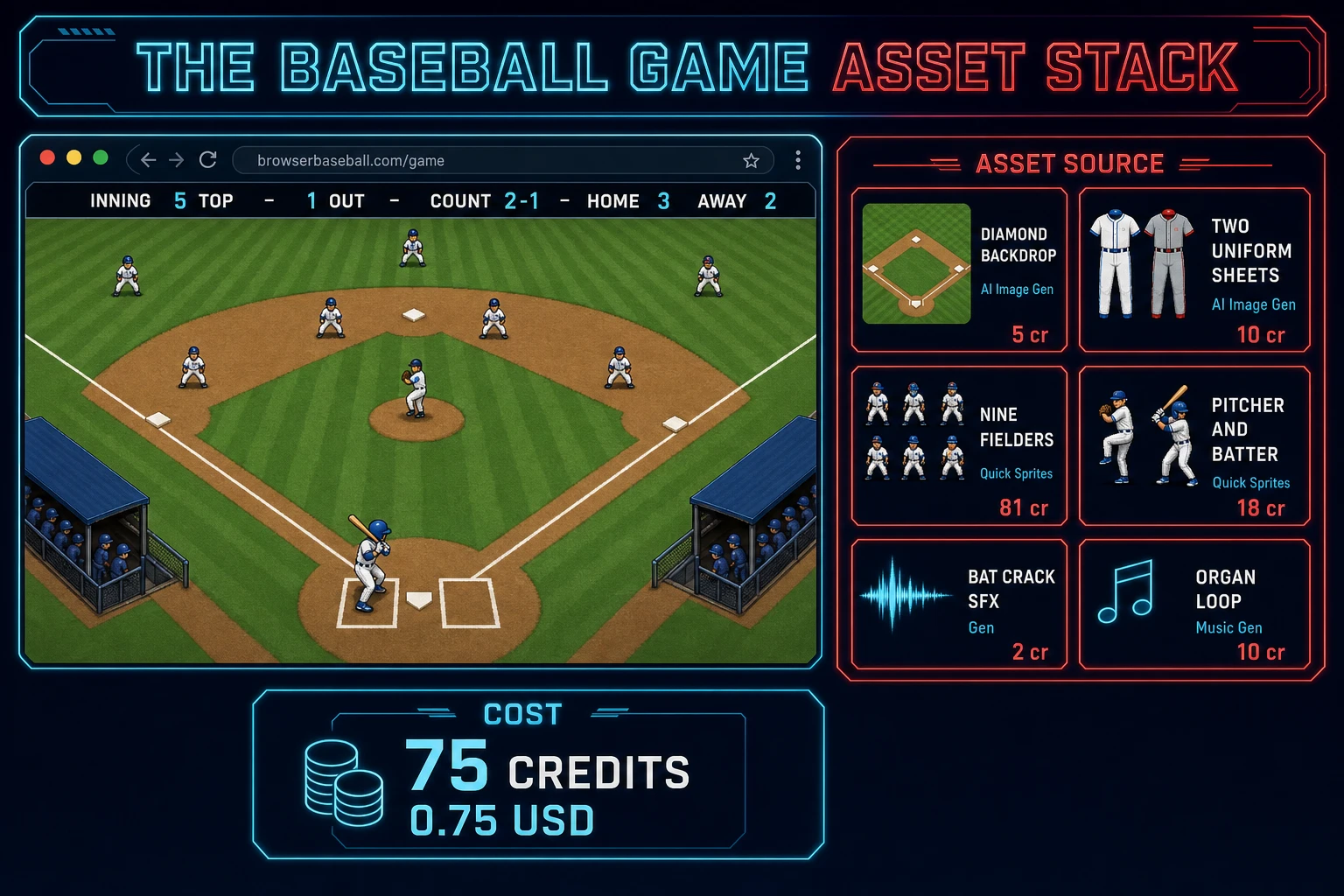
Baseball game asset stack diagram showing AI Image Gen diamond backdrop, two uniform sheets, and scoreboard, Quick Sprites nine fielders and pitcher and batter, SFX Gen bat cracks and glove pops, Music Gen organ loop - about 75 credits total
The baseball game asset stack: AI Image Gen for diamond, uniforms, and scoreboard, Quick Sprites for fielders and batter and pitcher, SFX Gen for cracks and pops, Music Gen for the between-inning organ - about 75 credits total.

Step 4 - Playtest the browser baseball game like a jam judge

Before you share the build, run a five-minute checklist borrowed from sports-game jam judges:

  1. The first pitch lands inside thirty seconds - the app boots into a menu or straight to the diamond, the pitcher's animation starts, and the batter is already standing at home plate with a swing timing indicator visible.
  2. The pitch reads as a real pitch, not a laser - a fastball crosses the plate in roughly 300 ms and gives a small but real window to react; a curveball breaks visibly over the last third of the flight; a changeup arrives late and freezes the impatient batter.
  3. The bat contact reads as bat contact - an on-time swing on a fastball down the middle produces a line drive to center that lands cleanly for a hit; an early swing pulls a grounder to the shortstop for a routine 6-3 out; a late swing pushes an opposite-field pop fly that the right fielder catches for the out.
  4. The scoreboard math conserves - after every out, the out count increments by exactly one and resets to zero when the half-inning flips; after every run, the correct team's total increments by exactly one; the innings frame updates on every half-inning transition.
  5. The nine-inning game ends cleanly - after the top of the ninth (or the bottom, if the home team is behind), the game transitions to a GAME OVER screen showing the final line score by inning and a "Play Again" button that resets state without a page reload.

Log issues as WizardGenie follow-ups, not rewrites. "Add a walk-off state so the bottom of the ninth ends the moment the home team takes the lead" is one prompt. "Add pitcher fatigue so a starter's velocity drops one mph every 15 pitches after the seventieth pitch" is another. The Sorceress tools guide lists every asset tool if you want to swap Quick Sprites fielders for hand-drawn portraits or add a Speech Gen play-by-play announcer that calls "STRIKE THREE - HE'S OUT" and "IT'S OUTTA HERE" over the crowd noise.

What how to make a baseball game costs on Sorceress in 2026

An honest budget for the stack above against the 2026 Sorceress rate card (verified 2026-09-01 against local source):

  • One AI Image Gen diamond backdrop with GPT Image 2: ~5 credits (0.05 USD)
  • Two AI Image Gen uniform sheets (home + away) with GPT Image 2: ~10 credits (0.10 USD)
  • One AI Image Gen scoreboard HUD tile with GPT Image 2: ~5 credits (0.05 USD)
  • Six unique Quick Sprites fielder poses at 9 credits each: ~54 credits (0.54 USD)
  • One Quick Sprites batter and pitcher pair: ~18 credits (0.18 USD)
  • Four SFX Gen cues (bat crack, glove pop, umpire call, crowd cheer): ~5 credits (0.05 USD)
  • One Music Gen organ loop for inning breaks: ~10 credits (0.10 USD)
  • Coding-model API time with planner + budget executor: under 0.30 USD

Total roughly 107 credits or 1.07 USD in generation, plus a small model bill. Trim the roster to a single fielder pose shared across positions and the total drops closer to 75 credits or 0.75 USD - the free 100-credit signup grant covers that trimmed build outright, with headroom for a second uniform-sheet retry or a between-inning organ change. Lifetime Early Access sits at 49 USD (LIFETIME_PRICE in src/app/plans/page.tsx line 51) if you want desktop WizardGenie with auto-update for the next jam. Credits convert at 100 per dollar (CREDITS_PER_DOLLAR in src/lib/models.ts). Adding pitcher fatigue, base-stealing, and a play-by-play announcer adds about 20 credits, still under a two-dollar ceiling for a portfolio-grade browser baseball game.

That is the whole path for how to make a baseball game as a browser diamond loop in 2026: model a nine-inning diamond with honest pitch-swing timing on a 100-ms contact window, let WizardGenie scaffold the pitch-swing-hit-run cycle with a fielder pursuit AI from one prompt, dress the field with AI Image Gen and layer bat cracks with SFX Gen, and ship the browser baseball experience before the weekend ends. When you are ready for defensive shifts, pitcher fatigue, and full pinch-hitter and bullpen management, graduate slowly - but finish one honest diamond loop first.

Frequently Asked Questions

What defines a baseball game as a genre in 2026?

Baseball is a bat-and-ball sport played between two teams of nine players who take turns batting and fielding on a diamond-shaped infield with four bases 90 feet apart at the amateur and Major League level, per the baseball overview on Wikipedia (verified 2026-09-01). A team scores when a batter puts the ball in play and legally advances a runner around all four bases to touch home plate. A regulation game runs nine innings, each inning divided into a top and bottom half, and a half-inning ends when the fielding team records three outs. A browser baseball game does not have to ship the full MLB rulebook to read correctly as baseball - it needs a diamond with a mound and home plate, a pitcher who throws toward a batter with variable velocity and location, a bat swing on a timed input that connects or misses, a ball that either lands foul, is caught for an out, or drops for a hit that lets the runner advance, three outs per half-inning, and a scoreboard that tracks runs by inning. Balls and strikes counts, base stealing, double plays, pinch runners, and pitcher fatigue are all optional first-pass polish that reads as baseball to a genre-literate player when the core pitch-swing-hit-run loop is honest.

How is how to make a baseball game different from how to make a hockey game or a soccer game?

The core loop shape differs across the three sibling sports guides - baseball is a turn-based possession sport (one side bats while the other fields, then the roles flip), while hockey and soccer are continuous-possession sports where both teams pursue the same puck or ball at once. Compared to the sibling how to make a hockey game guide, baseball trades a low-friction ice sheet with a floating puck for a grass field where a batted ball follows a parabolic arc that must be caught before it lands or fielded on a bounce. Compared to the sibling how to make a soccer game guide, baseball trades a continuous 45-minute half with a running clock for discrete pitches inside discrete half-innings that end on three outs rather than a wall-clock timer. Both siblings share the field-boundary and shot-target discipline. An honest baseball game tutorial models the pitch-swing timing window (a 300-400 ms flight from mound to plate with a roughly 100-200 ms optimal swing window), the parabolic ball trajectory once bat contacts ball, the fielder pursuit and catch logic, and the discrete inning-ending three-out rule that ends every half-inning.

How do I model honest pitch-swing timing in a browser baseball game?

Three cheap primitives ship the pitch-swing feel that reads as baseball. First, model the pitch as a ball with a fixed velocity vector that travels the 60.5-foot mound-to-plate distance in a scaled flight time (300 ms for a fastball, 450 ms for a curveball, 550 ms for a changeup) and add a small horizontal or vertical break of 6 to 18 pixels over the last third of the flight to distinguish pitch types. Second, model the batter swing as a fixed 200-ms animation triggered on Space press with a 100-ms contact window in the middle - if the ball crosses the front of home plate during that 100-ms window, register contact; otherwise register a swing-and-miss (strike) or a taken pitch (ball or called strike based on horizontal offset from the plate center). Third, compute exit velocity and launch angle at contact from the swing timing offset - swings on time within a 30-ms sweet spot produce a line drive with 90 percent exit velocity, early swings produce a pulled grounder to the left side, late swings produce an opposite-field fly, and misses inside the contact window but outside the sweet spot produce weak popups. Those three primitives give a javascript baseball loop that reads correctly to a baseball fan without any physics engine at all; a Matter.js or Cannon.js rigid-body swap becomes worth it only when you add outfield wall ricochets or infield chopper bounces.

How do I make a pitcher and fielder AI that reads as fair without being unbeatable?

The pitcher AI has one job - throw a pitch at a chosen velocity and location - and three heuristics ship it fairly. First, weight the pitch-type distribution against the current count so a 3-0 count favors a fastball down the middle (get the strike) and a 0-2 count favors a curveball just off the plate (chase pitch), mirroring how a real pitcher pitches to the count. Second, track cumulative pitch count per pitcher and add a small velocity-decay factor after 75 pitches to model pitcher fatigue - a starter throwing 95 mph in the first inning drops to 91 mph in the seventh, opening more contact chances late in the game. Third, add a small location error of about 4 to 10 percent of the strike-zone width, tuned per difficulty, so the pitcher misses badly enough to walk a batter maybe once per two innings on average. The fielder AI does two things: on any batted ball, compute the landing spot in advance and set the nearest fielder to run toward it at a capped speed (about 24 feet per second at the professional level, scaled to your grid), and on any ground ball, add a small fielder error rate of 2 to 5 percent so the SS or 2B occasionally boots a routine grounder for a base-running scoring chance. That combination ships a defense that reads as competitive but beatable.

How much does building a baseball game on Sorceress cost in 2026?

A first-project browser baseball game budgets like this against the 2026 Sorceress rate card (verified 2026-09-01 against local source). One AI Image Gen diamond backdrop plus two team uniform sheets plus a scoreboard HUD at roughly 5 credits per generation with GPT Image 2 (verified 2026-09-01 in src/lib/models.ts and src/app/_home-v2/_data/tools.ts) lands around 20 credits (4 generations). One Quick Sprites nine-player pack plus a batter and pitcher per team at roughly 9 credits per sprite (CREDITS_PER_GEN in src/app/quick-sprites/page.tsx) totals around 40 credits across a small roster. Four SFX Gen cues (bat crack, glove pop, umpire call, crowd cheer) at roughly one credit per second (SEED_AUDIO_CREDITS_PER_SECOND is 1 in src/app/sfx-gen/page.tsx line 23) total around 5 credits. One Music Gen organ loop for inning breaks at roughly 10 credits (MUSIC_CREDIT_COST in src/app/music-gen/page.tsx). Coding-model API time with a planner plus budget executor under 0.30 USD. Total roughly 75 credits or 0.75 USD in generation. The free 100-credit signup grant covers the build with headroom. Lifetime Early Access is 49 USD (LIFETIME_PRICE in src/app/plans/page.tsx line 51) and unlocks the desktop WizardGenie with auto-update for the next jam.

Sources

  1. Baseball - Wikipedia
  2. Baseball rules - Wikipedia
  3. Phaser v4.2.1 Giedi stable download
  4. MDN - Canvas API
  5. MDN - requestAnimationFrame
  6. MDN - Gamepad API
Written by Arron R.·3,815 words·17 min read

Related posts