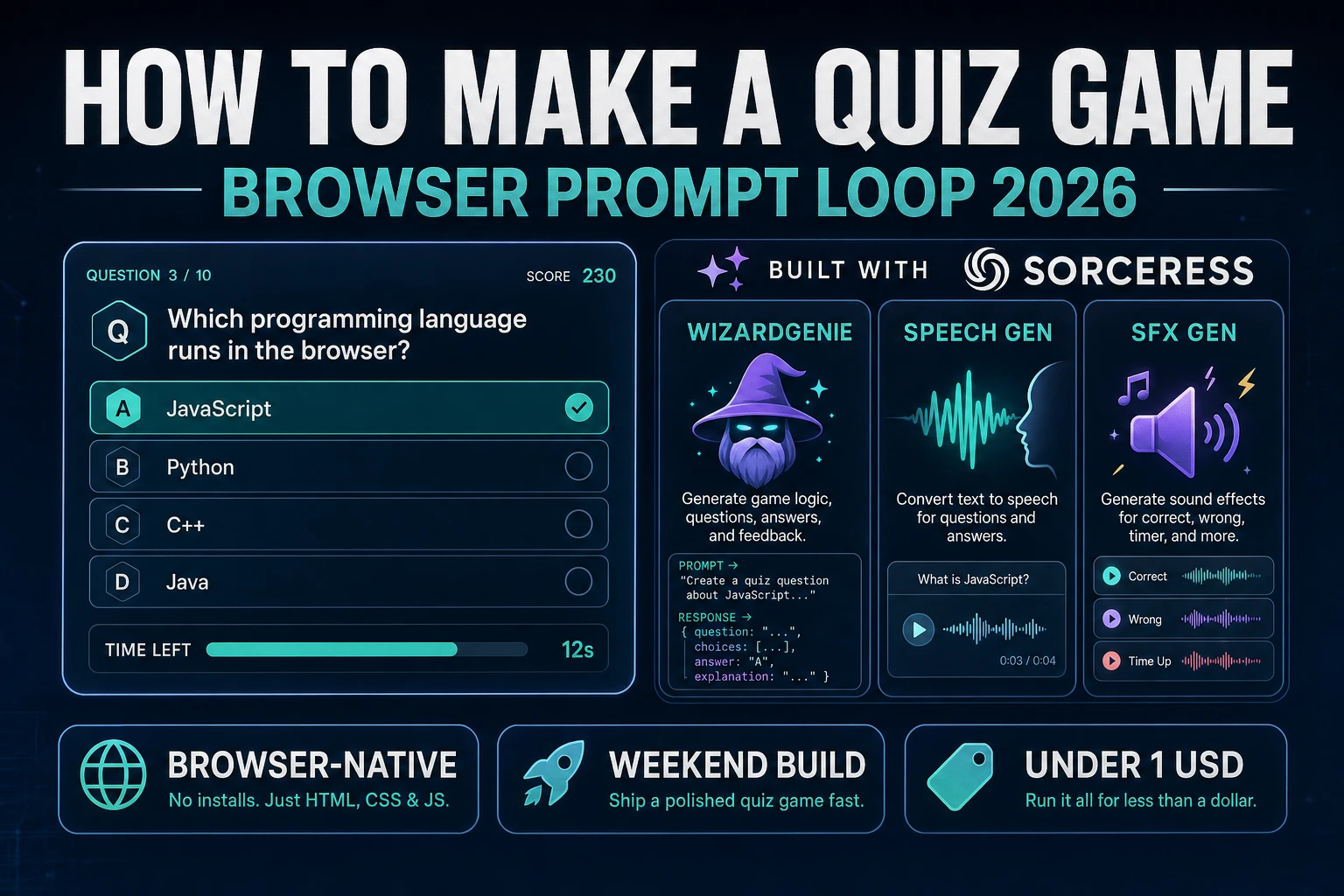
Ask How to Make a Quiz Game (Browser Prompt Loop 2026)

By Arron R.10 min read
How to make a quiz game in 2026: design a prompt-choice-score question schema with streaks and timers, wire the load-answer-feedback-next loop in WizardGenie, t

Most searchers who type “how to make a quiz game” want a prompt-choice-score loop they can finish in a weekend: load a question, show answers, grade the pick, flash feedback, advance. A full classroom LMS with authoring dashboards and anti-cheat servers is a product company. A browser prompt loop is different. A coding agent scaffolds the question schema, timer, and streak math from one prompt, and AI generation covers theme art, host lines, and feedback stings. On desktop or web, that means WizardGenie for the load-answer-next loop, AI Image Gen for theme cards, Speech Gen for host VO, SFX Gen for correct and wrong cues, and optional Music Gen for a quiet round bed. This guide is the honest end-to-end for how to make a quiz game in 2026, as a timed multiple-choice build you can ship once.
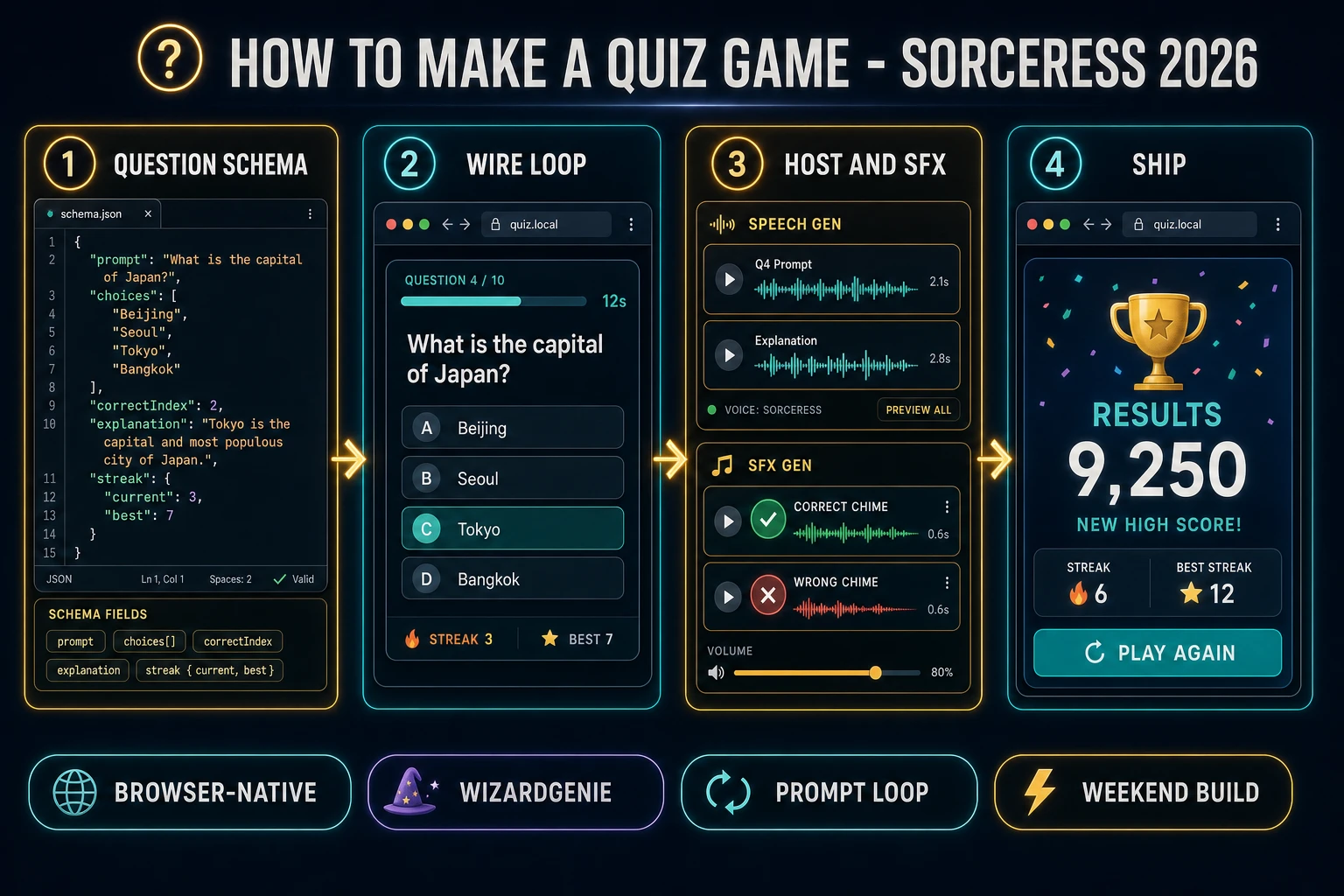
How to make a quiz game browser pipeline: design a prompt-choice-score schema, wire timed rounds in WizardGenie, add Speech Gen host lines and SFX
The 2026 how to make a quiz game recipe: model question schema and scoring, wire timed rounds and streaks in WizardGenie, then add theme art, host VO, and feedback audio.

What how to make a quiz game actually means in 2026

The query “how to make a quiz game” hides three intents. Some searchers want a printable worksheet with bubbles for a classroom — that is paper, not a playable digital game. A second intent is a live multiplayer quiz show with host cameras and real-time leaderboards — a networking and moderation problem. The third intent, and the one this guide targets, is a browser quiz: a fixed question pack, one prompt on screen, two to four choices, a countdown, score and streak HUD, short feedback copy, and a results card with accuracy and Play Again. That is a weekend build, it demos the Sorceress toolset, and it is the format most quiz game tutorial and javascript quiz searchers actually want.

Keep trivia and quiz straight so you don’t rebuild the wrong sibling. A trivia title leans on a large knowledge bank with categories and difficulty tags — our how to make a trivia game guide owns that bank-first path. A quiz title owns scoring rules, timed rounds, explanations after each answer, and optional host narration. Educational drills and personality-style quizzes still use the same prompt-choice-score schema; they just change how you map answers to points. If you already shipped a math drill loop, the how to make a math game post covers number prompts; this post owns general multiple-choice feedback and Speech Gen host lines instead.

The quiz loop in one minute (load question, answer, feedback, next)

Five moving parts, repeated until the pack is empty. First, load — pull the next question object from a shuffled queue (or weighted by difficulty). Second, show — render the prompt, choice buttons, and start the per-question timer. Third, answer — wait for a click or timer expiry. Fourth, feedback — grade the pick, update score and streak, play a sting, optionally speak a host line, and show a one-line explanation. Fifth, next — hold the reveal for about 1.5 seconds, then advance or open the results card. That is the entire quiz loop. Daily packs, online lobbies, and teacher dashboards are polish layered after one honest solo round feels fair.
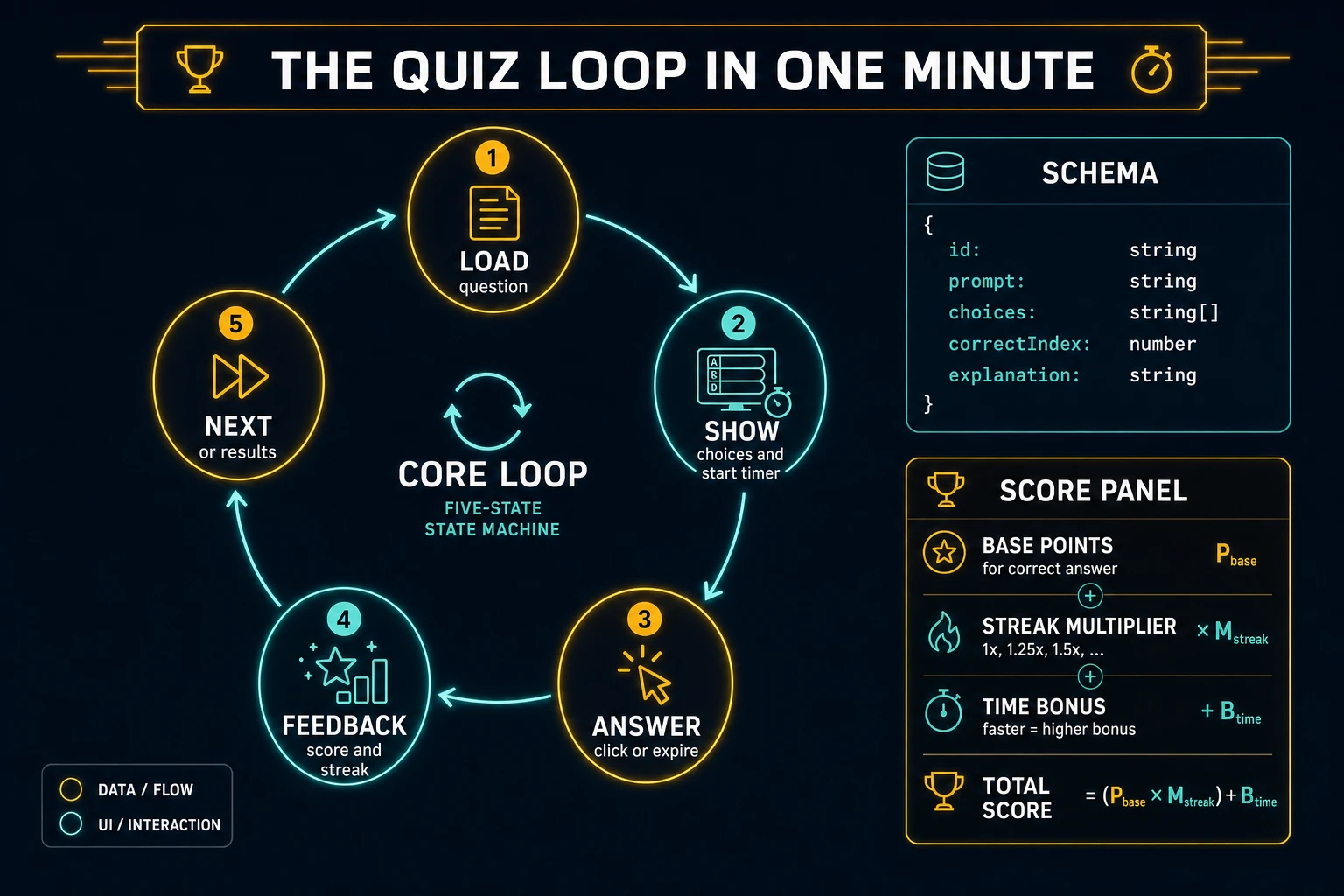
Quiz loop state machine diagram showing load question, show choices and timer, answer, feedback with streak, and next or results
The quiz loop: load a question, show choices and start the timer, accept an answer, apply feedback and streak math, then advance or show results.

Pick your engine for how to make a quiz game: DOM, Phaser, or WizardGenie

Three good targets in 2026, each with a different trade-off. Vanilla JavaScript on the DOM is the honest default and the pick this guide recommends for a first build. Render a question card, a grid of choice buttons, a countdown bar, and a score line. Total code footprint for a working html5 quiz with shuffle, timer, streaks, and local best-score is under 400 lines. No engine to install, ships as a static HTML file, deploys anywhere. The MDN setTimeout docs (verified 2026-08-21) cover the timer surface; the Web Storage API covers best-score persistence.

Canvas with painted cards becomes the right pick if every choice button is custom art and you want animated confetti on streaks. You trade free focus rings and accessibility for visuals — fine for a showcase jam, heavier once you reimplement hit-testing and keyboard navigation yourself.

Phaser 4.1.0 (verified 2026-08-21 on the official Phaser API documentation page) becomes the right pick if you want Scene lifecycle for title-play-results, tweens when a choice lights green or red, or particle pops on a five-streak. Phaser does not invent your scoring rules — you still need the same question schema and grade helpers. Use Phaser when motion polish is the product; use DOM when the product is a timed quiz game people can tap on a phone.

WizardGenie is not a separate rendering engine — it scaffolds whichever of the three you pick from a single natural-language prompt. WizardGenie ships as both a desktop app (Windows installer with auto-update, available to Early Access supporters and above) and a no-install web build. Its coding-model lineup covers Claude Opus 4.7, GPT-5.5, Gemini 3.1 Pro, DeepSeek V4 Pro, Kimi K2.5, Grok 4.2, and MiniMax M2.7 (verified 2026-08-21 in src/app/_home-v2/_data/tools.ts). For a quiz, any frontier model scaffolds the schema, timer, and feedback flow in one prompt. Pair a frontier planner with a budget executor like DeepSeek V4 Pro or Kimi K2.5 for the typing pass — the Dual-agent pattern lands most projects at roughly one-fifth the single-frontier cost.

Step 1 — design question schema and scoring rules

Nothing else in the pipeline matters if correct answers are ambiguous, or if streaks reset on the wrong events. Start with a small, testable model for a multiple choice game:

const QUESTIONS = [
  {
    id: 'q1',
    prompt: 'Which HTML element creates a clickable button?',
    choices: ['<div>', '<button>', '<span>', '<img>'],
    correctIndex: 1,
    explanation: '<button> is the semantic control for actions.',
    points: 10,
  },
];

function shuffle(arr) {
  const a = arr.slice();
  for (let i = a.length - 1; i > 0; i--) {
    const j = Math.floor(Math.random() * (i + 1));
    [a[i], a[j]] = [a[j], a[i]];
  }
  return a;
}

function grade(question, choiceIndex, msLeft, streak) {
  const correct = choiceIndex === question.correctIndex;
  const nextStreak = correct ? streak + 1 : 0;
  const timeBonus = correct ? Math.max(0, Math.floor(msLeft / 1000)) : 0;
  const streakBonus = correct ? Math.min(nextStreak - 1, 5) * 2 : 0;
  const delta = correct ? question.points + timeBonus + streakBonus : 0;
  return { correct, delta, nextStreak, explanation: question.explanation };
}

function startRound(bank, count = 10) {
  return {
    queue: shuffle(bank).slice(0, count),
    index: 0,
    score: 0,
    streak: 0,
    answered: 0,
    correctCount: 0,
  };
}

Game state is { queue, index, score, streak, answered, correctCount, timerId, msLeft, phase } where phase is idle | asking | feedback | results. Unit-test four asserts before you paint UI: shuffle preserves length and membership; a wrong pick zeros streak and awards zero points; a correct pick with 8 seconds left awards base plus time bonus; a five-streak caps streak bonus so runaway multipliers cannot break a classroom balance. Those asserts are the difference between a quiz game tutorial people trust and one that silently grades the wrong index.

Keep fill-in-the-blank and multi-select out of v1 — they are schema variants on top of the same grade helper. Related educational pacing also shows up in the educational game guide if you want lesson-style framing after this prompt loop ships.

Step 2 — wire timed rounds and streaks in WizardGenie

With the model solid, open WizardGenie. Drop in a bare index.html with a question card, four choice buttons, a countdown bar, and a score/streak line. Give the agent one paragraph: Build a browser quiz. Load questions from a local JSON array with prompt, choices, correctIndex, explanation, and points. Shuffle and deal ten questions per round. Show one prompt with four buttons. Start a 15-second countdown with setTimeout ticks every 250 ms. On click or expiry, grade the answer, update score and streak, show explanation for 1500 ms, then advance. On empty queue, show results with accuracy and Play Again. Persist best score in localStorage. Use DOM buttons and click handlers. Feed that to any coding model and the scaffold lands in under five minutes.

The remaining afternoon is polish via follow-ups. Keep the timer and click handlers thin and testable:

function clearTimer(game) {
  if (game.timerId) clearTimeout(game.timerId);
  game.timerId = null;
}

function tick(game, onExpire) {
  clearTimer(game);
  const step = () => {
    game.msLeft -= 250;
    renderTimer(game.msLeft);
    if (game.msLeft <= 0) {
      clearTimer(game);
      onExpire();
      return;
    }
    game.timerId = setTimeout(step, 250);
  };
  game.timerId = setTimeout(step, 250);
}

function onChoice(game, choiceIndex) {
  if (game.phase !== 'asking') return;
  clearTimer(game);
  const q = game.queue[game.index];
  const result = grade(q, choiceIndex, game.msLeft, game.streak);
  game.score += result.delta;
  game.streak = result.nextStreak;
  game.answered += 1;
  if (result.correct) game.correctCount += 1;
  game.phase = 'feedback';
  showFeedback(result);
  playSfx(result.correct ? 'correct' : 'wrong');
  setTimeout(() => advance(game), 1500);
}

function advance(game) {
  game.index += 1;
  if (game.index >= game.queue.length) {
    game.phase = 'results';
    saveBest(game.score);
    showResults(game);
    return;
  }
  game.phase = 'asking';
  game.msLeft = 15000;
  renderQuestion(game.queue[game.index]);
  tick(game, () => onChoice(game, -1));
}

function saveBest(score) {
  const key = 'quiz-best';
  const prev = Number(localStorage.getItem(key) || 0);
  if (score > prev) localStorage.setItem(key, String(score));
}

Wire choices with pointerup or the classic click event so touch devices do not need a separate path. Disable buttons the moment feedback starts so double-taps cannot double-score. Treat choiceIndex === -1 as a timeout miss. Style the correct button green and the wrong pick red during feedback; never leave the reveal up forever — the 1500 ms hold is what keeps pace. Persist best score with localStorage so Refresh does not wipe a personal record. For a light “daily pack” later, store a date-keyed seed and reshuffle from it — a true multiplayer lobby is a follow-up afternoon once solo rounds already feel fair.

Step 3 — AI Image Gen themes, Speech Gen host lines, SFX Gen and Music Gen

Gray text on a white card proves the loop. Art, voice, and audio make the round feel intentional. Open AI Image Gen and run Nano Banana Pro at 18 credits per pass (verified 2026-08-21 in src/lib/models.ts). Prompt two assets: a title/theme backdrop with high-contrast space for a question card, and a results overlay that still leaves room for SCORE and PLAY AGAIN. Keep the playfield readable — busy backgrounds lose to soft vignettes for a browser quiz.

Open Speech Gen (MiniMax Turbo at 0.3 credits per 1K characters with a 1-credit minimum, verified 2026-08-21 in src/app/speech-gen/page.tsx) and generate eight short host lines: welcome, round start, correct, wrong, streak-three, streak-five, time’s up, and results. Cache them as MP3 and trigger on the matching phase. Browser Web Speech API synthesis is fine for prototypes, but OS voices vary; ship Speech Gen clips for the five moments players hear every session.

Open SFX Gen (1 credit per second of audio, verified 2026-08-21 in src/app/sfx-gen/page.tsx) and generate four short clips: correct chime, wrong buzz, timer-low tick, and round-complete sting. Trigger correct and wrong inside onChoice, timer-low when msLeft crosses three seconds, and round-complete on results. Keep volumes low so a twenty-question pack does not fatigue.

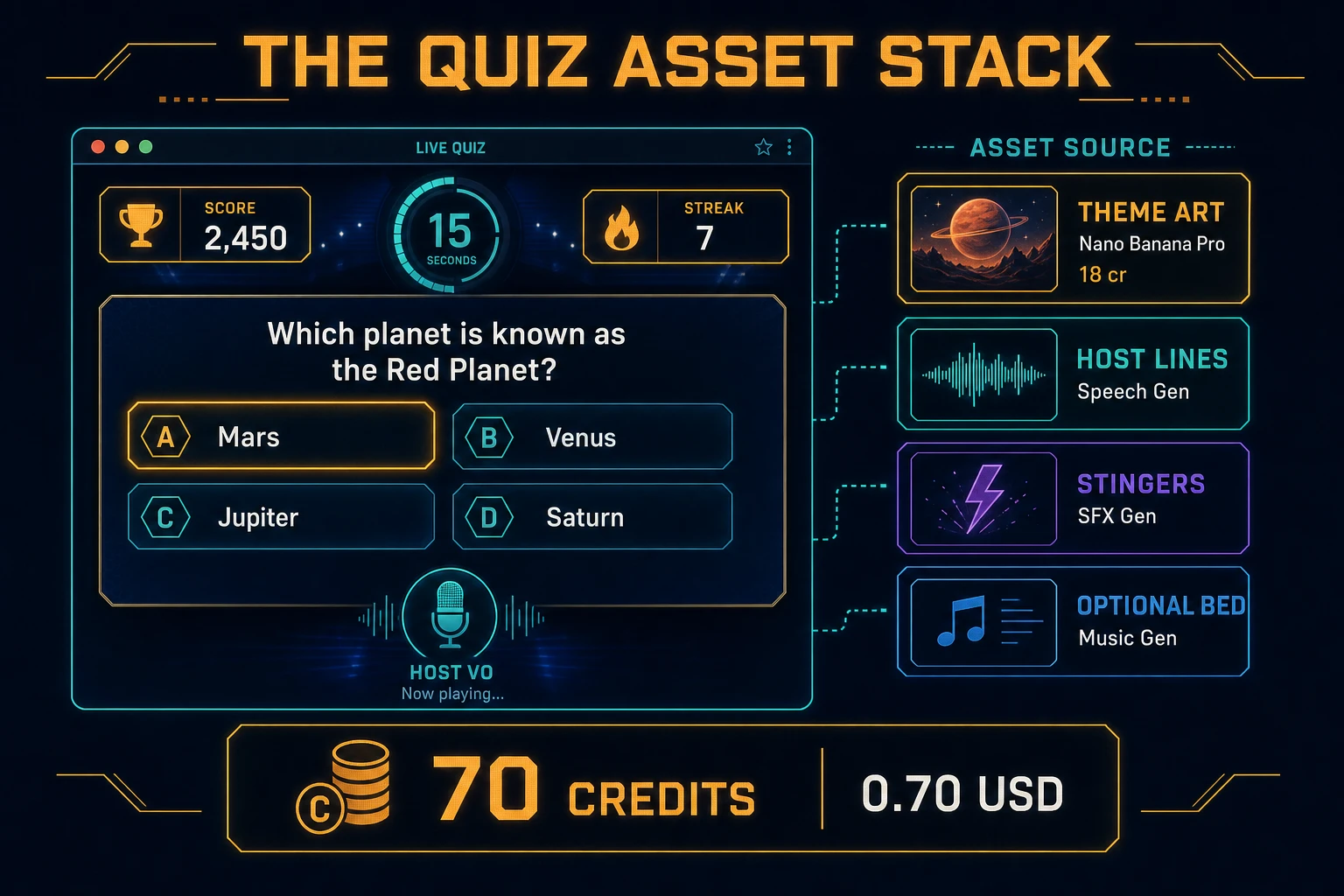
Optional but nice: open Music Gen (10 credits per generation, verified 2026-08-21 in src/app/music-gen/page.tsx) and prompt a quiet quiz-night bed — “soft instrumental lounge, no vocals, low dynamics for a quiz round.” One or two tries is enough. Mute music by default so players who want silence stay in flow. Browse the rest of the stack from the tools guide if you later add category icons or a personality-quiz branch. The asset stack for a weekend how to make a quiz game project stays well under a dollar of credits; see the cost section below for the line-item math.

Quiz asset stack diagram showing AI Image Gen themes, Speech Gen host lines, SFX Gen stingers, optional Music Gen bed, and total credit cost under one dollar
The quiz asset stack: AI Image Gen for theme art, Speech Gen for host lines, SFX Gen for feedback cues, optional Music Gen bed — roughly 70 credits on the 2026 Sorceress rate card.

What a how to make a quiz game project costs on Sorceress in 2026

Here is an honest first-project budget against the live Sorceress rate card (verified 2026-08-21 against local source). Two Nano Banana Pro images at 18 credits each = 36 credits ($0.36) for title and results themes. Eight Speech Gen host lines at the 1-credit minimum each = 8 credits ($0.08). Four SFX clips totaling about 6 billable seconds at 1 credit/sec = 6 credits ($0.06). Optional Music Gen bed with a retry at 10 credits each = 20 credits ($0.20). Coding-model API time for the WizardGenie scaffold and polish pass is typically under $0.40 when you pair a frontier planner with DeepSeek V4 Pro or Kimi K2.5 as executor. Grand total: roughly 70 credits ($0.70) plus sub-dollar agent time. The free 100-credit signup grant (verified 2026-08-21 in src/app/api/admin/credits/route.ts) covers the entire art, voice, and audio stack on day one. Credit packs and supporter tiers live on Plans if you outgrow the grant.

That is the whole pipeline for how to make a quiz game in 2026: a prompt-choice-score schema, timed rounds with streak math, DOM click-to-answer, Speech Gen host lines, and a thin Sorceress asset layer so the round feels finished. Ship the static build, play one full ten-question pack without double-scoring or stuck timers, then decide whether a daily seed pack or a second question type is worth another afternoon — only after the first streak-five already feels fair.

Frequently Asked Questions

How is a quiz game different from a trivia game?

A trivia game is usually a knowledge bank with categories and difficulty tags — who painted what, which planet is closest. A quiz game is the broader prompt-choice-score loop: educational drills, personality quizzes, classroom checks, or timed multiple-choice rounds. The schema is the same shape (prompt, options, correct index or scoring map), but a how to make a quiz game project often adds streaks, partial credit, explanations after each answer, and optional host narration. If you only need a pub-style knowledge bank, start with our trivia guide; if you need scoring rules and feedback copy, stay on this quiz path.

Do I need a backend for a browser quiz?

Not for a first single-player html5 quiz. Ship questions as a local JSON array, score on the client, and store best score in localStorage. That is enough for a jam entry, a classroom kiosk, or a portfolio demo. Add a backend only when you need private answer keys for competitive leaderboards, daily fresh packs, or teacher dashboards. Trying to hide answers with base64 in the client is not security — it is busywork.

How should timed rounds work?

Use a per-question countdown with setTimeout or requestAnimationFrame, cancel it the instant the player picks an answer, then hold a feedback state for about 1.5 seconds before advancing. Ten to twenty seconds is the sweet spot for general multiple choice; stretch to thirty for reading-heavy prompts. On expiry, mark wrong (strict), skip with no penalty (kind), or reveal-then-advance (educational). Award a small time bonus for fast correct answers so confidence feels rewarded without punishing careful players.

Should I use Speech Gen or the browser Web Speech API for the host?

For production VO that sounds intentional, use Speech Gen and cache short MP3 lines for intro, correct, wrong, streak, and results. Browser SpeechSynthesis is free and useful for prototypes, but voices and pacing vary wildly by OS. Ship Speech Gen clips for the five host moments players hear every session; keep Web Speech as a mute-fallback only if you want zero asset weight.

How much does it cost to build a quiz game on Sorceress?

A first-project browser quiz budgets like this against the 2026 Sorceress rate card (verified 2026-08-21 against local source). Two theme images at Nano Banana Pro 18 credits each = 36 credits or 0.36 USD. Eight short Speech Gen host lines at the 1-credit minimum each = 8 credits or 0.08 USD. Four SFX clips totaling about 6 billable seconds at 1 credit per second = 6 credits or 0.06 USD. Optional Music Gen bed with a retry at 10 credits each = 20 credits or 0.20 USD. Total roughly 70 credits or 0.70 USD plus under 0.40 USD in coding-model API time. The free 100-credit signup grant covers the full stack.

Sources

  1. MDN - Window.setTimeout()
  2. MDN - Web Speech API
  3. MDN - Web Storage API
  4. Phaser 4.1.0 API Documentation
Written by Arron R.·2,230 words·10 min read

Related posts


