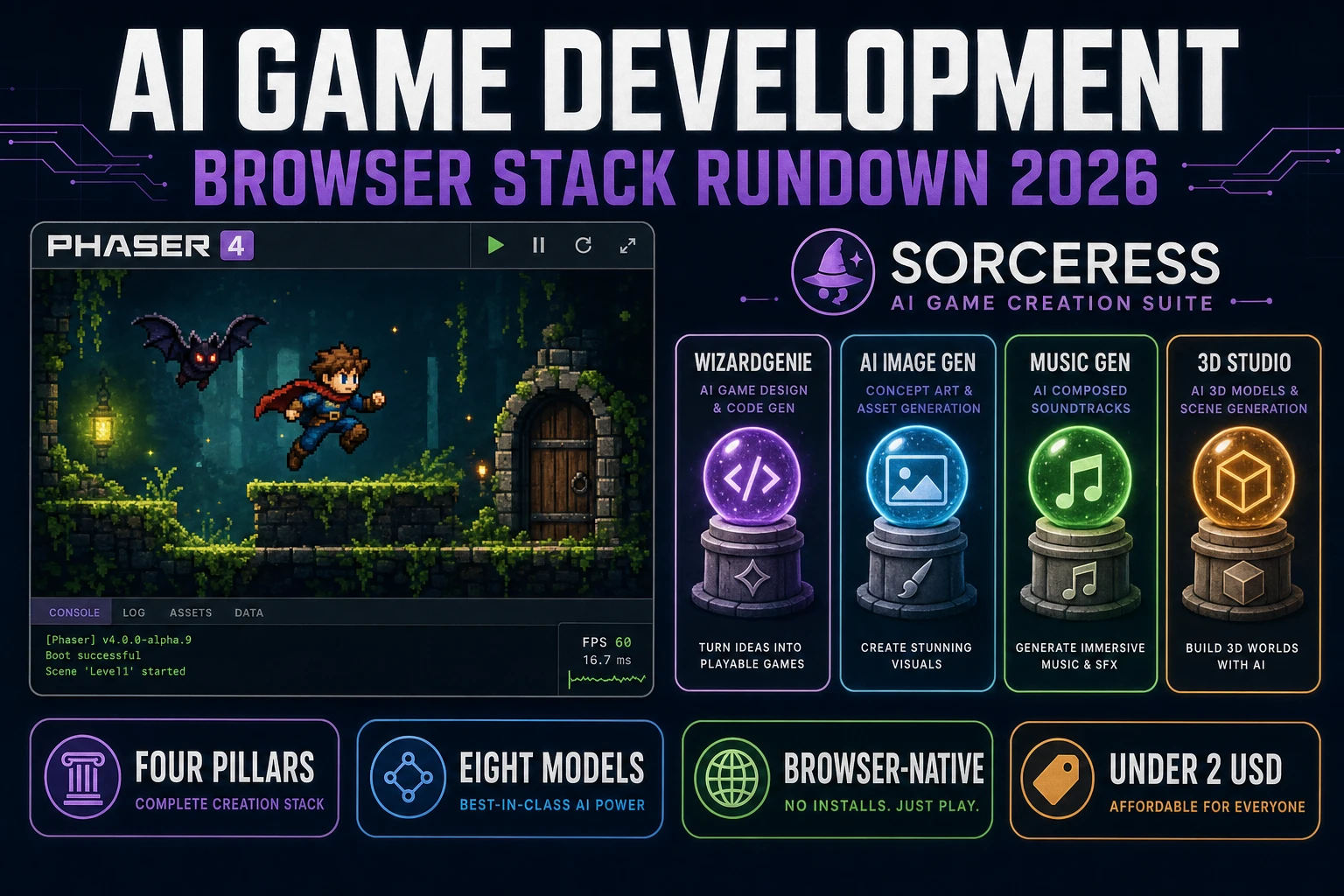
AI Game Development in 2026 (Browser Stack Rundown)

By Arron R.13 min read
AI game development in 2026 lands honest as a four-pillar browser stack, not a magic button: WizardGenie drives eight coding models on the code side, AI Image G

Most searchers who type "ai game development" in 2026 are asking a genuinely honest question - is the stack real yet, and can I actually ship a game with it this weekend? - and the truthful 2026 answer is yes, but only if the four pillars are named honestly. AI game development on a browser-native stack in 2026 is not a single magic tool that produces a AAA RPG from one prompt. It is a four-pillar assembly line: an AI coding agent (WizardGenie plus the Sorceress Code agent) that scaffolds and iterates the game loop, an art pipeline (AI Image Gen, Auto-Sprite v2, 3D Studio, Tileset Forge) that produces every visual asset from a prompt, an audio pipeline (Music Gen, SFX Gen, Speech Gen) that scores the loop, and a publish path (Sorceress Publishing plus the Play Arcade) that ships the finished tab. The runtime underneath is Phaser v4.2.1 "Giedi" (released 9 July 2026, verified 2026-09-02 on the official Phaser stable download page) on top of the HTML Canvas API or WebGL, and the whole thing runs in a browser tab that never asks you to install a native engine. This guide is the honest four-pillar rundown for ai game development on the Sorceress stack in 2026, with real costs and real model names.
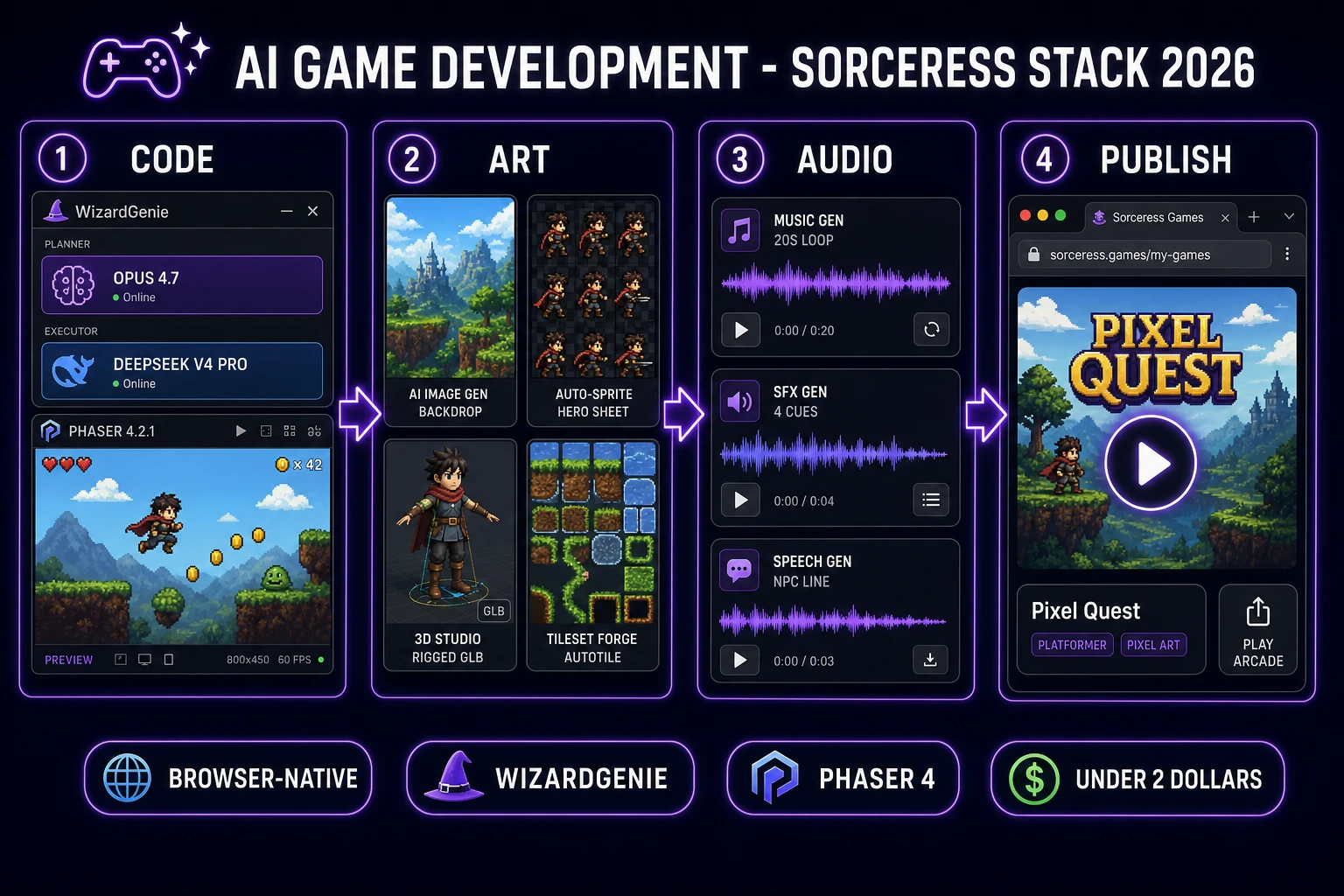
AI game development in 2026 as a four-pillar browser stack: code pillar (WizardGenie plus Planner Executor coding models), art pillar (AI Image Gen, Auto-Sprite, 3D Studio, Tileset Forge), audio pillar (Music Gen, SFX Gen, Speech Gen), and publish pillar (Sorceress Publishing plus Play Arcade)
The 2026 ai game development recipe: four pillars, one browser tab - WizardGenie codes, the art pipeline dresses, the audio stack scores, Sorceress Publishing ships.

What ai game development actually is in 2026 (agent, not autopilot)

The phrase "ai game development" shows up in three very different search intents. Some searchers want a philosophical piece on whether AI will replace game designers - it will not, and that is a separate essay. Some want a market map naming every AI game engine on the planet - a comparison article for a different day. The intent this article targets is the third and by far the largest: a practical reader who wants to know what an actual ai game development workflow looks like in 2026, what tools cover which parts of the pipeline, which coding models to pair, and what a first weekend-scope project honestly costs. The honest 2026 answer is a four-pillar browser stack, and the rest of this piece walks it end to end.

The mental model that keeps a first ai game development project on the rails is agent, not autopilot. A coding agent in 2026 is genuinely capable of a working video game development scaffold from a natural-language spec (verified 2026-09-02 on the Wikipedia video game development entry). A well-scoped prompt to WizardGenie produces a Phaser 4 game loop with a hero, an enemy, input, collision, and a scoreboard in under twenty minutes, and follow-up prompts refine physics, spawner, HUD, and scoring without any manual code stitching. What the agent does not do in 2026 is make design decisions or read playtest instincts. It cannot tell you that the jump feels floaty because gravity should be 0.9 instead of 0.6, or that the game is boring after ninety seconds because the difficulty curve is flat. The human owns scope, taste, and playtest feel; the agent owns scaffolding, boilerplate, and the asset pipeline. Anyone selling "one sentence in, playable game out" is showing a demo, not a workflow.

The second reframe is scope over cleverness. A first ai game development project in 2026 is weekend-jam scope (verified 2026-09-02 on the Wikipedia game jam entry) - one screen, one hero, one enemy, one verb (jump, shoot, tap), one win state (reach the door, survive ninety seconds, hit ten targets). The agent will happily attempt a giant open-world project in your first prompt and fail invisibly. Locking scope inside the spec prompt itself is the single biggest predictor of whether a first Saturday afternoon ends in a playable tab or a wall of TypeScript errors. That reframe applies at every pillar of the stack: do not ask AI Image Gen for a 40-frame animation on pass one, do not ask 3D Studio to rig ten characters on pass one, do not ask Music Gen for a full soundtrack on pass one. One asset, one prompt, one pass, iterate.

The four pillars of the Sorceress ai game development stack

The Sorceress stack is deliberately structured as four pillars because that is how the actual work of shipping a game splits in 2026 - code, art, audio, and publish. Every tool below is verified 2026-09-02 against the FEATURED_TOOLS list in src/app/_home-v2/_data/tools.ts. Group the tools this way in your head from day one and every ai game development question ("where do I make the tileset?", "which model handles the hero sheet?", "how do I add NPC voice?") has an immediate answer.

  • Code pillar - WizardGenie (AI-powered game engine, browser or desktop) plus Sorceress Code (chat-based coding agent tuned for Phaser and Three.js). Both drive the same eight top-tier coding models with a Planner+Executor split.
  • Art pillar - AI Image Gen (multi-model text-to-image, twelve models in one panel), Auto-Sprite v2 (prompt-to-animated-sprite-sheet), 3D Studio (image-to-rigged-GLB with text-to-animation), Voxel Studio (MagicaVoxel-style props), Tileset Forge (autotile-ready terrain), Material Forge (PBR textures), True Pixel (image-to-pixel-art).
  • Audio pillar - Music Gen (looping beds via Suno V5.5), SFX Gen (per-second cue generation), Speech Gen (NPC dialogue voice).
  • Publish pillar - Sorceress Publishing (one-click host at sorceress.games/play/<slug>) plus the Play Arcade (social distribution to other indie players).

The four-pillar frame matters because it maps onto how time splits on an actual ai game development weekend. Roughly 40 percent of a first weekend goes to the code pillar (the loop is where the game actually lives), 30 percent goes to the art pillar (the game reads as a game the moment sprite placeholders leave), 15 percent goes to the audio pillar (three or four cues plus a music bed is the whole audio contract on a jam build), and 15 percent goes to publish plus polish. If any pillar is eating more than double its budget on a first project, that is the honest signal to shrink scope rather than push through - the prompt to game browser loop guide and the AI for game development indie stack both cover the same lesson from different angles.

The coding pillar - WizardGenie plus the eight coding models

The code pillar is where every ai game development project actually lives, because a game engine is a real-time loop and the loop is the thing an agent has to write. WizardGenie is the Sorceress AI-powered game engine and it drives every leading coding model in the industry through a browser tab or a Windows desktop installer with an auto-updater (both ship the same agent). The Sorceress Code agent runs the same models in a chat-based file-aware editor tuned specifically for Phaser scene management, Three.js renderers, game loops, collision, and asset loading.

The eight coding models available in the WizardGenie panel in 2026 (verified 2026-09-02 against CODING_MODELS in src/app/_home-v2/_data/tools.ts lines 766-775, sourced from the WizardGenie desktop AVAILABLE_MODELS table) are:

ModelProviderTier tagBest role
Claude Opus 4.7AnthropicTop tierPlanner
Claude Sonnet 4.6AnthropicFast + smartSolo (small scope)
GPT-5.5OpenAIFrontierPlanner
Gemini 3.1 ProGoogle1M contextPlanner (long files)
DeepSeek V4 ProDeepSeekBudgetExecutor
Kimi K2.5Moonshot256K codingExecutor
Grok 4.2xAI2M contextPlanner (huge codebases)
MiniMax M2.7MiniMaxAgent-readyExecutor

The pattern that makes ai game development actually cheap in 2026 is a Planner+Executor split: an expensive reasoner plans, a cheap fast typer executes. The Planner reads the one-page spec, breaks it into a task list, reviews the current file, and writes the next follow-up prompt for the Executor. The Executor writes the actual Phaser code. That pairing lands most weekend builds at roughly one-fifth the single-frontier cost, because the Planner only fires a handful of times while the Executor grinds through the boilerplate. Never put Claude Sonnet, Claude Opus, GPT-5.5, or Gemini 3.1 Pro on the Executor side; that erases roughly 80 percent of the cost advantage the pattern exists to capture. For a first ai game development project, the honest default pairing is Opus 4.7 as Planner and DeepSeek V4 Pro as Executor. The best AI coding model breakdown covers each model against game-dev tasks specifically, and the vibe coding apps benchmark compares WizardGenie against the general-purpose coding-agent field on game-loop tasks.
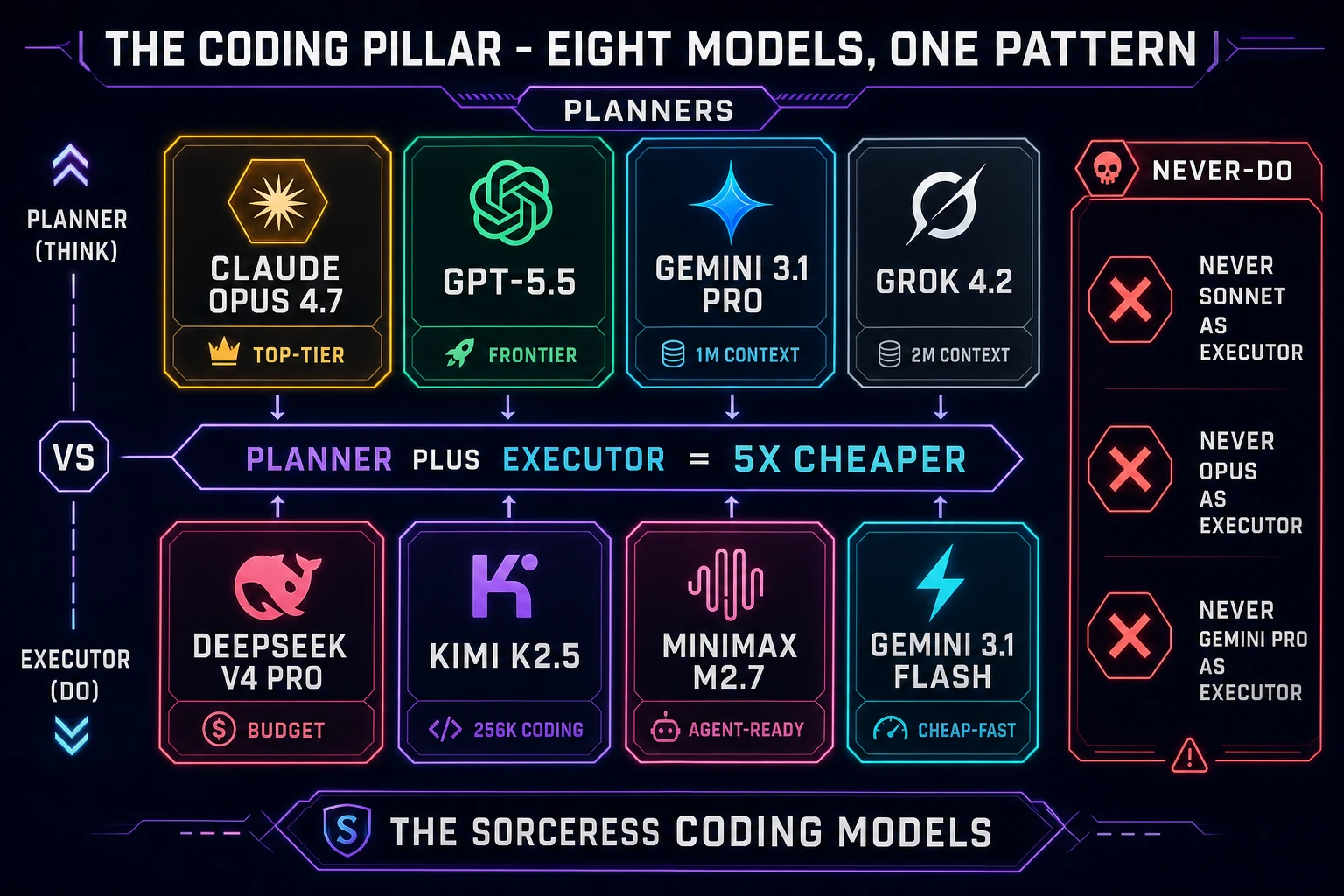
The Sorceress coding pillar - eight coding models arranged as a Planner Executor grid: Claude Opus 4.7, GPT-5.5, Gemini 3.1 Pro, and Grok 4.2 as Planners; DeepSeek V4 Pro, Kimi K2.5, MiniMax M2.7, and Gemini 3.1 Flash as Executors; never Sonnet or Opus as Executor
The coding pillar: eight models, one pattern. A Planner+Executor split cuts the ai game development bill by roughly five - never put a frontier model on the typing side.

The art pillar - AI Image Gen, Auto-Sprite, 3D Studio, Tileset Forge

The art pillar covers everything a player sees in a finished ai game development build - the backdrop, the hero, the enemy, the tileset, the UI, the props, the environment. The Sorceress art stack splits it into a handful of specialized generators plus one general-purpose text-to-image panel, and every game-ready asset has an obvious home.

  • AI Image Gen - the general-purpose text-to-image workspace, shipping twelve top-tier models in one panel including Nano Banana Pro, Nano Banana 2, GPT Image 2, Seedream 5 Lite, Flux 2 Pro, Grok Imagine, and Z-Image Turbo (verified 2026-09-02 against IMAGE_MODELS in src/lib/models.ts). Use Nano Banana Pro for consistent character sheets with reference images; use GPT Image 2 for clean geometric backdrops and any image that needs legible in-image text; use Flux 2 Pro for photoreal environment plates.
  • Auto-Sprite v2 - the specialized prompt-to-animated-sprite-sheet tool. Three steps: generate a character concept, animate it with AI video, sprite-ify the clip into a clean game-ready sheet with idle, run, jump, and attack frames on transparent background.
  • 3D Studio - the full 3D character pipeline: AI image generation of the concept, image-to-3D lift to a textured mesh, humanoid auto-rig with weight-paint refinement, and text-to-animation. Exports to FBX, GLB, or GLTF via the glTF (GLB) 2.0 specification (Khronos standard, verified 2026-09-02) for any engine.
  • Voxel Studio - MagicaVoxel-style voxel props with rigged characters straight from a prompt. Best for stylized retro-3D games where a full 3D Studio rig is more than the aesthetic needs.
  • Tileset Forge - autotile-ready terrain tilesets from a prompt. Ships tile-aligned edges, matching corner variants, and Godot or Tiled-ready JSON export.
  • Material Forge - image-to-PBR-material for 3D scenes. Bakes albedo, normal, roughness, and metallic maps from a single reference image.
  • True Pixel - image-to-pixel-art with grid-aligned crispness for retro game aesthetics.

The art pillar's honest lesson for a first ai game development project is one tool per asset class, not one tool for everything. Do not try to make a tileset in AI Image Gen when Tileset Forge exists; do not try to hand-rig a 3D model when 3D Studio Auto-Rigging does the humanoid skeleton in one click. Each specialized tool is trained on the exact constraint that class of asset needs (edge alignment, transparent background, rigged skeleton, PBR channel split), and the composite artwork reads more coherent when each asset comes out of the tool built for it. The animation AI generator guide covers how Auto-Sprite composes with AI Video Gen for animated sheets, and the Roblox game logo maker walkthrough covers the same AI Image Gen panel from a branding angle.

The audio pillar - Music Gen, SFX Gen, Speech Gen

The audio pillar is the smallest of the four in scope but has the biggest per-dollar impact on how a browser build feels. A silent Phaser scene reads as a debugger; the same scene with three short SFX cues and a 20-second music bed reads as a game. Three tools cover the whole audio contract on any first ai game development project.

  • Music Gen - looping music beds via Suno V5.5 (verified 2026-09-02 against MODELS in src/lib/sorceress-tools/audio/music.ts). Bills a flat MUSIC_CREDIT_COST of 10 credits per generation, returning roughly two variations per call (verified 2026-09-02 in src/app/music-gen/page.tsx line 28). Best prompt shape for a jam build: "chill 90 BPM lo-fi loop in A minor with soft vinyl crackle, no vocals, 20 seconds, loopable" - short, describes the biome mood, names the tempo and key, ends with "loopable" so the bed cross-fades cleanly.
  • SFX Gen - per-cue sound effect generation. Bills at SEED_AUDIO_CREDITS_PER_SECOND equals 1 credit per second of generated audio (verified 2026-09-02 in src/app/sfx-gen/page.tsx line 23). Four short cues for a first game (jump 180ms, coin 120ms, hit 200ms, level-complete 400ms) total roughly 5 credits or 0.05 USD.
  • Speech Gen - NPC dialogue voice for text-based games, visual novels, or in-game barks. Handles multiple speakers with distinct voice profiles; export as WAV or MP3 for direct import into the Phaser scene as audio assets.

Two audio rules that keep a first project honest. First, score the loop, not the story - a 20-second Music Gen bed loops for an entire five-minute play session and nobody notices; a full three-minute Music Gen track for the intro screen adds nothing to the play experience. Second, write the SFX prompt in physical terms, not musical ones - "soft plosive whoosh of a pixel hero jumping, 180 ms" produces a better cue than "cool retro jump sound" because the model has a physical event to render. The AI character voice generator walkthrough covers Speech Gen with a full NPC roster in mind, and the AI voice for games guide covers the same tool from the dialogue-recording angle.

The publish pillar - Sorceress Publishing plus the Play Arcade

The publish pillar closes the ai game development loop: the finished Phaser build has to live at a URL that a player can open in one tap on a phone or a desktop, and it has to be discoverable to other players who like games like yours. Sorceress covers both halves with Sorceress Publishing and the Play Arcade.

Sorceress Publishing takes a finished WizardGenie project and hosts it at sorceress.games/play/<your-slug> with one click. The build ships as a static HTML5 bundle over an ISR-cached edge CDN, so first paint is under a second on a warm cache and under two seconds cold. There is no server-side state, no backend to spin up, and no manual deploy step - the same tab that ran the game inside WizardGenie is the tab that pushes it live. That path is the most honest 2026 way to answer "how do I put my ai game development project somewhere a friend can play it right now?" - Sorceress Publishing is the answer, and the URL is shareable the moment the build is live.

The Play Arcade is the social layer on top: browse recent player-shipped games, sort by newest or by tag (platformer, puzzle, shmup, deck builder, incremental), leave a heart, follow a creator, and see everything that creator has shipped. That discoverability is a genuine differentiator for solo ai game development in 2026 - a finished Phaser build on your own GitHub Pages URL gets zero traffic outside your own social channels; the same build on the Play Arcade gets browsed by every visitor who lands on sorceress.games/play-games that week. WizardGenie does NOT auto-publish your finished game to Sorceress Arcade - the publish flow is deliberate, requires the creator to open the Publishing tab, and gives you a chance to set the tags, the thumbnail, and the "coming from a jam" flag. That is a feature, not a limitation: it prevents half-finished throwaway builds from cluttering the Arcade and preserves the honest signal-to-noise for players who browse it.

What an ai game development first project costs on Sorceress in 2026

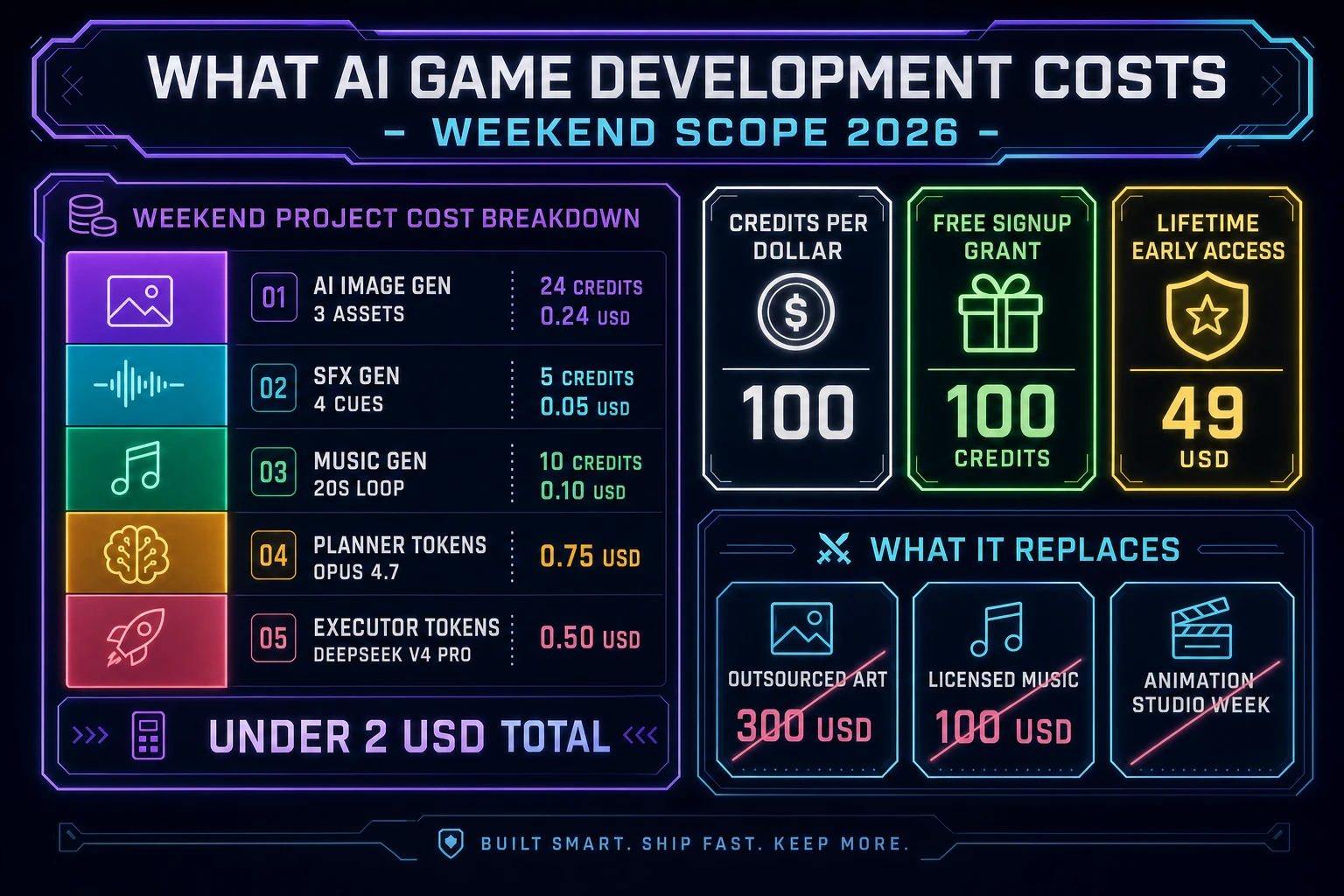
An honest budget for a first weekend-scope ai game development project against the 2026 Sorceress rate card (verified 2026-09-02 against local source):

  • Three AI Image Gen assets (backdrop, hero sprite sheet, enemy sprite sheet) at roughly 8 credits per generation: 24 credits or 0.24 USD.
  • One 3D Studio pass (optional, for a 3D prop or hero if the game needs one): roughly 40 credits or 0.40 USD.
  • Four SFX Gen cues (jump, coin, hit, level-complete) at SEED_AUDIO_CREDITS_PER_SECOND = 1: 5 credits or 0.05 USD.
  • One Music Gen 20-second looping bed at MUSIC_CREDIT_COST = 10: 10 credits or 0.10 USD.
  • Coding-model API time with a Planner + Executor split for a one-screen scope: under 1.50 USD.

Total roughly 39 credits or 0.39 USD in Sorceress asset generation (or 79 credits / 0.79 USD if you use the 3D Studio pillar), plus a coding-model bill under 1.50 USD, for a grand total under 2 USD on a pure-2D first weekend build. Credits convert at 100 per dollar via CREDITS_PER_DOLLAR in src/lib/models.ts line 69 (verified 2026-09-02). The free 100-credit signup grant covers the entire asset side outright and leaves headroom for a backdrop retry or a second music bed. Lifetime Early Access sits at 49 USD (LIFETIME_PRICE in src/app/plans/page.tsx line 51, verified 2026-09-02) if you want desktop WizardGenie with auto-update for the next jam plus a bigger monthly credit allowance.

The ai game development cost breakdown for a weekend-scope first project: AI Image Gen 24 credits, SFX Gen 5 credits, Music Gen 10 credits, Planner tokens 0.75 USD, Executor tokens 0.50 USD - under 2 USD total, with a free 100-credit signup grant that covers the asset side
The ai game development cost breakdown: under 2 USD total for a weekend-scope build. The free 100-credit signup grant covers the entire asset side. Lifetime Early Access sits at 49 USD.

The Sorceress tools guide lists every tool with a one-line description if you want to browse the whole surface, and the how to make a game with AI walkthrough is the concrete step-by-step that assembles this same four-pillar stack into a Saturday-afternoon platformer. Ai game development in 2026 is not a demo reel - it is a working browser stack, four pillars deep, that ships real games in real time under a two-dollar generation bill. Open a WizardGenie tab, write a one-page spec, pick Opus 4.7 plus DeepSeek V4 Pro, and the first playable is roughly twenty minutes from the first prompt. The rest is polish. The large language model (verified 2026-09-02 on Wikipedia) is the coding partner; you are the designer.

Frequently Asked Questions

What does ai game development actually mean in 2026?

AI game development in 2026 means a browser-native stack where an AI coding agent scaffolds the game loop while AI generators handle the art, audio, and 3D pipeline, verified 2026-09-02 against the Sorceress source in src/app/_home-v2/_data/tools.ts. The honest mental model is agent-not-autopilot: a human still writes the one-page spec, picks a Planner+Executor coding-model pair, watches the first ten seconds of the run, and patches specific systems for the next hour. The AI handles the scaffolding, the boilerplate, and the asset pipeline (image gen, sprite sheets, texture bake, rigged 3D, tileset autotile, music bed, SFX cues). The human handles scope, design taste, and playtest instincts. In practice ai game development ships a scoped weekend prototype in one to three days from an empty tab, not a Baldur's Gate clone from one sentence.

What are the four pillars of ai game development on Sorceress in 2026?

Code, art, audio, publish - verified 2026-09-02 against the FEATURED_TOOLS list in src/app/_home-v2/_data/tools.ts. The code pillar is WizardGenie plus the Sorceress Code agent, driving eight top-tier coding models (Claude Opus 4.7, Claude Sonnet 4.6, GPT-5.5, Gemini 3.1 Pro, DeepSeek V4 Pro, Kimi K2.5, Grok 4.2, MiniMax M2.7) with a Planner+Executor split to cut cost roughly 5x versus a single frontier model. The art pillar is AI Image Gen (twelve models including Nano Banana Pro, GPT Image 2, Flux 2 Pro, Seedream 5 Lite) plus Auto-Sprite v2 for animated sheets, 3D Studio for image-to-rigged-GLB, Voxel Studio for MagicaVoxel-style props, Tileset Forge for autotile-ready terrain, Material Forge for PBR textures. The audio pillar is Music Gen for looping beds, SFX Gen for cues, Speech Gen for NPC dialogue, plus SFX Editor for post. The publish pillar is Sorceress Publishing (auto-host at /my-games) plus the Play Arcade (/play-games) for social distribution.

Which AI models should I pair for ai game development in 2026?

A Planner+Executor split beats any single frontier model on cost, verified 2026-09-02 in src/app/_home-v2/_data/tools.ts CODING_MODELS. Pick an expensive-reasoner Planner (Claude Opus 4.7, GPT-5.5, Gemini 3.1 Pro, or Grok 4.2 with 2M context) to read the spec, plan the task list, and write each follow-up prompt. Pick a cheap-fast-typer Executor (DeepSeek V4 Pro at Budget tag, Kimi K2.5 at 256K coding context, MiniMax M2.7 agent-ready, or Gemini 3.1 Flash) to write the actual Phaser code. Never put Claude Sonnet, Claude Opus, GPT-5.5, or Gemini 3.1 Pro on the typing side; that erases roughly 80 percent of the cost advantage the pattern exists to capture. The default honest pairing for a first ai game development project is Opus 4.7 as Planner and DeepSeek V4 Pro as Executor - about one-fifth the single-frontier bill for the same weekend build.

What does an ai game development first project cost on Sorceress in 2026?

A one-screen weekend build lands under two US dollars in generation, verified 2026-09-02 against the local rate card. Three AI Image Gen assets (a scene backdrop, a hero sprite sheet, a small enemy sheet) at roughly 8 credits per generation total 24 credits or 0.24 USD. Four SFX Gen cues (jump, hit, pickup, hurt) at SEED_AUDIO_CREDITS_PER_SECOND equals 1 credit per second of generated audio in src/app/sfx-gen/page.tsx line 23 total around 5 credits or 0.05 USD. One Music Gen 20-second looping bed at MUSIC_CREDIT_COST equals 10 credits in src/app/music-gen/page.tsx line 28 costs 0.10 USD. Coding-model API time with a Planner+Executor split under 1.50 USD. Total under 2 USD, plus the model bill. Credits convert at 100 per dollar via CREDITS_PER_DOLLAR in src/lib/models.ts line 69. The free 100-credit signup grant covers the entire asset side outright. Lifetime Early Access sits at 49 USD (LIFETIME_PRICE in src/app/plans/page.tsx line 51) if you want desktop WizardGenie with auto-update.

Is ai game development actually going to replace human game devs?

No, and 2026 is the year that stopped being a live question, verified 2026-09-02 against the shipping Sorceress workflow. AI game development in its 2026 form is a productivity multiplier on the parts of the job that used to eat weeks (boilerplate, asset creation, sprite animation, texture bake, tileset autotile, music bed, SFX pass) and it leaves the design, the scope, the playtest, and the taste calls entirely on the human. A one-person team ships in 2026 what a five-person team shipped in 2022 - that is a scope shift, not a job replacement. The bottleneck in ai game development moved from 'can we build this' to 'do we know what to build and does it feel good' - and those are the parts nobody has automated. The honest read is that AI raises the ceiling of what a solo developer can attempt and lowers the floor of what a first-time jammer can complete.

Sources

  1. Phaser v4.2.1 'Giedi' stable download
  2. Video game development - Wikipedia
  3. Canvas API - MDN Web Docs
  4. WebGL - MDN Web Docs
  5. Large language model - Wikipedia
  6. glTF (GLB) 2.0 specification - Khronos
  7. Game jam - Wikipedia
Written by Arron R.·2,962 words·13 min read

Related posts