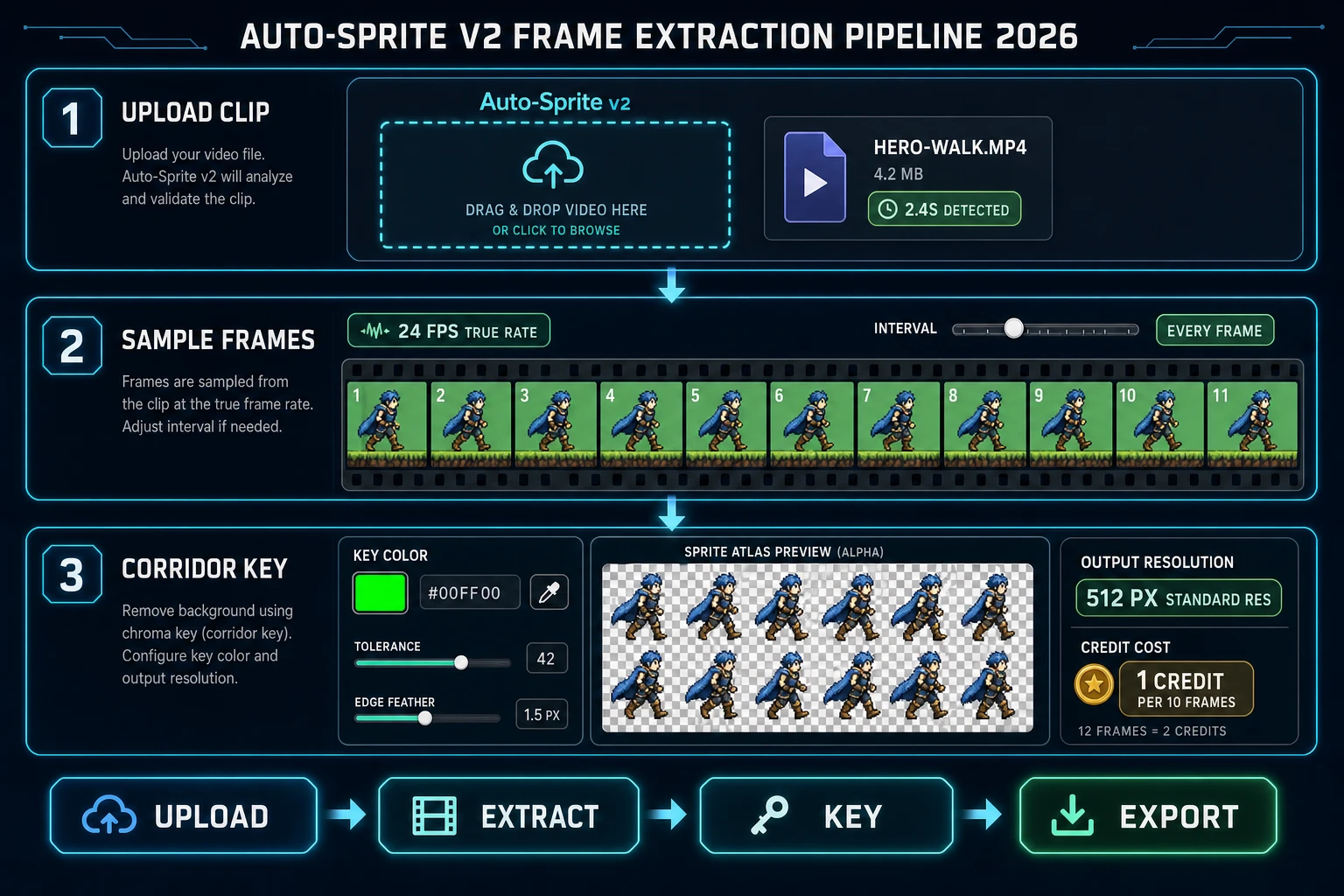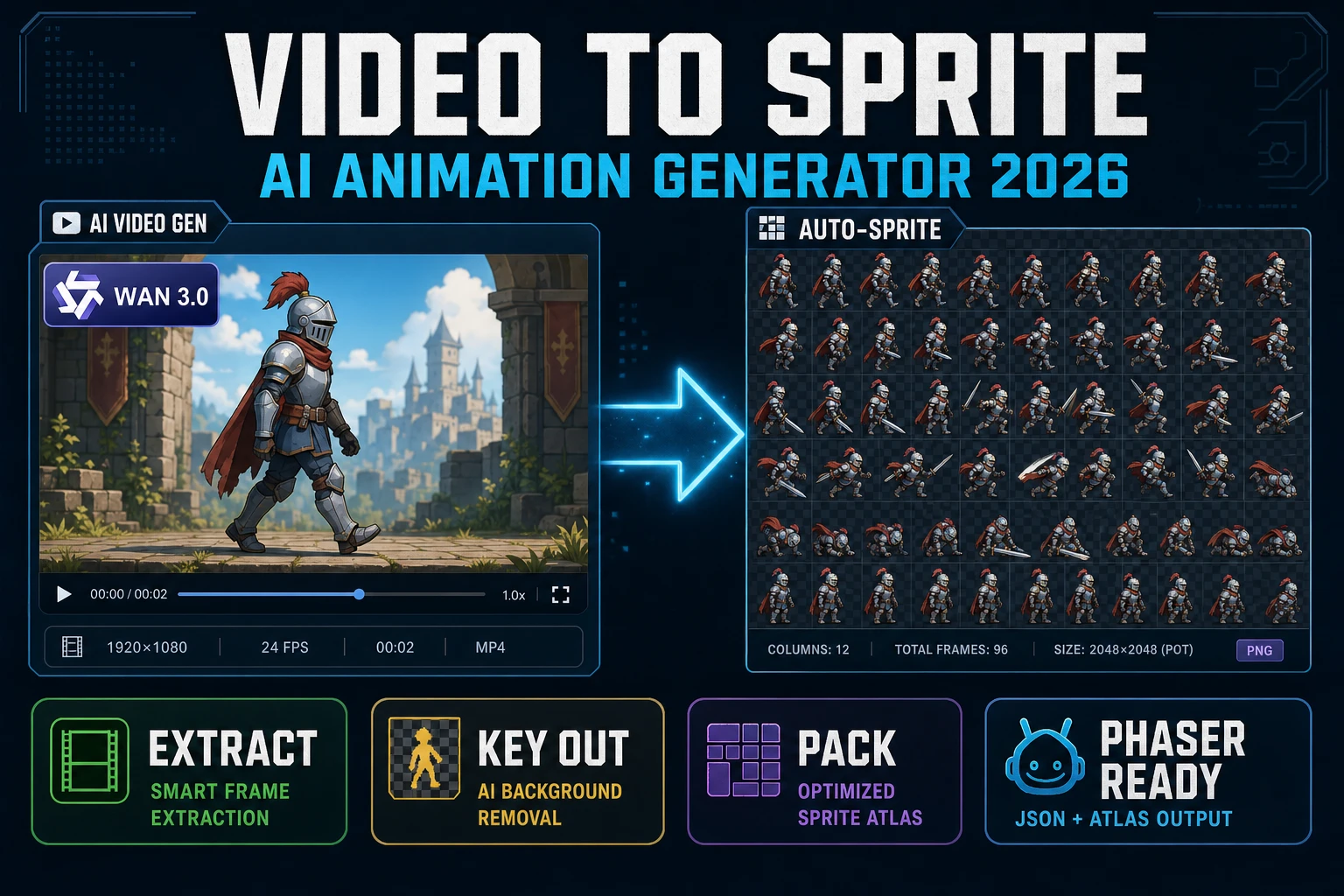
Search demand for ai animation generator lives around 3,600 queries a month in 2026, and the vast majority of results point at short marketing clips - a phone-screen loop of a cartoon face blinking, a stock text-to-video demo, or a template motion graphic. None of those are game assets. A game asset is a sprite: a rectangular PNG with a transparent background, a fixed frame size, and a predictable animation loop that a runtime like Phaser or Godot can drop straight into this.load.spritesheet(...). This piece is the honest browser recipe for closing that gap end-to-end - prompt a video-diffusion model in Sorceress AI Video Gen, hand the clip to Auto-Sprite v2, and export a game-ready sheet without opening a desktop tool.
What an ai animation generator actually delivers in 2026 (video, not sprite)
The phrase ai animation generator is doing double duty in 2026 search intent. About half of the query volume is people looking for a text-to-video or image-to-video model - Wan 3.0, Seedance 2.5, Kling 3.0 Omni, Grok Imagine Video, that family - to make a short animated clip. The other half is people looking for something that produces a game-ready animated character: a sprite sheet, a rigged 3D loop, or a GIF that runs at a locked frame rate in a game engine. Vendors on the marketing side happily conflate the two because it makes a demo reel look magic; game developers on the honest side have to separate them or the pipeline never ships.
The video-diffusion side of the field is real and getting better every quarter. A 2026 image-to-video model takes a still reference and a short prompt (walk left, loop, 24 frames) and returns a 5-to-10-second MP4 that renders the motion. Kling 3.0 Omni added identity preservation on a reference character that finally holds through a full loop; Seedance 2.5 landed prompt fidelity high enough to trust adjective-heavy prompts; Wan 3.0 shipped native audio and long-clip coherence that keeps the character consistent past the 5-second mark. Those are big deals. None of them ship a sprite sheet.
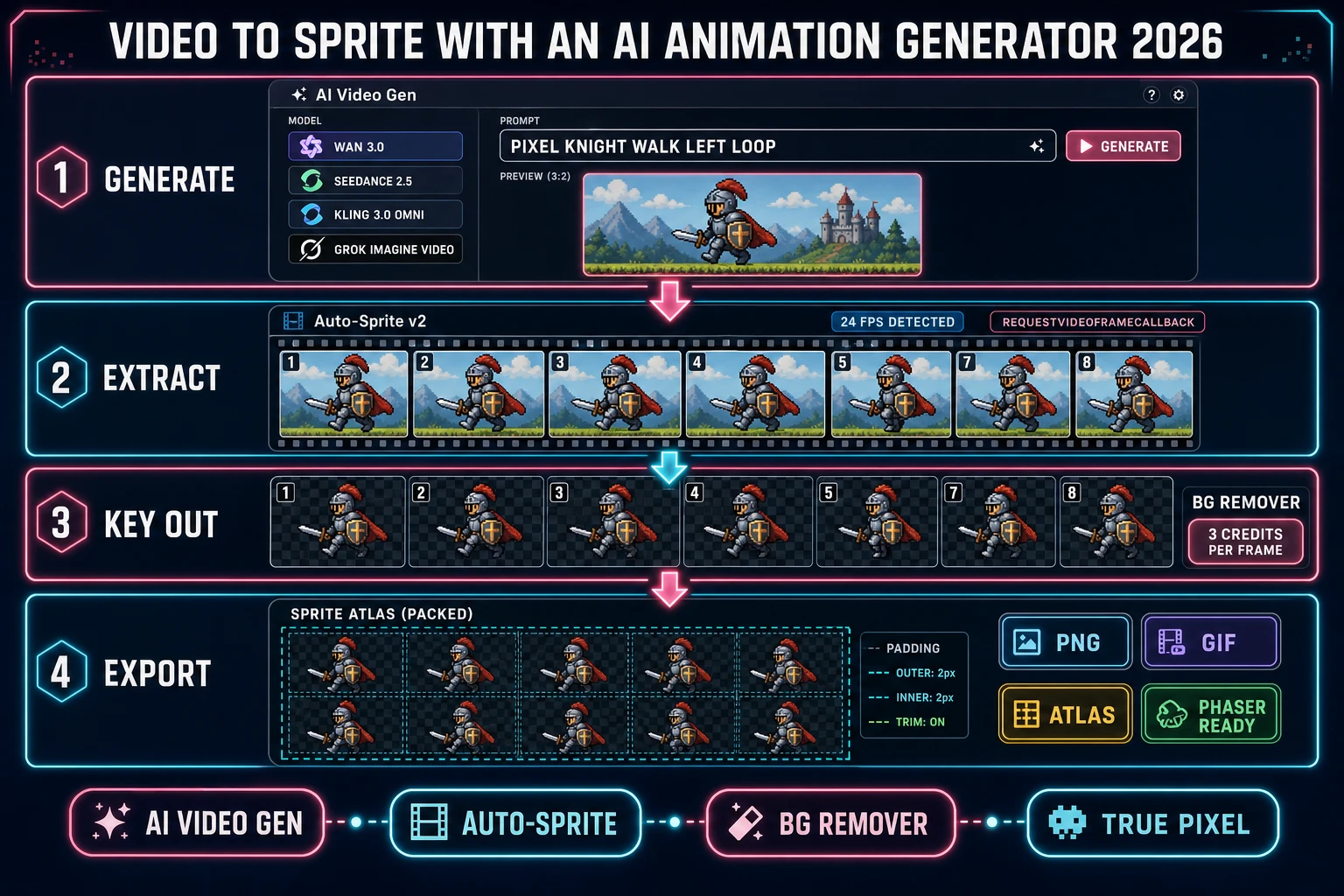
The gap is not the model. The gap is that a video-diffusion model outputs a video, and a game needs an atlas. Closing that gap is a three-step second stage: sample frames from the video at the true FPS, remove the background, and pack the frames into an atlas or a GIF loop. That second stage is exactly the job Sorceress Auto-Sprite v2 was built for. The rest of this piece is the honest recipe for stitching stage one and stage two together, in the same browser tab, at a cost that makes sense for indie work.
Why the browser is the right home for an ai animation generator pipeline
Three reasons the video-to-sprite pipeline belongs in a browser tab rather than a desktop suite chained through DaVinci or After Effects:
- The models already run in the browser. Every 2026 video-diffusion model with a real production track record - Wan 3.0, Seedance 2.5, Kling 3.0 Omni, Grok Imagine Video 1.5 - is a hosted API. There is nothing to install, no GPU to provision, no ComfyUI graph to wire. A prompt goes in over a REST call and an MP4 comes back. The Sorceress AI Video Gen panel is a thin UI over that lane with unified billing.
- Frame extraction is a browser-native job. An HTMLVideoElement and a canvas is enough to decode any MP4 the diffusion model returns. The one hard part - waiting for the actual painted frame rather than the naive
seekedevent - is solved by the requestVideoFrameCallback API on MDN, which Auto-Sprite v2 uses to guarantee frame accuracy on heavily P-frame-coded clips. - The rest of the pipeline is already in the tab. Background removal at /bg-remover, pixel-art quantization at True Pixel, and the concept-art step at AI Image Gen all share the same auth and credit balance. Context-switching to Photoshop or After Effects between stages is an artificial cost.
The desktop path still wins for a studio that already lives inside Blender or a full VFX suite for reasons outside the scope of a game jam. For indie work - a first game, a jam entry, a Steam Next Fest demo, a Discord community mod - the browser path is the honest fastest route from a still character concept to an animated sprite in an engine.
The models: what an ai animation generator actually is inside AI Video Gen
Sorceress AI Video Gen ships every major 2026 video-diffusion model behind one panel, verified 2026-09-04 in src/lib/video-models.ts. The four picks that matter for a character-animation loop, in the order most game builds will reach for them:
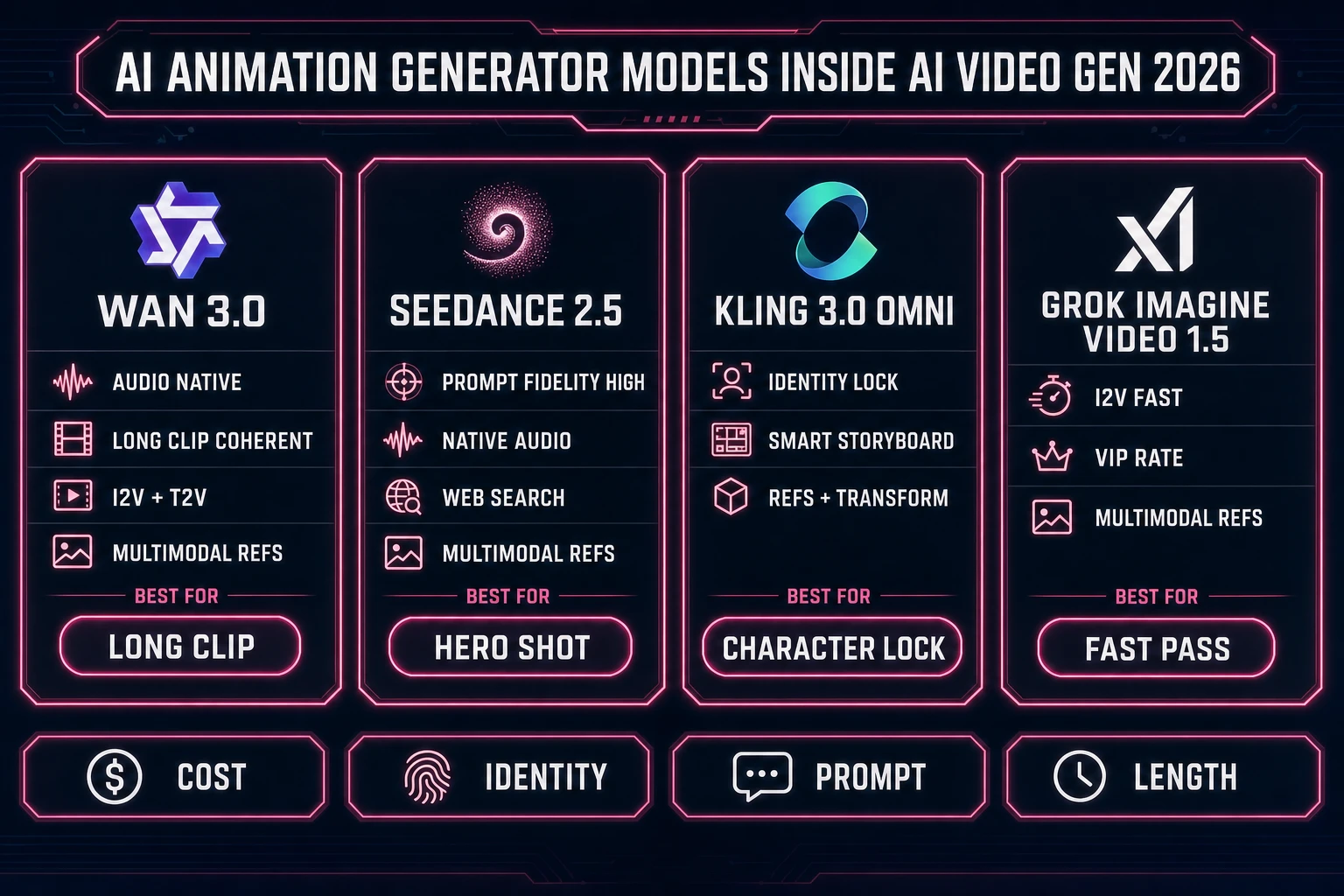
- Wan 2.2 Fast - the cheapest reliable first pass. Image-to-video with a numeric frames slider, adjustable FPS, and an optional smooth-motion interpolation pass. Use this to check whether the reference character and the prompt line up before spending on a hero clip. Local-video profiles exist too if the machine has a big-enough GPU.
- Kling 3.0 Omni - the identity-lock pick. Reference and Transform modes, Smart Storyboarding, native audio option, and the best character consistency across a 10-second clip in the current lineup. Reach for this when the character has to be recognizable across every frame - hero walk cycles, NPC idle loops, cutscene singles.
- Seedance 2.5 - the prompt-fidelity pick. High adjective density in the prompt lands as intended - a sluggish, exhausted trudge to the left reads as that motion rather than a generic walk. Multimodal Refs mode accepts audio references so the clip has a native-audio track baked in. Best pick when the animation intent is complex.
- Wan 3.0 - the long-clip pick. Longest coherent duration in the panel, image-to-video plus text-to-video, native-audio toggle, multimodal Refs. Use this for animations that need to hold past 5 seconds without the character drifting - long NPC dialogue loops, environmental animation cycles, boss intros.
Every model above is a rectangular MP4 out. None of them ship a sprite sheet. The rest of the pipeline is what turns MP4 into game asset.
Step 1 - generate the animation clip in AI Video Gen (or use real footage)
The generate step has three inputs and one output. The inputs are the reference image, the motion prompt, and the model. The output is a downloadable MP4 with a real, measurable frame rate.
- Reference image. Open AI Image Gen, prompt a T-pose or 3/4 pose of the character on a plain green or magenta background (chroma-key sheet: any solid color that does not appear in the character). Save. If the game already has final character art, skip this step and drop the existing PNG in directly.
- Motion prompt. Open AI Video Gen, switch to image-to-video mode, drop the reference. Prompt the exact motion the sprite needs:
walk left, loop, feet plant on floor, arms swing naturally, camera locked. The words loop and camera locked matter - they suppress camera drift that would otherwise force a re-crop per frame. - Model. Pick per the axis in the previous section. First pass: Wan 2.2 Fast. Hero shot: Kling 3.0 Omni. Complex prompt: Seedance 2.5. Long loop: Wan 3.0.
The output is a 3-to-10-second MP4 in the AI Video Gen gallery. Download it. Or - and this is the honest shortcut - if the studio already has a hand-shot animation reference (a phone recording, a screen capture from a Unity scene, a piece of live-action reference footage), skip AI Video Gen entirely and take that MP4 straight into stage two. Auto-Sprite v2 does not care whether the clip came from a diffusion model or a real camera.