Tune How to Make Music for Game (Loop Bed 2026)

By Arron R.8 min read
How to make music for game: ship one looping bed, one short stinger, and keep SFX on their own layer. Sorceress Music Gen writes the bed with Suno V6, V6 Mini,

How to make music for game is a shipping problem: which files the scene needs, how they loop, and which bus they ride. A finished pop song with a fade-out fights the player who is still in the same room. This piece is the practical plan for a browser level — beds versus stingers, length and export, the SFX layer, engine cues, and the credit math on Sorceress Music Gen. Model names, modes, and costs below were read on 2026-09-23 from src/app/music-gen/page.tsx, src/app/sfx-gen/page.tsx, and src/app/_home-v2/_data/tools.ts. Soundtrack definitions were checked the same day on the Wikipedia video game music article. Playback claims were checked on MDN.
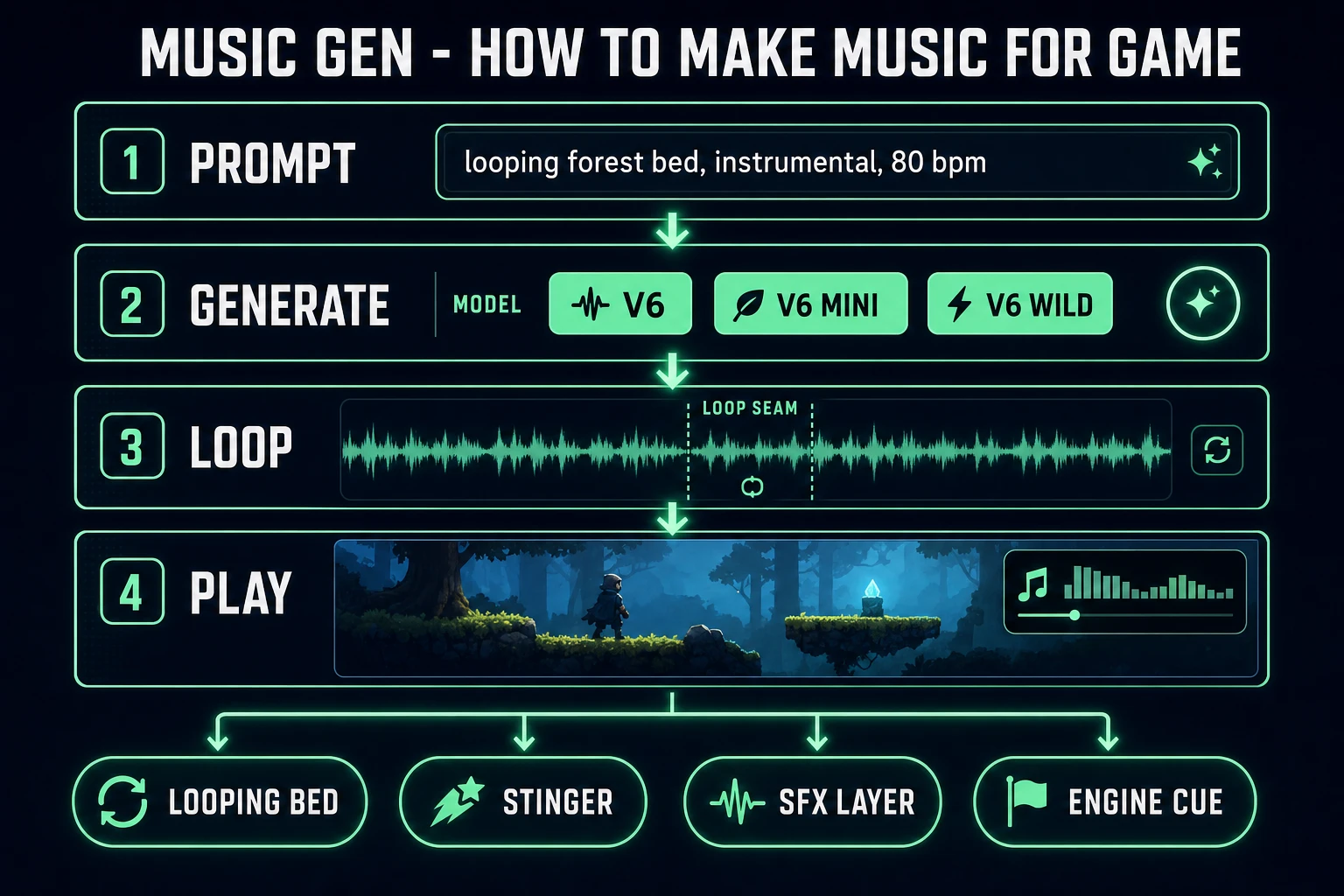
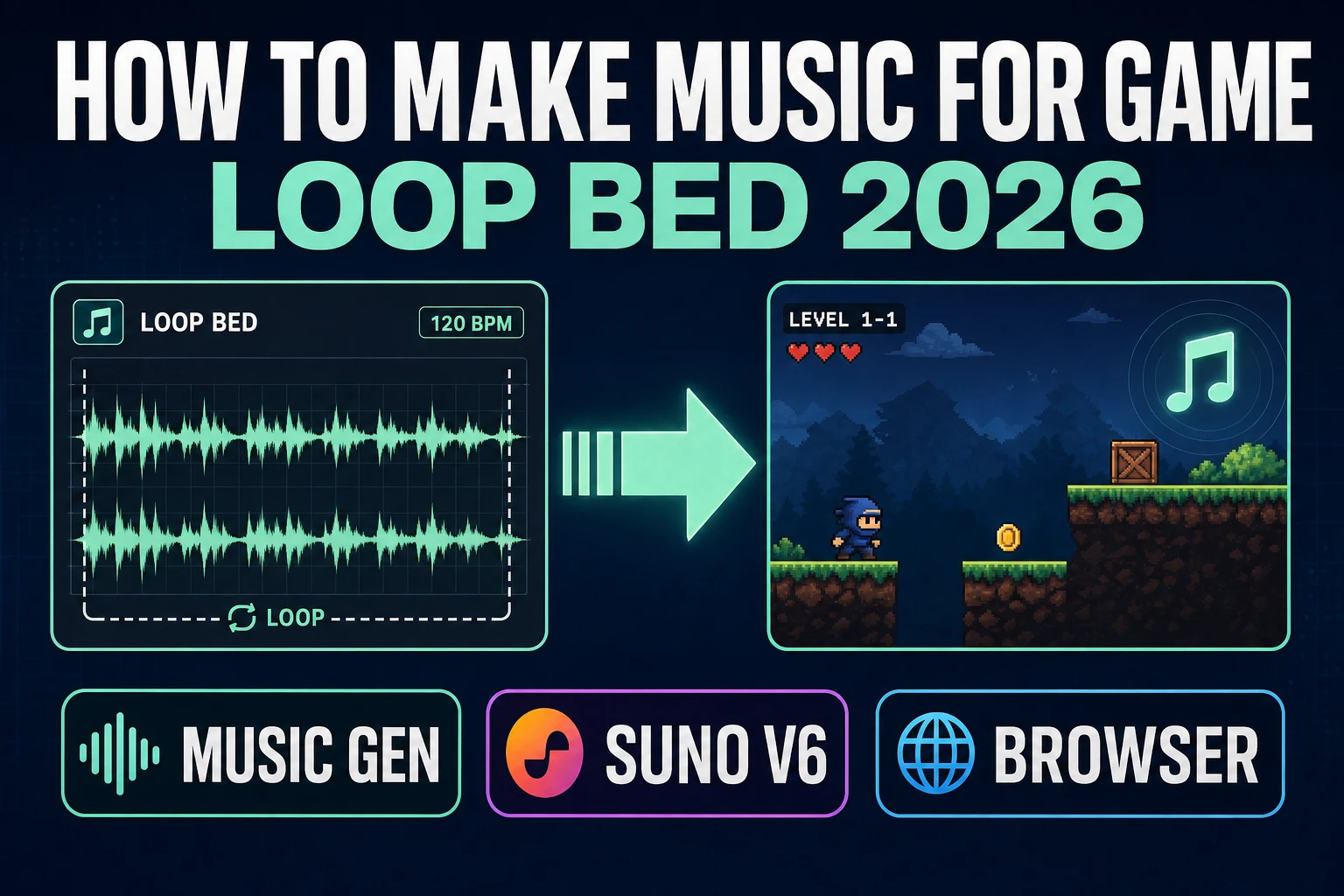
How to make music for game pipeline: prompt, Suno V6 generate, loop seam, play under a level
Four beats for a level score: prompt a looping bed, generate it, find the seam, then cue it under the scene.

Beds vs stingers: the file plan for how to make music for game

Wikipedia, verified 2026-09-23, calls video game music the soundtrack that accompanies a game. It can sit on a title screen, a menu, or gameplay, and it can change when the situation of the player changes. That definition is useful because it names a job, not a genre. How to make music for game starts by splitting that job into files the engine can address.

A bed is continuous music under a scene. It should survive repetition. Harmony stays in one pocket. Percussion does not build to a chorus drop at bar 32 unless you want that drop every time the loop restarts. Vocals are usually wrong on a bed, because a sung lyric becomes a narrator the player cannot mute without killing the whole score.

A stinger is a short musical punctuation — typically two to six seconds — for a door, a chest, a win, or a fail. The bed keeps going, or it ducks briefly, while the stinger announces that something changed. Mixing the stinger into the bed file is the usual failure: the engine cannot fire the event without restarting the level score.

People also search how to make music for a video game, how to make music for a game, and how to make video game music. Those phrases want the same deliverable: files you can drop into a scene. DataForSEO lists how to make music for game at 320 searches a month with KD 0 (verified 2026-09-23 in tools/research-supplement.md). Neighboring phrases sit at the same volume with higher KD. Answer the structure first. The generator fills the files; it does not redefine the job.

A workable first pass has three files and nothing else:

  1. One instrumental bed that loops cleanly for the main scene.
  2. One short stinger for a door, a chest, or a win.
  3. A handful of one-shot effects that never share a file with the melody.

If you only finish the bed, the level already feels directed. The other two files are how the game talks back.
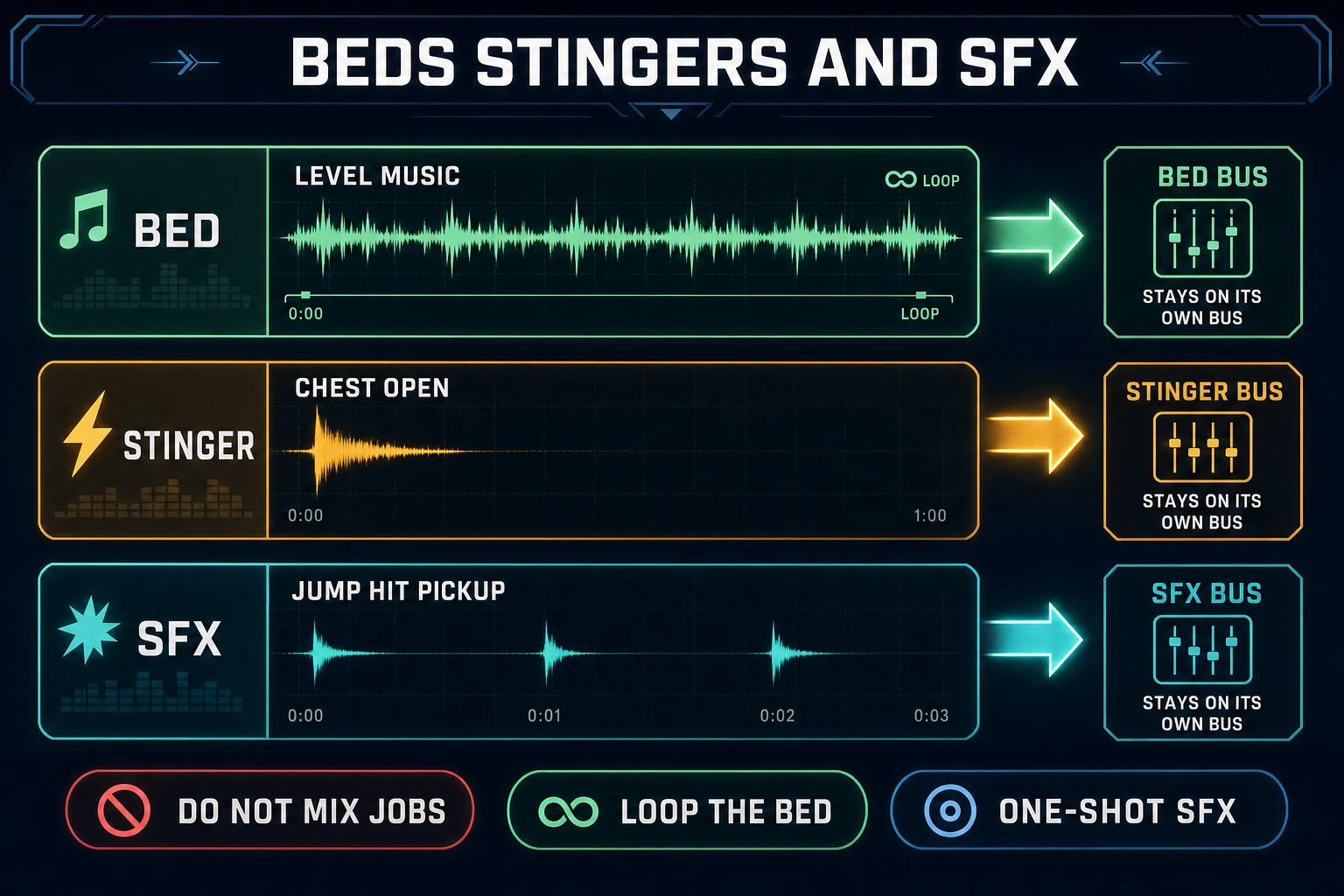
How to make music for game by separating looping beds, short stingers, and one-shot SFX
Beds loop. Stingers mark events. Sound effects stay one-shots. Mixing those jobs into one file is the usual failure.

Music Gen: prompt a bed, not a single

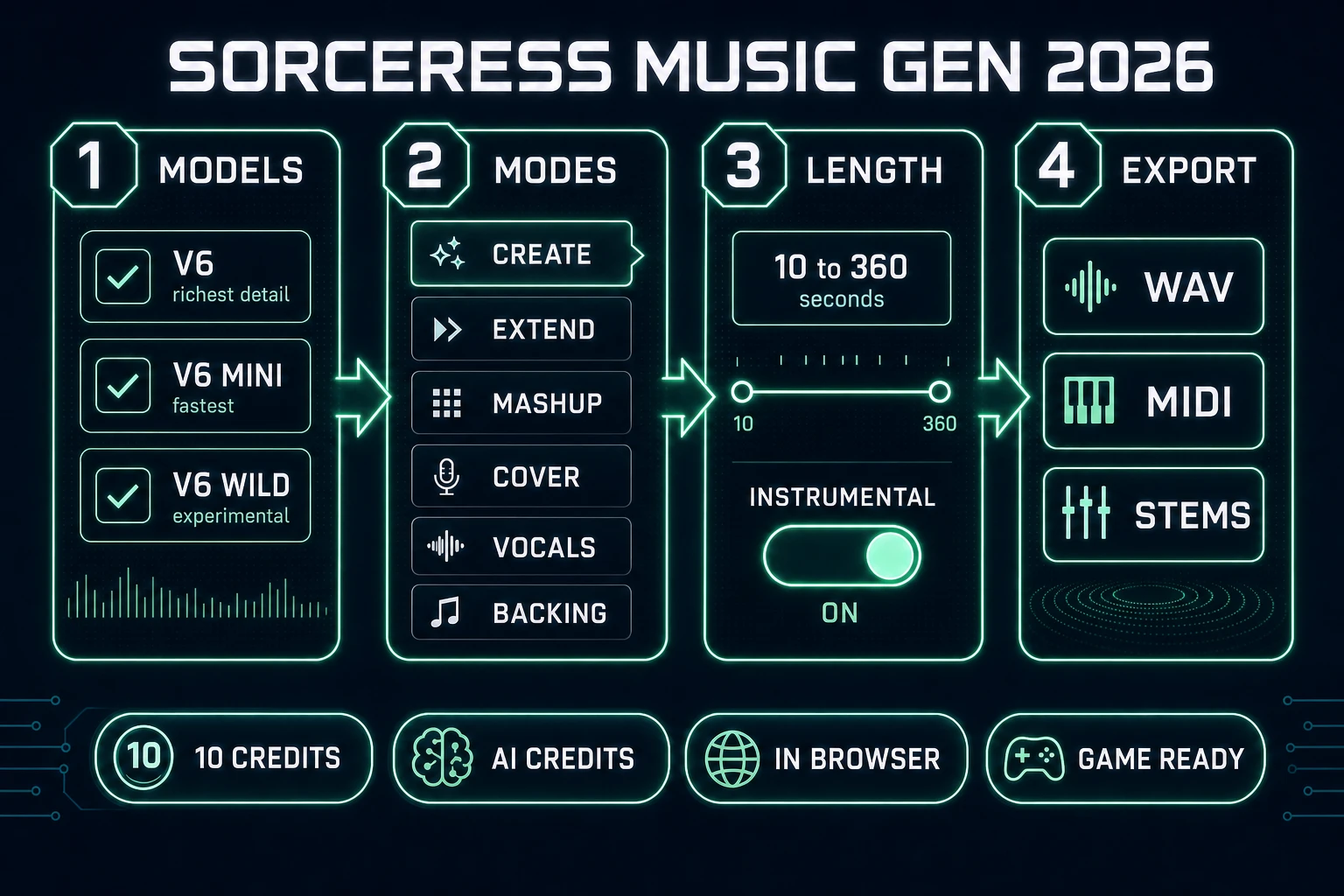
Music Gen is the Sorceress tool for full vocal or instrumental tracks from a prompt. The home card marks it AI Credits, in the Audio Studio group (verified 2026-09-23 in tools.ts). The page talks to current Suno models only. The source comment is explicit: V5.5 and older are discontinued upstream. The checklist on the left is:

Model Label in the UI What the blurb says
V6 V6 richest detail (this is the default)
V6_MINI V6 Mini fastest
V6_WILD V6 Wild experimental

Mode tabs on the same page, verified 2026-09-23, are Create, Extend, Mashup, Cover, Vocals, and Backing. Create is the path for a new bed. Extend continues an existing track from a point you set on the waveform, which is the practical fix when a loop is almost right but ends too soon. Cover, Vocals, and Backing are for when you already have audio and want a new arrangement or a sung layer. For a level bed, stay on Create, turn Instrumental on, and skip lyrics.

Prompt the bed like a location, not like a playlist genre soup. Useful constraints:

  • Scene: quiet forest path, soft footsteps, no combat yet.
  • Tempo band: 80 bpm, sparse percussion.
  • Instrumentation: soft pads, light pulse, no lead vocal.
  • Energy ceiling: never climaxes, stays under dialogue.
  • Length target: long enough to hide the seam, short enough to iterate.

How to make music for game with no instrument skills is mostly refusing the pop-song template. A level bed is not a single. It is a texture the player can ignore for ten minutes and still recognize when it drops out. Do not paste a famous melody into the style box and hope the model makes it gamey. That is how a known hook ends up inside your loop without a license.
Length, export, and finding the loop seam

Advanced mode accepts an optional target length from 10 to 360 seconds. Leave it unset and the model picks a length. For how to make music for game that actually loops in a scene, set something in the 30 to 90 second band first. A six-minute cue is a concert piece. It will not teach you where the seam is.

After a Create job finishes, listen for the restart. If the final bar resolves like a chorus ending, the loop will click every time. Prefer beds that feel mid-phrase at both ends. When the take is close but short, use Extend from a point inside the track instead of regenerating from zero. When the take is right but the edges are messy, open SFX Editor (Pro on the home card) and trim the fade before you set the engine loop flag.

Export paths on Music Gen, verified 2026-09-23:

  • WAV convert — 2 credits — the usual drop-in for browser audio.
  • MIDI export — 15 credits — useful when you want a notation handoff, not a finished bed.
  • Separate vocal stem — 8 credits — skip this when Instrumental was on.
  • Full stem split — 42 credits — drums, bass, guitar, keys, and more when you need stems.
  • Advanced single-instrument split — 17 credits — one named instrument plus the rest.

For a jam bed, WAV is enough. Stem work is for when the mix fights the scene and you need to mute one layer without re-prompting.

Sorceress Music Gen UI for how to make music for game: V6 models, modes, length, export
Music Gen checklist and tabs as they exist in the app: V6 family, six modes, optional 10 to 360 second length, then WAV, MIDI, or stems.

SFX layer: keep hits off the score

SFX Gen builds packs from text. Two models are in the picker, verified 2026-09-23 in src/app/sfx-gen/page.tsx:

Model Billing Notes
Seed Audio 1.0 (default) 1 credit per second of finished audio, minimum 1 BytePlus full-scene SFX and cinematic sound design
Suno Sounds V6 flat 2 credits per call Cheaper than per-second for longer one-shots; looping-friendly

Generate jumps, hits, pickups, and UI confirms as separate clips. Never bake a jump into the bed. If the player can spam the action, a musical jump inside the loop will stack into mud. Keep the SFX bus independent so you can duck the bed under combat without muting footsteps.

Sound Studio is the wider audio home: AI music, SFX, and voice in one place, also on AI Credits. Use it when the next need is a voice line or a quick clip beside the score. The dedicated track tool remains Music Gen. If you want the product-shaped tour of generators rather than this attach-to-game recipe, the earlier post Mint an AI Game Music Generator (Loop Bed 2026) sits on that keyword. For the close cousin phrase how to make video game music, see Chord How to Make Video Game Music (Loop 2026). This article stays on how to make music for game as a file-and-cue plan.

Engine cues: how the browser plays the bed

Once the files exist, the engine needs two jobs: start the bed under the scene, and fire a stinger without restarting the bed. MDN documents two practical paths (verified 2026-09-23).

The HTML <audio> element has a loop attribute that seeks back to the start when playback ends. That is enough for many jam builds. Pair one looping <audio> for the bed with a second non-looping element for the stinger. Start both from a user gesture such as a click or keypress, because browsers block surprise autoplay.

For tighter control, decode the file with the Web Audio API and set AudioBufferSourceNode.loop. That path lets you schedule exact start times, duck the bed gain when the stinger fires, and crossfade between explore and alert beds without tearing down the graph. MDN’s Web Audio overview and Using the Web Audio API guide cover the AudioContext, buffer sources, and gain nodes you need for those moves.

State is still simpler than composition. Hold a variable: explore, alert, or victory. Each state points at a file. If you only have time for one reactive moment, make it the win stinger. Players remember the noise that means they finished.

Credit math on Music Gen

Credit costs, read from constants in src/app/music-gen/page.tsx on 2026-09-23. CREDITS_PER_DOLLAR = 100 in src/lib/models.ts, so one credit is one cent:

Action Credits
Create, per selected model 10
Auto lyrics, when you are not instrumental 2 extra
WAV export 2
MIDI export 15
Separate vocal stem 8
Full stem split 42
Advanced split, one named instrument plus the rest 17
Replace a section 5

Selecting two models on one Create doubles the 10-credit line, because the cost multiplies by the number of selected models. For a bed, pick V6 once. Use V6 Mini when you are still hunting a prompt and do not want to spend the richer pass yet. V6 Wild is the experimental slot when the forest prompt keeps coming back too polite. Replace Section at 5 credits is cheaper than a full re-Create when only one phrase is wrong.

A realistic first session for how to make music for game on a browser jam: one V6 Create at 10 credits, one WAV at 2, maybe one Extend or Replace if the seam fails, plus a short SFX Gen pack for jumps and picks. That is enough to hear the level with a score under it.

The verdict

How to make music for game is three files and a cue plan. Ship the looping instrumental bed first. Add one stinger that the engine can fire without restarting the bed. Keep sound effects on their own layer. Write the bed in Music Gen with Instrumental on, Advanced length in the 30 to 90 second band, and V6 unless you are still hunting the prompt on V6 Mini. Cue playback from a user gesture with a looping <audio> element or a Web Audio buffer source. Numbers and UI labels above were verified 2026-09-23 against the Sorceress source and the MDN / Wikipedia pages cited in the sources list.

Frequently Asked Questions

How to make music for game if I cannot play an instrument?

How to make music for game is a file plan, not a performance. You need a looping instrumental bed for the scene, a short stinger for events, and sound effects on separate files. Sorceress Music Gen writes full tracks from a prompt with Suno V6, V6 Mini, or V6 Wild (verified 2026-09-23 in src/app/music-gen/page.tsx). Turn Instrumental on so the bed does not sing over gameplay.

How long should a game music loop be?

Most indie levels sit well in the 30 to 90 second band. Music Gen Advanced mode accepts a target length from 10 to 360 seconds (verified 2026-09-23). Shorter beds hide seams faster while you iterate. If the restart clicks, Extend from a point inside the waveform, or trim ends in SFX Editor before you set the loop flag.

What is the difference between a bed and a stinger?

A bed is the continuous score under a scene and usually loops. A stinger is a short musical punctuation for a door, chest, win, or fail. Wikipedia describes video game music as soundtrack that can change with the player situation (checked 2026-09-23). Keep beds and stingers as separate files so an event does not restart the whole level score.

How many credits does Sorceress Music Gen cost?

Create costs 10 credits per selected Suno model. Auto lyrics add 2. WAV export is 2, MIDI is 15, vocal stem split is 8, full stem split is 42, Advanced single-instrument split is 17, and replace section is 5. One credit equals one cent (CREDITS_PER_DOLLAR = 100). Constants read from src/app/music-gen/page.tsx and src/lib/models.ts on 2026-09-23.

How do I cue music inside a browser game?

The HTML audio element supports a loop attribute that seeks to the start when playback ends (MDN, verified 2026-09-23). For tighter control, decode with the Web Audio API and set AudioBufferSourceNode.loop. Start playback from a user gesture such as a click, because browsers block surprise autoplay.

Sources

  1. Video game music - Wikipedia
  2. Web Audio API - MDN
  3. HTML audio element - MDN
  4. Using the Web Audio API - MDN
Written by Arron R.·1,814 words·8 min read

Related posts