Spin Image to 3D Model Free (Voxel Games 2026)

By Arron R.8 min read
Image to 3D model free for voxel games in 2026 means the honest low-credit path: 100 signup credits, Hunyuan 3D 3.1 at 30 credits, Voxel Studio at 20–25 credits

Indie searches for image to 3D model free usually want one of three things: a zero-dollar GPU forever, a signup grant that clears a jam weekend, or a browser path that does not force a desktop install. In September 2026 the honest Sorceress answer is the second and third — a 100-credit signup grant, Hunyuan 3D 3.1 at 30 credits for textured mesh, Voxel Studio at 20–25 credits for blocky props, and Pixal3D free unlimited only for VIP. This how-to walks the full spin: drop a PNG, pick the cheap lane, export GLB/GLTF/FBX, then optionally auto-rig and bake PBR maps. Every credit figure below was verified 2026-09-18 against src/lib/threed-models.ts, src/lib/voxelgen-hunyuan.ts, src/lib/rigging/external-rig/autoRigPricing.ts, and live pages for glTF, voxels, and Hunyuan 3D.
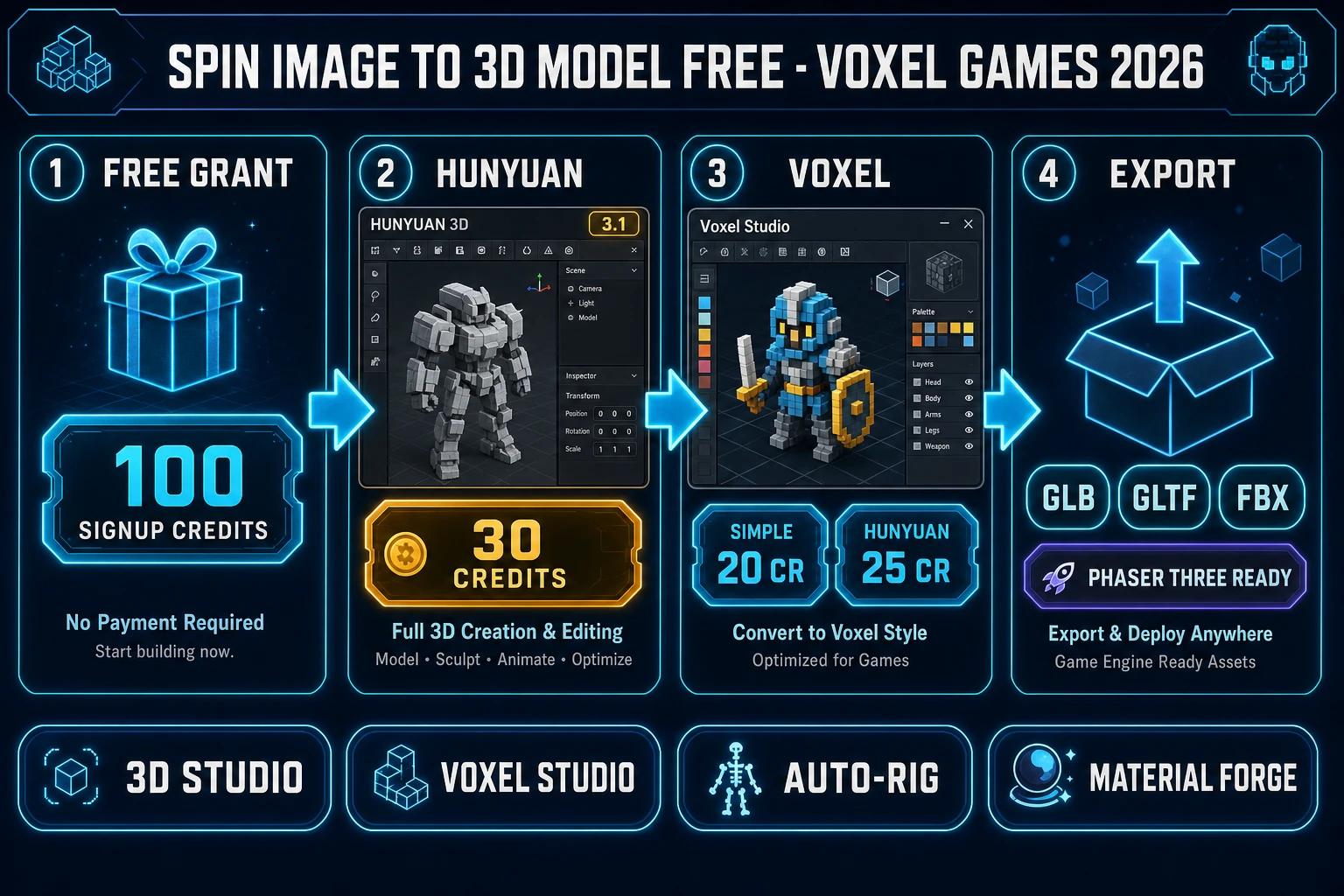
Spin image to 3D model free voxel games 2026 pipeline with signup grant Hunyuan Voxel Studio and GLB export
The 2026-09-18 image to 3D model free path on Sorceress — 100 signup credits into Hunyuan or Voxel Studio, then GLB export for voxel games.

What image to 3D model free means in 2026

The phrase image to 3D model free is overloaded. Hosted "free" tiers often mean evaluation-only viewers, attribution licenses, or monthly credit caps that vanish the moment you need a commercial download. Self-hosted "free" means you bring a 16–24 GB NVIDIA GPU and a CUDA stack — free of vendor billing, not free of hardware. For a voxel or low-poly game jam the useful definition is narrower: can you turn one reference image into a downloadable, game-importable mesh without opening a second account at a mesh vendor?

On Sorceress that definition maps to four verified facts (2026-09-18). New accounts start with 100 free credits (called out on the home-v2 page and account API docs). CREDITS_PER_DOLLAR = 100 in src/lib/models.ts, so the grant is one dollar of underlying provider spend. 3D Studio and Voxel Studio both carry an AI Credits badge in the tools catalog — they are not Free-badge tools like Canvas. Pixal3D inside 3D Studio is the only image-to-3D lane with credits: 0 and creditLabel: "Free unlimited", and it is vipOnly: true. Everything else is low-credit, not magic.

Open-source research still matters for E-E-A-T. Tencent’s Hunyuan3D-2.1 repo describes "From Images to High-Fidelity 3D Assets with Production-Ready PBR Material" (verified 2026-09-18 on GitHub, 4,036 stars). Microsoft’s TRELLIS paper "Structured 3D Latents for Scalable and Versatile 3D Generation" remains a CVPR'25 Spotlight (verified 2026-09-18 on github.com/microsoft/TRELLIS, 13,668 stars). Those projects explain why image-to-3D exists; the credit sheet below explains how to use it inside a jam budget.

Step 1: Claim the free grant, then pick the cheap mesh lane

Create a Sorceress account and confirm the 100-credit signup grant before you burn a frontier model on a throwaway silhouette. Open 3D Studio and switch to Image to 3D. The budget default is Hunyuan 3D 3.1 at 30 credits — marked rating: "best-budget" and image-to-3D only in src/lib/threed-models.ts. At 30 credits you clear three textured props from the grant with 10 credits left for a concept image or a later tweak.

Lane Credits Who can use it Best for
Pixal3D0 (Free unlimited)VIP onlyUnlimited image-to-3D drafts on Sorceress GPU
Hunyuan 3D 3.130Anyone with creditsCheapest textured mesh for props and characters
TRELLIS 240Anyone with creditsSingle-image concept meshes from the Microsoft Research stack
Meshy 7 (textured default)50Anyone with creditsA-Pose / T-Pose characters headed to auto-rig
Voxel Studio Simple20Anyone with creditsCheapest voxel image path
Voxel Studio Hunyuan 3.125Anyone with creditsHigher-quality voxelization from an image

If you already own Lifetime Early Access at $49 (LIFETIME_PRICE in src/app/plans/page.tsx) and VIP, skip the grant math and park Pixal3D as your free unlimited image to 3D model free online lane. If you do not, treat Hunyuan 3.1 and Voxel Simple as the two spins that respect a jam wallet.
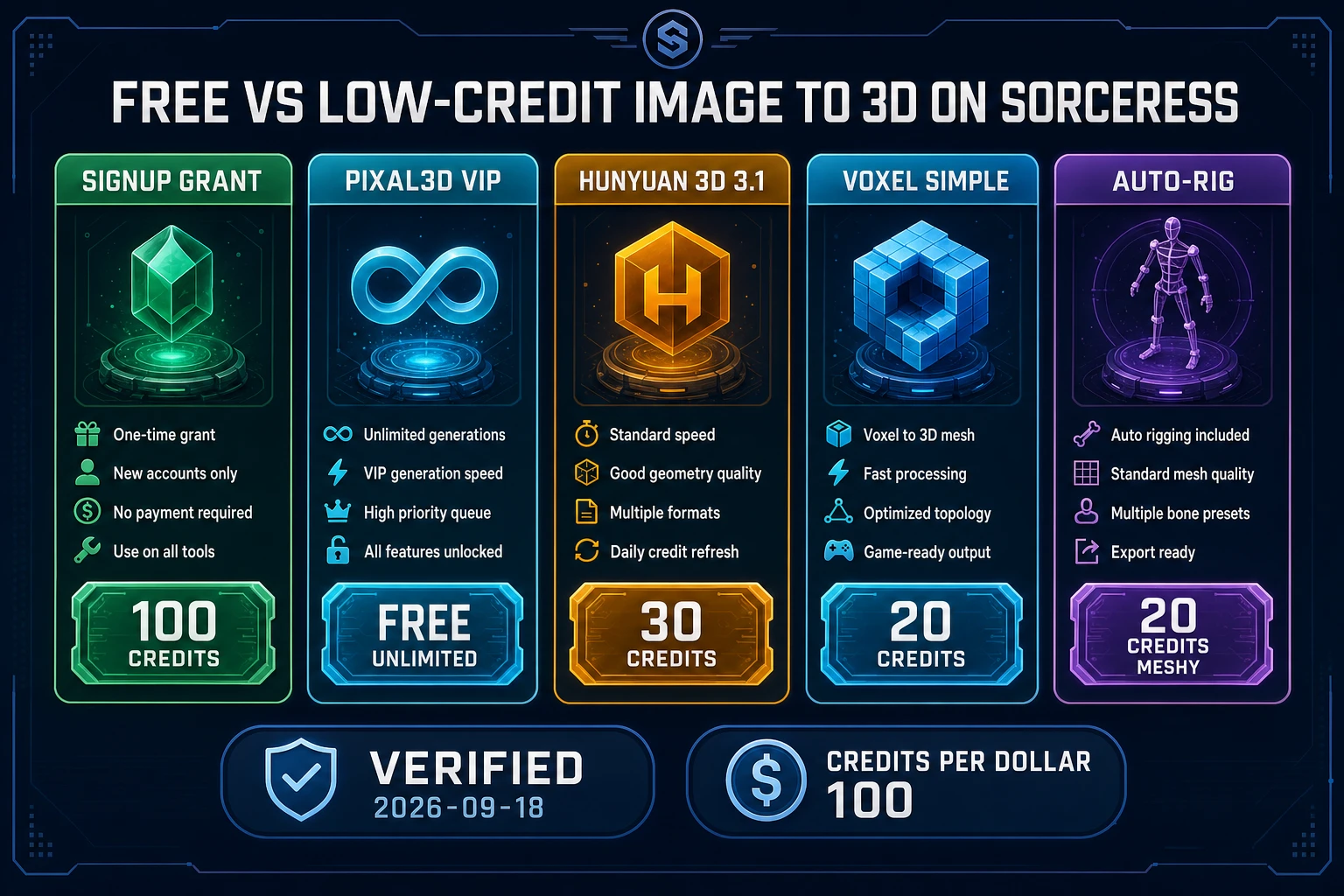
Free vs low-credit image to 3D model free comparison chart with signup grant Pixal3D Hunyuan Voxel and auto-rig costs
Verified 2026-09-18 credit sheet — signup grant, VIP Pixal3D, Hunyuan 30, Voxel 20–25, auto-rig 20.

Step 2: Spin image to 3D model free through Voxel Studio

Voxel games need cubes, not dense organic meshes. A voxel is a value on a regular 3D grid — the 3D analog of a pixel — so the honest free-adjacent path for MagicaVoxel-style art is Voxel Studio, not a high-poly Meshy pass you then smash into cubes by hand.

Verified 2026-09-18 in src/app/_home-v2/_data/tools.ts, Voxel Studio turns images, text prompts, or 3D models into voxel creations, auto-rigs humanoids, procedurally rigs multi-legged creatures, and animates with plain-text motion prompts. The image models in src/app/voxelgen/page.tsx are Simple at 20 credits and Hunyuan 3.1 at VOXEL_HUNYUAN_CREDITS = 25. Hunyuan 3.1 on the voxel API is image-to-3D only — send source: "image" with file data; text alone is rejected for that model.

  1. Open /voxelgen and choose Image input.
  2. Drop a front-facing PNG with a clean silhouette (crate, goblin, lantern, weapon).
  3. Pick Simple (20 cr) for draft voxels or Hunyuan 3.1 (25 cr) for a cleaner voxelization.
  4. Generate, inspect the grid, then export the game-ready package for your engine.

Five Simple spins exhaust the 100-credit grant. Four Hunyuan 3.1 voxel spins leave nothing for auto-rig. That is the trade: voxel volume versus skeleton budget. For a pure prop jam (no skinned characters), burn the grant on Voxel Simple and ship five unique blocks before you top up.
Step 3: The image-to-mesh workflow in 3D Studio

When the game needs a continuous surface — a hero prop, a humanoid that will walk, a weapon that needs UVs — stay in 3D Studio. The catalog description (verified 2026-09-18) chains AI image generation, single-image to textured 3D, humanoid auto-rigging with weight-paint refinement, and text-to-animation, all exported to FBX, GLB, or GLTF.

  1. Reference. Use an existing sprite or photo, or generate one in AI Image Gen. Ask for A-pose, plain background, full body, single subject.
  2. Drop. Switch 3D Studio to Image to 3D and drop the PNG.
  3. Pick Hunyuan 3D 3.1 for the free-budget spin (30 credits). Skip Ultra / 8K Meshy options until the silhouette is locked.
  4. Generate. Wait for the textured mesh. Preview lighting and silhouette before you spend again.
  5. Export. Choose GLB for Three.js / Babylon.js, GLTF for Godot HTML5, FBX for Unity / Unreal desktop pipelines.

glTF is the Khronos royalty-free delivery format for 3D scenes — often called the JPEG of 3D — and glTF 2.0 is ISO/IEC 12113:2022 (verified 2026-09-18 on khronos.org/gltf and the Wikipedia glTF entry). See also MDN 3D games on the Web. Exporting GLB from an image to 3D model free run is the standard browser delivery path.

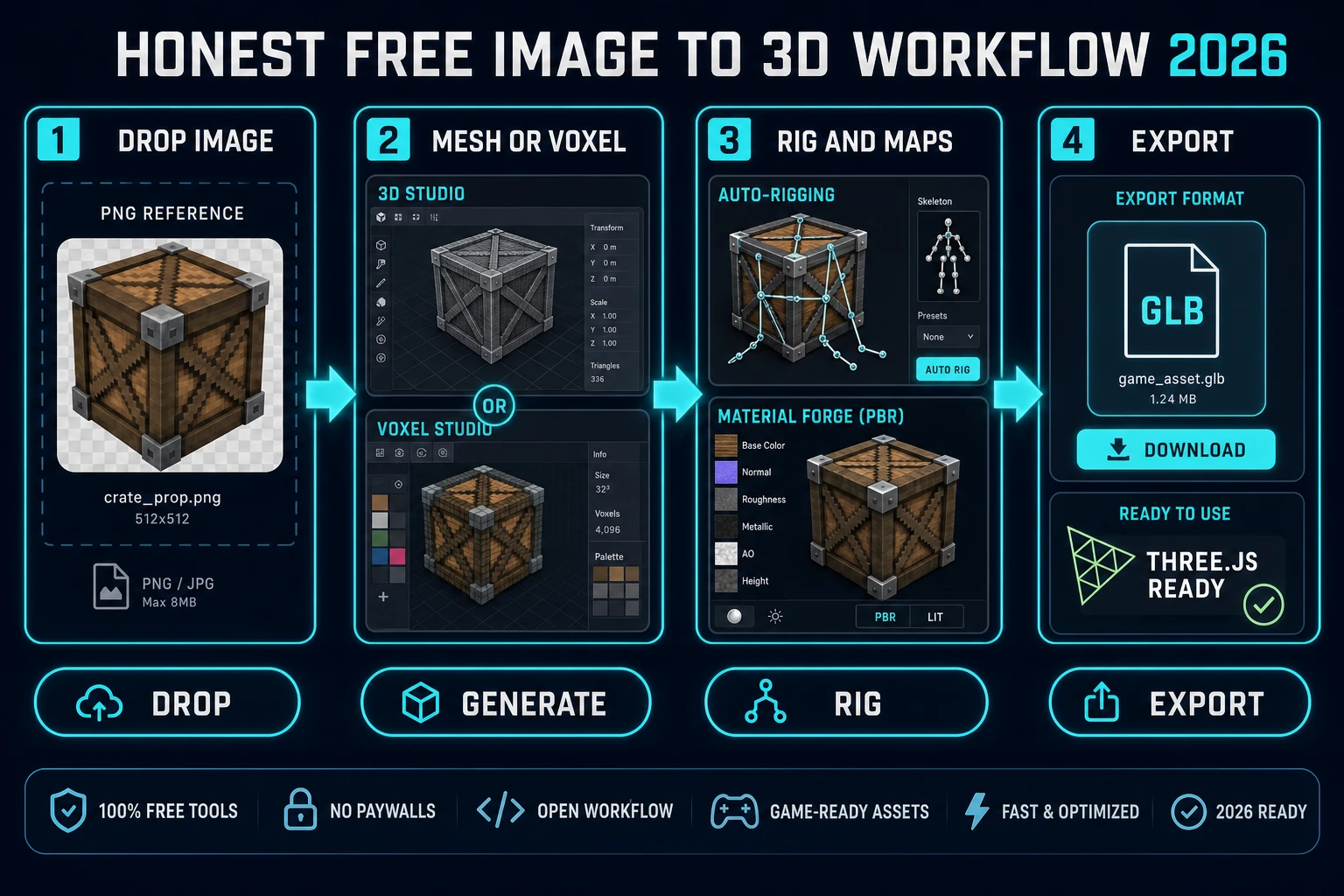
Honest free image to 3D workflow diagram drop generate rig and export for voxel games 2026
Drop to generate (mesh or voxel) to auto-rig / PBR to GLB export. Verified 2026-09-18.

Step 4: Auto-Rigging and Material Forge downstream

A free mesh that cannot move is still useful as a static prop. A free mesh that needs a walk cycle needs a skeleton. Auto-Rigging is badged Pro in the catalog and charges AUTO_RIG_CREDITS.meshy = 20 credits for the Meshy humanoid path (verified 2026-09-18 in src/lib/rigging/external-rig/autoRigPricing.ts). Tripo stays registered at 40 credits but is no longer offered in the UI. Plan the grant as either three Hunyuan meshes (90 cr) with no rig, or one Hunyuan mesh (30) plus one auto-rig (20) with headroom for a concept image.

For surfaces, open Material Forge (AI Credits badge). It turns a single image into a full PBR set — albedo, roughness, metallic, normal, AO — ready for Unity, Unreal, or Godot. Physically based rendering is the lighting model those maps feed; Material Forge exists so you do not hand-paint five maps for every crate. Use it after the mesh spin when the prop needs a tileable material rather than the baked albedo that came with the image-to-3D pass.

Cross-links that keep the stack coherent: the earlier prop-loop post Snap Image to 3D Model AI covers the full Meshy / Tripo roster when you leave the free budget; Chunk an AI Voxel Generator digs deeper into Voxel Studio; Best Free AI 3D Model Generator benches the grant against other free tiers. This post stays on the free / low-credit spin for voxel games.

Step 5: Credit math versus free marketing

Here is the wallet math for image to 3D model free work on Sorceress, verified 2026-09-18:

Goal Spend USD at 100 cr/$ Grant leftover
3 Hunyuan mesh props90 cr$0.9010 cr
5 Voxel Simple props100 cr$1.000 cr
4 Voxel Hunyuan 3.1100 cr$1.000 cr
1 Hunyuan mesh + 1 auto-rig50 cr$0.5050 cr
VIP Pixal3D drafts0 cr$0.00grant unused

Competitor free tiers are not linked here — Hard Rule #13 — but the pattern is familiar: monthly credits that cannot download, or downloads locked behind attribution. The Sorceress grant is one-shot, commercially usable, and downloads immediately as GLB. That is the practical meaning of image to 3D model free for an indie who needs assets in the build folder tonight.

Common issues

  • Problem: Free search results promise zero cost forever.
    Solution: Use the 100-credit grant + Hunyuan 30 / Voxel 20–25, or VIP Pixal3D at 0 credits. Do not expect a Free badge on 3D Studio or Voxel Studio — both are AI Credits tools.
  • Problem: Voxel Hunyuan rejects a text-only job.
    Solution: Hunyuan 3.1 in Voxel Studio is image-to-3D only. Send an image source, or use a text-capable model for prompt-only runs.
  • Problem: Humanoid mesh fails to auto-rig.
    Solution: Regenerate with a clear A-pose reference, arms away from the torso, legs apart. Then spend the 20-credit Meshy auto-rig pass once — not on a crumpled silhouette.
  • Problem: Grant is gone after one Meshy 7 hero pass.
    Solution: Meshy 7 textured defaults land near 50 credits. Lock the silhouette on Hunyuan 3.1 at 30 first; upgrade only when the prop is approved.

The verdict on free image-to-3D for indies

For voxel and low-poly games in 2026, the winning image to 3D model free workflow is a spin, not a fantasy: claim 100 signup credits, prefer Hunyuan 3D 3.1 at 30 credits or Voxel Studio at 20–25 credits, export GLB/GLTF/FBX from the same browser account, and reserve Auto-Rigging 20 credits for the one character that must walk. VIP Pixal3D is the only truly free unlimited lane. Everything else is cheap, fast, and honest — which is what a jam build needs more than another marketing badge.

Open 3D Studio or Voxel Studio, drop one PNG, and spend the grant on assets that land in the repo — not in a locked viewer.

Frequently Asked Questions

What does image to 3D model free actually mean in 2026?

Image to 3D model free in 2026 is rarely zero-cost forever on a hosted GPU. On Sorceress (verified 2026-09-18), new accounts start with 100 free credits (home-v2 and account API docs), CREDITS_PER_DOLLAR = 100 in src/lib/models.ts, Hunyuan 3D 3.1 image-to-3D costs 30 credits in 3D Studio (src/lib/threed-models.ts), Voxel Studio Simple costs 20 credits and Hunyuan 3.1 costs 25 credits (VOXEL_HUNYUAN_CREDITS in src/lib/voxelgen-hunyuan.ts), and Pixal3D is credits: 0 with creditLabel Free unlimited for VIP only. Lifetime Early Access is $49 (LIFETIME_PRICE in src/app/plans/page.tsx).

Is there a truly free unlimited image to 3D model free lane on Sorceress?

Yes for VIP: Pixal3D in 3D Studio is image-to-3D only, credits: 0, creditLabel Free unlimited, vipOnly: true (verified 2026-09-18 in src/lib/threed-models.ts). Non-VIP users see it locked with an upsell. Everyone else should treat Hunyuan 3D 3.1 at 30 credits or Voxel Studio Simple at 20 credits as the budget path against the 100-credit signup grant.

How many free image-to-3D props can I spin from the 100-credit signup grant?

At CREDITS_PER_DOLLAR = 100, the grant is $1.00 of underlying spend. Hunyuan 3D 3.1 at 30 credits clears three textured meshes with 10 credits left. Voxel Studio Simple at 20 credits clears five voxel props. Voxel Hunyuan 3.1 at 25 credits clears four voxel props. Auto-Rigging via Meshy costs AUTO_RIG_CREDITS.meshy = 20 credits per humanoid rig (src/lib/rigging/external-rig/autoRigPricing.ts), so budget one mesh plus one rig from the grant, or three meshes with no rig.

Can I export an image to 3D model free result as GLB for Three.js?

Yes. 3D Studio exports FBX, GLB, or GLTF (verified 2026-09-18 in src/app/_home-v2/_data/tools.ts). glTF is the Khronos royalty-free delivery format often called the JPEG of 3D, and glTF 2.0 is ISO/IEC 12113:2022 (verified 2026-09-18 on khronos.org/gltf and Wikipedia glTF). MDN’s 3D-on-the-web guide covers loading those assets in Three.js, Babylon.js, and PlayCanvas for browser games.

Should I use 3D Studio or Voxel Studio for image to 3D model free voxel games?

Use 3D Studio when you need a continuous textured mesh for a prop or humanoid that will be auto-rigged. Use Voxel Studio when the art direction is blocky voxels: image or mesh input becomes a voxel creation that can be rigged and animated in-browser (verified 2026-09-18 in tools.ts Voxel Studio description). Voxel Studio’s cheapest image lane is Simple at 20 credits; Hunyuan 3.1 is 25 credits. Both tools are badged AI Credits in the catalog — free means low-credit or VIP-free, not a Free badge on every generation.

Sources

  1. glTF - Wikipedia
  2. glTF - Khronos Group
  3. Voxel - Wikipedia
  4. Physically based rendering - Wikipedia
  5. Tencent-Hunyuan/Hunyuan3D-2.1
  6. microsoft/TRELLIS - CVPR'25 Spotlight
  7. 3D games on the Web - MDN
Written by Arron R.·1,731 words·8 min read

Related posts