Speak AI Voice Generator Character (NPC Line 2026)

By Arron R.7 min read
An ai voice generator character for NPC lines is Speech Gen: MiniMax Speech 2.8 HD, 17 presets, HD 0.5 cr/1k chars (API 1/2k), clone at 400 credits, then SFX be

An ai voice generator character for a jam NPC is not a studio session. Searchers want spoken lines they can cue when the player enters a trigger: short barks, quest hooks, one shop greeting. This guide builds that pack on Sorceress with Speech Gen for the takes, SFX Gen and Sound Studio when a line needs a bed, and a preload map so the first play never stalls.
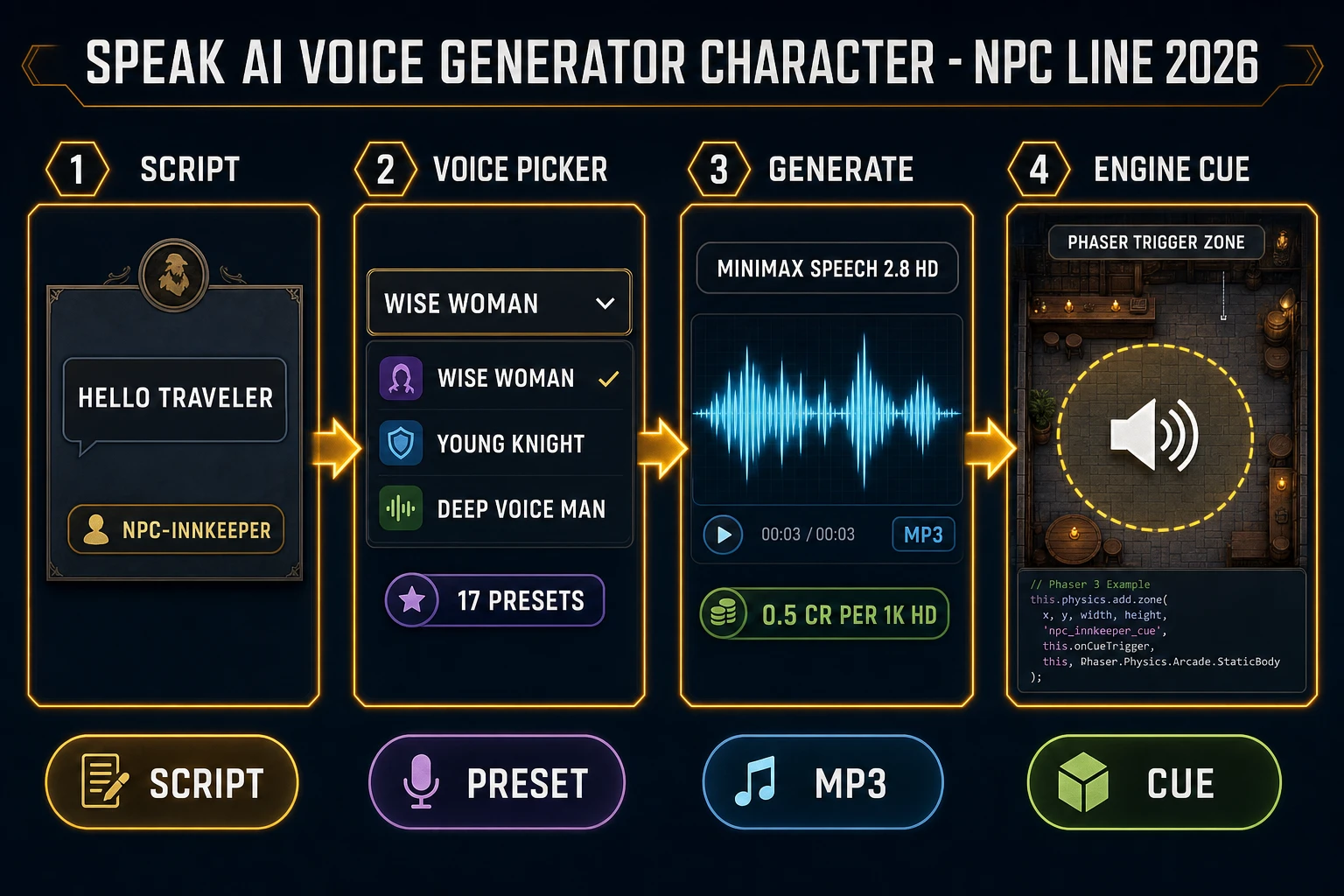
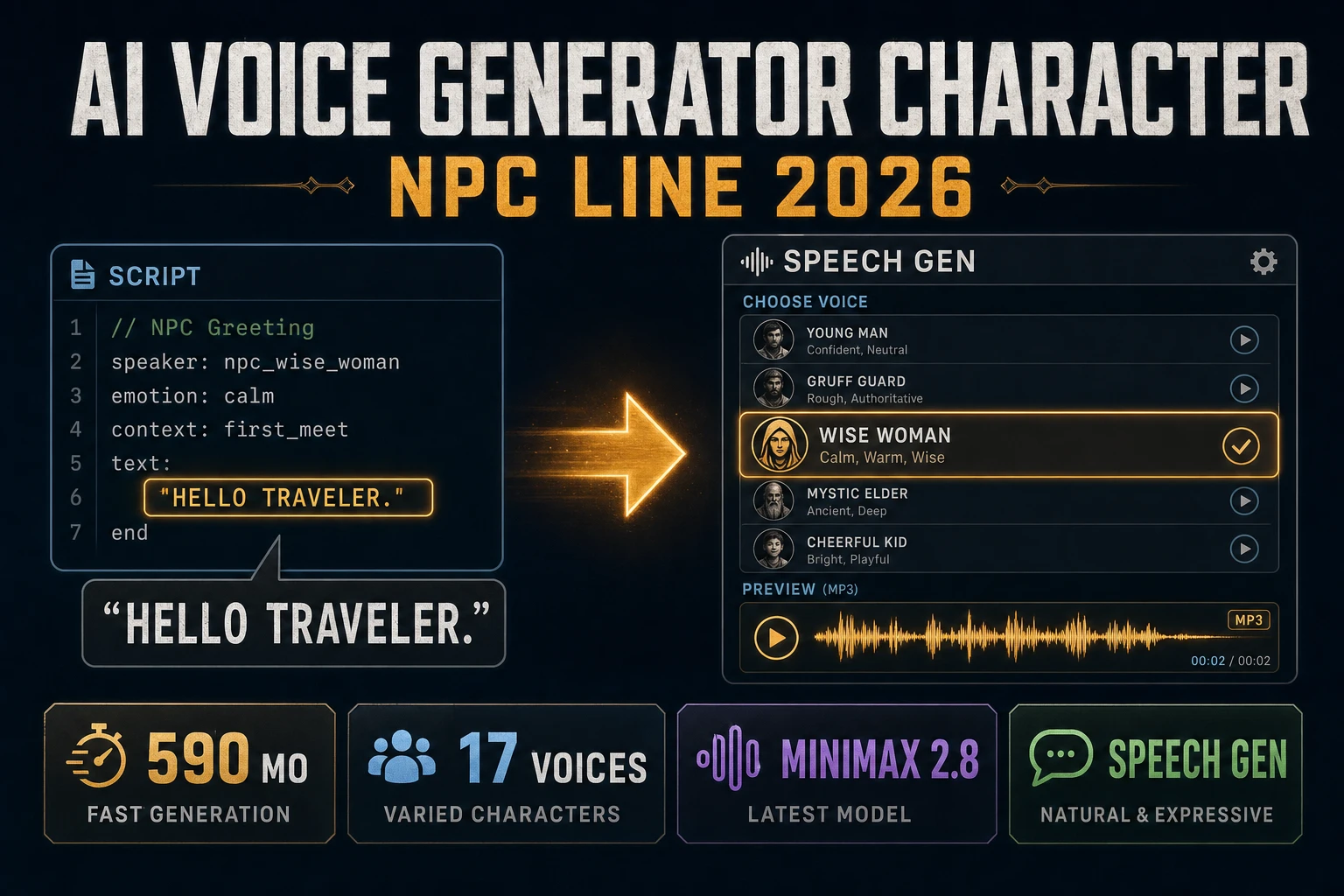
AI voice generator character pipeline: script, Speech Gen voice picker, MiniMax mp3, engine cue
An ai voice generator character NPC line: lock the script, pick a preset or clone, generate the mp3, then cue it on enter.

What an ai voice generator character needs for NPC lines

DataForSEO lists ai voice generator character at 590 searches a month, KD 17 (confirmed 2026-09-22 in tools/research-supplement.md). Neighbor intent is commercial: people want a character voice they can assign to an NPC roster, not a generic narrator demo. Sibling posts already cover nearby phrasing — AI NPC voice and AI character voice generator. This page stays on the head commercial query and the NPC-line path: one voice id per cast member → short takes → engine cues.

Wikipedia’s Speech synthesis page (checked 2026-09-25) defines text-to-speech as converting normal language text into speech. Your ai voice generator character job is that conversion with a stable identity: the blacksmith must sound like the same person on line three as on line one.

Write the lines before you open the voice picker. Cap each bark at one breath. A 40–80 character greeting costs the same minimum credit as a padded monologue and is easier to A/B. Keep a sheet with columns: npc_id, line_id, text, voice_id, emotion, filename. That sheet is the contract between the writer and the loader.

Speech Gen: the Sorceress ai voice generator character path

Speech Gen is the Audio Studio tool that answers the ai voice generator character search on this site. The home card badges it AI Credits (verified 2026-09-25 in src/app/_home-v2/_data/tools.ts). The live stack is MiniMax Speech 2.8 HD via Replicate model minimax/speech-2.8-hd (verified 2026-09-25 in src/lib/sorceress-tools/audio/speech.ts).

Seventeen preset voices ship in the picker (nine male, eight female), same file:

  • Male: Deep Voice Man, Casual Guy, Patient Man, Young Knight, Determined Man, Decent Boy, Imposing Manner, Elegant Man, Friendly Person.
  • Female: Wise Woman, Calm Woman, Inspirational Girl, Lively Girl, Lovely Girl, Abbess, Sweet Girl, Exuberant Girl.

In the UI (verified 2026-09-25 in src/app/speech-gen/page.tsx):

  • MiniMax HD at CREDITS_PER_1K_HD = 0.5 credits per 1,000 characters.
  • MiniMax Turbo at CREDITS_PER_1K_TURBO = 0.3 credits per 1,000 characters.
  • Minimum 1 credit per successful generation.

The API/tool path bills whole credits only: 1 credit per 2,000 characters, minimum 1 (ttsCost in speech.ts). Max text length is 10,000 characters. Emotions: none, happy, calm, sad, angry, fearful, disgusted, surprised. Optional speed (0.5–2.0), pitch (−12 to 12), volume, and language_boost do not change the price.

A practical ai voice generator character run for one NPC:

  1. Open Speech Gen and pick HD for final takes, Turbo for scratch reads.
  2. Assign one preset voice id to that NPC for the whole pack. Example: innkeeper = Wise_Woman, guard = Young_Knight.
  3. Paste one line. Set emotion only when the beat needs it (angry for a threat, calm for lore).
  4. Generate. Download the mp3. Name it {npc_id}_{line_id}.mp3.
  5. Repeat until the roster has greet, quest-offer, and deny lines at minimum.

Do not swap presets mid-roster for the same character. That is the fastest way to make an ai voice generator character pack sound like a radio station instead of a cast.
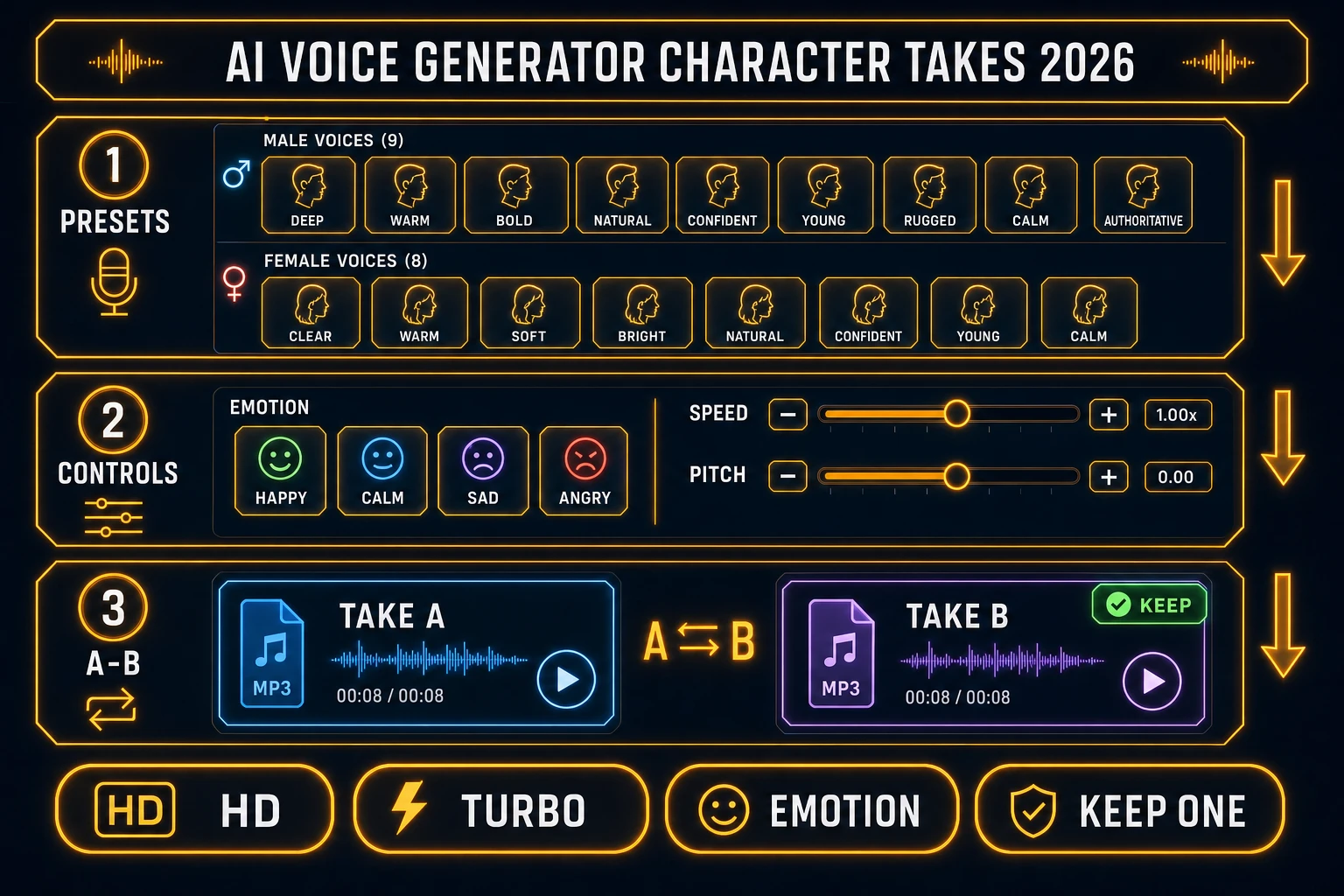
AI voice generator character take selection: 17 presets, emotion controls, A/B keep one
Take selection for an ai voice generator character: lock one preset, roll emotion only when needed, keep one mp3 per line id.

Take selection without burning the credit budget

Generate two takes only when the first reading clips a name or rushes a comma. Keep the better one. Delete the rest. An ai voice generator character pack fails when folders fill with _v3_final_FINAL files nobody can cue.

Pitch and speed are for dialect trim, not for inventing a second cast member. If the preset is wrong, change the voice id once and re-roll the pack. If you need a unique hero voice, clone instead of stacking pitch extremes.

Voice cloning facts (verified 2026-09-25 in page.tsx): VOICE_CLONE_CREDITS = 400, sample duration 10 seconds to 4:59 (MAX_CLONE_DURATION = 299), max upload 20 MB. Samples are saved for reuse. Consent is required for any real person’s voice. After training, the clone sits beside the 17 presets and uses the same per-line rates.
Mix the character line with SFX and beds

Dialogue alone can feel dry in a noisy tavern scene. Layer, do not bury. Generate UI clicks, coin clinks, or door creaks in SFX Gen (AI Credits badge verified 2026-09-25). Trim and fade in SFX Editor (Pro) or inside Sound Studio when you want music, SFX, and voice in one library.

Keep the spoken take as the loudest midrange element. Duck the bed under the line, then restore. Music Gen is the right tool for a short loop bed under a cutscene, not for replacing the ai voice generator character itself. Export stems with clear names: vo_, sfx_, bed_.

If the line needs a pause for a punchline, put the pause in the script with punctuation — do not stitch three mp3s of the same sentence. Speech Gen returns one mp3 per call; stitching invites pops at the joins.

Export and name files the loader can trust

Download each successful take as mp3. Keep one folder per build: /audio/npc/{npc_id}/. File names must match the sheet. Never rename in the engine without updating the sheet — silent missing-file bugs are worse than a missing bark.

Normalize loudness across the cast before import. A whisper NPC next to a shouted guard will force players to ride the volume slider. Sound Studio’s trim/fade/master path is enough for jam loudness; do not chase broadcast LUFS targets unless you are shipping a trailer.

For commercial disclosure, credit the tool on the about screen the same way most jams credit AI art. Cloning without consent is not an “ai voice generator character feature” — it is a liability.

Engine cues: preload then play on trigger

Wire the pack with HTMLAudioElement or the Web Audio API. MDN’s HTMLAudioElement docs (checked 2026-09-25) show new Audio(url) then .play(). MDN’s Web Audio API overview (checked 2026-09-25) covers modular routing when you need gain and spatialization.

const lines = new Map();
function preload(npcId, lineId, url) {
  const a = new Audio(url);
  a.preload = 'auto';
  lines.set(`${npcId}:${lineId}`, a);
}
async function speak(npcId, lineId) {
  const a = lines.get(`${npcId}:${lineId}`);
  if (!a) return;
  a.currentTime = 0;
  await a.play();
}

Call preload during the loading screen. Call speak from the NPC trigger after a user gesture has unlocked audio (browsers block autoplay — see MDN’s play() notes, checked 2026-09-25). For a WizardGenie browser game, ask the coding agent to preload every line into that Map and to stop the previous take when a new one starts.

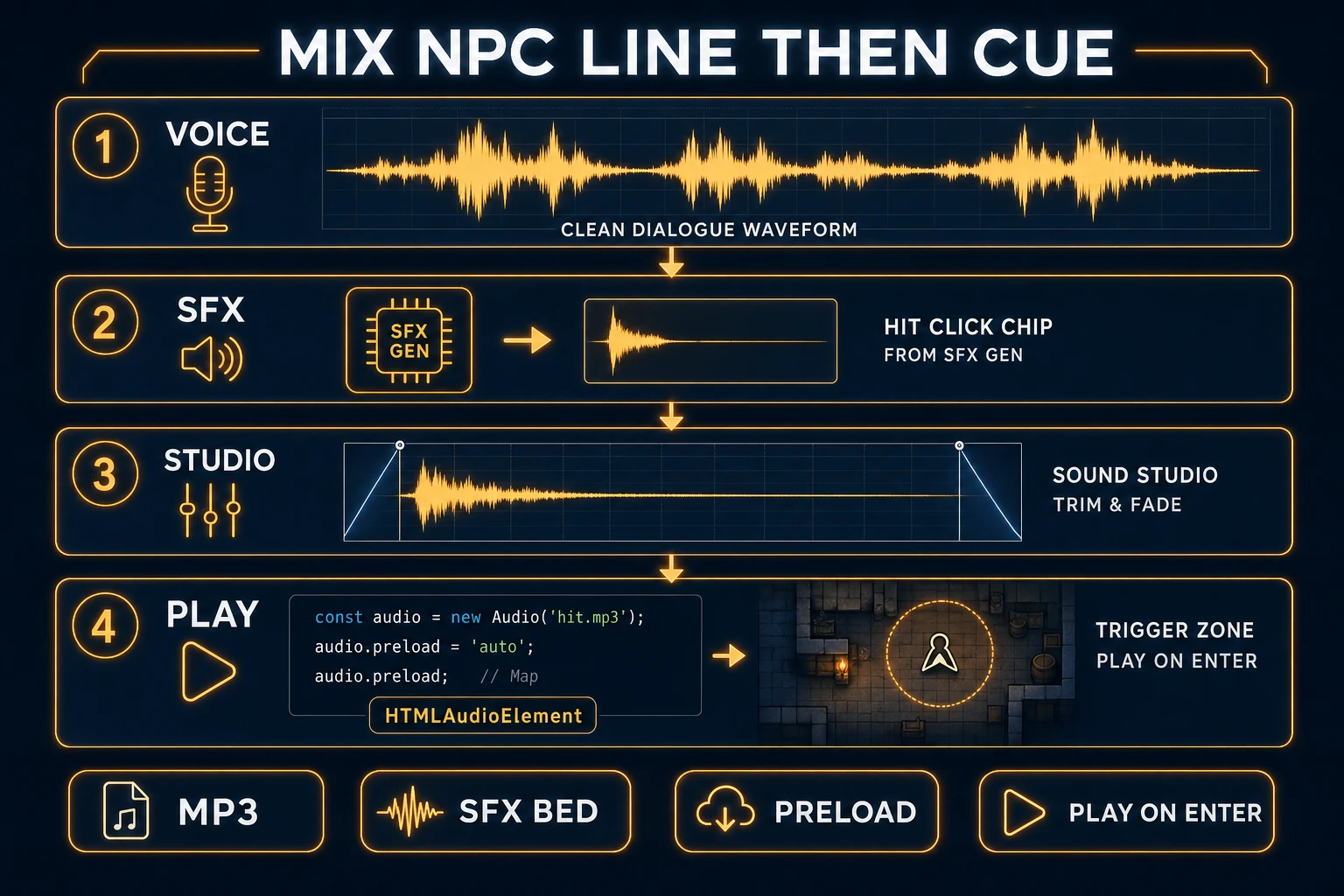
Mix NPC line then cue: voice mp3, SFX bed, Sound Studio trim, HTMLAudioElement preload map
After the ai voice generator character export: optional SFX bed, trim in Sound Studio, preload, play on enter.

Credits, when to clone, and when to stop regenerating

Short NPC lines almost always cost the minimum 1 credit. A dense lore dump near 2,000 characters is still about one API credit (or ~1 credit on HD UI math at 0.5 per 1k). Cloning at 400 credits is for a hero or trailer narrator you will reuse across dozens of lines — not for a one-off goblin bark.

Stop regenerating when the name pronunciation is correct and the energy matches the emotion chip. A fifth take that only softens a final consonant is a credit sink. Sibling workflow for music beds: how to make music for game. For party scaffolding around those NPCs, see how to make an RPG game.

Common issues with an ai voice generator character pack

  • Same NPC, different voice: The sheet lost the voice id. Lock one preset per npc_id before batching.
  • First line stutters: You played before canplaythrough. Preload on the loading screen.
  • Autoplay blocked: Trigger play from a click/tap path. MDN documents the autoplay policy on HTMLAudioElement.
  • Clone rejected: Sample under 10s, over 4:59, or over 20 MB. Trim to a clean 30–60s read.
  • Line fights the bed: Duck music under VO; do not raise both faders.

Prompt and script patterns that keep character VO on-model

Speech Gen speaks the text you give it. Soft stage directions inside the string (“says softly while smiling”) often get read aloud. Put direction in the emotion/speed controls instead. For an ai voice generator character roster, write lines like production ADR:

  • One idea per line. Split quest dumps into greet → offer → detail.
  • Spell odd names phonetically once in a scratch take, then lock the spelling that pronounced correctly.
  • Prefer contractions the character would actually say. “You are late” and “You’re late” cue different mouths.
  • End punctuation matters. A period lands flatter than a question mark on the same words.

Batch by voice id, not by scene. Rolling every Wise_Woman line in one session keeps mic consistency better than hopping between five NPCs. When a line must interrupt combat, keep it under two seconds of spoken audio so the SFX bed can return. That discipline is what makes an ai voice generator character pack feel designed instead of pasted.

The verdict

An ai voice generator character that ships NPC lines is Speech Gen on MiniMax Speech 2.8 HD: one preset (or one clone) per cast member, short scripts, HD for keepers, optional SFX/Sound Studio bed, mp3 files named to the sheet, and a preload Map into HTMLAudioElement.play(). Mention competitor TTS toys only as plain text if you must — this page’s destination is the Sorceress Speech Gen path. Verified against source and vendor docs on 2026-09-25.

Frequently Asked Questions

What is an ai voice generator character for game NPC lines?

An ai voice generator character turns scripted NPC text into spoken mp3 takes you can cue in-engine. Wikipedia’s Speech synthesis page (checked 2026-09-25) defines text-to-speech as converting normal language text into speech. On Sorceress, that path is Speech Gen at /speech-gen: MiniMax Speech 2.8 HD via Replicate model minimax/speech-2.8-hd, 17 preset voices, optional cloning, returns one mp3 per call (verified 2026-09-25 in src/lib/sorceress-tools/audio/speech.ts).

How much does an ai voice generator character line cost on Speech Gen?

In the Speech Gen UI (verified 2026-09-25 in src/app/speech-gen/page.tsx), MiniMax HD bills 0.5 credits per 1,000 characters and MiniMax Turbo bills 0.3, minimum 1 credit, charged on success. The API/tool path in speech.ts bills 1 whole credit per 2,000 characters (minimum 1). A typical 40–80 character bark is one credit either way. Voice cloning is a separate 400-credit job (VOICE_CLONE_CREDITS = 400).

Can I clone a custom ai voice generator character instead of using presets?

Yes. Upload or record a sample between 10 seconds and 4:59 (MAX_CLONE_DURATION = 299), max 20 MB. Training costs 400 credits. Once ready, the clone voice_id sits beside the 17 MiniMax presets and uses the same per-line billing. Do not clone a real person without written consent.

Which emotions work on an ai voice generator character take?

Emotions supported today are none, happy, calm, sad, angry, fearful, disgusted, and surprised — eight options in the EMOTIONS array (verified 2026-09-25 in speech.ts). Optional speed (0.5–2.0), pitch (−12 to 12), volume, and language_boost do not change the price.

How do I play an ai voice generator character mp3 in a browser game?

Speech Gen returns one mp3 URL per generation. MDN’s HTMLAudioElement docs (checked 2026-09-25) show new Audio(url) then .play() after a user gesture or after preload. Prefer listening for canplaythrough, store lines in a Map keyed by npcId + lineId, and keep beds in Music Gen or Sound Studio so dialogue never fights the loop. For spatial mixes, MDN’s Web Audio API (checked 2026-09-25) covers GainNode routing.

Sources

  1. Speech synthesis - Wikipedia
  2. Web Audio API - MDN Web Docs
  3. HTMLAudioElement - MDN Web Docs
  4. HTMLMediaElement.play() - MDN Web Docs
Written by Arron R.·1,640 words·7 min read

Related posts