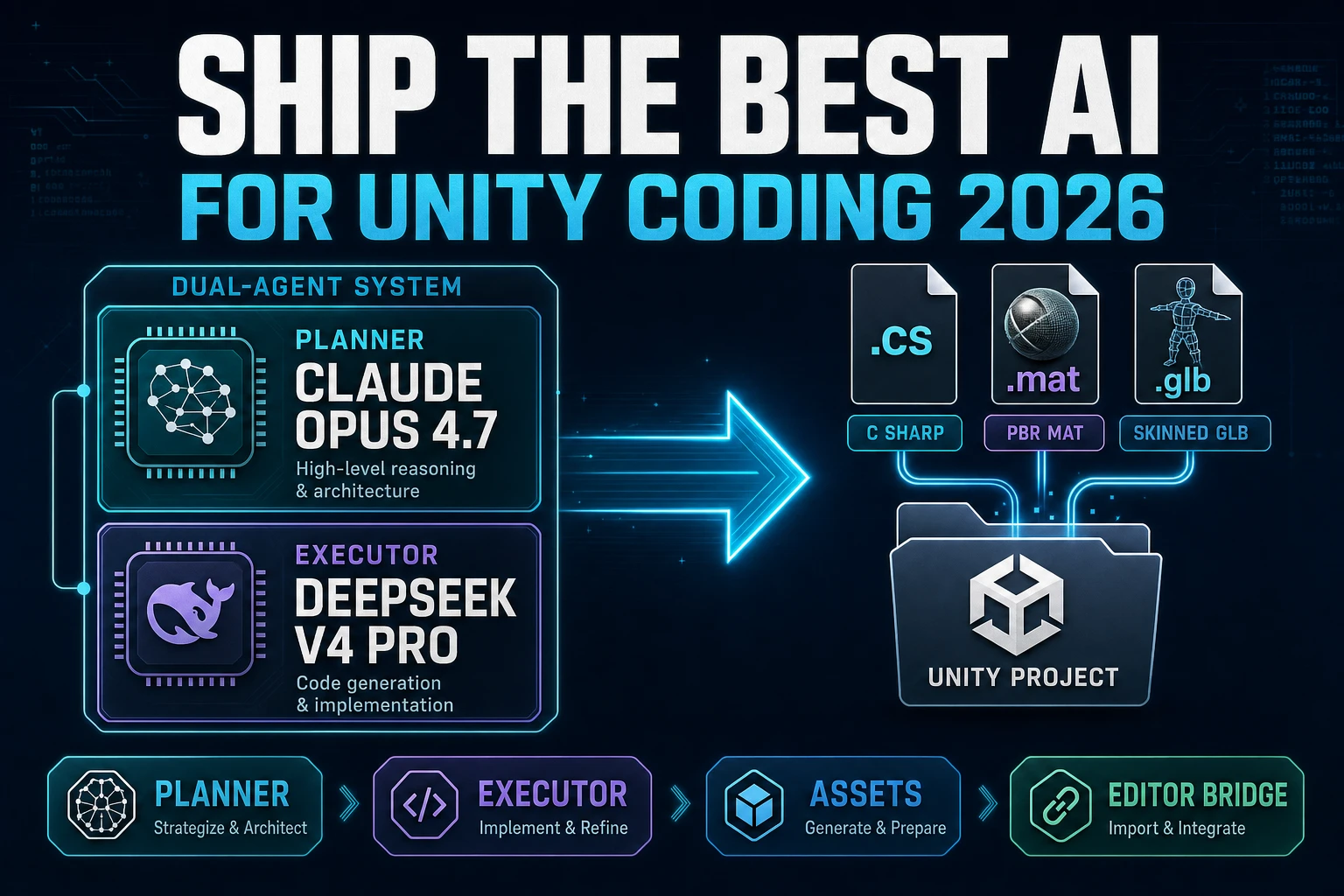
Ship the Best AI for Unity Coding (Editor Bridge 2026)

By Arron R.11 min read
The best ai for unity coding in 2026 is a two-agent shape: the in-editor AI Assistant on Unity 6.0+ (open beta, 10 USD per month Personal) plus a Sorceress Wiza

Searchers who type best ai for unity coding in 2026 land on two very different answers, and the honest one takes both seriously. Path one is the in-editor AI Assistant that shipped with Unity 6.0 and up (open beta launched May 2 2026, verified 2026-09-06 via unity.com/features/ai) — project-context-aware, third-party frontier models routed through Unity Cloud, ten dollars a month for Personal after a fourteen-day one-thousand-credit trial. Path two is a browser-first Sorceress stack that drives the same Unity 6.6 project (released 2026-09-01, verified 2026-09-06) from outside the Editor: WizardGenie planner-plus-executor for the C# scaffolding, 3D Studio and Auto-Rigging for the character pipeline, Material Forge for the URP or HDRP .mat files. Same repo, two different agents; below is the honest bench across both.
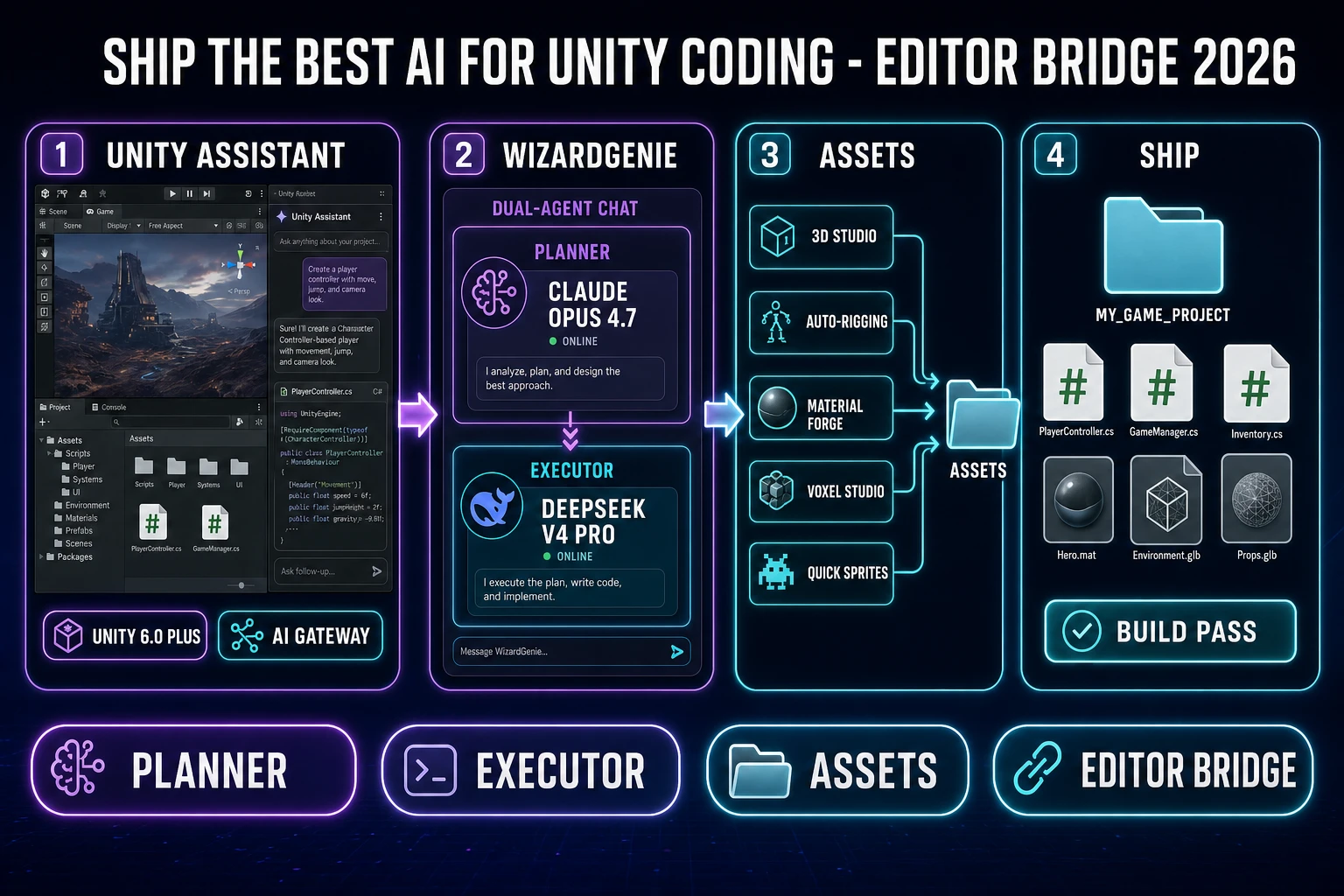
Best AI for Unity coding 2026 diagram: Unity 6.6 editor with the in-editor AI Assistant panel on one side and a Sorceress browser stack (WizardGenie planner plus executor, 3D Studio, Auto-Rigging, Material Forge) bridging into the Assets folder on the other
Two agents, one Unity project. The in-editor AI Assistant (open beta on Unity 6.0+, third-party models via Unity Cloud) and the Sorceress browser stack (WizardGenie planner plus executor plus asset pipeline) both target the same C# repo — pick the one whose price and shape fits.

What best ai for unity coding actually means in 2026

Unity coding in 2026 is not "write a MonoBehaviour, hit save, hope the compile passes." It is an agentic loop: read the spec, read the current scene graph, plan a task list, write C# into an Assets subfolder, wait for the Editor's incremental compile, read the console, patch the file, loop. The pattern is documented for browser games in the weigh the best ai coding model bench and for the general vibe-coding shape in the best ai model for vibe coding writeup. It maps directly onto Unity because the Editor already carries a live project graph — a software agent that can read the scene and target platform in real time is meaningfully different from a general chatbot pasting using UnityEngine; above a stub.

The best ai for unity coding in 2026 is therefore not a single model name — it is a decision about where the agent sits and which model drives it. In-editor sits closest to the scene graph but binds the workflow to Unity Cloud, one vendor's model gateway, and a specific credits meter. Out-of-editor sits further from the scene but lets you swap models freely across the eight-model Sorceress lineup, keeps the same agent driving your browser games and your Unity projects, and never spends a Unity credit on typing. Both are honest paths. The rest of this bench lays out what each one is good for and what it costs on a real 2026 project.

Two paths that both count as best ai for unity coding

The two paths differ on four axes: where the agent runs, which models it drives, who bills the tokens, and what it can touch. Every honest bench for the phrase best ai for unity coding has to hold both up side by side.

  • Unity's in-editor AI Assistant (open beta since 2026-05-02, verified 2026-09-06 via unity.com/blog/unity-ai-how-to-get-started). Requires Unity 6.0 or newer, ships as an Editor package, links to a Unity Cloud project. Reads the live scene graph, the target platform, and the installed packages. Free 14-day 1,000-credit trial for Unity Personal, then 10 US dollars a month for 1,000 credits; Pro and Enterprise seats include credits and MCP Server access. The AI Gateway routes Editor requests to third-party frontier models — Claude, GPT, Gemini — and API calls that traverse the Gateway do not consume Unity credits (verified 2026-09-06 via unity.com/features/ai). The MCP Server is Unity's official Model Context Protocol host, which lets an external agent (Claude Desktop, IDE plugins, WizardGenie via BYO connector) read Editor context before writing.
  • The Sorceress browser stack. Runs in a browser tab or on the desktop app. Drives the same eight CODING_MODELS visible in the Coding Studio card at tools-guide: Claude Opus 4.7 (Top tier), Claude Sonnet 4.6 (Fast + smart), GPT-5.5 (Frontier), Gemini 3.1 Pro (1M context), DeepSeek V4 Pro (Budget), Kimi K2.5 (256K coding), Grok 4.2 (2M context), MiniMax M2.7 (Agent-ready) — every name and tag verified 2026-09-06 in src/app/_home-v2/_data/tools.ts at lines 767-774. Writes C# into a local folder that Unity's asset importer picks up on save, or emits a ZIP that unpacks under Assets/. Billed against Sorceress credits at one credit per US cent (CREDITS_PER_DOLLAR = 100 in src/lib/models.ts, verified 2026-09-06), or against your own vendor keys through the Code page's BYO-API slots for Anthropic, DeepSeek, OpenAI, and NVIDIA (verified 2026-09-06 in src/app/code/page.tsx).

The two paths are not mutually exclusive. A serious 2026 workflow runs both: the in-editor Assistant for scene-graph-aware nudges (place this GameObject, rewrite this MonoBehaviour that touches four other components, suggest a Job System refactor) and the Sorceress browser stack for the parts of the project that never need the Editor loaded (asset pipeline, boilerplate C# scaffolding, cross-project design docs, batch generation of enemy stat blocks). The next three sections lay out the browser side because that is the side this blog can speak to directly — the in-editor Assistant's exact model routing changes weekly under the open beta and is best read from the vendor page on the day you install.

The Sorceress CODING_MODELS lineup for Unity C#

The eight-model lineup in the WizardGenie coding picker is the same lineup that drives Phaser and Three.js browser games; nothing in the panel is Unity-specific. That is a feature, not a gap — Unity C# is C# the language, and the frontier coding models were trained on public GitHub which is thick with C# by volume. The models handle Unity as first-class output.

Split the eight names by role, the same split the executor picks bench uses for browser games. The Planner reasons over the Unity scene shape and produces a task list. The Executor writes the C# and patches it after each incremental compile.

  • Planner seat (reasoning-heavy, low call volume): Claude Opus 4.7 for dense component graphs and animator controllers, GPT-5.5 for cross-file plans that touch Prefabs plus ScriptableObjects plus a Job System, Gemini 3.1 Pro when the session has been running long enough that a 1M-token context matters, Grok 4.2 when the project has crossed into production week and even 1M is tight.
  • Executor seat (typing-heavy, high call volume): DeepSeek V4 Pro as the default (Budget tag), Kimi K2.5 when the executor context needs to hold the scene graph plus a Prefab dump plus five iterations (256K coding tag), MiniMax M2.7 for tool-call heavy edit loops (Agent-ready tag). Never Sonnet or Opus on the typing side — the whole point of the split is the price asymmetry, and Sonnet 4.6 on the executor seat erases roughly 80 percent of the savings.

The pair that ships the most Unity work in a weekend, without a strong opinion from the project shape: Claude Opus 4.7 planner, DeepSeek V4 Pro executor. Swap the planner to Gemini 3.1 Pro when the running conversation is the primary risk to sanity; swap the executor to Kimi K2.5 the moment the scene graph plus the prior iterations blow past 100K tokens. The rest of the panel is available for one-off swaps mid-run.
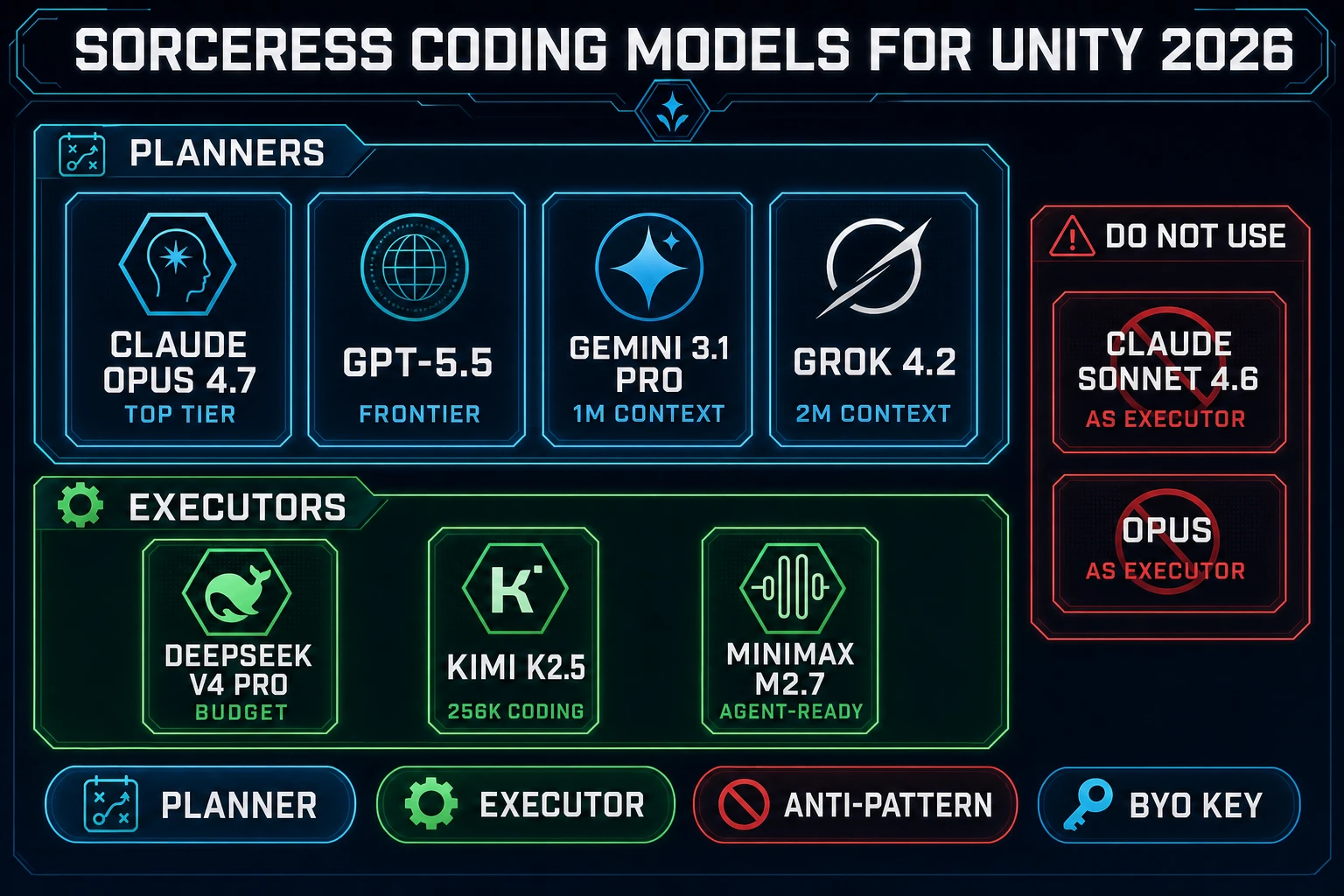
Sorceress CODING_MODELS panel for Unity coding 2026: planner row Claude Opus 4.7, GPT-5.5, Gemini 3.1 Pro 1M context, Grok 4.2 2M context above executor row DeepSeek V4 Pro Budget, Kimi K2.5 256K coding, MiniMax M2.7 Agent-ready, with the anti-pattern Sonnet 4.6 as executor struck through
The eight-model Sorceress lineup verified 2026-09-06 in src/app/_home-v2/_data/tools.ts. Planner up top, executor below. Same picker drives WizardGenie whether the target is a Unity project folder, a Phaser browser game, or a Three.js scene.

Step 1 — Pick the planner that fits your Unity project shape

The planner is the seat that reads the current Unity scene, the currently open C# file, and the last iteration's compile log. It writes the next task list; it does not write the next MonoBehaviour. Match the pick to what the project actually stresses.

  1. Claude Opus 4.7 (Top tier). Default for dense component graphs, custom Editor tooling, and Animator state machines. Reaches for the right Unity API on first draft more often than the others in the panel. Best paired with DeepSeek V4 Pro on the executor seat.
  2. GPT-5.5 (Frontier). Reach for it when the plan crosses four or more files at once — a Prefab plus a ScriptableObject plus a Job System scheduler plus a UI Toolkit layout. GPT-5.5 keeps the shape consistent across the four files without you re-stating the constraints. Best paired with GPT-5.5 Mini or DeepSeek V4 Pro.
  3. Gemini 3.1 Pro (1M context). The session-five planner. When you have iterated the same NPC AI for a full afternoon and the conversation is the primary risk to derailment, 1M context lets Gemini re-read the whole thread without chunking. Best paired with Gemini 3.1 Flash or Kimi K2.5.
  4. Grok 4.2 (2M context). Production-week overkill for a weekend jam; correct pick for a shipping project where every earlier decision has to stay in scope. Best paired with DeepSeek V4 Pro or Kimi K2.5.

Step 2 — Pick the executor for MonoBehaviour scaffolding

The executor is the seat that types the actual C#: Awake, Start, Update, FixedUpdate, the [SerializeField] declarations, the coroutine bodies, the small refactors that a scene rewrite propagates through six sibling scripts. The volume dwarfs the planner — a real Unity iteration afternoon spends roughly 10 to 15 executor turns per planner turn.

  1. DeepSeek V4 Pro (Budget). The default. Cheap per token, reasons well enough for straight typing, holds a MonoBehaviour plus its immediate collaborators without dropping context. First pick unless a specific weakness shows up.
  2. Kimi K2.5 (256K coding). Reach for it when the running context — scene graph plus the current Prefab plus the last five iterations — starts to feel constrained. K2.5 handles the extra dump without chunking.
  3. MiniMax M2.7 (Agent-ready). The tool-call executor. When the loop is heavy on multi-step edits inside a single turn (edit script, read compile log, edit again, run the next test), M2.7's native tool-calling shape avoids the planner having to arbitrate every hop.

The five anti-patterns that quietly burn Sorceress credits (or Unity credits, or vendor API budget, depending on the routing): Sonnet 4.6 on the executor seat, Opus on both seats, GPT-5.5 on both seats, an executor swap mid-project without retesting the specific bug you were prompting around, and the reverse — a planner swap without re-anchoring the spec. All five collapse the price ratio that makes the split worth deploying. Full breakdown in the executor picks bench.

Step 3 — Bridge the asset pipeline into Unity Assets

The coding models produce the C#. The asset pipeline produces every FBX, PNG, WAV, and PBR map that C# loads. This is the part of a Unity project that the in-editor Assistant does not touch — the Assistant scaffolds the code that consumes the asset, not the asset itself. Sorceress' browser stack fills the same gap the same way it fills it for browser games.

  • Character pipeline. AI Image Gen anchors a concept portrait against up to 16 reference images on GPT Image 2 or 8 references on Nano Banana Pro (verified 2026-09-06 in src/lib/models.ts). 3D Studio lifts the portrait to a textured 3D mesh through Meshy 6, Rodin 2.0, Tripo v3.1, or Hunyuan 3D 3.1. Auto-Rigging attaches a humanoid skeleton (Meshy provider at 20 credits per rig, verified 2026-09-06 in src/lib/rigging/external-rig/autoRigPricing.ts). The Unity export path packages the skinned GLB, a walk config JSON, and three C# scripts — ProcWalkController.cs, CreatureCamera.cs, and ProcCreatureSetup.cs — as a ZIP that drops under Assets/, or pushes directly to a project folder via the File System Access API. Both the New Input System and the legacy Input Manager are supported (verified 2026-09-06 in src/lib/rigging/unity-export.ts).
  • Multi-legged creature pipeline. Procedural Walk handles quadrupeds, spiders, centipedes — everything the humanoid rig cannot. Same Unity export shape: GLB plus JSON plus C# controllers. The IK feet plant on Unity's uneven terrain without any keyframed clips.
  • Material pipeline. Material Forge exports Unity URP or HDRP .mat files directly (verified 2026-09-06 in src/lib/material-forge/exporters/unity.ts) — base color, normal, roughness, metallic, ambient occlusion, emissive, remapped through Unity's Smoothness convention (Smoothness = 1 - Roughness) so the values land correctly in the Universal Render Pipeline. Six PBR maps per material, one .mat file, dropped straight into Assets/Materials/.
  • Voxel and stylized pipeline. Voxel Studio emits any of .glb, .gltf, .fbx, .obj, or .stl (verified 2026-09-06 in src/app/voxelgen/page.tsx) — Unity's default importer reads all five directly with no plugin.
  • 2D pipeline. Quick Sprites, True Pixel, and Tileset Forge produce transparent-background PNG sheets that Unity's Sprite Editor slices with the standard grid-by-cell-size mode.

The bridge is a plain folder plus a save. Unity's asset importer watches the Assets/ tree; anything Sorceress writes there shows up on the next Editor tab refresh with the correct import settings inferred from the file extension. There is no proprietary format between the two stacks — every export is either an engine-neutral file (GLB, FBX, PNG, WAV) or a Unity-native file (.mat, .cs) generated to Unity's own schema.

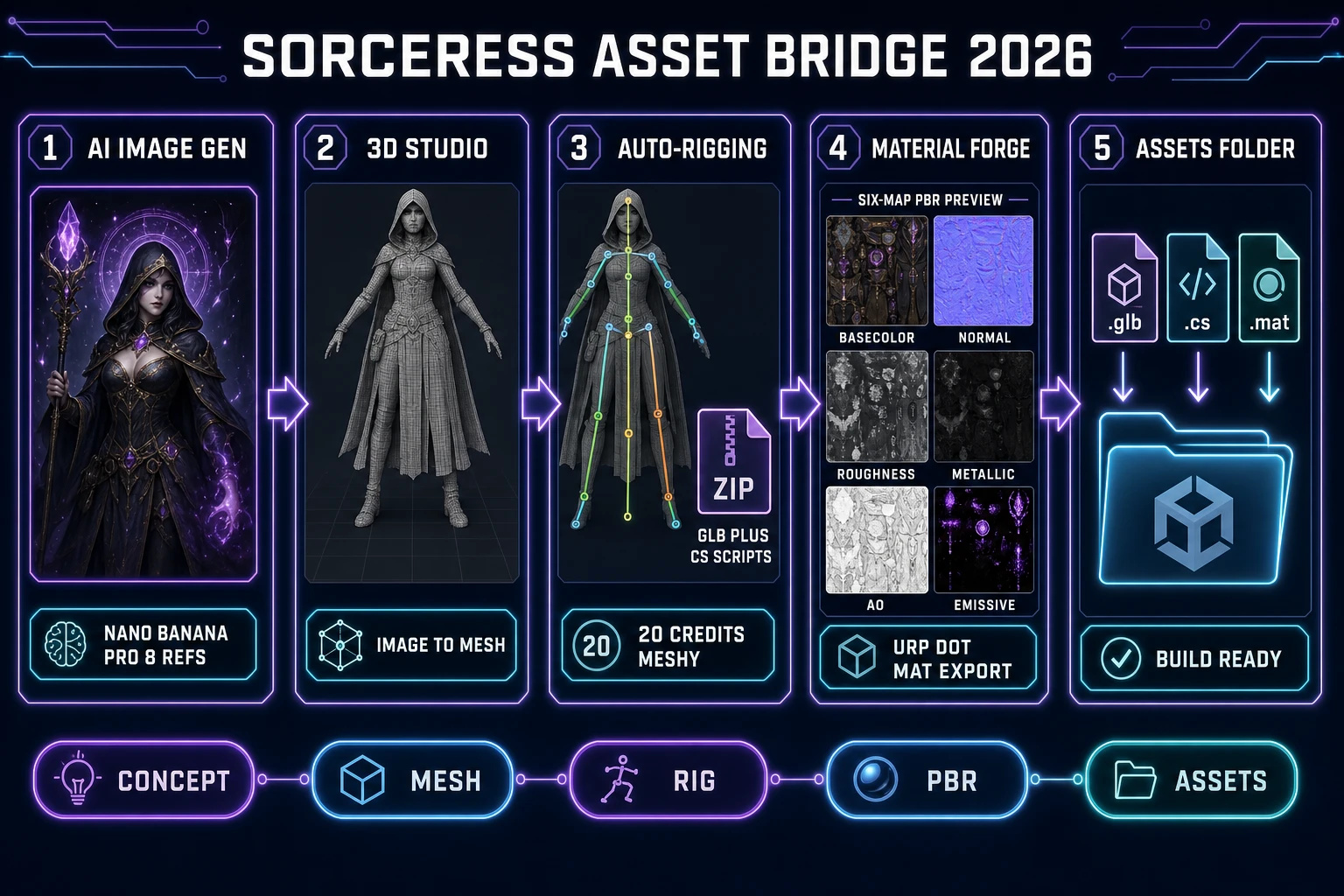
Sorceress to Unity asset bridge diagram 2026: five numbered panels showing AI Image Gen concept portrait, 3D Studio image-to-mesh, Auto-Rigging skinned GLB plus C# scripts ZIP, Material Forge Unity URP mat file, Voxel Studio GLB or FBX export, all dropping into Unity 6.6 Assets folder
Every Sorceress pipeline exits in a Unity-ready shape. Auto-Rigging bundles a GLB plus a JSON config plus three C# scripts as a ZIP; Material Forge writes URP or HDRP .mat files directly; Voxel Studio emits any of five model formats. Verified 2026-09-06 across src/lib/rigging/unity-export.ts, src/lib/material-forge/exporters/unity.ts, and src/app/voxelgen/page.tsx.

What best ai for unity coding actually costs in 2026

Two pricing meters, honestly compared. Unity's in-editor AI Assistant charges 10 US dollars a month for the Personal seat after the 14-day 1,000-credit trial, and Pro or Enterprise seats include the AI credits in the subscription (verified 2026-09-06 via unity.com/blog/unity-ai-how-to-get-started and unity.com/features/ai). External model calls routed through the AI Gateway (Claude Sonnet 4.6, GPT-5.5, Gemini 3.1 Pro) do not consume Unity credits — those bill against the developer's own vendor API key. So the Assistant subscription pays for the Editor integration and the MCP Server hosting; the model cost is separate and lands wherever the developer's key points.

The Sorceress side bills against credits at one credit per US cent (CREDITS_PER_DOLLAR = 100 in src/lib/models.ts, verified 2026-09-06). A representative weekend Unity C# session — call it a 12-planner-turn, 180-executor-turn build for a small game jam entry, sized to match the executor bench in the vibe coding bench — lands in the low single-digit-dollar range on the Sorceress-credit meter with Opus 4.7 planner plus DeepSeek V4 Pro executor. The asset pipeline adds one Nano Banana Pro portrait (18 credits), one 3D Studio image-to-mesh pass, one Auto-Rigging call (20 credits Meshy provider), and a pair of Material Forge PBR sets (roughly 10 credits per set) — call it 60 to 80 credits, sixty to eighty US cents, for a full character-plus-materials pack. Under two dollars for the code plus the assets on a jam-team session.

The BYO-key path on the Code page takes the Sorceress-credit meter out of the equation entirely — the four provider slots (Anthropic, DeepSeek, OpenAI, NVIDIA) store keys only in localStorage (verified 2026-09-06 in src/app/code/page.tsx). The developer pays the vendors directly, at the same per-token rates they would pay through Unity's AI Gateway. Which meter is cheaper on a given project is a function of session shape, not of the tools — the honest 2026 answer to "which is cheaper" is "run both for a week and read the two invoices." Everything else is marketing. Ready to try the browser side end to end? Start a session at WizardGenie or open the Code page with your own key, and check the current tool credits on the plans page before locking a monthly budget.

Frequently Asked Questions

What is the best ai for unity coding in 2026?

The best ai for unity coding in 2026 is not one product but a two-agent shape. Path one is Unity's in-editor AI Assistant, in open beta since 2026-05-02 on Unity 6.0 and up, which reads the live scene graph, target platform, and installed packages, and routes to third-party frontier models (Claude, GPT, Gemini) via the Unity Cloud AI Gateway. Personal pricing is a 14-day 1,000-credit trial then 10 US dollars a month for 1,000 credits (verified 2026-09-06 via unity.com/blog/unity-ai-how-to-get-started). Path two is the Sorceress browser stack: WizardGenie planner-plus-executor drives the eight-model CODING_MODELS lineup (Claude Opus 4.7, Claude Sonnet 4.6, GPT-5.5, Gemini 3.1 Pro, DeepSeek V4 Pro, Kimi K2.5, Grok 4.2, MiniMax M2.7, verified 2026-09-06 in src/app/_home-v2/_data/tools.ts lines 767-774), writes C# into a folder Unity's asset importer picks up, and bridges the asset pipeline through 3D Studio, Auto-Rigging, and Material Forge. Serious 2026 projects run both.

Which coding model in the Sorceress lineup fits Unity C# scaffolding best?

Split the eight-model panel by role, the same split browser games use. Planner seat: Claude Opus 4.7 (Top tier, default for dense component graphs), GPT-5.5 (Frontier, best for cross-file plans that touch Prefabs plus ScriptableObjects plus Job System), Gemini 3.1 Pro (1M context, session-five planner), Grok 4.2 (2M context, production-week overkill correct pick). Executor seat: DeepSeek V4 Pro (Budget, default typing pick), Kimi K2.5 (256K coding, when the scene graph plus iterations blow past 100K tokens), MiniMax M2.7 (Agent-ready, for tool-call heavy edit loops). Never Sonnet or Opus on the executor seat. The pair that ships the most Unity work in a weekend: Claude Opus 4.7 planner plus DeepSeek V4 Pro executor. Every tag and name verified 2026-09-06 in src/app/_home-v2/_data/tools.ts.

How does Sorceress bridge assets into a Unity project folder?

Every Sorceress pipeline exits in a Unity-ready file shape. Auto-Rigging exports a ZIP containing the skinned GLB, a walk config JSON, and three C# scripts - ProcWalkController.cs, CreatureCamera.cs, ProcCreatureSetup.cs - and supports both the New Input System and the legacy Input Manager (verified 2026-09-06 in src/lib/rigging/unity-export.ts). The panel can also push directly to a chosen Assets folder via the File System Access API. Material Forge exports Unity URP or HDRP .mat files with Smoothness remapped correctly from Roughness (verified 2026-09-06 in src/lib/material-forge/exporters/unity.ts). Voxel Studio emits .glb, .gltf, .fbx, .obj, or .stl (verified 2026-09-06 in src/app/voxelgen/page.tsx). Quick Sprites, True Pixel, and Tileset Forge output transparent-background PNG sheets that Unity's Sprite Editor slices with the standard grid-by-cell-size mode. There is no proprietary format between Sorceress and Unity - every file is engine-neutral or Unity-native.

What does the Unity in-editor AI Assistant cost in 2026?

Unity's in-editor AI Assistant charges 10 US dollars a month for the Personal seat after a 14-day 1,000-credit trial (verified 2026-09-06 via unity.com/blog/unity-ai-how-to-get-started). Pro and Enterprise subscriptions include the AI credits and access to the MCP Server. It requires Unity 6.0 or newer - it is not backwards compatible. External model calls routed through the AI Gateway (Claude, GPT, Gemini via the developer's own vendor API key) do not consume Unity credits; the subscription pays for the Editor integration, the AI Gateway hosting, and the Model Context Protocol server. Unity Muse, the earlier deprecated product, has been fully replaced by the AI Assistant.

What does the Sorceress browser stack cost for Unity coding on a jam-team weekend?

Sorceress credits price at one credit per US cent (CREDITS_PER_DOLLAR = 100 in src/lib/models.ts, verified 2026-09-06). A representative weekend Unity build - 12 planner turns, 180 executor turns, Opus 4.7 planner plus DeepSeek V4 Pro executor - lands in the low single-digit-dollar range on the credit meter. The asset pipeline adds one Nano Banana Pro portrait (18 credits, verified 2026-09-06 in src/lib/models.ts), one 3D Studio image-to-mesh pass, one Auto-Rigging call (20 credits Meshy provider, verified 2026-09-06 in src/lib/rigging/external-rig/autoRigPricing.ts), and a pair of Material Forge PBR sets at roughly 10 credits per set. Total for a full character-plus-materials pack: 60 to 80 credits, sixty to eighty US cents. Under two dollars for the C# scaffolding plus the assets on a jam-team session, before any Unity subscription.

Can I use my own vendor API keys with Sorceress for Unity coding?

Yes. The Sorceress /code page carries BYO-API-key slots for four providers - Anthropic, DeepSeek, OpenAI, and NVIDIA - and stores keys only in localStorage so they never leave the browser (verified 2026-09-06 in src/app/code/page.tsx). That path takes the Sorceress-credit meter out of the equation entirely; you pay the vendor at their published per-token rate, the same way you would pay them if you routed the same call through Unity's AI Gateway. Which meter ends up cheaper on a given project is a function of session shape rather than tool choice - the honest 2026 answer to which path costs less is to run both for a week and read the two invoices.

Sources

  1. Software agent - Wikipedia
  2. C Sharp (programming language) - Wikipedia
  3. MonoBehaviour - Wikipedia
  4. Model Context Protocol - Wikipedia
  5. File System API - MDN
  6. Games - MDN Web Docs
Written by Arron R.·2,558 words·11 min read

Related posts