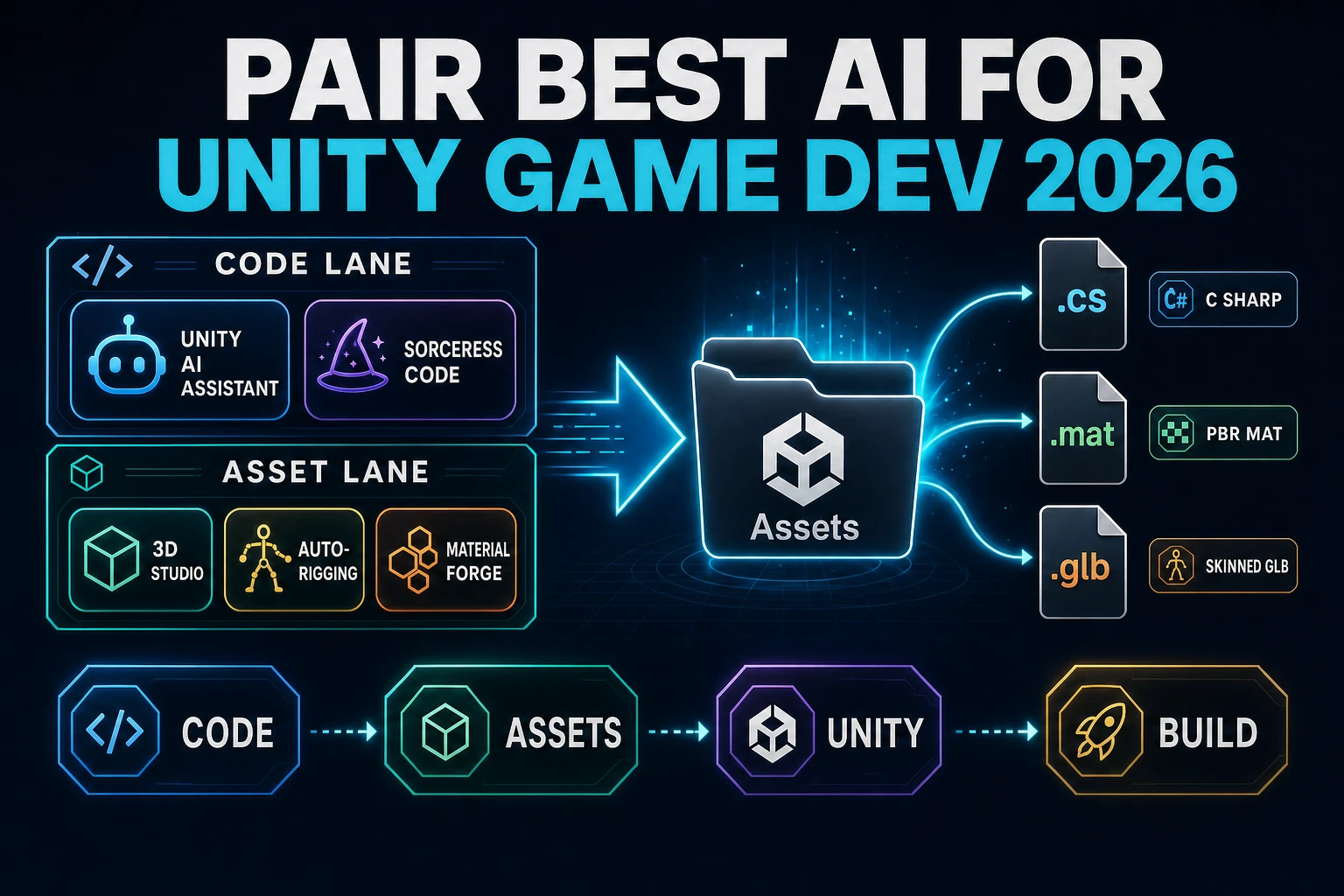
Pair Best AI for Unity Game Development (Editor Loop 2026)

By Arron R.13 min read
The best ai for unity game development in 2026 is two lanes at once: Unity 6.0+ AI Assistant ($10/mo Personal) inside the Editor plus the Sorceress WizardGenie

Searchers who type best ai for unity game development in September 2026 are asking a two-lane question and usually only get one lane back. Unity Personal is a real free tier, Unity 6.0 shipped its first in-editor AI Assistant into open beta this year, and the Anthropic + OpenAI + Google + DeepSeek + Moonshot + xAI + MiniMax coding-model roster has settled into a stable eight-seat rotation the Sorceress CODING_MODELS array locks. But the honest answer for a Unity project is that code alone is one-fifth of the surface - the other four-fifths are 3D character rigging, PBR materials, voxel props, sprite atlases, background music, SFX, and the .glb / .mat / .fbx / .wav / .cs files a Unity Assets/ folder actually receives. Every claim below was verified 2026-09-09 against vendor documentation and the Sorceress source in src/app/_home-v2/_data/tools.ts, src/app/code/page.tsx, src/lib/rigging/unity-export.ts, and src/lib/material-forge/exporters/unity.ts. The verdict resolves into two lanes and a shared Assets/ folder, not a single-tool leaderboard.
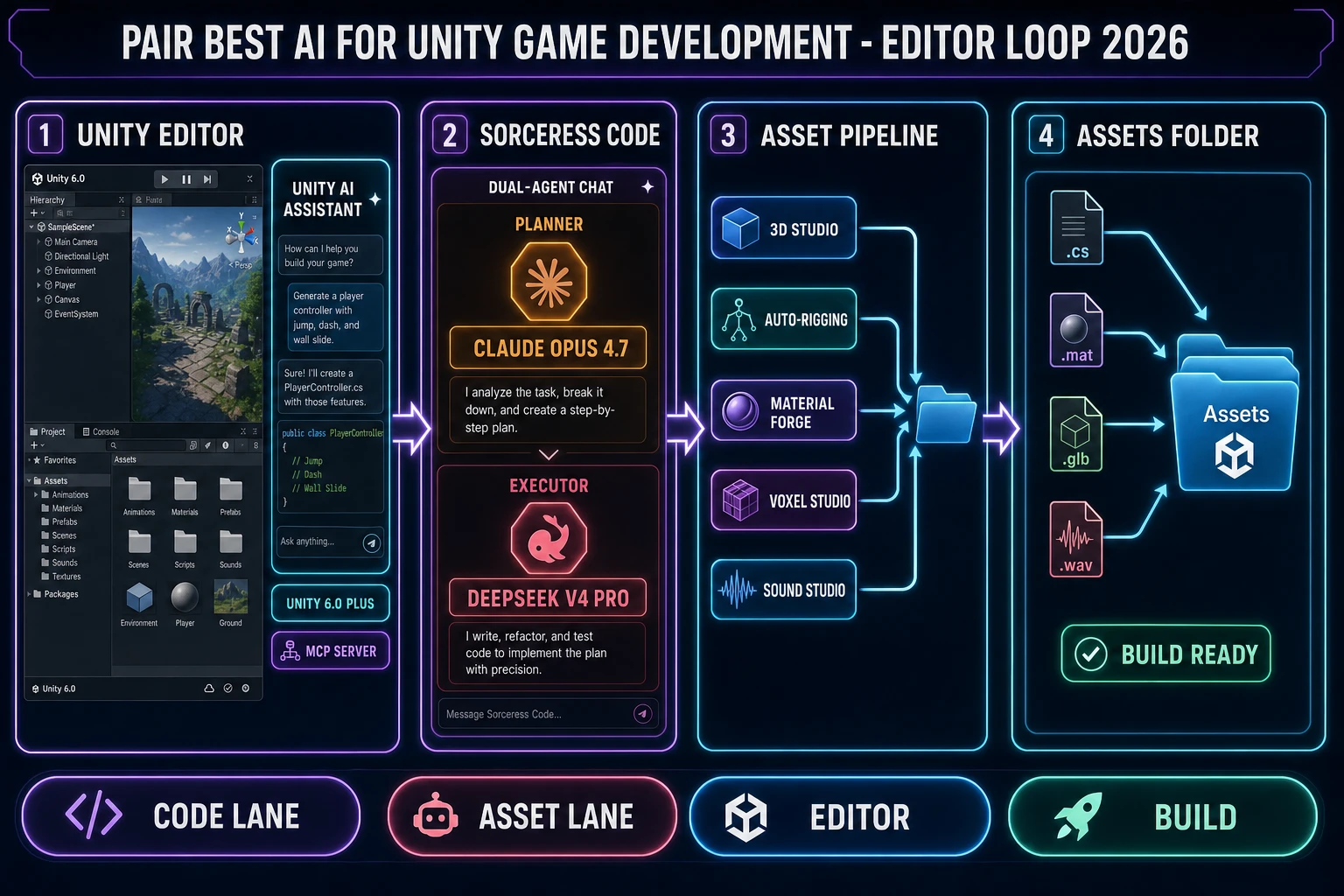
Best ai for unity game development 2026 diagram pairing the Unity 6.0 in-editor AI Assistant with a Sorceress WizardGenie planner Claude Opus 4.7 plus DeepSeek V4 Pro executor and the full asset pipeline 3D Studio Auto-Rigging Material Forge Voxel Studio Sound Studio feeding a Unity Assets folder with .cs .mat .glb .wav files
The two-lane AI rig for Unity game development as of 2026-09-09 - Unity 6.0 in-editor AI Assistant plus a Sorceress WizardGenie planner-plus-executor and asset pipeline, both feeding one Unity Assets folder.

What "Unity game development" means separately from "Unity coding"

The phrase best ai for unity game development and the phrase best ai for unity coding look almost identical, and they resolve into different answers. Unity coding is the C# and shader lane: MonoBehaviour subclasses, Update loops, coroutines, ScriptableObjects, Job System, Burst compiler, and the New Input System versus the legacy Input Manager. Unity game development is the whole surface. That includes the C# lane, but it also includes 3D character rigging, PBR material authoring (physically based rendering maps and Unity URP/HDRP conversion), scene assembly, level design, animation state graphs and blend trees, VFX Graph, audio (music, ambient beds, SFX, voice), lighting, and the build pipeline that ships to PC, consoles, mobile, and WebGL.

An AI stack that only writes C# leaves eight of those ten lanes untouched. That is why the best ai for unity game development question resolves into a two-lane rig rather than a single-tool leaderboard: the code lane covers C# scaffolding and shader edits, and the asset lane covers everything a scripting agent cannot produce - rigged 3D characters, .mat files, .fbx voxel props, PNG sprite atlases, music beds, and .wav SFX. Sorceress ships both lanes under one credit meter through WizardGenie, Sorceress Code, and the asset tools on the tools guide. Unity 6.0+ ships the in-editor AI Assistant that covers the C# lane with project-aware context. Together they close the two-lane loop for a real Unity project.

The two AI lanes a Unity project actually needs

Split the AI stack for Unity into two lanes and every product on the market sorts cleanly. The code lane writes C#, edits shaders, refactors Prefab references, and drives the Unity Editor via the Model Context Protocol server. The asset lane generates 3D meshes, rigs skeletons, bakes PBR maps, voxelizes props, slices sprites, and produces .wav files for music and SFX.

Lane What it produces Where it lands in Unity Sorceress or Unity tool
Code laneMonoBehaviour scripts, coroutines, scriptable objects, shader editsAssets/Scripts/*.cs, Packages/Unity AI Assistant, WizardGenie, Sorceress Code
Asset lane - charactersSkinned .glb with humanoid or custom rig, walk config JSON, C# controllersAssets/Characters/*.glb + SorceressRigBot/*.csAuto-Rigging
Asset lane - meshesImage-to-mesh .glb, text-to-mesh .glb, base color texturesAssets/Props/*.glb3D Studio
Asset lane - materialsURP or HDRP .mat YAML files with PBR maps (BaseColor, Normal, Metallic, Roughness-to-Smoothness, AO, Emissive)Assets/Materials/*.matMaterial Forge
Asset lane - voxels.glb, .gltf, .fbx, .obj, .stl voxel propsAssets/VoxelProps/*.fbxVoxel Studio
Asset lane - spritesTransparent PNG sprite sheets, cell-sliced atlasesAssets/Sprites/*.png (Sprite Editor grid-by-cell-size)Quick Sprites, True Pixel, Tileset Forge
Asset lane - audio.wav music beds, SFX, NPC voice linesAssets/Audio/*.wavSound Studio, Music Gen, SFX Gen, Speech Gen

The row that changes the most in 2026 is the audio lane. Unity 6 shipped its own AI Generators for placeholder audio, but production audio still comes from a dedicated audio-AI pipeline. Sorceress Music Gen bills 10 credits per bed (MUSIC_CREDIT_COST in src/lib/sorceress-tools/audio/music.ts, verified 2026-09-09), SFX Gen bills a per-clip minimum of 1 credit, and Speech Gen produces NPC voice lines. That means one Sorceress credit ($0.01 at the CREDITS_PER_DOLLAR = 100 conversion in src/lib/models.ts) buys one SFX; ten credits ($0.10) buys one music bed. A whole Unity jam's audio track lands under a dollar.

Unity 6.0+ AI Assistant - the code lane inside the Editor

Unity's own in-editor AI Assistant went to open beta in 2026 on Unity 6.0 and later. It runs inside the Unity Editor rather than in a browser tab, which is what makes it the Editor half of the "Editor Loop" title. Verified 2026-09-09 on unity.com/features/ai and unity.com/blog/unity-ai-how-to-get-started, the Assistant reads the live scene graph, GameObjects, components, installed packages, and target platform in real time, and routes to third-party frontier models through the Unity Cloud AI Gateway. The three modes are Ask (Q&A), Plan (multi-step scaffolds), and Agent (write files, edit components, run the scene). The MCP Server sits behind it and lets external IDEs read Unity project state.

Pricing verified 2026-09-09: Personal Edition gets a 14-day 1,000-credit trial that converts to 10 USD per month for 1,000 credits. Pro, Enterprise, and Industry subscribers get the Assistant, AI Gateway, and MCP Server access included with their existing seats plus a monthly credit allotment. Overage credit bundles are purchasable. Third-party model calls routed through the AI Gateway with your own Anthropic, OpenAI, or Google API key do not consume Unity credits - the Unity subscription pays for the Editor integration, the AI Gateway hosting, and the MCP Server. Unity Muse (the earlier deprecated product line) has been fully replaced by the AI Assistant. It requires Unity 6.0 or newer; it is not backwards compatible.

The role Unity's Assistant plays in the two-lane rig is narrow and important: it is the Editor-native scripting seat. If you are debugging a physics collision in Play Mode, the Assistant reads the Rigidbody component values and the collision layer matrix and can propose a change without the developer copy-pasting anything into a browser tab. That is the Editor-integration advantage. What it does not do is generate a rigged 3D character, bake a PBR material, or produce a .wav music bed - those live in the asset lane.

The Sorceress code lane - WizardGenie planner plus Sorceress Code executor

The Sorceress code lane runs in a browser tab or the desktop WizardGenie Electron app. Its structural advantage over the in-Editor Assistant is the eight-model rotation and the planner-plus-executor split. Verified 2026-09-09 in src/app/_home-v2/_data/tools.ts lines 766-775, the CODING_MODELS array is exactly eight seats with color-coded accents that render in the Sorceress model picker across every page.

Model Provider Sorceress tag Right-now seat for Unity
Claude Opus 4.7AnthropicTop tierPlanner default - dense component graphs, cross-file refactor plans
Claude Sonnet 4.6AnthropicFast + smartPlanner shoulder - same tokenizer as Opus 4.7, cheaper per token
GPT-5.5OpenAIFrontierPlanner - Prefab + ScriptableObject + Job System cross-cuts
Gemini 3.1 ProGoogle1M contextPlanner - session-five refactor across nine Unity scripts
DeepSeek V4 ProDeepSeekBudgetExecutor default - typing the C# the planner drafted
Kimi K2.5Moonshot256K codingExecutor - when scene graph plus code blows past 100K tokens
Grok 4.2xAI2M contextPlanner - when the whole Unity project pastes in one prompt
MiniMax M2.7MiniMaxAgent-readyExecutor - open file, patch, save, run tests, report loops

The right-now Unity pair on 2026-09-09 is Claude Opus 4.7 as planner plus DeepSeek V4 Pro as executor. Opus 4.7 sits at Anthropic Top tier pricing ($5 input / $25 output per MTok), verified 2026-09-09 on the Anthropic pricing page which lists Opus 4.7 alongside Opus 4.8 and Opus 5 on the same tier. DeepSeek V4 Pro sits at roughly $0.27 / $1.10 per MTok on the DeepSeek API, verified 2026-09-09 on the DeepSeek docs which resolve the API alias to DeepSeek-V4-Pro-0813 with Non-Think / Think High / Think Max modes and a 1M context window. The cost ratio between planner and executor lands at roughly one-fifth of a single-frontier session, which is exactly why the Planner + Executor pattern exists.

Sorceress Code is the BYO-key runtime that pairs with WizardGenie. Verified 2026-09-09 in src/app/code/page.tsx, the /code page exposes four provider slots - Anthropic, DeepSeek, OpenAI, NVIDIA - and stores keys only in browser localStorage so they never touch Sorceress servers. That is the path for a Unity indie team already paying Anthropic or DeepSeek directly on a company card.
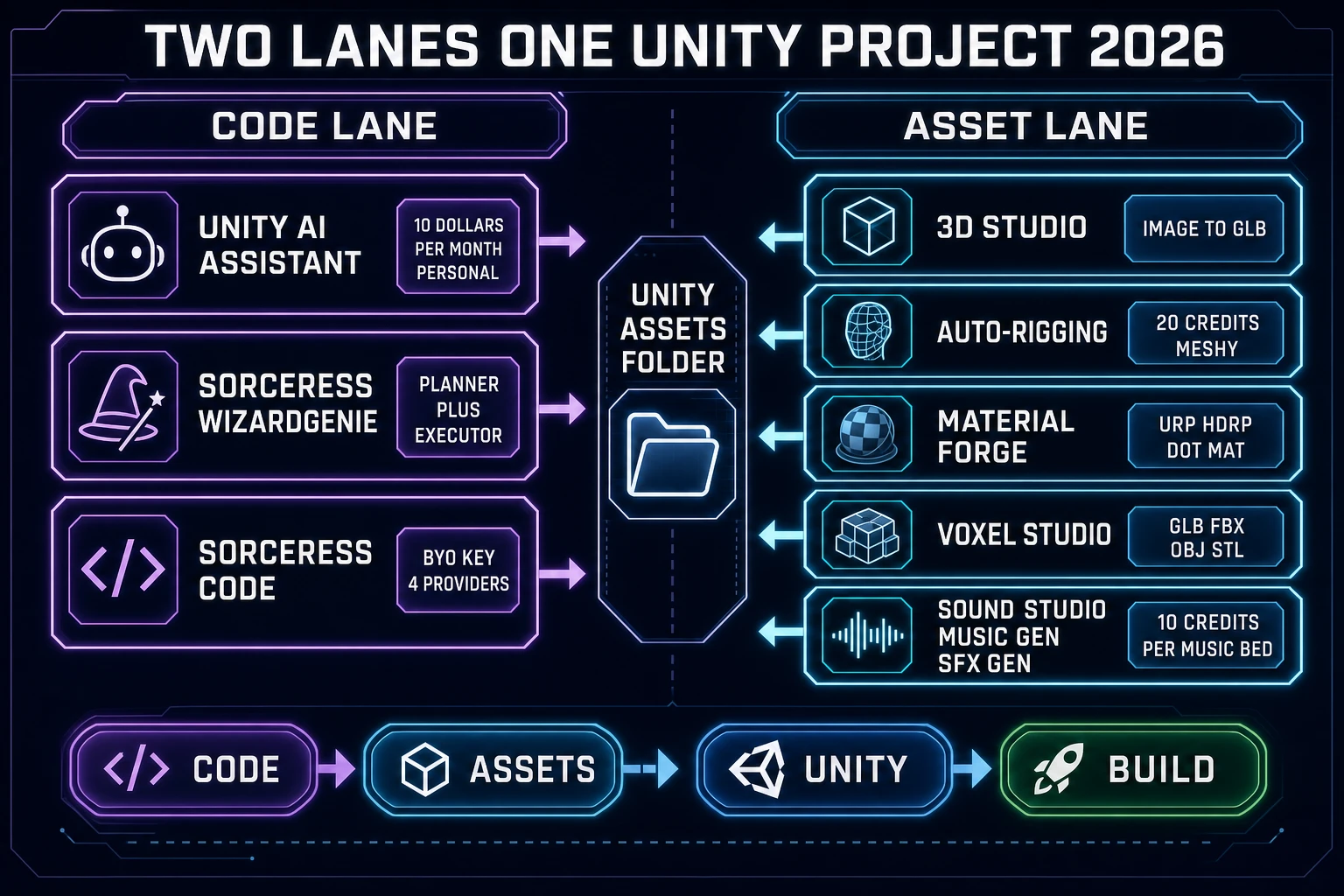
Two-lane AI rig diagram showing the Unity code lane and asset lane both feeding a Unity Assets folder with 3D Studio Auto-Rigging Material Forge Voxel Studio Sound Studio outputs on one side and Unity AI Assistant plus Sorceress WizardGenie and Code on the other
The two lanes running side by side into one Unity Assets folder - the code lane on the left (Unity AI Assistant, WizardGenie, Sorceress Code) and the asset lane on the right (3D Studio, Auto-Rigging, Material Forge, Voxel Studio, audio).

The asset lane - Sorceress tools that write to Unity Assets

Every Sorceress asset tool exports files that Unity's asset importer picks up without conversion. There is no proprietary Sorceress format sitting between the browser and the Unity project. Each file lands in Assets/ and Unity's importer generates the .meta files, the Prefabs, and the material stubs automatically.

Auto-Rigging - characters plus C# controllers

Auto-Rigging is the highest-value single tool in the Unity asset lane. Verified 2026-09-09 in src/lib/rigging/unity-export.ts, one export call produces a ZIP containing: a skinned .glb character mesh, a _walk.json config file with the full bone hierarchy and gait presets, three C# scripts (ProcWalkController.cs, CreatureCamera.cs, and ProcCreatureSetup.cs), an Editor-side setup script, and a README with drop-in instructions. The C# scripts branch on the New Input System versus the legacy Input Manager at generation time. Credit cost is 20 credits when routed through the Meshy provider (AUTO_RIG_CREDITS.meshy in src/lib/rigging/external-rig/autoRigPricing.ts, verified 2026-09-09), which resolves to 20 cents on the Sorceress credit meter.

Material Forge - Unity URP/HDRP .mat files

Verified 2026-09-09 in src/lib/material-forge/exporters/unity.ts, Material Forge produces the YAML material header Unity's asset importer expects, with _Metallic, _Smoothness (remapped from Roughness as 1 - roughness), _BumpScale, _OcclusionStrength, _ClearCoatMask, and transparency handled correctly via _Surface and _SrcBlend / _DstBlend. The .mat drops straight into Assets/Materials/ and shows up in the Project window with the correct thumbnail. Tiling values pass through to _BaseMap, _BumpMap, _EmissionMap, _MetallicGlossMap, and _OcclusionMap so the material behaves identically to a hand-authored URP material.

3D Studio and Voxel Studio - .glb, .fbx, and voxel props

3D Studio handles image-to-3D and text-to-3D mesh generation. Output is a .glb file - Unity's asset importer picks it up as a Model and generates the Materials folder plus a Prefab automatically. Voxel Studio emits five formats verified 2026-09-09 in src/app/voxelgen/page.tsx line 170: .glb, .gltf, .fbx, .obj, and .stl. That FBX path is the one to reach for when a Unity project has an existing FBX-only pipeline; the GLB path is the one to reach for when the project is on the modern glTF importer.

Sprites and audio

Sprite-lane tools - Quick Sprites, True Pixel, and Tileset Forge - emit transparent-background PNG sheets that Unity's Sprite Editor slices with the grid-by-cell-size mode. Audio-lane tools output .wav or .mp3; Music Gen bills 10 credits per bed, SFX Gen at a 1-credit minimum, and Speech Gen produces NPC voice lines that drop into AudioSource components without conversion.

The Unity editor loop - one full session end to end

The whole point of the two-lane rig is that the Unity Editor becomes the merge point where both lanes converge. A representative 2026-09-09 session runs like this:

  1. Prompt on the WizardGenie planner side. Open WizardGenie, load the Planner + Executor mode with Opus 4.7 on the planner seat and DeepSeek V4 Pro on the executor seat. Prompt: "Draft a Unity 6 platformer PlayerController with New Input System, ground check, coyote time, and variable jump height." Opus 4.7 emits the plan, DeepSeek V4 Pro types the C# file.
  2. Drop the C# into Assets/Scripts/. WizardGenie writes to the local filesystem via the File System Access API (or the desktop app's native Node filesystem). Unity's asset importer picks up the new file within a second and compiles it.
  3. Generate the character on the asset lane. Open 3D Studio, image-to-mesh a concept portrait, export the .glb, drop into Assets/Characters/. Then open Auto-Rigging, upload the .glb, run the humanoid rig, download the ZIP, and extract the skinned .glb plus SorceressRigBot C# scripts into the same Characters folder.
  4. Bake the material on Material Forge. Open Material Forge, prompt "worn leather armor with copper rivets," export as Unity URP, drop the .mat into Assets/Materials/. Unity's Project window shows the correct thumbnail immediately.
  5. Add the music bed and SFX. Open Music Gen, generate a 60-second exploration bed, download the .wav, drop into Assets/Audio/Music/. Add three SFX from SFX Gen for jump, land, and pickup.
  6. Bounce Play Mode errors back through Sorceress Code. Enter Play Mode. If a NullReferenceException lands in the Console, paste the stack trace into Sorceress Code with the C# file already loaded. The BYO-key DeepSeek V4 Pro seat proposes the fix, you accept it, and Unity recompiles.
  7. Handoff to the Unity AI Assistant for Editor-native tasks. Some tasks - "adjust the ProBuilder mesh vertices," "add a new render pass to the URP asset," "wire up the input action reference in the Inspector" - are Editor-shaped, not code-shaped. That is where the Unity 6.0 AI Assistant takes over because it can drive the Editor UI, not just the file tree.

The loop closes in the Editor. Both lanes wrote into Assets/; the Editor rendered, compiled, and ran. That is the "Editor Loop" the article title names.

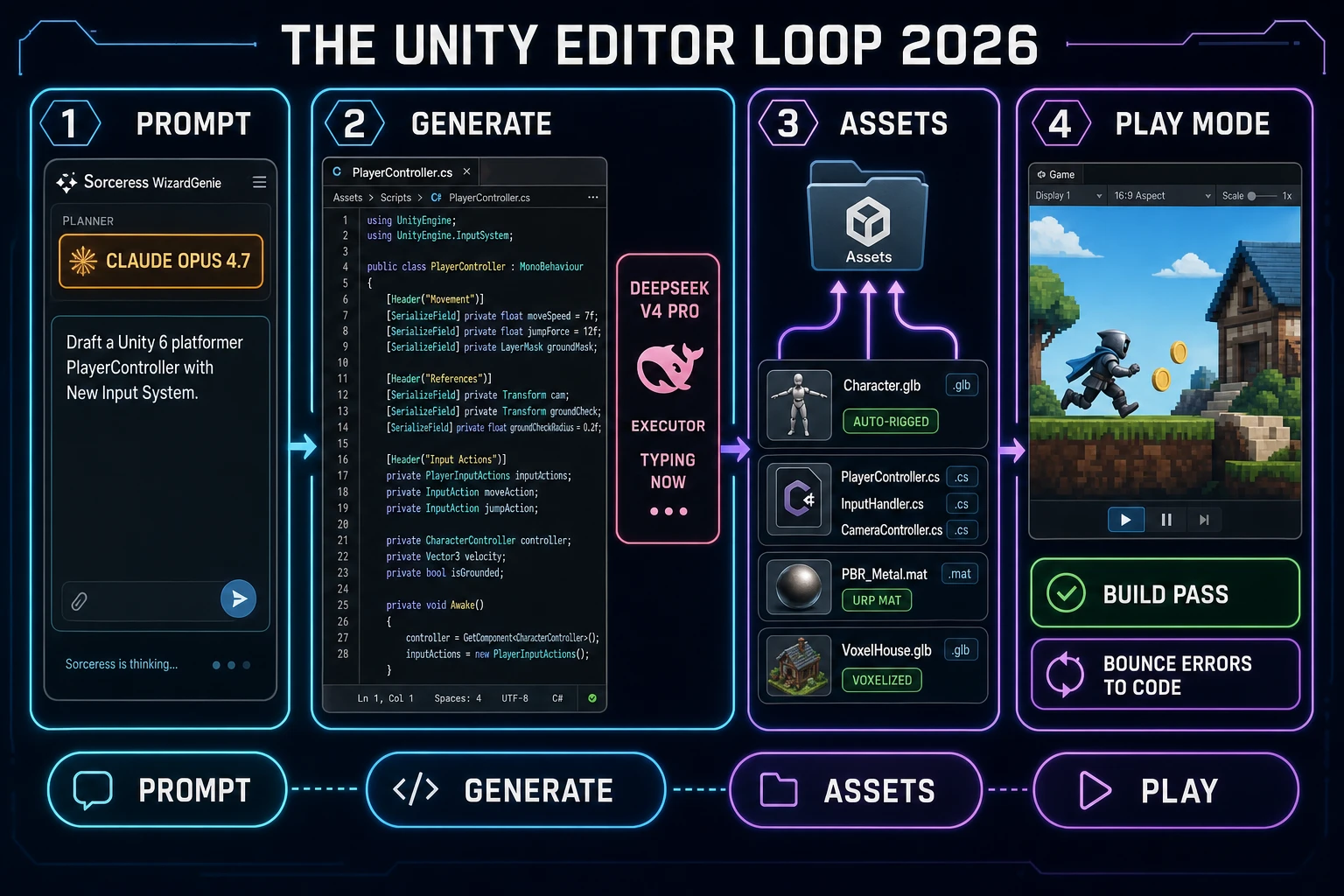
Unity editor loop 2026 diagram showing WizardGenie planner Opus 4.7 prompt leading to DeepSeek V4 Pro executor typing PlayerController.cs then assets folder receiving character.glb PBR .mat voxel.glb files then Unity Play Mode running a platformer scene with a chip bounce errors to Code
One full Unity editor loop on 2026-09-09 - WizardGenie prompts, DeepSeek V4 Pro types the C#, the asset tools drop .glb / .mat / .wav into Assets, and Unity Play Mode runs the scene with errors bouncing back through Sorceress Code.

What the two-lane rig costs on a Unity jam weekend

A jam-team Unity weekend on the two-lane rig lands at roughly 12 USD all-in as of 2026-09-09. Verified in src/lib/models.ts that Sorceress credits price at CREDITS_PER_DOLLAR = 100, so one credit is one US cent. The Sorceress side of the weekend:

  • Planner turns on Opus 4.7: 8 planner turns of ~8k input + 4k output. At $5/$25 per MTok, that is roughly 60 credits ($0.60) total.
  • Executor typing on DeepSeek V4 Pro: 60 executor turns of ~4k input + 1k output. At $0.27/$1.10 per MTok, that is roughly 120 credits ($1.20) on the credit meter, or literal cents if you BYO-key the DeepSeek slot.
  • Auto-Rigging: 20 credits per rig (AUTO_RIG_CREDITS.meshy = 20, verified 2026-09-09), so $0.20 per character.
  • Material Forge: approximately 10 credits per PBR set exported to Unity URP; four sets is $0.40.
  • Music Gen bed: 10 credits per bed (MUSIC_CREDIT_COST, verified 2026-09-09), so $0.10 per music track.
  • SFX Gen and Speech Gen: 1-credit minimum per SFX (MIN_CREDITS in src/lib/sorceress-tools/audio/sfx.ts, verified 2026-09-09); a jam SFX pack of 20 clips lands under $0.40.

Sorceress side sub-total: about $3 for a full weekend jam. Unity side: $10 per month for the Personal AI Assistant if the developer opts into it, or free on Pro / Enterprise / Industry seats. Sorceress Lifetime Early Access is a one-time $49 (LIFETIME_PRICE in src/app/plans/page.tsx line 51, verified 2026-09-09) that unlocks the desktop WizardGenie build with auto-update. For a Unity-first indie team, the two-lane rig runs under $15 all-in for a shipping-quality jam entry - well below the cost of a single 3D artist commission for one hero character.

The verdict on the best ai for unity game development

Holding steady on 2026-09-09, the honest single-lane answer to best ai for unity game development is Unity's own in-editor AI Assistant on Unity 6.0+ for teams that only care about C# scaffolding. It is Editor-native, project-context-aware, MCP-integrated, and $10 per month on Personal or free-with-subscription on Pro. But the honest workflow answer is a two-lane rig: Unity 6.0+ AI Assistant on the code lane inside the Editor, plus the Sorceress WizardGenie planner-plus-executor and asset pipeline on the browser lane feeding Assets/. Claude Opus 4.7 is the right-now planner seat, DeepSeek V4 Pro is the executor default, and the Sorceress asset tools cover every non-code lane a Unity project actually needs. The Editor Loop closes when Play Mode renders the scene both lanes fed.

For adjacent reading, see the sibling piece Ship the Best AI for Unity Coding (Editor Bridge 2026) for the narrower C#-only lane, Steer the Best AI for Unreal Engine (Blueprint Path 2026) for the Unreal-side comparison, Score Best Coding AI Model Right Now (Frontier Bench 2026) for the eight-model bench in detail, and Best AI Model for Vibe Coding (Executor Picks 2026) for the executor-seat framing on browser games. External anchors: the Wikipedia Unity article for engine background, the C# language article for the scripting-lane baseline, and the MDN Games documentation for the browser-side primitives Sorceress uses. Re-verify the Anthropic and DeepSeek pricing pages before your next Unity jam - the coding-model prices rotate faster than any docs page updates.

Frequently Asked Questions

What is the best ai for unity game development in 2026?

The best ai for unity game development in 2026 is a two-lane rig, not a single product. Lane one is Unity's own in-editor AI Assistant, open beta on Unity 6.0 and later, which reads the live scene graph, GameObjects, components, packages, and build target, and routes to third-party frontier models through the Unity Cloud AI Gateway. Personal pricing is a 14-day 1,000-credit trial that converts to 10 USD per month for 1,000 credits (verified 2026-09-09 via unity.com/features/ai and unity.com/blog/unity-ai-how-to-get-started). Lane two is the Sorceress browser stack: WizardGenie plus Sorceress Code drive the eight-model CODING_MODELS lineup (Claude Opus 4.7, Claude Sonnet 4.6, GPT-5.5, Gemini 3.1 Pro, DeepSeek V4 Pro, Kimi K2.5, Grok 4.2, MiniMax M2.7, verified 2026-09-09 in src/app/_home-v2/_data/tools.ts lines 766-775) for C# scaffolding, and 3D Studio, Auto-Rigging, Material Forge, and Voxel Studio feed the Unity Assets folder with .glb, .mat, and rigged character packs. Real Unity 2026 projects run both lanes in parallel.

How is Unity game development different from Unity coding for the AI stack?

Unity coding is a narrower question that only covers the C# and shader lane. Unity game development is the whole surface: C# scripts, scene assembly, 3D character rigging, PBR materials, level design, animation state graphs, audio, music, VFX, and the build pipeline. An AI stack that only writes C# leaves eight of those ten lanes untouched. That is why the 2026 answer to best ai for unity game development is a two-lane rig where the code lane covers C# scaffolding and the asset lane covers everything a scripting agent cannot produce - rigged characters, PBR .mat files, voxel models, sprite atlases, background music, and SFX. Sorceress ships both lanes under one credit meter; Unity's in-editor AI Assistant covers the scripting lane with project-aware context; together they close the two-lane loop for a real Unity project.

Which Sorceress tools export directly into a Unity Assets folder?

Every Sorceress asset tool exits in a Unity-ready file shape - no proprietary format between Sorceress and Unity. Auto-Rigging exports a ZIP containing a skinned .glb, a walk config JSON, and three C# scripts (ProcWalkController.cs, CreatureCamera.cs, ProcCreatureSetup.cs) supporting both the New Input System and the legacy Input Manager (verified 2026-09-09 in src/lib/rigging/unity-export.ts). Material Forge exports Unity URP or HDRP .mat files with the YAML material header, Smoothness remapped from Roughness, and PBR maps hooked up (verified 2026-09-09 in src/lib/material-forge/exporters/unity.ts). Voxel Studio emits .glb, .gltf, .fbx, .obj, and .stl (verified 2026-09-09 in src/app/voxelgen/page.tsx line 170). Quick Sprites, True Pixel, and Tileset Forge output transparent-background PNG sheets that Unity's Sprite Editor slices with the standard grid-by-cell-size mode. 3D Studio exports .glb from image-to-mesh or text-to-mesh. Sound Studio, Music Gen, SFX Gen, and Speech Gen output .wav or .mp3 files.

Which of the 8 Sorceress coding models is best for Unity C# scaffolding?

Split the eight-model panel by seat, the same split browser games use. Planner seat: Claude Opus 4.7 (Top tier, default for dense component graphs), GPT-5.5 (Frontier, best for cross-file plans that touch Prefabs plus ScriptableObjects plus Job System), Gemini 3.1 Pro (1M context, session-five refactor planner), Grok 4.2 (2M context, when the whole Unity project pastes in one prompt). Executor seat: DeepSeek V4 Pro (Budget, default typing pick), Kimi K2.5 (256K coding, when the scene graph plus C# blows past 100K tokens), MiniMax M2.7 (Agent-ready, tool-use heavy edit loops). Never Sonnet or Opus on the executor seat - that defeats the roughly one-fifth cost ratio the Planner + Executor pattern exists to deliver. The pair that ships the most Unity work in a jam weekend is Claude Opus 4.7 planner plus DeepSeek V4 Pro executor. Every tag and seat verified 2026-09-09 in src/app/_home-v2/_data/tools.ts.

What does a Unity indie project cost on the two-lane Sorceress plus Unity AI rig?

Sorceress credits price at one credit per US cent (CREDITS_PER_DOLLAR = 100 in src/lib/models.ts, verified 2026-09-09). A representative Unity jam weekend on the Sorceress side lands at roughly 2 to 4 dollars across three passes: about 60 credits (0.60 dollars) for planner turns on Claude Opus 4.7, about 120 credits (1.20 dollars) for executor typing on DeepSeek V4 Pro, plus one Auto-Rigging call (20 credits, verified 2026-09-09 in src/lib/rigging/external-rig/autoRigPricing.ts), one Material Forge PBR set (approximately 10 credits per set), one Music Gen bed (10 credits, MUSIC_CREDIT_COST in src/lib/sorceress-tools/audio/music.ts), and a handful of SFX. Add Unity's in-editor AI Assistant at 10 USD per month Personal for the in-editor scripting lane. Sorceress Lifetime Early Access is 49 USD one-time (LIFETIME_PRICE in src/app/plans/page.tsx line 51) and unlocks the desktop WizardGenie build. Total burn for a full weekend jam: about 12 USD all-in for the two-lane rig, well under the cost of a single 3D artist commission.

Can I bring my own vendor API keys to the Sorceress side for Unity work?

Yes. The Sorceress /code page carries BYO-API-key slots for four providers - Anthropic, DeepSeek, OpenAI, and NVIDIA - with keys stored only in browser localStorage so they never leave the browser (verified 2026-09-09 in src/app/code/page.tsx). That path takes the Sorceress-credit meter out of the equation entirely; you pay the vendor at their published per-token rate. On Anthropic that is Opus 4.7 at 5 dollars input / 25 dollars output per MTok; Sonnet 4.6 at 3 dollars / 15 dollars; on DeepSeek V4 Pro that is roughly 0.27 dollars / 1.10 dollars per MTok. Which meter ends up cheaper is a function of session shape, not tool choice. Unity's in-editor AI Assistant works in parallel: routing Claude, GPT, or Gemini through the Unity Cloud AI Gateway with your own vendor key does not consume Unity credits, so on Pro or Enterprise you get the Editor integration and the MCP Server for free while paying vendors directly.

Sources

  1. Unity - Wikipedia
  2. C Sharp (programming language) - Wikipedia
  3. MonoBehaviour - Wikipedia
  4. glTF - Wikipedia
  5. Physically Based Rendering - Wikipedia
  6. Games - MDN Web Docs
Written by Arron R.·2,884 words·13 min read

Related posts

Weigh Best Open Source AI Model for Coding (BYO Bench 2026)

Weigh Best Open Source AI Model for Coding (BYO Bench 2026)

The best open source ai model for coding a game in 2026 is not one model - it is a rotation. DeepSeek V4-Pro's MIT weights, Kimi K2.5's Modified MIT release, GLM-4.6's MIT coding stack, and Qwen3-Coder-Next's Apache 2.0 executor stitch into WizardGenie through the BYO-key slots on Sorceress Code.

Score Best Coding AI Model Right Now (Frontier Bench 2026)

Score Best Coding AI Model Right Now (Frontier Bench 2026)

The best coding AI model right now is not a single pick - it is a pairing. Claude Opus 4.7 plans, Claude Sonnet 4.6 or DeepSeek V4 Pro types, Gemini 3.1 Pro carries the 1M-context refactor, Grok 4.2 handles the 2M-context paste, and MiniMax M2.7 runs the agent loop.

Splice Best AI Tools for Game Development (Stack Path 2026)

Splice Best AI Tools for Game Development (Stack Path 2026)

The best AI tools for game development in 2026 are not one super-app - they are a five-category stack. Coding covers WizardGenie and Sorceress Code with 8 CODING_MODELS on tap; art covers AI Image Gen, Quick Sprites, True Pixel, and Tileset Forge; 3D covers 3D Studio, Auto-Rigging, and Material Forge; audio covers Music Gen, Sound Studio, Speech Gen, and SFX Gen; and publish covers Publishing, Play Arcade, and Layout Preview.

Gauge the Best Free AI Model for Coding (Games Bench 2026)

Gauge the Best Free AI Model for Coding (Games Bench 2026)

The best free AI model for coding in 2026 is not one model - it is a pairing. DeepSeek V4 Pro web chat and Kimi K2.5 free tier cover the reasoning half, Qwen3-Coder-Next on Ollama covers the executor half, and WizardGenie BYO-key slots stitch the two into one game-loop workflow.