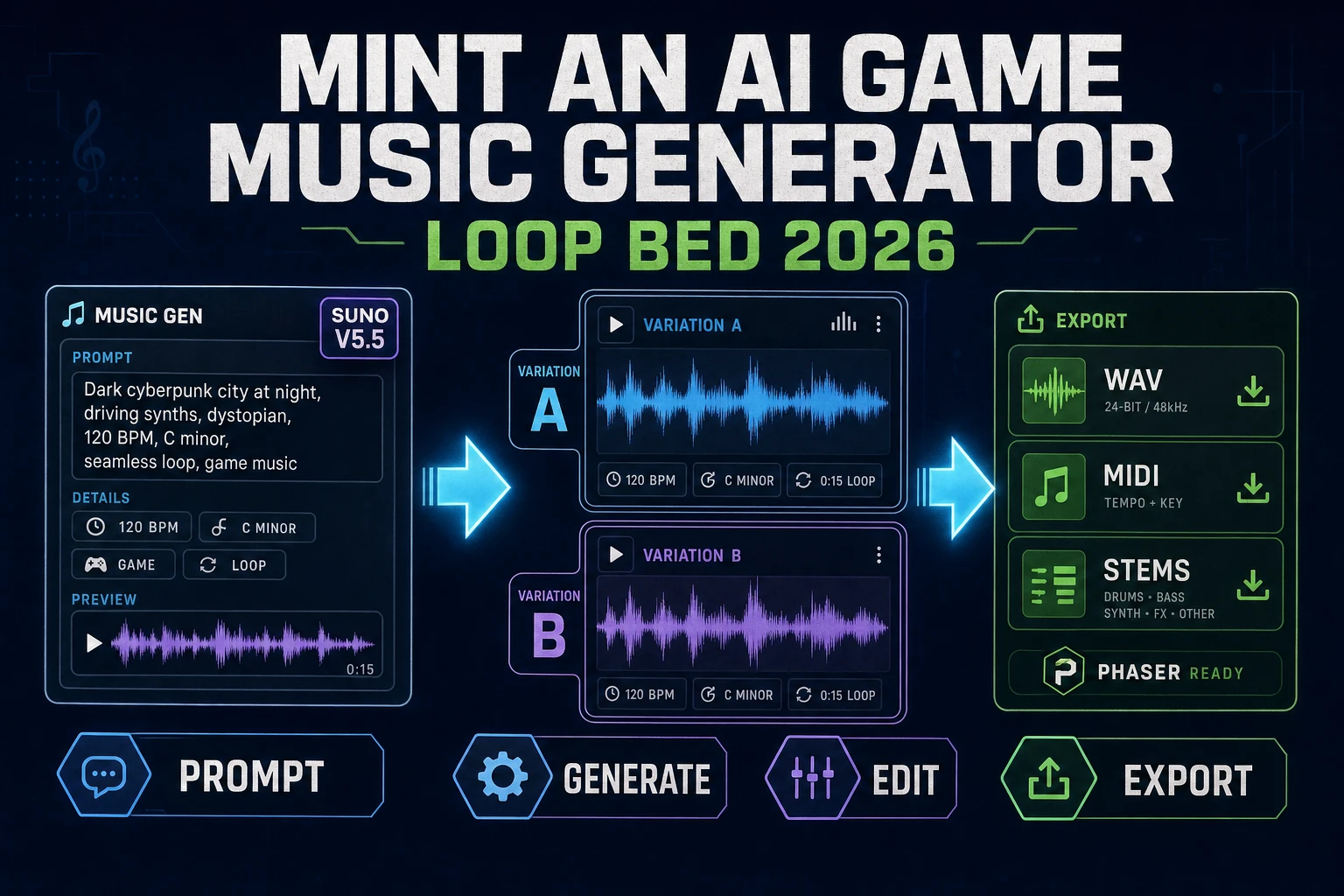
Mint an AI Game Music Generator (Loop Bed 2026)

By Arron R.12 min read
An ai game music generator that ships a real loop bed in 2026 is a three-step workflow: prompt Sorceress Music Gen with a stylistic brief on Suno V5.5, lock the

Type ai game music generator into Google in 2026 and the SERP hands back a mix of free web demos that spit out a thirty-second MP3 and desktop DAW plugins that assume a music-theory background. Neither is what a game project needs. A game needs a loopable bed for the menu, a dynamic mix for exploration, a cue that swells when the boss appears, and an export the engine can load in one line. The 2026 version of that pipeline lives inside a single Sorceress panel: Music Gen at /music-gen wraps the current stable Suno V5.5 model with the game-side exports (WAV, MIDI, stems, section-replace, extend) that a project actually ships. Every credit price, model version, and code constant below is verified against the Sorceress source on 2026-09-05.
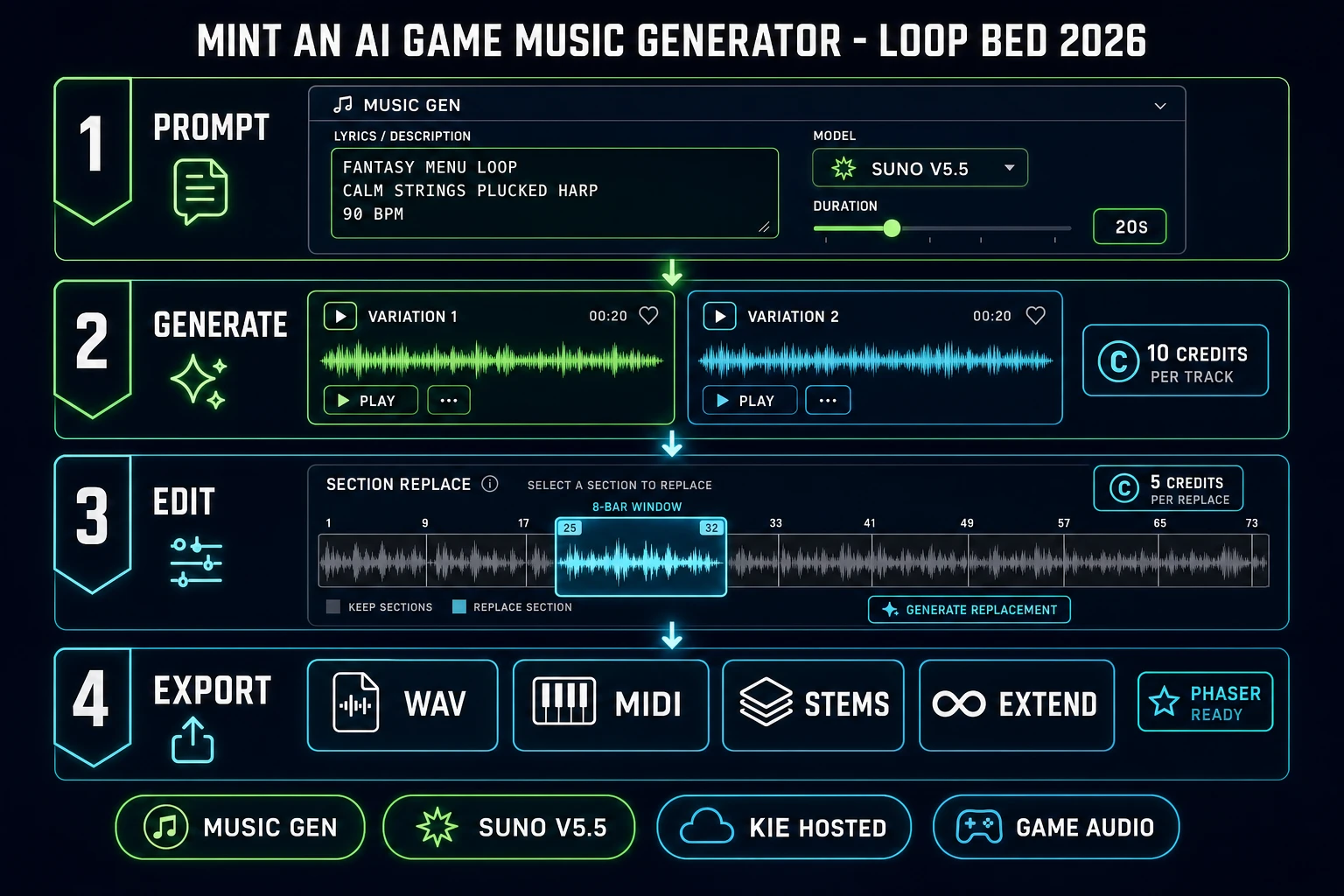
Mint an ai game music generator loop bed 2026: four-panel Sorceress Music Gen diagram showing a stylistic prompt on Suno V5.5, two variation cards, an in-card section-replace editor, and export buttons for WAV, MIDI, stems, and extend
The Sorceress ai game music generator workflow in four panels: prompt, generate, edit, export.

What an ai game music generator actually delivers in 2026

The phrase ai game music generator covers three different products in the same search results, which is why the top of Google is so noisy. The first meaning is a browser demo that returns a novelty MP3 - useful for a TikTok clip, useless for a game engine. The second meaning is a general text-to-music app (Suno on its own, an audio-diffusion notebook) that returns a finished song file - closer, but a song is not a loop bed, and a finished MP3 does not let the engine crossfade between exploration and combat. The third meaning is the actual game-audio tool: a browser pipeline that returns an engine-ready file family (loopable WAV, split stems, MIDI part) plus the editing surface to make the track fit the scene it will play under. That third meaning is what a jam team or an indie studio actually asks for, and it is the meaning worth building around.

Three capabilities crossed the "good enough for a game" line in the past year and made the third meaning real. Text-to-music models learned to hold a stylistic brief - genre, tempo, mood, instrument palette - across a two- or three-minute track without drifting into a random bridge. Section-replace editors learned to regenerate one 8- or 16-bar block inside an existing track instead of forcing a full re-run every time the middle needed a fix. Stem-splitting and MIDI-extraction pipelines learned to hand the engine four independent mix busses (drums, bass, melody, atmosphere) instead of one mixed-down file. Stitch the three together inside one panel and the exported bed loops cleanly, layers dynamically, and re-orchestrates at runtime. That is the honest baseline for what a 2026 ai game music generator ships.

The Music Gen loop in one minute (prompt, variation lock, edit, export)

A game project rarely wants "a song" - it wants a bed: a two- to three-minute piece with a clear looping section, a defined tempo, and stems the engine can layer. The one-minute mental model of Sorceress Music Gen is: write a stylistic prompt, hit generate, pick the stronger of the two variations Kie returns, run one small edit pass, and export the file family the engine needs. The prompt stage is the taste stage: get the genre, tempo, and instrumentation right, and the model does the heavy lifting. The generate stage is the variation stage: Kie always returns two versions of the same brief, priced as one 10-credit call (MUSIC_CREDIT_COST = 10, verified 2026-09-05 in src/app/music-gen/page.tsx). The edit stage is the fix stage: section-replace, extend, or add-vocals as needed. The export stage is the engine stage: WAV, MIDI, stems, or the raw MP3.

The critical ordering is what makes the bed cohere. Write the prompt as a stylistic brief, not a lyric - the model can invent lyrics if the auto-lyrics toggle is on (a separate LYRICS_CREDIT_COST = 2 billed once per batch when the picker is on Auto). Pick the strongest of the two variations before running any downstream export - re-running MIDI or WAV on a rejected variation is wasted credits. Do the section-replace pass before the extend pass - fixing a broken bar in a two-minute track is 5 credits (REPLACE_SECTION_CREDIT_COST = 5), while re-extending a track and then fixing a bar is 10 plus 5. Small ordering, real credit savings on a full menu-plus-battle-plus-victory pack.

Sorceress Music Gen as the ai game music generator surface (V5.5 default, five-model picker)

Music Gen is the ai game music generator surface on Sorceress. It sits inside the Audio Studio group next to SFX Gen and Speech Gen, so a game project can generate the music bed, the impact stings, and the NPC voice from the same tab. The model picker exposes five Kie-hosted Suno models, verified 2026-09-05 in src/app/music-gen/page.tsx: V5.5, V5, V4.5+, V4.5, V4. V5.5 is the default and the current stable Suno flagship (Suno released V5.5 on 2026-03-26; the official release notes on about.suno.com position it as the "most expressive model yet"). V5 is the previous flagship, useful as a stylistic variation when V5.5 keeps overproducing a specific brief. V4.5+ is the pick for the add-vocals mode - it plus V5.5 and V5 are the three models the Vocals surface accepts. V4.5 and V4 are legacy picks kept in the picker for library-match continuity with an older Suno project.

The panel exposes five creation modes, verified 2026-09-05 in the same file: Create (the default text-to-music path), Extend (continue an existing track from a splice point), Mashup (blend two tracks into a transition), Cover (upload a hummed melody and re-instrument it), and Vocals (add vocals to an existing instrumental). Each mode maps to a game scenario. Create is the menu loop and the exploration bed. Extend is how a two-minute jam-length track becomes a five-minute boss piece without a hard cut. Mashup is the menu-to-battle transition. Cover is how a designer with a melody in their head gets it into the game without recording anything. Vocals is how an anthem gets an actual singer without hiring one. The custom-duration slider (10 to 360 seconds, DEFAULT_SONG_DURATION = 20) is V5.5-only inside the Advanced pane - the other four models use standard Kie durations. Verified 2026-09-05 in the same file.
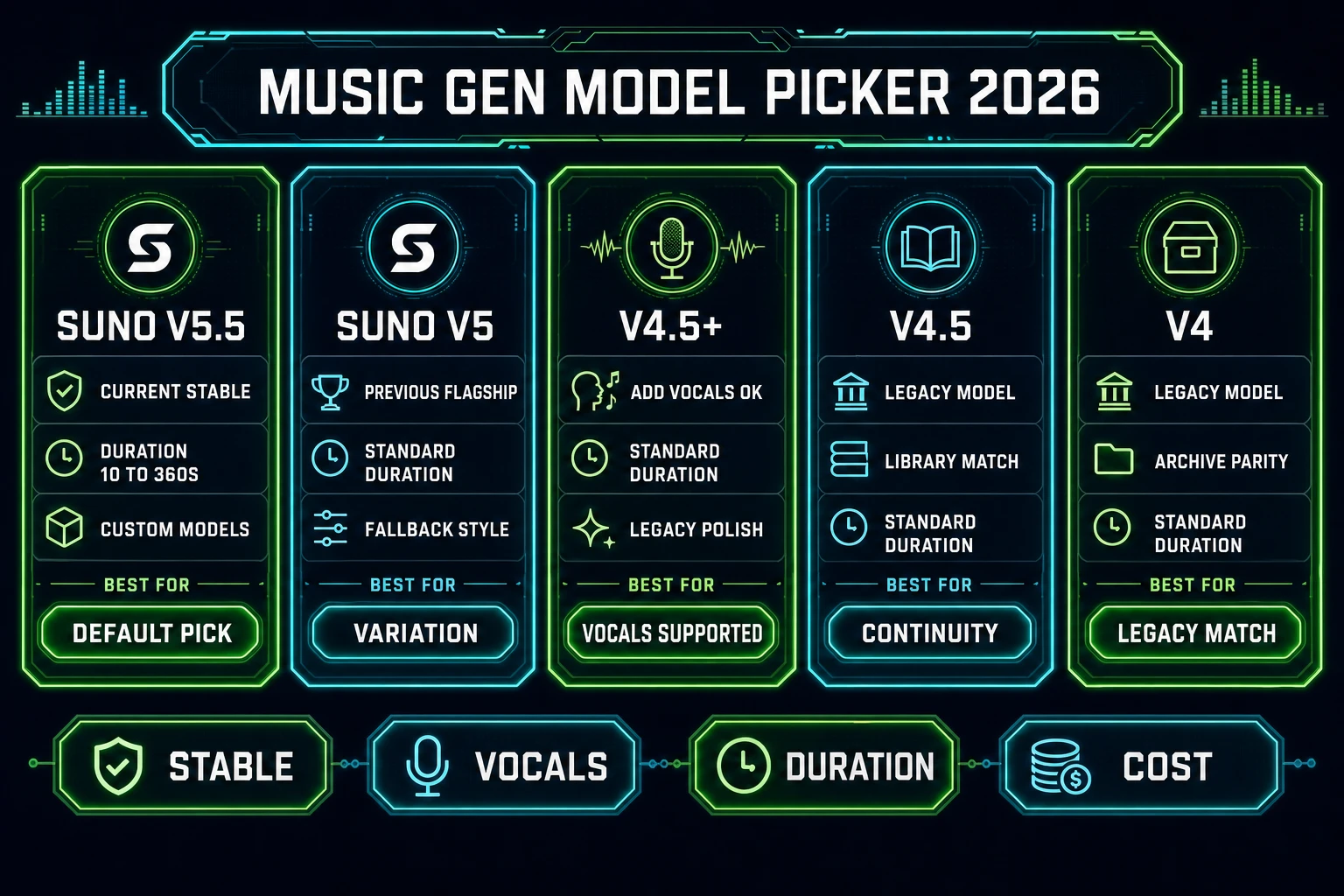
Music Gen model picker for the ai game music generator 2026: Suno V5.5 as default pick with 10-360 second duration, V5 for variation, V4.5+ for add-vocals support, V4.5 for library continuity, V4 for legacy match
Five Suno models inside Music Gen, each with a different first-pick reason for the ai game music generator stage.

Step 1 - describe the game moment as a stylistic prompt (tempo, genre, mood, engine cue)

The prompt shape is what determines whether the model returns a shopping-mall placeholder or a scene-fitting bed. The honest recipe for a game-music prompt is four parts: game moment, genre, tempo and time signature, and instrumentation. "Fantasy town menu loop, calm strings, plucked harp, warm brass swell every 16 bars, 90 BPM, 4/4, loopable, no vocals" is a working brief - it names the scene, the palette, the tempo, and the engineering constraint (loopable, no vocals). "Boss battle, dark orchestral, driving low brass, agitated percussion, 140 BPM, 4/4, three-minute arc with intro, main loop, and outro sting" is a working brief for a combat cue. "Victory theme, uplifting jazz, brushed drums, walking bass, muted trumpet, 120 BPM, 4/4, 20 seconds" is a working brief for a state-transition sting. The panel exposes an Advanced pane with dedicated fields for style, title, weirdness (0 to 1), and style weight (0 to 1) - all four fields land in the same Suno request, so the prompt does not have to carry every constraint as prose. Verified 2026-09-05 in src/app/music-gen/page.tsx.

The ai game music generator gets the vibe right about 60 percent of the time on the first prompt. The other 40 percent it drops in a synth sting where a pad belonged, or the intro takes eight bars to settle. The honest way to raise the hit rate is to switch on the Instrumental toggle for any bed the game will play under dialogue (the game does not need lyrics competing with NPC lines) and set a specific BPM. A vague brief ("epic music") returns vague results; a specific brief ("140 BPM boss orchestral") returns something a game programmer can drop into the engine and know it will loop on the beat. If lyrics belong in the piece (a title theme, an anthem, an end-credits ballad), leave Auto-Lyrics on and let Suno write them - the auto-lyrics pass is a separate 2 credits per batch (LYRICS_CREDIT_COST = 2).
Step 2 - lock a variation and edit with extend, mashup, cover, or vocals

Kie always returns two variations from a single generation call - same prompt, two different takes. The first fifteen seconds of each track is the most important listen: if the intro reads like the scene, the rest of the track usually holds. Pick one, discard the other, and move to the edit stage. Music Gen ships a full in-card waveform editor with per-track playback, a zoom control, a loop-region selector, and a section-replace tool. Verified 2026-09-05 in src/app/music-gen/page.tsx: the waveform component (the Waveform React component around line 400) supports drag-to-select, zero-crossing snap, and playback locked to the selected region. That editor is what turns "a track" into "a loop bed" - mark the loop point at a zero-crossing (where the waveform crosses the horizontal center) and the loop closes without an audible click.

Four edit modes cover the four fixes a real bed usually needs. Section-Replace (5 credits per pass, verified) regenerates a marked 8- to 16-bar window inside the track without touching the rest - the honest fix when the middle-eight decayed into a bad bridge. Extend (10 credits per pass, priced the same as a fresh generation) continues the track from a chosen splice point, so a two-minute jam-length menu bed becomes a three-minute exploration bed by adding a full new section on the end. Mashup blends two existing tracks (the menu bed plus the battle bed) into a single crossfaded piece, which is how a game gets a menu-to-battle transition without asking the engine to crossfade at runtime. Cover accepts an uploaded MP3 or WAV (a hummed melody, a synth sketch, an instrumental idea) and re-instruments it - useful when a designer wants a specific melody the model would not have invented on its own. Every mode preserves the original track in history, so a rejected edit is one click away from a rollback.

Step 3 - export WAV, MIDI, or stems and load the file into the engine

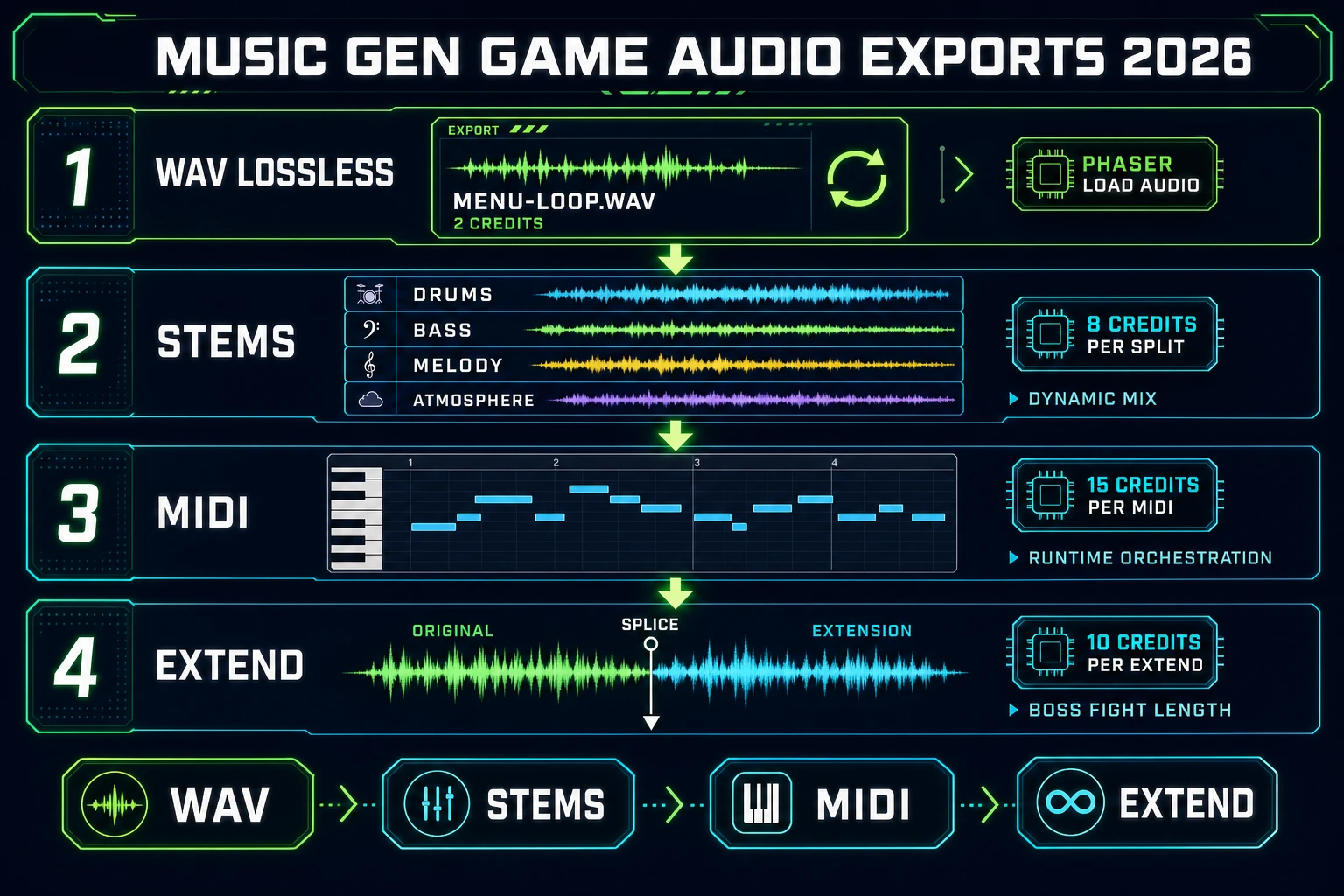
The base Music Gen export is an MP3 delivered by Kie. That format works for a jam-length game hosted on itch.io. The four premium exports are what make the tool a game-audio tool instead of a music demo, and every one is verified 2026-09-05 in src/app/music-gen/page.tsx. WAV lossless (WAV_CREDIT_COST = 2) is the pick for a shippable game - the engine can loop a WAV without the joint discontinuity that MP3 loops sometimes introduce. Stems (STEM_CREDIT_COST = 8) split the mix into four buses (drums, bass, melody, atmosphere) as separate files, which is what makes a horizontally-mixed dynamic score possible. MIDI (MIDI_CREDIT_COST = 15) extracts the melody as a MIDI file the game can re-orchestrate at runtime through a Web Audio synth. Extend (10 credits) is the export-adjacent action that keeps the track alive across a longer scene.

Loading the exported file into the engine is the last stage. Phaser v4.2.1 "Giedi" (released 2026-07-09, verified 2026-09-05 via phaser.io/download/stable) carries the same audio API as Phaser 3: call this.load.audio in preload with the exported URL, then this.sound.add and play in create, passing { loop: true } so the bed plays continuously. For a dynamic score using the stems, add each stem as its own sound object and toggle .setMute(true|false) or .setVolume(0..1) on scene state changes - the engine crossfades between "exploration" and "combat" by unmuting the drums-and-bass stems while the melody stem plays through. For a runtime-orchestrated MIDI score, load the MIDI file, parse it with any browser MIDI parser, and drive a synth through the Web Audio API AudioContext. The browser game-music walkthrough covers the loop-point mechanics in more depth; the 2026 game-score guide covers the state-machine side of dynamic mixing.

Music Gen game-audio export pipeline 2026: WAV lossless at 2 credits for Phaser load.audio, stems at 8 credits split into drums bass melody atmosphere for dynamic mixing, MIDI at 15 credits for runtime orchestration, and extend at 10 credits for boss-fight length
Four game-audio exports from a single Music Gen track: WAV, stems, MIDI, and extend.

Where SFX Gen, Speech Gen, and WizardGenie fit around the music bed

Music is one layer of a game score. The other layers - impact stings, ambient one-shots, UI clicks, NPC voice - live in adjacent Sorceress panels and share the same Kie-hosted infrastructure. SFX Gen at /sfx-gen is the pick for the impacts and UI cues. It defaults to the BytePlus Seed-Audio model (DEFAULT_SFX_MODEL = 'byteplus-seed-audio', verified 2026-09-05 in src/app/sfx-gen/page.tsx), which is BytePlus's full-scene audio model tuned for cinematic sound design. The pricing is duration-based rather than flat per-generation, so a two-second UI click costs less than a ten-second boss-roar impact. Pair a Music Gen menu bed with three SFX Gen UI clicks (button hover, button press, menu close) and the menu already sounds finished. Pair a Music Gen combat bed with four SFX Gen impacts (sword hit, spell cast, dodge, victory sting) and the combat state has an audible layer separate from the bed.

Speech Gen at /speech-gen is the pick for NPC dialogue, tutorial narration, and boss monologues. The AI NPC voice walkthrough covers the voice presets and the emotion tags in detail. The play-together rule is: mute the melody stem of the Music Gen bed while a Speech Gen line is playing, keep the drums-and-bass stems audible so the scene has motion, then unmute the melody on dialogue-end. That is what makes a scored game feel like a scored game instead of a game with music blasting under the dialogue. WizardGenie is the coding-agent side: describe the state machine (menu on load, exploration after start, combat when an enemy is in range, victory when combat ends), and WG scaffolds the Phaser scene transitions, the audio load calls, and the stem-mute logic in the same session. All four tools bill from the same credit pool, so the whole audio stack ships from one dashboard - see the tools guide for the current group lineup, and the game-SFX pack walkthrough for the SFX side of the workflow.

What an ai game music generator run costs on Sorceress in 2026

The credit math for a full ai game music generator pack is transparent and stackable. Verified 2026-09-05 in src/app/music-gen/page.tsx: MUSIC_CREDIT_COST = 10 per generation (returns two variations), LYRICS_CREDIT_COST = 2 for the auto-lyrics pass, MIDI_CREDIT_COST = 15, STEM_CREDIT_COST = 8, WAV_CREDIT_COST = 2, REPLACE_SECTION_CREDIT_COST = 5. A single menu loop generated on V5.5 with a WAV export is 10 + 2 = 12 credits. A menu-plus-exploration-plus-combat-plus-victory pack (four prompts on V5.5, one WAV per keep) is 4 x 10 + 4 x 2 = 48 credits. A boss cue with a section-replace fix and an extend is 10 + 5 + 10 + 2 = 27 credits, WAV included. Stems on a hero track add 8; a MIDI extraction adds 15. The credit unit is documented as 1 credit equals 1 cent (CREDITS_PER_DOLLAR = 100 in src/lib/models.ts), so wall-clock dollar totals are legible instead of hidden in a per-model rate card.

Two operating modes affect the bill. Auto-Lyrics on adds a flat 2 credits per batch when the prompt does not carry manual lyrics; Instrumental on removes the vocals entirely and does not fire auto-lyrics. Multi-model generation (V5.5 plus V5 on the same brief) multiplies the base cost by the model count - two models is 20 credits for four total tracks. VIP users bill at 0 for the base generation (verified in the credit-deduction code path). The plans page carries the tier-level credit bundles - a jam-length game's full music pack ships for a small fraction of what a hand-composed pack would cost, and every price is published rather than negotiated. For the code side, WizardGenie is the paired agent that wires the exported tracks into the Phaser or Three.js scene loop; for the visual side, AI Image Gen is where the cover art and the loading-screen art come from. Ship the pack, wire it into the engine, mint the next bed - the ai game music generator workflow is a browser session, not a studio booking.

Frequently Asked Questions

What is an ai game music generator in the 2026 sense?

An ai game music generator in the 2026 sense is a browser pipeline that turns a stylistic brief - genre, tempo, mood, instrument list - into a game-ready audio file the engine can load, not a novelty demo that spits out a thirty-second MP3. Sorceress Music Gen at /music-gen is that pipeline: it exposes five Kie-hosted Suno models (V5.5, V5, V4.5+, V4.5, V4) with V5.5 as the default (Suno released V5.5 on 2026-03-26, verified 2026-09-05 via about.suno.com/blog/v5-5). A single generation returns two variations at 10 credits per track (MUSIC_CREDIT_COST = 10, verified in src/app/music-gen/page.tsx). From there the tool ships extend, mashup, upload-cover, add-vocals modes plus stems, MIDI, WAV, and section-replace exports, so the same track becomes a menu loop, a boss cue, or a full three-minute victory piece without leaving the browser.

How is the ai game music generator flow different from asking Suno for a track directly?

The difference is the game-audio surface. A direct Suno prompt returns a song file; a game project needs a loopable bed, a stem for interactive mixing, or a MIDI part that the engine can re-orchestrate at runtime. Sorceress Music Gen wraps the same Suno V5.5 model with the game-side exports: MIDI at 15 credits (MIDI_CREDIT_COST = 15), stems at 8 (STEM_CREDIT_COST = 8), WAV lossless at 2 (WAV_CREDIT_COST = 2), and section-replace at 5 (REPLACE_SECTION_CREDIT_COST = 5) - all verified 2026-09-05 in src/app/music-gen/page.tsx. The extend mode lets a two-minute jam-length track become a three-minute boss piece by continuing from a chosen splice point. The mashup mode blends two tracks (useful for a menu-to-battle transition). The upload-cover mode takes a hummed melody and re-instruments it. None of those exports exist on the plain Suno app - they exist because the game workflow needs them.

Which Suno model inside the ai game music generator should the first prompt use?

V5.5 is the default for a reason: it is the current stable Suno model (verified 2026-09-05 via suno.com/release-notes and techjacksolutions.com dating V5.5 as the top of the paid picker as of 2026), and it is the only model in the Music Gen picker that supports the custom-duration slider (10 to 360 seconds, DEFAULT_SONG_DURATION = 20). V5 is the previous flagship - useful as a second variation when V5.5 keeps overproducing. V4.5+ is the pick for the add-vocals mode - it plus V5.5 and V5 are the three models the Vocals surface accepts. V4.5 and V4 are legacy picks for style continuity with an older library. The honest first-prompt recipe is: leave V5.5 selected, write a stylistic prompt, hit generate, keep the stronger of the two variations. If the pack needs stylistic variety across scenes, generate the same brief on V5.5 and V5 together (the picker accepts multiple selections and the cost multiplies by the model count).

What does one ai game music generator run actually cost on Sorceress in 2026?

The base generation is 10 credits per track and one generation returns two variations, so a single Music Gen click on one model is 10 credits total (MUSIC_CREDIT_COST is billed per successful batch, not per variation, verified 2026-09-05 in src/app/music-gen/page.tsx). Auto-generated lyrics add 2 credits (LYRICS_CREDIT_COST = 2). Generating the same brief across two models is 20; across three models is 30. Downstream exports are priced per action: MIDI at 15, stems at 8, WAV at 2, section-replace at 5. A full menu-plus-battle-plus-victory pack (three prompts on V5.5, plus one WAV export per keep) is 3 x 10 + 3 x 2 = 36 credits. The credit unit is documented as 1 credit equals 1 cent (CREDITS_PER_DOLLAR = 100 in src/lib/models.ts), so the wall-clock dollar total is legible instead of hidden. The published /plans page carries the tier-level credit bundles.

How does the exported track actually load into a Phaser or Web Audio project?

Music Gen exports the track as MP3 by default and offers WAV for 2 credits when the engine needs lossless. Phaser v4.2.1 Giedi (released 2026-07-09, verified 2026-09-05 via phaser.io/download/stable) uses the same audio API as Phaser 3: call this.load.audio in preload with the exported URL, then this.sound.add plus play in create. Set loop true on the Web Audio node so the loop bed plays continuously. For interactive scoring, export stems (drums, bass, melody, atmosphere separated) and load each stem as a separate this.sound.add call; mute or unmute stems on state changes (menu, exploration, combat) to get a horizontally-mixed dynamic score without regenerating anything. For runtime orchestration, export MIDI and drive a Web Audio synth through the browser AudioContext (documented on MDN); the game can transpose the melody or swap instrument banks at runtime. That is what turns an AI-generated track into a game score instead of a background MP3.

Do I need to hand-edit the ai game music generator output before shipping?

Usually one small pass. Suno V5.5 gets the vibe right on the first prompt about 60 percent of the time - the other 40 percent it drops in a synth sting where a pad belonged, or the intro takes eight bars to settle. The honest workflow is: generate, listen, keep the stronger variation, then use the in-card section-replace mode to regenerate the single 8- or 16-bar block that broke the mood (REPLACE_SECTION_CREDIT_COST = 5, so a targeted fix costs half of a full re-generation). For a loopable bed, drop the WAV into the built-in waveform editor inside the card and mark the loop point at a zero-crossing so the loop closes without a click. The extend mode is the honest way to make a two-minute AI track long enough for a five-minute boss fight without a hard cut. None of that requires leaving the browser or paying a composer for a rewrite; taste and cleanup, yes.

Sources

  1. Suno v5.5 release notes - Suno
  2. Phaser v4.2.1 release notes - GitHub
  3. Web Audio API - MDN
  4. Video game music - Wikipedia
  5. MIDI - Wikipedia
  6. Vorbis - Wikipedia
Written by Arron R.·2,707 words·12 min read

Related posts