Mesh 2D to 3D Image Conversion (Prop Path 2026)

By Arron R.8 min read
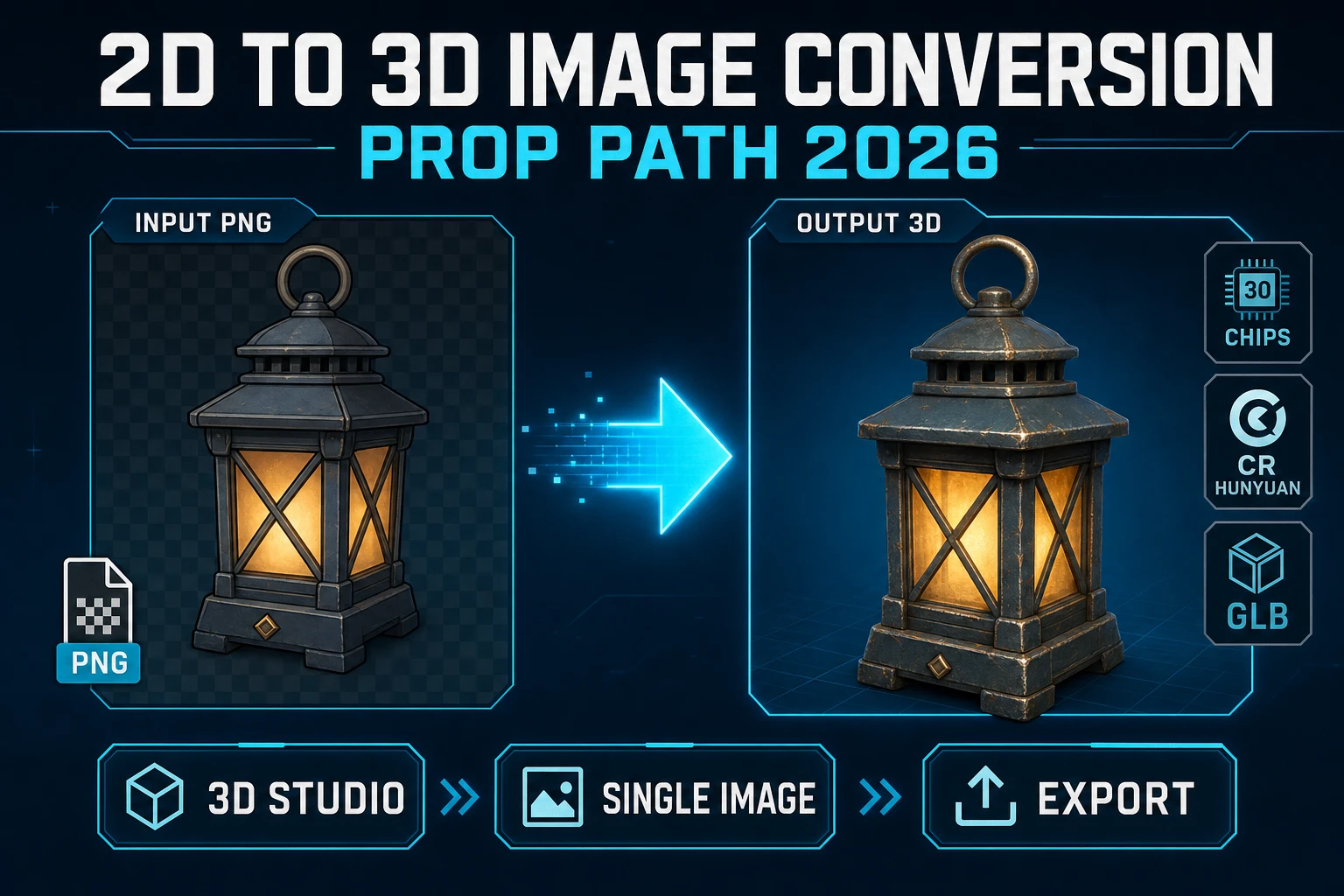
2D to 3D image conversion in 3D Studio is one image in and a textured mesh out: Hunyuan 3D 3.1 is 30 credits, TRELLIS 2 defaults to 40, and Meshy 7 or Tripo v3.

A 2D to 3D image conversion job starts as one flat picture and has to leave as a mesh you can drop into a game. Searchers asking for conversion software usually want a desktop installer that “makes it solid.” What they get, if the tool is honest, is a single-image reconstruction: the front is measured from the photo, and the back is inferred. This how-to is that path for props — upload or generate the 2D source, run it through 3D Studio, export GLB, GLTF, or FBX, and rig only if the object has to walk. Credit figures below were checked 2026-09-21 in src/lib/threed-models.ts and src/lib/rigging/external-rig/autoRigPricing.ts.
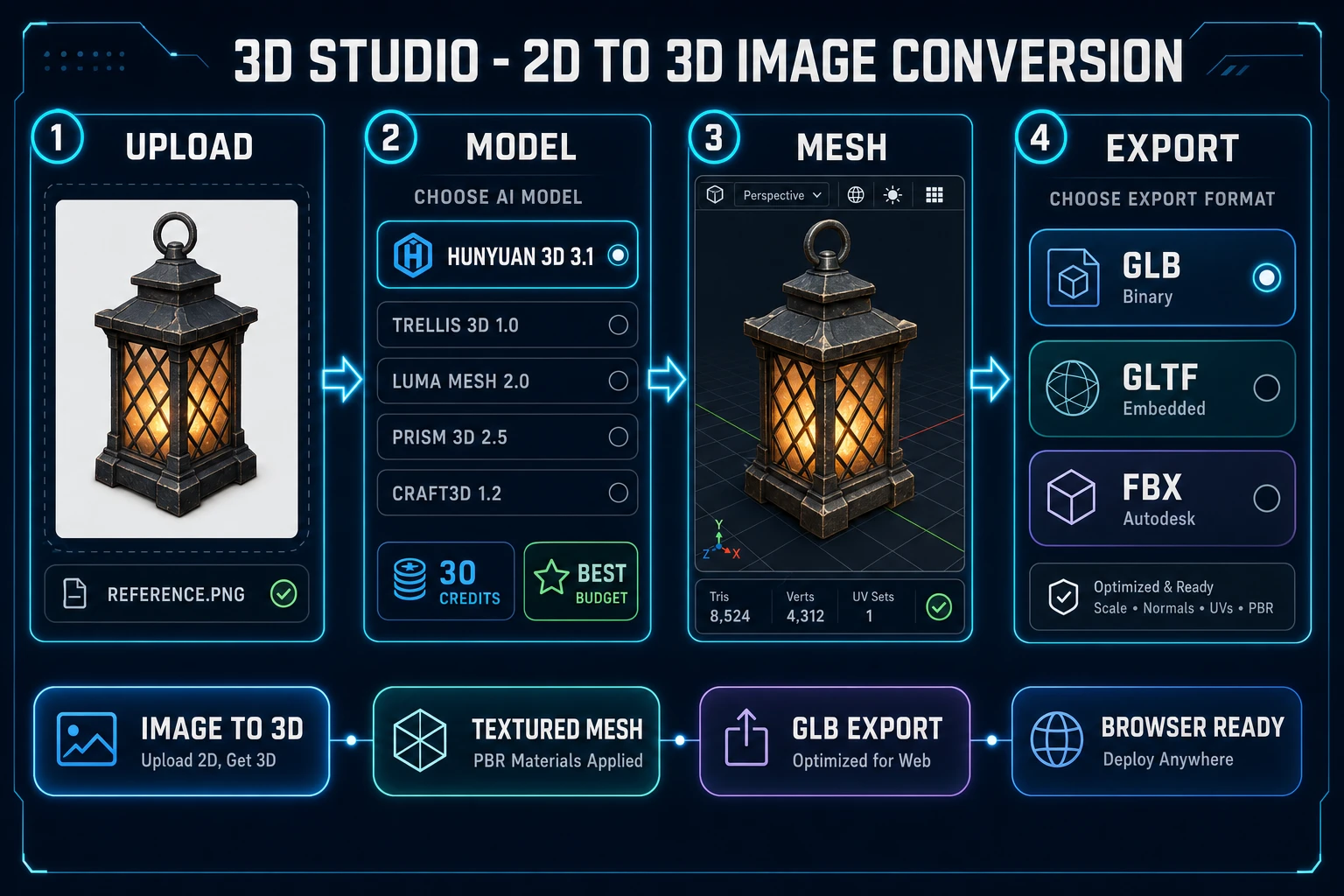
2D to 3D image conversion pipeline: upload a PNG, pick Hunyuan 3D 3.1, mesh, export GLB
2D to 3D image conversion on Sorceress: one reference image, a textured mesh, then GLB, GLTF, or FBX. Verified 2026-09-21.

What 2D to 3D image conversion actually asks for

Photogrammetry is the science of measuring physical objects from photographs. Stereophotogrammetry estimates 3D coordinates from two or more images taken from different positions, by triangulating shared points. That is a real multi-photo capture method. A one-file 2D to 3D image converter is a different contract: one viewpoint goes in, a watertight mesh comes out, and anything the camera never saw is a guess.

For a crate, lantern, sword, or potion bottle, that guess is often good enough. The silhouette, the material color, and the readable front face carry the prop. For a hero character, the guess is where ears, backpacks, and the far arm go wrong. Treat 2D to 3D image conversion as a prop factory first. If you need the unseen side to match a design sheet, generate that sheet on purpose — A-pose, plain background, one subject — before you spend the mesh credits.

The public research lines up with that split. Tencent’s Hunyuan3D-2.1 repository describes “From Images to High-Fidelity 3D Assets with Production-Ready PBR Material” (verified 2026-09-21, 4,050 stars). Microsoft’s TRELLIS repo is the paper “Structured 3D Latents for Scalable and Versatile 3D Generation,” a CVPR 2025 Spotlight (verified 2026-09-21, 13,690 stars). Those projects are why a browser can offer 2D to 3D image conversion at all. The picker costs below are why you can budget a jam around it.

The 3D Studio path for 2D to 3D image conversion

3D Studio is badged AI Credits in the tools catalog, not Free. The catalog description (verified 2026-09-21 in src/app/_home-v2/_data/tools.ts) chains AI image generation, single-image to textured 3D, humanoid auto-rigging with weight-paint refinement, and text-to-animation, exported as FBX, GLB, or GLTF. The home-page steps are Generate, Lift to 3D, Auto-rig and weight paint, then text-to-animation and export. For a static prop you stop after the lift and the file download.

The visible image lanes, and what a default run costs, come from getCredits in src/lib/threed-models.ts (verified 2026-09-21). Hidden and admin-only entries are left out of this table.

Model Default image cost Views it accepts Use it when
Hunyuan 3D 3.1 30 credits image-to-3d only Best-budget textured prop from one PNG
TRELLIS 2 40 credits at 1024 (35 at 512, 45 at 1536) image-to-3d only Single concept mesh, resolution you can dial
Tripo v3.1 50 credits at default HD (30 with texture off, 40 at standard) image, text, or multi-image You have a turntable, or you want HD color from one photo
Meshy 7 50 credits textured single image (35 base + 15 texture) image, text, or multi-image A-pose or T-pose characters, or a multi-view set
Rodin 2.0 50 credits image or text You need the format enum: GLB, FBX, OBJ, USDZ, or STL
Pixal3D 0 credits, VIP only image-to-3d only Unlimited drafts if you already have VIP

Hunyuan 3D 3.1 is the one marked rating: "best-budget". Pixal3D is credits: 0 with creditLabel: "Free unlimited" and vipOnly: true. Everyone else pays per conversion. New accounts start with 100 free credits (home page and account API docs), and CREDITS_PER_DOLLAR = 100 in src/lib/models.ts, so a 30-credit Hunyuan pass is $0.30 of the grant.

If you want the grant math and the voxel branch, the earlier post Spin Image to 3D Model Free stays on that question. The model-roster post Snap Image to 3D Model AI stays on picking among AI mesh models. This page stays on 2D to 3D image conversion: one picture, one mesh, one export.
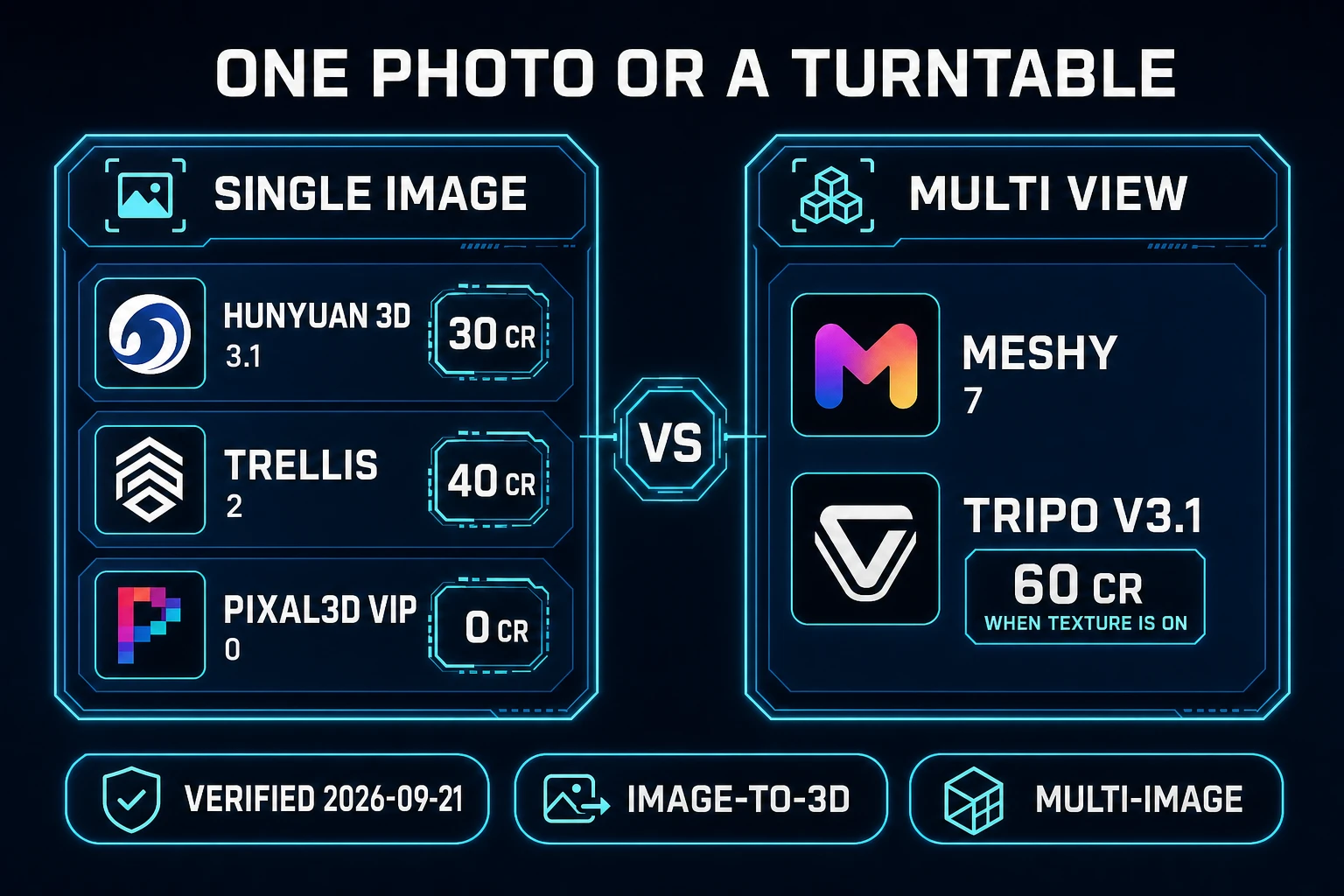
2D to 3D image conversion chart comparing single-image models with multi-view Meshy 7 and Tripo v3.1
Single-image lanes versus multi-view. Hunyuan 3D 3.1 and TRELLIS 2 refuse a turntable; Meshy 7 and Tripo v3.1 accept one. Verified 2026-09-21.

Prompt a concept, or upload the picture you already have

Two inputs feed the same converter. If the prop already exists as a sprite, a photo, or a concept PNG, drop that file. If you only have a sentence, make the picture first in AI Image Gen, then convert. The image catalog (verified 2026-09-21) lists Nano Banana Pro, GPT Image 2, Grok Imagine, Seedream 5, Flux 2 Pro, and Z-Image Turbo in one panel at /generate.

A usable source image for converting image to 3d model work has four traits:

  1. One subject. A second object in frame becomes a fused blob.
  2. A plain background. Busy scenery gets reconstructed as geometry.
  3. The whole object in frame, including the base. Cropped feet and cropped hilts come back incomplete.
  4. For anything you will rig, an A-pose or T-pose with limbs off the torso. Meshy 7 exposes Pose Mode with options a-pose and t-pose. Rodin 2.0 exposes Force T/A-Pose. Turn that on before you generate, not after a crumpled result.

Prompt versus upload is not a quality ranking. Upload wins when the art direction is already locked. Prompt wins when you do not have a drawing and you need a clean silhouette in minutes. Either way the next click is the same: Image to 3D inside 3D Studio, not a separate 2D to 3D image conversion software install.

Multi-view is the upgrade when one photo is not enough. Meshy 7 and Tripo v3.1 list multi-image-to-3d. Hunyuan 3D 3.1, TRELLIS 2, Pixal3D, and Rodin 2.0 do not. Meshy 7’s getCredits uses 45 as the multi-image base and 35 as the single-image base, then adds 15 when Generate Texture is on. Defaults leave texture on, so a turntable pass is 60 credits and a single textured pass is 50. Ultra Mode adds 10 credits and is hidden for multi-view. Remesh adds 15. 8K texture adds 10; 2K and 4K do not.

GLB, GLTF, and FBX after the mesh exists

A conversion that you cannot download is a viewer, not a pipeline. 3D Studio’s export set is FBX, GLB, or GLTF. glTF is Khronos’s royalty-free specification for transmitting 3D scenes. The core is JSON, a single binary .glb can hold the scene, and Khronos calls it the JPEG of 3D. glTF 2.0 became ISO/IEC 12113:2022 (verified 2026-09-21 on khronos.org/gltf). Skins and animations are part of that file when you have them; a static prop is still a valid glTF.

MDN’s 3D games on the Web guide puts WebGL on the HTML canvas and names Three.js, Babylon.js, and PlayCanvas as the libraries people actually load those files with. GLB is the practical browser handoff. FBX is the practical handoff when a desktop DCC or engine import expects it. Rodin 2.0 is the picker entry that also offers OBJ, USDZ, and STL in its Output Format enum, defaulting to GLB. Tripo v3.1’s Quad Mesh option forces FBX and adds 5 credits; leave it off unless you specifically want quads.

TRELLIS 2’s polycount target defaults to 500,000 vertices. The parameter note in source says 500K is the sweet spot, and that web or mobile builds should drop toward 20K–50K or optimize afterward. Do that before you check the GLB into a browser game. A 2D image to 3D model that is faithful and a million triangles will still miss frame budget.

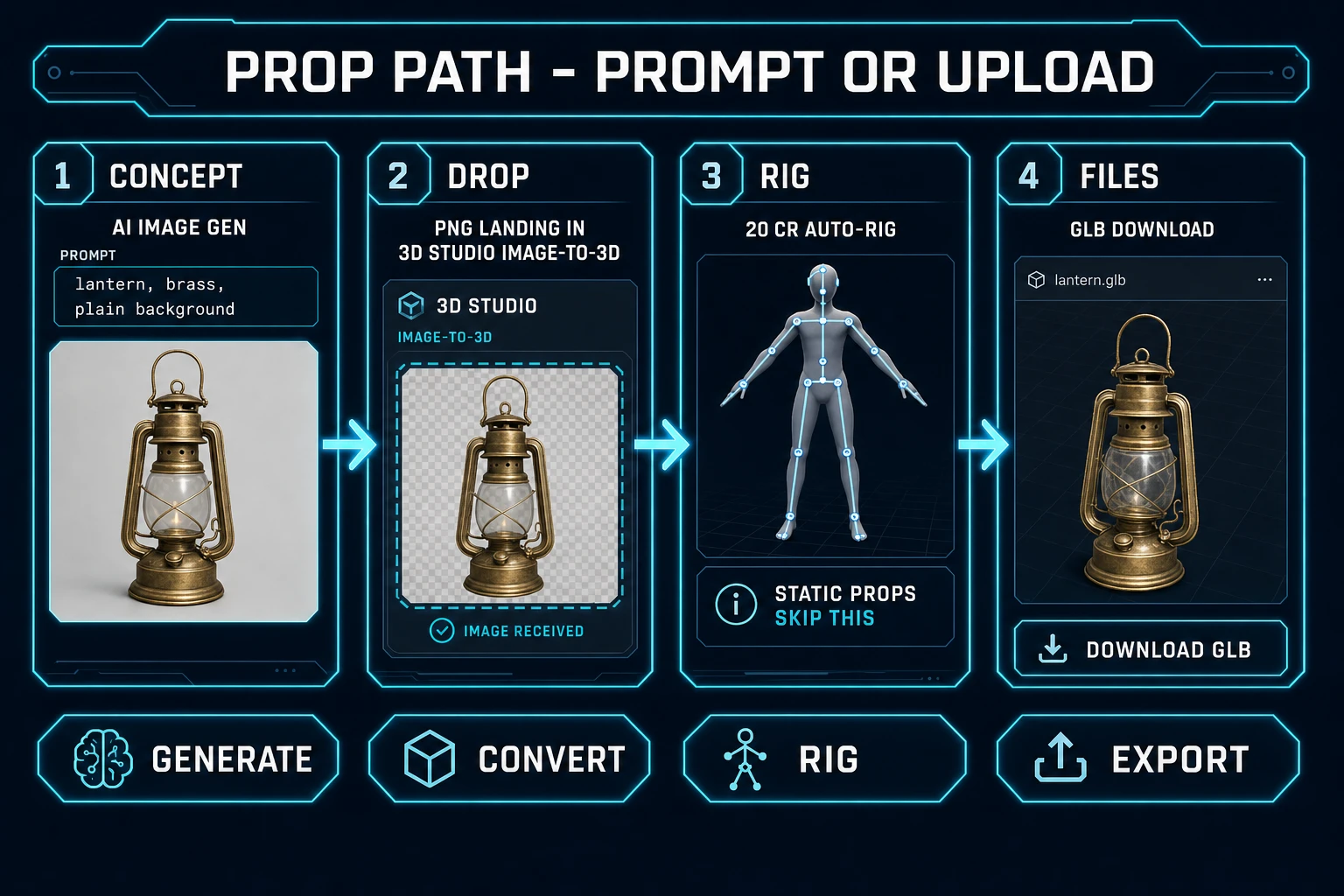
Prop path for 2D to 3D image conversion: concept image, drop into 3D Studio, optional auto-rig, GLB export
Prompt or upload, convert, rig only if the prop must move, then export. Verified 2026-09-21.

Auto-rig only when the converted mesh must move

Most props from a 2D to 3D image conversion should stay static. A lantern does not need a skeleton. A humanoid does. Auto-Rigging is badged Pro. The Meshy humanoid path costs AUTO_RIG_CREDITS.meshy = 20 credits. Tripo remains in the pricing map at 40 credits, and the file says it is no longer offered in the UI because it could only rig models that Tripo itself generated. Plan on the 20-credit Meshy rig.

Order matters. Pose the source image, run the conversion, inspect the mesh, then rig once. A bad silhouette rigged at 20 credits is a wasted skeleton. Arms glued to the torso and a three-quarter photo of a running pose are the usual failures. Regenerate the 2D image in A-pose, convert again, then rig. That second conversion is still cheaper than discovering the skeleton cannot walk.

Credit math for one conversion

Here is a prop budget on the 100-credit signup grant, using the defaults above. This is the wallet view of 2D to 3D image conversion. Verified 2026-09-21.

Job Credits USD at 100 credits per dollar Grant left
3 Hunyuan 3D 3.1 props 90 $0.90 10
2 TRELLIS 2 props at 1024 80 $0.80 20
1 Meshy 7 textured prop 50 $0.50 50
1 Tripo v3.1 HD prop 50 $0.50 50
1 Hunyuan prop + 1 auto-rig 50 $0.50 50
1 Meshy 7 multi-view, texture on 60 $0.60 40

Lock the silhouette on Hunyuan 3D 3.1 at 30 credits. Spend Meshy 7 or Tripo v3.1 when you need multi-view, a forced pose, or a higher default texture tier. That is the practical meaning of 2D to 3D image conversion software inside Sorceress: no second vendor account, a credit number you can read before you click, and a file that leaves the browser.

Common issues

  • Problem: The back of the prop does not match the design.
    Solution: One photo cannot see the back. Shoot or generate a second angle and use Meshy 7 or Tripo v3.1 multi-image, or accept the inferred back on a Hunyuan pass.
  • Problem: The background became part of the mesh.
    Solution: Re-export the reference on a flat color. 2D to 3D image conversion treats high-contrast clutter as shape.
  • Problem: A turntable upload is rejected.
    Solution: Hunyuan 3D 3.1, TRELLIS 2, Pixal3D, and Rodin 2.0 are image-to-3d only. Switch to Meshy 7 or Tripo v3.1 for multi-image-to-3d.
  • Problem: Auto-rig produces a broken skeleton.
    Solution: Do not rig the first crumpled mesh. Regenerate from an A-pose reference, then spend the 20-credit rig once.
  • Problem: The GLB is too heavy for a browser scene.
    Solution: On TRELLIS 2, lower the polycount target toward 20K–50K before export. On Meshy 7, turn Remesh on only when you are ready to pay the extra 15 credits for a target polycount.

The verdict on 2D to 3D image conversion

For indie props in 2026, 2D to 3D image conversion is a short loop on Sorceress: make or drop one clean image, run Hunyuan 3D 3.1 at 30 credits unless you already know you need multi-view, export GLB for the web or FBX when the importer asks for it, and add the 20-credit auto-rig only for a body that has to move. TRELLIS 2 at 40 credits and the 50-credit Meshy 7 or Tripo v3.1 HD defaults are the step up, not the first click. VIP Pixal3D is the zero-credit image lane, and it is locked for everyone else.

Open 3D Studio, drop the PNG, and keep the mesh. That is the whole converter.

Frequently Asked Questions

What is 2D to 3D image conversion for a game prop?

2D to 3D image conversion turns one flat reference into a downloadable mesh. On Sorceress that job lives in 3D Studio as image-to-3D: drop a PNG, pick a model that lists image-to-3d in src/lib/threed-models.ts, and export FBX, GLB, or GLTF. It is not multi-photo photogrammetry. Photogrammetry, per Wikipedia (verified 2026-09-21), measures objects from photographs, and stereophotogrammetry uses two or more views. A single-image converter invents the unseen sides.

Which 2D to 3D image converter is the budget default in 3D Studio?

Hunyuan 3D 3.1 is marked rating best-budget at 30 credits and accepts image-to-3d only (verified 2026-09-21 in src/lib/threed-models.ts). TRELLIS 2 defaults to 40 credits at 1024 resolution (35 at 512, 45 at 1536) and is also single-image. Pixal3D is 0 credits with creditLabel Free unlimited, but vipOnly is true. New accounts start with 100 free credits, and CREDITS_PER_DOLLAR is 100.

Can I use several photos in a 2D to 3D image conversion?

Only on models whose inputModes include multi-image-to-3d. Meshy 7 and Tripo v3.1 do. Hunyuan 3D 3.1, TRELLIS 2, Pixal3D, and Rodin 2.0 do not. Meshy 7 multi-image starts at 45 credits before the texture add-on; with Generate Texture on (the default) that is 60 credits. Ultra Mode is hidden on multi-view.

What file should I export after converting an image to a 3D model?

3D Studio exports FBX, GLB, or GLTF (verified 2026-09-21 in the 3D Studio catalog description). glTF is a royalty-free delivery format, often called the JPEG of 3D, and glTF 2.0 is ISO/IEC 12113:2022 (verified 2026-09-21 on khronos.org/gltf). Use GLB for browser games. The MDN 3D-on-the-web guide covers WebGL on canvas plus Three.js, Babylon.js, and PlayCanvas.

Does 2D to 3D image conversion include a skeleton?

The mesh conversion does not rig by itself. Auto-Rigging is a separate Pro tool at /rigging. The Meshy humanoid path costs AUTO_RIG_CREDITS.meshy = 20 credits (verified 2026-09-21 in src/lib/rigging/external-rig/autoRigPricing.ts). Tripo rigging stays priced at 40 credits but is not offered in the UI. For a character, generate an A-pose or T-pose reference first, then run the 20-credit rig once.

Sources

  1. Photogrammetry - Wikipedia
  2. glTF - Khronos Group
  3. Tencent-Hunyuan/Hunyuan3D-2.1
  4. microsoft/TRELLIS - CVPR'25 Spotlight
  5. 3D games on the Web - MDN
Written by Arron R.·1,890 words·8 min read

Related posts