Key AI Video Background Remover (Alpha Clip 2026)

By Arron R.13 min read
A game-side ai video background remover job is a per-frame neural keying pass, not a still cutout: run the clip through Sorceress Corridor Chroma on the Cloud b

People who type ai video background remover into a search box in 2026 already have a clip on disk. A five-second phone capture of an actor in front of a green sheet. An AI-generated video from the "video" panel. A screen recording of a puppet against a colored wall. What they need is not another still-image tool applied 120 times in a row — they need a per-frame keying pass that reads each frame with matching alpha so hair, motion blur, and semi-transparent edges survive the cut. This page treats the query as a shipping problem: what the search actually wants, why still-image background removers fail on moving clips, how Sorceress Corridor Chroma keys every frame with a hair-grade neural matte, and how the keyed stack hands off to Auto-Sprite v2 for a game-ready sheet. Every credit, every backend, and every default color in this piece was checked against the local source on 2026-09-30.
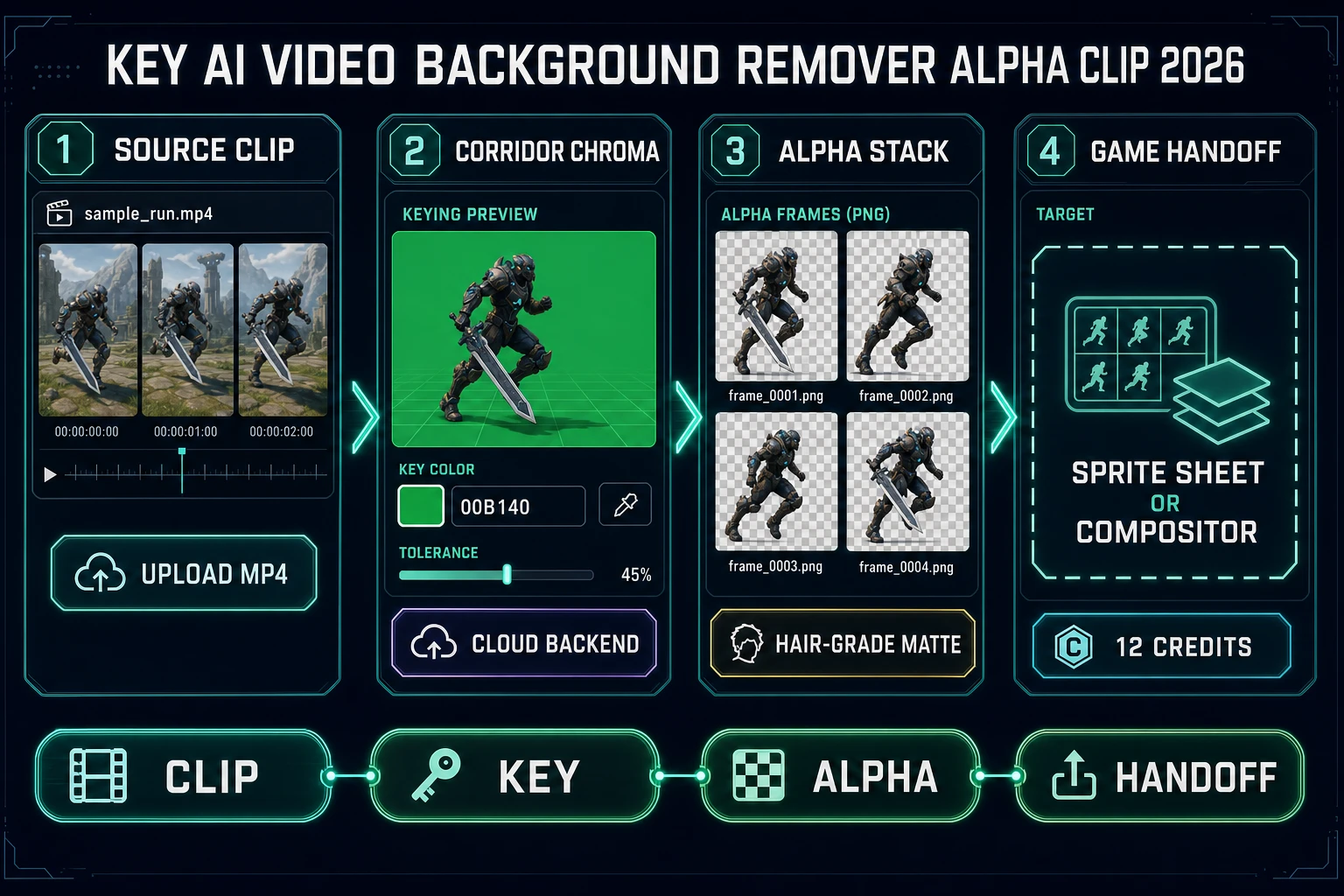
Key ai video background remover: upload clip, run Corridor Chroma neural keying, download the alpha stack, hand off to Auto-Sprite v2 or a compositor
An ai video background remover reframed as a per-frame neural key: upload the clip, run Corridor Chroma against the trained green plane, and download an alpha PNG stack the sprite sheet packer can consume.

What an ai video background remover search actually wants

DataForSEO lists ai video background remover at 590 searches a month with KD 36 and informational intent (confirmed in tools/research-supplement.md, verified 2026-09-29 pull). The sister phrases split cleanly. background remover ai is still-image territory and rounds to a segmentation tool. ai video generator is a create-from-scratch query. But ai video background remover sits in the middle: the searcher already has motion on disk and needs the background gone across every frame, not just one.

Wikipedia’s chroma key article (verified 2026-09-30) is blunt about the job: a colored screen is replaced with a different image, and the technique is standard in film and TV precisely because it works per frame with predictable color separation. The classical implementation is a per-pixel color-distance test. The neural-network implementation replaces the per-pixel test with a network trained on real green-screen footage — and the difference matters most where the classical test fails, which is hair, motion blur, translucent props, and any pixel that is partially green because it caught bounce light from the screen behind it.

Wikipedia’s alpha compositing entry (verified 2026-09-30) is the other half of the picture. The output of a video background remover is not a set of cutout frames; it is a set of frames plus a matte layer that stores coverage information as an 8-bit alpha channel. Alpha 0 means fully transparent, 255 means fully opaque, and everything in between is what lets hair strands blend into the next background without a hard edge. An ai video background remover that ships only a binary cutout throws that middle range away and is why so many results look like a paper-doll pasted onto the composite. The Sorceress path keeps the middle range because Corridor Chroma writes real 8-bit alpha per frame.

Why a still-image background remover flickers on video

The obvious first instinct is to extract every frame and run each one through BG Remover. It technically works. BG Remover in Sorceress is a segmentation pass tuned for stills at BG_REMOVER_CREDITS = 3 per image (verified 2026-09-30 in src/app/bg-remover/page.tsx) and it returns a clean transparent PNG for any single portrait. Run it on 120 frames of a walking cycle and you get 120 correctly-cut portraits — and 120 subtly different mattes because the segmentation network resolved the collar, the hair edge, and the fingertips a couple of pixels differently on each frame. The result plays back as an alpha that shivers frame to frame, which the eye reads as “why is this actor made of jelly.”

A video keyer has to be temporally aware — the matte decisions from adjacent frames need to agree unless the subject actually moved. Corridor Chroma keys with a color-plus-network pass that is stable across adjacent frames because it uses the same trained model with the same color target on every frame. That is why the neural green-screen lane is the right tool for the job, and why 30 separate BG Remover cutouts are not.

The other quiet failure of the still-image path is cost. BG Remover at 3 credits per image on a 24fps 5-second clip is 3 × 120 = 360 credits, or .60 at CREDITS_PER_DOLLAR = 100 (verified 2026-09-30 in src/lib/models.ts). Corridor Chroma on the same clip at the small working size is 12 credits, or .12. Thirty times cheaper, temporally stable, and hair-grade — that is the whole reason a dedicated video keyer exists as a separate tool.

The Corridor Chroma neural keying lane

Corridor Chroma is the featured tool for the video-side ai video background remover pass. The home more-tools card (verified 2026-09-30 in src/app/_home-v2/_data/tools.ts) lists it as “neural green-screen keying with hair-grade edges.” Under the hood it is a Corridor Key model shared with Auto-Sprite v3 Animate Studio and the Tileset Forge keying pass — the same trained network that powers those keyed sprite workflows also runs the standalone tool.

Credit math verified today in src/lib/corridor-key/client.ts, function getCorridorKeyCreditCost:

function getCorridorKeyCreditCost(args) {
  if (args.isVip) return 0;
  const maxDim = Math.max(args.frameWidth, args.frameHeight);
  const isHiRes = maxDim > 512;
  return Math.max(1, Math.ceil(args.frameCount / 10) * (isHiRes ? 2 : 1));
}

Translated: about one credit per 10 frames when the frame is at or below 512 pixels on its longest side, doubled to two credits per 10 frames above 512. VIP accounts key for free. The billed count is always the frames actually keyed, and the tool only charges on success (also verified in the registry costNote at src/lib/sorceress-tools/registry.ts). Local backend keying is always free — that is the “Local” backend toggle on the tool page, which routes to a workstation-side keyer instead of the Cloud model.

BackendWhere it runsWorking sizeCredit basis
Cloud (default)Corridor Key on RunpodUp to 512 px cheap, 1024 px HD, 1536 or 2048 on Dedicated1 cr per 10 frames ≤ 512 px, 2 cr per 10 frames above
LocalWorkstation Corridor KeyUp to 2048 pxAlways free (no server round-trip)
Dedicated CloudReserved Corridor Key host512 / 1024 / 1536 / 2048 bucketsSame as Cloud; larger frames land in the 2x lane

Which backend to pick depends on hardware. If a workstation with an RTX-class GPU is available and the Corridor Key local service is installed (the tool page probes for it and shows a green “Local” pill when it is up), every keying pass is free. Otherwise Cloud at 12 credits per 5-second clip is the honest default. Dedicated is the escape hatch for a batch that has to key at 2048 px because the finished sprite sheet is meant for a 4K render or a canvas-side portrait.

Green vs blue vs no screen at all

Corridor Chroma is trained on the film-standard chroma-key green — the default key color in src/app/corridor-chroma/page.tsx is #00b140 (verified 2026-09-30), the same hex that dominates green-screen studio inventory because Wikipedia’s chroma key article notes green is the furthest color from human skin tones in the RGB gamut and therefore the least likely to bleed into a foreground subject. Blue screens are not supported. The tool exposes a color picker so the key target can shift a few hex points toward the actual screen paint on set, and a tolerance slider (default 80) that controls how forgiving the color-distance test is before the neural pass takes over.

Three practical scenarios for a video background remover job:

  • Real green screen footage — the cleanest lane. Phone or camera captured against a solid green sheet, evenly lit, subject at least a foot in front of the plane so bounce spill is minimal. Corridor Chroma keys with the default settings and the hair edge survives without tuning.
  • AI-generated video with a green background prompt — the second cleanest lane. Prompt the video panel for a subject “against a solid chroma-key green background, flat lighting, no shadow” and the diffuser tends to comply. Corridor Chroma treats the result the same as camera-captured footage.
  • No screen, mixed backgrounds — the hardest lane. Corridor Chroma still runs; the matte quality depends on how cleanly the subject separates from the background in color and luminance. If the subject is a bright character on a dim environment, the key is usable; if the subject shares palette with the background, the matte gets ambiguous and the temporally-stable neural pass helps but does not save.

Wikipedia’s matte (filmmaking) entry (verified 2026-09-30) is the reminder that when chroma key is not an option, the classical film pipeline used hand-painted or rotoscoped mattes. Wikipedia’s rotoscoping article (verified 2026-09-30) describes the technique of tracing an outline frame by frame. That is the labor the neural key eliminates on mixed-background footage: instead of hand-rotoscoping the subject on every frame, the trained network resolves an alpha per frame and only asks the operator to clean up the handful of frames where the foreground and background palettes actually cross.
Shooting or generating a clip that keys cleanly

The quality of the ai video background remover output is decided before the clip ever touches the keying tool. Practical habits that make Corridor Chroma succeed on the first pass:

  • Solid saturated green plane. On camera, a matte-finish chroma-key sheet (paint or fabric) at approximately #00b140. On AI-generated video, include the phrase “solid chroma-key green background, no gradient, no shadow” in the prompt.
  • Separation between subject and screen. Twelve to eighteen inches of air behind the actor keeps green bounce off the shoulders and hair. On AI-generated video, a prompt line like “subject clearly foregrounded, background flat and far” pushes the same result.
  • Even flat lighting. A single hard key light with a soft fill is fine; a spotlight that pools shadow across half the green plane forces the tolerance slider open until the matte gets sloppy.
  • No green wardrobe or props. The exception is deliberate: a magic potion vial the character is supposed to render invisible.
  • Constant frame rate. Variable frame rate captures from phones sometimes confuse the frame extractor. If the source has odd timing, re-encode at a fixed 24 or 30 fps before uploading.
  • File size sanity. The Corridor Chroma still upload cap is 80 MB (verified 2026-09-30 in src/app/corridor-chroma/page.tsx, constant MAX_FILE_SIZE_MB). Video-source workflows that exceed that route through Auto-Sprite v3 Animate Studio, which handles the frame extraction on its side.

MDN’s image types guide (verified 2026-09-30) is the reminder that PNG and WebP are the alpha-supporting still formats on the web, and PNG is the canonical choice for keyed frame stacks that will feed a downstream sprite sheet packer. Corridor Chroma writes keyed stills as PNG with a straight alpha channel — usable by every game engine’s texture importer without a conversion step.

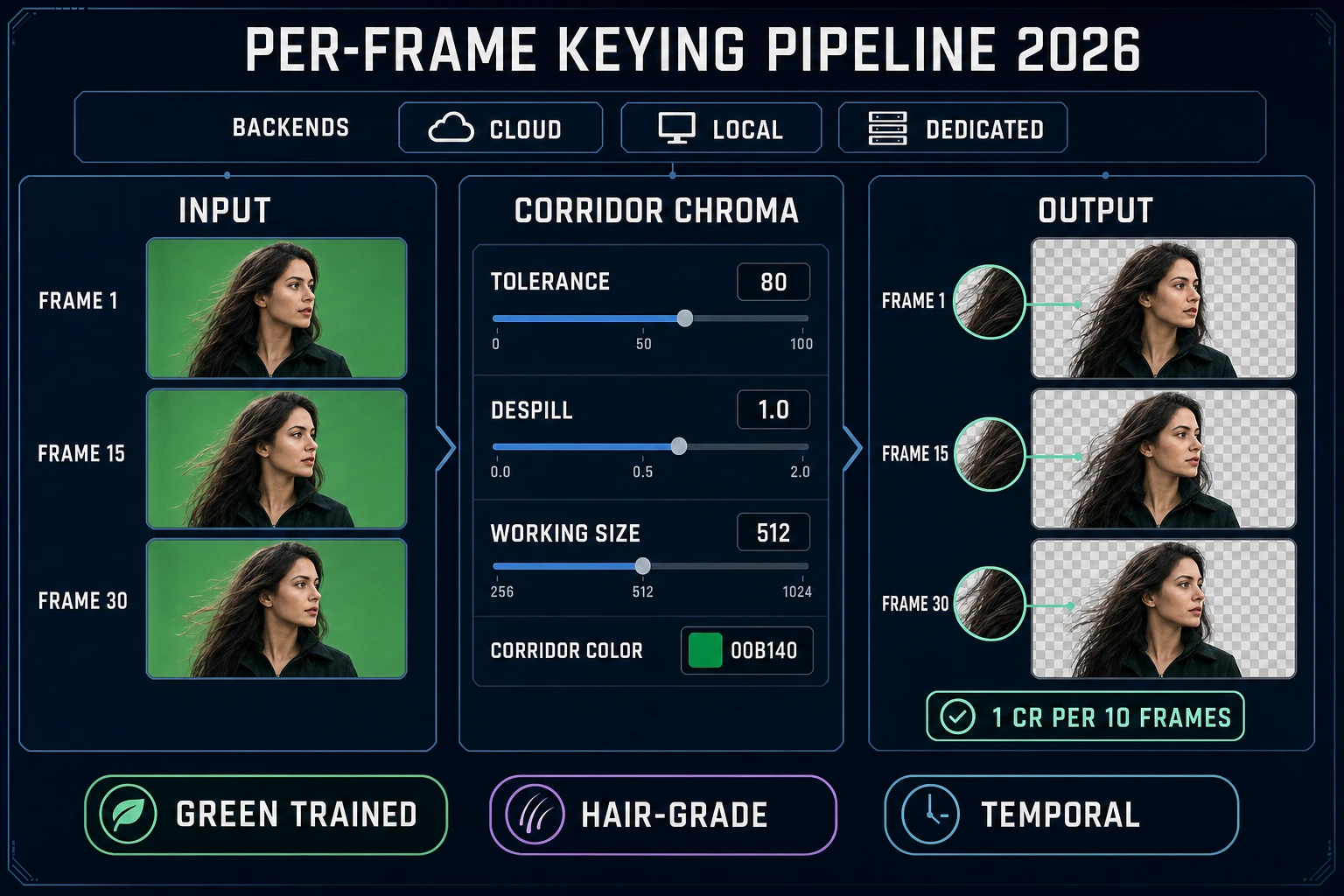
Per-frame ai video background remover pipeline: frames on green plane, Corridor Chroma settings, transparent-checker output with hair-grade edges
Corridor Chroma per-frame keying pipeline: green plane frames on the left, the color plus tolerance plus working-size settings in the middle, transparent-checker alpha frames on the right at about 1 credit per 10 frames at the small working size.

From keyed alpha stack to a game-ready sprite sheet

An ai video background remover pass gives back a stack of transparent PNGs; a game engine wants an atlas. The handoff tool is Auto-Sprite v2. The home more-tools card lists it as “prompt to animated 2D sprite sheet” (verified 2026-09-30 in src/app/_home-v2/_data/tools.ts) — and although the front-page workflow is prompt-first, Auto-Sprite can also accept an existing keyed animation and pack it into a grid-formatted atlas sized for Godot, Unity, Phaser, and RPG Maker (the four engines listed in the Auto-Sprite tools-catalog block, verified 2026-09-30 in .cursor/skills/sorceress-blog/tools-catalog.md).

The whole video-to-sprite pipeline in five steps:

  1. Shoot or generate a 3-to-6-second clip against a chroma-key green plane.
  2. Upload to Corridor Chroma on the Cloud backend at the small working size (or Local if the workstation daemon is running).
  3. Let the tool key every frame and download the keyed stack as a PNG sequence.
  4. Import the stack into Auto-Sprite v2 (or Auto-Sprite v3 Animate Studio, which also has a keying pass on the same Corridor Key backend).
  5. Auto-Sprite packs the frames into a grid-formatted PNG sheet at the tile size the target engine expects (128 px per tile for Godot AtlasTexture, 64 px for tight RPG Maker sheets, custom for Phaser).

If the clip is longer than a walk cycle — a full attack combo, a death animation with squash and stretch — Auto-Sprite v3 Animate Studio is the sibling workflow. It runs the Corridor Key model directly (verified 2026-09-30 in src/components/autosprite-v3/CharacterAnimateStudio.tsx) at the same credit rate: about 1 credit per 10 frames at the small working size, 2 credits per 10 frames on the HD lane, VIP free. That is the “video to sprite sheet” pipeline the Auto-Sprite card advertises, and it collapses the keying step and the packing step into one workspace.

Related Sorceress angles already on the blog for adjacent moves: matte ai-powered background remover sprite for the still-image counterpart to this workflow, sheet sprite sheet generator ai atlas pack for the pure prompt-to-sheet path that skips keying entirely, and video to sprite with an ai animation generator for the wider video-to-sprite pipeline discussion.

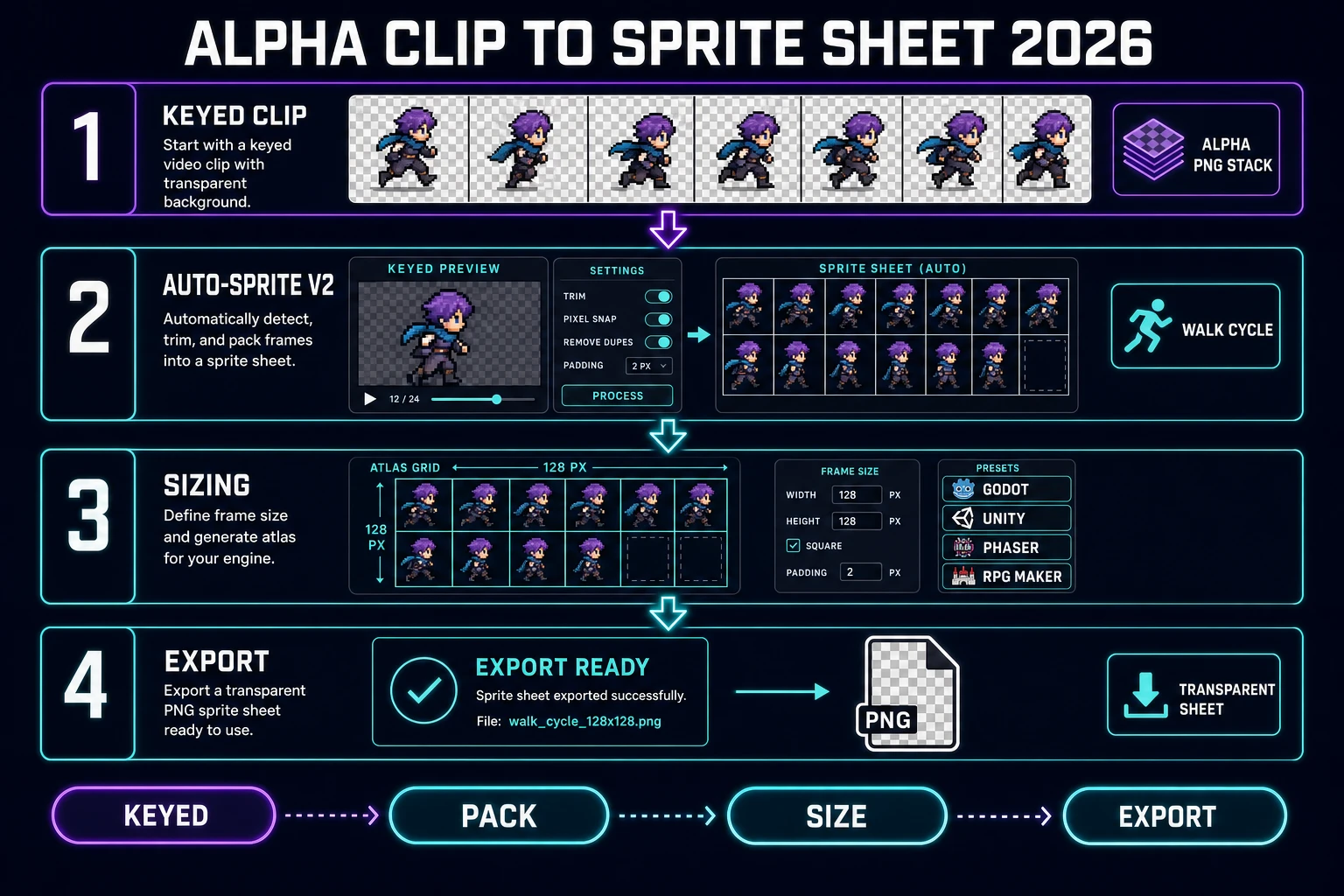
Alpha clip to sprite sheet handoff: keyed PNG stack imported into Auto-Sprite v2 and packed into a Godot Unity Phaser RPG Maker atlas
Honest video-to-sprite handoff after the ai video background remover pass: keyed PNG stack on the left, Auto-Sprite v2 workspace in the middle, engine-sized atlas grid on the right, transparent sheet exported at the end.

Credit math for a five-second ai video background remover session

Quote wallet numbers from source, not marketing memory. CREDITS_PER_DOLLAR = 100 in src/lib/models.ts. The getCorridorKeyCreditCost formula in src/lib/corridor-key/client.ts is Math.max(1, Math.ceil(frameCount / 10) * (isHiRes ? 2 : 1)) where isHiRes triggers above 512 pixels on the longest dimension. Both verified 2026-09-30.

Session planFramesBackend / sizeCredit totalUSD at 100 cr/$
Single 3-second phone-green clip, 24 fps, 512 px72Cloud ≤ 512 px8.08
5-second walk cycle, 24 fps, 512 px120Cloud ≤ 512 px12.12
5-second walk cycle, 24 fps, 1024 px (HD)120Cloud 1024 px24.24
10-second cutscene, 30 fps, 1024 px300Cloud 1024 px60.60
Four short combat clips, 24 fps, 512 px4 × 96Cloud ≤ 512 px40.40
Same set, workstation Local backend4 × 96Local0Free
Same 5-second clip run through 120 BG Remover passes (do not do this)120Still segmentation360.60

The bottom row is the anti-pattern that motivates this whole workflow: paying thirty times more for a matte that flickers frame to frame is the failure mode of “run the still tool 120 times.” The correct default for an ai video background remover pass is Corridor Chroma on the Cloud backend at the small working size — twelve credits per five-second walk cycle, temporally stable, and hair-grade. The 100-credit signup grant covers eight of those clips before a first top-up.

A practical checklist before you run the ai video background remover loop: verify permission to key the source footage, upload a solid green plane where possible, keep the file under 80 MB, pick Cloud backend at the small working size for the default speed lane and Local for the free lane if the daemon is up, download the keyed PNG stack, hand off to Auto-Sprite v2 for the sheet packer, and reserve the HD lane for shots that actually target a large output canvas. Flickering mattes are a temporally-unaware-tool problem, not a Corridor Chroma problem — do not chop the video into 120 still frames and feed them to BG Remover.

Verdict: key the clip, ship the alpha, hand it to the packer

A clean ai video background remover session on Sorceress in 2026 ends with a folder of transparent PNG frames whose alpha edges hold through hair and motion blur, and either a compositor-ready image sequence or a game-ready sprite sheet packed by Auto-Sprite. The finished shape is a keyed clip, not a chopped-up still, and the whole session should bill in single-digit credits per short clip on the Cloud backend or nothing at all on Local. Every step in the pipeline was checked against local source on 2026-09-30.

  1. Capture or generate a 3-to-6-second clip against a solid #00b140 green plane, single subject, even light, constant frame rate, under 80 MB.
  2. Upload the clip to Corridor Chroma, pick the Cloud backend and the small (≤ 512 px) working size for the default 1-credit-per-10-frames lane; switch to 1024 px or Dedicated only if the shot targets a large output canvas.
  3. Let the neural key run; download the resulting PNG stack with straight 8-bit alpha per frame.
  4. Hand the stack to Auto-Sprite v2 (or Auto-Sprite v3 Animate Studio) and let it pack a grid-formatted PNG atlas sized for the target engine.
  5. For any single-frame still that also needs a cutout, keep BG Remover at 3 credits per image in the pipeline — and never use it as a substitute for a video keyer on a multi-frame clip.

That is the whole job the ai video background remover search is actually buying: not a chopped-up still, not a face-swap filter, but a temporally-stable per-frame matte on a moving clip that a game engine or a compositor can drop onto any background without a flickering edge. Key the clip, ship the alpha, hand it to the packer — then let the sheet meet an engine that treats the transparent PNGs as native game-ready assets.

Frequently Asked Questions

What does an ai video background remover search actually want?

For the game-dev slice, it wants a per-frame alpha pass on a moving clip, not a single-still cutout. DataForSEO lists ai video background remover at 590 searches a month with KD 36 and informational intent (tools/research-supplement.md, verified 2026-09-29). The searcher already has a clip - a phone capture, an AI-generated 5-second video, a screen recording of a green-screen shoot - and needs a workflow that keys every frame with matching alpha so the result plays as a transparent video or composites onto a new background without seams.

Why does a still-image background remover fail on video?

Frame-by-frame BG Remover works, but the alpha decisions do not agree between adjacent frames. BG Remover in Sorceress is a segmentation pass tuned for stills at BG_REMOVER_CREDITS = 3 per image (verified 2026-09-30 in src/app/bg-remover/page.tsx). Run it on 30 frames of a walk cycle and you get 30 correctly-cut portraits whose edges flicker frame to frame because the segmentation network resolved a slightly different mask on each one. Video keying needs a temporally-aware pass, which is what Corridor Chroma provides.

Which Sorceress tool is the ai video background remover?

Corridor Chroma at /corridor-chroma is the neural green-screen keying tool. The home more-tools card lists it as neural green-screen keying with hair-grade edges (verified 2026-09-30 in src/app/_home-v2/_data/tools.ts). Under the hood it is a Corridor Key model shared with Auto-Sprite v3 Animate Studio and Tileset Forge keying. The Cloud backend keys at about 1 credit per 10 frames when the frame longest dimension is under 512 pixels, 2x credits above that (verified 2026-09-30 in src/lib/corridor-key/client.ts, function getCorridorKeyCreditCost).

Do I need a real green screen, or does Corridor Chroma work on any background?

Green screen is the trained lane and it is the cleanest path. Corridor Chroma is trained on the film-standard chroma-key green (approximately #00b140, the app default key color in src/app/corridor-chroma/page.tsx verified 2026-09-30). Blue screens are not supported. For non-green sources - phone footage against a wall, AI-generated clips with a plain background - the tool still runs, and the matte quality depends on how cleanly the subject separates from the background in color and luminance. When in doubt, generate or reshoot against a plain saturated green plane and the neural key catches hair and motion blur automatically.

How much does a 5-second ai video background remover pass cost on Sorceress?

Verified 2026-09-30 against src/lib/corridor-key/client.ts and src/lib/models.ts: getCorridorKeyCreditCost charges max(1, ceil(frameCount / 10) * (isHiRes ? 2 : 1)) credits, where isHiRes triggers when the frame longest dimension exceeds 512 pixels. A 5-second clip at 24fps is 120 frames, which is 12 credits at the small working size or 24 credits above 512 pixels. CREDITS_PER_DOLLAR is 100 (src/lib/models.ts), so the cheap lane is .12 per 5-second clip and the HD lane is .24. VIP accounts key for free. A 100-credit signup grant covers roughly 40 short clips at the small working size.

Sources

  1. Chroma key - Wikipedia
  2. Alpha compositing - Wikipedia
  3. Matte (filmmaking) - Wikipedia
  4. Image file type and format guide - MDN
  5. Rotoscoping - Wikipedia
Written by Arron R.·2,905 words·13 min read

Related posts