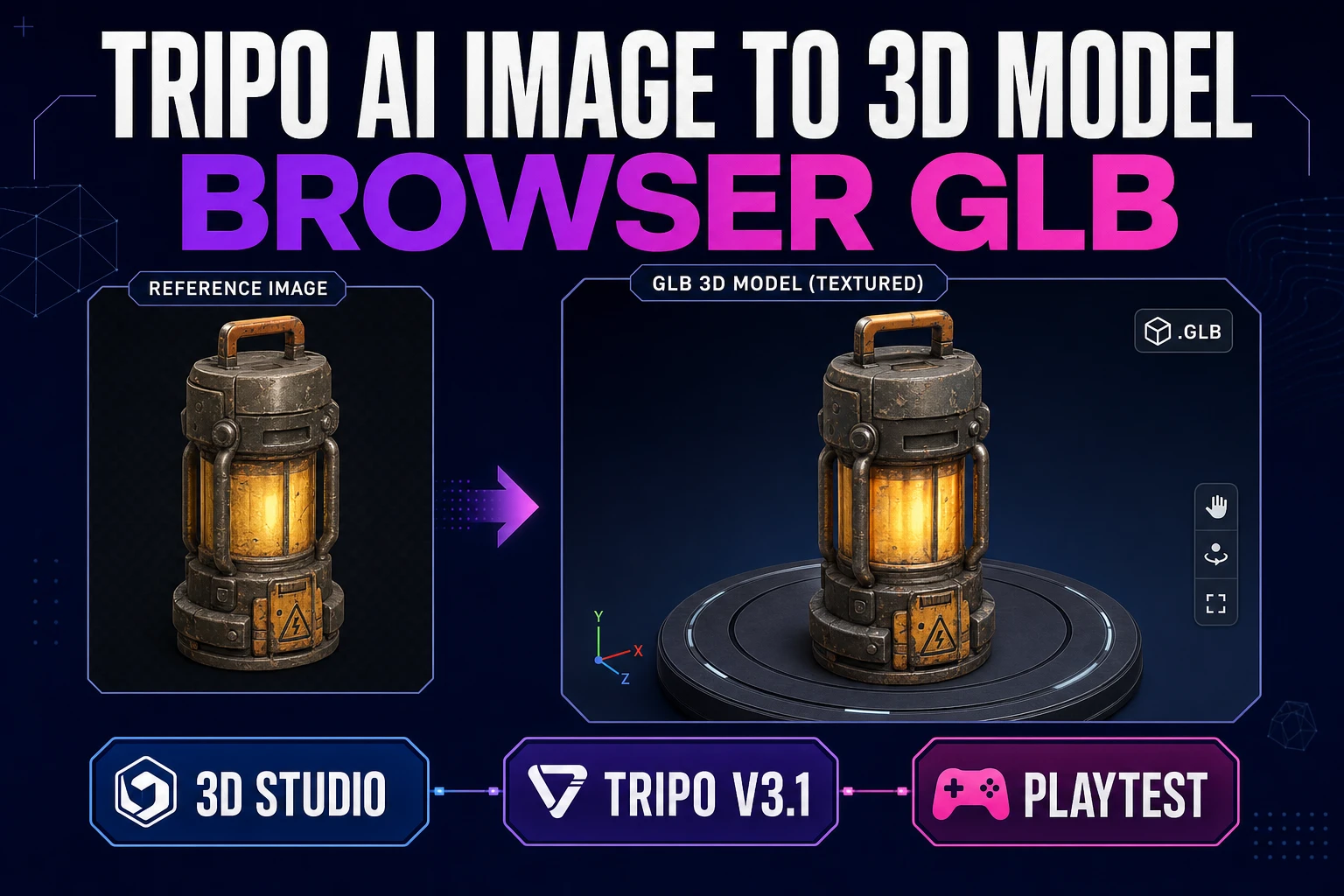
Form Tripo AI Image to 3D Model (Browser GLB)

By Arron R.7 min read
A Tripo AI image to 3D model path for game props: strip the matte, run Tripo v3.1 once in 3D Studio, orbit-check the silhouette, then export GLB for a one-scree

Searchers typing tripo ai image to 3d model want a playable prop mesh, not a gallery turntable. A single clean plate, one Tripo v3.1 pass in 3D Studio, an orbit check, and a GLB drop into a one-screen playtest beats three blind re-rolls. This guide forms that path with credits and model snapshot verified July 25, 2026.
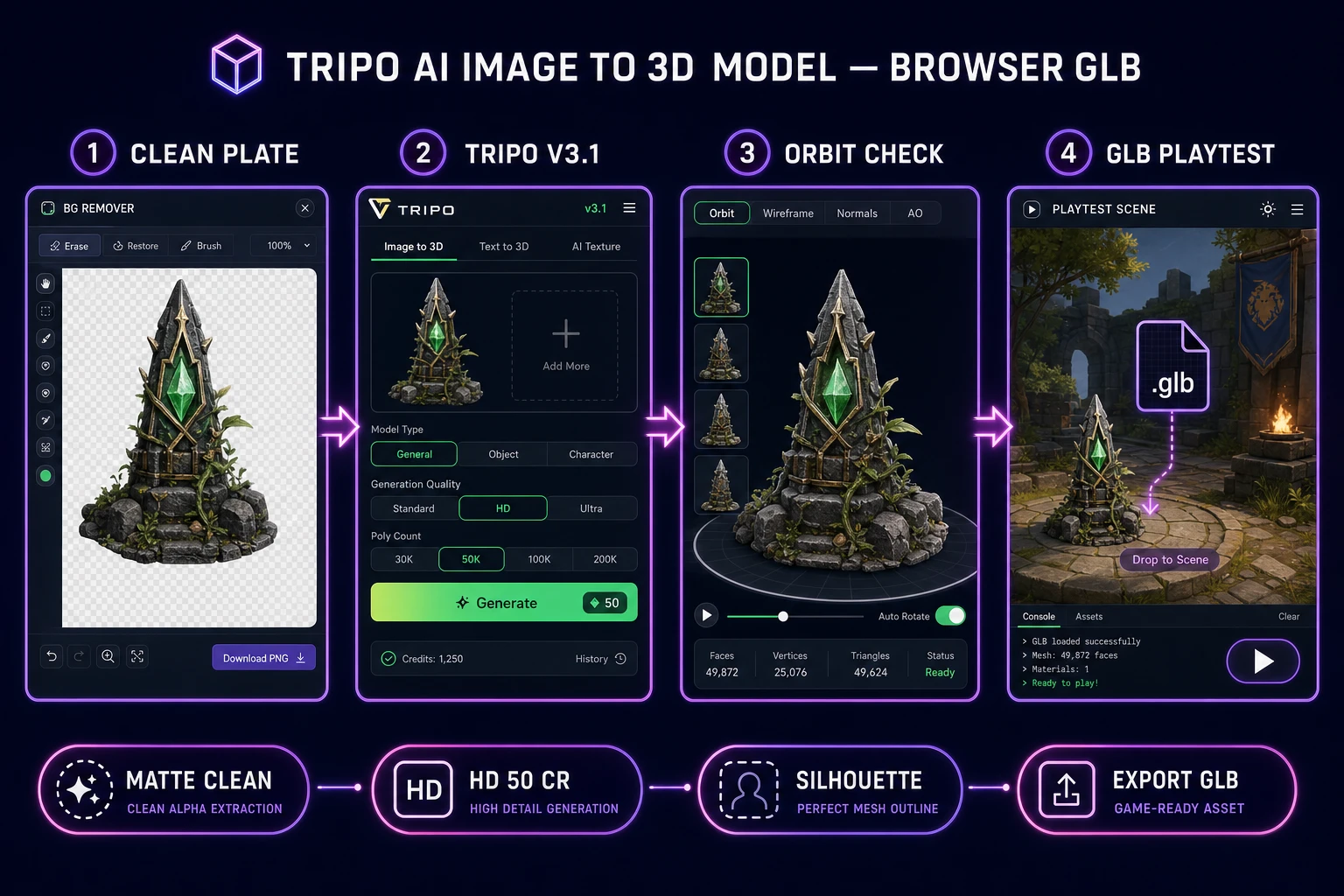
Tripo AI image to 3D model pipeline from clean plate to browser GLB playtest
Clean plate to Tripo v3.1 to orbit check to GLB playtest. One measured pass beats three identical HD re-rolls.

What a tripo ai image to 3d model search wants

DataForSEO lists tripo ai image to 3d model at 1,000 monthly searches with KD 5 in research-supplement.md, verified July 25, 2026. Sibling phrases like image to 3d model (8,100/mo) and converting image to 3d model (720/mo) share the same job: turn a 2D plate into a mesh you can load. Tripo is the named route inside that job.

Write four lines in a text file named prop_brief_v1.txt before you open the picker:

  1. Prop job — pickup, weapon, crate, or landmark (pick one).
  2. Camera rule — front three-quarter for single-image; plan front/side/back if the silhouette matters from all sides.
  3. Poly budget — web/mobile playtest vs hero render (do not mix those goals on pass one).
  4. Export rule — GLB must drop into a graybox scene without manual retopo.

That brief is the difference between a tripo ai image to 3d model workflow that ships and a folder of pretty meshes that never leave the viewer. For the broader umbrella path without a Tripo-specific credit chart, see Mold Image to 3D (Browser GLB Path). This article stays on Tripo v3.1 inside Sorceress.

Decide what is out of scope. Full characters that need auto-rig belong in a later pass on Auto-Rigging. Trailer cinematics belong in Video Gen. Day-one Tripo work should prove one prop reads at game scale.

Prep a clean single-subject plate

Start from a photo you trust or generate a concept in AI Image Gen. The plate must be:

  • Single subject — one prop, centered, with padding on every edge.
  • Plain backdrop — solid or near-solid; busy rooms force salvage geometry later.
  • Even light — soft fill beats hard side shadows that bake into fake volume.
  • Readable silhouette — if you cannot recognize the prop as a black cutout, Tripo cannot invent the missing outline.

If the plate has a messy background, run it through BG Remover and composite onto a flat color before 3D Studio. Image-to-3D models amplify whatever is already noisy. A cleaner plate is cheaper than three HD regeneration loops.

Name files boringly: crate_front_v03.png, not final_final2.png. Credits disappear when you cannot tell which plate produced which mesh. Keep rejects in a rejects/ folder with one-line notes (“cropped feet”, “busy alley”, “side light too hard”).

Optional but useful: drop a 32-pixel scale ruler in the corner of the plate (a simple bar you will crop out before upload). When the GLB lands oversized or tiny, you can compare against the ruler note in your brief instead of guessing. Scale problems are plate problems dressed up as mesh problems.

If you are generating the plate in AI Image Gen, lock aspect ratio and seed notes the same way you lock Tripo settings. A tripo ai image to 3d model pipeline that changes the still and the mesh knobs at the same time cannot tell you which change worked.
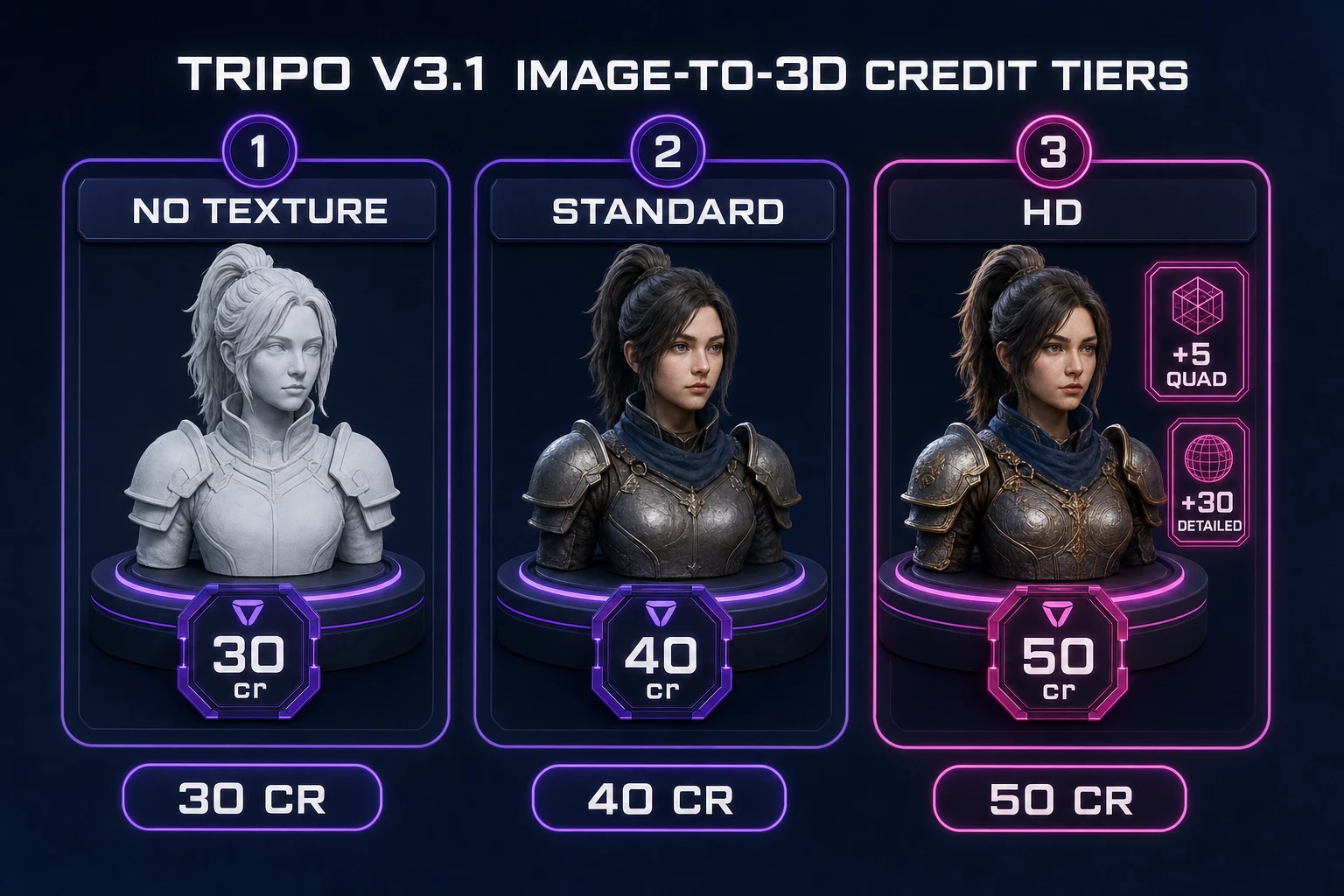
Tripo v3.1 image-to-3D credit tiers in Sorceress 3D Studio
Tripo v3.1 image-to-3D on Sorceress: 30 / 40 / 50 credits for no / standard / HD texture, plus optional quad and detailed surcharges.

Pick Tripo v3.1 texture and credit tier

Open 3D Studio and select Tripo v3.1. On Sorceress it sits first in the visible picker order (verified against THREED_MODEL_ORDER in src/lib/threed-models.ts on July 25, 2026). The provider snapshot Tripo documents as current stable is v3.1-20260211 — live-checked on Tripo Developers on July 25, 2026. Upstream Tripo image-to-3D list prices (no / standard / detailed texture) are 20 / 30 / 40 of their credits; Sorceress bills its own credit schedule on top of that routing.

Sorceress image-to-3D credit math for Tripo v3.1 (same source file, verified July 25, 2026):

  • No texture: 30 credits — geometry only, useful when you will retexture later.
  • Standard texture: 40 credits — default color maps for most jam props.
  • HD texture: 50 credits — use when close-up readability matters.
  • Quad mesh: +5 credits — forces FBX-oriented topology; skip for a first GLB playtest.
  • Detailed geometry quality: +30 credits — only after a standard pass proves the silhouette.

Neighboring picker tiers for context: Hunyuan 3D 3.1 at 30 credits (budget image-only), TRELLIS 2 at 35–45 by resolution, Meshy 6 textured single-image default at 50, Rodin 2.0 at 50, Pixal3D free unlimited for VIP. Match the prop to the tier; do not burn HD+detailed on a crate that will sit ten meters from the camera.

Default first pass for most game props: Tripo v3.1, standard or HD texture, geometry quality standard, quad off, face limit adaptive (0). Write those settings into prop_brief_v1.txt so a second session does not invent a new recipe.
Generate once and orbit-check silhouettes

Upload the cleaned plate, confirm Tripo v3.1, and generate once. While it runs, prepare the playtest scene: a graybox floor, a directional light, and a camera at the distance your game will actually use. Do not open a second Tripo job until the first mesh fails a written check.

Orbit checklist (fail any one → stop and fix the plate, do not re-roll blind):

  1. Front — silhouette matches the brief; no fused limbs or table edges.
  2. Side — thickness reads; thin props are not paper-flat or bloated.
  3. Back — no invented spikes; if the back is nonsense, plan multi-image next.
  4. Game distance — zoom to play camera; if the prop vanishes into noise, the texture tier or plate contrast failed.

Agents and humans share the same failure mode: staring at a flattering three-quarter angle and calling it done. Force the side and back views before you spend another 50 credits.

Keep a short orbit log next to the brief: date, plate filename, texture tier, pass/fail per view, one-line note. After six props you will see whether HD actually earns its keep on your art style or whether standard texture plus a cleaner plate wins more often. That log is also how a teammate inherits your Tripo habit without relearning it from chat history.

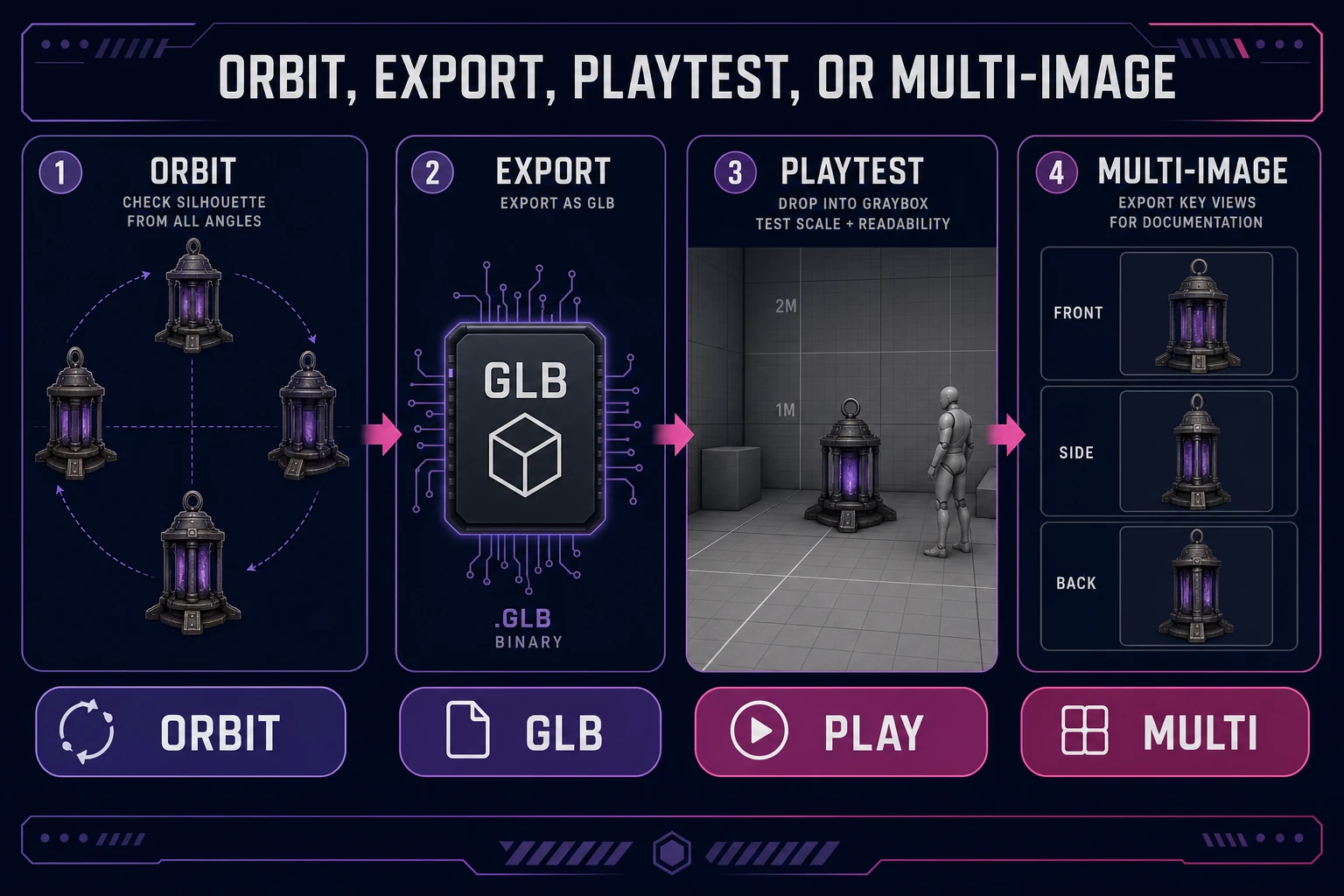
Orbit check, GLB export, playtest, and multi-image decision for Tripo props
Orbit, export GLB, playtest, or switch to multi-image. Re-shoot the plate before you burn identical HD re-rolls.

Export GLB for a one-screen playtest

glTF is the Khronos runtime 3D delivery format; GLB is the binary container that packs mesh, materials, and textures into one file. The glTF 2.0 specification (ISO/IEC 12113:2022) is the reason browser loaders and engine importers agree on the same asset. Sorceress 3D Studio persists finished meshes as GLB for that reason.

Export sequence:

  1. Export GLB from the finished Tripo job.
  2. Drop it into a one-screen playtest (browser Three.js loader or your engine’s glTF importer). See the three.js loading guide if you are validating in a minimal web scene.
  3. Play for sixty seconds with the prop as the only new asset.
  4. Write three failing observations — scale wrong, silhouette soft, texture muddy — before you touch Tripo again.

The Library of Congress GLB/glTF note is a useful reminder that GLB is an interchange container, not a magic polish step. If the mesh fails in play, the plate or the settings failed — not the file extension.

When to multi-image instead of re-rolling

Tripo v3.1 on Sorceress supports image-to-3D and multi-image-to-3D. Use multi-image when:

  • The side or back silhouette fails the orbit checklist.
  • Thin handles, barrels, or straps fuse into the body.
  • You already cleaned the matte and the single front plate still hides volume.

Do not use multi-image as a first instinct. Capture or generate front, side, and back plates with the same lighting and costume rules, then run one multi-image job. Three matched plates beat three mismatched HD singles. Meshy 6 shares the multi-image path in the same picker if you later want a second opinion on topology — keep that comparison for a later article; today stay on Tripo until the playtest passes.

Re-shoot rules vs re-roll rules: re-shoot when framing, crop, or lighting hid the form; re-roll only when the plate is already clean and you are changing a documented setting (texture tier, face limit, orientation). Blind re-rolls are how jam budgets die.

Cost math and stop rules

Budget a first prop like this on July 25, 2026 rates:

  • One BG Remover pass (cheap hygiene).
  • One Tripo v3.1 standard or HD image-to-3D (40 or 50 credits).
  • One playtest. Zero second Tripo jobs until the orbit checklist fails in writing.

Stop rules:

  • Pass: silhouette holds at game distance; GLB loads; scale feels right after one transform tweak.
  • Plate fail: fix matte, crop, or lighting; do not raise geometry quality yet.
  • View fail: switch to multi-image with matched plates.
  • Scope fail: the prop needs a full character pipeline — leave Tripo prop mode and plan Auto-Rigging later.

Browse the wider catalog in the tools guide when you later need materials, voxels, or sprite sheets. Day-one tripo ai image to 3d model work should stay narrow: clean plate, one Tripo pass, GLB playtest, then stop.

If you need a second prop the same day, reuse the settings block from prop_brief_v1.txt. Changing five knobs between crates teaches you nothing about which knob mattered. Consistency is how you turn Tripo from a slot machine into a production habit.

A practical weekend budget: three props at one Tripo pass each (120–150 credits if you stay on standard/HD without detailed geometry), plus matte cleanup and one playtest scene. That is enough to prove whether your art style survives image-to-3D. Burning the same credit total on one prop with six re-rolls teaches you only that re-rolls feel productive.

When the third prop still fails side silhouettes after clean mattes, pause the tripo ai image to 3d model loop and redesign the prop for readability—thicker handles, fewer floating straps, clearer color blocks. The model cannot invent design clarity the plate refused to show.

Frequently Asked Questions

What does a Tripo AI image to 3D model search need for a game prop?

A playable mesh, not a gallery render. You need one textured asset that loads as GLB, keeps a readable silhouette at game camera distance, and does not explode polycount on web or mobile. The Sorceress path is: clean reference → Tripo v3.1 in 3D Studio → orbit inspect → GLB export → one-screen playtest.

Which Tripo version does Sorceress 3D Studio run, and what does it cost?

Tripo v3.1 routes to snapshot v3.1-20260211 (live-checked on Tripo Developers July 25, 2026). Sorceress image-to-3D credits from src/lib/threed-models.ts (verified July 25, 2026): no texture 30 cr, standard 40 cr, HD 50 cr; +5 cr for quad mesh; +30 cr for detailed geometry quality. Tripo sits first in the visible 3D Studio picker order.

Should I remove the background before a Tripo AI image to 3D model run?

Yes for most props. Busy backgrounds invent fake limbs, table edges, and fused silhouettes. Run the plate through BG Remover, keep a flat or transparent matte, and frame a single subject. If you do not have a photo yet, generate a clean concept in AI Image Gen with a plain backdrop, then cut the matte before 3D Studio.

What is a GLB file, and why export it after Tripo?

GLB is the binary glTF 2.0 container defined by the Khronos Group. One file embeds mesh, materials, and textures, which is ideal for browser loaders and quick engine drops. Export GLB from 3D Studio, drop it into a one-screen playtest, and only then decide whether to re-shoot the reference or spend another generation.

When should I use multi-image instead of re-rolling a single Tripo pass?

Switch to multi-image when the side or back silhouette fails, when thin props fuse into the body, or when the camera angle hid the volume you need in-game. Front/side/back plates on Tripo beat burning three identical single-image HD runs on a bad plate. Fix lighting, framing, and matte first; regenerate second.

Sources

  1. glTF Overview — Khronos Group
  2. glTF 2.0 Specification — Khronos Registry
  3. Loading 3D models — three.js docs
  4. GLB / glTF Format Description — Library of Congress FDD
Written by Arron R.·1,677 words·7 min read

Related posts