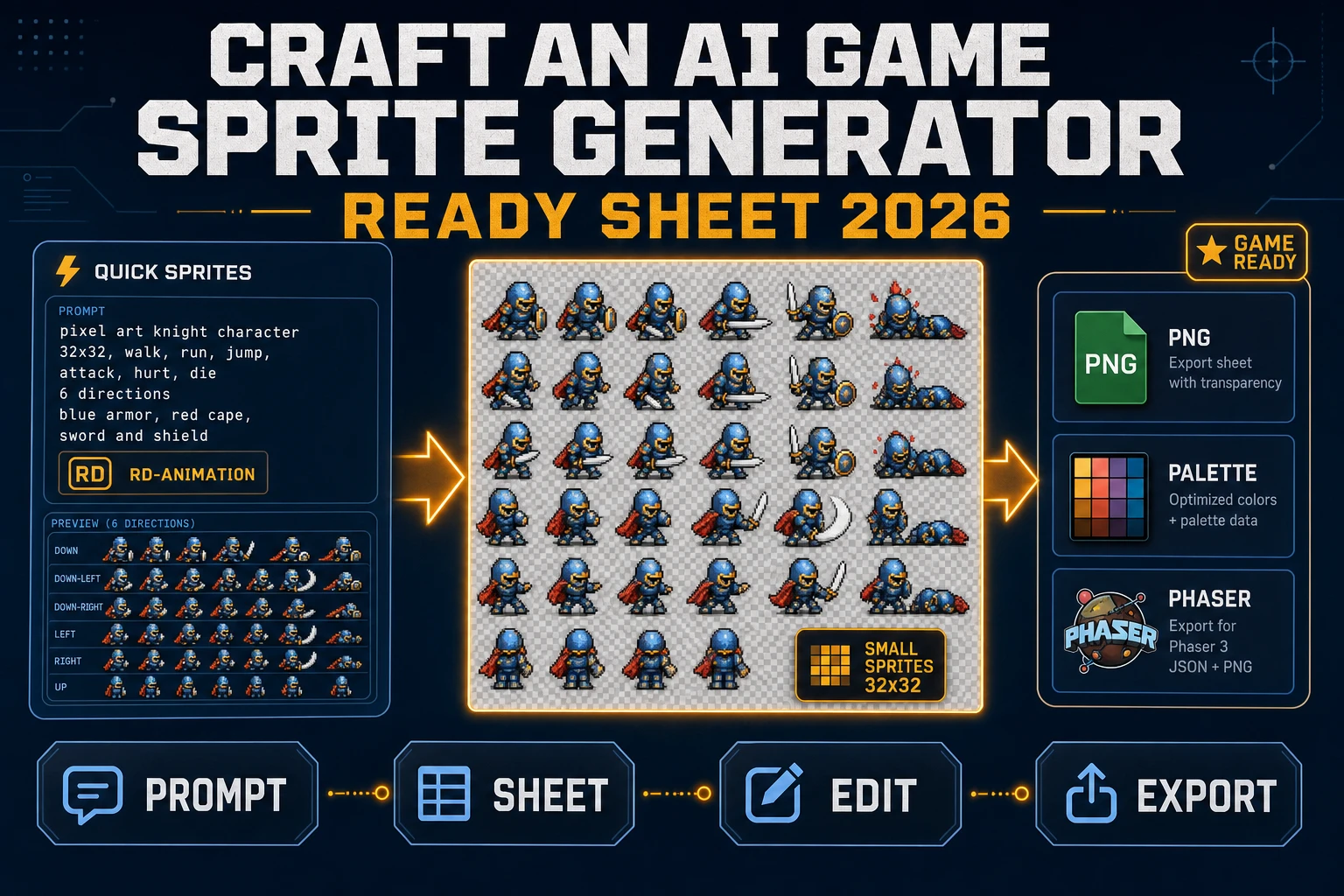
Craft an AI Game Sprite Generator (Ready Sheet 2026)

By Arron R.11 min read
An ai game sprite generator that ships a ready sheet in 2026 is a three-tool loop: prompt Quick Sprites for a 4-direction walk or 6-row NPC set, extend with Aut

Type ai game sprite generator into Google in 2026 and the SERP hands back a wall of free tools that spit out a single character portrait, plus a handful of desktop suites that assume a pixel-art background the reader does not have. Neither is what a game project ships. A game ships a transparent-background PNG spritesheet with the frames laid out in a uniform grid the engine can slice with one call. The 2026 version of that pipeline lives inside three Sorceress panels: Quick Sprites for a fixed-style sheet, Auto-Sprite v2 for a custom animation, and True Pixel for the palette-lock finish. Every credit price, model id, and code constant below is verified against the Sorceress source on 2026-09-06.
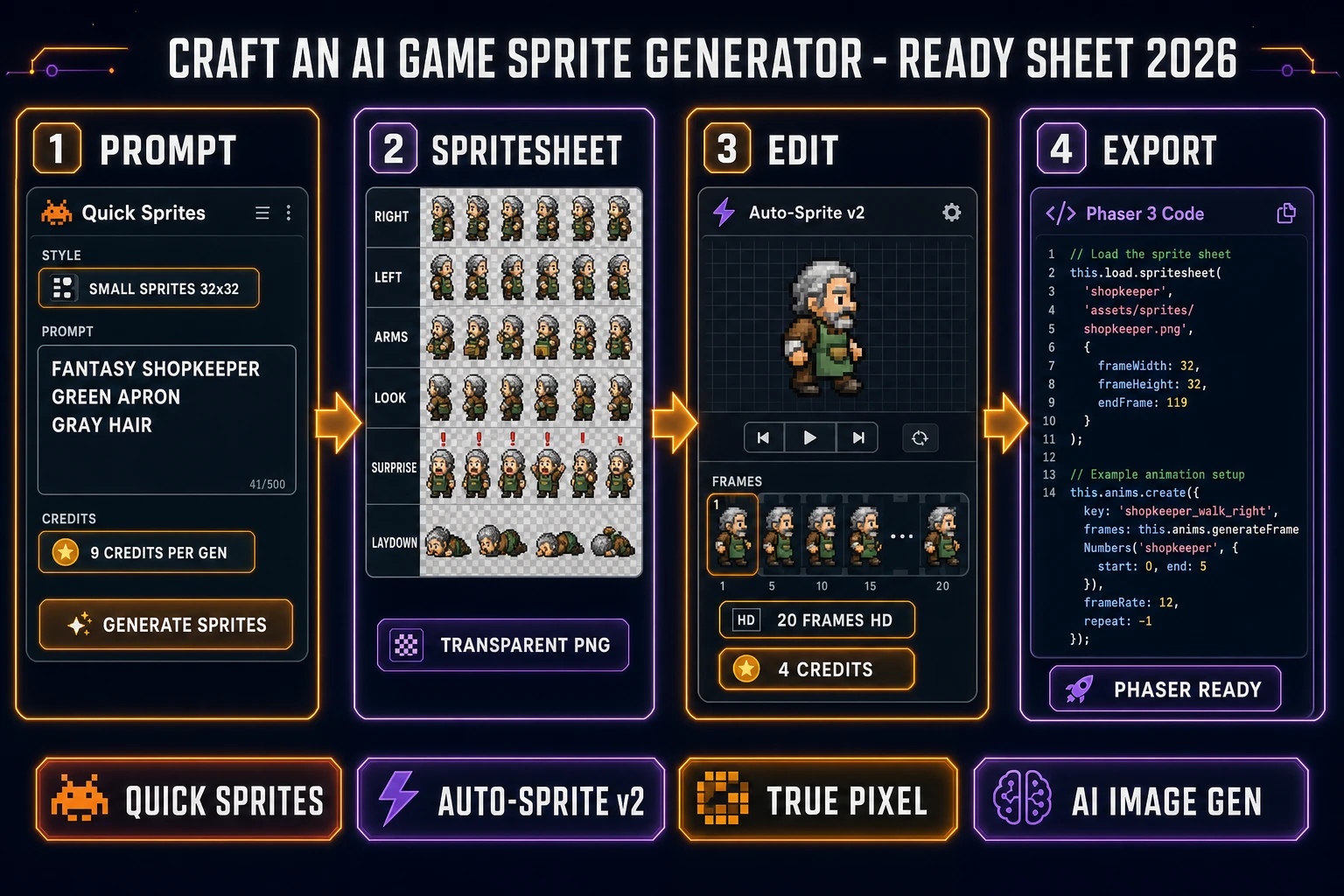
Craft an ai game sprite generator ready sheet 2026: four-panel Sorceress pipeline showing a Quick Sprites prompt, a transparent-background PNG grid, an Auto-Sprite v2 frame strip, and a Phaser this.load.spritesheet call
The Sorceress ai game sprite generator workflow in four panels: prompt, sheet, edit, export.

What an ai game sprite generator actually ships for a 2026 game

The phrase ai game sprite generator covers three different products in the same search results, which is why the top of Google is so noisy. The first meaning is a browser toy that returns a single AI-painted character portrait, useful for a Discord avatar and useless for a game engine. The second meaning is a general text-to-image app (Nano Banana, GPT Image, Seedream) that returns a hero illustration - closer, but a hero illustration is not a spritesheet, and the engine has no way to loop a walking animation on a single JPG. The third meaning is the actual game-asset tool: a browser pipeline that returns a transparent-background PNG with the frames arranged in a uniform grid, sized for the engine at 32x32 or 48x48, and paired with the row labels the engine reads to pick a specific animation. That third meaning is what a jam team or an indie studio actually asks for, and it is the meaning worth building around.

Three capabilities crossed the honest-good-enough-for-a-game line in the past year and made the third meaning real. Pixel-art diffusion models learned to hold a consistent character across a small grid of poses (front, back, left, right) without repainting the shirt color between frames. Frame-extraction pipelines learned to pull twenty in-motion frames out of a two-second AI Video Gen clip while cleaning the background to alpha in the same pass. Palette-lock quantizers learned to remap any 32-bit AI portrait onto a fixed 16-color PICO-8 or NES palette while keeping the silhouette readable. Chain the three together inside one dashboard and the exported sheet loads through Phaser's this.load.spritesheet in one line. That is the honest baseline for what a 2026 ai game sprite generator ships.

The Sorceress ai game sprite generator loop in one minute

A game project rarely wants "a character portrait" - it wants a sheet: a grid PNG with four to twenty-four frames, a transparent background, a consistent silhouette, and dimensions the engine can slice with a single frameWidth and frameHeight. The one-minute mental model of the Sorceress pipeline is: prompt Quick Sprites for a stock style (four-direction hero walk, six-row NPC set, or an impact VFX), fall back to Auto-Sprite v2 when the animation is not one of the three stock shapes, and finish through True Pixel when the palette needs to match an existing environment tileset. Three tools, one game-ready sheet, one dashboard.

The critical ordering is what makes the loop honest. Start with Quick Sprites for anything that fits the three stock styles - a 32x32 NPC roster or a 48x48 hero on the world map is a nine-credit call rather than a twelve-step custom pipeline. Fall back to Auto-Sprite v2 only when the animation is not one of the three stock shapes - a two-handed swing, a somersault, a spellcasting arc. Layer True Pixel on top only when the palette needs to lock to an existing scene - a game with a mixed AI-portrait roster and a hand-pixeled tileset drifts in color without a shared quantization pass. Small ordering, real credit savings, and every step preserves the transparent-background PNG grid the engine wants at the end.

Sorceress Quick Sprites as the ai game sprite generator anchor (three styles, one call)

Quick Sprites is the anchor of the Sorceress ai game sprite generator because it lands the game-ready sheet in a single API call. It sits inside the Sprites & 2D group next to Auto-Sprite v2 and True Pixel (verified 2026-09-06 in src/app/_home-v2/_data/tools.ts) and calls the Retro Diffusion rd-animation model under the hood (MODEL_ID = 'retro-diffusion/rd-animation', verified 2026-09-06 in src/app/quick-sprites/page.tsx). The pricing is a flat nine credits per generation (CREDITS_PER_GEN = 9) and one generation returns one spritesheet PNG in the selected style. The Spritesheet PNG toggle is on by default so the output ships as a single grid image the engine loads with one call, not as a folder of frame PNGs the engine has to load and reassemble.

Three animation styles cover the three sheets a 2D game actually ships. Four Angle Walking (id: 'four_angle_walking') returns a 48x48 grid with the four cardinal directions on four rows and four walk frames per row - the classic top-down hero shape. Small Sprites (id: 'small_sprites') returns a 32x32 grid with six rows: right-walk, left-walk, arms (idle chatter), look (idle head-turn), surprise (dialogue reaction), and lay down (defeated or sleeping) - the classic NPC shape. VFX Effects (id: 'vfx') returns a square 1:1 sheet at any of six sizes (24, 32, 48, 64, 80, or 96 pixels) - the classic impact shape (a spell cast, an explosion, a lightning strike). Verified 2026-09-06 in src/app/quick-sprites/page.tsx: the ANIMATION_STYLES array carries all three definitions and the STYLE_ROW_LABELS map carries the six-row NPC layout by name.
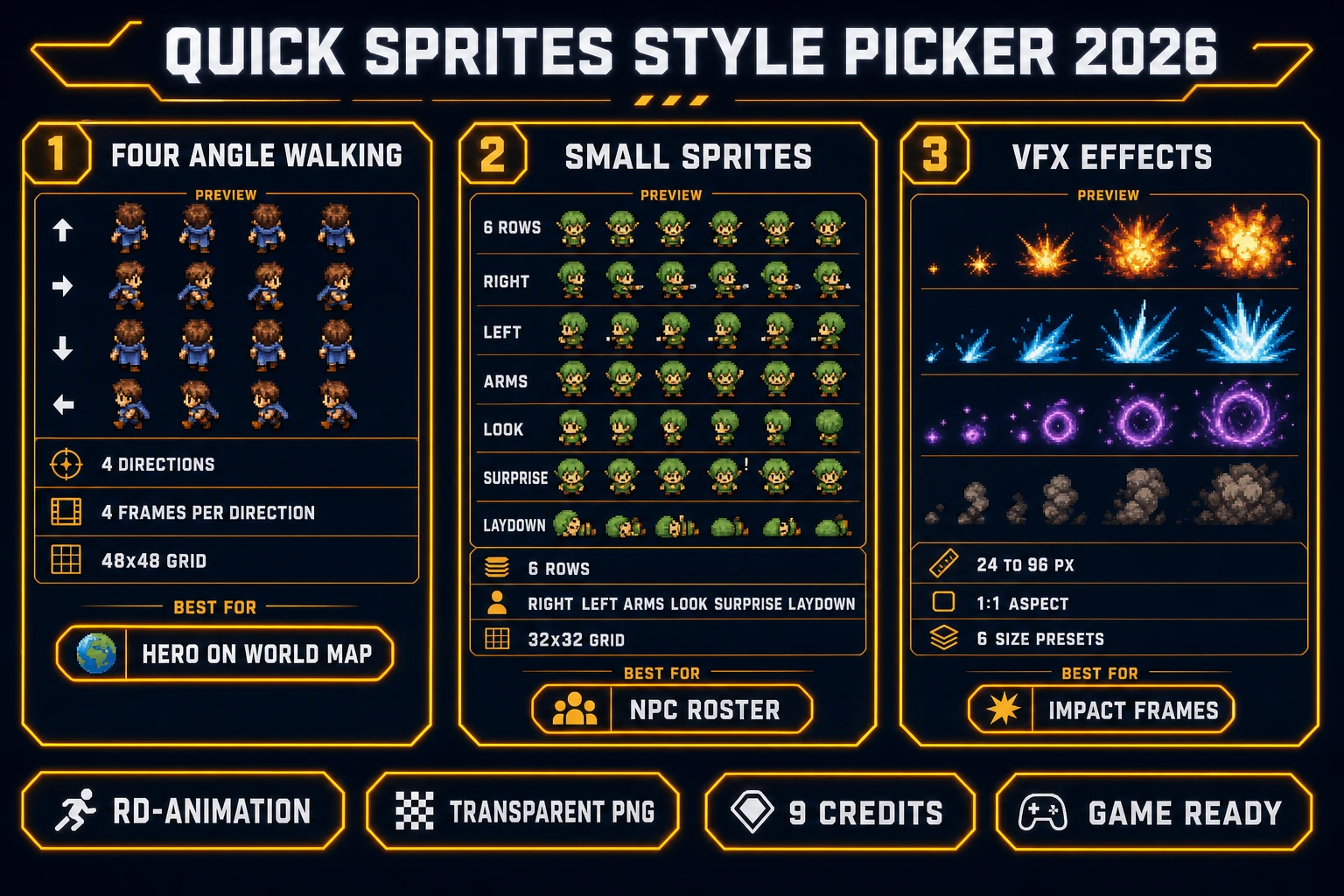
Quick Sprites style picker for the ai game sprite generator 2026: Four Angle Walking 48x48 for the hero on the world map, Small Sprites 32x32 for the NPC roster, and VFX Effects 24 to 96 px for impact frames
Three Quick Sprites styles inside the ai game sprite generator, each with a different first-pick reason.

Step 1 - pick the style and prompt the sheet as a stylistic brief

The prompt shape is what determines whether the sheet renders a scene-fitting character or a generic fantasy silhouette. The honest recipe for a Quick Sprites prompt is four parts: character role, silhouette, palette or era, and a one-word attitude. "Fantasy shopkeeper, green apron, gray hair, plump, friendly" is a working brief for a Small Sprites NPC row. "Warrior hero, red cape, silver mail, tall, determined" is a working brief for a Four Angle Walking hero. "Fire explosion, orange to yellow, radial burst, quick" is a working brief for a VFX impact. The panel exposes a reference-image upload alongside the prompt (refImage in the source), so a character already generated inside AI Image Gen can be sent through Quick Sprites as a visual anchor rather than as free-text prose - the model latches onto the silhouette and the palette from the reference and paints the four or six poses to match.

The pick-the-style step is what saves credits. A hero on the world map does not need a six-row NPC sheet - the four extra rows are dead pixels the engine will never render. Pick Four Angle Walking for a hero, Small Sprites for an NPC, VFX for an impact - the three styles map one-to-one to the three sheet shapes a 2D game actually ships. On a full town scene the honest breakdown is one hero on Four Angle Walking (9 credits), four NPCs on Small Sprites (4 x 9 = 36 credits), and three impact VFX (3 x 9 = 27 credits) - 72 credits for a complete character sheet pack, less than a dollar at the documented one-credit-equals-one-cent rate (CREDITS_PER_DOLLAR = 100 in src/lib/models.ts, verified 2026-09-06).
Step 2 - upgrade to Auto-Sprite v2 when the animation is not stock

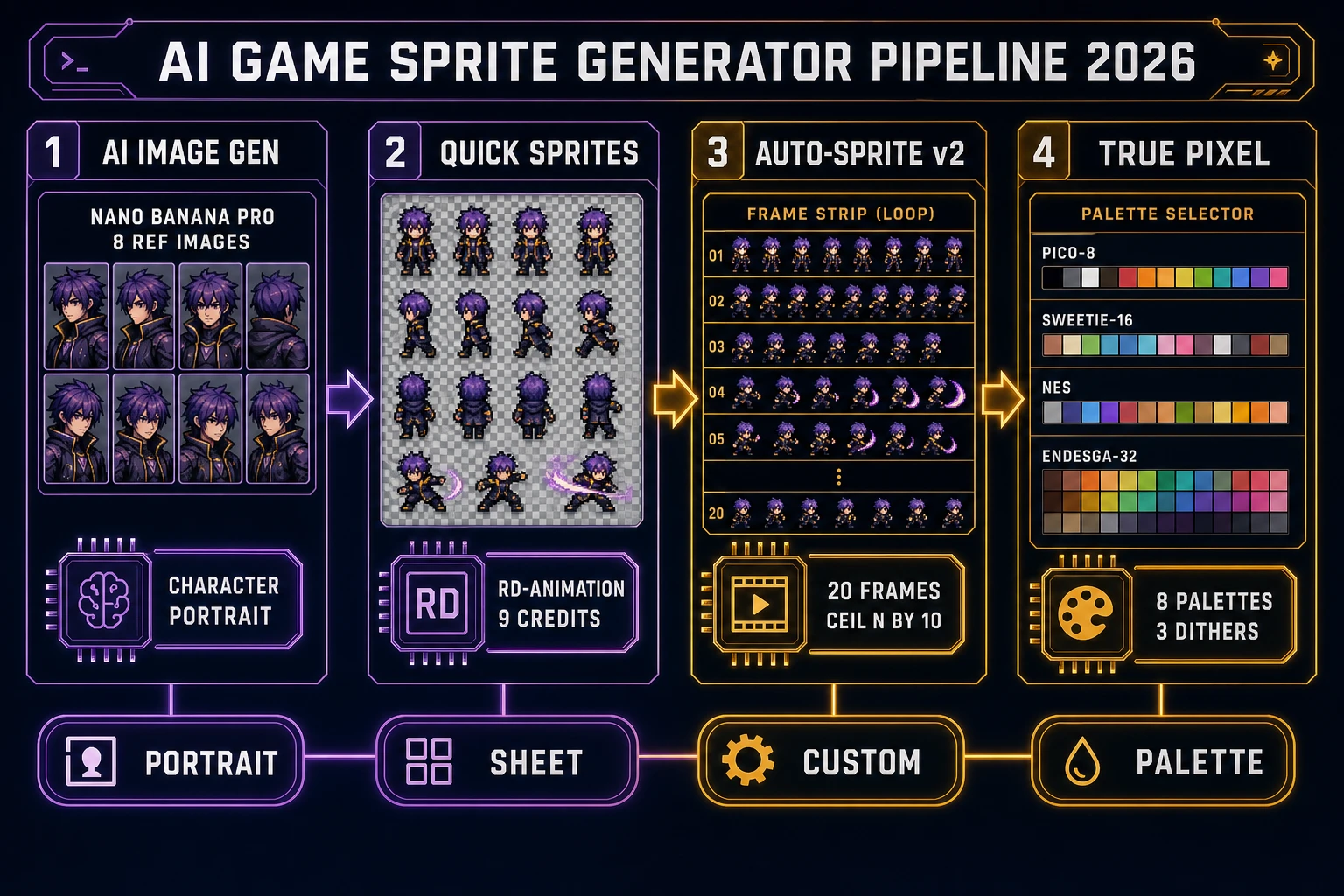
Quick Sprites is fast but fixed. The three stock styles cover the three most common sheet shapes and nothing else. When a project needs a custom animation - a two-handed sword swing, a shield block, a somersault dodge, a spellcasting arc - the loop hands off to Auto-Sprite v2 at /autosprite-v2. That tool works in three stages: generate a character portrait through AI Image Gen, animate it through AI Video Gen as a short two-to-four-second clip, then upload the clip to Auto-Sprite v2 for frame extraction, background removal, alignment, and grid packing. The output shape is the same as Quick Sprites: a transparent-background PNG with the frames laid out in a uniform grid the engine slices with one call.

The Auto-Sprite v2 pricing scales with the frame count, not with the character - the same model that costs 4 credits for a 20-frame HD walk cycle costs 4 credits for a 20-frame HD sword swing. Verified 2026-09-06 in src/app/autosprite-v2/page.tsx: getCreditCost = Math.max(1, Math.ceil(frameCount / 10) * (isHiRes ? 2 : 1)) where isHiRes is true when the max frame dimension exceeds 512 pixels. The math reads: 20 frames at 32x32 is ceil(20/10) x 1 = 2 credits (SD, one credit per ten frames); 20 frames at 1024x1024 is ceil(20/10) x 2 = 4 credits (HD, two credits per ten frames). Local backend mode is free - Auto-Sprite v2 detects a local server (the tool ships a Local server setup card with the exact CorridorKey command) and skips the credit deduction on the client. That local path is how a jam team runs a hundred frame batches without spending a paid credit, and it is documented inside the tool card rather than hidden.

Step 3 - lock the palette with True Pixel and match the environment

True Pixel is the palette-lock stage of the loop. A raw AI portrait ships in a 32-bit color space with subtle gradients and anti-aliasing halos that read as fine art on a still image and read as noise on an in-engine sprite. True Pixel at /pixel-art is the browser tool that remaps that portrait onto a fixed palette while keeping the silhouette readable. Verified 2026-09-06 in src/app/pixel-art/page.tsx: the tool exposes eight palette presets (PICO-8 at 16 colors, SWEETIE-16 at 16, Endesga 32 at 32, Game Boy at 4, CGA at 16, NES at 54, Grayscale at 8, and 1-Bit at 2), three dither modes (none, ordered Bayer, and Floyd-Steinberg), K-means color quantization for arbitrary palettes, chroma-key alpha removal, and a master-resolution longest-side cap of 256 pixels (MASTER_RES_LONGSIDE = 256).

The palette-lock pass is what makes a game feel like a game rather than a collage. Generate the environment tileset in Tileset Forge with a PICO-8 palette; generate the NPC roster in Quick Sprites at any style; drop each NPC sheet through True Pixel with PICO-8 selected; the whole scene now shares one palette and reads as a single visual world instead of a Steam key art collision. For a sheet that already ships palette-locked (Quick Sprites rd-animation output is already close to a fixed palette), True Pixel is the safety net rather than the primary pass. For a sheet that came from a full-color AI Video Gen clip through Auto-Sprite v2, True Pixel is the mandatory step - the raw video frames are 32-bit and need the palette-lock pass to feel like part of the game rather than a movie clip pasted on top. The image-to-pixel-art walkthrough covers the palette-quantization mechanics in more depth.

AI game sprite generator ready-sheet pipeline 2026: Nano Banana Pro portrait, Quick Sprites rd-animation grid, Auto-Sprite v2 frame strip with ceil(n/10) credit formula, and True Pixel palette selector with PICO-8, SWEETIE-16, NES, and Endesga-32
Four Sorceress panels feed a single game-ready sheet: portrait, sheet, custom animation, palette lock.

Where AI Image Gen, Sprite Analyzer, and Slicer fit around the sheet

The three-panel loop above ships the character. The finishing panels around it ship the workflow. AI Image Gen at /generate is the upstream character source when the project needs a reference-image anchor for Quick Sprites or a full portrait for Auto-Sprite v2. It exposes the current unified model lineup (Nano Banana Pro, Nano Banana 2, GPT Image 2, Seedream 5 Lite, Flux 2 Pro, Grok Imagine, and more) with per-model reference-image caps documented in src/lib/models.ts - Nano Banana Pro at 8 reference images, GPT Image 2 at 16, Seedream 5 Lite at 14, and so on. That per-model cap is what enables the character-consistency workflow: upload eight reference shots of the same character face, generate the sprite pose, and the model paints the same face across every frame.

Sprite Analyzer at /spritesheet-analyzer is the downstream verifier - drop the exported sheet into it and preview the animation frame-by-frame, extract frame data, and confirm the row layout matches what the engine expects. Quick Sprites exposes a one-click "send to Sprite Analyzer" button (verified 2026-09-06 in src/app/quick-sprites/page.tsx, the sorceress:navigate postMessage path) so a jam team can validate the sheet without leaving the browser tab. Slicer at /slicer is the utility panel that cuts a sheet back into individual frame PNGs when the engine requires a folder-of-frames layout (a small number of engines do). WizardGenie is the paired coding agent that wires the exported sheet into the Phaser or Three.js scene: describe the character (state machine, animation names, transition triggers), and WG scaffolds the this.load.spritesheet and this.anims.create calls in the same session. See the tools guide for the full Sprites & 2D group lineup, and the general AI sprite generator walkthrough for the model-picking side.

What an ai game sprite generator run costs on Sorceress in 2026

The credit math for a full ai game sprite generator pack is transparent and stackable. Every constant is verified 2026-09-06 in the tool source. Quick Sprites is CREDITS_PER_GEN = 9 per generation. Auto-Sprite v2 is Math.max(1, Math.ceil(frameCount / 10) * (isHiRes ? 2 : 1)). BG Remover for a lone portrait is BG_REMOVER_CREDITS = 3. True Pixel is Pro-tier and adds no per-run credit for the palette pass. AI Image Gen varies by model in src/lib/models.ts: Nano Banana 2 Lite at 4 credits, GPT Image 2 at 5, Nano Banana at 6, GPT Image 1.5 at 7, Nano Banana 2 at 9, Nano Banana Pro at 18 for the 1K or 2K tier. The credit unit is CREDITS_PER_DOLLAR = 100, so one credit is one cent and every price above is legible in dollars rather than hidden in a per-model rate card.

Two real project totals ground the math. A full four-NPC town on Small Sprites is 4 x 9 = 36 credits (thirty-six cents). A hero-plus-three-enemies scene with Four Angle Walking sheets is 4 x 9 = 36 credits. A custom boss animation through the Auto-Sprite v2 pipeline (one Nano Banana Pro portrait at 18 + one AI Video Gen clip at ~20 + one 20-frame HD extraction at 4 + one True Pixel palette pass at 0) is about 42 credits. A complete character sheet pack for a small game (one hero, five NPCs, three impact VFX, one custom boss) is roughly 9 + 5 x 9 + 3 x 9 + 42 = about 123 credits, or under two dollars for a full 2D roster - a hundredth of what a hand-pixeled pack of the same size costs a solo dev in time. Ship the sheet, wire it into the engine with Phaser's single this.load.spritesheet call (documented in the Phaser stable channel, verified 2026-09-06) or the browser Canvas API's drawImage with a source rectangle, and mint the next sheet. See the plans page for the tier-level credit bundles and the how-to-make-a-sprite-sheet walkthrough for the beginner path through the same loop.

Frequently Asked Questions

What does an ai game sprite generator actually output in 2026?

An ai game sprite generator in the 2026 sense returns a transparent-background PNG spritesheet the engine can slice - not a single portrait, not a hero illustration. Sorceress Quick Sprites at /quick-sprites is that pipeline. It calls Retro Diffusion rd-animation (MODEL_ID = 'retro-diffusion/rd-animation', verified 2026-09-06 in src/app/quick-sprites/page.tsx) at 9 credits per generation (CREDITS_PER_GEN = 9) and returns a grid PNG in one of three shapes: Four Angle Walking (48x48, 4 directions with 4 walk frames each), Small Sprites (32x32, 6 rows covering right and left walk, arms, look, surprise, and lay down), or VFX Effects (24 to 96 px, 1:1). The Spritesheet PNG toggle is on by default so the output ships as a single tileable atlas the engine loads with one image call.

Which ai game sprite generator style fits an RPG NPC roster?

Small Sprites is the pick for an NPC roster. Its 6-row layout maps almost one-to-one to a classic top-down RPG NPC sprite: right-walk, left-walk, arms (idle chatter), look (idle head-turn), surprise (dialogue reaction), and lay down (defeated or sleeping). Verified 2026-09-06 in src/app/quick-sprites/page.tsx: STYLE_ROW_LABELS lists the six rows for the small_sprites style at 32x32. Generate a shopkeeper, a guard, a villager, and a child on the same prompt template and every sprite lands on the same grid, which is what a scene needs to render a talking scene without hand-alignment. For a hero on the world map, Four Angle Walking at 48x48 gives the four cardinal directions the engine needs for classic 2D movement. VFX Effects is the pick for the impact frames - a spell cast, an explosion, a lightning strike - at whatever size the parent sprite runs at.

How does the ai game sprite generator loop use Auto-Sprite v2 and True Pixel?

Quick Sprites is fast but fixed. When a project needs a custom animation Quick Sprites does not cover - a somersault, a two-handed swing, a spellcasting arc - the loop hands off to Auto-Sprite v2 at /autosprite-v2. That tool takes an AI Image Gen character plus a short AI Video Gen clip of the character in motion, extracts frames with requestVideoFrameCallback, background-removes them, and packs them into a grid PNG the same way Quick Sprites does. Auto-Sprite v2 is priced by frame count: getCreditCost = Math.max(1, Math.ceil(frameCount / 10) * (isHiRes ? 2 : 1)) where isHiRes is true when the max frame dimension is above 512 pixels (verified 2026-09-06 in src/app/autosprite-v2/page.tsx). Local backend mode is free. True Pixel at /pixel-art is the palette-lock step: drop a Nano Banana Pro character portrait into True Pixel, pick PICO-8 or NES palette, dial in the resolution, and the tool returns a real pixel-art sprite with 8 palettes, 3 dither modes, and K-means color quantization (verified 2026-09-06 in src/app/pixel-art/page.tsx). Three tools, one game-ready sheet.

What does one ai game sprite generator sheet actually cost on Sorceress?

A single Quick Sprites generation is 9 credits (CREDITS_PER_GEN = 9, verified 2026-09-06 in src/app/quick-sprites/page.tsx). One generation returns one spritesheet PNG in the selected style. A full four-NPC town (shopkeeper, guard, villager, child on Small Sprites) is 4 x 9 = 36 credits. A hero plus three enemies with Four Angle Walking sheets is 4 x 9 = 36 credits. Auto-Sprite v2 for a custom 20-frame HD walk cycle is Math.max(1, ceil(20/10) x 2) = 4 credits; the same 20-frame animation at 512 px or below is 2 credits; local backend is free. True Pixel is a Pro tool billed as part of the subscription (badge Pro in src/app/_home-v2/_data/tools.ts, verified 2026-09-06) - the palette-lock pass adds no per-run credits. AI Image Gen for the source character portrait varies by model (verified in src/lib/models.ts): Nano Banana 2 Lite at 4 credits, GPT Image 2 at 5, Nano Banana at 6, Nano Banana 2 at 9, GPT Image 1.5 at 7, Nano Banana Pro at 18 for the 1K or 2K tier. The credit unit is documented as 1 credit equals 1 cent (CREDITS_PER_DOLLAR = 100 in src/lib/models.ts), so the wall-clock dollar total is transparent and stackable.

How does the output sheet actually load into Phaser or a browser engine?

Quick Sprites and Auto-Sprite v2 both export a transparent-background PNG that packs frames as a uniform grid. Phaser v4.2.1 Giedi (released 2026-07-09, verified 2026-09-06 via phaser.io/download/stable) loads that grid with a single spritesheet call: this.load.spritesheet(key, url, { frameWidth, frameHeight }) in preload, then this.anims.create({ key, frames: this.anims.generateFrameNumbers(key, { start, end }), frameRate, repeat: -1 }) in create. For a Small Sprites 32x32 NPC, frameWidth and frameHeight are both 32; for a Four Angle Walking 48x48 hero, both are 48. The engine picks the row by naming the animation with a start-end range that maps to the row four frames. For a raw browser project without Phaser, the same grid loads through the Canvas API drawImage call with a source rectangle (documented on MDN) - pass sx, sy, sWidth, sHeight to pick the frame, and the destination rectangle to place it on the tilemap. Same PNG, two loaders.

Does the ai game sprite generator honestly need hand-editing before shipping?

Usually one small cleanup pass. rd-animation gets the pose consistent about 80 percent of the time on a walk cycle; the other 20 percent one of the four frames drifts (a foot placed a pixel too far, an arm at a different height). The honest fix is to open the exported PNG in the free Canvas tool at /canvas and nudge the offending frame; the fix is faster than regenerating the sheet because a regeneration draws four new frames that need the same visual review. For a color drift between the AI Image Gen portrait and the Quick Sprites sheet (the model painted the shirt slightly bluer on the sheet), send the sheet through True Pixel with a locked palette; the palette pass normalizes the shirt color across every frame and every sprite that references the same palette. For a scene that needs consistent lighting between the NPC roster and the environment tiles, generate the tileset with the same palette in Tileset Forge and load both through the same texture atlas. Cleanup is minutes, not hours, and it is the difference between a demo sheet and a game-ready sheet.

Sources

  1. Phaser v4.2.1 release notes - GitHub
  2. Phaser download - stable channel
  3. Canvas API - MDN
  4. Sprite (computer graphics) - Wikipedia
  5. Pixel art - Wikipedia
  6. Texture atlas - Wikipedia
Written by Arron R.·2,526 words·11 min read

Related posts