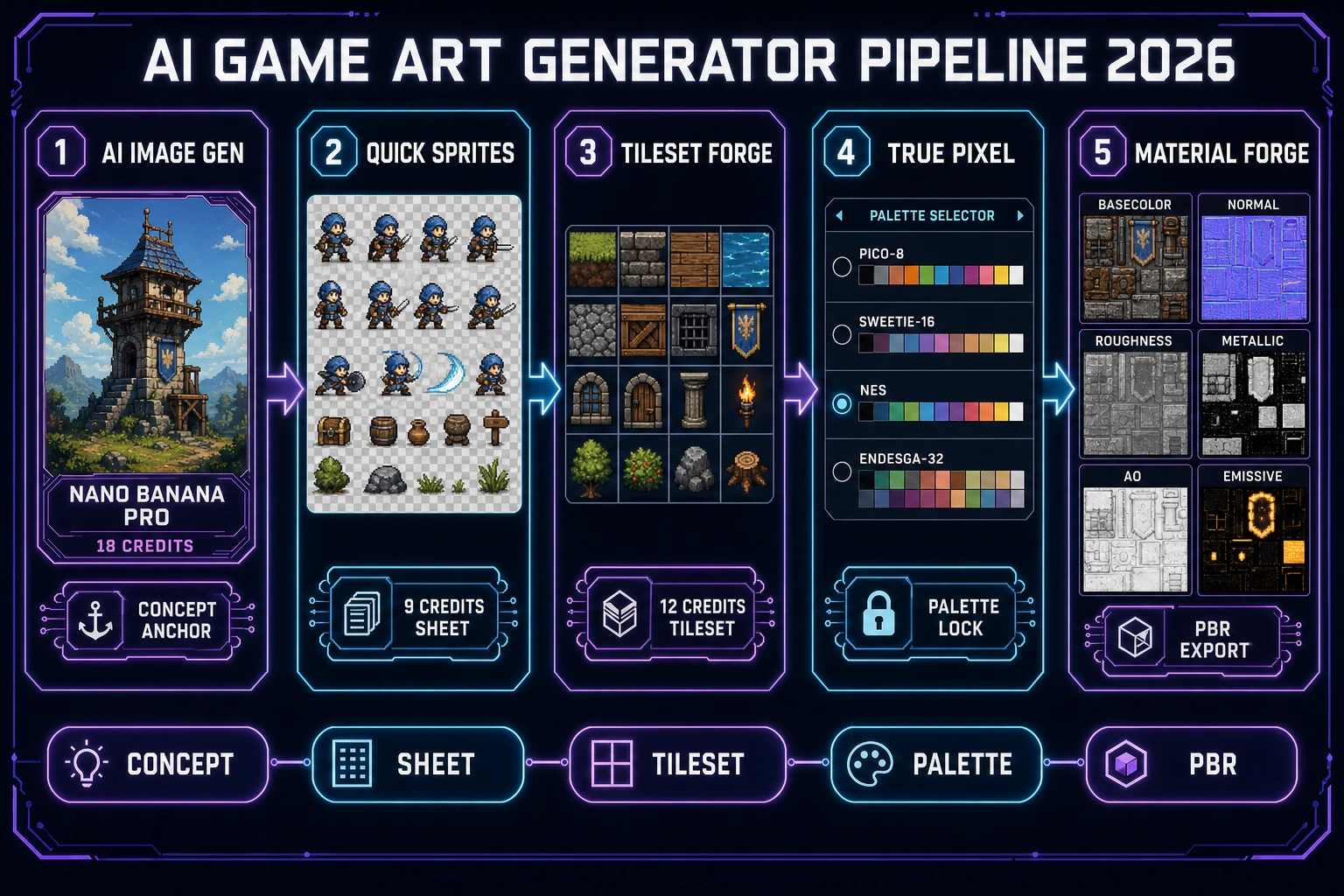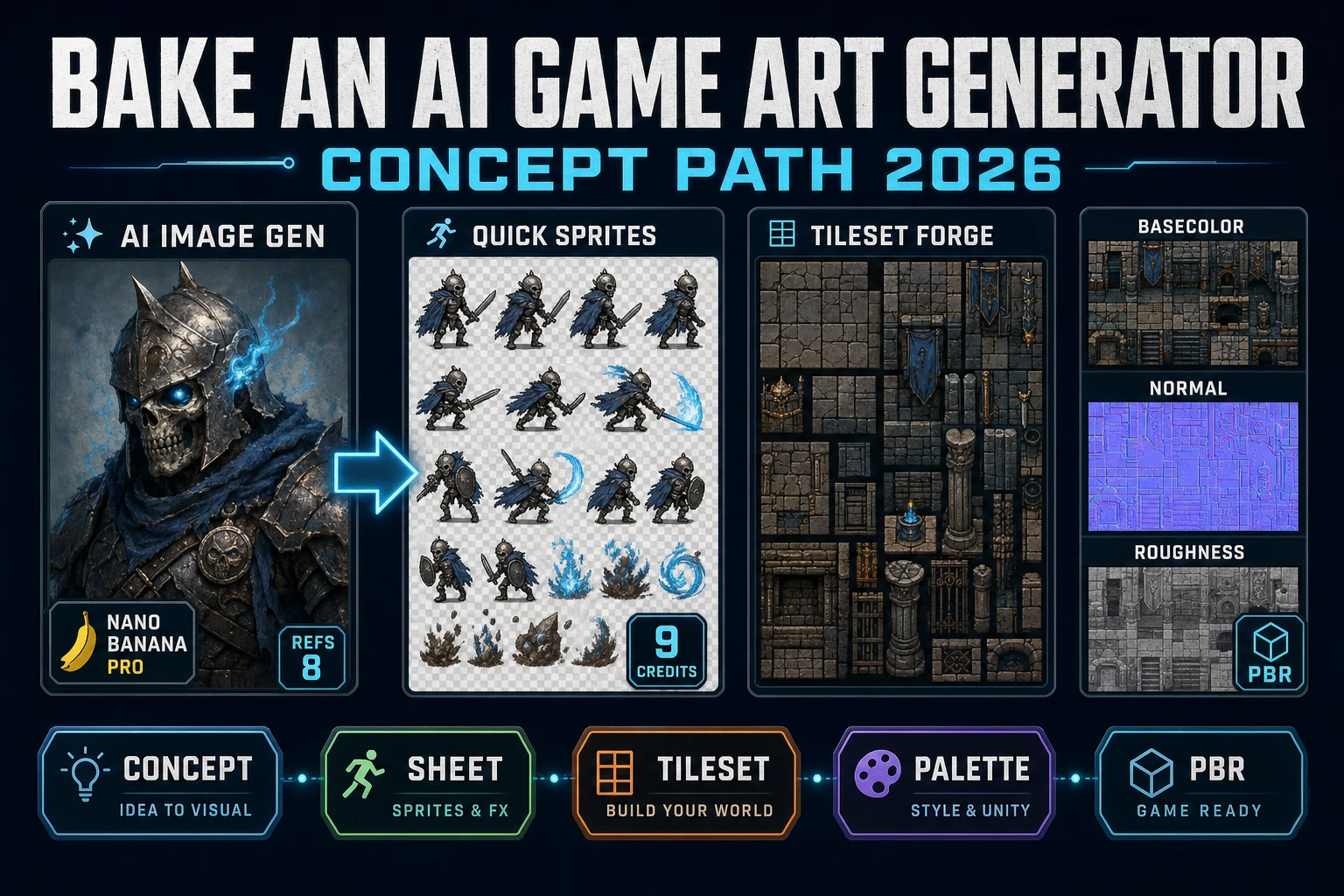
Type ai game art generator into Google in 2026 and the SERP mixes three unrelated products under one query. The top slot is a general text-to-image toy - useful for a Discord avatar, useless for a game project that needs a matched character, tileset, HUD, and material set. The middle slot is a single-model wrapper - fine for one concept sketch, hostile to iteration because a re-roll on a different prompt loses the silhouette. The bottom slot is the honest one: a multi-model panel that anchors the character on a reference image and then feeds the same silhouette forward into a sprite sheet, a tileset, a pixel-art palette, and a PBR material set. That third meaning is what a jam team or a solo indie studio needs for a coherent game, and the 2026 Sorceress version of that pipeline lives inside five panels: AI Image Gen for the concept, Quick Sprites for the game-ready sheet, Tileset Forge for the level art, True Pixel for the palette lock, and Material Forge for the 3D prop textures. Every credit price, model id, and code constant below is verified against the Sorceress source on 2026-09-06.
What an ai game art generator actually ships for a game in 2026
The phrase ai game art generator covers three separate products in the same SERP, which is why the top of Google reads as noise. The first is a single-model text-to-image wrapper that returns one 1024x1024 illustration - a Discord avatar rather than a game asset. The second is a general text-to-image app pointed at fantasy prompts - closer to game art, but the output ships as a still image and a game project needs a matched character sheet, a tileable environment, and a set of props that share the same palette. The third is the honest game-asset tool: a multi-model panel that anchors the concept on a reference image, feeds the same silhouette forward into sprite generation, tileset extraction, palette quantization, and PBR texture derivation. That third meaning is what a real 2026 game project ships, and it is the meaning worth building the pipeline around.
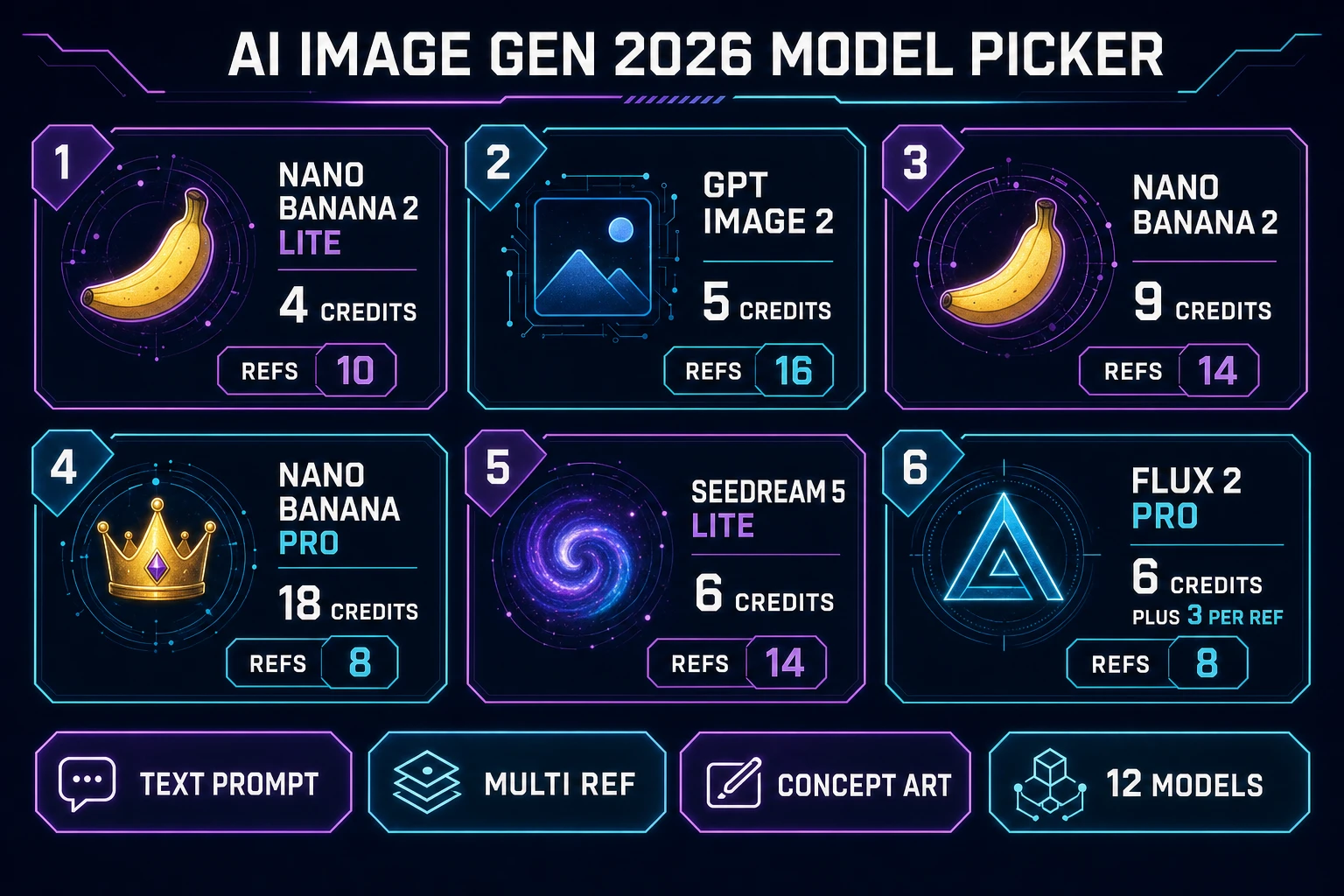
Three capabilities crossed the honest-good-enough-for-a-game line in the last year and made the third meaning real. Multi-reference diffusion models learned to hold a consistent character across a small grid of poses without re-rolling the shirt color or the hair shape between frames (Nano Banana Pro at 8 refs via image_input, Nano Banana 2 at 14, GPT Image 2 at 16, Seedream 5 Lite at 14 - every ref limit verified 2026-09-06 in src/lib/models.ts). Tileset extraction learned to align raw AI art to a fixed grid without a manual redraw. PBR material derivation learned to produce a full six-map set (base color, normal, roughness, metallic, ambient occlusion, emissive) from a single texture image in the browser without a Substance Designer license. Chain the three together inside one dashboard and the exported game art loads through Phaser or any browser Canvas API scene in a single load call. That is the honest baseline for what a 2026 ai game art generator ships.
The Sorceress ai game art generator loop in one minute
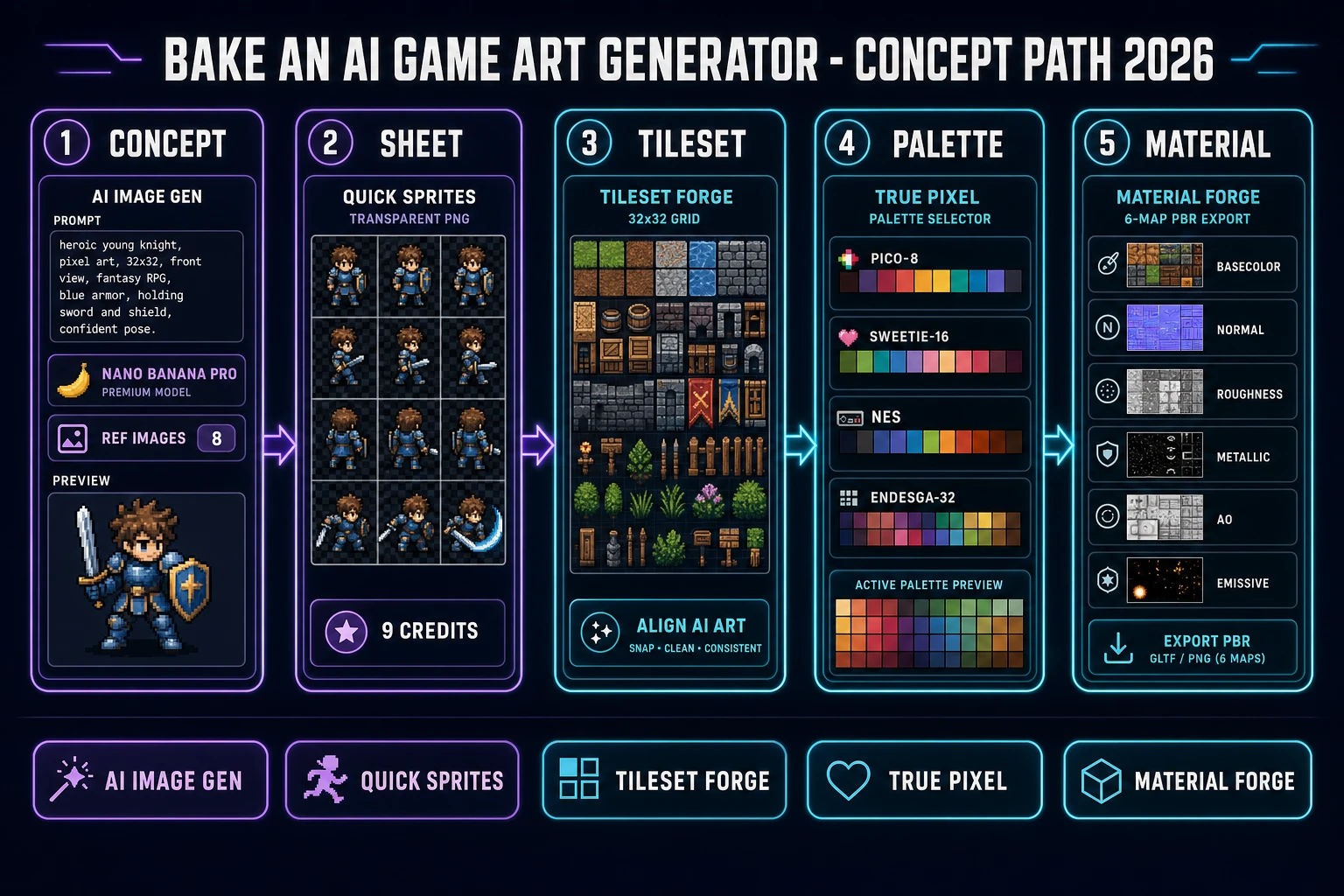
A game project rarely wants a single hero portrait - it wants the whole set: a character sheet with four to eight poses, a tileable environment grid, a consistent palette across every asset, and a matched PBR material for the 3D prop. The one-minute mental model of the Sorceress pipeline is: concept the character in AI Image Gen using multi-reference anchoring, branch the same portrait into Quick Sprites for the sheet, feed a scene render into Tileset Forge for the level grid, lock everything through True Pixel when the target style is retro, and bake the 3D prop textures in Material Forge. Five tools, one game-ready art pack, one dashboard tab, one shared silhouette from the first concept.
The critical ordering is what makes the loop honest. Concept the character first in AI Image Gen because the reference-image workflow is what keeps every downstream asset on-model. Branch into Quick Sprites second because the three stock styles (Four Angle Walking at 48x48, Small Sprites at 32x32, VFX Effects at 24-96 px, verified 2026-09-06 in src/app/quick-sprites/page.tsx) cover the shapes a 2D game actually ships. Feed a scene render into Tileset Forge third because the extraction step aligns raw AI art to a fixed 16x16 or 32x32 grid the engine can slice. Palette-lock through True Pixel fourth when the target is a retro pixel scene, skip when it is a full-color 3D scene. Bake Material Forge last because a 3D prop only needs a PBR map set after the concept, silhouette, and palette are locked. Ordering matters because each step preserves the shared silhouette from step one and each skipped step is a saved credit.
Sorceress AI Image Gen as the ai game art generator anchor (twelve models, one panel)
AI Image Gen is the anchor of the Sorceress ai game art generator because it is the panel every downstream tool references. It sits inside the Image Gen group (verified 2026-09-06 in src/app/_home-v2/_data/tools.ts) and exposes twelve concept-art models under one prompt field, each with its own reference-image limit and its own credit price. Verified 2026-09-06 in src/lib/models.ts: Nano Banana Pro (18 credits at 1K or 2K, 33 at 4K, up to 8 refs via image_input), Nano Banana 2 (9 credits at 1K, 12 at 2K, 17 at 4K, up to 14 refs), Nano Banana 2 Lite (4 credits, up to 10 refs, 1K only), Nano Banana (6 credits, up to 3 refs), GPT Image 2 (5 credits at 1K, 8 at 2K, 15 at 4K, up to 16 refs via input_images), GPT Image 1.5 (3 low / 4 medium / 15 high, up to 4 refs), Seedream 5 Lite (6 credits at 2K, 8 at 3K, up to 14 refs), Flux 2 Pro (6 credits base plus 3 per reference, up to 8 refs), Z-Image (3 credits), Seedream 4.5 (6 credits at 2K), Seedream 5 Pro (6 at 1K basic, 10 at 2K high, VIP early access), and Grok Imagine (6 credits).
The right model for the concept-art step depends on the reference budget and the resolution target. For a first-pass silhouette on a jam-team budget, Nano Banana 2 Lite at 4 credits is the cheapest way to iterate a character portrait. For a locked hero concept that needs to feed every downstream sheet and tileset, Nano Banana Pro at 18 credits is the reference workhorse - eight anchor images plus a text prompt returns a portrait that survives four re-rolls without a silhouette drift. For a stylized retro or cel-shaded look, GPT Image 2 at 5 credits handles the medium-fidelity path with the highest reference cap in the panel (16 refs). The CREDITS_PER_DOLLAR = 100 constant means every price in the panel reads in cents rather than in an opaque per-model rate card, so a full concept pass on Nano Banana Pro plus four Nano Banana 2 Lite re-rolls lands at roughly 34 credits or thirty-four cents.
Step 1 - concept the character in AI Image Gen with multi-reference anchoring
The prompt shape determines whether the concept survives the pipeline or has to be re-drawn at every downstream step. The honest 2026 recipe starts with two to eight anchor references rather than a text-only brief. Verified 2026-09-06 in src/lib/models.ts: every model in the panel exposes a refImages field with a maximum ref count and a transport hint (data_url for uploads, url for hosted assets). Nano Banana Pro takes up to 8 image inputs on the image_input parameter. Nano Banana 2 takes up to 14 on the same parameter. GPT Image 2 takes up to 16 on input_images. Seedream 5 Lite takes up to 14 on image_input. Flux 2 Pro takes up to 8 on input_images, with a credit surcharge of 3 per reference (refImageCredits: 3). More references narrow the stochastic space and keep the silhouette on-model across the whole concept run.
Prompt shape stays four parts: character role, silhouette, palette or era, and a one-word attitude. "Fantasy shopkeeper, green apron, gray hair, plump, friendly" is a working concept brief for a small-town RPG. "Warrior hero, red cape, silver mail, tall, determined" is a working brief for a top-down action game. "Cyberpunk merchant, teal jacket, chrome arm, lean, guarded" is a working brief for a sci-fi shop scene. Anchor the prompt with two to eight portrait references from the same character (three-quarter face, profile, full body) and the diffusion model latches onto the silhouette, the palette, and the era from the references rather than free-associating from the text. The resulting concept portrait is the reference that every downstream Sorceress panel consumes - one silhouette, five tools, one coherent ai game art generator run.
Step 2 - branch the concept into Quick Sprites for the game-ready sheet
Quick Sprites is the second panel in the loop because a 2D game project needs a sheet, not a still portrait. Verified 2026-09-06 in src/app/quick-sprites/page.tsx: the tool calls the Retro Diffusion rd-animation model (MODEL_ID = 'retro-diffusion/rd-animation') at a flat nine credits per generation (CREDITS_PER_GEN = 9) and returns a transparent-background PNG grid in one of three fixed styles. Four Angle Walking (id: 'four_angle_walking') returns a 48x48 grid with four cardinal directions on four rows and four walk frames per row. Small Sprites (id: 'small_sprites') returns a 32x32 grid with six rows covering right-walk, left-walk, arms, look, surprise, and lay down. VFX Effects (id: 'vfx') returns a square 1:1 sheet at 24, 32, 48, 64, 80, or 96 pixels. The Spritesheet PNG toggle ships on by default so the export is one atlas image the engine loads with a single spritesheet call, not a folder of per-frame PNGs.
The reference-image workflow is what turns Quick Sprites from a lottery into an ai game art generator anchor. Upload the concept portrait from step one as the reference (refImage in the source), keep the seed constant across re-rolls, and the model paints the four or six poses to match the same silhouette. Verified 2026-09-06 in src/app/quick-sprites/page.tsx: the GeneratedSprite type carries a seed field and the queue item forwards the same seed to a second run, so a re-roll on a modified prompt ("green apron" to "blue apron") reproduces the same shopkeeper walk cycle in a different color. That deterministic-with-seed behavior is what makes Quick Sprites a real pipeline stage rather than a re-roll gamble. Quick Sprites also exposes a one-click "send to Sprite Analyzer" button (the sorceress:navigate postMessage path) that jumps the exported sheet straight into Sprite Analyzer at /spritesheet-analyzer for frame-by-frame validation without leaving the tab.