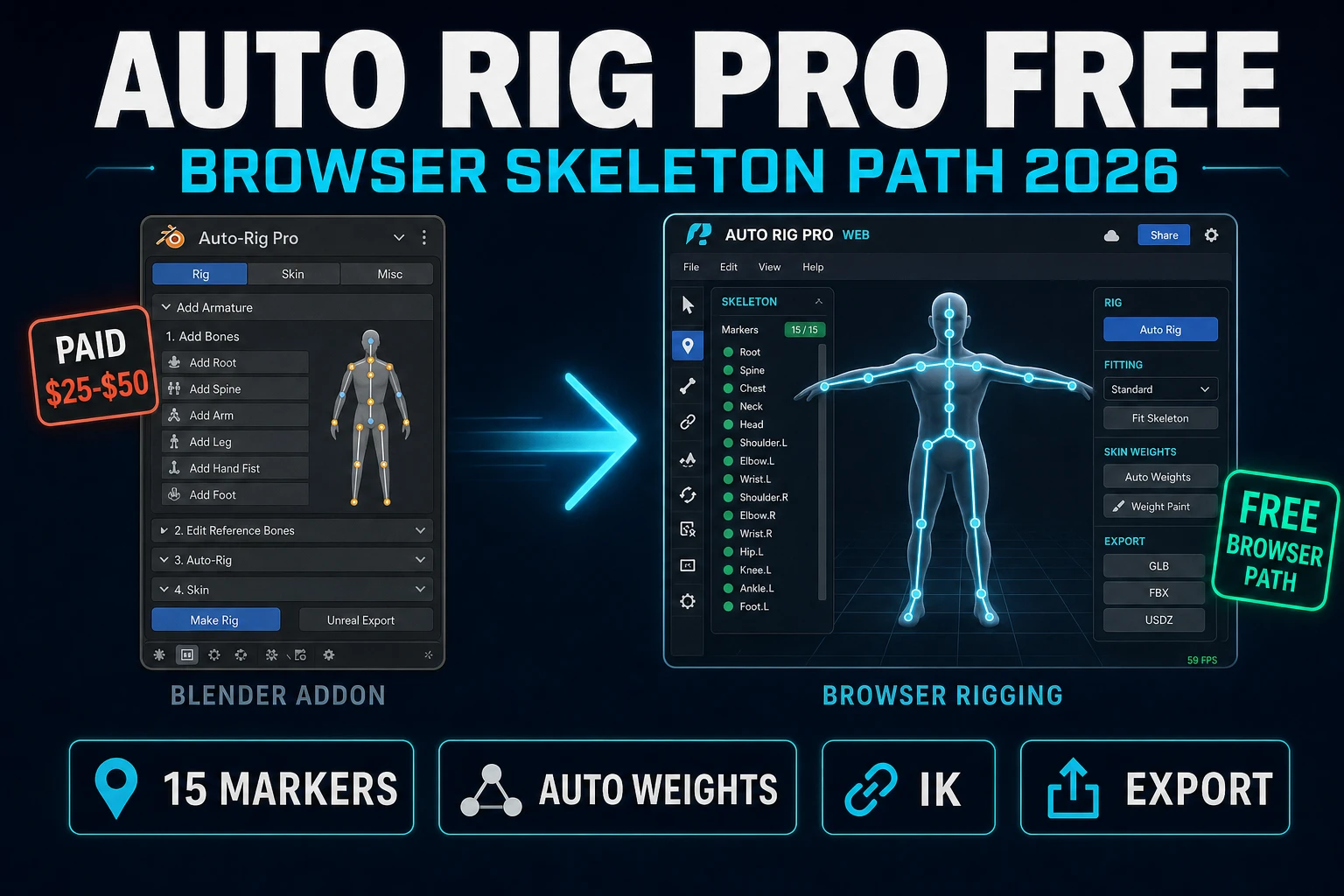
Auto Rig Pro Free (Browser Skeleton Path 2026)

By Arron R.11 min read
Auto Rig Pro is not free in 2026 - the addon by Artell on Superhive costs $25 (Lite) or $50 (Full) and only runs inside Blender. The honest browser alternative

Searchers who type auto rig pro in 2026 usually want one of three things: the actual Blender addon by Artell, an honest read on whether a free copy exists, or a working browser-based path to a rigged, game-ready humanoid without opening a desktop 3D suite. The short answer is that Auto Rig Pro is a paid Blender addon in 2026 (Superhive, $25 Lite or $50 Full, verified 2026-09-04) and the honest free-tier-friendly browser alternative for indie game work is Sorceress Auto-Rigging, which takes a naked mesh through 15 markers, auto weights, IK pose testing, and FBX or GLB export straight to Unreal, Unity, or the Sorceress runtime. The rest of this piece is the whole picture: what Auto Rig Pro actually costs, what it does inside Blender, and how the Sorceress browser path compares step by step.
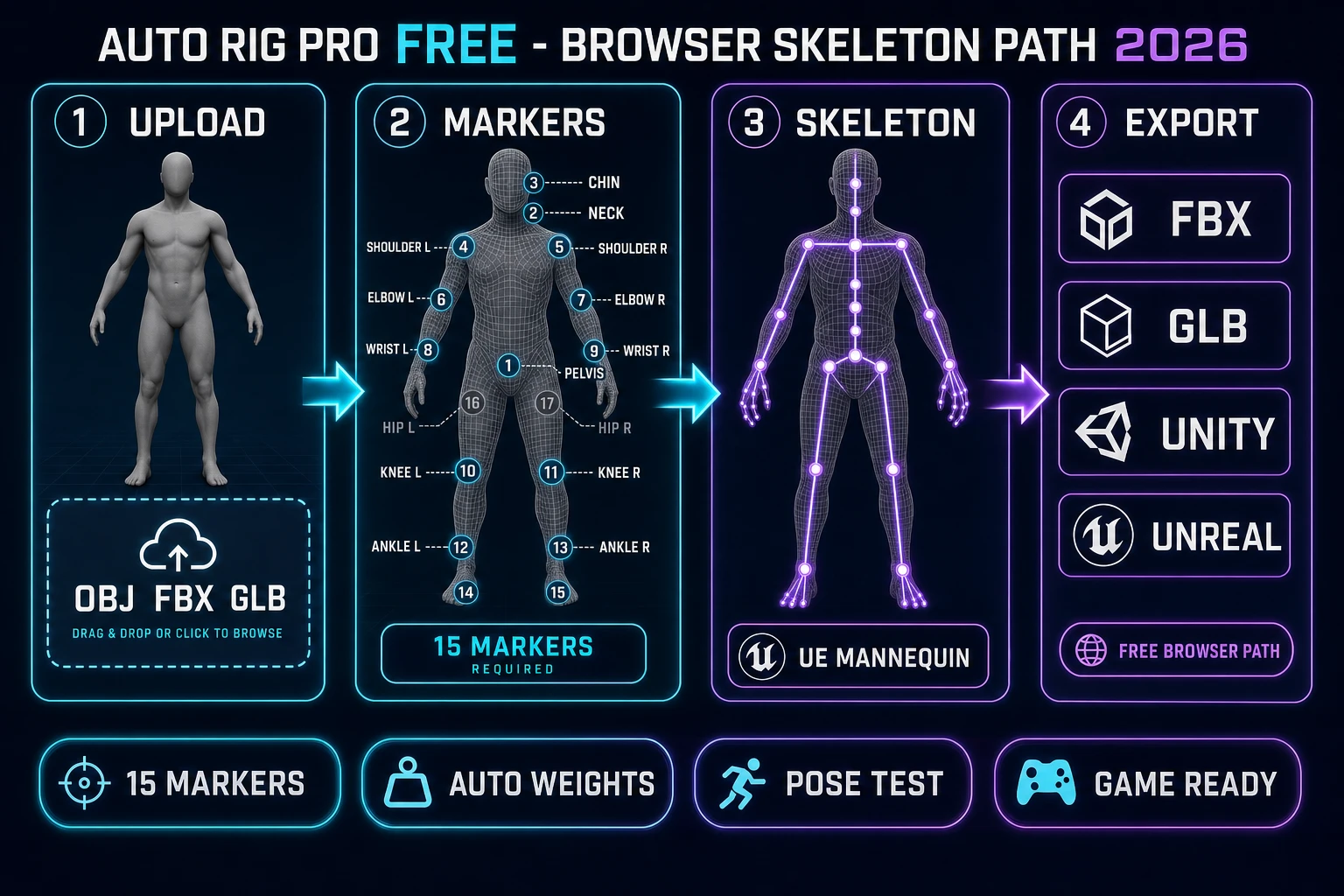
Auto Rig Pro Free browser skeleton path 2026 diagram: Sorceress Auto-Rigging four-panel pipeline showing mesh upload, 15-marker placement, UE Mannequin skeleton overlay, and FBX GLB Unity Unreal export
The 2026 browser skeleton path from a naked humanoid mesh to a game-ready rig: upload, drop 15 markers, generate the UE Mannequin skeleton, and export to any engine. Auto Rig Pro remains the desktop-in-Blender option; the browser lane is the honest free-tier-friendly alternative for indie work.

What auto rig pro is (and why "free" is not the honest description)

Auto Rig Pro is a rigging and animation addon for Blender, first published almost ten years ago and still actively maintained by the developer Artell. It solves the humanoid-rigging problem that every indie 3D pipeline hits: the mesh is done, the animation library is waiting, and the character has no skeleton. The Smart tool on the Full tier scans a static biped mesh, places bones automatically, and computes skin weights so the character can bend at the shoulders and hips without collapsing.

The addon is not free. The word "free" chases the query because a huge share of the search population is hoping there is a free download somewhere, and there is not. Every path to legitimate Auto Rig Pro is a paid purchase on Superhive (formerly Blender Market). Everything else - torrents, mirror sites, cracked builds - fails the honest bar this blog holds. The right question is not "where is the free download" but "what is the honest free-tier-friendly workflow that solves the same job." That question has a real answer, and it is a browser tool.

Auto Rig Pro pricing on Superhive in 2026 - the numbers

Every price below was pulled from the live Auto Rig Pro product page on Superhive on 2026-09-04. The listing is under the developer name Artell and covers Blender 2.93 through 5.2, extension type add-on, license GPL. Sales counter above 68,000 and download counter above 93,000 place it among the most-adopted rigging addons in the ecosystem.

  • Auto-Rig Pro Full - the complete package - $50. Includes the core addon, the Smart tool for biped body recognition, the Fbx and Gltf exporters targeted at Unreal and Unity, and the Remap tool for animation retargeting between skeletons.
  • Auto-Rig Pro Lite - core only - $25. No Smart tool, no export presets, no Remap. The rigging works but the game-engine on-ramp is missing.
  • Studio 10 seats - $162. Bulk license for a team of ten.
  • Studio 20 seats - $227. Bulk license for a team of twenty.
  • Support and updates - 12 months included. An extra 12 months costs 25 percent of the product price.

Two practical notes for a first-time buyer. The Full tier is the one to pick for game work because the Fbx and Gltf exporters and the Remap tool together are what make the rigged character land inside an engine without a separate re-export pass. The Lite tier is meant for artists who already own a hand-rolled export chain in Blender and only want the core auto-rigging. Neither tier removes the platform constraint - the addon only runs inside Blender, and the current supported Blender range tops out at 5.2, which matches the Blender 5.2 LTS release announcement from the Blender Foundation. Blender 5.3 is in alpha (expected 2026-11-17), so an early adopter of that branch may hit a compatibility gap until Artell ships an update.

Why a browser auto rig pro alternative wins for indie game work

The Blender-only constraint is the biggest single reason to consider a browser path even for artists who happily own the Full tier. Three concrete reasons a browser rigging surface wins for a jam or an indie build:

  1. Zero-install onboarding. No Blender download, no add-on install, no license seat check, no re-install after Blender updates. A Chromebook, a locked-down school laptop, or a borrowed machine at a jam site all run the browser tool with no admin rights.
  2. No version drift. A desktop addon lives on a version-support matrix. When Blender ships a major release the addon has to catch up; when the addon ships a major release the workflow has to catch up. A browser rigging tool tracks its own skeletal animation backend and updates every user at once.
  3. Direct integration with the rest of the asset pipeline. The character concept came out of an AI image generator; the 3D model came out of an image-to-3D tool; the rig has to feed a walk cycle back into the same browser tab. The whole loop belongs on one surface. Sorceress 3D Studio already does concept-to-3D-to-animation in one page; adding rigging inside the same tab is the natural next step, not a context switch.

None of the above says Auto Rig Pro is a bad tool - it is the right pick when the studio is already living inside Blender for lookdev, sim, and offline rendering. The argument is only about the honest fastest path from a naked mesh to a rigged sprite in a game jam or an early indie build. That path lives in a browser tab.

Sorceress Auto-Rigging as the honest auto rig pro alternative

Sorceress Auto-Rigging is the browser surface that owns the humanoid rigging job on Sorceress. Access is a Pro-tier feature (badge Pro in src/app/_home-v2/_data/tools.ts, verified 2026-09-04) and the actual AI auto-rig job billing is 20 credits per rig (constant AUTO_RIG_CREDITS.meshy = 20 in src/lib/rigging/external-rig/autoRigPricing.ts). Check current tier prices on the Sorceress plans page before locking a project budget.

What the tool actually contains, all verified 2026-09-04 against src/app/rigging/page.tsx and the supporting library files:

  • 15 humanoid markers defined in the MARKER_NAMES array: 13 required (pelvis, neck, chin, shoulder left/right, elbow left/right, wrist left/right, knee left/right, ankle left/right) plus 2 optional hip markers. The DEFAULT_MARKERS and CALIBRATED_MARKERS constants ship real coordinates so the first-time run is close before a single adjustment.
  • Guided placement flow with left-right auto-mirror and a center-snap toggle. The guided order (GUIDED_LEFT_ORDER): chin, neck, pelvis, hip left, shoulder left, elbow left, wrist left, knee left, ankle left. The mirror flag automatically fills the right side.
  • K-means-driven auto weight computation through a Blender API backend (blender-client.ts) or a RunPod-hosted worker (autoweight-runpod.ts, autoweight-ai-runpod.ts). The paint-style refinement tab lets you brush corrections onto per-bone weights without dropping into a desktop tool.
  • IK pose testing with two-bone inverse kinematics solvers (solveTwoBoneIK in src/lib/rigging/posing.ts). The pose mode toggles between rotate and grab handles so you can drag the wrist and watch the elbow bend correctly before exporting the rig.
  • Four export paths: FBX (fbx-export.ts), glTF / GLB (threejs-export.ts), Unity FBX (unity-export.ts), and Unreal FBX (unreal-export.ts). Every export ships bind-pose deltas so the rig lands upright in the target engine without a manual axis flip.
  • UE Mannequin as the default skeleton profile (DEFAULT_PROFILE = UE_MANNEQUIN_PROFILE in src/lib/rigging/profiles/index.ts). Alternate profiles: Mixamo, DAZ G8, SMPL. Pick the profile that matches the animation library the game will consume.
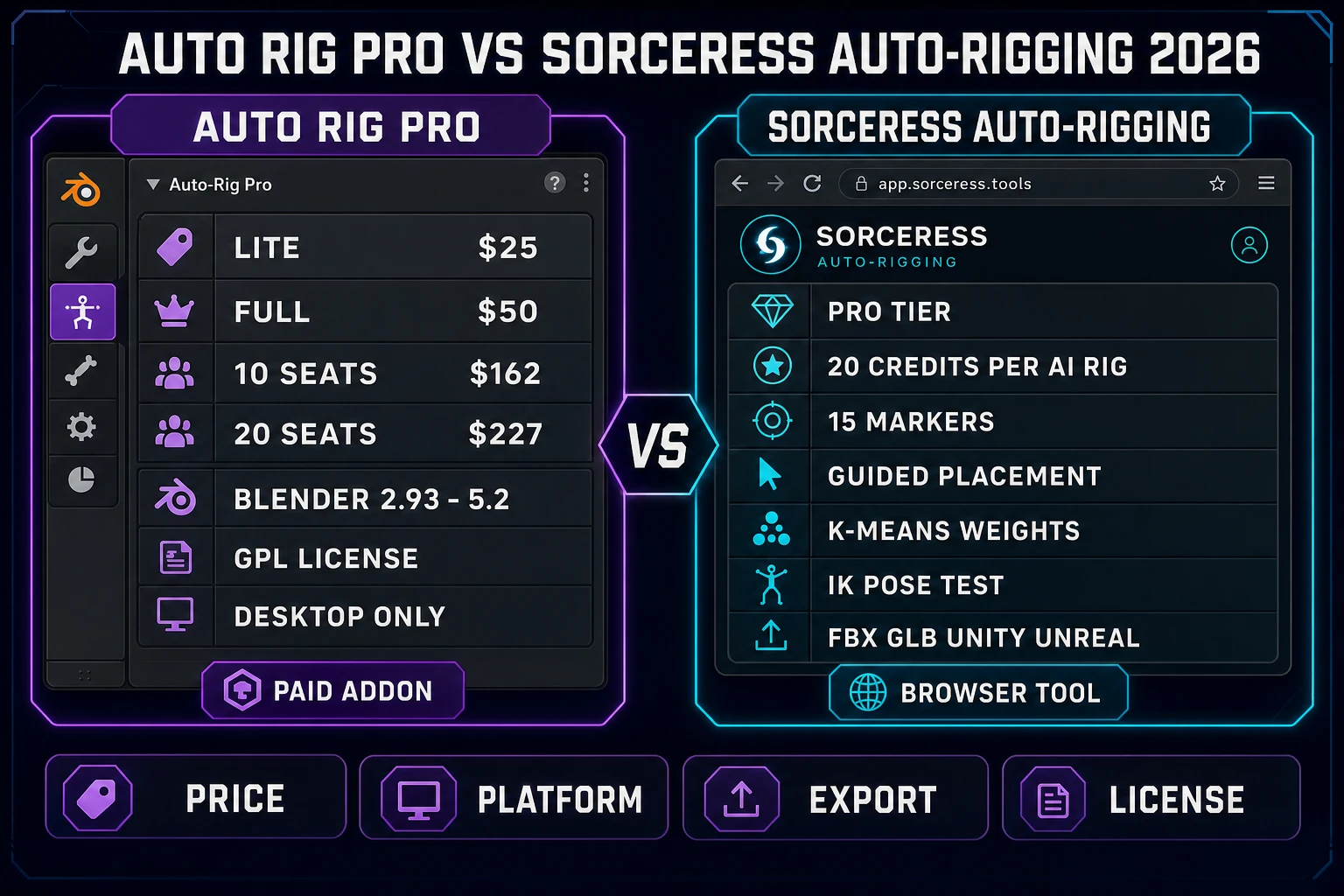
Auto Rig Pro vs Sorceress Auto-Rigging comparison matrix 2026: paid Blender addon column ($25 Lite, $50 Full, GPL, desktop only) versus browser tool column (Pro tier, 20 credits per AI rig, 15 markers, K-means weights, IK pose test, FBX GLB Unity Unreal)
Auto Rig Pro versus Sorceress Auto-Rigging on 2026-09-04. Blender addon on the left, browser tool on the right, honest columns down the middle. The right choice depends on whether the pipeline already lives inside Blender.

The 15-marker guided flow: lay a skeleton in three minutes

The marker-driven approach is where Sorceress Auto-Rigging diverges from Auto Rig Pro Smart. Instead of scanning a T-pose and hoping the biped detector picks the right shoulder line, you place 13 required markers (and optionally 2 hip markers) on the mesh directly. Guided mode walks the user through the placement one marker at a time, and the auto-mirror toggle copies each left-side click to the right side so the rig comes out symmetric by default.

The end-to-end path a first-time user follows:

  1. Load the mesh. Drop an OBJ, FBX, or GLB into the file zone. The character does not have to be in a strict T-pose - even a relaxed A-pose or an idle stance rigs cleanly as long as the limbs are separated from the torso.
  2. Enter guided mode. The tool auto-selects chin as the first marker and walks through the GUIDED_LEFT_ORDER array: chin, neck, pelvis, hip left, shoulder left, elbow left, wrist left, knee left, ankle left. Left-click places the active marker on the closest surface point; auto-mirror copies to the right side.
  3. Adjust and re-place. Marker-edit mode lets you select any placed marker and drag it with a translate gizmo. Center-snap constrains the marker to the mesh median plane for markers that should be on-axis (pelvis, neck, chin).
  4. Auto-detect fingers. The tool ships a Blender API-backed finger detector that runs geodesic voting on the hand vertex island and returns five fingertip peaks with knuckle, PIP, and DIP joint estimates. That path lives in src/lib/rigging/detector.ts and the associated DEFAULT_DETECTION_CONFIG.
  5. Build the skeleton. Hit Build. The tool constructs the full SkeletonPreview (bones with position, forward, up, right vectors, length) and overlays it on the mesh. Diagnostics call out any missing markers.

Three minutes is not a marketing round number - it is the honest median first-time run for a clean humanoid mesh with the default calibrated markers already dialed in.

Weight paint, IK pose testing, and non-humanoid rigs

A rigged skeleton is not a game-ready character. Two more passes finish the job.

Auto weight, then paint refinement. The Compute Weights action calls the Blender API backend (or the RunPod worker) and returns per-vertex bone weights. Show Weights toggles the visualization; picking a bone in the skeleton tree highlights the vertices it influences. The paint-style refinement tab exposes brush strength and radius, so a hand-tune of the shoulder deltoid or the collar bone takes about ten seconds instead of the ten minutes it costs in a desktop weight-paint mode. Auto Rig Pro Full ships a similar path in Blender; Sorceress keeps that path inside the browser.

Pose testing. Pose Mode enables a per-bone rotate handle plus an IK grab handle. The two-bone IK solver at the elbow and knee chains (findIKChainForBone, solveTwoBoneIK) lets you drag the wrist and watch the elbow bend naturally. If the elbow flips the wrong way, the marker was off - go back and re-place it before exporting. This visual check catches nearly every bad rig before it lands in the engine.

Non-humanoid rigs. A humanoid skeleton is not enough for a game that has spider bosses, quadruped mounts, centipede enemies, or any other non-biped. That job belongs to Sorceress Procedural Walk at /rigging-multileg, which auto-rigs multi-legged creatures and drives them with real-time inverse kinematics so feet plant naturally on uneven terrain. Auto Rig Pro Smart does not do this at all - biped-only is a feature, not a workaround.

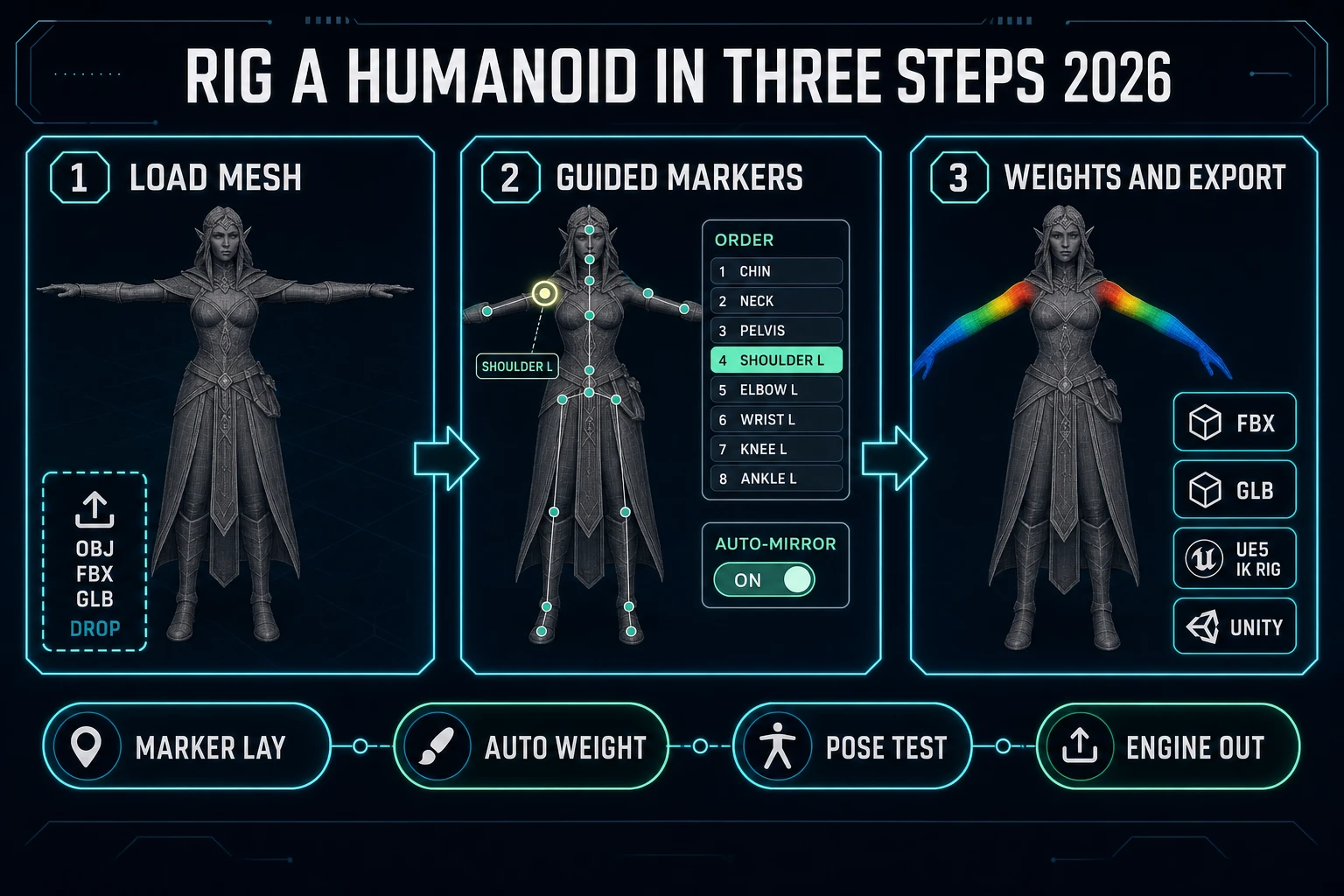
Sorceress Auto-Rigging three-step workflow diagram 2026: T-pose mesh load, guided marker placement with auto-mirror, weight paint and export to FBX GLB Unity Unreal
The three steps from a naked mesh to a game-engine-ready rig in the Sorceress browser tool. Marker placement is the only step that needs a human; the weight computation and the export both run headless.

Export to Unreal, Unity, Godot, and the Sorceress runtime

Every export path in the Sorceress rigging surface is verified against src/lib/rigging on 2026-09-04. Four separate files handle four separate engines:

  • fbx-export.ts - vanilla FBX with the UE Mannequin skeleton layout. Loads into any engine that consumes FBX (Unreal, Unity, Godot 4 with FBX2glTF, cocos, and so on).
  • threejs-export.ts - glTF and GLB using the standard Three.js exporter. The glTF format is the Khronos standard for interchangeable 3D assets on the web; the Sorceress runtime, Godot 4 native, Babylon.js, and any WebGL engine all consume it directly.
  • unity-export.ts - Unity-flavored FBX with axis and unit conventions pre-adjusted so the rig lands upright and at 1 unit per meter without a manual re-import.
  • unreal-export.ts - Unreal-flavored FBX with the UE Mannequin bone names and axis conventions so the character maps 1:1 to the UE5 IK Rig retargeting flow.

The UE Mannequin default is the practical difference from Mixamo or a generic auto-rig. In an Unreal project the character becomes a drop-in retarget source. In a Unity project the same skeleton loads under the standard humanoid rig without a manual bone map. In the Sorceress runtime the GLB drops straight into a WebGL game with no re-parsing.

What one auto rig actually costs in 2026 - Sorceress vs Auto Rig Pro

The math on a real project. A first indie game with 6 humanoid characters (a player, an ally, four NPC roles) and one boss with a stock humanoid rig:

  • Sorceress Auto-Rigging path. 7 AI auto-rig jobs at 20 credits each = 140 credits total. Marker placement and pose testing are free (browser-side). Access is Pro-tier; check current subscription prices on Sorceress plans.
  • Auto Rig Pro Full path. One-time $50 license, unlimited rigs. Requires Blender installed and updated. Requires per-project time for the Smart-detect and re-detect pass on each mesh (typically 5-10 minutes each, faster than the browser guided flow for someone already fluent in Blender).
  • Break-even. If the game only needs 7 rigs total, the browser path is cheaper on cash outlay and dramatically cheaper on onboarding time. If the game needs 100 rigs across a multi-year production, the Blender addon amortizes and the pipeline stability of a Blender-native workflow matters more than the browser convenience.

The honest verdict on 2026-09-04: for a game jam, an indie prototype, or a small commercial indie build, Sorceress Auto-Rigging is the free-tier-friendly browser answer to auto rig pro. Pair it with 3D Studio for the mesh generation upstream, Procedural Walk for the non-humanoid enemies, and the Sorceress Tools Guide for the whole 3D pipeline. Complementary reads on the blog: Auto Rig for Maya for the Maya-specific comparison, Rig With Auto Rig for Game Characters for the weight-check pass, and Try a Mixamo Alternative for the third leg of the stool. Together they cover the whole rigging surface a first Sorceress game needs.

Frequently Asked Questions

Is there a free version of Auto Rig Pro in 2026?

No. The Auto Rig Pro addon by Artell on Superhive (formerly Blender Market) sells at $25 for the Lite tier and $50 for the Full tier, with 10-seat and 20-seat studio licenses at $162 and $227 respectively. Verified 2026-09-04 on the Superhive product page. The Full tier includes the Smart tool for biped body recognition, the Remap tool for animation retargeting, and Fbx and Gltf export to Unreal and Unity. Every tier ships with 12 months of updates and support; an extra 12 months costs 25 percent of the product price. There is no free trial and no free stub - the honest free alternative for a browser workflow is Sorceress Auto-Rigging at /rigging.

What is Auto Rig Pro used for?

Auto Rig Pro is a Blender addon that automates humanoid rigging. Its Smart tool identifies biped body parts on a static mesh, places bones in the correct locations, computes skin weights, and exposes a picker for keyframe animation. The Full tier adds Remap for retargeting animation clips from one skeleton to another and Fbx / Gltf export to game engines. It only runs inside Blender; the license is GPL and the addon supports Blender 2.93 through 5.2, verified 2026-09-04 on Superhive.

What is the best free auto rig pro alternative for game work in 2026?

For a browser-based indie workflow the honest free-tier-friendly alternative to Auto Rig Pro is Sorceress Auto-Rigging at /rigging. Verified 2026-09-04 in src/lib/rigging/types.ts and src/app/rigging/page.tsx, the tool ships 13 required humanoid markers (pelvis, neck, chin, shoulders, elbows, wrists, knees, ankles) plus 2 optional hip markers, a guided placement flow with left-right auto-mirror, K-means-driven auto weight computation via the Blender API backend, a paint-style refinement tab, IK pose testing, and FBX / GLB / Unity / Unreal export. Access to Sorceress Auto-Rigging is a Pro-tier feature (badge Pro in src/app/_home-v2/_data/tools.ts) and an AI auto-rig job costs 20 credits (AUTO_RIG_CREDITS.meshy in src/lib/rigging/external-rig/autoRigPricing.ts). Check the current tier prices on the Sorceress plans page before locking a budget.

What Blender versions does Auto Rig Pro support in 2026?

Auto Rig Pro supports Blender 2.93 through 5.2, per the Superhive product listing verified 2026-09-04. That covers both current LTS branches - Blender 4.5 LTS (updated to 4.5.13 on 2026-08-25) and Blender 5.2 LTS (updated to 5.2.1 on 2026-08-25 per blender.org/releases). Blender 5.3 is in alpha and is not yet listed. If you install a Blender 5.3 alpha or the eventual 5.4 release before the addon updates, expect a compatibility gap; that is one of the practical reasons a browser-based rigging tool that tracks its own Blender API backend is easier to keep current.

Can I export a rig from Sorceress Auto-Rigging to Unreal or Unity?

Yes. Verified 2026-09-04 in src/lib/rigging, the Sorceress rigging surface ships four export paths: FBX via fbx-export.ts, glTF / GLB via threejs-export.ts, Unity FBX via unity-export.ts, and Unreal FBX via unreal-export.ts. The default skeleton profile is UE Mannequin (DEFAULT_PROFILE in src/lib/rigging/profiles/index.ts), which is the same bone layout Unreal ships with, so a rigged character drops into a UE5 project with the standard IK Rig retargeting flow. Alternate profiles include Mixamo, DAZ G8, and SMPL - pick the profile that matches the animation library the game will consume.
How does Sorceress Auto-Rigging compare to Mixamo for a first game?

Mixamo delivers a fixed-topology auto-rig plus a stock animation library; Sorceress Auto-Rigging delivers a custom marker-driven rig plus paint-style weight refinement and IK pose testing. The Sorceress path wins on two axes for game work: the exported skeleton uses the UE Mannequin layout by default (so retargeting to Unreal or a UE-style skeleton in Unity is a one-step operation), and the browser tool supports non-humanoid creatures through Procedural Walk at /rigging-multileg for spiders, quadrupeds, and multi-legged bosses. Mixamo is still the fastest path when you need a stock walk cycle in the next 60 seconds. Use both.

What does one auto rig actually cost on Sorceress in 2026?

One AI auto-rig job on Sorceress bills 20 credits, per the AUTO_RIG_CREDITS constant in src/lib/rigging/external-rig/autoRigPricing.ts (verified 2026-09-04). Access to the Auto-Rigging surface is a Pro-tier feature per the badge Pro in src/app/_home-v2/_data/tools.ts. That combination - subscription for access, then 20 credits per run - is the honest 2026 comparison against the Auto Rig Pro one-time Blender-addon license ($25 Lite or $50 Full on Superhive). If the game needs three or four humanoid rigs total, the browser path is cheaper; if the game needs 400 rigs across a long production, the addon license amortizes. Check current tier prices on the Sorceress plans page before locking a project budget.

Sources

  1. Blender - Wikipedia
  2. Blender 5.2 LTS Release - Blender Foundation
  3. Inverse kinematics - Wikipedia
  4. Skeletal animation - Wikipedia
  5. glTF (GL Transmission Format) - Khronos Group
Written by Arron R.·2,402 words·11 min read

Related posts